"c14ff6bd758dadb1"{"id":"1000551","slug":"traffic-ai-system","title":"Traffic AI System","category":"Gameplay Features","engine":"5.1+","assetVersion":"","engineVersion":"Engine Version: 5.1+","tag":"Gameplay Features","accent":"blue","visual":"mech","summary":"A Blueprint-based AI traffic system for Unreal Engine 5.1–5.7 using splines for road generation and distance-based vehicle spawning for automotive scenes.","platform":"Unreal Engine","publishedAt":"2026-07-15T06:39:21.636Z","updatedAt":"2026-07-15T06:39:21.636Z","sourceNotes":[],"fileContents":[],"compatibility":["Unreal Engine","Engine Version: 5.1+"],"featuredImage":{"alt":"Traffic AI System","src":"/wp-content/uploads/published/2026/07/e074d7d2d020-30e2fb25-5755-4221-9664-6f688036b241-00f296e3db.webp"},"hasDownloadLink":true,"downloads":8,"terms":[{"taxonomy":"category","slug":"gameplay-features","name":"Gameplay Features"}],"galleryImages":[{"src":"/wp-content/uploads/published/2026/07/f8e831a179ac-79e0c17b-3087-424d-817c-151545e7b4b8-d628b58e9b.webp","alt":"Traffic AI System"},{"src":"/wp-content/uploads/published/2026/07/0edda6a5026b-4d50a4f5-f5ad-4fd0-8f8c-24b1fb31539e-ecb9dc247e.webp","alt":"Traffic AI System"},{"src":"/wp-content/uploads/published/2026/07/f6c2c710d2e9-518d6280-4608-4404-9c0a-7bb1d208bcb9-651c19da6a.webp","alt":"Traffic AI System"},{"src":"/wp-content/uploads/published/2026/07/82f2aa6326a4-66cf5d92-c51d-4173-92a1-25e410507315-ec2ce92620.webp","alt":"Traffic AI System"},{"src":"/wp-content/uploads/published/2026/07/9d245175f724-9f06120e-5271-4891-a7b2-42e9fea8d018-f86026a648.webp","alt":"Traffic AI System"}],"accessPanel":{"kind":"resource","title":"Download this resource","eyebrow":"Free Download","message":"Log in or create a free account to start your download.","fileName":"TrafficAISystem.7z","safetyNote":"Resources are manually reviewed before listing to improve quality and reduce obvious risks.","actionLabel":"Download Free","resourceType":"Resource archive"},"contentHtml":"\u003cp\u003eVehicles moving along a road rarely need full simulation. What most driving or automotive scenes actually need is traffic that reads as alive from the player's vantage point, disappears when it leaves meaningful range, and snaps back into place when the player approaches again. Traffic AI System approaches this through a combination of spline-driven road construction and distance-based vehicle management, all wired through Blueprints. It works across Unreal Engine 5.1 through 5.7, placing it within reach of contemporary automotive visualization, gameplay prototyping, and industrial scene work where roads and signage matter.\u003c/p\u003e\u003ch2\u003eSpline-driven street generation\u003c/h2\u003e\u003cp\u003eThe system leans on a spline workflow for laying out streets. Instead of requiring manual placement of road meshes or complex topology, the spline defines the path the road follows. This lets the road curve, turn, and extend organically through the scene. The vehicle AI then uses the same spline logic to navigate, so the geometry of the street and the movement along it stay tightly linked.\u003c/p\u003e\u003cp\u003eSpline-based road construction has practical value beyond speed. A scene requiring a winding industrial access road, a gridded urban block, or a sweeping highway interchange can be blocked out by adjusting control points along the spline. Vehicles then follow that geometry, making the road itself the foundation for behavior rather than a decorative layer placed afterward.\u003c/p\u003e\u003ch2\u003eDistance-based spawn and despawn logic\u003c/h2\u003e\u003cp\u003eThe performance character of a traffic system often matters as much as the driving behavior. Traffic AI System manages vehicles through spawn and despawn based on distance from the player. Vehicles appear within observable range and are removed beyond it. This keeps the active vehicle count tied to player proximity rather than forcing every car to remain permanently simulated across the entire map.\u003c/p\u003e\u003cp\u003eFor scenes where the camera travels a route, such as a driving sequence, an industrial flythrough, or a gameplay situation where the player's position regularly shifts, this distance logic keeps the visual density constant while the actual number of processed actors stays controlled. The system's tags include \u003cem\u003eSign\u003c/em\u003e, \u003cem\u003eCar\u003c/em\u003e, \u003cem\u003eAutomotive\u003c/em\u003e, and \u003cem\u003eAsphalt\u003c/em\u003e, pointing to an automotive and road-oriented visual vocabulary where vehicles, signage, and road surface are integral parts of the environment.\u003c/p\u003e\u003ch2\u003eBlueprint architecture and integration\u003c/h2\u003e\u003cp\u003eTraffic AI System is Blueprint-based. The integration path involves placing the system into an Unreal Engine project and working with existing Blueprints, which keeps the pipeline within familiar territory for teams already using Unreal's visual scripting. The tag \u003cem\u003eSpline\u003c/em\u003e And \u003cem\u003eBlueprint\u003c/em\u003e Together indicate that both the road generation and traffic logic are exposed in this layer rather than buried in C++ or locked plugin code.\u003c/p\u003e\u003cp\u003eBlueprint exposure matters here. It means designers can inspect how the spline generates streets, observe how the spawn distance is calculated, and tweak variables tied to vehicle behavior without leaving the editor. The system is having easy integration, and the Blueprint implementation is the structural reason why that claim holds: the core logic is visible, editable, and referenced through the same visual scripting interface used for prototyping across Unreal Engine 5.1 through 5.7.\u003c/p\u003e\u003ch2\u003eBuilding automotive and industrial scenes pointedly\u003c/h2\u003e\u003cp\u003eThe tag set positions this system within specific visual contexts. The \u003cem\u003eAutomotive\u003c/em\u003e And \u003cem\u003eCar\u003c/em\u003e Tags point to vehicle-centered scenes. The \u003cem\u003eIndustrial\u003c/em\u003e Tag suggests relevance for factories, logistics yards, loading zones, or service roads where Trucks and industrial equipment move along defined paths. The \u003cem\u003eAsphalt\u003c/em\u003e And \u003cem\u003eRoad\u003c/em\u003e Tags ground the system in road surface construction, while \u003cem\u003eSign\u003c/em\u003e Implies that the road network is expected to include traffic signage, not just a network of vehicles. Together these tags outline the subject matter: a road traffic system oriented toward automotive, industrial, and road-building scenes.\u003c/p\u003e\u003cp\u003eThis positions the Traffic AI System as suitable for a range of real-world-grounded projects. A visualization of a new highway interchange can use the spline tool to lay out the interchange geometry and have vehicles flow through it. An industrial facility scene can populate internal roads with vehicles traveling defined routes. A driving game prototype can use the distance spawn system to populate roads near the player without burdening the wider world simulation. The \u003cem\u003eAI\u003c/em\u003e Tag indicates that the vehicles are not simply following a static animation, but carrying behavioral logic that responds to conditions, with spline following and player distance acting as the primary drivers.\u003c/p\u003e\u003ch2\u003eCompatibility across Unreal Engine 5.1 through 5.7\u003c/h2\u003e\u003cp\u003eThe system supports Unreal Engine versions 5.1 through 5.7. This covers a broad stretch of Unreal Engine 5 development, from early 5.1 releases through later 5.x updates. Teams already working on projects within this version range can integrate the system without a version migration step. This wide compatibility is useful for projects still on earlier 5.x builds, as well as those targeting more recent releases.\u003c/p\u003e\u003cp\u003eThe Blueprint-based nature means the system's compatibility relies on the stability of Unreal's Blueprint framework across those versions. Given that splines, actor spawning, and distance checks are core Blueprint features that remain consistent across 5.1 through 5.7, the system is built on workflow elements that hold steady throughout that range.\u003c/p\u003e\u003ch2\u003eWhere the system fits\u003c/h2\u003e\u003cp\u003eTraffic AI System fits projects requiring populated roads without full city simulation. The combination of spline-based street construction, distance-controlled vehicle management, and Blueprint-level access makes it a practical tool for automotive visualization, industrial scene work, and gameplay prototypes where roads need traffic that reacts to the player. Its workflow stays within visual scripting, supports a broad span of Unreal Engine 5 versions, and focuses on the specific behaviors that make a scene feel populated without demanding more simulation than the situation requires.\u003c/p\u003e\u003cp\u003eFor teams evaluating traffic systems against spline road tools, the strongest takeaway is the integration. The spline handles the road, the distance handler manages the vehicles, and both live in Blueprints editable across 5.1 through 5.7. This is a focused, functional approach to populating automotive and industrial scenes without overengineering the underlying systems.\u003c/p\u003e\n\n\u003ch2\u003eExplore Similar Assets\u003c/h2\u003e\n\u003cul\u003e\n\u003cli\u003e\u003ca href=\"https://3dcghub.com/city-traffic-pro/\" title=\"City Traffic Pro\"\u003eCity Traffic Pro\u003c/a\u003e\u003c/li\u003e\n\u003cli\u003e\u003ca href=\"https://3dcghub.com/intelligent-traffic-system/\" title=\"Intelligent Traffic System\"\u003eIntelligent Traffic System\u003c/a\u003e\u003c/li\u003e\n\u003cli\u003e\u003ca href=\"https://3dcghub.com/traffic-control-system/\" title=\"Traffic Control System\"\u003eTraffic Control System\u003c/a\u003e\u003c/li\u003e\n\u003cli\u003e\u003ca href=\"https://3dcghub.com/open-world-ai-spawn-system/\" title=\"Open World AI Spawn System\"\u003eOpen World AI Spawn System\u003c/a\u003e\u003c/li\u003e\n\u003cli\u003e\u003ca href=\"https://3dcghub.com/universal-shooting-game-template-and-framework/\" title=\"Universal Shooting Game Template and Framework\"\u003eUniversal Shooting Game Template and Framework\u003c/a\u003e\u003c/li\u003e\n\u003c/ul\u003e","contentTextLength":6648,"navigation":{"current":1312,"total":3719,"previous":{"id":"1000552","slug":"western-town-village-pack-western-town-village-cowboy-town-village-usa","title":"Western Town / Village Pack ( Western Town Village Cowboy Town Village USA )","category":"Towns \u0026 Villages","platform":"Unreal Engine","updatedAt":"2026-07-15T06:51:19.725Z"},"next":{"id":"1000550","slug":"survival-npc-maria-mimi-estrada","title":"Survival NPC - Maria \"Mimi\" Estrada","category":"Characters \u0026 Creatures","platform":"Unreal Engine","updatedAt":"2026-07-15T06:11:10.481Z"}},"relatedResources":[{"id":"10667","slug":"city-traffic-pro","title":"City Traffic Pro","category":"Gameplay Features","engine":"5.6+","assetVersion":"Engine version: 5.6+","engineVersion":"5.2","tag":"Gameplay Features","accent":"blue","visual":"city","summary":"City Traffic Pro is a complete, flexible, and performance-optimized traffic AI system designed for Unreal Engine 5. It enables developers to simulate realistic vehicle movement, complex intersections, and dynamic traffic flow for open-world projects.","platform":"Unreal Engine","publishedAt":"2026-03-03T15:55:56.000Z","updatedAt":"2026-04-19T15:49:57.000Z","sourceNotes":[],"fileContents":[],"compatibility":["Unreal Engine","Engine version: 5.6+"],"featuredImage":{"alt":"City Traffic Pro","src":"https://3dcghub.com/wp-content/uploads/2026/03/22b9385f-dac3-476f-9d6b-1d02dd1b4a6c.webp"},"hasDownloadLink":true,"downloads":4},{"id":"1001049","slug":"character-interaction","title":"Character Interaction","category":"Gameplay Features","engine":"5.3+","assetVersion":"","engineVersion":"Engine Version: 5.3+","tag":"Gameplay Features","accent":"blue","visual":"character","summary":"Blueprint-based character interaction system for UE5 with IK, first-person support, weapon switcher, vehicles, AI enemies, and close combat. Includes CI Add-on","platform":"Unreal Engine","publishedAt":"2026-08-27T16:20:39.102Z","updatedAt":"2026-08-27T16:20:39.102Z","sourceNotes":[],"fileContents":[],"compatibility":["Unreal Engine","Engine Version: 5.3+"],"featuredImage":{"alt":"Character Interaction","src":"/wp-content/uploads/published/2026/08/c04328b89794-30343517-c1fe-4277-9c93-7f18419493c9-612ecb684f.webp"},"hasDownloadLink":true,"downloads":3},{"id":"5145","slug":"intelligent-traffic-system","title":"Intelligent Traffic System","category":"Vehicles \u0026 Transportation","engine":"5.3+","assetVersion":"Engine version: 5.3+","engineVersion":"5.3","tag":"Vehicles","accent":"blue","visual":"mech","summary":"Enhance your Unreal Engine projects with the Intelligent Traffic System. Features AI-controlled vehicles, pedestrian logic, and optimized low-poly assets.","platform":"Unreal Engine","publishedAt":"2026-02-14T17:53:02.000Z","updatedAt":"2026-04-19T15:57:01.000Z","sourceNotes":[],"fileContents":[],"compatibility":["Unreal Engine","Engine version: 5.3+"],"featuredImage":{"alt":"Intelligent Traffic System","src":"https://3dcghub.com/wp-content/uploads/2026/02/065b19e9-617f-4f7f-9edb-ee361c6473b5.webp"},"hasDownloadLink":true,"downloads":1}]}
Gameplay Features
Traffic AI System
A Blueprint-based AI traffic system for Unreal Engine 5.1–5.7 using splines for road generation and distance-based vehicle spawning for automotive scenes.
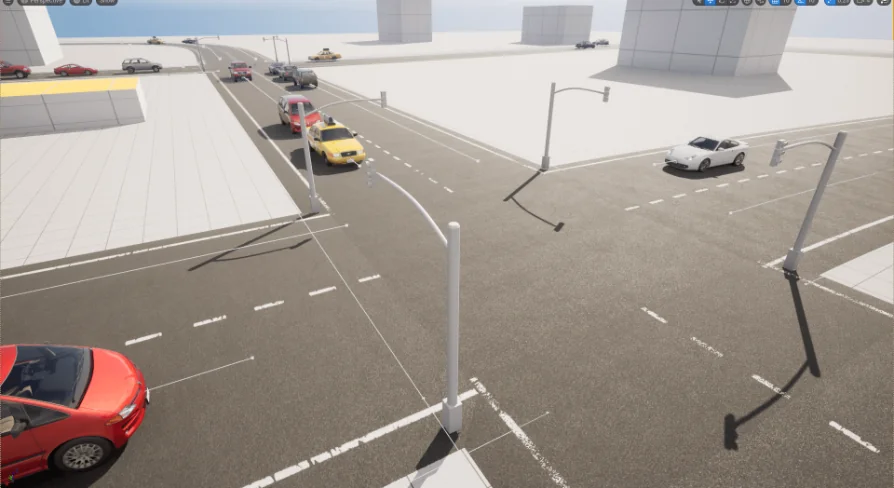
Vehicles moving along a road rarely need full simulation. What most driving or automotive scenes actually need is traffic that reads as alive from the player's vantage point, disappears when it leaves meaningful range, and snaps back into place when the player approaches again. Traffic AI System approaches this through a combination of spline-driven road construction and distance-based vehicle management, all wired through Blueprints. It works across Unreal Engine 5.1 through 5.7, placing it within reach of contemporary automotive visualization, gameplay prototyping, and industrial scene work where roads and signage matter.
Spline-driven street generation
The system leans on a spline workflow for laying out streets. Instead of requiring manual placement of road meshes or complex topology, the spline defines the path the road follows. This lets the road curve, turn, and extend organically through the scene. The vehicle AI then uses the same spline logic to navigate, so the geometry of the street and the movement along it stay tightly linked.
Spline-based road construction has practical value beyond speed. A scene requiring a winding industrial access road, a gridded urban block, or a sweeping highway interchange can be blocked out by adjusting control points along the spline. Vehicles then follow that geometry, making the road itself the foundation for behavior rather than a decorative layer placed afterward.
Distance-based spawn and despawn logic
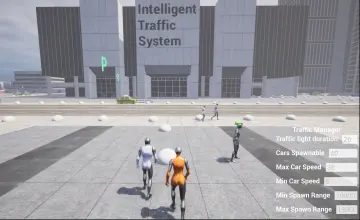
The performance character of a traffic system often matters as much as the driving behavior. Traffic AI System manages vehicles through spawn and despawn based on distance from the player. Vehicles appear within observable range and are removed beyond it. This keeps the active vehicle count tied to player proximity rather than forcing every car to remain permanently simulated across the entire map.
For scenes where the camera travels a route, such as a driving sequence, an industrial flythrough, or a gameplay situation where the player's position regularly shifts, this distance logic keeps the visual density constant while the actual number of processed actors stays controlled. The system's tags include Sign, Car, Automotive, and Asphalt, pointing to an automotive and road-oriented visual vocabulary where vehicles, signage, and road surface are integral parts of the environment.
Blueprint architecture and integration
Traffic AI System is Blueprint-based. The integration path involves placing the system into an Unreal Engine project and working with existing Blueprints, which keeps the pipeline within familiar territory for teams already using Unreal's visual scripting. The tag Spline And Blueprint Together indicate that both the road generation and traffic logic are exposed in this layer rather than buried in C++ or locked plugin code.
Blueprint exposure matters here. It means designers can inspect how the spline generates streets, observe how the spawn distance is calculated, and tweak variables tied to vehicle behavior without leaving the editor. The system is having easy integration, and the Blueprint implementation is the structural reason why that claim holds: the core logic is visible, editable, and referenced through the same visual scripting interface used for prototyping across Unreal Engine 5.1 through 5.7.
Building automotive and industrial scenes pointedly
The tag set positions this system within specific visual contexts. The Automotive And Car Tags point to vehicle-centered scenes. The Industrial Tag suggests relevance for factories, logistics yards, loading zones, or service roads where Trucks and industrial equipment move along defined paths. The Asphalt And Road Tags ground the system in road surface construction, while Sign Implies that the road network is expected to include traffic signage, not just a network of vehicles. Together these tags outline the subject matter: a road traffic system oriented toward automotive, industrial, and road-building scenes.
This positions the Traffic AI System as suitable for a range of real-world-grounded projects. A visualization of a new highway interchange can use the spline tool to lay out the interchange geometry and have vehicles flow through it. An industrial facility scene can populate internal roads with vehicles traveling defined routes. A driving game prototype can use the distance spawn system to populate roads near the player without burdening the wider world simulation. The AI Tag indicates that the vehicles are not simply following a static animation, but carrying behavioral logic that responds to conditions, with spline following and player distance acting as the primary drivers.
Compatibility across Unreal Engine 5.1 through 5.7
The system supports Unreal Engine versions 5.1 through 5.7. This covers a broad stretch of Unreal Engine 5 development, from early 5.1 releases through later 5.x updates. Teams already working on projects within this version range can integrate the system without a version migration step. This wide compatibility is useful for projects still on earlier 5.x builds, as well as those targeting more recent releases.
The Blueprint-based nature means the system's compatibility relies on the stability of Unreal's Blueprint framework across those versions. Given that splines, actor spawning, and distance checks are core Blueprint features that remain consistent across 5.1 through 5.7, the system is built on workflow elements that hold steady throughout that range.
Where the system fits
Traffic AI System fits projects requiring populated roads without full city simulation. The combination of spline-based street construction, distance-controlled vehicle management, and Blueprint-level access makes it a practical tool for automotive visualization, industrial scene work, and gameplay prototypes where roads need traffic that reacts to the player. Its workflow stays within visual scripting, supports a broad span of Unreal Engine 5 versions, and focuses on the specific behaviors that make a scene feel populated without demanding more simulation than the situation requires.
For teams evaluating traffic systems against spline road tools, the strongest takeaway is the integration. The spline handles the road, the distance handler manages the vehicles, and both live in Blueprints editable across 5.1 through 5.7. This is a focused, functional approach to populating automotive and industrial scenes without overengineering the underlying systems.
 Gameplay Features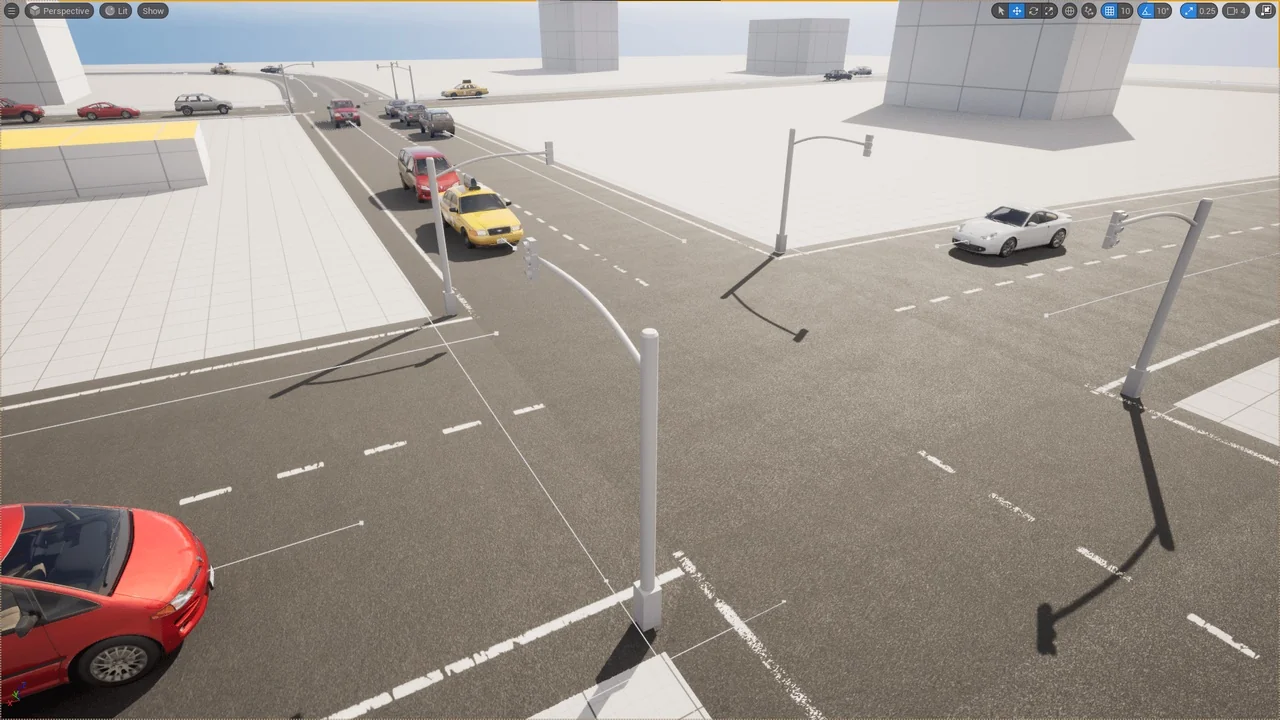
 Gameplay Features
 Gameplay Features
 Vehicles