"7b46a695175d8694"{"id":"1000053","slug":"dragon","title":"Dragon","category":"Creatures \u0026 Monsters","engine":"5.1+","assetVersion":"","engineVersion":"5.1+","tag":"Creatures","accent":"blue","visual":"character","summary":"A cinematic wyvern with walking, flight, landing, takeoff, fire breath, Control Rig, Live Link facial mocap support, and Fire and Ice textures.","platform":"Unreal Engine","publishedAt":"2026-05-22T13:33:18.918Z","updatedAt":"2026-05-22T13:33:18.918Z","sourceNotes":[],"fileContents":[],"compatibility":["Unreal Engine","Engine version: 5.1+"],"featuredImage":{"alt":"Dragon","src":"/wp-content/uploads/published/2026/05/e28671acc617-e0b72e17-c394-4668-a933-1fd9e18939e3-c4991e3716.webp"},"hasDownloadLink":true,"downloads":4,"terms":[{"taxonomy":"category","slug":"creatures-and-monsters","name":"Creatures \u0026 Monsters"}],"galleryImages":[{"src":"/wp-content/uploads/published/2026/05/3519a7dbdb02-88d3ef97-2ecc-4d06-82af-97993facb2b6-9279c8b6f3.webp","alt":"Dragon"},{"src":"/wp-content/uploads/published/2026/05/b9d91dbc2f51-65da60ba-b28a-494f-85b3-644bb45d69e6-1873cf46ff.webp","alt":"Dragon"},{"src":"/wp-content/uploads/published/2026/05/f1a36fa62a5f-0be65814-b7df-44c4-9551-075cbc455e51-f6a334ff50.webp","alt":"Dragon"},{"src":"/wp-content/uploads/published/2026/05/e1bc5eb9dd35-c3ffe466-83ef-4542-85a3-44d88c57c7e6-c20fb55c3c.webp","alt":"Dragon"},{"src":"/wp-content/uploads/published/2026/05/3b10b476155f-381d2e27-47c2-45c7-9293-3c2c5e4c4576-3d50202d2a.webp","alt":"Dragon"},{"src":"/wp-content/uploads/published/2026/05/7841e58eb95f-04184bfd-52e5-4647-84d1-b076c7165b55-ec4f8bea7a.webp","alt":"Dragon"},{"src":"/wp-content/uploads/published/2026/05/851655fe54e1-1efd160e-020b-46a8-bee9-6ffcbb74e5f2-04e29549bc.webp","alt":"Dragon"},{"src":"/wp-content/uploads/published/2026/05/0a44bec66d23-9f8358de-b561-4de2-ac00-08ebdc8bdd87-d9c92e25e6.webp","alt":"Dragon"},{"src":"/wp-content/uploads/published/2026/05/d2ab3871d9e3-0adc78a9-521e-4a0f-b385-1bcdba1347e0-625fb743e2.webp","alt":"Dragon"},{"src":"/wp-content/uploads/published/2026/05/2fecfb873c33-5b74faa0-891d-46ef-a7ea-3092553eb866-fb658b58c7.webp","alt":"Dragon"}],"accessPanel":{"kind":"resource","title":"Access this resource","eyebrow":"Free Download","message":"Log in or create a free account to start your download.","fileName":"Content.7z","safetyNote":"Resources are manually reviewed before listing to improve quality and reduce obvious risks.","actionLabel":"Download Free","resourceType":"Resource archive"},"contentHtml":"\u003cp\u003eA scene can start with a heavy landing, shift into a roar, and then carry the creature back into the air with a fly loop, a glide, or a breath fire pass while airborne. That behavior-first setup is central here. This wyvern is not presented only as a detailed creature model; it comes with movement states, attack actions, facial expression support through blendshapes, and tools that make it easier to place the dragon into cinematic work or gameplay-driven sequences.\u003c/p\u003e\n\u003cp\u003eThe creature is ARRASAX, described as Arrasax the Abyss Dancer wyvern, with both a Fire wyvern dragon and an Ice wyvern dragon texture version. The asset is positioned at cinematic quality with a high detail model, and the description calls out anatomy details such as the number of fingers and wing span. Skin subsurface scattering is included, which matters for a creature like this because the surface treatment is part of how the dragon reads under close lighting and shot-based presentation.\u003c/p\u003e \u003ch2\u003eARRASAX in motion: walk, fly, landing, and take off\u003c/h2\u003e\n\u003cp\u003eUpdate 3.1 adds a Basic Flying System focused on locomotion. That system includes walk, fly, landing, and take off, alongside breath fire, audio setup, camera shake, and a flying trail. Taken together, those pieces shape the dragon as something meant to be staged in motion rather than posed once and left alone. The camera shake and flying trail details push the setup beyond a bare move set and into scene response, where the creature’s presence affects the shot.\u003c/p\u003e\n\u003cp\u003eThe available animation list is extensive and covers both grounded and airborne behavior. Combat actions include a bite attack, a right foot attack, a left foot attack, breath fire on the ground, and a turn 180 with tail attack. Basic character presence is handled through a roar, an idle loop, and death. Ground navigation is represented through walk straight forward loop, walk right loop, walk left forward loop, walk straight back loop, walk right back loop, and walk left back loop. Those directional variations are useful when the dragon needs to adjust position in a more deliberate way than a simple forward cycle would allow.\u003c/p\u003e\n\u003cp\u003eFlight is treated as its own major state beyond one loop. The list includes fly start for takeoff, fly loop, fly loop in vertical, glide loop, glide left loop, glide right loop, fly end for landing, and fly end with a roar. Fire attacks continue into the air with breath fire while flying and breath fire while gliding. For implementation, that means the dragon can transition between takeoff, sustained flight, gliding, attack moments, and landing without reducing the whole aerial experience to one repeated clip.\u003c/p\u003e \u003ch2\u003eBasic Flying System and scene response\u003c/h2\u003e\n\u003cp\u003eThe Basic Flying System is one of the clearest practical anchors of this resource. It is not described as a broad creature framework with many species or variants; it is a specific locomotion setup attached to this dragon. Walk, fly, landing, and take off establish the state changes that matter first when integrating a large winged creature. Breath fire extends those states into action, while audio setup, camera shake, and a flying trail give the movement a more complete scene footprint.\u003c/p\u003e\n\u003cp\u003eThat matters for implementation because a dragon often needs more than isolated animation clips. It needs a way to feel present when moving across the frame or entering and leaving a shot. The included effects-oriented touches suggest a workflow where the creature’s motion can be accompanied by impact and atmosphere rather than handled as raw animation data alone. Within the verified details, this is one of the strongest indicators that the asset is suited to active use inside a sequence.\u003c/p\u003e\n\u003cp\u003eThere are also several overview and demonstration materials named around that workflow: ARRASAX CINEMATIC for a cloudy scene, ARRASAX CINEMATIC for a fly in the storm scene, a Basic Flying System video, a Live Link facial motion capture video, a Control Rig overview video, and a Maya rig overview video. Those titles point to the main implementation paths around the character: cinematic presentation, locomotion setup, facial capture, in-engine rig control, and external rig access.\u003c/p\u003e \u003ch2\u003eControl Rig, Live Link facial mocap, and Maya full rig files\u003c/h2\u003e\n\u003cp\u003eRigging support is one of the most substantial parts of the package. The dragon is Control Rig ready, which places it directly into a workflow where animation adjustment and shot work can happen through Control Rig rather than relying only on imported clips. That is especially relevant for a creature whose winged body language and head motion may need scene-specific refinement.\u003c/p\u003e\n\u003cp\u003eLive Link facial mocap is also supported, with ARKit blendshape support explicitly stated. On a dragon, facial work often makes the difference between a creature that simply attacks and one that can express reaction, aggression, strain, or presence in a close shot. The asset also contains lots of blendshapes to create emotion for the dragon, so the facial system is not limited to one fixed expression set. The blendshape support and Live Link path make the facial side of the creature one of the more defined implementation areas in the package.\u003c/p\u003e\n\u003cp\u003eMaya full rig files are included as well, and Substance files are included too. Those inclusions broaden the working context around the dragon without drifting into vague compatibility claims. Maya rig files matter when a team wants direct access to the full rig, while Substance files matter for material and texture-oriented work. Since both are explicitly included, the dragon is not confined to one narrow usage path. It can sit in an engine-focused setup while still exposing supporting files for rigging and surface work.\u003c/p\u003e \u003ch2\u003eFire and Ice versions of Arrasax the Abyss Dancer wyvern\u003c/h2\u003e\n\u003cp\u003eThe dragon comes with two texture versions: Fire and Ice. That is a straightforward but meaningful creative split. It gives the same creature two distinct surface identities without changing the underlying character into a different species or unrelated design. For scene planning, this can support very different moods, from a heat-driven destructive presence to a colder, more severe interpretation of the same wyvern.\u003c/p\u003e\n\u003cp\u003eThe asset’s naming also stays specific: Arrasax the Abyss Dancer wyvern, identified as a Wyvern Dragon, with Fire wyvern dragon and Ice wyvern dragon variants. That makes the resource easier to place conceptually. It is not a generic dragon bundle with many unrelated forms. It is one named wyvern presented in two texture directions, paired with a rigged and animated setup meant for active use.\u003c/p\u003e\n\u003cp\u003eThe high detail model, cinematic quality, anatomy focus, and skin subsurface scattering all align with that. These are presentation-oriented qualities, but they also support practical shot use. Wing span and finger structure are called out directly, which suggests that silhouette and body construction are part of the character’s visual read, especially during flight and gliding.\u003c/p\u003e \u003ch2\u003eAnimation coverage from Bite attack to Fly end with a roar\u003c/h2\u003e\n\u003cp\u003eThe animation range is broad enough to support more than one type of scene. Ground attacks include bite, right foot attack, left foot attack, and breath fire on the ground. Transitional motion is represented through turn 180 and turn 180 with tail attack. Presence beats are covered by roar and idle loop. End-state coverage includes death.\u003c/p\u003e\n\u003cp\u003eMovement loops on the ground are especially detailed for directional control. Straight forward, right, left forward, straight back, right back, and left back loops give the dragon a more usable movement set than a single walk cycle would. For teams staging encounters, creature entrances, or tracking shots, these directional options can help keep the motion aligned with camera and blocking needs.\u003c/p\u003e\n\u003cp\u003eThe aerial side is just as deliberate. Fly start leads into fly loop and fly loop in vertical, while glide loop, glide left loop, and glide right loop introduce a second airborne feel distinct from powered flight. Offense continues in the air through breath fire while flying and breath fire while gliding. Landings are given two endings: a standard fly end and a fly end with a roar. That last detail is small but expressive, because it gives arrival a more performative option instead of treating every landing as mechanically identical.\u003c/p\u003e \u003ch2\u003ePractical fit for a cinematic dragon workflow\u003c/h2\u003e\n\u003cp\u003eThis dragon fits a workflow where the creature must do more than exist as a hero render. It has locomotion support through the Basic Flying System, facial performance support through Live Link and ARKit blendshapes, rigging access through Control Rig and included Maya full rig files, and surface-side flexibility through included Substance files and the Fire and Ice texture versions. The animation set covers ground movement, attacks, flight, gliding, fire actions, and landing states. For teams evaluating whether the creature can carry both shot work and active scene behavior, that breadth is the clearest takeaway.\u003c/p\u003e\n\n\u003ch2\u003eExplore Similar Assets\u003c/h2\u003e\n\u003cul\u003e\n\u003cli\u003e\u003ca href=\"https://3dcghub.com/monsters-skeleton/\" title=\"Monsters - Skeleton\"\u003eMonsters - Skeleton\u003c/a\u003e\u003c/li\u003e\n\u003cli\u003e\u003ca href=\"https://3dcghub.com/demon-7/\" title=\"Demon 7\"\u003eDemon 7\u003c/a\u003e\u003c/li\u003e\n\u003cli\u003e\u003ca href=\"https://3dcghub.com/undead-knight/\" title=\"Undead Knight\"\u003eUndead Knight\u003c/a\u003e\u003c/li\u003e\n\u003cli\u003e\u003ca href=\"https://3dcghub.com/stylized-halloween-pack-2/\" title=\"Stylized Halloween Pack #2\"\u003eStylized Halloween Pack #2\u003c/a\u003e\u003c/li\u003e\n\u003cli\u003e\u003ca href=\"https://3dcghub.com/otherside-beast/\" title=\"Otherside beast\"\u003eOtherside beast\u003c/a\u003e\u003c/li\u003e\n\u003c/ul\u003e","contentTextLength":9036,"navigation":{"current":1575,"total":3481,"previous":{"id":"1000051","slug":"desert-ruins-environment-desert-ruins-environment-ruins-desert-ruins-desert","title":"Desert Ruins Environment ( Desert Ruins Environment Ruins Desert Ruins Desert )","category":"Desert","platform":"Unreal Engine","updatedAt":"2026-05-22T20:12:08.751Z"},"next":{"id":"1000050","slug":"desert-and-snow-vdb-collection","title":"Desert \u0026 Snow VDB Collection","category":"Weather","platform":"Unreal Engine","updatedAt":"2026-05-22T12:42:59.843Z"}},"relatedResources":[{"id":"2043","slug":"monsters-skeleton","title":"Monsters - Skeleton","category":"Creatures \u0026 Monsters","engine":"5.4+","assetVersion":"Engine version: 5.4+","engineVersion":"4.17","tag":"Creatures","accent":"blue","visual":"character","summary":"Enhance your game with this AAA-quality skeleton character. Optimized for VR, mobile, and PC, it features PBR textures and Epic Skeleton compatibility.","platform":"Unreal Engine","publishedAt":"2026-02-06T23:00:56.000Z","updatedAt":"2026-04-19T15:58:25.000Z","sourceNotes":[],"fileContents":[],"compatibility":["Unreal Engine","Engine version: 5.4+"],"featuredImage":{"alt":"Monsters - Skeleton","src":"https://3dcghub.com/wp-content/uploads/2026/02/e838c2c8-6e72-406b-b6c9-32c9be52581f.webp"},"hasDownloadLink":true,"downloads":0},{"id":"1001541","slug":"orc-collection","title":"Orc Collection","category":"Creatures \u0026 Monsters","engine":"4.18+,5.0+","assetVersion":"","engineVersion":"Engine Version: 4.18+,5.0+","tag":"Creatures","accent":"blue","visual":"character","summary":"A technical breakdown of the Orc Collection featuring five modular character models, Epic Skeleton rigs, texture setups, and engine cloth configurations.","platform":"Unreal Engine","publishedAt":"2026-10-09T17:34:05.651Z","updatedAt":"2026-10-09T17:34:05.651Z","sourceNotes":[],"fileContents":[],"compatibility":["Unreal Engine","Engine Version: 4.18+,5.0+"],"featuredImage":{"alt":"Orc Collection","src":"/wp-content/uploads/published/2026/10/9ff3bb5a9361-628d553e-be49-4cb9-9960-86f1d5ed21f2-13ae042025.webp"},"hasDownloadLink":true,"downloads":0},{"id":"1001005","slug":"orc-warrior","title":"Orc Warrior","category":"Creatures \u0026 Monsters","engine":"4.26+,5.0+","assetVersion":"","engineVersion":"Engine Version: 4.26+,5.0+","tag":"Creatures","accent":"blue","visual":"character","summary":"A rigged low-poly orc with a weapon, 11 animations, a control rig, plus 4096x4096 Color, Normal, and AORM textures for real-time fantasy work.","platform":"Unreal Engine","publishedAt":"2026-08-22T10:59:41.214Z","updatedAt":"2026-08-22T10:59:41.214Z","sourceNotes":[],"fileContents":[],"compatibility":["Unreal Engine","Engine Version: 4.26+,5.0+"],"featuredImage":{"alt":"Orc Warrior","src":"/wp-content/uploads/published/2026/08/07a81bcdb165-a721db55-38ea-4d04-a1d7-b62b48c726b0-dc71636e7b.webp"},"hasDownloadLink":true,"downloads":2}]}
Creatures
Dragon
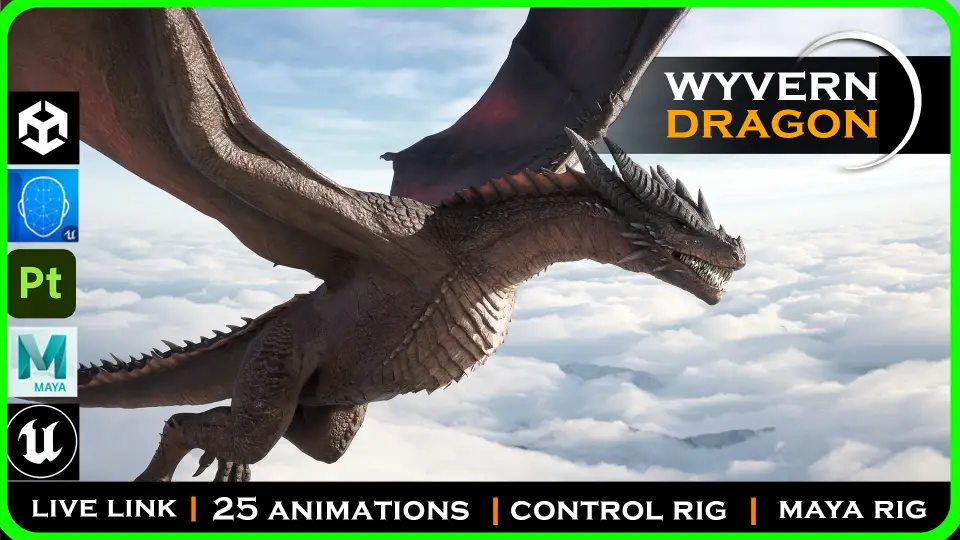
A cinematic wyvern with walking, flight, landing, takeoff, fire breath, Control Rig, Live Link facial mocap support, and Fire and Ice textures.
A scene can start with a heavy landing, shift into a roar, and then carry the creature back into the air with a fly loop, a glide, or a breath fire pass while airborne. That behavior-first setup is central here. This wyvern is not presented only as a detailed creature model; it comes with movement states, attack actions, facial expression support through blendshapes, and tools that make it easier to place the dragon into cinematic work or gameplay-driven sequences.
The creature is ARRASAX, described as Arrasax the Abyss Dancer wyvern, with both a Fire wyvern dragon and an Ice wyvern dragon texture version. The asset is positioned at cinematic quality with a high detail model, and the description calls out anatomy details such as the number of fingers and wing span. Skin subsurface scattering is included, which matters for a creature like this because the surface treatment is part of how the dragon reads under close lighting and shot-based presentation.
ARRASAX in motion: walk, fly, landing, and take off
Update 3.1 adds a Basic Flying System focused on locomotion. That system includes walk, fly, landing, and take off, alongside breath fire, audio setup, camera shake, and a flying trail. Taken together, those pieces shape the dragon as something meant to be staged in motion rather than posed once and left alone. The camera shake and flying trail details push the setup beyond a bare move set and into scene response, where the creature’s presence affects the shot.
The available animation list is extensive and covers both grounded and airborne behavior. Combat actions include a bite attack, a right foot attack, a left foot attack, breath fire on the ground, and a turn 180 with tail attack. Basic character presence is handled through a roar, an idle loop, and death. Ground navigation is represented through walk straight forward loop, walk right loop, walk left forward loop, walk straight back loop, walk right back loop, and walk left back loop. Those directional variations are useful when the dragon needs to adjust position in a more deliberate way than a simple forward cycle would allow.
Flight is treated as its own major state beyond one loop. The list includes fly start for takeoff, fly loop, fly loop in vertical, glide loop, glide left loop, glide right loop, fly end for landing, and fly end with a roar. Fire attacks continue into the air with breath fire while flying and breath fire while gliding. For implementation, that means the dragon can transition between takeoff, sustained flight, gliding, attack moments, and landing without reducing the whole aerial experience to one repeated clip.
Basic Flying System and scene response
The Basic Flying System is one of the clearest practical anchors of this resource. It is not described as a broad creature framework with many species or variants; it is a specific locomotion setup attached to this dragon. Walk, fly, landing, and take off establish the state changes that matter first when integrating a large winged creature. Breath fire extends those states into action, while audio setup, camera shake, and a flying trail give the movement a more complete scene footprint.
That matters for implementation because a dragon often needs more than isolated animation clips. It needs a way to feel present when moving across the frame or entering and leaving a shot. The included effects-oriented touches suggest a workflow where the creature’s motion can be accompanied by impact and atmosphere rather than handled as raw animation data alone. Within the verified details, this is one of the strongest indicators that the asset is suited to active use inside a sequence.
There are also several overview and demonstration materials named around that workflow: ARRASAX CINEMATIC for a cloudy scene, ARRASAX CINEMATIC for a fly in the storm scene, a Basic Flying System video, a Live Link facial motion capture video, a Control Rig overview video, and a Maya rig overview video. Those titles point to the main implementation paths around the character: cinematic presentation, locomotion setup, facial capture, in-engine rig control, and external rig access.
Control Rig, Live Link facial mocap, and Maya full rig files
Rigging support is one of the most substantial parts of the package. The dragon is Control Rig ready, which places it directly into a workflow where animation adjustment and shot work can happen through Control Rig rather than relying only on imported clips. That is especially relevant for a creature whose winged body language and head motion may need scene-specific refinement.
Live Link facial mocap is also supported, with ARKit blendshape support explicitly stated. On a dragon, facial work often makes the difference between a creature that simply attacks and one that can express reaction, aggression, strain, or presence in a close shot. The asset also contains lots of blendshapes to create emotion for the dragon, so the facial system is not limited to one fixed expression set. The blendshape support and Live Link path make the facial side of the creature one of the more defined implementation areas in the package.
Maya full rig files are included as well, and Substance files are included too. Those inclusions broaden the working context around the dragon without drifting into vague compatibility claims. Maya rig files matter when a team wants direct access to the full rig, while Substance files matter for material and texture-oriented work. Since both are explicitly included, the dragon is not confined to one narrow usage path. It can sit in an engine-focused setup while still exposing supporting files for rigging and surface work.
Fire and Ice versions of Arrasax the Abyss Dancer wyvern
The dragon comes with two texture versions: Fire and Ice. That is a straightforward but meaningful creative split. It gives the same creature two distinct surface identities without changing the underlying character into a different species or unrelated design. For scene planning, this can support very different moods, from a heat-driven destructive presence to a colder, more severe interpretation of the same wyvern.
The asset’s naming also stays specific: Arrasax the Abyss Dancer wyvern, identified as a Wyvern Dragon, with Fire wyvern dragon and Ice wyvern dragon variants. That makes the resource easier to place conceptually. It is not a generic dragon bundle with many unrelated forms. It is one named wyvern presented in two texture directions, paired with a rigged and animated setup meant for active use.
The high detail model, cinematic quality, anatomy focus, and skin subsurface scattering all align with that. These are presentation-oriented qualities, but they also support practical shot use. Wing span and finger structure are called out directly, which suggests that silhouette and body construction are part of the character’s visual read, especially during flight and gliding.
Animation coverage from Bite attack to Fly end with a roar
The animation range is broad enough to support more than one type of scene. Ground attacks include bite, right foot attack, left foot attack, and breath fire on the ground. Transitional motion is represented through turn 180 and turn 180 with tail attack. Presence beats are covered by roar and idle loop. End-state coverage includes death.
Movement loops on the ground are especially detailed for directional control. Straight forward, right, left forward, straight back, right back, and left back loops give the dragon a more usable movement set than a single walk cycle would. For teams staging encounters, creature entrances, or tracking shots, these directional options can help keep the motion aligned with camera and blocking needs.
The aerial side is just as deliberate. Fly start leads into fly loop and fly loop in vertical, while glide loop, glide left loop, and glide right loop introduce a second airborne feel distinct from powered flight. Offense continues in the air through breath fire while flying and breath fire while gliding. Landings are given two endings: a standard fly end and a fly end with a roar. That last detail is small but expressive, because it gives arrival a more performative option instead of treating every landing as mechanically identical.
Practical fit for a cinematic dragon workflow
This dragon fits a workflow where the creature must do more than exist as a hero render. It has locomotion support through the Basic Flying System, facial performance support through Live Link and ARKit blendshapes, rigging access through Control Rig and included Maya full rig files, and surface-side flexibility through included Substance files and the Fire and Ice texture versions. The animation set covers ground movement, attacks, flight, gliding, fire actions, and landing states. For teams evaluating whether the creature can carry both shot work and active scene behavior, that breadth is the clearest takeaway.
 Creatures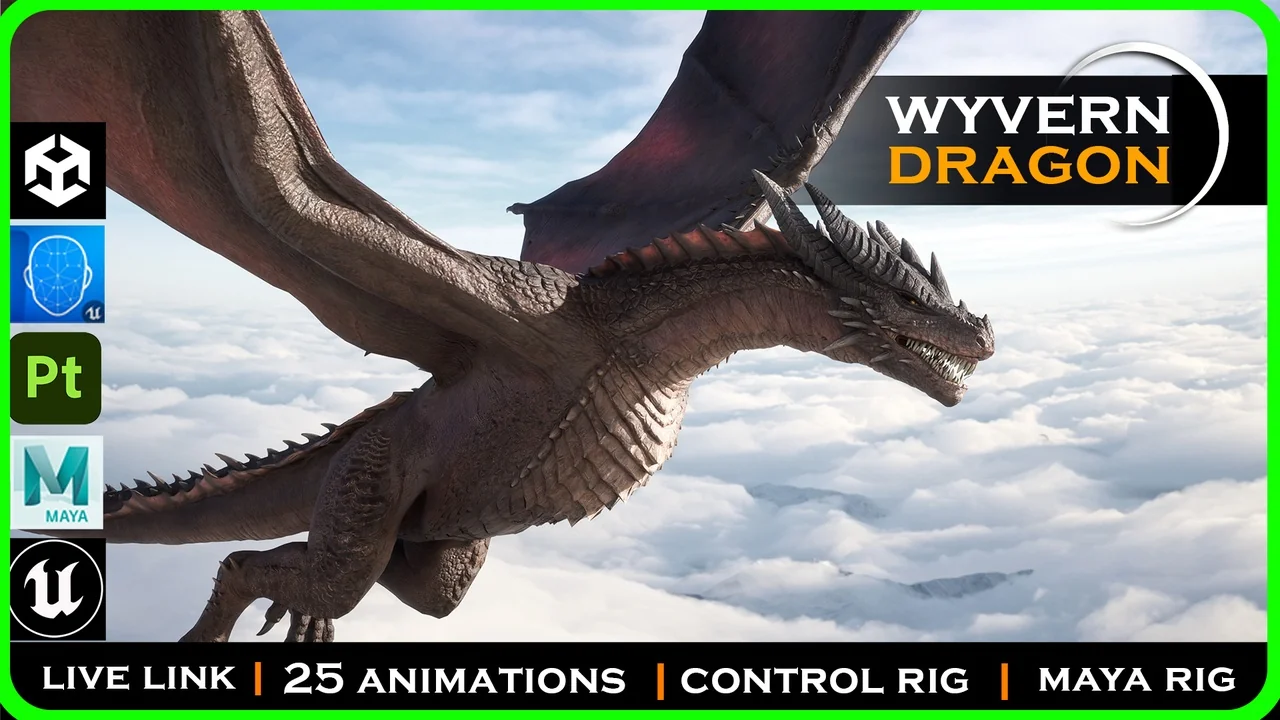
 Creatures
 Creatures
 Creatures