"c68a05d5e51405b3"{"id":"1000545","slug":"port","title":"Port","category":"Industrial","engine":"4.26+,5.0+","assetVersion":"","engineVersion":"Engine Version: 4.26+,5.0+","tag":"Industrial","accent":"blue","visual":"mech","summary":"Port industrial environment pack with warehouses, cargo props, vehicles, and a ship for Unreal Engine, supporting versions 4.26 through 5.8.","platform":"Unreal Engine","publishedAt":"2026-07-15T04:07:22.619Z","updatedAt":"2026-07-22T18:15:19.221Z","sourceNotes":[],"fileContents":[],"compatibility":["Unreal Engine","Engine Version: 4.26+,5.0+"],"featuredImage":{"alt":"Port","src":"/wp-content/uploads/published/2026/07/804c7c7ad3d3-dc0b61d5-a785-440c-b062-0837d0068d63-0209f8eedb.webp"},"hasDownloadLink":true,"downloads":2,"terms":[{"taxonomy":"category","slug":"industrial-environments","name":"Industrial"}],"galleryImages":[{"src":"/wp-content/uploads/published/2026/07/8bfe2123da79-a56b43ff-b17b-4a22-b50f-74b5c7f2821d-26e11f17f3.webp","alt":"Port"},{"src":"/wp-content/uploads/published/2026/07/d99f598b1286-a37fa954-3030-4856-be92-9f1ae31598f9-7bd8ebe131.webp","alt":"Port"},{"src":"/wp-content/uploads/published/2026/07/29eb95a0cf4b-6e1bb5aa-9dc3-4c11-8951-d1a38ea8d6bc-c030f1e4bc.webp","alt":"Port"},{"src":"/wp-content/uploads/published/2026/07/5098fc9c4ba9-5a3443f8-8bf2-4be7-9a7f-76535ff7458e-c7a55e799b.webp","alt":"Port"},{"src":"/wp-content/uploads/published/2026/07/1d829a5a5447-525cb1bc-d5e6-41f6-8b1e-e9f5ce36a53d-1f1e37ec8f.webp","alt":"Port"},{"src":"/wp-content/uploads/published/2026/07/f39d5bf64999-170a0a65-cb22-40f0-b98c-fa8f76c66e16-515b96fd1e.webp","alt":"Port"},{"src":"/wp-content/uploads/published/2026/07/8042eab6f48a-747a0904-fdc0-4901-a157-9ee84b485708-63766e526a.webp","alt":"Port"},{"src":"/wp-content/uploads/published/2026/07/50e179e83f4a-48ff04fc-9e38-4667-b047-bc6558389b58-4582e5ad66.webp","alt":"Port"},{"src":"/wp-content/uploads/published/2026/07/01d0abdae5ef-d8f6cb11-1eea-41b7-bb0a-39c697cd6aef-b497f424d9.webp","alt":"Port"},{"src":"/wp-content/uploads/published/2026/07/fe46a1811277-576057ef-18af-4dec-b5c6-f8c9ed00e5fd-1773605c76.webp","alt":"Port"}],"accessPanel":{"kind":"resource","title":"Download this resource","eyebrow":"Free Download","message":"Log in or create a free account to start your download.","fileName":"Content.7z","safetyNote":"Resources are manually reviewed before listing to improve quality and reduce obvious risks.","actionLabel":"Download Free","resourceType":"Resource archive"},"contentHtml":"\u003ch2\u003eEnabling the Water Plugin Before First Use\u003c/h2\u003e\n\n\u003cblockquote\u003e\n \u003cp\u003e\u003cstrong\u003e⚠️ CRITICAL SETUP STEP: Enable the Water Plugin Before Importing!\u003c/strong\u003e\u003cbr\u003e\n You \u003cem\u003emust\u003c/em\u003e enable Unreal Engine's built-in Water Plugin before adding this pack to your project. If the plugin is inactive during the initial import, \u003cstrong\u003ethe demo map will not be included\u003c/strong\u003e, and it will not appear retroactively. This demo map is the primary showcase of the environment, so skipping this step means losing the reference layout for the entire port.\u003c/p\u003e\n\u003c/blockquote\u003e\n\n\u003cp\u003eThe setup path is straightforward for anyone familiar with Unreal Engine's plugin workflow. Open the Plugin Browser, locate the Water plugin, enable it, and restart the editor if prompted. Once that is done, the pack can be safely imported or added to a project, and the demo map will be available for inspection. This step needs to be completed before any other work begins.\u003c/p\u003e\n\n\u003ch2\u003eEngine Versions and Compatibility Scope\u003c/h2\u003e\n\u003cp\u003eThe Port pack is compatible with Unreal Engine versions spanning from 4.26 through 4.27, and continuing into the 5.x line from 5.0 up to 5.8. This range covers the transition period between Unreal Engine 4 and Unreal Engine 5, meaning projects still maintained on the older version can use the pack alongside those that have already migrated forward.\u003c/p\u003e\n\u003cp\u003eBecause the compatibility window includes both major engine generations, the pack can be dropped into existing environments without forcing a version upgrade. A project running on 4.27 that is not yet ready to move to Unreal Engine 5 can incorporate the port assets, vehicles, and warehouses, while a new project starting on 5.8 can seamlessly integrate them. The Water plugin requirement applies uniformly across these versions, as it is a built-in part of Unreal Engine and does not require a separate external installation.\u003c/p\u003e \n\n\u003ch2\u003eWhat the Port Industrial Environment Contains\u003c/h2\u003e\n\u003cp\u003eThe pack is structured around a complete industrial port setting. The primary visual layers include:\u003c/p\u003e\n\u003cul\u003e\n \u003cli\u003e\u003cstrong\u003eWarehouses with Interiors:\u003c/strong\u003e The buildings are not hollow shells or facade-only props; they feature internal spaces that can be entered, populated with additional props, or used as mission locations in a game context. Interior access is crucial for cargo handling and logistics scenes where gameplay or cinematics require characters to move through these spaces.\u003c/li\u003e\n \u003cli\u003e\u003cstrong\u003eCargo Props:\u003c/strong\u003e These are the objects that populate a working port—crates, containers, and similar items that visually communicate the function of the environment. They provide mid-range scale details and can be stacked or scattered to make the port feel active rather than empty.\u003c/li\u003e\n \u003cli\u003e\u003cstrong\u003eIndustrial Vehicles:\u003c/strong\u003e In a port setting, vehicles typically refer to the machinery and transport used to move goods. While exact models are not enumerated, the vehicle category confirms that mobile or drivable equipment (like forklifts, trucks, or cranes) is part of the package.\u003c/li\u003e\n \u003cli\u003e\u003cstrong\u003eLarge-Scale Ship:\u003c/strong\u003e A ship is included to represent the massive vessels that dock at the port, serving as the origin or destination for the cargo and acting as a dominant visual landmark.\u003c/li\u003e\n\u003c/ul\u003e\n\n\u003ch2\u003eDemo Map as a Reference Layout\u003c/h2\u003e\n\u003cp\u003eThe demo map functions as the starting reference for how the port environment is intended to be assembled. Because the Water plugin is required for the map to be included, enabling the plugin is the effective trigger for gaining access to a full level that showcases the warehouses, cargo props, vehicles, and ship in context. Rather than importing individual assets and placing them from scratch, developers can open the demo map to study a pre-built layout, then modify, expand, or deconstruct it.\u003c/p\u003e\n\u003cp\u003eThis approach significantly reduces the initial setup effort. The demo map provides a working example of how the warehouses relate to the open cargo areas, where vehicles are positioned relative to the ship, and how the overall industrial flow is structured. For teams or solo developers, having a reference map means the first session with the pack can focus on evaluation and adjustment instead of blank-canvas placement.\u003c/p\u003e \n\n\u003ch2\u003eWhere the Port Pack Fits in Production\u003c/h2\u003e\n\u003cp\u003eThe tag set—Vehicle, Warehouse, Ship, Level, Cargo, Industrial—defines the pack as an industrial-themed environment collection. It is production-ready for scenes that require a working port atmosphere: logistics hubs, shipping yards, industrial waterfronts, or transportation sequences involving cargo and vessels.\u003c/p\u003e\n\u003cp\u003eFor cinematic work, the pack supplies the structural and prop elements needed to stage shots at a dockside location without modeling from scratch. For game development, the warehouse interiors and cargo props provide spaces that can support gameplay—search objectives, cover, or traversal challenges within an industrial setting. The ship serves as a potential interactive structure for boarding, unloading, or narrative sequences.\u003c/p\u003e \n\n\u003ch2\u003eWho Benefits Most from This Pack\u003c/h2\u003e\n\u003cp\u003eDevelopers building industrial, logistics, or maritime-themed levels in Unreal Engine gain the most direct value. The pack removes the modeling and assembly effort for a core port environment, providing warehouses, a ship, vehicles, and cargo as ready assets. As long as the one-time \u003cstrong\u003eWater plugin setup\u003c/strong\u003e is completed, the demo map becomes a highly practical starting point for evaluation, iteration, or direct use in a project.\u003c/p\u003e\n\u003cp\u003eTeams working across the UE 4.26–4.27 and 5.0–5.8 ranges can integrate the pack without version friction. For anyone who needs a populated industrial port with interiors, mobile equipment, and large-scale vessel geometry, this pack delivers those elements in a single, cohesive collection.\u003c/p\u003e\n\n\n\u003ch2\u003eExplore Similar Assets\u003c/h2\u003e\n\u003cul\u003e\n\u003cli\u003e\u003ca href=\"https://3dcghub.com/sci-fi-port-environment/\" rel=\"noopener noreferrer\"\u003eSci-fi Port Environment\u003c/a\u003e\u003c/li\u003e\n\u003cli\u003e\u003ca href=\"https://3dcghub.com/container-yard-environment-set/\" rel=\"noopener noreferrer\"\u003eContainer Yard Environment Set\u003c/a\u003e\u003c/li\u003e\n\u003cli\u003e\u003ca href=\"https://3dcghub.com/old-factory/\" rel=\"noopener noreferrer\"\u003eOld Factory\u003c/a\u003e\u003c/li\u003e\n\u003cli\u003e\u003ca href=\"https://3dcghub.com/junkyard-environment-14-assets/\" rel=\"noopener noreferrer\"\u003eJunkyard Environment / 14 Assets\u003c/a\u003e\u003c/li\u003e\n\u003cli\u003e\u003ca href=\"https://3dcghub.com/industrial-city-mega-pack-jan-16-2022-update/\" rel=\"noopener noreferrer\"\u003eIndustrial City Mega Pack / Jan 16, 2022 Update\u003c/a\u003e\u003c/li\u003e\n\u003c/ul\u003e","contentTextLength":5672,"navigation":{"current":1319,"total":3860,"previous":{"id":"1000686","slug":"stylish-dual-gunner-pack-action-rpg-game","title":"Stylish Dual Gunner Pack Action RPG Game","category":"Combat","platform":"Unreal Engine","updatedAt":"2026-07-22T19:45:21.243Z"},"next":{"id":"1000685","slug":"steam-package-and-publish-tool","title":"Steam Package \u0026 Publish Tool","category":"Engine Tools","platform":"Unreal Engine","updatedAt":"2026-07-22T17:25:15.449Z"}},"relatedResources":[{"id":"1001165","slug":"hawknest-shipping-port-modular","title":"HAWKNEST - Shipping Port (Modular)","category":"Industrial","engine":"5.1+","assetVersion":"","engineVersion":"Engine Version: 5.1+","tag":"Industrial","accent":"blue","visual":"mech","summary":"Configure and deploy HAWKNEST - Shipping Port (Modular) in Unreal Engine with drivable vehicles, modular warehouses, Chaos physics, and harbor props.","platform":"Unreal Engine","publishedAt":"2026-09-16T09:15:39.305Z","updatedAt":"2026-09-16T09:15:39.305Z","sourceNotes":[],"fileContents":[],"compatibility":["Unreal Engine","Engine Version: 5.1+"],"featuredImage":{"alt":"HAWKNEST - Shipping Port (Modular)","src":"/wp-content/uploads/published/2026/09/60a683ccfcff-e3eea282-3eb7-4851-afc1-c2d91f2c2c16-c24dcaf1ce.webp"},"hasDownloadLink":true,"downloads":1},{"id":"8704","slug":"sci-fi-port-environment","title":"Sci-fi Port Environment","category":"Industrial","engine":"4.26+,5.0+","assetVersion":"Engine version: 4.26+,5.0+","engineVersion":"4.26","tag":"Industrial","accent":"blue","visual":"city","summary":"Transform your digital projects with this extra-detailed Sci-fi Port Environment. Designed for both games and films, it offers modular assets and full Unreal Engine 5 compatibility.","platform":"Unreal Engine","publishedAt":"2026-02-23T18:42:51.000Z","updatedAt":"2026-04-19T15:55:22.000Z","sourceNotes":[],"fileContents":[],"compatibility":["Unreal Engine","Engine version: 4.26+,5.0+"],"featuredImage":{"alt":"Sci-fi Port Environment","src":"https://3dcghub.com/wp-content/uploads/2026/02/1efc373d-9125-4981-8c32-27c06e653a37.webp"},"hasDownloadLink":true,"downloads":1},{"id":"8560","slug":"container-yard-environment-set","title":"Container Yard Environment Set","category":"Industrial","engine":"4.26+,5.0+","assetVersion":"Engine version: 4.26+,5.0+","engineVersion":"4.16","tag":"Industrial","accent":"blue","visual":"city","summary":"Build detailed industrial landscapes with this comprehensive set of shipping containers and port assets. It features customizable materials and background elements for maximum realism.","platform":"Unreal Engine","publishedAt":"2026-02-23T17:50:40.000Z","updatedAt":"2026-04-19T15:55:24.000Z","sourceNotes":[],"fileContents":[],"compatibility":["Unreal Engine","Engine version: 4.26+,5.0+"],"featuredImage":{"alt":"Container Yard Environment Set","src":"https://3dcghub.com/wp-content/uploads/2026/02/f5c20195-e95e-4c0f-8b29-40e11412677d.webp"},"hasDownloadLink":true,"downloads":0}]}
Industrial
Port
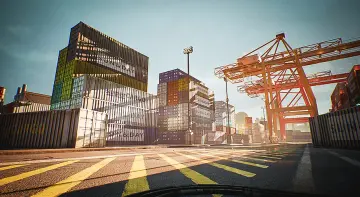
Port industrial environment pack with warehouses, cargo props, vehicles, and a ship for Unreal Engine, supporting versions 4.26 through 5.8.
⚠️ CRITICAL SETUP STEP: Enable the Water Plugin Before Importing!
You must enable Unreal Engine's built-in Water Plugin before adding this pack to your project. If the plugin is inactive during the initial import, the demo map will not be included, and it will not appear retroactively. This demo map is the primary showcase of the environment, so skipping this step means losing the reference layout for the entire port.
The setup path is straightforward for anyone familiar with Unreal Engine's plugin workflow. Open the Plugin Browser, locate the Water plugin, enable it, and restart the editor if prompted. Once that is done, the pack can be safely imported or added to a project, and the demo map will be available for inspection. This step needs to be completed before any other work begins.
Engine Versions and Compatibility Scope
The Port pack is compatible with Unreal Engine versions spanning from 4.26 through 4.27, and continuing into the 5.x line from 5.0 up to 5.8. This range covers the transition period between Unreal Engine 4 and Unreal Engine 5, meaning projects still maintained on the older version can use the pack alongside those that have already migrated forward.
Because the compatibility window includes both major engine generations, the pack can be dropped into existing environments without forcing a version upgrade. A project running on 4.27 that is not yet ready to move to Unreal Engine 5 can incorporate the port assets, vehicles, and warehouses, while a new project starting on 5.8 can seamlessly integrate them. The Water plugin requirement applies uniformly across these versions, as it is a built-in part of Unreal Engine and does not require a separate external installation.
What the Port Industrial Environment Contains
The pack is structured around a complete industrial port setting. The primary visual layers include:
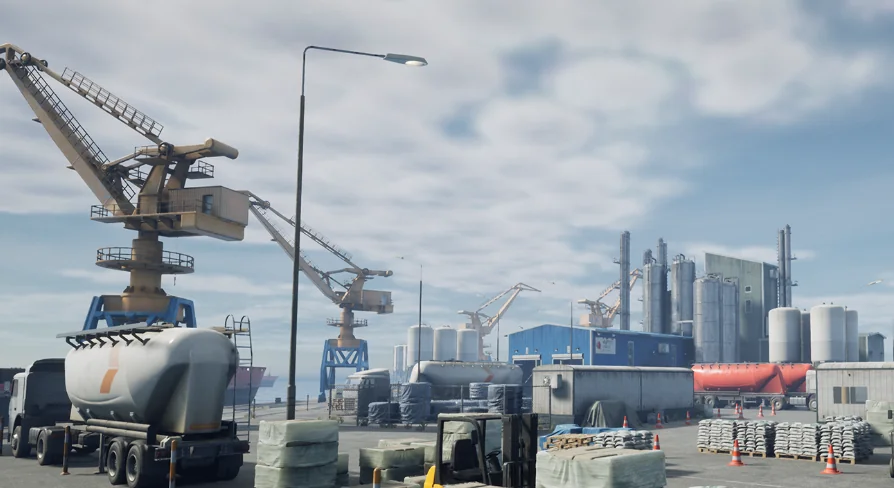
Warehouses with Interiors: The buildings are not hollow shells or facade-only props; they feature internal spaces that can be entered, populated with additional props, or used as mission locations in a game context. Interior access is crucial for cargo handling and logistics scenes where gameplay or cinematics require characters to move through these spaces.
Cargo Props: These are the objects that populate a working port—crates, containers, and similar items that visually communicate the function of the environment. They provide mid-range scale details and can be stacked or scattered to make the port feel active rather than empty.
Industrial Vehicles: In a port setting, vehicles typically refer to the machinery and transport used to move goods. While exact models are not enumerated, the vehicle category confirms that mobile or drivable equipment (like forklifts, trucks, or cranes) is part of the package.
Large-Scale Ship: A ship is included to represent the massive vessels that dock at the port, serving as the origin or destination for the cargo and acting as a dominant visual landmark.
Demo Map as a Reference Layout
The demo map functions as the starting reference for how the port environment is intended to be assembled. Because the Water plugin is required for the map to be included, enabling the plugin is the effective trigger for gaining access to a full level that showcases the warehouses, cargo props, vehicles, and ship in context. Rather than importing individual assets and placing them from scratch, developers can open the demo map to study a pre-built layout, then modify, expand, or deconstruct it.
This approach significantly reduces the initial setup effort. The demo map provides a working example of how the warehouses relate to the open cargo areas, where vehicles are positioned relative to the ship, and how the overall industrial flow is structured. For teams or solo developers, having a reference map means the first session with the pack can focus on evaluation and adjustment instead of blank-canvas placement.
Where the Port Pack Fits in Production
The tag set—Vehicle, Warehouse, Ship, Level, Cargo, Industrial—defines the pack as an industrial-themed environment collection. It is production-ready for scenes that require a working port atmosphere: logistics hubs, shipping yards, industrial waterfronts, or transportation sequences involving cargo and vessels.
For cinematic work, the pack supplies the structural and prop elements needed to stage shots at a dockside location without modeling from scratch. For game development, the warehouse interiors and cargo props provide spaces that can support gameplay—search objectives, cover, or traversal challenges within an industrial setting. The ship serves as a potential interactive structure for boarding, unloading, or narrative sequences.
Who Benefits Most from This Pack
Developers building industrial, logistics, or maritime-themed levels in Unreal Engine gain the most direct value. The pack removes the modeling and assembly effort for a core port environment, providing warehouses, a ship, vehicles, and cargo as ready assets. As long as the one-time Water plugin setup is completed, the demo map becomes a highly practical starting point for evaluation, iteration, or direct use in a project.
Teams working across the UE 4.26–4.27 and 5.0–5.8 ranges can integrate the pack without version friction. For anyone who needs a populated industrial port with interiors, mobile equipment, and large-scale vessel geometry, this pack delivers those elements in a single, cohesive collection.
 Industrial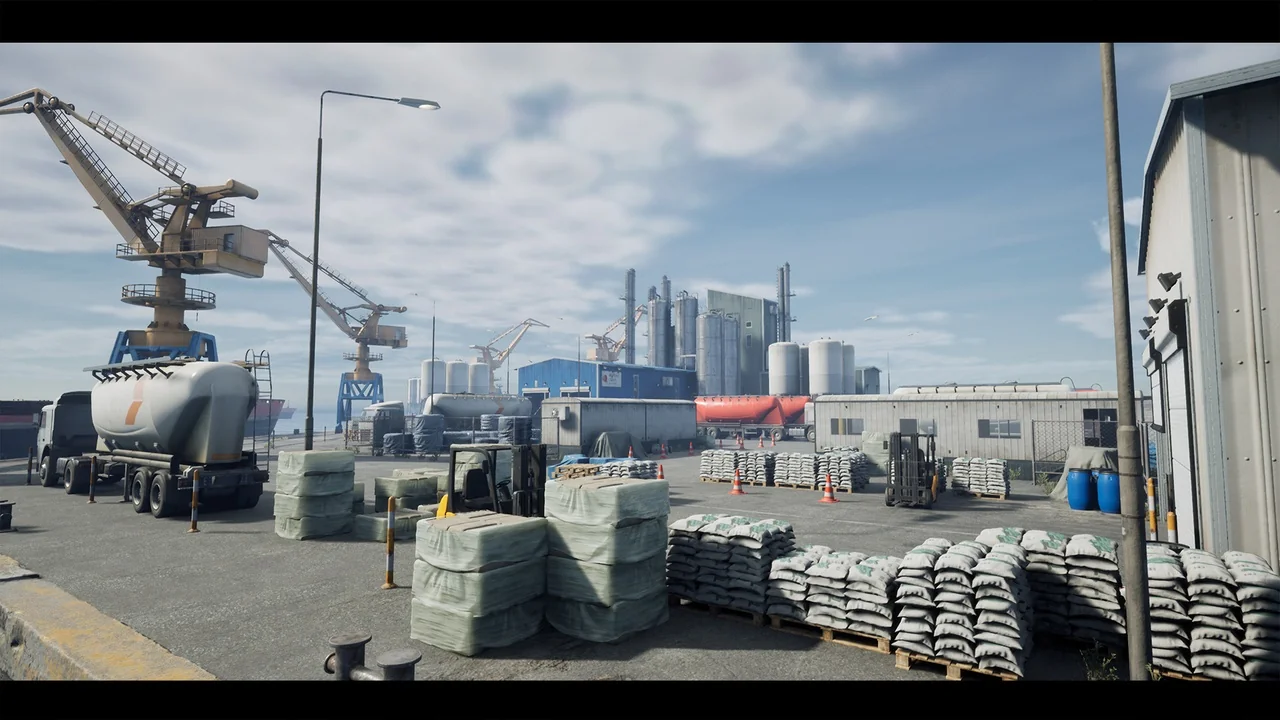
 Industrial
 Industrial
 Industrial