"c14ff6bd758dadb1"{"id":"1000562","slug":"arctic-base","title":"Arctic Base","category":"Mountain","engine":"4.26+,5.0+","assetVersion":"","engineVersion":"Engine Version: 4.26+,5.0+","tag":"Mountain","accent":"blue","visual":"mech","summary":"Arctic Base is a polar station environment pack with buildings, props, landscape, and water materials across Unreal Engine versions from 4.19 to 5.8.","platform":"Unreal Engine","publishedAt":"2026-07-16T05:00:29.747Z","updatedAt":"2026-07-16T05:00:29.747Z","sourceNotes":[],"fileContents":[],"compatibility":["Unreal Engine","Engine Version: 4.26+,5.0+"],"featuredImage":{"alt":"Arctic Base","src":"/wp-content/uploads/published/2026/07/b73e66f11064-912225d2-ed0b-4150-a5c3-a003ea26c179-8381e0955a.webp"},"hasDownloadLink":true,"downloads":0,"terms":[{"taxonomy":"category","slug":"mountain","name":"Mountain"}],"galleryImages":[{"src":"/wp-content/uploads/published/2026/07/e5ba28e4ffac-84d4367f-f5c4-4771-bb39-9737318464ba-20ddec64df.webp","alt":"Arctic Base"},{"src":"/wp-content/uploads/published/2026/07/927af04c06a4-f29386a4-9fec-442a-a4e9-f760be77466e-cbb3a5145a.webp","alt":"Arctic Base"},{"src":"/wp-content/uploads/published/2026/07/cdf7c32be84a-2ceea80e-e593-4423-b1ba-b5caa2778252-5bc9caf502.webp","alt":"Arctic Base"},{"src":"/wp-content/uploads/published/2026/07/b350f073def4-8e341801-3d7f-4967-aedc-4799dd02e16b-7b427154f8.webp","alt":"Arctic Base"},{"src":"/wp-content/uploads/published/2026/07/d5fbb60a3c55-6e4b327f-2316-471d-a364-169f6a351168-f83a82807b.webp","alt":"Arctic Base"},{"src":"/wp-content/uploads/published/2026/07/873d21cb36f1-1598290f-7f01-4e00-85ac-f6542c316c2c-9f19230e19.webp","alt":"Arctic Base"},{"src":"/wp-content/uploads/published/2026/07/4eefd6781c59-47f74889-f9dc-4839-b654-6bc6234c828f-ea00d138bd.webp","alt":"Arctic Base"},{"src":"/wp-content/uploads/published/2026/07/85555ed38691-a6300b02-24a0-43b8-b236-2a256270ef78-cb835126d7.webp","alt":"Arctic Base"}],"accessPanel":{"kind":"resource","title":"Download this resource","eyebrow":"Free Download","message":"Log in or create a free account to start your download.","fileName":"Content.7z","safetyNote":"Resources are manually reviewed before listing to improve quality and reduce obvious risks.","actionLabel":"Download Free","resourceType":"Resource archive"},"contentHtml":"\u003cp\u003eDropping a crew into a frozen landscape usually means weeks of blocking out structures, scattering gear, and tuning snow surfaces before a single shot reads as believable. Arctic Base short-circuits that ramp-up by arriving as a pre assembled polar station environment, complete with a demo level that already places its assets into a coherent scene. Teams can load the level, walk through it, and immediately judge whether the visual language fits a survival storyline, a research outpost establishing shot, or a mission Briefing backdrop before committing to custom layout work.\u003c/p\u003e\u003cp\u003eThe package is built for Unreal Engine and carries a wide compatibility band, running from version 4.19 through 4.27 and continuing into the 5.0–5.8 range. That spread matters for studios still mid-production on last-generation projects as well as those actively shipping on the current engine line. An art director can pull the same pack into a 4.27 cinematic pipeline and later port the scene into a 5.x build without hunting for a replacement kit mid-project.\u003c/p\u003e\u003ch2\u003eWhat Arctic Base Contains as a Station Package\u003c/h2\u003e\u003cp\u003eAt its core the asset set targets high-quality arctic or antarctic station environments. Rather than handing over a pile of loose meshes and leaving the assembly entirely to the user, the project provides a demo level that groups those elements into a readable layout. Buildings, props, landscape, and water materials all ship inside that level, which means the foundational geography, the structures on top of it, and the surrounding water treatment are already interacting with each other inside the file.\u003c/p\u003e\u003cp\u003eFor a environment artist, that demo level doubles as a reference for density and placement. Instead of guessing how many props per square meter reads as occupied rather than cluttered, or how far buildings should sit from a shoreline to feel like a planned installation, the scene gives a working example. It also serves as a lighting and mood target: load the level, match the exposure values, and any new structures added later inherit a proven Environmental baseline.\u003c/p\u003e\u003ch2\u003eStation Buildings and Architectural Pieces\u003c/h2\u003e\u003cp\u003eThe buildings included cover the structural backbone of a cold-climate outpost. Their architecture falls under the Building and Architecture tags attached to the pack, and the project is tagged as Lowpoly while also carrying a Realistic descriptor. That combination places the assets in a practical middle ground for production: geometry dense enough to read as convincing under realistic shading, yet light enough that an entire station can sit in frame without crippling frame rates.\u003c/p\u003e\u003cp\u003eThese structural pieces are the components a director or level designer rearranges when adapting the kit to a specific narrative beat. A communications tower can anchor one corner of a compound. Storage modules can line a perimeter road. The demo level’s existing arrangement is a starting point; the individual building assets exist to be broken out, repositioned, or duplicated as a story demands.\u003c/p\u003e\u003ch2\u003eProps for Arctic and Antarctic Station Density\u003c/h2\u003e\u003cp\u003eBeyond the walls and frames, a believable station lives in its clutter. Antarctic and arctic environments in particular rely on the gear left outside—fuel cans, equipment crates, lighting rigs, ventilation ducts—because nothing reads as a working outpost without maintenance apparatus scattered in the snow. Arctic Base includes aprops range that fills the gaps between buildings and gives the environment its operational texture.\u003c/p\u003e\u003cp\u003eIn practice, a prop set tied to a themed environment package like this saves the scavenger hunt of buying a structure kit and then searching a separate asset store for compatible gear. The props here already share the visual language established by the buildings and landscape, so dropped crates and drums inherit the same surface treatment and weathering logic as the structures around them.\u003c/p\u003e\u003ch2\u003eLandscape and Water Materials in the Demo Level\u003c/h2\u003e\u003cp\u003eThe terrain component covers the ground the station occupies, while the water materials handle the frozen or partially frozen surroundings that define a polar setting. Together they respond to the most persistent technical question in cold-climate scenes: how does the snow look, and how does the water look where it meets the snow. Arctic Base addresses both inside the demo level, letting teams evaluate the materials under the pack’s own lighting rather than against a test sphere in an empty map.\u003c/p\u003e\u003cp\u003eWater in particular is a defining surface for arctic and antarctic environments. Any coastal station or ice Shelf scenario needs water materials that hold up under camera scrutiny, whether the scene is locked to a cinematic frame or built for real-time exploration. By bundling the water treatment with the landscape and structures, the kit avoids the mismatch that occurs when terrain, water, and buildings come from three different vendors with incompatible shading models.\u003c/p\u003e\u003ch2\u003eStylistic Position and Practical Deployment\u003c/h2\u003e\u003cp\u003eThe pack’s tag set—Lowpoly, Level, Realistic, Building, Architecture—tells art directors what to expect from the visual register before they open the file. The Lowpoly tag signals efficiency, which is useful for real-time scenes where a full polar landscape needs to coexist with complex structures without drying out performance. The Realistic tag prevents Lowpoly from veering into stylized or cartoon territory; the goal is efficient realism rather than hand-painted charm.\u003c/p\u003e\u003cp\u003eThis positioning makes the kit a fit for cinematic previsualization, real-time cutscenes, and game levels where a cold-climate setting needs to load quickly without sacrificing believability. A team could use the demo level directly as a establishing location if the story calls for a generic polar facility. They can just as easily strip the level back to bare landscape and drop in their own station layout using the same building and prop parts, converting a finished reference scene into a custom iteration without leaving the asset package.\u003c/p\u003e\u003ch3\u003eEngine Version Range and Project Slotting\u003c/h3\u003e\u003cp\u003eThe supported span from 4.19 to 5.8 covers two major engine generations and the transition years that fractured many studios between 4.x and 5.x pipelines. Kit compatibility across that divide prevents asset-triage delays when a project migrates. The same Arctic Base install can serve a 4.25 trailer, a 4.27 gameplay test, and the final 5.x build without forcing an art pass to fix broken materials or missing references.\u003c/p\u003e\u003cp\u003eNewer teams on 5.x benefit from continued support up through 5.8, confirming the package is actively maintained and not locked to pre-Nanite workflows. Existing projects still on 4.x can adopt it just as cleanly, which is rare for packs that typically split across major versions.\u003c/p\u003e\u003ch3\u003eA Working Demo Level as the First Practical Asset\u003c/h3\u003e\u003cp\u003eIf a production team only pulls one thing from Arctic Base on day one, the demo level is the highest-value entry point. It arranges the buildings, props, landscape, and water materials into a finished polar station environment, giving a director or environment lead a concrete example of how the kit behaves when its pieces are used together. From that baseline, the same components can be lifted, rearranged, or repurposed across an entire frozen region without rebuilding the underlying material and geometry library from scratch.\u003c/p\u003e\n\n\u003ch2\u003eMore From The Same Workflow\u003c/h2\u003e\n\u003cul\u003e\n\u003cli\u003e\u003ca href=\"https://3dcghub.com/brushify-arctic-pack/\" title=\"Brushify - Arctic Pack\"\u003eBrushify - Arctic Pack\u003c/a\u003e\u003c/li\u003e\n\u003cli\u003e\u003ca href=\"https://3dcghub.com/arctic-aurora-landscape/\" title=\"Arctic Aurora Landscape\"\u003eArctic Aurora Landscape\u003c/a\u003e\u003c/li\u003e\n\u003cli\u003e\u003ca href=\"https://3dcghub.com/natural-wonders-mojave/\" title=\"Natural Wonders - Mojave\"\u003eNatural Wonders - Mojave\u003c/a\u003e\u003c/li\u003e\n\u003cli\u003e\u003ca href=\"https://3dcghub.com/brushify-moorlands-pack/\" title=\"Brushify - Moorlands Pack\"\u003eBrushify - Moorlands Pack\u003c/a\u003e\u003c/li\u003e\n\u003cli\u003e\u003ca href=\"https://3dcghub.com/brushify-volcano-pack/\" title=\"Brushify Volcano Pack\"\u003eBrushify Volcano Pack\u003c/a\u003e\u003c/li\u003e\n\u003c/ul\u003e","contentTextLength":7438,"navigation":{"current":1301,"total":3719,"previous":{"id":"1000563","slug":"assassin-spell-vfx-pack","title":"Assassin Spell VFX Pack","category":"Spells \u0026 Combat","platform":"Unreal Engine","updatedAt":"2026-07-16T05:04:58.240Z"},"next":{"id":"1000561","slug":"animated-low-poly-weapons-v1-0","title":"Animated Low Poly Weapons v1.0","category":"Combat","platform":"Unreal Engine","updatedAt":"2026-07-16T04:51:47.005Z"}},"relatedResources":[{"id":"9357","slug":"brushify-arctic-pack","title":"Brushify - Arctic Pack","category":"Mountain","engine":"4.26+,5.0+","assetVersion":"Engine version: 4.26+,5.0+","engineVersion":"4.24","tag":"Mountain","accent":"blue","visual":"city","summary":"The Brushify - Arctic Pack is a professional modular toolkit for Unreal Engine designed to streamline the creation of massive, detailed winter environments. It features high-resolution alpha brushes, distance meshes, and an advanced landscape auto-material.","platform":"Unreal Engine","publishedAt":"2026-03-01T16:40:54.000Z","updatedAt":"2026-04-19T15:51:14.000Z","sourceNotes":[],"fileContents":[],"compatibility":["Unreal Engine","Engine version: 4.26+,5.0+"],"featuredImage":{"alt":"Brushify - Arctic Pack","src":"https://3dcghub.com/wp-content/uploads/2026/03/b49cbf83-56c1-49bc-a42a-d7077b34e2f7.webp"},"hasDownloadLink":true,"downloads":1},{"id":"1001136","slug":"eastern-iceland-landscape","title":"Eastern Iceland Landscape","category":"Mountain","engine":"4.26+,5.0+","assetVersion":"","engineVersion":"Engine Version: 4.26+,5.0+","tag":"Mountain","accent":"blue","visual":"city","summary":"A 64 square kilometer terrain with 1x1 m vertex density, volumetric 3D clouds, dynamic cloud shadows, and layered material controls for realistic outdoor scenes","platform":"Unreal Engine","publishedAt":"2026-09-09T03:20:31.567Z","updatedAt":"2026-09-09T03:20:31.567Z","sourceNotes":[],"fileContents":[],"compatibility":["Unreal Engine","Engine Version: 4.26+,5.0+"],"featuredImage":{"alt":"Eastern Iceland Landscape","src":"/wp-content/uploads/published/2026/09/ffd4b4699908-7793c3ec-35c9-4cc6-b06d-962d5f6ccb4e-89f3513491.webp"},"hasDownloadLink":true,"downloads":1},{"id":"28484","slug":"arctic-aurora-landscape","title":"Arctic Aurora Landscape","category":"Mountain","engine":"4.26+,5.0+","assetVersion":"Engine version: 4.26+,5.0+","engineVersion":"","tag":"Mountain","accent":"blue","visual":"city","summary":"Arctic Aurora Landscape centers on a realistic snowy mountain scene shaped by layered terrain, aurora-filled skies, and atmospheric particles. It combines detailed landscape shaders, snow-covered vegetation, distant mountain backdrops, and lighting settings...","platform":"Unreal Engine","publishedAt":"2026-05-15T17:17:38.000Z","updatedAt":"2026-05-15T17:17:39.000Z","sourceNotes":[],"fileContents":[],"compatibility":["Unreal Engine","Engine version: 4.26+,5.0+"],"featuredImage":{"alt":"Arctic Aurora Landscape","src":"https://3dcghub.com/wp-content/uploads/2026/05/e519b62c651a_7fcc4b27-978c-4834-9de9-f4fe863e8487.webp"},"hasDownloadLink":true,"downloads":1}]}
Mountain
Arctic Base
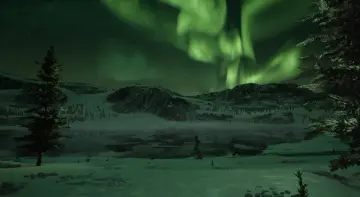
Arctic Base is a polar station environment pack with buildings, props, landscape, and water materials across Unreal Engine versions from 4.19 to 5.8.
Dropping a crew into a frozen landscape usually means weeks of blocking out structures, scattering gear, and tuning snow surfaces before a single shot reads as believable. Arctic Base short-circuits that ramp-up by arriving as a pre assembled polar station environment, complete with a demo level that already places its assets into a coherent scene. Teams can load the level, walk through it, and immediately judge whether the visual language fits a survival storyline, a research outpost establishing shot, or a mission Briefing backdrop before committing to custom layout work.
The package is built for Unreal Engine and carries a wide compatibility band, running from version 4.19 through 4.27 and continuing into the 5.0–5.8 range. That spread matters for studios still mid-production on last-generation projects as well as those actively shipping on the current engine line. An art director can pull the same pack into a 4.27 cinematic pipeline and later port the scene into a 5.x build without hunting for a replacement kit mid-project.
What Arctic Base Contains as a Station Package
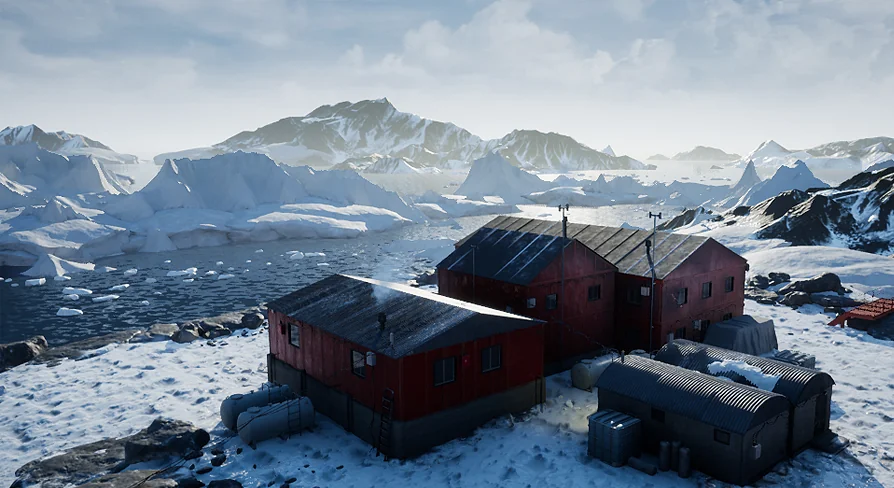
At its core the asset set targets high-quality arctic or antarctic station environments. Rather than handing over a pile of loose meshes and leaving the assembly entirely to the user, the project provides a demo level that groups those elements into a readable layout. Buildings, props, landscape, and water materials all ship inside that level, which means the foundational geography, the structures on top of it, and the surrounding water treatment are already interacting with each other inside the file.
For a environment artist, that demo level doubles as a reference for density and placement. Instead of guessing how many props per square meter reads as occupied rather than cluttered, or how far buildings should sit from a shoreline to feel like a planned installation, the scene gives a working example. It also serves as a lighting and mood target: load the level, match the exposure values, and any new structures added later inherit a proven Environmental baseline.
Station Buildings and Architectural Pieces
The buildings included cover the structural backbone of a cold-climate outpost. Their architecture falls under the Building and Architecture tags attached to the pack, and the project is tagged as Lowpoly while also carrying a Realistic descriptor. That combination places the assets in a practical middle ground for production: geometry dense enough to read as convincing under realistic shading, yet light enough that an entire station can sit in frame without crippling frame rates.
These structural pieces are the components a director or level designer rearranges when adapting the kit to a specific narrative beat. A communications tower can anchor one corner of a compound. Storage modules can line a perimeter road. The demo level’s existing arrangement is a starting point; the individual building assets exist to be broken out, repositioned, or duplicated as a story demands.
Props for Arctic and Antarctic Station Density
Beyond the walls and frames, a believable station lives in its clutter. Antarctic and arctic environments in particular rely on the gear left outside—fuel cans, equipment crates, lighting rigs, ventilation ducts—because nothing reads as a working outpost without maintenance apparatus scattered in the snow. Arctic Base includes aprops range that fills the gaps between buildings and gives the environment its operational texture.
In practice, a prop set tied to a themed environment package like this saves the scavenger hunt of buying a structure kit and then searching a separate asset store for compatible gear. The props here already share the visual language established by the buildings and landscape, so dropped crates and drums inherit the same surface treatment and weathering logic as the structures around them.
Landscape and Water Materials in the Demo Level
The terrain component covers the ground the station occupies, while the water materials handle the frozen or partially frozen surroundings that define a polar setting. Together they respond to the most persistent technical question in cold-climate scenes: how does the snow look, and how does the water look where it meets the snow. Arctic Base addresses both inside the demo level, letting teams evaluate the materials under the pack’s own lighting rather than against a test sphere in an empty map.
Water in particular is a defining surface for arctic and antarctic environments. Any coastal station or ice Shelf scenario needs water materials that hold up under camera scrutiny, whether the scene is locked to a cinematic frame or built for real-time exploration. By bundling the water treatment with the landscape and structures, the kit avoids the mismatch that occurs when terrain, water, and buildings come from three different vendors with incompatible shading models.
Stylistic Position and Practical Deployment
The pack’s tag set—Lowpoly, Level, Realistic, Building, Architecture—tells art directors what to expect from the visual register before they open the file. The Lowpoly tag signals efficiency, which is useful for real-time scenes where a full polar landscape needs to coexist with complex structures without drying out performance. The Realistic tag prevents Lowpoly from veering into stylized or cartoon territory; the goal is efficient realism rather than hand-painted charm.
This positioning makes the kit a fit for cinematic previsualization, real-time cutscenes, and game levels where a cold-climate setting needs to load quickly without sacrificing believability. A team could use the demo level directly as a establishing location if the story calls for a generic polar facility. They can just as easily strip the level back to bare landscape and drop in their own station layout using the same building and prop parts, converting a finished reference scene into a custom iteration without leaving the asset package.
Engine Version Range and Project Slotting
The supported span from 4.19 to 5.8 covers two major engine generations and the transition years that fractured many studios between 4.x and 5.x pipelines. Kit compatibility across that divide prevents asset-triage delays when a project migrates. The same Arctic Base install can serve a 4.25 trailer, a 4.27 gameplay test, and the final 5.x build without forcing an art pass to fix broken materials or missing references.
Newer teams on 5.x benefit from continued support up through 5.8, confirming the package is actively maintained and not locked to pre-Nanite workflows. Existing projects still on 4.x can adopt it just as cleanly, which is rare for packs that typically split across major versions.
A Working Demo Level as the First Practical Asset
If a production team only pulls one thing from Arctic Base on day one, the demo level is the highest-value entry point. It arranges the buildings, props, landscape, and water materials into a finished polar station environment, giving a director or environment lead a concrete example of how the kit behaves when its pieces are used together. From that baseline, the same components can be lifted, rearranged, or repurposed across an entire frozen region without rebuilding the underlying material and geometry library from scratch.
 Mountain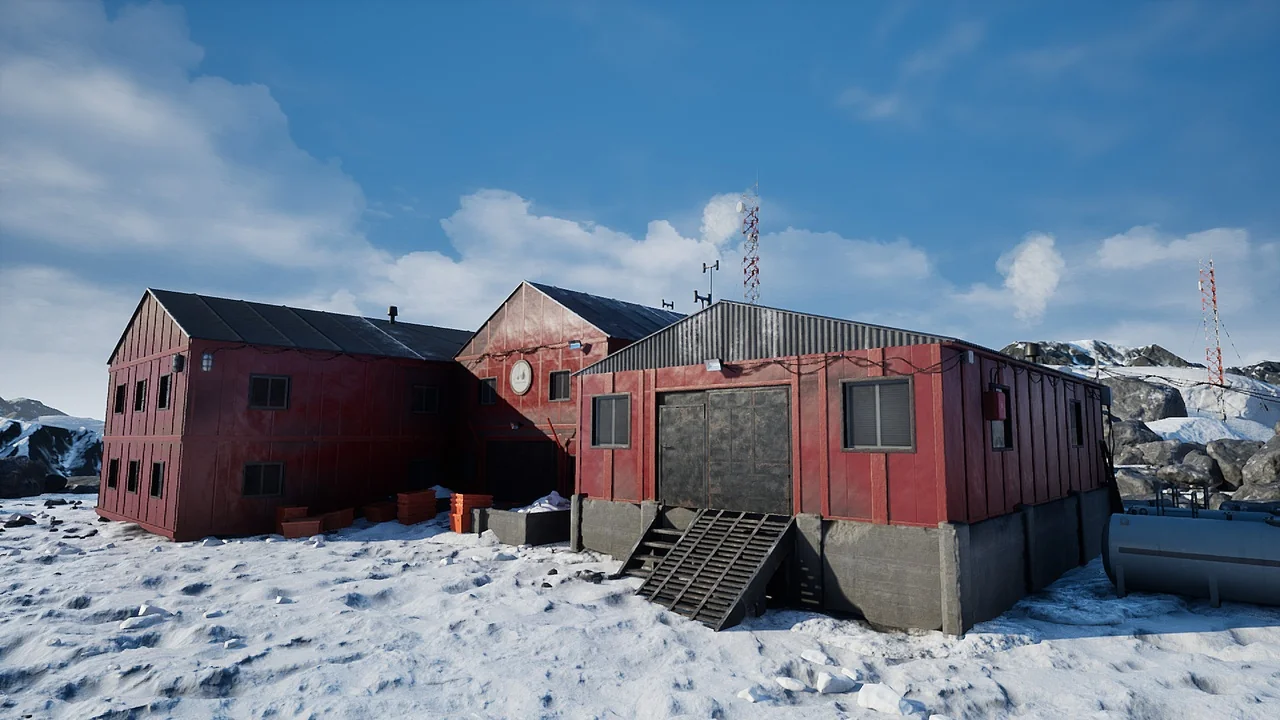
 Mountain
 Mountain
 Mountain