"c14ff6bd758dadb1"{"id":"1000543","slug":"office-interior-archinteriors-vol-1-scene-3","title":"Office Interior - Archinteriors Vol 1 Scene 3","category":"Interior","engine":"4.27,5.0+","assetVersion":"","engineVersion":"Engine Version: 4.27,5.0+","tag":"Interior","accent":"blue","visual":"mech","summary":"A modern office interior scene for Unreal Engine 4.27 and 5.0–5.1 with raytraced reflections, baked lightmaps, animated cinema cameras, and PBR materials with d","platform":"Unreal Engine","publishedAt":"2026-07-15T03:54:10.400Z","updatedAt":"2026-07-15T03:54:10.400Z","sourceNotes":[],"fileContents":[],"compatibility":["Unreal Engine","Engine Version: 4.27,5.0+"],"featuredImage":{"alt":"Office Interior - Archinteriors Vol 1 Scene 3","src":"/wp-content/uploads/published/2026/07/083e091ba01b-73b073f7-ef09-4d62-a281-1675f82403ba-03134ea3ef.webp"},"hasDownloadLink":true,"downloads":1,"terms":[{"taxonomy":"category","slug":"interior","name":"Interior"}],"galleryImages":[{"src":"/wp-content/uploads/published/2026/07/1d992abc0e61-6bb91759-368b-4f4b-aad0-acac718fb21b-8e2c35cc32.webp","alt":"Office Interior - Archinteriors Vol 1 Scene 3"},{"src":"/wp-content/uploads/published/2026/07/c60763757681-9680b792-7b19-4de3-b171-d33f637bcd36-f78f89d9fd.webp","alt":"Office Interior - Archinteriors Vol 1 Scene 3"},{"src":"/wp-content/uploads/published/2026/07/457915b84239-580d7ac8-3a03-4cc5-b0b8-1d38bd0b842b-53fd757c0b.webp","alt":"Office Interior - Archinteriors Vol 1 Scene 3"},{"src":"/wp-content/uploads/published/2026/07/a49a7fc68c30-0d8a5281-3a3c-4a12-b529-f01a01cf66bd-d3c87bc1b8.webp","alt":"Office Interior - Archinteriors Vol 1 Scene 3"},{"src":"/wp-content/uploads/published/2026/07/28f06c41ace2-3b64dc9f-4122-43a4-903e-9afba4e6697d-b5a29a4c6e.webp","alt":"Office Interior - Archinteriors Vol 1 Scene 3"},{"src":"/wp-content/uploads/published/2026/07/671901b17b48-fc16c843-7cd2-46e4-b082-dbed76f924b6-21b0f72f52.webp","alt":"Office Interior - Archinteriors Vol 1 Scene 3"},{"src":"/wp-content/uploads/published/2026/07/b3eac5be8b97-aec56405-e9fa-42e7-9c5b-0bc02ffafe94-b9e9cae92a.webp","alt":"Office Interior - Archinteriors Vol 1 Scene 3"},{"src":"/wp-content/uploads/published/2026/07/2b24d1c2d468-57797a3d-da9d-4d67-9b14-ed890190c797-22c3afb9e0.webp","alt":"Office Interior - Archinteriors Vol 1 Scene 3"},{"src":"/wp-content/uploads/published/2026/07/fdcc41bc1e80-956cbfc7-1a8b-4085-8387-44afb5d687d9-902dc413e8.webp","alt":"Office Interior - Archinteriors Vol 1 Scene 3"},{"src":"/wp-content/uploads/published/2026/07/f67674cf65af-8680c76c-da70-469b-b792-093b1afc1338-bce7257ae8.webp","alt":"Office Interior - Archinteriors Vol 1 Scene 3"}],"accessPanel":{"kind":"resource","title":"Download this resource","eyebrow":"Free Download","message":"Log in or create a free account to start your download.","fileName":"Content.7z","safetyNote":"Resources are manually reviewed before listing to improve quality and reduce obvious risks.","actionLabel":"Download Free","resourceType":"Resource archive"},"contentHtml":"\u003ch2\u003eDropping the Office Interior Into Unreal Engine 4.27 and 5.0–5.1\u003c/h2\u003e\n\u003cp\u003eThis modern office interior is built to run in Unreal Engine 4.27 and 5.0 through 5.1, and the first thing you encounter after import is the lighting setup. All lightmaps are baked using a new GPU baker, which means the scene arrives with precomputed lighting that already looks polished before you touch a single setting. For archviz artists who want predictable results without long cook times, that baked foundation is what makes the scene usable straight away.\u003c/p\u003e \u003cp\u003eThe geometry has been optimised throughout the environment, and a large collection of new props populates the space. Desks, chairs, monitors, lamps, pictures, and furniture pieces fill the office with enough density to read as a real workplace. Industrial details like pipes, brick walls, wood surfaces, and glass elements round out the material variety, giving the scene a modern but grounded character rather than a sterile corporate look.\u003c/p\u003e \u003ch2\u003eSetting Up Raytracing or Falling Back to Baked Reflections\u003c/h2\u003e\n\u003cp\u003eRaytracing is enabled by default to deliver the highest quality reflections. If you have an RTX graphics card, the scene takes advantage of real-time raytraced reflections across glass surfaces, metal objects, and the polished floors. Light bounces interact with materials in a way baked cubemaps cannot fully replicate, which is where the thin film effect on metal objects becomes visible—the coating catches and splits light in a manner that greatly improves realism on metallic surfaces.\u003c/p\u003e \u003cp\u003eIf you do not have an RTX card, the scene does not break. You can turn raytracing off and rely entirely on the baked lighting and captured reflections. The captured reflections still look convincing because they were prepared alongside the baked lightmaps with the same attention to surface response. This dual approach means the same project file works whether you are presenting on an RTX-equipped workstation or a mid-range GPU without hardware raytracing support.\u003c/p\u003e \u003ch3\u003eTuning GPU Performance on Weaker Hardware\u003c/h3\u003e\n\u003cp\u003eThe scene was optimised for a 2080 Ti GPU, but weaker hardware is still viable. If frame rates drop, the Post Process Volume settings let you reduce reflection bounces, which immediately lowers the rendering cost of raytraced reflections. You can also switch to the non-RTX version of the scene and skip real-time raytracing entirely. Installing Nvidia DLSS is recommended for an additional performance boost, letting the GPU push more frames by rendering at a lower internal resolution and then intelligently upscaling the output.\u003c/p\u003e \u003ch2\u003eNavigating the Scene With Cinema Cameras and FPP\u003c/h2\u003e\n\u003cp\u003eTen animated cinema cameras are included, each framing a different part of the office. For cinematic walkthroughs or presentation reels, these cameras let you sequence shots without manually keyframing camera movement. You can play through them in Sequencer, edit their timing, or let them run as a looping showcase.\u003c/p\u003e \u003cp\u003eFor interactive exploration, a first-person perspective module is included so you can move freely through every space. The FPP module means the scene doubles as a navigable environment rather than just a fixed-camera render set. You can walk through corridors, approach desks, and inspect material details up close—all of which matters when presenting an archviz project to a client who wants to feel the scale of a room rather than only see it from curated angles.\u003c/p\u003e \u003ch2\u003eMaterial System With Dirt, Normal Detail, and Thin Film\u003c/h2\u003e\n\u003cp\u003eThe base materials have been rebuilt to support more realistic surface behavior. Dirt can now be added through the roughness channel, so surfaces do not have to look uniformly clean—an important detail for archviz work where a spotless office can feel artificial. By varying roughness with dirt maps, you can break up specular highlights and give desks, walls, and floors a lived-in appearance.\u003c/p\u003e \u003cp\u003eNormal detail maps are layered onto materials to improve the realism of surface imperfections. These micro-detail normal maps add fine grain, scratches, and subtle bumps that become visible when the camera gets close to a surface or when light rakes across it at a low angle. Combined with the roughness-channel dirt, the materials hold up under scrutiny in ways flat textures cannot.\u003c/p\u003e \u003cp\u003eMetal objects received a separate upgrade in the form of a thin film effect. This effect simulates the iridescent interference layer seen on certain coated metals and anodized surfaces. When light bounces off these objects, the thin film layer splits and shifts the reflected color slightly, producing the kind of highlight behavior that makes metal read as a real physical material instead of a flat shader response.\u003c/p\u003e \u003ch3\u003eHigher-Resolution Textures and Remade Assets\u003c/h3\u003e\n\u003cp\u003eMany textures in this remastered scene have been replaced with higher-resolution versions. Some textures were not just upscaled but completely remade, which means the surface detail is sharper and more accurate rather than simply larger. For artists who need to render close-up shots of desks, monitors, wood furniture, or brick walls, the added texture resolution prevents the softness that plagues older interior scenes when the camera gets near a surface.\u003c/p\u003e \u003cp\u003eThe combination of higher-resolution textures, new normal detail maps, roughness-channel dirt, and thin film effects on metal gives the material pipeline enough depth to handle both wide establishing shots and tight detail shots without losing fidelity.\u003c/p\u003e \u003ch2\u003eCreative Uses for the Modern Office Environment\u003c/h2\u003e\n\u003cp\u003eFor archviz artists, this scene works as a presentation-ready office interior that can be rendered cinematically or explored interactively. You can use the ten animated cinema cameras to produce a sequenced walkthrough, then switch to the FPP module for live client presentations where the viewer controls the camera. The baked lighting means you can achieve consistent results across renders without recompute time, while raytracing adds that final layer of reflection quality for hero shots.\u003c/p\u003e \u003cp\u003eGame developers can repurpose the props and materials for their own office environments. The desks, chairs, computers, monitors, lamps, pipes, and furniture pieces are all usable as dressed assets. Because the geometry has been optimised and the materials support dirt and detail maps, these props integrate into game scenes without requiring a full rework of their shading network.\u003c/p\u003e \u003cp\u003eCustom shaders are tagged as part of the scene's technical scope, which ties into the thin film effect, dirt-capable base materials, and normal detail systems. Artists who want to study how PBR materials handle surface imperfections in Unreal Engine can dissect these shaders to understand how roughness-channel dirt and normal detail maps improve realism without adding geometric complexity.\u003c/p\u003e \u003ch2\u003eProduction-Readiness and Support\u003c/h2\u003e\n\u003cp\u003eThe scene is part of Archinteriors for UE vol. 1 Remastered, a collection that includes multiple office and interior environments in the same remastered pipeline. Scenes 1, 4, 5, and 6 are available alongside this one, each following the same approach of improved lighting, new props, optimised geometry, and upgraded materials.\u003c/p\u003e \u003cp\u003eSupport is available for any technical issues encountered during setup or use. The scene targets Unreal Engine 4.27 and 5.0 through 5.1, so if you are working in any of those engine versions, the project should open and run without version conflicts. The baked lightmaps and captured reflections mean the scene is production-ready for rendering and presentation even on systems without RTX hardware, while DLSS support and adjustable reflection bounces in the Post Process Volume give you clear paths to maintain performance as your hardware allows.\u003c/p\u003e\n\n\u003ch2\u003eContinue Browsing Similar Packs\u003c/h2\u003e\n\u003cul\u003e\n\u003cli\u003e\u003ca href=\"https://3dcghub.com/cgma-studio-offices/\" title=\"CGMA Studio Offices\"\u003eCGMA Studio Offices\u003c/a\u003e\u003c/li\u003e\n\u003cli\u003e\u003ca href=\"https://3dcghub.com/virtual-studios-vol-1-scene-1/\" title=\"Virtual Studios Vol 1 Scene 1\"\u003eVirtual Studios Vol 1 Scene 1\u003c/a\u003e\u003c/li\u003e\n\u003cli\u003e\u003ca href=\"https://3dcghub.com/rino-s-diner-environment-rinos-diner-american-american-interior-diner-usa/\" title=\"Rino\u0026#039;s Diner Environment ( Rinos Diner American American Interior Diner USA )\"\u003eRino\u0026#039;s Diner Environment ( Rinos Diner American American Interior Diner USA )\u003c/a\u003e\u003c/li\u003e\n\u003cli\u003e\u003ca href=\"https://3dcghub.com/carpenters-workshop-environment-workshop-prop-pack-carpenter-woodworking-3d/\" title=\"Carpenter\u0026#039;s Workshop Environment ( Workshop Prop Pack Carpenter Woodworking 3d )\"\u003eCarpenter\u0026#039;s Workshop Environment ( Workshop Prop Pack Carpenter Woodworking 3d )\u003c/a\u003e\u003c/li\u003e\n\u003cli\u003e\u003ca href=\"https://3dcghub.com/modern-modular-office/\" title=\"Modern Modular Office\"\u003eModern Modular Office\u003c/a\u003e\u003c/li\u003e\n\u003c/ul\u003e","contentTextLength":7910,"navigation":{"current":1319,"total":3719,"previous":{"id":"1000544","slug":"office-interior-archinteriors-vol-1-scene-5","title":"Office Interior - Archinteriors Vol 1 Scene 5","category":"Interior","platform":"Unreal Engine","updatedAt":"2026-07-15T03:59:42.434Z"},"next":{"id":"1000542","slug":"office-corridor-environment-office-corridor-environment-office-corridor-3d","title":"Office Corridor Environment ( Office Corridor Environment Office Corridor 3D )","category":"Interior","platform":"Unreal Engine","updatedAt":"2026-07-15T03:47:27.924Z"}},"relatedResources":[{"id":"1000544","slug":"office-interior-archinteriors-vol-1-scene-5","title":"Office Interior - Archinteriors Vol 1 Scene 5","category":"Interior","engine":"4.27,5.0+","assetVersion":"","engineVersion":"Engine Version: 4.27,5.0+","tag":"Interior","accent":"blue","visual":"mech","summary":"Modern office interior scene for Unreal Engine 4.27 and 5.0 featuring RTX raytracing, baked lightmaps, animated cinema cameras, and improved PBR materials.","platform":"Unreal Engine","publishedAt":"2026-07-15T03:59:42.434Z","updatedAt":"2026-07-15T03:59:42.434Z","sourceNotes":[],"fileContents":[],"compatibility":["Unreal Engine","Engine Version: 4.27,5.0+"],"featuredImage":{"alt":"Office Interior - Archinteriors Vol 1 Scene 5","src":"/wp-content/uploads/published/2026/07/660529cf3a61-48dd8f44-522d-4b13-83d0-deb33c85958f-2a3e37f19a.webp"},"hasDownloadLink":true,"downloads":1},{"id":"1000648","slug":"modern-library-scene-and-assets","title":"Modern Library - Scene \u0026 Assets","category":"Interior","engine":"4.26+,5.0+","assetVersion":"","engineVersion":"Engine Version: 4.26+,5.0+","tag":"Interior","accent":"blue","visual":"mech","summary":"A modern library scene and asset pack with PBR materials, weighted normals, and modular bookshelves suited for VR, games, mobile, and visualization projects.","platform":"Unreal Engine","publishedAt":"2026-07-21T18:45:17.507Z","updatedAt":"2026-07-21T18:45:17.507Z","sourceNotes":[],"fileContents":[],"compatibility":["Unreal Engine","Engine Version: 4.26+,5.0+"],"featuredImage":{"alt":"Modern Library - Scene \u0026 Assets","src":"/wp-content/uploads/published/2026/07/6f644af051b7-84ceb579-6845-48ff-b676-0385e7896e87-b8adad5df1.webp"},"hasDownloadLink":true,"downloads":0},{"id":"8811","slug":"cgma-studio-offices","title":"CGMA Studio Offices","category":"Interior","engine":"4.27,5.0+","assetVersion":"Engine version: 4.27,5.0+","engineVersion":"4.23","tag":"Interior","accent":"blue","visual":"city","summary":"Enhance your game project with CGMA Studio Offices, a professional-grade environment pack featuring 249 modular meshes. This collection provides everything needed for realistic corporate interiors with high-fidelity textures.","platform":"Unreal Engine","publishedAt":"2026-02-25T17:55:31.000Z","updatedAt":"2026-04-19T15:51:22.000Z","sourceNotes":[],"fileContents":[],"compatibility":["Unreal Engine","Engine version: 4.27,5.0+"],"featuredImage":{"alt":"CGMA Studio Offices","src":"https://3dcghub.com/wp-content/uploads/2026/02/4790748e-43df-46f4-9f47-9e450d83393d.webp"},"hasDownloadLink":true,"downloads":1}]}
Interior
Office Interior - Archinteriors Vol 1 Scene 3
A modern office interior scene for Unreal Engine 4.27 and 5.0–5.1 with raytraced reflections, baked lightmaps, animated cinema cameras, and PBR materials with d
Dropping the Office Interior Into Unreal Engine 4.27 and 5.0–5.1
This modern office interior is built to run in Unreal Engine 4.27 and 5.0 through 5.1, and the first thing you encounter after import is the lighting setup. All lightmaps are baked using a new GPU baker, which means the scene arrives with precomputed lighting that already looks polished before you touch a single setting. For archviz artists who want predictable results without long cook times, that baked foundation is what makes the scene usable straight away.
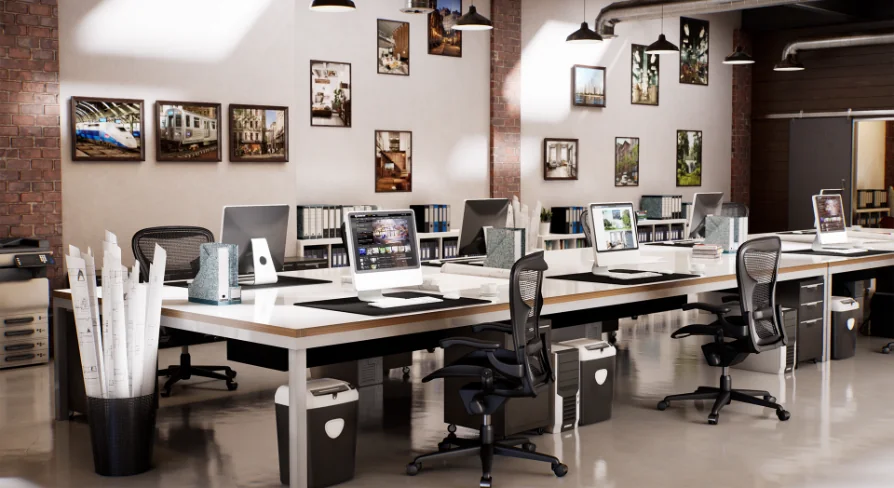
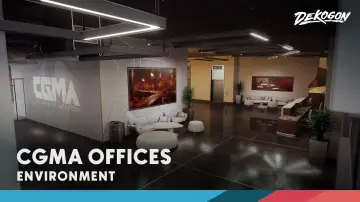
The geometry has been optimised throughout the environment, and a large collection of new props populates the space. Desks, chairs, monitors, lamps, pictures, and furniture pieces fill the office with enough density to read as a real workplace. Industrial details like pipes, brick walls, wood surfaces, and glass elements round out the material variety, giving the scene a modern but grounded character rather than a sterile corporate look.
Setting Up Raytracing or Falling Back to Baked Reflections
Raytracing is enabled by default to deliver the highest quality reflections. If you have an RTX graphics card, the scene takes advantage of real-time raytraced reflections across glass surfaces, metal objects, and the polished floors. Light bounces interact with materials in a way baked cubemaps cannot fully replicate, which is where the thin film effect on metal objects becomes visible—the coating catches and splits light in a manner that greatly improves realism on metallic surfaces.
If you do not have an RTX card, the scene does not break. You can turn raytracing off and rely entirely on the baked lighting and captured reflections. The captured reflections still look convincing because they were prepared alongside the baked lightmaps with the same attention to surface response. This dual approach means the same project file works whether you are presenting on an RTX-equipped workstation or a mid-range GPU without hardware raytracing support.
Tuning GPU Performance on Weaker Hardware
The scene was optimised for a 2080 Ti GPU, but weaker hardware is still viable. If frame rates drop, the Post Process Volume settings let you reduce reflection bounces, which immediately lowers the rendering cost of raytraced reflections. You can also switch to the non-RTX version of the scene and skip real-time raytracing entirely. Installing Nvidia DLSS is recommended for an additional performance boost, letting the GPU push more frames by rendering at a lower internal resolution and then intelligently upscaling the output.
Navigating the Scene With Cinema Cameras and FPP
Ten animated cinema cameras are included, each framing a different part of the office. For cinematic walkthroughs or presentation reels, these cameras let you sequence shots without manually keyframing camera movement. You can play through them in Sequencer, edit their timing, or let them run as a looping showcase.
For interactive exploration, a first-person perspective module is included so you can move freely through every space. The FPP module means the scene doubles as a navigable environment rather than just a fixed-camera render set. You can walk through corridors, approach desks, and inspect material details up close—all of which matters when presenting an archviz project to a client who wants to feel the scale of a room rather than only see it from curated angles.
Material System With Dirt, Normal Detail, and Thin Film
The base materials have been rebuilt to support more realistic surface behavior. Dirt can now be added through the roughness channel, so surfaces do not have to look uniformly clean—an important detail for archviz work where a spotless office can feel artificial. By varying roughness with dirt maps, you can break up specular highlights and give desks, walls, and floors a lived-in appearance.
Normal detail maps are layered onto materials to improve the realism of surface imperfections. These micro-detail normal maps add fine grain, scratches, and subtle bumps that become visible when the camera gets close to a surface or when light rakes across it at a low angle. Combined with the roughness-channel dirt, the materials hold up under scrutiny in ways flat textures cannot.
Metal objects received a separate upgrade in the form of a thin film effect. This effect simulates the iridescent interference layer seen on certain coated metals and anodized surfaces. When light bounces off these objects, the thin film layer splits and shifts the reflected color slightly, producing the kind of highlight behavior that makes metal read as a real physical material instead of a flat shader response.
Higher-Resolution Textures and Remade Assets
Many textures in this remastered scene have been replaced with higher-resolution versions. Some textures were not just upscaled but completely remade, which means the surface detail is sharper and more accurate rather than simply larger. For artists who need to render close-up shots of desks, monitors, wood furniture, or brick walls, the added texture resolution prevents the softness that plagues older interior scenes when the camera gets near a surface.
The combination of higher-resolution textures, new normal detail maps, roughness-channel dirt, and thin film effects on metal gives the material pipeline enough depth to handle both wide establishing shots and tight detail shots without losing fidelity.
Creative Uses for the Modern Office Environment
For archviz artists, this scene works as a presentation-ready office interior that can be rendered cinematically or explored interactively. You can use the ten animated cinema cameras to produce a sequenced walkthrough, then switch to the FPP module for live client presentations where the viewer controls the camera. The baked lighting means you can achieve consistent results across renders without recompute time, while raytracing adds that final layer of reflection quality for hero shots.
Game developers can repurpose the props and materials for their own office environments. The desks, chairs, computers, monitors, lamps, pipes, and furniture pieces are all usable as dressed assets. Because the geometry has been optimised and the materials support dirt and detail maps, these props integrate into game scenes without requiring a full rework of their shading network.
Custom shaders are tagged as part of the scene's technical scope, which ties into the thin film effect, dirt-capable base materials, and normal detail systems. Artists who want to study how PBR materials handle surface imperfections in Unreal Engine can dissect these shaders to understand how roughness-channel dirt and normal detail maps improve realism without adding geometric complexity.
Production-Readiness and Support
The scene is part of Archinteriors for UE vol. 1 Remastered, a collection that includes multiple office and interior environments in the same remastered pipeline. Scenes 1, 4, 5, and 6 are available alongside this one, each following the same approach of improved lighting, new props, optimised geometry, and upgraded materials.
Support is available for any technical issues encountered during setup or use. The scene targets Unreal Engine 4.27 and 5.0 through 5.1, so if you are working in any of those engine versions, the project should open and run without version conflicts. The baked lightmaps and captured reflections mean the scene is production-ready for rendering and presentation even on systems without RTX hardware, while DLSS support and adjustable reflection bounces in the Post Process Volume give you clear paths to maintain performance as your hardware allows.
 Interior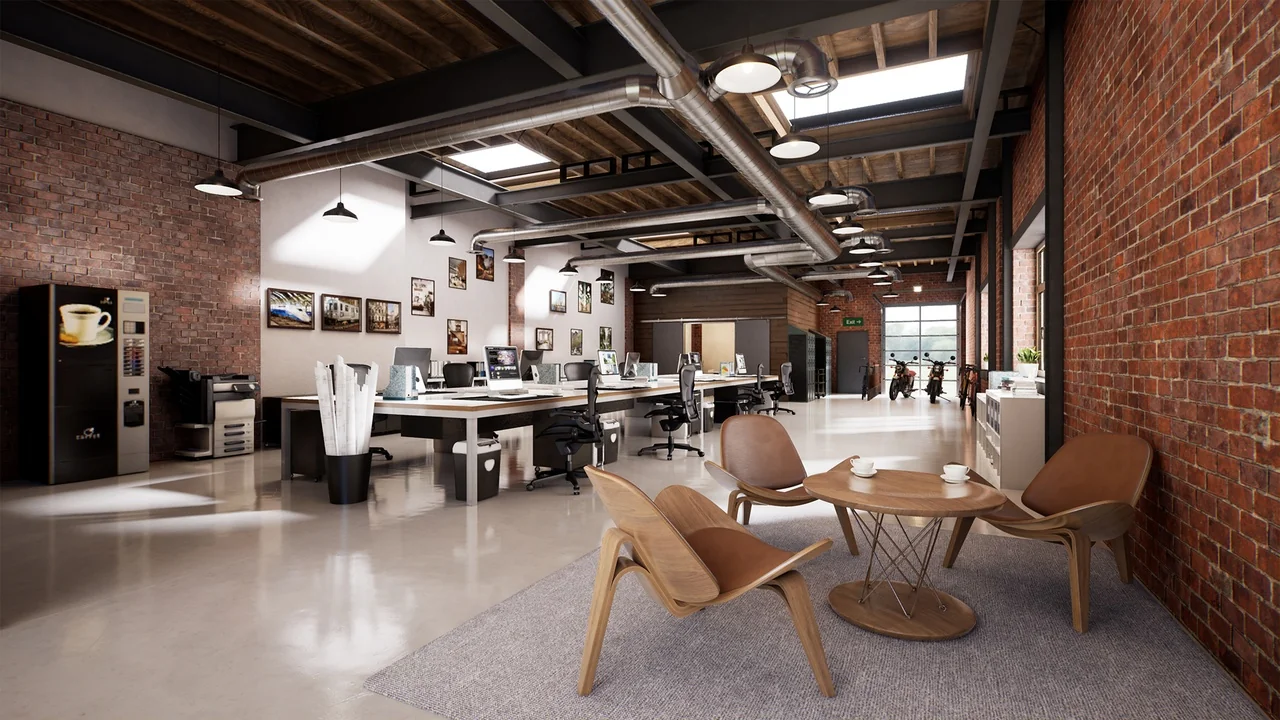
 Interior
 Interior
 Interior