"c14ff6bd758dadb1"{"id":"1000544","slug":"office-interior-archinteriors-vol-1-scene-5","title":"Office Interior - Archinteriors Vol 1 Scene 5","category":"Interior","engine":"4.27,5.0+","assetVersion":"","engineVersion":"Engine Version: 4.27,5.0+","tag":"Interior","accent":"blue","visual":"mech","summary":"Modern office interior scene for Unreal Engine 4.27 and 5.0 featuring RTX raytracing, baked lightmaps, animated cinema cameras, and improved PBR materials.","platform":"Unreal Engine","publishedAt":"2026-07-15T03:59:42.434Z","updatedAt":"2026-07-15T03:59:42.434Z","sourceNotes":[],"fileContents":[],"compatibility":["Unreal Engine","Engine Version: 4.27,5.0+"],"featuredImage":{"alt":"Office Interior - Archinteriors Vol 1 Scene 5","src":"/wp-content/uploads/published/2026/07/660529cf3a61-48dd8f44-522d-4b13-83d0-deb33c85958f-2a3e37f19a.webp"},"hasDownloadLink":true,"downloads":1,"terms":[{"taxonomy":"category","slug":"interior","name":"Interior"}],"galleryImages":[{"src":"/wp-content/uploads/published/2026/07/e19be4e7e1d4-cb82c213-059b-42a9-9e69-44e8f9f02571-57fc41b149.webp","alt":"Office Interior - Archinteriors Vol 1 Scene 5"},{"src":"/wp-content/uploads/published/2026/07/6d8d8e12b6e9-9e0dfef5-ee66-4b0c-9907-e6e4f510bacd-6686cbfbea.webp","alt":"Office Interior - Archinteriors Vol 1 Scene 5"},{"src":"/wp-content/uploads/published/2026/07/dfcd9bc1f8e2-38d0b1a7-06a6-4485-b212-627e791749e9-909f789115.webp","alt":"Office Interior - Archinteriors Vol 1 Scene 5"},{"src":"/wp-content/uploads/published/2026/07/a101da69e71b-512c4489-c72f-4d96-b694-c24140624043-b492c6eee0.webp","alt":"Office Interior - Archinteriors Vol 1 Scene 5"},{"src":"/wp-content/uploads/published/2026/07/a5345f8e23b4-3902672f-4426-4f82-8487-41315a3922e8-91489b068f.webp","alt":"Office Interior - Archinteriors Vol 1 Scene 5"},{"src":"/wp-content/uploads/published/2026/07/0b7830fa1688-7de6e359-395c-49e9-9af9-9d85a11771d7-105e7596fc.webp","alt":"Office Interior - Archinteriors Vol 1 Scene 5"},{"src":"/wp-content/uploads/published/2026/07/2fa20e1b7ea8-55492310-4459-49b1-9d1d-d812feb47afe-1a8072bb31.webp","alt":"Office Interior - Archinteriors Vol 1 Scene 5"},{"src":"/wp-content/uploads/published/2026/07/4215309b2e08-d406c987-91cb-456f-800f-2514c215bdbc-fb73dcb820.webp","alt":"Office Interior - Archinteriors Vol 1 Scene 5"},{"src":"/wp-content/uploads/published/2026/07/06d522c38d2f-9a394aa4-fa3d-41b5-991c-196168b8dd2c-836b524103.webp","alt":"Office Interior - Archinteriors Vol 1 Scene 5"},{"src":"/wp-content/uploads/published/2026/07/efe21ca8a296-cc3a4cf1-7c6e-4ab1-b1aa-8cd4ca8f686e-74132f9c8b.webp","alt":"Office Interior - Archinteriors Vol 1 Scene 5"}],"accessPanel":{"kind":"resource","title":"Download this resource","eyebrow":"Free Download","message":"Log in or create a free account to start your download.","fileName":"Content.7z","safetyNote":"Resources are manually reviewed before listing to improve quality and reduce obvious risks.","actionLabel":"Download Free","resourceType":"Resource archive"},"contentHtml":"\u003cp\u003eSetting up a modern architectural visualization in Unreal Engine requires careful management of lighting, reflections, and material fidelity. \u003cstrong\u003eOffice Interior - Archinteriors Vol 1 Scene 5\u003c/strong\u003e Provides a ready-made environment tailored for this workflow, supporting Unreal Engine 4.27 and 5.0. The scene is built to take advantage of RTX graphics cards for real-time raytraced reflections, but it retains a fallback path for users without RTX hardware. All lightmaps are baked using a new GPU baker to ensure the lighting foundation is solid before any real-time effects are applied.\u003c/p\u003e\u003ch2\u003eConfiguring RTX Raytracing and Baked Lighting\u003c/h2\u003e\u003cp\u003eThe primary rendering setup relies on raytracing to deliver high-quality light bouncing and reflections throughout the modern office. This requires an RTX-capable graphics card to function as intended. The scene was specifically optimized for an RTX 2080 Ti GPU to balance visual fidelity and performance at this standard.\u003c/p\u003e\u003cp\u003eIf an RTX card is not available, the implementation does not break. Raytracing can be easily turned off, transitioning the scene to rely entirely on its baked lighting and captured reflections. The baked lighting setup is designed to look highly realistic on its own, ensuring that non-RTX hardware can still render the architectural space effectively. This dual-path rendering approach allows artists to drop the scene into an existing project and choose the rendering method that matches their target hardware capabilities.\u003c/p\u003e\u003ch2\u003eFirst-Person Movement and Cinema Camera Setup\u003c/h2\u003e\u003cp\u003eBeyond static visualization, the environment includes modules for interactive and cinematic presentation. An FPP (first-person perspective) module is integrated, allowing users to move freely through each space within the office to inspect the layout and props in real time. This is useful for client reviews or exploring the scale of the architectural design.\u003c/p\u003e\u003cp\u003eFor pre-rendered or automated presentations, the setup includes 10 animated cinema cameras. These cameras are sequenced to provide dynamic shots of the interior, giving artists an immediate set of angles to work with for video exports or showcase reels without needing to animate custom camera paths from scratch.\u003c/p\u003e\u003ch2\u003eMaterial Improvements and Surface Detailing\u003c/h2\u003e\u003cp\u003eThe visual fidelity of the office relies heavily on an updated material system. The base materials have been newly improved to allow the addition of dirt, which is also supported in the roughness channel. This means surfaces can show varied wear and tear rather than appearing uniformly clean, adding to the realism of the workspace environment.\u003c/p\u003e\u003cp\u003eDetail maps have been integrated into the normal channel to enhance the realism of surface imperfections across the props and architecture. Metal objects within the scene utilize a thin film effect, greatly improving the realism of how light bounces off metallic surfaces such as desk legs, monitors, and industrial fixtures.\u003c/p\u003e\u003cp\u003eMany of the textures across the scene have been replaced with higher resolution versions, with some textures being completely remade to meet modern standards. The geometry of the scene has also been optimized to work seamlessly with these new materials and textures.\u003c/p\u003e\u003ch2\u003ePerformance Scaling for Non-2080 Ti Hardware\u003c/h2\u003e\u003cp\u003eWhile the base optimization targets the RTX 2080 Ti, the scene includes adjustable parameters for users running cheaper or less powerful GPUs. Performance can be manually improved by accessing the Post Process Volume settings and reducing the number of reflection bounces. Cutting down these bounces lowers the rendering cost of real-time reflections while keeping the scene functional.\u003c/p\u003e\u003cp\u003eFor further performance gains, the creators recommend installing Nvidia DLSS. This allows the engine to render the office interior at a lower internal resolution while using AI upscaling to present a sharper final image, a common technique for maintaining high framerates in complex archviz scenes.\u003c/p\u003e\u003ch2\u003eAsset Composition and Scene Context\u003c/h2\u003e\u003cp\u003eThe environment is populated with many new props that fit a modern, minimalist office aesthetic. The layout features typical workspace elements including monitors, lamps, desks, chairs, conference tables, and sofas. The design incorporates a mix of glass, wood, and industrial architectural elements, defining the space as a contemporary professional setting. Custom shaders are used across the scene to facilitate PBR (physically based rendering) accuracy and enhance the visual lighting setup.\u003c/p\u003e\u003cp\u003eThis specific office layout is known as Scene 5, and it belongs to the Archinteriors for UE vol. 1 collection. The collection includes other distinct interior layouts, such as Scene 1, Scene 3, Scene 4, and Scene 6, providing a variety of architectural spaces built to the same technical standards.\u003c/p\u003e\u003ch2\u003eProduction Readiness and Maintenance\u003c/h2\u003e\u003cp\u003eThe scene has been constructed to meet modern visualization standards, taking into account both the aesthetic and technical requirements of current Unreal Engine development. By combining GPU-baked lightmaps, optional raytracing, DLSS integration, and a comprehensive set of animated cameras, the environment functions as a complete production-ready starting point for office archviz projects. For technical maintenance or troubleshooting during implementation, support is available via email to assist with any issues related to the scene's setup or operation.\u003c/p\u003e\n\n\u003ch2\u003eContinue Browsing Similar Packs\u003c/h2\u003e\n\u003cul\u003e\n\u003cli\u003e\u003ca href=\"https://3dcghub.com/office-interior-archinteriors-vol-1-scene-3/\" title=\"Office Interior - Archinteriors Vol 1 Scene 3\"\u003eOffice Interior - Archinteriors Vol 1 Scene 3\u003c/a\u003e\u003c/li\u003e\n\u003cli\u003e\u003ca href=\"https://3dcghub.com/cgma-studio-offices/\" title=\"CGMA Studio Offices\"\u003eCGMA Studio Offices\u003c/a\u003e\u003c/li\u003e\n\u003cli\u003e\u003ca href=\"https://3dcghub.com/virtual-studios-vol-1-scene-1/\" title=\"Virtual Studios Vol 1 Scene 1\"\u003eVirtual Studios Vol 1 Scene 1\u003c/a\u003e\u003c/li\u003e\n\u003cli\u003e\u003ca href=\"https://3dcghub.com/rino-s-diner-environment-rinos-diner-american-american-interior-diner-usa/\" title=\"Rino\u0026#039;s Diner Environment ( Rinos Diner American American Interior Diner USA )\"\u003eRino\u0026#039;s Diner Environment ( Rinos Diner American American Interior Diner USA )\u003c/a\u003e\u003c/li\u003e\n\u003cli\u003e\u003ca href=\"https://3dcghub.com/modern-modular-office/\" title=\"Modern Modular Office\"\u003eModern Modular Office\u003c/a\u003e\u003c/li\u003e\n\u003c/ul\u003e","contentTextLength":5571,"navigation":{"current":1318,"total":3719,"previous":{"id":"1000546","slug":"procedural-road-and-highway-tool-with-simple-vehicle-traffic","title":"Procedural Road And Highway Tool With Simple Vehicle Traffic","category":"Procedural Systems","platform":"Unreal Engine","updatedAt":"2026-07-15T04:13:04.435Z"},"next":{"id":"1000543","slug":"office-interior-archinteriors-vol-1-scene-3","title":"Office Interior - Archinteriors Vol 1 Scene 3","category":"Interior","platform":"Unreal Engine","updatedAt":"2026-07-15T03:54:10.400Z"}},"relatedResources":[{"id":"1000543","slug":"office-interior-archinteriors-vol-1-scene-3","title":"Office Interior - Archinteriors Vol 1 Scene 3","category":"Interior","engine":"4.27,5.0+","assetVersion":"","engineVersion":"Engine Version: 4.27,5.0+","tag":"Interior","accent":"blue","visual":"mech","summary":"A modern office interior scene for Unreal Engine 4.27 and 5.0–5.1 with raytraced reflections, baked lightmaps, animated cinema cameras, and PBR materials with d","platform":"Unreal Engine","publishedAt":"2026-07-15T03:54:10.400Z","updatedAt":"2026-07-15T03:54:10.400Z","sourceNotes":[],"fileContents":[],"compatibility":["Unreal Engine","Engine Version: 4.27,5.0+"],"featuredImage":{"alt":"Office Interior - Archinteriors Vol 1 Scene 3","src":"/wp-content/uploads/published/2026/07/083e091ba01b-73b073f7-ef09-4d62-a281-1675f82403ba-03134ea3ef.webp"},"hasDownloadLink":true,"downloads":1},{"id":"1000648","slug":"modern-library-scene-and-assets","title":"Modern Library - Scene \u0026 Assets","category":"Interior","engine":"4.26+,5.0+","assetVersion":"","engineVersion":"Engine Version: 4.26+,5.0+","tag":"Interior","accent":"blue","visual":"mech","summary":"A modern library scene and asset pack with PBR materials, weighted normals, and modular bookshelves suited for VR, games, mobile, and visualization projects.","platform":"Unreal Engine","publishedAt":"2026-07-21T18:45:17.507Z","updatedAt":"2026-07-21T18:45:17.507Z","sourceNotes":[],"fileContents":[],"compatibility":["Unreal Engine","Engine Version: 4.26+,5.0+"],"featuredImage":{"alt":"Modern Library - Scene \u0026 Assets","src":"/wp-content/uploads/published/2026/07/6f644af051b7-84ceb579-6845-48ff-b676-0385e7896e87-b8adad5df1.webp"},"hasDownloadLink":true,"downloads":0},{"id":"8811","slug":"cgma-studio-offices","title":"CGMA Studio Offices","category":"Interior","engine":"4.27,5.0+","assetVersion":"Engine version: 4.27,5.0+","engineVersion":"4.23","tag":"Interior","accent":"blue","visual":"city","summary":"Enhance your game project with CGMA Studio Offices, a professional-grade environment pack featuring 249 modular meshes. This collection provides everything needed for realistic corporate interiors with high-fidelity textures.","platform":"Unreal Engine","publishedAt":"2026-02-25T17:55:31.000Z","updatedAt":"2026-04-19T15:51:22.000Z","sourceNotes":[],"fileContents":[],"compatibility":["Unreal Engine","Engine version: 4.27,5.0+"],"featuredImage":{"alt":"CGMA Studio Offices","src":"https://3dcghub.com/wp-content/uploads/2026/02/4790748e-43df-46f4-9f47-9e450d83393d.webp"},"hasDownloadLink":true,"downloads":1}]}
Interior
Office Interior - Archinteriors Vol 1 Scene 5
Modern office interior scene for Unreal Engine 4.27 and 5.0 featuring RTX raytracing, baked lightmaps, animated cinema cameras, and improved PBR materials.
Setting up a modern architectural visualization in Unreal Engine requires careful management of lighting, reflections, and material fidelity. Office Interior - Archinteriors Vol 1 Scene 5 Provides a ready-made environment tailored for this workflow, supporting Unreal Engine 4.27 and 5.0. The scene is built to take advantage of RTX graphics cards for real-time raytraced reflections, but it retains a fallback path for users without RTX hardware. All lightmaps are baked using a new GPU baker to ensure the lighting foundation is solid before any real-time effects are applied.
Configuring RTX Raytracing and Baked Lighting
The primary rendering setup relies on raytracing to deliver high-quality light bouncing and reflections throughout the modern office. This requires an RTX-capable graphics card to function as intended. The scene was specifically optimized for an RTX 2080 Ti GPU to balance visual fidelity and performance at this standard.
If an RTX card is not available, the implementation does not break. Raytracing can be easily turned off, transitioning the scene to rely entirely on its baked lighting and captured reflections. The baked lighting setup is designed to look highly realistic on its own, ensuring that non-RTX hardware can still render the architectural space effectively. This dual-path rendering approach allows artists to drop the scene into an existing project and choose the rendering method that matches their target hardware capabilities.
First-Person Movement and Cinema Camera Setup
Beyond static visualization, the environment includes modules for interactive and cinematic presentation. An FPP (first-person perspective) module is integrated, allowing users to move freely through each space within the office to inspect the layout and props in real time. This is useful for client reviews or exploring the scale of the architectural design.
For pre-rendered or automated presentations, the setup includes 10 animated cinema cameras. These cameras are sequenced to provide dynamic shots of the interior, giving artists an immediate set of angles to work with for video exports or showcase reels without needing to animate custom camera paths from scratch.
Material Improvements and Surface Detailing
The visual fidelity of the office relies heavily on an updated material system. The base materials have been newly improved to allow the addition of dirt, which is also supported in the roughness channel. This means surfaces can show varied wear and tear rather than appearing uniformly clean, adding to the realism of the workspace environment.
Detail maps have been integrated into the normal channel to enhance the realism of surface imperfections across the props and architecture. Metal objects within the scene utilize a thin film effect, greatly improving the realism of how light bounces off metallic surfaces such as desk legs, monitors, and industrial fixtures.
Many of the textures across the scene have been replaced with higher resolution versions, with some textures being completely remade to meet modern standards. The geometry of the scene has also been optimized to work seamlessly with these new materials and textures.
Performance Scaling for Non-2080 Ti Hardware
While the base optimization targets the RTX 2080 Ti, the scene includes adjustable parameters for users running cheaper or less powerful GPUs. Performance can be manually improved by accessing the Post Process Volume settings and reducing the number of reflection bounces. Cutting down these bounces lowers the rendering cost of real-time reflections while keeping the scene functional.
For further performance gains, the creators recommend installing Nvidia DLSS. This allows the engine to render the office interior at a lower internal resolution while using AI upscaling to present a sharper final image, a common technique for maintaining high framerates in complex archviz scenes.
Asset Composition and Scene Context
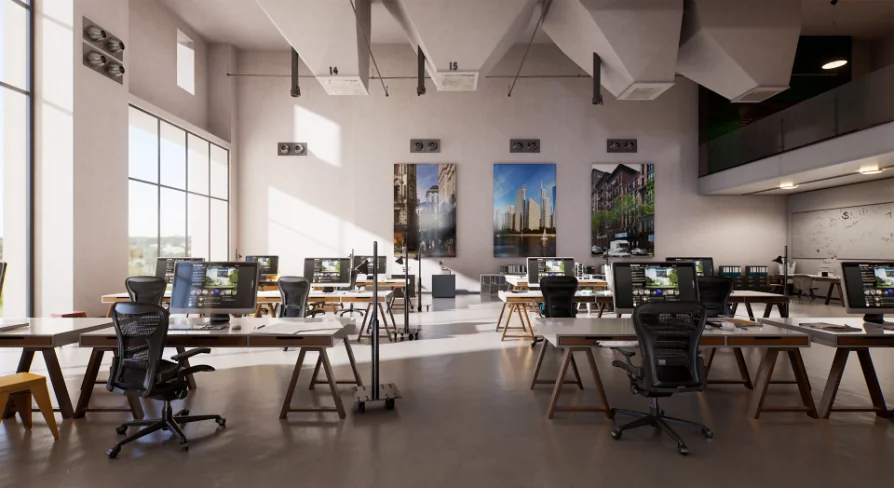
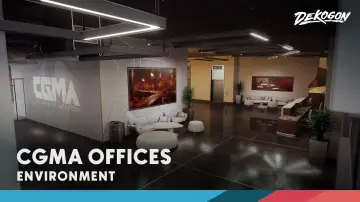
The environment is populated with many new props that fit a modern, minimalist office aesthetic. The layout features typical workspace elements including monitors, lamps, desks, chairs, conference tables, and sofas. The design incorporates a mix of glass, wood, and industrial architectural elements, defining the space as a contemporary professional setting. Custom shaders are used across the scene to facilitate PBR (physically based rendering) accuracy and enhance the visual lighting setup.
This specific office layout is known as Scene 5, and it belongs to the Archinteriors for UE vol. 1 collection. The collection includes other distinct interior layouts, such as Scene 1, Scene 3, Scene 4, and Scene 6, providing a variety of architectural spaces built to the same technical standards.
Production Readiness and Maintenance
The scene has been constructed to meet modern visualization standards, taking into account both the aesthetic and technical requirements of current Unreal Engine development. By combining GPU-baked lightmaps, optional raytracing, DLSS integration, and a comprehensive set of animated cameras, the environment functions as a complete production-ready starting point for office archviz projects. For technical maintenance or troubleshooting during implementation, support is available via email to assist with any issues related to the scene's setup or operation.
 Interior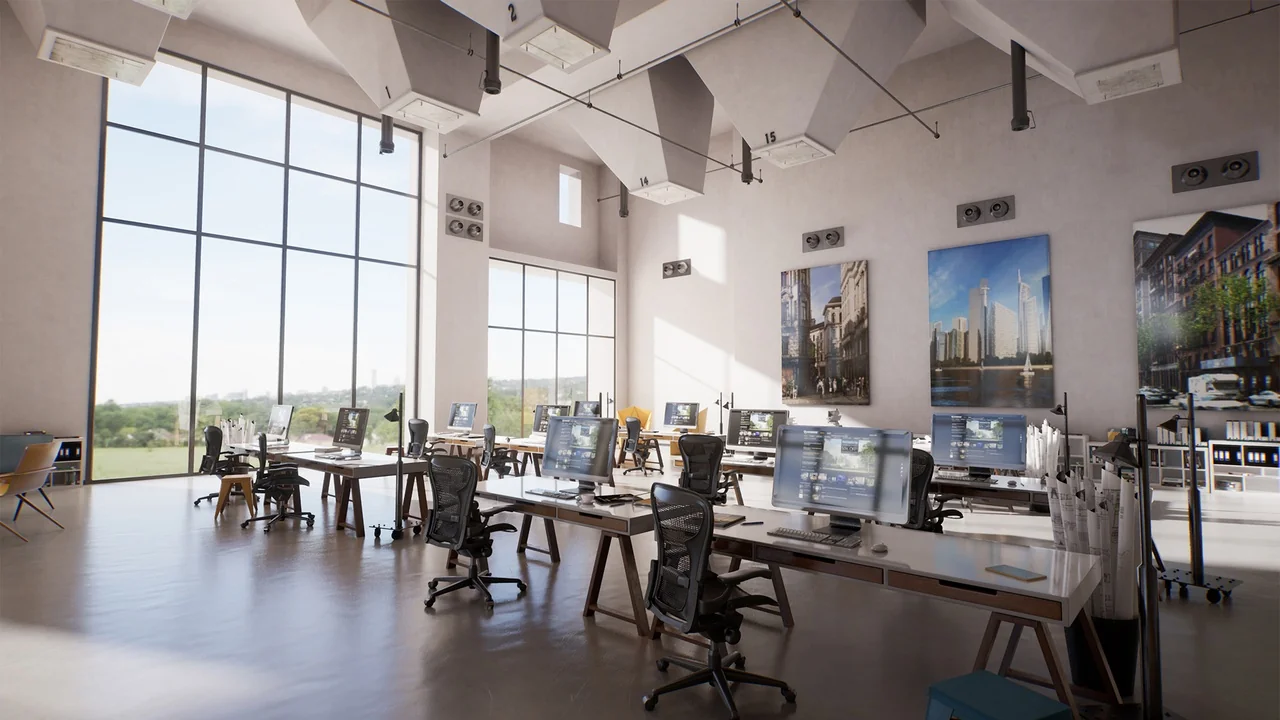
 Interior
 Interior
 Interior