"918649c09937b9b2"{"resourcesTotal":2510,"platforms":[{"key":"unreal","name":"Unreal","slug":"unreal-engine-2","href":"/category/unreal-engine-2/","resourceCount":1970},{"key":"unity","name":"Unity","slug":"unity-2","href":"/category/unity-2/","resourceCount":451},{"key":"blender","name":"Blender","slug":"blender-add-ons-plugins","href":"/category/blender-add-ons-plugins/","resourceCount":10},{"key":"tutorials","name":"Tutorials","slug":"tutorial-library","href":"/category/tutorial-library/","resourceCount":84}]}{"items":[{"id":"1000560","slug":"alien-planet-pack","title":"Alien Planet Pack","category":"Fantasy","engine":"4.26+,5.0+","assetVersion":"","engineVersion":"Engine Version: 4.26+,5.0+","tag":"Fantasy","accent":"cyan","visual":"mech","summary":"A lowpoly Unreal Engine environment pack with 158 meshes across four biomes, modular alien structures, spaceships with spline paths, and dynamic weather particl","platform":"Unreal Engine","updatedAt":"2026-07-16","sourceNotes":[],"fileContents":[],"compatibility":["Unreal Engine","Engine Version: 4.26+,5.0+"],"featuredImage":{"alt":"Alien Planet Pack","src":"/wp-content/uploads/published/2026/07/85824b592254-f5a8409b-79ad-48cc-b04c-f5ba1757e1ac-06fbbe3478.webp"},"hasDownloadLink":true},{"id":"1000561","slug":"animated-low-poly-weapons-v1-0","title":"Animated Low Poly Weapons v1.0","category":"Combat","engine":"5.0+","assetVersion":"","engineVersion":"Engine Version: 5.0+","tag":"Combat","accent":"cyan","visual":"mech","summary":"Animated low-poly weapon models for Unreal Engine rapid prototyping with first and third person character animations and blueprint examples included.","platform":"Unreal Engine","updatedAt":"2026-07-16","sourceNotes":[],"fileContents":[],"compatibility":["Unreal Engine","Engine Version: 5.0+"],"featuredImage":{"alt":"Animated Low Poly Weapons v1.0","src":"/wp-content/uploads/published/2026/07/507e79b03596-coverimagetemplate-1920x1080-5023db897b15244a57950-76570b0d34.webp"},"hasDownloadLink":true},{"id":"1000562","slug":"arctic-base","title":"Arctic Base","category":"Mountain","engine":"4.26+,5.0+","assetVersion":"","engineVersion":"Engine Version: 4.26+,5.0+","tag":"Mountain","accent":"cyan","visual":"mech","summary":"Arctic Base is a polar station environment pack with buildings, props, landscape, and water materials across Unreal Engine versions from 4.19 to 5.8.","platform":"Unreal Engine","updatedAt":"2026-07-16","sourceNotes":[],"fileContents":[],"compatibility":["Unreal Engine","Engine Version: 4.26+,5.0+"],"featuredImage":{"alt":"Arctic Base","src":"/wp-content/uploads/published/2026/07/b73e66f11064-912225d2-ed0b-4150-a5c3-a003ea26c179-8381e0955a.webp"},"hasDownloadLink":true},{"id":"1000535","slug":"icy-snow-environment-asset-pack","title":"Icy Snow Environment - Asset Pack","category":"Nature \u0026 Plants","engine":"5.4+","assetVersion":"","engineVersion":"Engine Version: 5.4+","tag":"Nature \u0026 Plants","accent":"cyan","visual":"city","summary":"Photoscanned Nanite winter asset pack with tiled micro detail materials, 1M-poly average meshes, and path tracer-ready fallback settings for Unreal 5.4.","platform":"Unreal Engine","updatedAt":"2026-07-15","sourceNotes":[],"fileContents":[],"compatibility":["Unreal Engine","Engine Version: 5.4+"],"featuredImage":{"alt":"Icy Snow Environment - Asset Pack","src":"/wp-content/uploads/published/2026/07/43229206f53c-b4b60840-e842-4b8d-951e-04f0fd8f708c-80fb98fcd2.webp"},"hasDownloadLink":true},{"id":"1000536","slug":"modular-sci-fi-environment-a","title":"Modular sci-fi Environment A","category":"Sci-Fi","engine":"4.26+,5.0+","assetVersion":"","engineVersion":"Engine Version: 4.26+,5.0+","tag":"Sci-Fi","accent":"cyan","visual":"city","summary":"43 modular sci-fi environment blocks with unique PBR materials, textures from 32x32 to 4096x4096. Compatible with engine versions 5.4 through 5.8.","platform":"Unreal Engine","updatedAt":"2026-07-15","sourceNotes":[],"fileContents":[],"compatibility":["Unreal Engine","Engine Version: 4.26+,5.0+"],"featuredImage":{"alt":"Modular sci-fi Environment A","src":"/wp-content/uploads/published/2026/07/80f6aa4b0162-b2149a7e-1bc0-4fb3-a26b-4a4e774d5064-a75ebe76f4.webp"},"hasDownloadLink":true},{"id":"1000537","slug":"modular-sci-fi-environment-engineer","title":"Modular Sci-Fi Environment: Engineer","category":"Sci-Fi","engine":"4.26+,5.0+","assetVersion":"","engineVersion":"Engine Version: 4.26+,5.0+","tag":"Sci-Fi","accent":"cyan","visual":"city","summary":"High-quality modular asset kit for building sci-fi engineer and industrial environments with grid-snapping compatibility for Unreal Engine projects.","platform":"Unreal Engine","updatedAt":"2026-07-15","sourceNotes":[],"fileContents":[],"compatibility":["Unreal Engine","Engine Version: 4.26+,5.0+"],"featuredImage":{"alt":"Modular Sci-Fi Environment: Engineer","src":"/wp-content/uploads/published/2026/07/6b9d88baf22f-e84ddf1e-debc-4f6a-9272-91d4803112d1-1a9fbd64df.webp"},"hasDownloadLink":true},{"id":"1000538","slug":"modular-target-practice-hangar","title":"Modular Target Practice Hangar","category":"Industrial","engine":"4.26+,5.0+","assetVersion":"","engineVersion":"Engine Version: 4.26+,5.0+","tag":"Industrial","accent":"cyan","visual":"mech","summary":"Modular Target Practice Hangar delivers modular interior walls, animated rail targets, scaffolding, a work-bench, and props for tactical training scenes.","platform":"Unreal Engine","updatedAt":"2026-07-15","sourceNotes":[],"fileContents":[],"compatibility":["Unreal Engine","Engine Version: 4.26+,5.0+"],"featuredImage":{"alt":"Modular Target Practice Hangar","src":"/wp-content/uploads/published/2026/07/69b125e42586-d2a5ec2f-2ea3-430e-8301-3eb6b803e9ac-defd1cdee2.webp"},"hasDownloadLink":true},{"id":"1000539","slug":"mothership-service-rooms","title":"Mothership Service Rooms","category":"Industrial","engine":"4.26+,5.0+","assetVersion":"","engineVersion":"Engine Version: 4.26+,5.0+","tag":"Industrial","accent":"cyan","visual":"mech","summary":"A retro sci-fi modular environment asset pack featuring dark, dirty service corridors, thin vents, and large hangar segments lit by emergency lighting for Unrea","platform":"Unreal Engine","updatedAt":"2026-07-15","sourceNotes":[],"fileContents":[],"compatibility":["Unreal Engine","Engine Version: 4.26+,5.0+"],"featuredImage":{"alt":"Mothership Service Rooms","src":"/wp-content/uploads/published/2026/07/2e6272479151-9e384487-b2c8-4372-b466-174daf62192c-eb99c572eb.webp"},"hasDownloadLink":true},{"id":"1000540","slug":"mw-conifer-forest-trees-biome","title":"MW Conifer Forest Trees Biome","category":"Forest \u0026 Jungle","engine":"5.2+","assetVersion":"","engineVersion":"Engine Version: 5.2+","tag":"Forest \u0026 Jungle","accent":"cyan","visual":"mech","summary":"A complete UE5 conifer forest biome using photogrammetry scans, procedural generation, Nanite, and Lumen to build photorealistic Nordic woodland environments.","platform":"Unreal Engine","updatedAt":"2026-07-15","sourceNotes":[],"fileContents":[],"compatibility":["Unreal Engine","Engine Version: 5.2+"],"featuredImage":{"alt":"MW Conifer Forest Trees Biome","src":"/wp-content/uploads/published/2026/07/3dd2c4777675-4c89bb7b-21f5-49bb-b1e2-9dbc379e3dc7-0d55b0a3bb.webp"},"hasDownloadLink":true},{"id":"1000541","slug":"nyc-new-york-city","title":"NYC | New York City","category":"Cities","engine":"4.26+,5.0+","assetVersion":"","engineVersion":"Engine Version: 4.26+,5.0+","tag":"Cities","accent":"cyan","visual":"city","summary":"Universal urban environment pack featuring modular NYC buildings with ground-floor interiors, LODs, collisions, and a detailed demonstration level. Compatible w","platform":"Unreal Engine","updatedAt":"2026-07-15","sourceNotes":[],"fileContents":[],"compatibility":["Unreal Engine","Engine Version: 4.26+,5.0+"],"featuredImage":{"alt":"NYC | New York City","src":"/wp-content/uploads/published/2026/07/059c88207afc-27867b9e-4bc6-4530-a5e6-718353f9b45b-5a434e9b65.webp"},"hasDownloadLink":true},{"id":"1000542","slug":"office-corridor-environment-office-corridor-environment-office-corridor-3d","title":"Office Corridor Environment ( Office Corridor Environment Office Corridor 3D )","category":"Interior","engine":"5.0+","assetVersion":"","engineVersion":"Engine Version: 5.0+","tag":"Interior","accent":"cyan","visual":"city","summary":"A modular office corridor environment for Unreal Engine featuring 169 unique meshes, Lumen lighting, Nanite support, and the Ultimate Level Art Tool for fast sc","platform":"Unreal Engine","updatedAt":"2026-07-15","sourceNotes":[],"fileContents":[],"compatibility":["Unreal Engine","Engine Version: 5.0+"],"featuredImage":{"alt":"Office Corridor Environment ( Office Corridor Environment Office Corridor 3D )","src":"/wp-content/uploads/published/2026/07/cac97ccdaa91-464fff5d-fc15-465e-8a98-9e6e2f4aa7c6-f331eac002.webp"},"hasDownloadLink":true},{"id":"1000543","slug":"office-interior-archinteriors-vol-1-scene-3","title":"Office Interior - Archinteriors Vol 1 Scene 3","category":"Interior","engine":"4.27,5.0+","assetVersion":"","engineVersion":"Engine Version: 4.27,5.0+","tag":"Interior","accent":"cyan","visual":"mech","summary":"A modern office interior scene for Unreal Engine 4.27 and 5.0–5.1 with raytraced reflections, baked lightmaps, animated cinema cameras, and PBR materials with d","platform":"Unreal Engine","updatedAt":"2026-07-15","sourceNotes":[],"fileContents":[],"compatibility":["Unreal Engine","Engine Version: 4.27,5.0+"],"featuredImage":{"alt":"Office Interior - Archinteriors Vol 1 Scene 3","src":"/wp-content/uploads/published/2026/07/083e091ba01b-73b073f7-ef09-4d62-a281-1675f82403ba-03134ea3ef.webp"},"hasDownloadLink":true},{"id":"1000544","slug":"office-interior-archinteriors-vol-1-scene-5","title":"Office Interior - Archinteriors Vol 1 Scene 5","category":"Interior","engine":"4.27,5.0+","assetVersion":"","engineVersion":"Engine Version: 4.27,5.0+","tag":"Interior","accent":"cyan","visual":"mech","summary":"Modern office interior scene for Unreal Engine 4.27 and 5.0 featuring RTX raytracing, baked lightmaps, animated cinema cameras, and improved PBR materials.","platform":"Unreal Engine","updatedAt":"2026-07-15","sourceNotes":[],"fileContents":[],"compatibility":["Unreal Engine","Engine Version: 4.27,5.0+"],"featuredImage":{"alt":"Office Interior - Archinteriors Vol 1 Scene 5","src":"/wp-content/uploads/published/2026/07/660529cf3a61-48dd8f44-522d-4b13-83d0-deb33c85958f-2a3e37f19a.webp"},"hasDownloadLink":true},{"id":"1000545","slug":"port","title":"Port","category":"Industrial","engine":"4.26+,5.0+","assetVersion":"","engineVersion":"Engine Version: 4.26+,5.0+","tag":"Industrial","accent":"cyan","visual":"mech","summary":"Port industrial environment pack with warehouses, cargo props, vehicles, and a ship for Unreal Engine, supporting versions 4.26 through 5.8.","platform":"Unreal Engine","updatedAt":"2026-07-15","sourceNotes":[],"fileContents":[],"compatibility":["Unreal Engine","Engine Version: 4.26+,5.0+"],"featuredImage":{"alt":"Port","src":"/wp-content/uploads/published/2026/07/804c7c7ad3d3-dc0b61d5-a785-440c-b062-0837d0068d63-0209f8eedb.webp"},"hasDownloadLink":true},{"id":"1000546","slug":"procedural-road-and-highway-tool-with-simple-vehicle-traffic","title":"Procedural Road And Highway Tool With Simple Vehicle Traffic","category":"Procedural Systems","engine":"4.26+,5.0+","assetVersion":"","engineVersion":"Engine Version: 4.26+,5.0+","tag":"Procedural Systems","accent":"cyan","visual":"mech","summary":"Unreal Engine Blueprint tool for procedural roads, highways, bridges, and train tracks with spline-based generation, landscape deformation, and traffic spawner.","platform":"Unreal Engine","updatedAt":"2026-07-15","sourceNotes":[],"fileContents":[],"compatibility":["Unreal Engine","Engine Version: 4.26+,5.0+"],"featuredImage":{"alt":"Procedural Road And Highway Tool With Simple Vehicle Traffic","src":"/wp-content/uploads/published/2026/07/6e7951f23e2f-2fe34f13-8299-4e88-821d-c7764035437a-ded20f5dd1.webp"},"hasDownloadLink":true},{"id":"1000547","slug":"roof-city-pack","title":"Roof - City Pack","category":"Cities","engine":"4.26+,5.0+","assetVersion":"","engineVersion":"Engine Version: 4.26+,5.0+","tag":"Cities","accent":"cyan","visual":"city","summary":"Realistic Unreal Engine rooftop pack with modular roofs, HVAC units, fire escapes, pipes, decals, and blueprints for FPS, parkour, and cinematic scenes.","platform":"Unreal Engine","updatedAt":"2026-07-15","sourceNotes":[],"fileContents":[],"compatibility":["Unreal Engine","Engine Version: 4.26+,5.0+"],"featuredImage":{"alt":"Roof - City Pack","src":"/wp-content/uploads/published/2026/07/a7e0788b515d-8c08ea7c-c8c6-4d5e-a712-b27051ae731b-8bc84cb246.webp"},"hasDownloadLink":true},{"id":"1000548","slug":"shanty-town-slums","title":"Shanty Town Slums","category":"Abandoned","engine":"5.0+","assetVersion":"","engineVersion":"Engine Version: 5.0+","tag":"Abandoned","accent":"cyan","visual":"mech","summary":"Shanty Town Slums delivers environment assets for constructing a full village and dockside scene, compatible with Unreal Engine 5.0 through 5.6.","platform":"Unreal Engine","updatedAt":"2026-07-15","sourceNotes":[],"fileContents":[],"compatibility":["Unreal Engine","Engine Version: 5.0+"],"featuredImage":{"alt":"Shanty Town Slums","src":"/wp-content/uploads/published/2026/07/b708d2da2119-acb8297c-f33d-43e5-a8fd-a10cc25251f5-f9a26702e0.webp"},"hasDownloadLink":true},{"id":"1000549","slug":"spider-tank","title":"Spider Tank","category":"Characters \u0026 Creatures","engine":"5.1+","assetVersion":"","engineVersion":"Engine Version: 5.1+","tag":"Characters","accent":"cyan","visual":"character","summary":"Spider Tank is a fully customizable Unreal Engine robot asset with 4K textures, 4 LODs, 10 animations, SFX, AnimBPs, and single-slot master material.","platform":"Unreal Engine","updatedAt":"2026-07-15","sourceNotes":[],"fileContents":[],"compatibility":["Unreal Engine","Engine Version: 5.1+"],"featuredImage":{"alt":"Spider Tank","src":"/wp-content/uploads/published/2026/07/f2fc51502ac4-bb470fe7-e03b-491e-b261-e46d7177cba3-f1b3b70f9b.webp"},"hasDownloadLink":true},{"id":"1000550","slug":"survival-npc-maria-mimi-estrada","title":"Survival NPC - Maria \"Mimi\" Estrada","category":"Characters \u0026 Creatures","engine":"4.26+,5.0+","assetVersion":"","engineVersion":"Engine Version: 4.26+,5.0+","tag":"Characters","accent":"cyan","visual":"character","summary":"AAA hero character with digital human pipeline, 8k textures, mocap animations, blendshapes, loadout accessories, and example maps for cinematic survival scenes.","platform":"Unreal Engine","updatedAt":"2026-07-15","sourceNotes":[],"fileContents":[],"compatibility":["Unreal Engine","Engine Version: 4.26+,5.0+"],"featuredImage":{"alt":"Survival NPC - Maria \"Mimi\" Estrada","src":"/wp-content/uploads/published/2026/07/7f6b7129a96f-53d4412e-1050-4c0d-afe0-d397fceb5e05-62c91f2044.webp"},"hasDownloadLink":true},{"id":"1000551","slug":"traffic-ai-system","title":"Traffic AI System","category":"Gameplay Features","engine":"5.1+","assetVersion":"","engineVersion":"Engine Version: 5.1+","tag":"Gameplay Features","accent":"cyan","visual":"mech","summary":"A Blueprint-based AI traffic system for Unreal Engine 5.1–5.7 using splines for road generation and distance-based vehicle spawning for automotive scenes.","platform":"Unreal Engine","updatedAt":"2026-07-15","sourceNotes":[],"fileContents":[],"compatibility":["Unreal Engine","Engine Version: 5.1+"],"featuredImage":{"alt":"Traffic AI System","src":"/wp-content/uploads/published/2026/07/e074d7d2d020-30e2fb25-5755-4221-9664-6f688036b241-00f296e3db.webp"},"hasDownloadLink":true},{"id":"1000552","slug":"western-town-village-pack-western-town-village-cowboy-town-village-usa","title":"Western Town / Village Pack ( Western Town Village Cowboy Town Village USA )","category":"Towns \u0026 Villages","engine":"4.26+,5.0+","assetVersion":"","engineVersion":"Engine Version: 4.26+,5.0+","tag":"Towns \u0026 Villages","accent":"cyan","visual":"mech","summary":"A modular Unreal Engine western town environment pack featuring 10 buildings, spline blueprints, landscape vertex painting, and ULAT integration.","platform":"Unreal Engine","updatedAt":"2026-07-15","sourceNotes":[],"fileContents":[],"compatibility":["Unreal Engine","Engine Version: 4.26+,5.0+"],"featuredImage":{"alt":"Western Town / Village Pack ( Western Town Village Cowboy Town Village USA )","src":"/wp-content/uploads/published/2026/07/b741020b4802-47cef4f0-1125-423c-92bf-99d21cc24a5c-e0bc2c5e2f.webp"},"hasDownloadLink":true},{"id":"1000553","slug":"3d-scanned-venice-and-north-of-italy-assets-full-pack","title":"3D-Scanned Venice \u0026 North of Italy Assets - Full Pack","category":"Interior","engine":"4.26+,5.0+","assetVersion":"","engineVersion":"Engine Version: 4.26+,5.0+","tag":"Interior","accent":"cyan","visual":"mech","summary":"A 3D-scanned asset pack for Unreal Engine projects needing Italian or Venetian settings. Captures real-world architecture and details for scene building.","platform":"Unreal Engine","updatedAt":"2026-07-15","sourceNotes":[],"fileContents":[],"compatibility":["Unreal Engine","Engine Version: 4.26+,5.0+"],"featuredImage":{"alt":"3D-Scanned Venice \u0026 North of Italy Assets - Full Pack","src":"/wp-content/uploads/published/2026/07/21ac156a3507-veniceshowcase1-1920x1080-89e5c3250c0721a67f6552bd-8aa5a0ca42.webp"},"hasDownloadLink":true},{"id":"1000554","slug":"advanced-actor-transform","title":"Advanced Actor Transform","category":"Automations","engine":"4.26+,5.0+","assetVersion":"","engineVersion":"Engine Version: 4.26+,5.0+","tag":"Automations","accent":"cyan","visual":"mech","summary":"GPU-optimized Unreal Engine shader plugin for transforming actors via World Position Offset, supporting hundreds of thousands of instances across multiplayer an","platform":"Unreal Engine","updatedAt":"2026-07-15","sourceNotes":[],"fileContents":[],"compatibility":["Unreal Engine","Engine Version: 4.26+,5.0+"],"featuredImage":{"alt":"Advanced Actor Transform","src":"/wp-content/uploads/published/2026/07/005ee67e0428-e9331e0c-3598-449d-8b8b-c7f2f1a9f64f-f0fceddfd3.webp"},"hasDownloadLink":true},{"id":"1000555","slug":"adventure-characters-pack","title":"Adventure Characters (Pack)","category":"Characters \u0026 Creatures","engine":"4.26+,5.0+","assetVersion":"","engineVersion":"Engine Version: 4.26+,5.0+","tag":"Characters","accent":"cyan","visual":"character","summary":"Adventure Characters (Pack) delivers five post-apocalyptic survivors with unique weapons and face morphs, compatible with Unreal Engine 4.18 through 5.8.","platform":"Unreal Engine","updatedAt":"2026-07-15","sourceNotes":[],"fileContents":[],"compatibility":["Unreal Engine","Engine Version: 4.26+,5.0+"],"featuredImage":{"alt":"Adventure Characters (Pack)","src":"/wp-content/uploads/published/2026/07/af73ee312e4b-1d8afbd9-6651-4984-89c8-83134510c22b-619d98654b.webp"},"hasDownloadLink":true}],"total":2510,"limit":24,"offset":0}[{"key":"trending","label":"Trending","period":"Last 24 hours","items":[{"id":"20730","slug":"vampire-girl-modular","title":"Vampire Girl Modular","category":"Humans","engine":"Original Unity version: 2020.3.38","assetVersion":"Original Unity version: 2020.3.38","engineVersion":"Asset Version:1.0","tag":"Humans","accent":"rose","visual":"character","summary":"This modular character resource provides a rigged vampire model designed for versatility, featuring 52 calibrated blendshapes and a segmented mesh system to prevent clipping and optimize performance.","platform":"Unity","updatedAt":"2026-04-19","sourceNotes":[],"fileContents":[],"compatibility":["Unity","Original Unity version: 2020.3.38","Asset Version: 1.0"],"featuredImage":{"alt":"Vampire Girl Modular","src":"https://3dcghub.com/wp-content/uploads/2026/03/0077e0ab601b_5072beba-45b0-4f1b-bc70-3549f466cebf_1280x720_stretch.webp"},"hasDownloadLink":true,"pageviews":23},{"id":"27377","slug":"archviz-template-lite","title":"| ArchViz Template Lite |","category":"Simulation","engine":"5.7+","assetVersion":"Engine version: 5.7+","engineVersion":"","tag":"Simulation","accent":"amber","visual":"character","summary":"ArchViz Template Lite gives Unreal Engine projects a fast starting point for client walkthroughs, portfolio scenes, and mobile-ready presentations. It combines navigation modes, material switching, and a clean blueprint setup without the interior scene.","platform":"Unreal Engine","updatedAt":"2026-04-24","sourceNotes":[],"fileContents":[],"compatibility":["Unreal Engine","Engine version: 5.7+"],"featuredImage":{"alt":"| ArchViz Template Lite |","src":"https://3dcghub.com/wp-content/uploads/2026/04/2227dd6af0fc_d27cbdf7-73a8-48d8-826b-dd42d0b64138.webp"},"hasDownloadLink":true,"pageviews":3},{"id":"21543","slug":"japanese-city","title":"Japanese City","category":"Urban","engine":"Original Unity version: 2021.3.30","assetVersion":"Original Unity version: 2021.3.30","engineVersion":"Asset Version:1.1","tag":"Urban","accent":"rose","visual":"city","summary":"This resource provides a comprehensive collection of 3D art for building Japanese-themed downtown areas, offering optimized building meshes and multi-map textures for high-fidelity rendering.","platform":"Unity","updatedAt":"2026-04-19","sourceNotes":[],"fileContents":[],"compatibility":["Unity","Original Unity version: 2021.3.30","Asset Version: 1.1"],"featuredImage":{"alt":"Japanese City","src":"https://3dcghub.com/wp-content/uploads/2026/03/15b8d7a5fc4d_96d63a21-f9ce-4e7f-bfa7-71a58a2ad1c1_1280x720_stretch.webp"},"hasDownloadLink":true,"pageviews":3},{"id":"1000559","slug":"alien-growth-environment","title":"Alien Growth Environment","category":"Sci-Fi","engine":"5.6+","assetVersion":"","engineVersion":"Engine Version: 5.6+","tag":"Sci-Fi","accent":"cyan","visual":"city","summary":"Photoscanned alien growth environment assets for Unreal Engine 5 featuring Nanite-ready meshes, tiled micro-detail materials, moss decals, and a demo level.","platform":"Unreal Engine","updatedAt":"2026-07-15","sourceNotes":[],"fileContents":[],"compatibility":["Unreal Engine","Engine Version: 5.6+"],"featuredImage":{"alt":"Alien Growth Environment","src":"/wp-content/uploads/published/2026/07/81d10bf51a44-e3ae6231-2f4a-434f-9557-cb4e0600cfd3-6c4f020a69.webp"},"hasDownloadLink":true,"pageviews":2},{"id":"27256","slug":"ultimate-engine-copilot-formerly-ultimate-blueprint-generator","title":"Ultimate Engine CoPilot (formerly Ultimate Blueprint Generator)","category":"Automations","engine":"0.3.5 - 1.3.5","assetVersion":"Engine version: 5.4 - 5.7","engineVersion":"Asset Version:0.3.5 - 1.3.5","tag":"Automations","accent":"cyan","visual":"city","summary":"Ultimate Engine CoPilot keeps Blueprint setup, VFX work, UI creation, and other editor tasks inside Unreal Engine. It responds to natural language, supports voice input, and can run multiple AI agents while you work.","platform":"Unreal Engine","updatedAt":"2026-07-05","sourceNotes":[],"fileContents":[],"compatibility":["Unreal Engine","Engine version: 5.4 - 5.7","Asset Version:0.3.5 - 1.3.5"],"featuredImage":{"alt":"Ultimate Engine CoPilot (formerly Ultimate Blueprint Generator)","src":"https://3dcghub.com/wp-content/uploads/2026/04/fd75d459aa77_025b3508-1406-4cd3-96bf-9537f34d3d5f.webp"},"hasDownloadLink":true,"pageviews":2}]},{"key":"weekly","label":"Weekly","period":"Last 7 days","items":[{"id":"20730","slug":"vampire-girl-modular","title":"Vampire Girl Modular","category":"Humans","engine":"Original Unity version: 2020.3.38","assetVersion":"Original Unity version: 2020.3.38","engineVersion":"Asset Version:1.0","tag":"Humans","accent":"rose","visual":"character","summary":"This modular character resource provides a rigged vampire model designed for versatility, featuring 52 calibrated blendshapes and a segmented mesh system to prevent clipping and optimize performance.","platform":"Unity","updatedAt":"2026-04-19","sourceNotes":[],"fileContents":[],"compatibility":["Unity","Original Unity version: 2020.3.38","Asset Version: 1.0"],"featuredImage":{"alt":"Vampire Girl Modular","src":"https://3dcghub.com/wp-content/uploads/2026/03/0077e0ab601b_5072beba-45b0-4f1b-bc70-3549f466cebf_1280x720_stretch.webp"},"hasDownloadLink":true,"pageviews":23},{"id":"24852","slug":"ultimate-fps-animations-pack","title":"Ultimate FPS Animations Pack","category":"Combat","engine":"5.1+","assetVersion":"Engine version: 5.1+","engineVersion":"","tag":"Combat","accent":"violet","visual":"animation","summary":"This Unreal Engine pack focuses on first-person weapon motion, with idle, fire, reload, movement, and aim-down-sights states for a broad set of firearms. It also includes a demo weapon system, pickup and drop behavior, UI, sway, and several supporting effects.","platform":"Unreal Engine","updatedAt":"2026-04-20","sourceNotes":[],"fileContents":[],"compatibility":["Unreal Engine","Engine version: 5.1+"],"featuredImage":{"alt":"Ultimate FPS Animations Pack","src":"https://3dcghub.com/wp-content/uploads/2026/04/03918a632525_4347bcc2-6ebb-4e23-84a2-637bdc754e2b.webp"},"hasDownloadLink":true,"pageviews":9},{"id":"1000053","slug":"dragon","title":"Dragon","category":"Creatures \u0026 Monsters","engine":"5.1+","assetVersion":"","engineVersion":"5.1+","tag":"Creatures","accent":"cyan","visual":"character","summary":"A cinematic wyvern with walking, flight, landing, takeoff, fire breath, Control Rig, Live Link facial mocap support, and Fire and Ice textures.","platform":"Unreal Engine","updatedAt":"2026-05-22","sourceNotes":[],"fileContents":[],"compatibility":["Unreal Engine","Engine version: 5.1+"],"featuredImage":{"alt":"Dragon","src":"/wp-content/uploads/published/2026/05/e28671acc617-e0b72e17-c394-4668-a933-1fd9e18939e3-c4991e3716.webp"},"hasDownloadLink":true,"pageviews":8},{"id":"1000060","slug":"fps-animation-pack-ultimate","title":"FPS Animation Pack Ultimate","category":"Animations","engine":"5.3 - 5.5","assetVersion":"2025.2.0","engineVersion":"5.3 - 5.5","tag":"Animations","accent":"cyan","visual":"animation","summary":"A first-person shooter animation pack with 20 animated weapons, procedural actions, FPS arms, sound effects, and quick integration support.","platform":"Unreal Engine","updatedAt":"2026-05-28","sourceNotes":[],"fileContents":[],"compatibility":["Unreal Engine","Asset Version: 2025.2.0","Engine version: 5.3 - 5.5"],"featuredImage":{"alt":"FPS Animation Pack Ultimate","src":"/wp-content/uploads/published/2026/05/7987e4530bce-dc1469f4-de2a-4d56-989b-9decf4fc6447-a7b620e518.webp"},"hasDownloadLink":true,"pageviews":7},{"id":"5920","slug":"sword-animation-pack","title":"Sword Animation Pack","category":"Combat","engine":"4.26+,5.0+","assetVersion":"Engine version: 4.26+,5.0+","engineVersion":"4.20","tag":"Combat","accent":"cyan","visual":"animation","summary":"Enhance your game with this professional Sword Animation Pack. It features over 500 animations for UE4 and UE5, perfect for high-quality action RPG combat.","platform":"Unreal Engine","updatedAt":"2026-04-19","sourceNotes":[],"fileContents":[],"compatibility":["Unreal Engine","Engine version: 4.26+,5.0+"],"featuredImage":{"alt":"Sword Animation Pack","src":"https://3dcghub.com/wp-content/uploads/2026/02/d5c520a8-33d8-49c4-852c-3a7de9839f2d.webp"},"hasDownloadLink":true,"pageviews":5}]},{"key":"monthly","label":"Monthly","period":"Last 30 days","items":[{"id":"24852","slug":"ultimate-fps-animations-pack","title":"Ultimate FPS Animations Pack","category":"Combat","engine":"5.1+","assetVersion":"Engine version: 5.1+","engineVersion":"","tag":"Combat","accent":"violet","visual":"animation","summary":"This Unreal Engine pack focuses on first-person weapon motion, with idle, fire, reload, movement, and aim-down-sights states for a broad set of firearms. It also includes a demo weapon system, pickup and drop behavior, UI, sway, and several supporting effects.","platform":"Unreal Engine","updatedAt":"2026-04-20","sourceNotes":[],"fileContents":[],"compatibility":["Unreal Engine","Engine version: 5.1+"],"featuredImage":{"alt":"Ultimate FPS Animations Pack","src":"https://3dcghub.com/wp-content/uploads/2026/04/03918a632525_4347bcc2-6ebb-4e23-84a2-637bdc754e2b.webp"},"hasDownloadLink":true,"pageviews":34},{"id":"20730","slug":"vampire-girl-modular","title":"Vampire Girl Modular","category":"Humans","engine":"Original Unity version: 2020.3.38","assetVersion":"Original Unity version: 2020.3.38","engineVersion":"Asset Version:1.0","tag":"Humans","accent":"rose","visual":"character","summary":"This modular character resource provides a rigged vampire model designed for versatility, featuring 52 calibrated blendshapes and a segmented mesh system to prevent clipping and optimize performance.","platform":"Unity","updatedAt":"2026-04-19","sourceNotes":[],"fileContents":[],"compatibility":["Unity","Original Unity version: 2020.3.38","Asset Version: 1.0"],"featuredImage":{"alt":"Vampire Girl Modular","src":"https://3dcghub.com/wp-content/uploads/2026/03/0077e0ab601b_5072beba-45b0-4f1b-bc70-3549f466cebf_1280x720_stretch.webp"},"hasDownloadLink":true,"pageviews":23},{"id":"27256","slug":"ultimate-engine-copilot-formerly-ultimate-blueprint-generator","title":"Ultimate Engine CoPilot (formerly Ultimate Blueprint Generator)","category":"Automations","engine":"0.3.5 - 1.3.5","assetVersion":"Engine version: 5.4 - 5.7","engineVersion":"Asset Version:0.3.5 - 1.3.5","tag":"Automations","accent":"cyan","visual":"city","summary":"Ultimate Engine CoPilot keeps Blueprint setup, VFX work, UI creation, and other editor tasks inside Unreal Engine. It responds to natural language, supports voice input, and can run multiple AI agents while you work.","platform":"Unreal Engine","updatedAt":"2026-07-05","sourceNotes":[],"fileContents":[],"compatibility":["Unreal Engine","Engine version: 5.4 - 5.7","Asset Version:0.3.5 - 1.3.5"],"featuredImage":{"alt":"Ultimate Engine CoPilot (formerly Ultimate Blueprint Generator)","src":"https://3dcghub.com/wp-content/uploads/2026/04/fd75d459aa77_025b3508-1406-4cd3-96bf-9537f34d3d5f.webp"},"hasDownloadLink":true,"pageviews":17},{"id":"12083","slug":"multiplayer-bodycam","title":"MULTIPLAYER BODYCAM","category":"Shooter","engine":"5.6+","assetVersion":"Engine version: 5.6+","engineVersion":"4.27","tag":"Shooter","accent":"rose","visual":"audio","summary":"Streamline your development with the Multiplayer Bodycam kit, a math-driven procedural FPS system for Unreal Engine 5 that eliminates the need for manual movement keyframing.","platform":"Unreal Engine","updatedAt":"2026-04-19","sourceNotes":[],"fileContents":[],"compatibility":["Unreal Engine","Engine version: 5.6+"],"featuredImage":{"alt":"MULTIPLAYER BODYCAM","src":"https://3dcghub.com/wp-content/uploads/2026/03/e9f39831-4f9c-48ef-a73e-ea64ece81f2f.webp"},"hasDownloadLink":true,"pageviews":17},{"id":"28194","slug":"modular-soldier-pack-vol-1","title":"MODULAR SOLDIER PACK Vol. 1","category":"Humans","engine":"4.27,5.0+","assetVersion":"Engine version: 4.27,5.0+","engineVersion":"","tag":"Humans","accent":"violet","visual":"character","summary":"MODULAR SOLDIER PACK Vol. 1 tackles a common production issue: creating multiple believable soldiers without rebuilding each character from scratch. Its modular body sections, material controls, camouflage options, and patch variations make it practical for...","platform":"Unreal Engine","updatedAt":"2026-05-06","sourceNotes":[],"fileContents":[],"compatibility":["Unreal Engine","Engine version: 4.27,5.0+"],"featuredImage":{"alt":"MODULAR SOLDIER PACK Vol. 1","src":"https://3dcghub.com/wp-content/uploads/2026/05/167a6b365c34_362b9f8f-63b0-4873-8f2f-6e806c5775e4.webp"},"hasDownloadLink":true,"pageviews":12}]},{"key":"allTime","label":"All-Time","period":"Most discovered","items":[{"id":"24527","slug":"unity-bootcamp-3d-game-development","title":"Unity Bootcamp: 3D Game Development","category":"Unity","engine":"Video language: English","assetVersion":"Video language: English","engineVersion":"File content: video + supporting files + English subtitles","tag":"Unity","accent":"blue","visual":"animation","summary":"Unity Bootcamp: 3D Game Development follows a practical path from Unity fundamentals to playable 3D games. It moves through C# programming, story-driven scenes, RPG systems, and deployment across multiple platforms.","platform":"Unity","updatedAt":"2026-04-20","sourceNotes":[],"fileContents":[],"compatibility":["Unity","Video language: English","File content: video + supporting files + English subtitles"],"featuredImage":{"alt":"Unity Bootcamp: 3D Game Development","src":"https://3dcghub.com/wp-content/uploads/2026/04/366f3188f024_Course_Thumbnail_2_-_Unity_3D_Game_Development.webp"},"hasDownloadLink":true,"pageviews":88},{"id":"27256","slug":"ultimate-engine-copilot-formerly-ultimate-blueprint-generator","title":"Ultimate Engine CoPilot (formerly Ultimate Blueprint Generator)","category":"Automations","engine":"0.3.5 - 1.3.5","assetVersion":"Engine version: 5.4 - 5.7","engineVersion":"Asset Version:0.3.5 - 1.3.5","tag":"Automations","accent":"cyan","visual":"city","summary":"Ultimate Engine CoPilot keeps Blueprint setup, VFX work, UI creation, and other editor tasks inside Unreal Engine. It responds to natural language, supports voice input, and can run multiple AI agents while you work.","platform":"Unreal Engine","updatedAt":"2026-07-05","sourceNotes":[],"fileContents":[],"compatibility":["Unreal Engine","Engine version: 5.4 - 5.7","Asset Version:0.3.5 - 1.3.5"],"featuredImage":{"alt":"Ultimate Engine CoPilot (formerly Ultimate Blueprint Generator)","src":"https://3dcghub.com/wp-content/uploads/2026/04/fd75d459aa77_025b3508-1406-4cd3-96bf-9537f34d3d5f.webp"},"hasDownloadLink":true,"pageviews":87},{"id":"11138","slug":"story-framework-5-2-interactive-template","title":"Story Framework 5.2 - Interactive Template","category":"Gameplay Features","engine":"5.5+","assetVersion":"Engine version: 5.5+","engineVersion":"Asset Version:3.1","tag":"Gameplay Features","accent":"cyan","visual":"city","summary":"Kickstart your narrative project with the Story Framework 5.2 - Interactive Template for Unreal Engine 5. This comprehensive toolset features interaction systems, dialogue frameworks, and saving/loading capabilities.","platform":"Unreal Engine","updatedAt":"2026-04-19","sourceNotes":[],"fileContents":[],"compatibility":["Unreal Engine","Engine version: 5.5+","Asset Version: 3.1"],"featuredImage":{"alt":"Story Framework 5.2 - Interactive Template","src":"https://3dcghub.com/wp-content/uploads/2026/03/8af5b69f-ef2a-49cc-b74e-7cadca705f20.webp"},"hasDownloadLink":true,"pageviews":60},{"id":"6984","slug":"1950s-nyc-environment-megapack-1950s-50s-nycs-nycity-environment-packs-urban","title":"1950s NYC Environment Megapack ( 1950s 50s nycs NYCity Environment Packs Urban )","category":"Cities","engine":"5.1+","assetVersion":"Engine version: 5.1+","engineVersion":"4.22","tag":"Cities","accent":"violet","visual":"city","summary":"Transform your project with the 1950s NYC Environment Megapack, featuring over 1150 unique meshes and modular building tools. This comprehensive kit is perfect for creating authentic, optimized mid-century urban landscapes.","platform":"Unreal Engine","updatedAt":"2026-04-19","sourceNotes":[],"fileContents":[],"compatibility":["Unreal Engine","Engine version: 5.1+"],"featuredImage":{"alt":"1950s NYC Environment Megapack ( 1950s 50s nycs NYCity Environment Packs Urban )","src":"https://3dcghub.com/wp-content/uploads/2026/02/79eaf5b3-8ed4-421b-b543-adaa62c01c1e.webp"},"hasDownloadLink":true,"pageviews":50},{"id":"24852","slug":"ultimate-fps-animations-pack","title":"Ultimate FPS Animations Pack","category":"Combat","engine":"5.1+","assetVersion":"Engine version: 5.1+","engineVersion":"","tag":"Combat","accent":"violet","visual":"animation","summary":"This Unreal Engine pack focuses on first-person weapon motion, with idle, fire, reload, movement, and aim-down-sights states for a broad set of firearms. It also includes a demo weapon system, pickup and drop behavior, UI, sway, and several supporting effects.","platform":"Unreal Engine","updatedAt":"2026-04-20","sourceNotes":[],"fileContents":[],"compatibility":["Unreal Engine","Engine version: 5.1+"],"featuredImage":{"alt":"Ultimate FPS Animations Pack","src":"https://3dcghub.com/wp-content/uploads/2026/04/03918a632525_4347bcc2-6ebb-4e23-84a2-637bdc754e2b.webp"},"hasDownloadLink":true,"pageviews":47}]}]
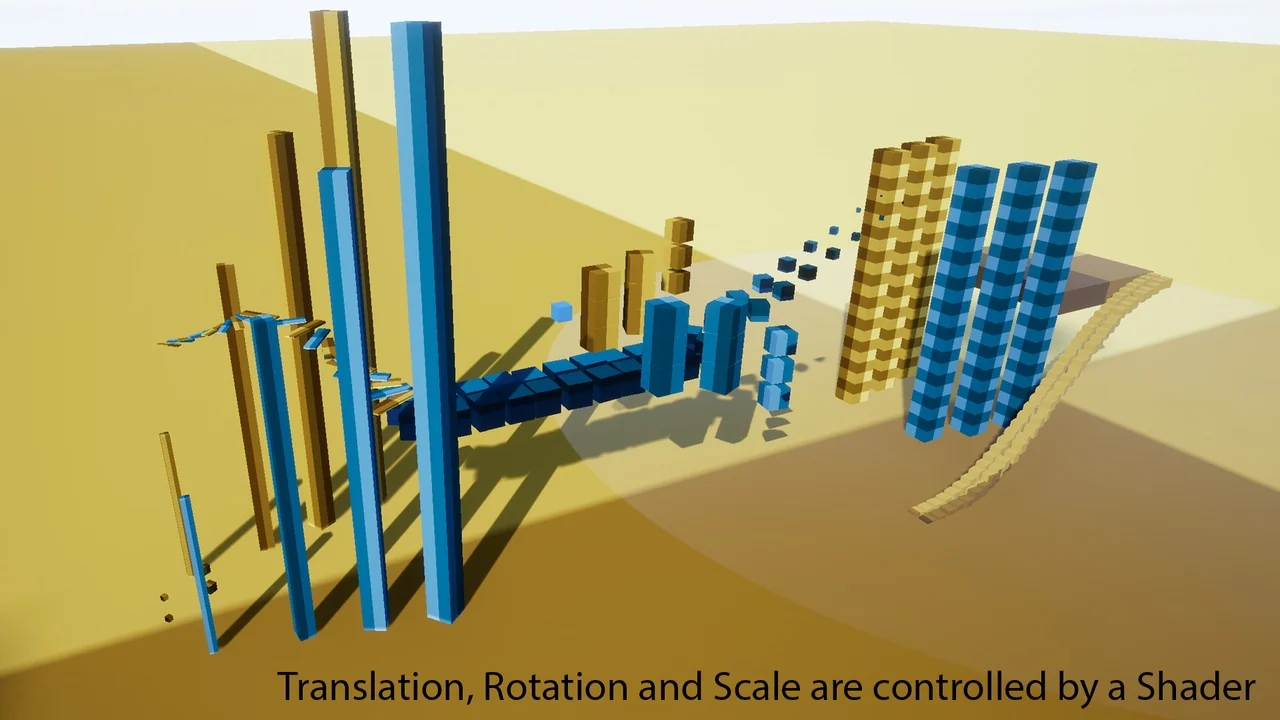
"918649c09937b9b2"{"id":"1000554","slug":"advanced-actor-transform","title":"Advanced Actor Transform","category":"Automations","engine":"4.26+,5.0+","assetVersion":"","engineVersion":"Engine Version: 4.26+,5.0+","tag":"Automations","accent":"cyan","visual":"mech","summary":"GPU-optimized Unreal Engine shader plugin for transforming actors via World Position Offset, supporting hundreds of thousands of instances across multiplayer an","platform":"Unreal Engine","updatedAt":"2026-07-15","sourceNotes":[],"fileContents":[],"compatibility":["Unreal Engine","Engine Version: 4.26+,5.0+"],"featuredImage":{"alt":"Advanced Actor Transform","src":"/wp-content/uploads/published/2026/07/005ee67e0428-e9331e0c-3598-449d-8b8b-c7f2f1a9f64f-f0fceddfd3.webp"},"hasDownloadLink":true,"galleryImages":[{"src":"/wp-content/uploads/published/2026/07/f5c518edbc44-7d23b67b-bc06-4bbd-b3e6-5f447decd239-2de4b3970e.webp","alt":"Advanced Actor Transform"},{"src":"/wp-content/uploads/published/2026/07/c8a280723a45-b1678af5-ffdb-40dc-ad62-88d3007ad3f8-9c59b31fba.webp","alt":"Advanced Actor Transform"},{"src":"/wp-content/uploads/published/2026/07/4e7c98a5ceb6-15e039fc-3c54-47c0-b715-9c85af87d71d-b0545de977.webp","alt":"Advanced Actor Transform"},{"src":"/wp-content/uploads/published/2026/07/cd5324e09355-acfb87f8-a12c-4f83-ba94-0ead326b6d51-97dda484c5.webp","alt":"Advanced Actor Transform"},{"src":"/wp-content/uploads/published/2026/07/fae7244b85c5-b907a9f9-d4cf-4cb2-8167-48815a9385ab-967fc52a93.webp","alt":"Advanced Actor Transform"}],"accessPanel":{"kind":"resource","title":"Download this resource","eyebrow":"Free Download","message":"Log in or create a free account to start your download.","fileName":"AAT.7z","safetyNote":"Resources are manually reviewed before listing to improve quality and reduce obvious risks.","actionLabel":"Download Free","resourceType":"Resource archive","sourceShortcode":"cryptomus_member"},"contentHtml":"\u003ch2\u003eShader-driven actor movement without blueprint overhead\u003c/h2\u003e\n\u003cp\u003eAdvanced Actor Transform tackles a specific production problem: moving, rotating, scaling, and transforming large numbers of actors without driving that motion through Blueprint logic or CPU-based tag systems. The plugin pushes transformation work onto the GPU through a material function connected to the World Position Offset input of any material. This makes it possible to animate or displace vast crowds of meshes—hundreds of thousands of instances simultaneously—while keeping the CPU free for gameplay and simulation work.\u003c/p\u003e\n\u003cp\u003eThe tool sits at the intersection of motion graphics, cinematic sequences, and game environments. Because the transform is purely visual, the plugin is recommended for areas players cannot physically reach, avoiding mismatch between visible geometry and invisible collision shells. This makes it a fit for background cities, distant terrain features, ambient particle meshes, and decorative motion setups where visual fidelity matters more than physical interaction.\u003c/p\u003e \u003ch2\u003eThe November 2024 refactor and how it changed the workflow\u003c/h2\u003e\n\u003cp\u003eA significant refactor in November 2024 rebuilt the plugin for better performance and stripped away its earlier dependency on actor tags. The current workflow requires only that a material function be wired into the World Position Offset node of whatever material the user wants to drive. This aligns the tool with standard Unreal material pipeline practices and removes a layer of management that previously made scenes harder to maintain.\u003c/p\u003e\n\u003cp\u003eThis refactor simplifies adoption considerably. Instead of tagging every actor, users apply a material function directly within their existing material graph. The transformation logic executes on the GPU through the shader, which allows the plugin to scale to massive instance counts without adding per-actor overhead.\u003c/p\u003e \u003ch3\u003eUnreal 5.3 compatibility note\u003c/h3\u003e\n\u003cp\u003eUsers on Unreal Engine 5.3 should be aware that the file \u003cem\u003eAAU_AdvancedActorTransformUtilities\u003c/em\u003e Exists only for backward compatibility and can cause compilation issues. Deleting that file resolves the problem. The issue has been fixed for Unreal Engine versions 5.4 and later.\u003c/p\u003e \u003ch2\u003eFour control modes and their multiplayer behavior\u003c/h2\u003e\n\u003cp\u003eAdvanced Actor Transform provides four control modes that define how transformations are driven and how they behave in networked environments. Each mode fits different creative scenarios, and understanding the distinction matters when building scenes for multiplayer games versus single-player cinematics.\u003c/p\u003e \u003cul\u003e\n\u003cli\u003e\u003cstrong\u003eCamera Distance Based\u003c/strong\u003e — Transformations respond to each viewer's camera distance. In multiplayer, every player sees a different result because the calculation is tied to that individual player's camera position. This mode is useful when a scene should react uniquely to each observer.\u003c/li\u003e\n\u003cli\u003e\u003cstrong\u003eTime Based\u003c/strong\u003e — Transformations are driven by time, and every player in a multiplayer session sees the same thing. This is well suited for synchronized ambient motion that should appear consistent across all clients.\u003c/li\u003e\n\u003cli\u003e\u003cstrong\u003eComponent Distance Based\u003c/strong\u003e — Uses a component's distance to drive the transform. In multiplayer, only one player needs to set the location value in the Material Parameter Collection, and every other player will see the same result. This centralizes control without requiring each client to compute independently.\u003c/li\u003e\n\u003cli\u003e\u003cstrong\u003eMPC Based\u003c/strong\u003e — Functions similarly to Component Distance Based, using a Material Parameter Collection as the driving mechanism. A single player sets the value, and all players see the synchronized result.\u003c/li\u003e\n\u003c/ul\u003e \u003cp\u003eThe distinction between per-player and shared visibility is important for level designers and technical artists working on networked titles. Camera Distance Based allows personalized visual responses, while Time Based and the two MPC modes ensure consistency across the network. For single-player cinematics, any mode can be used, and the multiplayer behavior becomes a non-issue.\u003c/p\u003e \u003ch2\u003eCollision limitations and recommended placement\u003c/h2\u003e\n\u003cp\u003eBecause Advanced Actor Transform is a shader-based solution, the plugin does not update collision. The visual mesh moves, scales, or rotates, but the underlying collision body remains in its original position. The plugin documentation warns about this directly: using the effect in reachable areas can cause players to collide with invisible objects or pass through visually displaced geometry.\u003c/p\u003e\n\u003cp\u003eThe recommendation is to restrict the effect to unreachable areas. Distant terrain features like mountains or moving clouds that sit beyond the player's navigable space are prime candidates. Background building clusters in a cityscape can be animated without worrying about physical interaction. Decorative or ambient visual layers benefit because the shader handles the visual transform while the collision system is bypassed entirely.\u003c/p\u003e\n\u003cp\u003eFor game environment artists, this constraint guides placement decisions. The plugin excels when used as a set dressing tool for far-field visuals, where the player can see the effect but never touch it. Cinematic sequences where the camera flies through an area but no character physically interacts with the environment are also safe contexts for full deployment.\u003c/p\u003e \u003ch2\u003eEditorScriptingUtilities and tag-based scripting\u003c/h2\u003e\n\u003cp\u003eAlthough the November 2024 refactor removed the plugin's dependency on tags for its core operation, the scripts for adding and removing actor tags still require Unreal Engine's built-in \u003cstrong\u003eEditorScriptingUtilities\u003c/strong\u003e Plugin to be enabled. This engine plugin must be turned on for those tag manipulation scripts to function.\u003c/p\u003e\n\u003cp\u003eFor users who have fully migrated to the material function workflow, this requirement may not surface often. However, projects that still rely on actor tag management or scripts that automate tagging workflows will need EditorScriptingUtilities active in their plugin list.\u003c/p\u003e \u003ch2\u003eArticle snapshot: scenes, scale, and where it fits\u003c/h2\u003e\n\u003cp\u003eAdvanced Actor Transform is ideal for motion graphics, cinematics, and games where large-scale visual transformation is needed without CPU overhead. The plugin's ability to support hundreds of thousands of instances simultaneously makes it relevant for crowd-scale visuals, ambient environment motion, and decorative effects that would be costly to drive through traditional Blueprint or actor-based systems.\u003c/p\u003e\n\u003cp\u003eTechnical artists building cinematic sequences can use any of the four control modes to drive visual motion synced across shots. Level designers working on multiplayer maps can choose between per-player and shared visibility modes depending on whether the effect should respond uniquely to each viewer or remain consistent across the network. The tool's GPU optimization keeps frame rates stable even at extreme instance counts.\u003c/p\u003e \u003ch3\u003eWho benefits most from this tool\u003c/h3\u003e\n\u003cp\u003eTechnical artists, shader artists, and level designers working on visually dense Unreal Engine projects will find the most value here. The plugin rewards users comfortable working within the material graph and who understand when to leverage GPU-driven motion over actor-based animation. For cinematics where collision is not a concern, and for game environments where the effect sits beyond player reach, Advanced Actor Transform offers a performant path to large-scale transformation work.\u003c/p\u003e\n\n\u003ch2\u003eRelated Resources Worth Checking\u003c/h2\u003e\n\u003cul\u003e\n\u003cli\u003e\u003ca href=\"https://3dcghub.com/liquid-bottle-simulation-vfx/\" title=\"Liquid Bottle Simulation VFX\"\u003eLiquid Bottle Simulation VFX\u003c/a\u003e\u003c/li\u003e\n\u003cli\u003e\u003ca href=\"https://3dcghub.com/multiplayer-world-origin-rebase-tool/\" title=\"Multiplayer World Origin Rebase Tool\"\u003eMultiplayer World Origin Rebase Tool\u003c/a\u003e\u003c/li\u003e\n\u003cli\u003e\u003ca href=\"https://3dcghub.com/fps-booster-static-mesh-optimizer/\" title=\"FPS Booster: Static Mesh Optimizer\"\u003eFPS Booster: Static Mesh Optimizer\u003c/a\u003e\u003c/li\u003e\n\u003cli\u003e\u003ca href=\"https://3dcghub.com/234-advanced-light-function/\" title=\"234 Advanced Light Function\"\u003e234 Advanced Light Function\u003c/a\u003e\u003c/li\u003e\n\u003cli\u003e\u003ca href=\"https://3dcghub.com/pivot-tool/\" title=\"Pivot Tool\"\u003ePivot Tool\u003c/a\u003e\u003c/li\u003e\n\u003c/ul\u003e","contentTextLength":7398,"navigation":{"current":2502,"total":2510,"previous":{"id":"1000553","slug":"3d-scanned-venice-and-north-of-italy-assets-full-pack","title":"3D-Scanned Venice \u0026 North of Italy Assets - Full Pack","category":"Interior","platform":"Unreal Engine","updatedAt":"2026-07-15"},"next":{"id":"1000555","slug":"adventure-characters-pack","title":"Adventure Characters (Pack)","category":"Characters \u0026 Creatures","platform":"Unreal Engine","updatedAt":"2026-07-15"}},"relatedResources":[{"id":"10337","slug":"liquid-bottle-simulation-vfx","title":"Liquid Bottle Simulation VFX","category":"Automations","engine":"4.26+,5.0+","assetVersion":"Engine version: 4.26+,5.0+","engineVersion":"4.25","tag":"Automations","accent":"violet","visual":"mech","summary":"Enhance your project's realism with a liquid simulation system that reacts to movement and velocity. This customizable asset is designed for easy implementation on custom 3D models.","platform":"Unreal Engine","updatedAt":"2026-04-19","sourceNotes":[],"fileContents":[],"compatibility":["Unreal Engine","Engine version: 4.26+,5.0+"],"featuredImage":{"alt":"Liquid Bottle Simulation VFX","src":"https://3dcghub.com/wp-content/uploads/2026/03/238a989d-14ef-4207-b1f4-f981e6595e80.webp"},"hasDownloadLink":true},{"id":"10366","slug":"multiplayer-world-origin-rebase-tool","title":"Multiplayer World Origin Rebase Tool","category":"Automations","engine":"4.26+,5.0+","assetVersion":"Engine version: 4.26+,5.0+","engineVersion":"4.24","tag":"Automations","accent":"teal","visual":"luts","summary":"The Multiplayer World Origin Rebase Tool provides an algorithmic solution for managing world origins in large-scale multiplayer environments. It eliminates floating point precision errors by repositioning the origin based on player movement.","platform":"Unreal Engine","updatedAt":"2026-04-19","sourceNotes":[],"fileContents":[],"compatibility":["Unreal Engine","Engine version: 4.26+,5.0+"],"featuredImage":{"alt":"Multiplayer World Origin Rebase Tool","src":"https://3dcghub.com/wp-content/uploads/2026/03/1ee7411a-3e4c-40b6-9ca8-e13aa12d7d2f.webp"},"hasDownloadLink":true},{"id":"10329","slug":"fps-booster-static-mesh-optimizer","title":"FPS Booster: Static Mesh Optimizer","category":"Automations","engine":"5.3+","assetVersion":"Engine version: 5.3+","engineVersion":"4.26","tag":"Automations","accent":"cyan","visual":"city","summary":"Improve your project performance with the FPS Booster: Static Mesh Optimizer. This tool converts static mesh actors into instanced versions to significantly reduce lighting build times.","platform":"Unreal Engine","updatedAt":"2026-04-19","sourceNotes":[],"fileContents":[],"compatibility":["Unreal Engine"],"featuredImage":{"alt":"FPS Booster: Static Mesh Optimizer","src":"https://3dcghub.com/wp-content/uploads/2026/03/0713c682-b5a8-4676-9fc5-e7e2477a6083.webp"},"hasDownloadLink":true}]}
Find production-ready assets before your next build.
Follow structured learning paths for Unreal, Unity, Godot, gameplay systems, VFX, C++, Blueprints, and UI. Tutorials cross-link to matching assets so you can learn and build with confidence.