"26aaab8a5d5ed4fc"{"id":"1001027","slug":"vehicle-variety-first-person-vehicle-interaction-system-fpvis","title":"Vehicle Variety First Person Vehicle Interaction System (FPVIS)","category":"Vehicles \u0026 Transportation","engine":"5.1+","assetVersion":"","engineVersion":"Engine Version: 5.1+","tag":"Vehicles","accent":"blue","visual":"mech","summary":"Four drivable vehicles with interiors, a first-person interaction system for opening doors and picking up physics objects, plus 31 props for Unreal Engine.","platform":"Unreal Engine","publishedAt":"2026-08-23T06:31:45.549Z","updatedAt":"2026-08-23T06:31:45.549Z","sourceNotes":[],"fileContents":[],"compatibility":["Unreal Engine","Engine Version: 5.1+"],"featuredImage":{"alt":"Vehicle Variety First Person Vehicle Interaction System (FPVIS)","src":"/wp-content/uploads/published/2026/08/931540a117b2-fae03a09-f100-4f0e-b0e9-1501943e1998-36105223ac.webp"},"hasDownloadLink":true,"downloads":0,"terms":[{"taxonomy":"category","slug":"vehicles-and-transportation","name":"Vehicles \u0026 Transportation"}],"galleryImages":[{"src":"/wp-content/uploads/published/2026/08/736baa850bb5-b44efce6-3ce9-4414-8ef0-bae5ce9799fb-57fb9805e4.webp","alt":"Vehicle Variety First Person Vehicle Interaction System (FPVIS)"},{"src":"/wp-content/uploads/published/2026/08/ca7fd0a4ee7f-e6147cbe-d15e-49d5-a4e8-ee2b532ac11f-2f1e670bd0.webp","alt":"Vehicle Variety First Person Vehicle Interaction System (FPVIS)"},{"src":"/wp-content/uploads/published/2026/08/5994d986d921-bc9d8f53-ff6c-4a66-a314-a7db54a969cf-0cc9d68f09.webp","alt":"Vehicle Variety First Person Vehicle Interaction System (FPVIS)"},{"src":"/wp-content/uploads/published/2026/08/597d57b01980-517275a5-d94b-4025-80ce-06df644a9e40-046eb8b626.webp","alt":"Vehicle Variety First Person Vehicle Interaction System (FPVIS)"},{"src":"/wp-content/uploads/published/2026/08/e8586be4af29-5f605409-3c0a-42e4-87d1-a8e3c2ecfd58-574f2174d6.webp","alt":"Vehicle Variety First Person Vehicle Interaction System (FPVIS)"},{"src":"/wp-content/uploads/published/2026/08/d4a1aa05c17d-e7610314-077a-46ab-8b85-25e030f0f690-7570d8c3d7.webp","alt":"Vehicle Variety First Person Vehicle Interaction System (FPVIS)"},{"src":"/wp-content/uploads/published/2026/08/72f9379cf862-535b2524-20d8-44cb-8338-8cacc0440458-9ec085841c.webp","alt":"Vehicle Variety First Person Vehicle Interaction System (FPVIS)"},{"src":"/wp-content/uploads/published/2026/08/0a3741e44a60-5728d5ee-b49f-464a-b832-3958e7f3d9e5-8bd8c6a100.webp","alt":"Vehicle Variety First Person Vehicle Interaction System (FPVIS)"},{"src":"/wp-content/uploads/published/2026/08/3a81f7efdd88-15f1a503-61c3-4a9d-bda5-342f567de26e-75abe60f1e.webp","alt":"Vehicle Variety First Person Vehicle Interaction System (FPVIS)"},{"src":"/wp-content/uploads/published/2026/08/c6858f90c28f-a6cc3761-0877-44a2-a192-f16c27070377-7898fd48ee.webp","alt":"Vehicle Variety First Person Vehicle Interaction System (FPVIS)"}],"accessPanel":{"kind":"resource","title":"Download this resource","eyebrow":"Free Download","message":"Log in or create a free account to start your download.","fileName":"Vehicle Variety First Person Vehicle Interaction System (FPVIS).7z","safetyNote":"Resources are manually reviewed before listing to improve quality and reduce obvious risks.","actionLabel":"Download Free","resourceType":"Resource archive"},"contentHtml":"\u003ch2\u003eWhen Driving Isn't Just About the Steering Wheel\u003c/h2\u003e\u003cp\u003eIn a first-person game, a vehicle can be more than a cockpit to sit in. It can be a space to explore, a storage container, or a place to interact with objects inside. Vehicle Variety First Person Vehicle Interaction System (FPVIS) treats vehicles as interactive environments rather than simple transportation.\u003c/p\u003e\u003cp\u003eThe pack includes four fully game-ready, drivable vehicles with interiors. It adds a blueprint-based interaction system that lets the player open doors, pick up physics objects, and walk around in first person while interacting with the vehicles. A first-person character controller handles the on-foot movement, and a vehicle control system keeps the driving tied into the same interaction loop.\u003c/p\u003e\u003ch2\u003eThe Vehicle Lineup: Sedan, Box Truck, SUV, and Campervan\u003c/h2\u003e\u003cp\u003eThe four vehicles cover a useful range of gameplay scenarios:\u003c/p\u003e\u003cul\u003e\u003cli\u003eSedan\u003c/li\u003e\u003cli\u003eBox Truck (Delivery Variant)\u003c/li\u003e\u003cli\u003eSUV\u003c/li\u003e\u003cli\u003eCampervan (Complete with entire rear interior)\u003c/li\u003e\u003c/ul\u003e\u003cp\u003eEach vehicle is built to be driven, with a full interior visible from the first-person perspective. The campervan gets special attention because it includes the entire rear interior, not just the driver's cabin. That makes it a strong fit for road-trip adventures, survival games, or any project where the player needs to move around the back of the vehicle. The box truck's delivery variant also suggests cargo-focused missions, while the sedan and SUV cover everyday driving and off-road situations.\u003c/p\u003e\u003ch2\u003eFirst Person Vehicle Interaction System in Practice\u003c/h2\u003e\u003cp\u003eFPVIS is structured through a fully interactive blueprint system. The player can open doors, pick up physics objects, walk around in first person, and interact with the vehicles directly. This goes beyond entering and exiting. You can approach a campervan, open the rear door, reach inside, and move items around. The first-person character controller includes an interaction system, so the same character that drives the vehicle also handles the on-foot logic.\u003c/p\u003e\u003cp\u003eWorld-space HUD elements are part of the vehicle control system. These elements live in the world rather than as a flat overlay, which helps immersion by keeping prompts and information tied to the physical vehicle. Instead of the player looking at a dashboard mockup, prompts can appear near the door handle or inside the cabin, reinforcing the idea that the vehicle is a real place.\u003c/p\u003e\u003ch2\u003eSupporting Props and Documentation\u003c/h2\u003e\u003cp\u003eThe pack ships 31 extra props to use with the vehicles: parcels, traffic cones, and road barriers. These are practical additions for a delivery game, a road construction scene, or a traffic-based puzzle. You can load a box truck with parcels, set up barriers to block a road, or create a small obstacle course with cones.\u003c/p\u003e\u003cp\u003eDocumentation is included to help implement the system into your own projects. A demonstration video and a demo are also part of the package, giving you a reference for how the interaction works before you dive into the blueprints.\u003c/p\u003e\u003ch2\u003eMaterial Budget and Technical Approach\u003c/h2\u003e\u003cp\u003eAll vehicles in FPVIS are designed with a consistent technical philosophy: keep material calls as low as possible while maintaining enough detail to be used up close. The developer made an effort to minimize material slots, and the average across the pack is around four slots per vehicle. Larger vehicles may use more due to their size, but the goal is to control draw calls so the vehicles hold up in close-up first-person view without draining performance.\u003c/p\u003e\u003cp\u003eThis makes the pack a practical fit for a production environment where you need quality visuals without sacrificing frame rate. It's not built as a high-end showcase for screenshots; it's built to work inside a playable scene.\u003c/p\u003e\u003ch2\u003eKnown Bugs and Plug-in Requirements\u003c/h2\u003e\u003cp\u003eThe Unreal 5 version of FPVIS requires the Chaos Vehicles Plugin to be enabled. The developer notes that vehicles generally behave better on Chaos. In contrast, general PhysX bugs on Unreal 4 can make vehicle physics unpredictable, so the UE4 version may need extra testing.\u003c/p\u003e\u003cp\u003eThe developer also lists known bugs that affect certain workflows:\u003c/p\u003e\u003cul\u003e\u003cli\u003eVehicles still maintain input after exiting. Acceleration, brakes, and turning don't reset to zero when the player leaves the vehicle.\u003c/li\u003e\u003cli\u003eWheel movement in UE5 is snappy and requires refactoring.\u003c/li\u003e\u003c/ul\u003e\u003cp\u003eThese limitations are revealed upfront. The input bug means an unattended car might continue rolling after the player steps out, which needs to be handled if you plan an exit-and-leave scenario. The UE5 wheel behavior indicates that the vehicle handling may not feel polished until you adjust it for your project.\u003c/p\u003e\u003ch2\u003eWhere FPVIS Fits in a Real Project\u003c/h2\u003e\u003cp\u003eFPVIS is a practical starting point for any Unreal project that needs first-person interaction with vehicles. Delivery games, campervan exploration, or any scene where the player should open doors, carry objects, and drive are natural matches. The included props for parcels, cones, and barriers make it easy to block roads, load cargo, or build a small interactive set.\u003c/p\u003e\u003cp\u003eThe documentation and demo help you get the system running quickly, while the low material budget keeps the vehicles light enough for real gameplay. If you're building a first-person driving experience where the vehicle is more than a seat, this pack offers a solid foundation.\u003c/p\u003e\n\n\u003ch2\u003eExplore Similar Assets\u003c/h2\u003e\n\u003cul\u003e\n\u003cli\u003e\u003ca href=\"https://3dcghub.com/emergency-vehicles-premium-drivable-and-interactable/\" title=\"Emergency Vehicles - Premium - Drivable and Interactable\"\u003eEmergency Vehicles - Premium - Drivable and Interactable\u003c/a\u003e\u003c/li\u003e\n\u003cli\u003e\u003ca href=\"https://3dcghub.com/vehicle-traffic-system/\" title=\"Vehicle Traffic System\"\u003eVehicle Traffic System\u003c/a\u003e\u003c/li\u003e\n\u003cli\u003e\u003ca href=\"https://3dcghub.com/scifi-playable-flying-drones/\" title=\"SciFi Playable Flying Drones\"\u003eSciFi Playable Flying Drones\u003c/a\u003e\u003c/li\u003e\n\u003cli\u003e\u003ca href=\"https://3dcghub.com/vehicles-vol-3-retro-cars-low-poly/\" title=\"Vehicles VOL.3 - Retro Cars (Low Poly)\"\u003eVehicles VOL.3 - Retro Cars (Low Poly)\u003c/a\u003e\u003c/li\u003e\n\u003cli\u003e\u003ca href=\"https://3dcghub.com/vehicles-vol-4-retro-cars-low-poly/\" title=\"Vehicles VOL.4 - Retro Cars (Low Poly)\"\u003eVehicles VOL.4 - Retro Cars (Low Poly)\u003c/a\u003e\u003c/li\u003e\n\u003c/ul\u003e","contentTextLength":5455,"navigation":{"current":491,"total":3400,"previous":{"id":"1001028","slug":"voyager-third-person-shooter-v3","title":"Voyager: Third Person Shooter v3","category":"Shooter","platform":"Unreal Engine","updatedAt":"2026-08-23T07:15:51.381Z"},"next":{"id":"1001026","slug":"utility-power-pole","title":"Utility/Power Pole","category":"Street / Road","platform":"Unreal Engine","updatedAt":"2026-08-23T06:16:36.079Z"}},"relatedResources":[{"id":"1000989","slug":"emergency-vehicles-premium-drivable-and-interactable","title":"Emergency Vehicles - Premium - Drivable and Interactable","category":"Vehicles \u0026 Transportation","engine":"5.3+","assetVersion":"","engineVersion":"Engine Version: 5.3+","tag":"Vehicles","accent":"blue","visual":"mech","summary":"Add drivable emergency vehicles with a full rig, functional interior, sirens, destructible parts, and level designer tools. Chaos Vehicles and OpenXR required.","platform":"Unreal Engine","publishedAt":"2026-08-18T06:37:54.815Z","updatedAt":"2026-08-18T06:37:54.815Z","sourceNotes":[],"fileContents":[],"compatibility":["Unreal Engine","Engine Version: 5.3+"],"featuredImage":{"alt":"Emergency Vehicles - Premium - Drivable and Interactable","src":"/wp-content/uploads/published/2026/08/1c514b2e1f8f-66ce2b26-a13c-4ac2-af06-f1e66e8c1668-e2131ac210.webp"},"hasDownloadLink":true,"downloads":2},{"id":"1001014","slug":"scifi-playable-flying-drones","title":"SciFi Playable Flying Drones","category":"Vehicles \u0026 Transportation","engine":"5.3+","assetVersion":"","engineVersion":"Engine Version: 5.3+","tag":"Vehicles","accent":"blue","visual":"mech","summary":"A playable sci-fi drone set with three pawns, five skins, 4K PBR textures, acceleration sound, and controls configured for immediate flight.","platform":"Unreal Engine","publishedAt":"2026-08-22T13:29:03.565Z","updatedAt":"2026-08-22T13:29:03.565Z","sourceNotes":[],"fileContents":[],"compatibility":["Unreal Engine","Engine Version: 5.3+"],"featuredImage":{"alt":"SciFi Playable Flying Drones","src":"/wp-content/uploads/published/2026/08/77b4dcd43224-75c0061e-e73b-4577-8f9f-fda418fe1f68-c298071771.webp"},"hasDownloadLink":true,"downloads":0},{"id":"1000903","slug":"vehicle-traffic-system","title":"Vehicle Traffic System","category":"Vehicles \u0026 Transportation","engine":"5.4+","assetVersion":"","engineVersion":"Engine Version: 5.4+","tag":"Vehicles","accent":"blue","visual":"mech","summary":"A Blueprint-driven vehicle traffic system for UE4 and UE5 with spline routing, traffic lights, priority lanes, passing lanes, highways, parking, and destination","platform":"Unreal Engine","publishedAt":"2026-08-06T05:10:23.369Z","updatedAt":"2026-08-06T05:10:23.369Z","sourceNotes":[],"fileContents":[],"compatibility":["Unreal Engine","Engine Version: 5.4+"],"featuredImage":{"alt":"Vehicle Traffic System","src":"/wp-content/uploads/published/2026/08/9618a01fc56f-cffbc0ee-1a2f-46ad-bd7b-b3dbc55a57c1-d20a51d985.webp"},"hasDownloadLink":true,"downloads":0}]}
Vehicles
Vehicle Variety First Person Vehicle Interaction System (FPVIS)
Four drivable vehicles with interiors, a first-person interaction system for opening doors and picking up physics objects, plus 31 props for Unreal Engine.
In a first-person game, a vehicle can be more than a cockpit to sit in. It can be a space to explore, a storage container, or a place to interact with objects inside. Vehicle Variety First Person Vehicle Interaction System (FPVIS) treats vehicles as interactive environments rather than simple transportation.
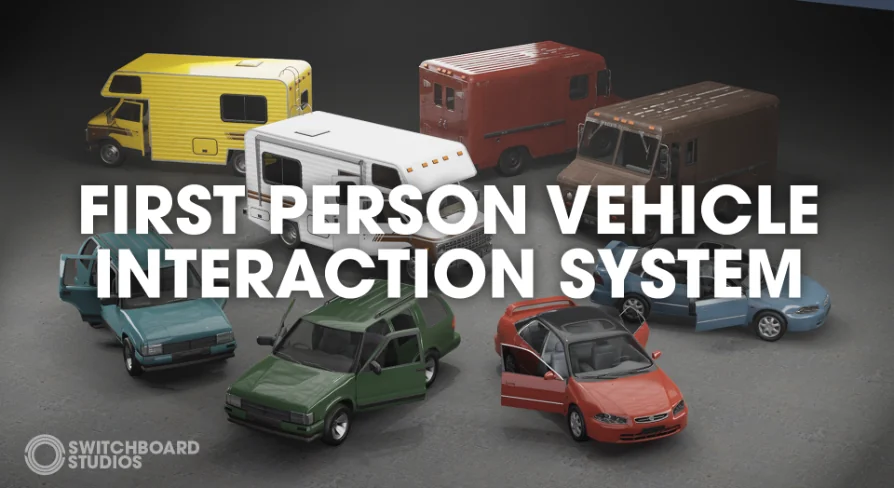
The pack includes four fully game-ready, drivable vehicles with interiors. It adds a blueprint-based interaction system that lets the player open doors, pick up physics objects, and walk around in first person while interacting with the vehicles. A first-person character controller handles the on-foot movement, and a vehicle control system keeps the driving tied into the same interaction loop.
The Vehicle Lineup: Sedan, Box Truck, SUV, and Campervan
The four vehicles cover a useful range of gameplay scenarios:
Sedan
Box Truck (Delivery Variant)
SUV
Campervan (Complete with entire rear interior)
Each vehicle is built to be driven, with a full interior visible from the first-person perspective. The campervan gets special attention because it includes the entire rear interior, not just the driver's cabin. That makes it a strong fit for road-trip adventures, survival games, or any project where the player needs to move around the back of the vehicle. The box truck's delivery variant also suggests cargo-focused missions, while the sedan and SUV cover everyday driving and off-road situations.
First Person Vehicle Interaction System in Practice
FPVIS is structured through a fully interactive blueprint system. The player can open doors, pick up physics objects, walk around in first person, and interact with the vehicles directly. This goes beyond entering and exiting. You can approach a campervan, open the rear door, reach inside, and move items around. The first-person character controller includes an interaction system, so the same character that drives the vehicle also handles the on-foot logic.
World-space HUD elements are part of the vehicle control system. These elements live in the world rather than as a flat overlay, which helps immersion by keeping prompts and information tied to the physical vehicle. Instead of the player looking at a dashboard mockup, prompts can appear near the door handle or inside the cabin, reinforcing the idea that the vehicle is a real place.
Supporting Props and Documentation
The pack ships 31 extra props to use with the vehicles: parcels, traffic cones, and road barriers. These are practical additions for a delivery game, a road construction scene, or a traffic-based puzzle. You can load a box truck with parcels, set up barriers to block a road, or create a small obstacle course with cones.
Documentation is included to help implement the system into your own projects. A demonstration video and a demo are also part of the package, giving you a reference for how the interaction works before you dive into the blueprints.
Material Budget and Technical Approach
All vehicles in FPVIS are designed with a consistent technical philosophy: keep material calls as low as possible while maintaining enough detail to be used up close. The developer made an effort to minimize material slots, and the average across the pack is around four slots per vehicle. Larger vehicles may use more due to their size, but the goal is to control draw calls so the vehicles hold up in close-up first-person view without draining performance.
This makes the pack a practical fit for a production environment where you need quality visuals without sacrificing frame rate. It's not built as a high-end showcase for screenshots; it's built to work inside a playable scene.
Known Bugs and Plug-in Requirements
The Unreal 5 version of FPVIS requires the Chaos Vehicles Plugin to be enabled. The developer notes that vehicles generally behave better on Chaos. In contrast, general PhysX bugs on Unreal 4 can make vehicle physics unpredictable, so the UE4 version may need extra testing.
The developer also lists known bugs that affect certain workflows:
Vehicles still maintain input after exiting. Acceleration, brakes, and turning don't reset to zero when the player leaves the vehicle.
Wheel movement in UE5 is snappy and requires refactoring.
These limitations are revealed upfront. The input bug means an unattended car might continue rolling after the player steps out, which needs to be handled if you plan an exit-and-leave scenario. The UE5 wheel behavior indicates that the vehicle handling may not feel polished until you adjust it for your project.
Where FPVIS Fits in a Real Project
FPVIS is a practical starting point for any Unreal project that needs first-person interaction with vehicles. Delivery games, campervan exploration, or any scene where the player should open doors, carry objects, and drive are natural matches. The included props for parcels, cones, and barriers make it easy to block roads, load cargo, or build a small interactive set.
The documentation and demo help you get the system running quickly, while the low material budget keeps the vehicles light enough for real gameplay. If you're building a first-person driving experience where the vehicle is more than a seat, this pack offers a solid foundation.
 Vehicles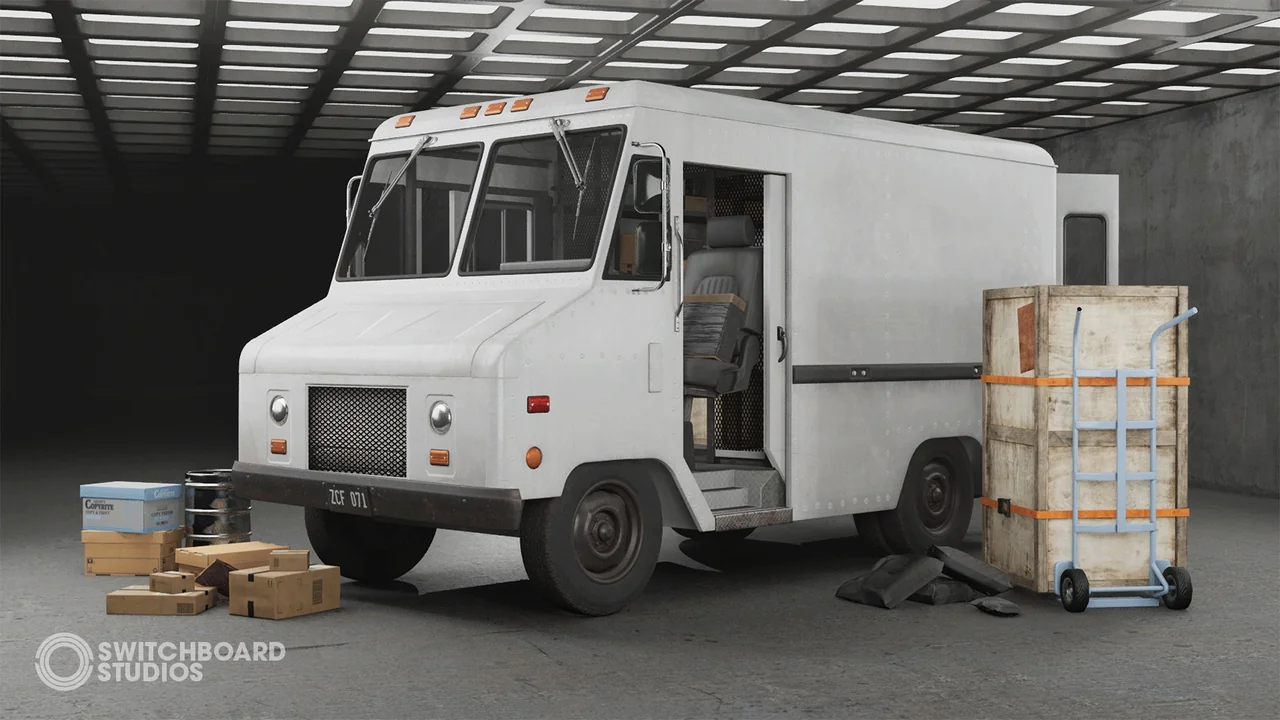
 Vehicles
 Vehicles
 Vehicles