"216a1d817ec3ca8a"{"id":"1000903","slug":"vehicle-traffic-system","title":"Vehicle Traffic System","category":"Vehicles \u0026 Transportation","engine":"5.4+","assetVersion":"","engineVersion":"Engine Version: 5.4+","tag":"Vehicles","accent":"blue","visual":"mech","summary":"A Blueprint-driven vehicle traffic system for UE4 and UE5 with spline routing, traffic lights, priority lanes, passing lanes, highways, parking, and destination","platform":"Unreal Engine","indexPolicy":"index","publishedAt":"2026-08-06T05:10:23.369Z","updatedAt":"2026-08-06T05:10:23.369Z","sourceNotes":[],"fileContents":[],"compatibility":["Unreal Engine","Engine Version: 5.4+"],"featuredImage":{"alt":"Vehicle Traffic System","src":"/wp-content/uploads/published/2026/08/9618a01fc56f-cffbc0ee-1a2f-46ad-bd7b-b3dbc55a57c1-d20a51d985.webp"},"hasDownloadLink":true,"downloads":0,"terms":[{"taxonomy":"category","slug":"vehicles-and-transportation","name":"Vehicles \u0026 Transportation"}],"galleryImages":[{"src":"/wp-content/uploads/published/2026/08/a47a2fc35c88-f05d4703-a4e8-4e6d-adcf-698942f83cf2-6b3c16f517.webp","alt":"Vehicle Traffic System"}],"accessPanel":{"kind":"resource","title":"Get this resource","eyebrow":"Free resource","message":"3DCGHUB is the service provider for this listing. Access is fulfilled through the official publisher channel.","fileName":"VehicleTrafficSystem.7z","safetyNote":"Resources are manually reviewed before listing to improve quality and reduce obvious risks.","actionLabel":"Get this resource","resourceType":"Resource archive","versions":[]},"contentHtml":"\u003cp\u003e\u003cem\u003eVehicle Traffic System\u003c/em\u003e is a Blueprint-based traffic package for Unreal Engine that covers road networks from basic lanes to highway merges. It brings together Spline-driven routes, traffic light control, lane priority, passing behavior, parking spots, and destination points under 1 single system. 2 current versions are available: 1 for Unreal Engine 4 (UE4) standing at V1.12, released on 25 October 2021, and an Unreal Engine 5 (UE5) build at V1.04, dated 21 September 2025. The package also comes with a downloadable demo, a changelog, and tutorial materials.\u003c/p\u003e\n\n\u003ch2\u003eA Blueprint Traffic Pack for UE4 and UE5\u003c/h2\u003e\n\n\u003cp\u003eAt its core, the system is shaped by Blueprints, which means the entire traffic simulation can be extended without touching C++ code. Road behavior is driven by Splines, so routes are defined by Spline paths rather than hand-placed waypoints. The same foundation supports several traffic elements: standard lanes, priority lanes, passing lanes, highway segments, and dedicated parking areas. Because the logic lives in Blueprints, Game Designers and Level Artists can adapt the network directly inside the Editor.\u003c/p\u003e\n\n\u003cp\u003eThe package is actively maintained across 2 engine generations. The UE4 branch reached V1.12 in late October 2021, while the UE5 branch is at V1.04 as of 21 September 2025. Each release is accompanied by a changelog, and the developer provides tutorials that walk through setup and customization. For quick evaluation, the Demo Map lets you press \u003ccode\u003eC\u003c/code\u003e to switch between Maps, giving you a live look at how the traffic system behaves in different layouts.\u003c/p\u003e\n\n\u003ch2\u003eSpline-Driven Roads and Lane Priorities\u003c/h2\u003e\n\n\u003cp\u003eSpline-based routing gives vehicles a predictable path through intersections, roundabouts, and straight stretches. The system uses these Splines to control vehicle position, speed, and turning behavior. Priority lanes are a notable feature: they let certain lanes or routes take precedence over others, which is essential for creating believable intersections and merge zones. Without priority logic, traffic at a crossing would either freeze or move randomly; here, the Spline setup can define which stream goes first.\u003c/p\u003e\n\n\u003cp\u003ePassing lanes are handled as well, allowing vehicles to move around slower traffic when the road layout permits. This is useful for highway on-ramps, multi-lane roads, and any scenario where vehicles need to overtake. The combination of passing and priority lanes means the system can model both urban gridlock and faster arterial roads without switching to a different traffic plugin.\u003c/p\u003e\n\n\u003ch2\u003eTraffic Lights, Highways, and Passing Maneuvers\u003c/h2\u003e\n\n\u003cp\u003eTraffic light logic is built into the system, so intersections can cycle through red, yellow, and green states according to configurable timing. The traffic lights work with the Spline network and the priority lanes, which keeps vehicles from entering a junction while the light is against them. This makes the system suitable for city intersections where stop-and-go behavior is expected.\u003c/p\u003e\n\n\u003cp\u003eFor higher-speed roads, the highway system handles merging and lane changes. Combined with the passing lane feature, vehicles can shift lanes to maintain flow or overtake slower vehicles. Whether the road is a 2-lane street or a multi-lane freeway, the same Spline files drive the behavior, so there is no need to set up separate logic for urban and highway traffic.\u003c/p\u003e\n\n\u003ch2\u003eParking, Destinations, and the Switchable Demo Map\u003c/h2\u003e\n\n\u003cp\u003eThe system also includes parking and destination points. Parking spots are likely snapping points where vehicles can pull in and stop, while destinations give vehicles a target to drive toward. Together they allow a vehicle to spawn, drive along a Spline route, find a parking slot, and stop there, or route to a specific destination and then disappear or reappear as needed. This is useful for deliveries, taxi services, or any gameplay objective that involves reaching a location by car.\u003c/p\u003e\n\n\u003cp\u003eThe Demo Map is a practical way to test these features. Pressing the \u003ccode\u003eC\u003c/code\u003e key changes the Map, letting you compare how the traffic system behaves in different environments. The same input is mentioned in the package description, so it works out of the box. With the changelog and tutorials included, you can see how the system has evolved and how to configure its components for your own project.\u003c/p\u003e\n\n\u003ch2\u003eWho This System Is Built For\u003c/h2\u003e\n\n\u003cp\u003e\u003cem\u003eVehicle Traffic System\u003c/em\u003e suits Unreal Engine developers who need a traffic solution without writing a custom simulation from scratch. The Blueprint-driven design makes it approachable for designers who want to lay out roads visually and tweak behavior through properties rather than code. The support for both UE4 and UE5 means studios with projects still on UE4 can use the same package, while teams already on UE5 can take advantage of the newer version.\u003c/p\u003e\n\n\u003cp\u003eIt is especially useful for open-world games, driving games, city builders, or any interactive simulation where vehicles need to move realistically along roads. The included components cover the most common traffic elements: Spline paths, traffic lights, priority lanes, passing lanes, highways, parking, and destination logic. For a team looking to populate a scene with believable vehicle flow, this package delivers a ready-made framework that can be extended through Blueprints and tested through the included demo.\u003c/p\u003e\n\n\u003ch2\u003eRelated Resources Worth Checking\u003c/h2\u003e\n\u003cul\u003e\n\u003cli\u003e\u003ca href=\"https://3dcghub.com/intelligent-traffic-system/\" rel=\"noopener noreferrer\"\u003eIntelligent Traffic System\u003c/a\u003e\u003c/li\u003e\n\u003cli\u003e\u003ca href=\"https://3dcghub.com/vehicles-vol-4-retro-cars-low-poly/\" rel=\"noopener noreferrer\"\u003eVehicles VOL.4 - Retro Cars (Low Poly)\u003c/a\u003e\u003c/li\u003e\n\u003cli\u003e\u003ca href=\"https://3dcghub.com/vehicles-vol-3-retro-cars-low-poly/\" rel=\"noopener noreferrer\"\u003eVehicles VOL.3 - Retro Cars (Low Poly)\u003c/a\u003e\u003c/li\u003e\n\u003cli\u003e\u003ca href=\"https://3dcghub.com/vehicles-vol-1-small-rides-nanite-and-low-poly/\" rel=\"noopener noreferrer\"\u003eVehicles VOL.1 - Small Rides (Nanite and Low Poly)\u003c/a\u003e\u003c/li\u003e\n\u003cli\u003e\u003ca href=\"https://3dcghub.com/boatyard-vol-5-tugboat-nanite/\" rel=\"noopener noreferrer\"\u003eBoatyard VOL.5 - Tugboat (Nanite)\u003c/a\u003e\u003c/li\u003e\n\u003c/ul\u003e","contentTextLength":5483,"navigation":{"current":1471,"total":4230,"previous":{"id":"1000904","slug":"visai-companion-modern-ai-framework","title":"VisAI - Companion - Modern AI Framework","category":"Characters \u0026 Creatures","platform":"Unreal Engine","updatedAt":"2026-08-06T05:14:19.512Z"},"next":{"id":"1000902","slug":"unlit-stylized-military-characters","title":"Unlit Stylized Military Characters","category":"Characters \u0026 Creatures","platform":"Unreal Engine","updatedAt":"2026-08-06T05:08:45.276Z"}},"relatedResources":[{"id":"5145","slug":"intelligent-traffic-system","title":"Intelligent Traffic System","category":"Vehicles \u0026 Transportation","engine":"5.3+","assetVersion":"Engine version: 5.3+","engineVersion":"5.3","tag":"Vehicles","accent":"blue","visual":"mech","summary":"Enhance your Unreal Engine projects with the Intelligent Traffic System. Features AI-controlled vehicles, pedestrian logic, and optimized low-poly assets.","platform":"Unreal Engine","indexPolicy":"index","publishedAt":"2026-02-14T17:53:02.000Z","updatedAt":"2026-04-19T15:57:01.000Z","sourceNotes":[],"fileContents":[],"compatibility":["Unreal Engine","Engine version: 5.3+"],"featuredImage":{"alt":"Intelligent Traffic System","src":"https://3dcghub.com/wp-content/uploads/2026/02/065b19e9-617f-4f7f-9edb-ee361c6473b5.webp"},"hasDownloadLink":true,"downloads":1},{"id":"1001021","slug":"traffic-lights-animated-14-pack-usa-stop-light-city","title":"Traffic Lights Animated 14 Pack USA Stop light City","category":"Vehicles \u0026 Transportation","engine":"4.26+,5.0+","assetVersion":"","engineVersion":"Engine Version: 4.26+,5.0+","tag":"Vehicles","accent":"blue","visual":"city","summary":"Animated USA traffic signals with working crosswalk countdown, realistic weathering textures, and adjustable green/amber/red timing via master material for game","platform":"Unreal Engine","indexPolicy":"index","publishedAt":"2026-08-23T05:16:10.308Z","updatedAt":"2026-08-23T05:16:10.308Z","sourceNotes":[],"fileContents":[],"compatibility":["Unreal Engine","Engine Version: 4.26+,5.0+"],"featuredImage":{"alt":"Traffic Lights Animated 14 Pack USA Stop light City","src":"/wp-content/uploads/published/2026/08/bfbbc7304f07-590eece3-e0e8-4fcf-ab09-5c081b40e123-713e7e1a0b.webp"},"hasDownloadLink":true,"downloads":0},{"id":"1002242","slug":"truck-trailer-attach-detach-system","title":"Truck Trailer Attach Detach System","category":"Vehicles \u0026 Transportation","engine":"5.4+","assetVersion":"","engineVersion":"Engine Version: 5.4+","tag":"Vehicles","accent":"blue","visual":"mech","summary":"Explore the Truck Trailer Attach Detach System featuring a truck cab, container and tanker trailers, working mirrors, full lighting, and sound integration.","platform":"Unreal Engine","indexPolicy":"index","publishedAt":"2026-10-29T15:58:22.057Z","updatedAt":"2026-10-29T15:58:22.057Z","sourceNotes":[],"fileContents":[],"compatibility":["Unreal Engine","Engine Version: 5.4+"],"featuredImage":{"alt":"Truck Trailer Attach Detach System","src":"/wp-content/uploads/published/2026/10/a084ad077072-59de3110-a96b-4b66-9c12-cc14487ac73a-33d37a585d.webp"},"hasDownloadLink":true,"downloads":0}]}
Vehicles
Vehicle Traffic System
A Blueprint-driven vehicle traffic system for UE4 and UE5 with spline routing, traffic lights, priority lanes, passing lanes, highways, parking, and destination
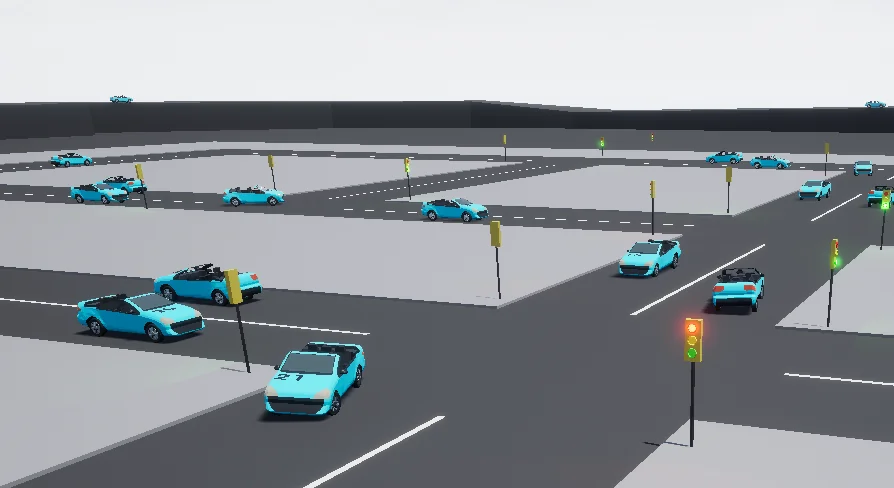
Vehicle Traffic System is a Blueprint-based traffic package for Unreal Engine that covers road networks from basic lanes to highway merges. It brings together Spline-driven routes, traffic light control, lane priority, passing behavior, parking spots, and destination points under 1 single system. 2 current versions are available: 1 for Unreal Engine 4 (UE4) standing at V1.12, released on 25 October 2021, and an Unreal Engine 5 (UE5) build at V1.04, dated 21 September 2025. The package also comes with a downloadable demo, a changelog, and tutorial materials.
A Blueprint Traffic Pack for UE4 and UE5
At its core, the system is shaped by Blueprints, which means the entire traffic simulation can be extended without touching C++ code. Road behavior is driven by Splines, so routes are defined by Spline paths rather than hand-placed waypoints. The same foundation supports several traffic elements: standard lanes, priority lanes, passing lanes, highway segments, and dedicated parking areas. Because the logic lives in Blueprints, Game Designers and Level Artists can adapt the network directly inside the Editor.
The package is actively maintained across 2 engine generations. The UE4 branch reached V1.12 in late October 2021, while the UE5 branch is at V1.04 as of 21 September 2025. Each release is accompanied by a changelog, and the developer provides tutorials that walk through setup and customization. For quick evaluation, the Demo Map lets you press C to switch between Maps, giving you a live look at how the traffic system behaves in different layouts.
Spline-Driven Roads and Lane Priorities
Spline-based routing gives vehicles a predictable path through intersections, roundabouts, and straight stretches. The system uses these Splines to control vehicle position, speed, and turning behavior. Priority lanes are a notable feature: they let certain lanes or routes take precedence over others, which is essential for creating believable intersections and merge zones. Without priority logic, traffic at a crossing would either freeze or move randomly; here, the Spline setup can define which stream goes first.
Passing lanes are handled as well, allowing vehicles to move around slower traffic when the road layout permits. This is useful for highway on-ramps, multi-lane roads, and any scenario where vehicles need to overtake. The combination of passing and priority lanes means the system can model both urban gridlock and faster arterial roads without switching to a different traffic plugin.
Traffic Lights, Highways, and Passing Maneuvers
Traffic light logic is built into the system, so intersections can cycle through red, yellow, and green states according to configurable timing. The traffic lights work with the Spline network and the priority lanes, which keeps vehicles from entering a junction while the light is against them. This makes the system suitable for city intersections where stop-and-go behavior is expected.
For higher-speed roads, the highway system handles merging and lane changes. Combined with the passing lane feature, vehicles can shift lanes to maintain flow or overtake slower vehicles. Whether the road is a 2-lane street or a multi-lane freeway, the same Spline files drive the behavior, so there is no need to set up separate logic for urban and highway traffic.
Parking, Destinations, and the Switchable Demo Map
The system also includes parking and destination points. Parking spots are likely snapping points where vehicles can pull in and stop, while destinations give vehicles a target to drive toward. Together they allow a vehicle to spawn, drive along a Spline route, find a parking slot, and stop there, or route to a specific destination and then disappear or reappear as needed. This is useful for deliveries, taxi services, or any gameplay objective that involves reaching a location by car.
The Demo Map is a practical way to test these features. Pressing the C key changes the Map, letting you compare how the traffic system behaves in different environments. The same input is mentioned in the package description, so it works out of the box. With the changelog and tutorials included, you can see how the system has evolved and how to configure its components for your own project.
Who This System Is Built For
Vehicle Traffic System suits Unreal Engine developers who need a traffic solution without writing a custom simulation from scratch. The Blueprint-driven design makes it approachable for designers who want to lay out roads visually and tweak behavior through properties rather than code. The support for both UE4 and UE5 means studios with projects still on UE4 can use the same package, while teams already on UE5 can take advantage of the newer version.
It is especially useful for open-world games, driving games, city builders, or any interactive simulation where vehicles need to move realistically along roads. The included components cover the most common traffic elements: Spline paths, traffic lights, priority lanes, passing lanes, highways, parking, and destination logic. For a team looking to populate a scene with believable vehicle flow, this package delivers a ready-made framework that can be extended through Blueprints and tested through the included demo.
 Vehicles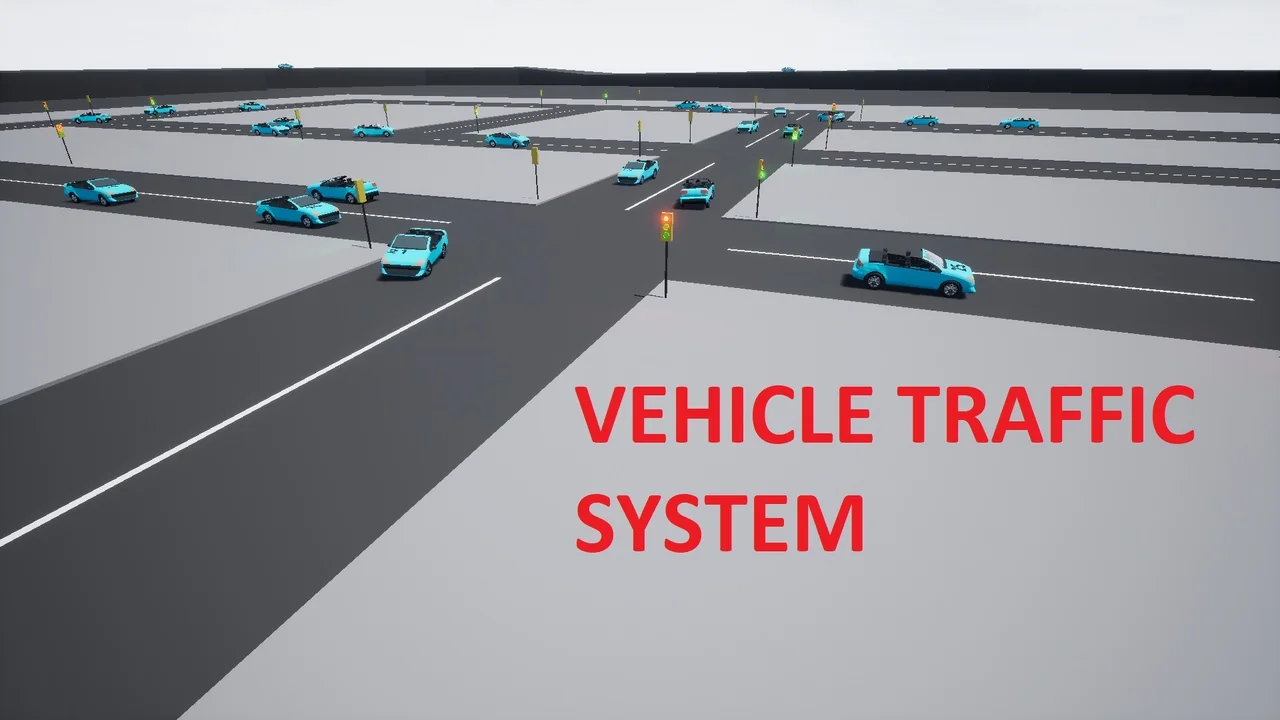
 Vehicles
 Vehicles
 Vehicles