"26aaab8a5d5ed4fc"{"id":"1001021","slug":"traffic-lights-animated-14-pack-usa-stop-light-city","title":"Traffic Lights Animated 14 Pack USA Stop light City","category":"Vehicles \u0026 Transportation","engine":"4.26+,5.0+","assetVersion":"","engineVersion":"Engine Version: 4.26+,5.0+","tag":"Vehicles","accent":"blue","visual":"city","summary":"Animated USA traffic signals with working crosswalk countdown, realistic weathering textures, and adjustable green/amber/red timing via master material for game","platform":"Unreal Engine","publishedAt":"2026-08-23T05:16:10.308Z","updatedAt":"2026-08-23T05:16:10.308Z","sourceNotes":[],"fileContents":[],"compatibility":["Unreal Engine","Engine Version: 4.26+,5.0+"],"featuredImage":{"alt":"Traffic Lights Animated 14 Pack USA Stop light City","src":"/wp-content/uploads/published/2026/08/bfbbc7304f07-590eece3-e0e8-4fcf-ab09-5c081b40e123-713e7e1a0b.webp"},"hasDownloadLink":true,"downloads":0,"terms":[{"taxonomy":"category","slug":"vehicles-and-transportation","name":"Vehicles \u0026 Transportation"}],"galleryImages":[{"src":"/wp-content/uploads/published/2026/08/9a4582b67c34-d8d26c1f-5a3b-4665-aee8-8882d4acd037-09f191feb9.webp","alt":"Traffic Lights Animated 14 Pack USA Stop light City"},{"src":"/wp-content/uploads/published/2026/08/831314fed98a-39fb111b-fc60-42c6-b166-66957d167048-bcab594c72.webp","alt":"Traffic Lights Animated 14 Pack USA Stop light City"},{"src":"/wp-content/uploads/published/2026/08/66650431425f-0320488d-aa5a-4773-8705-740af8cf38f1-9a50c48666.webp","alt":"Traffic Lights Animated 14 Pack USA Stop light City"},{"src":"/wp-content/uploads/published/2026/08/092c5cbe73a3-1c935d2c-d6a7-4355-86a7-19d90ceead42-d6c7812053.webp","alt":"Traffic Lights Animated 14 Pack USA Stop light City"},{"src":"/wp-content/uploads/published/2026/08/d6695096ab25-26b7e65c-a063-4ca4-8b34-433fce68593c-1c16cc2db4.webp","alt":"Traffic Lights Animated 14 Pack USA Stop light City"},{"src":"/wp-content/uploads/published/2026/08/1e5899fcbd3e-e5649500-8501-4a9c-b561-abedaf42065a-5440e3c580.webp","alt":"Traffic Lights Animated 14 Pack USA Stop light City"},{"src":"/wp-content/uploads/published/2026/08/ef6098f8be27-fa208c31-43d5-41e0-ba3e-68f19822b9e4-d35f3bbc77.webp","alt":"Traffic Lights Animated 14 Pack USA Stop light City"},{"src":"/wp-content/uploads/published/2026/08/fe092af3422e-c8edf6da-bcaf-4d26-879e-7df8f3eab8e3-e273c78135.webp","alt":"Traffic Lights Animated 14 Pack USA Stop light City"},{"src":"/wp-content/uploads/published/2026/08/8c6fb4b83dc9-e261aa15-1ee9-4174-b733-619a270a334c-45e23948a2.webp","alt":"Traffic Lights Animated 14 Pack USA Stop light City"}],"accessPanel":{"kind":"resource","title":"Download this resource","eyebrow":"Free Download","message":"Log in or create a free account to start your download.","fileName":"Content.7z","safetyNote":"Resources are manually reviewed before listing to improve quality and reduce obvious risks.","actionLabel":"Download Free","resourceType":"Resource archive"},"contentHtml":"\u003cp\u003ePlace the asset in a scene and the intersection immediately does what a real traffic signal should do: the light cycles through green, amber, and red, while a pedestrian crosswalk countdown runs in parallel, ticking off the seconds until the walk signal changes. That behavior—fully animated and tied to a master material that you control—is the heart of \u003cstrong\u003eTraffic Lights Animated 14 Pack USA Stop light City\u003c/strong\u003e, a collection of USA-style traffic signals built for production work without any manual keyframing.\u003c/p\u003e \u003ch2\u003eA Crosswalk Countdown That Actually Works\u003c/h2\u003e\n\u003cp\u003eThe pack is not just a stack of static light poles. Each signal behaves like the real thing. The crosswalk countdown is fully functional, updating in real time as the signal cycle advances. That makes it easy to create a pedestrian crossing that feels lived-in: set up the intersection, place the signals, and the countdown numbers flick down while the amber and red lights hold. For background traffic in a game or a street scene in a film, this level of behavior sells the moment.\u003c/p\u003e\n\u003cp\u003eBecause the signals are designed around an intersection layout, you can combine them to build anything from a simple two-lane road crossing to a full four-way junction. That the pack is meant for creating an intersection or pedestrian crosswalk, and the animated countdown is the piece that ties the crossing together visually. Without it, a pedestrian crossing would be just painted lines and a static signal. With it, the space becomes a place where traffic actually stops and waits.\u003c/p\u003e \u003ch2\u003eRealistic Detail, Unique Textures for Every Signal\u003c/h2\u003e\n\u003cp\u003eInstead of reusing the same worn texture across all fourteen lights, the pack gives every signal its own detailed texturing based on real-life weathering. Some housing might show sun-faded paint, others might have grime collecting around the visors, and the lens covers might carry different levels of haze or surface marks depending on the unit. This variation matters when a street scene needs to look organic rather than assembled from identical store-bought assets.\u003c/p\u003e\n\u003cp\u003eThe realistic detail also extends to the animation itself. The pack as fully animated in realistic detail, meaning transitions between green, amber, and red follow the timing behavior you expect from a USA traffic signal. There is no sudden snapping between colors; the lights turn on and off in a way that reads naturally at a distance. Combined with the varied weathering, the pack avoids the sterile look that plagues many environment asset packs and instead gives production teams a set of signals that already look like they have been on a city corner for years.\u003c/p\u003e \u003ch2\u003eMaster Material: Set Green, Amber, and Red Durations\u003c/h2\u003e\n\u003cp\u003eThe animation is driven entirely by animated materials, which keeps the system lightweight and easy to adjust. At the center is a master material that lets you specify exactly how long the green, amber, and red phases stay active. Instead of digging through animation timelines, you can adjust the duration of each color from the material parameters, then let the signal run on its own.\u003c/p\u003e\n\u003cp\u003eThis is particularly useful for crosswalk timing. You can make the green longer for a busy arterial street, shorten the amber for a school zone, or lengthen the red when the crosswalk needs more time for pedestrians. The master material also serves as the control surface for the countdown syncing, so the number display reacts to the same time settings. For previs or postvis, this means you can fine-tune the intersection rhythm in seconds without re-exporting or rebuilding the assets.\u003c/p\u003e \u003ch2\u003eReady for Games, Film, TV, Previs, Postvis, and Modular Builds\u003c/h2\u003e\n\u003cp\u003eThe pack’s intended use is broad. Games, film, and TV as target mediums, along with previs and postvis. Because the signals are fully animated and ready to go, they fit directly into a game level for real-time play or into a film shot as background street dressing. In previs, the ability to control the green/amber/red durations helps block out action sequences that depend on traffic timing. In postvis, these animated signals can be placed over plates to match the flow of traffic even if the original location had none.\u003c/p\u003e\n\u003cp\u003eThe pack also works as a building block in a more complex system. The phrase “building block” is important: these are not just isolated props. You can wire them into a larger traffic management setup, interface with other systems, or scatter them across a city map where the materials are customized per instance. The pack is also noted as compatible with Burning Wood 26 Customizable Fire Pack, which means you can place a burned-out vehicle under a signal or add fire effects to a crash scene without worrying about conflicting material systems. That integration opens the door to street drama—ambient fires, vehicle accidents, or post-apocalyptic urban scenes—while the traffic signals keep cycling as they would in real life.\u003c/p\u003e\n\u003cp\u003eFor teams evaluating the asset, the concrete takeaway is this: the traffic lights are not static decoration. They come with a working countdown, unique weathered textures, and a master material that puts timing control in the hands of the artist. Whether you are building a playable intersection, dressing a film set, or assembling a modular city block, \u003cstrong\u003eTraffic Lights Animated 14 Pack USA Stop light City\u003c/strong\u003e Gives you the animated infrastructure your scene needs, without the headache of rigging the lights yourself.\u003c/p\u003e\n\n\u003ch2\u003eRelated Resources Worth Checking\u003c/h2\u003e\n\u003cul\u003e\n\u003cli\u003e\u003ca href=\"https://3dcghub.com/vehicle-traffic-system/\" title=\"Vehicle Traffic System\"\u003eVehicle Traffic System\u003c/a\u003e\u003c/li\u003e\n\u003cli\u003e\u003ca href=\"https://3dcghub.com/sci-fi-gunship/\" title=\"Sci-fi Gunship\"\u003eSci-fi Gunship\u003c/a\u003e\u003c/li\u003e\n\u003cli\u003e\u003ca href=\"https://3dcghub.com/dystopian-tank/\" title=\"Dystopian Tank\"\u003eDystopian Tank\u003c/a\u003e\u003c/li\u003e\n\u003cli\u003e\u003ca href=\"https://3dcghub.com/medieval-siege-weapons/\" title=\"Medieval Siege Weapons\"\u003eMedieval Siege Weapons\u003c/a\u003e\u003c/li\u003e\n\u003cli\u003e\u003ca href=\"https://3dcghub.com/stellar-phoenix-shuttle-spaceship-with-controller/\" title=\"Stellar Phoenix Shuttle - Spaceship With Controller\"\u003eStellar Phoenix Shuttle - Spaceship With Controller\u003c/a\u003e\u003c/li\u003e\n\u003c/ul\u003e","contentTextLength":5529,"navigation":{"current":497,"total":3400,"previous":{"id":"1001022","slug":"trying-on-clothes-animation","title":"Trying On Clothes Animation","category":"Gestures","platform":"Unreal Engine","updatedAt":"2026-08-23T05:22:16.582Z"},"next":{"id":"1001020","slug":"stylized-log-cabin","title":"Stylized Log Cabin","category":"Fantasy","platform":"Unreal Engine","updatedAt":"2026-08-23T04:43:55.449Z"}},"relatedResources":[{"id":"1000903","slug":"vehicle-traffic-system","title":"Vehicle Traffic System","category":"Vehicles \u0026 Transportation","engine":"5.4+","assetVersion":"","engineVersion":"Engine Version: 5.4+","tag":"Vehicles","accent":"blue","visual":"mech","summary":"A Blueprint-driven vehicle traffic system for UE4 and UE5 with spline routing, traffic lights, priority lanes, passing lanes, highways, parking, and destination","platform":"Unreal Engine","publishedAt":"2026-08-06T05:10:23.369Z","updatedAt":"2026-08-06T05:10:23.369Z","sourceNotes":[],"fileContents":[],"compatibility":["Unreal Engine","Engine Version: 5.4+"],"featuredImage":{"alt":"Vehicle Traffic System","src":"/wp-content/uploads/published/2026/08/9618a01fc56f-cffbc0ee-1a2f-46ad-bd7b-b3dbc55a57c1-d20a51d985.webp"},"hasDownloadLink":true,"downloads":0},{"id":"1000879","slug":"sci-fi-gunship","title":"Sci-fi Gunship","category":"Vehicles \u0026 Transportation","engine":"4.26+,5.0+","assetVersion":"","engineVersion":"Engine Version: 4.26+,5.0+","tag":"Vehicles","accent":"blue","visual":"mech","summary":"High-detail sci-fi gunship with LODs, physics-based pawn movement, animated wing and minigun meshes, configurable camo materials, and impact hit effects for Unr","platform":"Unreal Engine","publishedAt":"2026-08-05T15:20:27.102Z","updatedAt":"2026-08-05T15:20:27.102Z","sourceNotes":[],"fileContents":[],"compatibility":["Unreal Engine","Engine Version: 4.26+,5.0+"],"featuredImage":{"alt":"Sci-fi Gunship","src":"/wp-content/uploads/published/2026/08/938bcc8e05ed-0adad982-6469-4b03-8e13-13dc6cb9648c-837211f26c.webp"},"hasDownloadLink":true,"downloads":1},{"id":"5124","slug":"dystopian-tank","title":"Dystopian Tank","category":"Vehicles \u0026 Transportation","engine":"4.26+,5.0+","assetVersion":"Engine version: 4.26+,5.0+","engineVersion":"4.18","tag":"Vehicles","accent":"blue","visual":"luts","summary":"Upgrade your game with this Dystopian Tank 3D model. Features 4K PBR textures, 30+ animations, and a detailed design perfect for sci-fi and fantasy projects.","platform":"Unreal Engine","publishedAt":"2026-02-14T17:46:57.000Z","updatedAt":"2026-04-19T15:57:01.000Z","sourceNotes":[],"fileContents":[],"compatibility":["Unreal Engine","Engine version: 4.26+,5.0+"],"featuredImage":{"alt":"Dystopian Tank","src":"https://3dcghub.com/wp-content/uploads/2026/02/d37ea551-c53b-457b-8c0e-24b2307ab118.webp"},"hasDownloadLink":true,"downloads":0}]}
Vehicles
Traffic Lights Animated 14 Pack USA Stop light City
Animated USA traffic signals with working crosswalk countdown, realistic weathering textures, and adjustable green/amber/red timing via master material for game
Place the asset in a scene and the intersection immediately does what a real traffic signal should do: the light cycles through green, amber, and red, while a pedestrian crosswalk countdown runs in parallel, ticking off the seconds until the walk signal changes. That behavior—fully animated and tied to a master material that you control—is the heart of Traffic Lights Animated 14 Pack USA Stop light City, a collection of USA-style traffic signals built for production work without any manual keyframing.
A Crosswalk Countdown That Actually Works
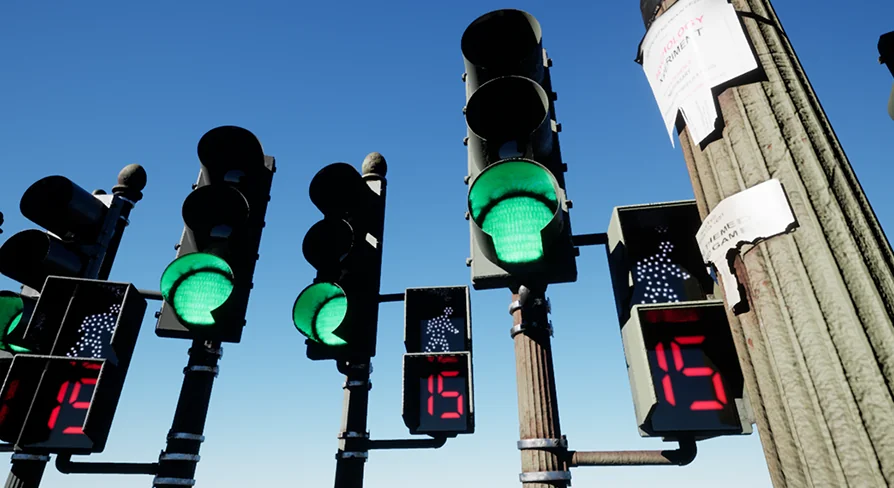
The pack is not just a stack of static light poles. Each signal behaves like the real thing. The crosswalk countdown is fully functional, updating in real time as the signal cycle advances. That makes it easy to create a pedestrian crossing that feels lived-in: set up the intersection, place the signals, and the countdown numbers flick down while the amber and red lights hold. For background traffic in a game or a street scene in a film, this level of behavior sells the moment.
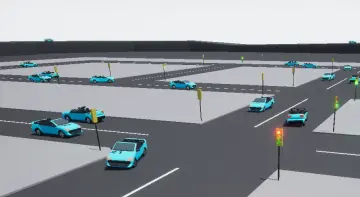
Because the signals are designed around an intersection layout, you can combine them to build anything from a simple two-lane road crossing to a full four-way junction. That the pack is meant for creating an intersection or pedestrian crosswalk, and the animated countdown is the piece that ties the crossing together visually. Without it, a pedestrian crossing would be just painted lines and a static signal. With it, the space becomes a place where traffic actually stops and waits.
Realistic Detail, Unique Textures for Every Signal
Instead of reusing the same worn texture across all fourteen lights, the pack gives every signal its own detailed texturing based on real-life weathering. Some housing might show sun-faded paint, others might have grime collecting around the visors, and the lens covers might carry different levels of haze or surface marks depending on the unit. This variation matters when a street scene needs to look organic rather than assembled from identical store-bought assets.
The realistic detail also extends to the animation itself. The pack as fully animated in realistic detail, meaning transitions between green, amber, and red follow the timing behavior you expect from a USA traffic signal. There is no sudden snapping between colors; the lights turn on and off in a way that reads naturally at a distance. Combined with the varied weathering, the pack avoids the sterile look that plagues many environment asset packs and instead gives production teams a set of signals that already look like they have been on a city corner for years.
Master Material: Set Green, Amber, and Red Durations
The animation is driven entirely by animated materials, which keeps the system lightweight and easy to adjust. At the center is a master material that lets you specify exactly how long the green, amber, and red phases stay active. Instead of digging through animation timelines, you can adjust the duration of each color from the material parameters, then let the signal run on its own.
This is particularly useful for crosswalk timing. You can make the green longer for a busy arterial street, shorten the amber for a school zone, or lengthen the red when the crosswalk needs more time for pedestrians. The master material also serves as the control surface for the countdown syncing, so the number display reacts to the same time settings. For previs or postvis, this means you can fine-tune the intersection rhythm in seconds without re-exporting or rebuilding the assets.
Ready for Games, Film, TV, Previs, Postvis, and Modular Builds
The pack’s intended use is broad. Games, film, and TV as target mediums, along with previs and postvis. Because the signals are fully animated and ready to go, they fit directly into a game level for real-time play or into a film shot as background street dressing. In previs, the ability to control the green/amber/red durations helps block out action sequences that depend on traffic timing. In postvis, these animated signals can be placed over plates to match the flow of traffic even if the original location had none.
The pack also works as a building block in a more complex system. The phrase “building block” is important: these are not just isolated props. You can wire them into a larger traffic management setup, interface with other systems, or scatter them across a city map where the materials are customized per instance. The pack is also noted as compatible with Burning Wood 26 Customizable Fire Pack, which means you can place a burned-out vehicle under a signal or add fire effects to a crash scene without worrying about conflicting material systems. That integration opens the door to street drama—ambient fires, vehicle accidents, or post-apocalyptic urban scenes—while the traffic signals keep cycling as they would in real life.
For teams evaluating the asset, the concrete takeaway is this: the traffic lights are not static decoration. They come with a working countdown, unique weathered textures, and a master material that puts timing control in the hands of the artist. Whether you are building a playable intersection, dressing a film set, or assembling a modular city block, Traffic Lights Animated 14 Pack USA Stop light City Gives you the animated infrastructure your scene needs, without the headache of rigging the lights yourself.
 Vehicles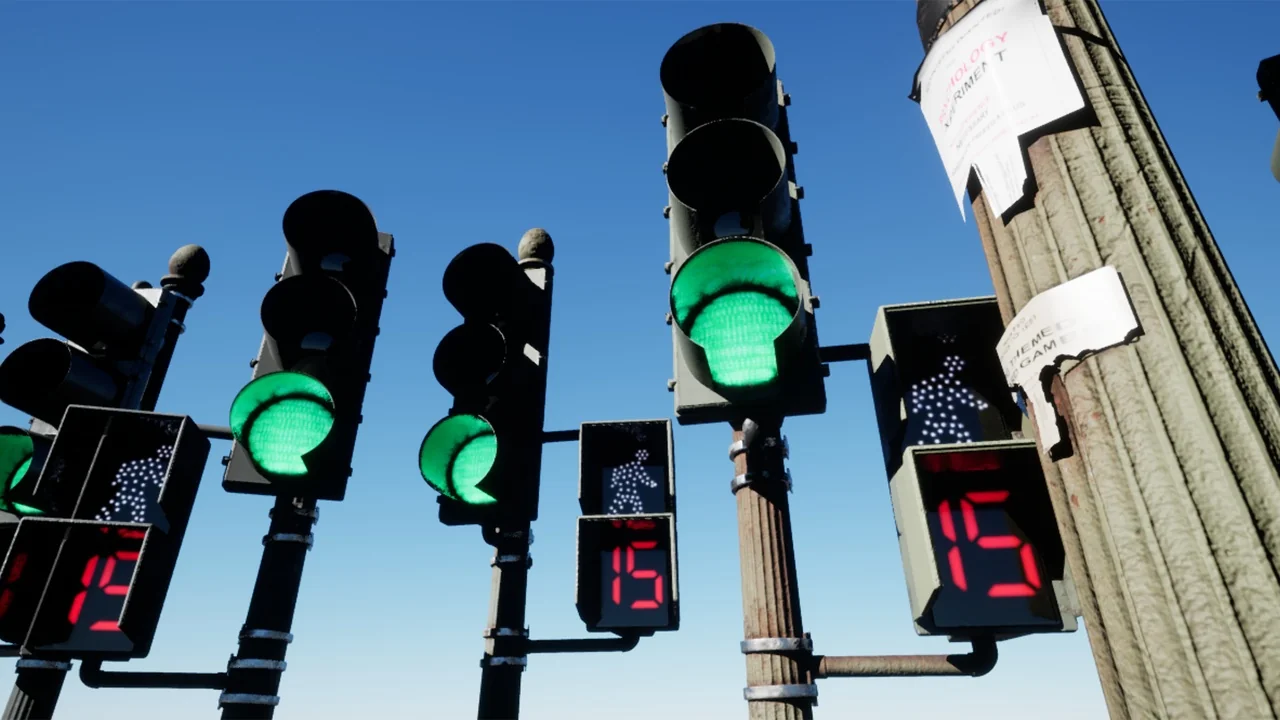
 Vehicles
 Vehicles
 Vehicles