"6f9bd6df1f44a86f"{"id":"1000879","slug":"sci-fi-gunship","title":"Sci-fi Gunship","category":"Vehicles \u0026 Transportation","engine":"4.26+,5.0+","assetVersion":"","engineVersion":"Engine Version: 4.26+,5.0+","tag":"Vehicles","accent":"blue","visual":"mech","summary":"High-detail sci-fi gunship with LODs, physics-based pawn movement, animated wing and minigun meshes, configurable camo materials, and impact hit effects for Unr","platform":"Unreal Engine","indexPolicy":"index","publishedAt":"2026-08-05T15:20:27.102Z","updatedAt":"2026-08-05T15:20:27.102Z","sourceNotes":[],"fileContents":[],"compatibility":["Unreal Engine","Engine Version: 4.26+,5.0+"],"featuredImage":{"alt":"Sci-fi Gunship","src":"/wp-content/uploads/published/2026/08/938bcc8e05ed-0adad982-6469-4b03-8e13-13dc6cb9648c-837211f26c.webp"},"hasDownloadLink":true,"downloads":1,"terms":[{"taxonomy":"category","slug":"vehicles-and-transportation","name":"Vehicles \u0026 Transportation"}],"galleryImages":[{"src":"/wp-content/uploads/published/2026/08/abc4360a4efa-fabe411e-5f25-4ec0-aec5-346dcc9e315d-8b2ee1e83a.webp","alt":"Sci-fi Gunship"},{"src":"/wp-content/uploads/published/2026/08/9a58bae73f20-29f1b671-01eb-440d-800c-e5fcaf7fff78-b57620f84e.webp","alt":"Sci-fi Gunship"},{"src":"/wp-content/uploads/published/2026/08/a31b4b6f1ec2-914a7d5f-a62d-45a6-89f0-f5ed58754318-d7b8e289f2.webp","alt":"Sci-fi Gunship"},{"src":"/wp-content/uploads/published/2026/08/0f57d69ae1d3-3c090b9b-c0f8-4c6c-854c-79a873ad0822-d0191e3e9c.webp","alt":"Sci-fi Gunship"},{"src":"/wp-content/uploads/published/2026/08/a1645135285b-1fc2acf2-dc50-4dca-b74b-e137081533be-228d423382.webp","alt":"Sci-fi Gunship"},{"src":"/wp-content/uploads/published/2026/08/ad4dee3d95f0-bcc43c37-c940-4797-b094-9d082426ff93-8158ca2216.webp","alt":"Sci-fi Gunship"},{"src":"/wp-content/uploads/published/2026/08/68980dc63c60-47fb70e8-6d35-444b-b1d0-fd149aebd210-49a6e16e2d.webp","alt":"Sci-fi Gunship"},{"src":"/wp-content/uploads/published/2026/08/f2527fd65f4c-9b91607b-be45-4aa3-8e93-fb286f49c534-b8c02994a4.webp","alt":"Sci-fi Gunship"},{"src":"/wp-content/uploads/published/2026/08/8e60d599a315-81b8369b-47b8-476e-bb8a-dd16a0c04549-ad79dfbf83.webp","alt":"Sci-fi Gunship"},{"src":"/wp-content/uploads/published/2026/08/90d14036dd7e-5ab5b950-9897-41c2-b0cd-6ffe370d4db8-f78e9f398d.webp","alt":"Sci-fi Gunship"}],"accessPanel":{"kind":"resource","title":"Download this resource","eyebrow":"Free Download","message":"Log in or create a free account to start your download.","fileName":"Content.7z","safetyNote":"Resources are manually reviewed before listing to improve quality and reduce obvious risks.","actionLabel":"Download Free","resourceType":"Resource archive"},"contentHtml":"\u003cp\u003eThe \u003cem\u003eSci-Fi Gunship\u003c/em\u003e is a high-detail vehicle package aimed at Unreal Engine projects that need a flying military platform with gameplay logic already in place. The model includes LODs, a \u003ccode\u003ePawn\u003c/code\u003e Class with physics-based movement, and a set of Skeletal Meshes that give the vehicle a reactive, mechanical feel. Everything from the wings to the antenna is treated as a moving component, so the gunship reads as a live machine on screen rather than a static prop.\u003c/p\u003e\n\n\u003ch2\u003eSkeletal Mesh Moving Elements\u003c/h2\u003e\n\n\u003cp\u003eWhat stands out in this package is how much of the model is shaped by moving Skeletal Meshes. The wings are driven by animations and an Aim Offset, meaning they react to the direction the \u003ccode\u003ePawn\u003c/code\u003e is looking or aiming. The minigun attachment is rigged with a physics-simulated swinging gun belt, so the belt follows the motion of the gun instead of staying rigid. The scanner is rigged as well, and it cycles through idle animations while the \u003ccode\u003ePawn\u003c/code\u003e is not possessed. The antenna swings in response to movement, adding a subtle physical touch to the ship's silhouette.\u003c/p\u003e\n\n\u003cp\u003eAll of these elements are also imported as Static Meshes. For scenes where the gunship itself should exist as a non-interactive set piece, the animated components can be swapped for simpler static versions. That dual setup keeps the model useful both in gameplay and in Cinematics or Level decoration.\u003c/p\u003e\n\n\u003ch2\u003ePawn Blueprint and Physics-Based Movement\u003c/h2\u003e\n\n\u003cp\u003eThe mechanics are concentrated inside the \u003ccode\u003ePawn\u003c/code\u003e Blueprint, which is what makes the possession model clean and direct. The vehicle can be possessed and unpossessed easily, which suits games where the player takes control of the gunship temporarily or where the same ship is shared between multiple \u003ccode\u003eActors\u003c/code\u003e. The physics-based movement setup is part of that Blueprint, so the flight behavior is tied to the \u003ccode\u003ePawn\u003c/code\u003e's own physics simulation rather than being split across unrelated systems.\u003c/p\u003e\n\n\u003cp\u003eThat arrangement also makes it straightforward to hook into a custom character or vehicle flow. Because the movement and animation logic are already in the \u003ccode\u003ePawn\u003c/code\u003e, developers can focus on mission design, AI, or player interaction without having to rebuild the core handling.\u003c/p\u003e\n\n\u003ch2\u003eConfigurable Camo Materials and Clean Color Overlay\u003c/h2\u003e\n\n\u003cp\u003eThe Materials are set up for quick visual variation. The camo Texture can be switched to any of the Textures included in the project, or replaced with a Texture you bring in yourself. This opens up custom military paint schemes without touching the Material network beneath. There is also an option to remove the camo entirely and leave a clean color, which is configured through a color overlay. That gives a plain, uniform surface for studio shots, team color identity, or a neutral base for further Material work.\u003c/p\u003e\n\n\u003cp\u003eBecause the Material is configurable from 1 single point, the same gunship model can be reused across different factions, environments, or art directions.\u003c/p\u003e\n\n\u003ch2\u003eHit Effects and Impact Response\u003c/h2\u003e\n\n\u003cp\u003eThe gunship plays basic hit effects from the Unreal Engine Starter Content when it takes an impact. These effects are triggered during normal damage events, so the vehicle has a visual response to being shot or colliding with something. The use of Starter Content keeps the package accessible, and it leaves room to swap in custom Visual Effects (VFX) without changing the underlying behavior.\u003c/p\u003e\n\n\u003ch2\u003eAxis Mappings for Custom Project Input\u003c/h2\u003e\n\n\u003cp\u003eFor the \u003ccode\u003ePawn\u003c/code\u003e to respond to player input in a custom project, the control axis mappings need to be set up manually. The package requires several axis mappings to be defined under \u003ccode\u003eProject Settings \u003e Input \u003e Bindings\u003c/code\u003e: \u003ccode\u003eMoveForward\u003c/code\u003e, \u003ccode\u003eMoveRight\u003c/code\u003e, \u003ccode\u003eTurn\u003c/code\u003e, \u003ccode\u003eLookUp\u003c/code\u003e, \u003ccode\u003eTurnRate\u003c/code\u003e, and \u003ccode\u003eLookUpRate\u003c/code\u003e. The \u003ccode\u003eTurn\u003c/code\u003e and \u003ccode\u003eLookUp\u003c/code\u003e entries are meant for mouse input, while \u003ccode\u003eTurnRate\u003c/code\u003e and \u003ccode\u003eLookUpRate\u003c/code\u003e handle gamepad input.\u003c/p\u003e\n\n\u003cp\u003eThe setup example shows how to bind the \u003ccode\u003eMoveForward\u003c/code\u003e axis. A \u003ccode\u003eW\u003c/code\u003e key should be added with a scale of \u003ccode\u003e1\u003c/code\u003e and an \u003ccode\u003eS\u003c/code\u003e key with a scale of \u003ccode\u003e-1\u003c/code\u003e for keyboard support. For gamepad support, the left thumbstick Y-axis is added with a scale of \u003ccode\u003e1\u003c/code\u003e. Similar bindings are needed for the other axis names. Once these mappings are in place, the existing \u003ccode\u003ePawn\u003c/code\u003e Blueprint can read the input and drive the physics-based movement.\u003c/p\u003e\n\n\u003cp\u003eThis configuration step is a common part of working with Blueprint-driven vehicles in a fresh Unreal Engine project, and the package lists the exact axis names to make the process clear.\u003c/p\u003e\n\n\u003ch2\u003eFlying Military and Sci-Fi Production Fit\u003c/h2\u003e\n\n\u003cp\u003eGiven the tag set that comes with the package, the gunship is aimed at \u003cem\u003eMachine\u003c/em\u003e, \u003cem\u003eVehicle\u003c/em\u003e, \u003cem\u003eArmy\u003c/em\u003e, \u003cem\u003eFlying\u003c/em\u003e, \u003cem\u003eSci-Fi\u003c/em\u003e, \u003cem\u003eMilitary\u003c/em\u003e, and \u003cem\u003eBlueprint-Driven\u003c/em\u003e work. Its combination of animated skeletal components and a possession-ready \u003ccode\u003ePawn\u003c/code\u003e makes it a strong fit for playable vehicles in shooter Levels, background aircraft in Cutscenes, or dynamic props in sci-fi environments.\u003c/p\u003e\n\n\u003cp\u003eDevelopers who need a ready-to-fly gunship with visible mechanical motion and configurable paint will find the setup covers both art and logic in 1 package.\u003c/p\u003e\n\n\u003ch2\u003eContinue Browsing Similar Packs\u003c/h2\u003e\n\u003cul\u003e\n\u003cli\u003e\u003ca href=\"https://3dcghub.com/sci-fi-aircraft/\" rel=\"noopener noreferrer\"\u003eSci Fi Aircraft\u003c/a\u003e\u003c/li\u003e\n\u003cli\u003e\u003ca href=\"https://3dcghub.com/dystopian-tank/\" rel=\"noopener noreferrer\"\u003eDystopian Tank\u003c/a\u003e\u003c/li\u003e\n\u003cli\u003e\u003ca href=\"https://3dcghub.com/scifi-grasshopper-mono-bike/\" rel=\"noopener noreferrer\"\u003eSciFi Grasshopper Mono Bike\u003c/a\u003e\u003c/li\u003e\n\u003cli\u003e\u003ca href=\"https://3dcghub.com/hoverbike-system/\" rel=\"noopener noreferrer\"\u003eHoverbike System\u003c/a\u003e\u003c/li\u003e\n\u003cli\u003e\u003ca href=\"https://3dcghub.com/stellar-phoenix-shuttle-spaceship-with-controller/\" rel=\"noopener noreferrer\"\u003eStellar Phoenix Shuttle - Spaceship With Controller\u003c/a\u003e\u003c/li\u003e\n\u003c/ul\u003e","contentTextLength":5051,"navigation":{"current":1485,"total":4218,"previous":{"id":"25019","slug":"shader-compilation-screen-remove-shader-stutters","title":"Shader Compilation Screen - remove shader stutters","category":"Engine Tools","platform":"Unreal Engine","updatedAt":"2026-08-05T15:22:48.242Z"},"next":{"id":"1000878","slug":"rooibos-walking-sim","title":"Rooibos Walking Sim","category":"Engine Tools","platform":"Unreal Engine","updatedAt":"2026-08-05T15:20:19.122Z"}},"relatedResources":[{"id":"5124","slug":"dystopian-tank","title":"Dystopian Tank","category":"Vehicles \u0026 Transportation","engine":"4.26+,5.0+","assetVersion":"Engine version: 4.26+,5.0+","engineVersion":"4.18","tag":"Vehicles","accent":"blue","visual":"luts","summary":"Upgrade your game with this Dystopian Tank 3D model. Features 4K PBR textures, 30+ animations, and a detailed design perfect for sci-fi and fantasy projects.","platform":"Unreal Engine","indexPolicy":"index","publishedAt":"2026-02-14T17:46:57.000Z","updatedAt":"2026-04-19T15:57:01.000Z","sourceNotes":[],"fileContents":[],"compatibility":["Unreal Engine","Engine version: 4.26+,5.0+"],"featuredImage":{"alt":"Dystopian Tank","src":"https://3dcghub.com/wp-content/uploads/2026/02/d37ea551-c53b-457b-8c0e-24b2307ab118.webp"},"hasDownloadLink":true,"downloads":0},{"id":"5189","slug":"sci-fi-aircraft","title":"Sci Fi Aircraft","category":"Vehicles \u0026 Transportation","engine":"4.26+,5.0+","assetVersion":"Engine version: 4.26+,5.0+","engineVersion":"4.18","tag":"Vehicles","accent":"blue","visual":"animation","summary":"Enhance your sci-fi game with this high-detail aircraft asset. Features 4K textures, LODs, and customizable materials for Unreal Engine game developers.","platform":"Unreal Engine","indexPolicy":"index","publishedAt":"2026-02-14T18:08:10.000Z","updatedAt":"2026-04-19T15:57:00.000Z","sourceNotes":[],"fileContents":[],"compatibility":["Unreal Engine","Engine version: 4.26+,5.0+"],"featuredImage":{"alt":"Sci Fi Aircraft","src":"https://3dcghub.com/wp-content/uploads/2026/02/cf154877-d15b-4aab-a3db-b8f154217f22.webp"},"hasDownloadLink":true,"downloads":0},{"id":"5223","slug":"scifi-grasshopper-mono-bike","title":"SciFi Grasshopper Mono Bike","category":"Vehicles \u0026 Transportation","engine":"4.27,5.0+","assetVersion":"Engine version: 4.27,5.0+","engineVersion":"4.26","tag":"Vehicles","accent":"blue","visual":"city","summary":"Enhance your game with the SciFi Grasshopper Mono Bike. Features drivable blueprints, high-res textures, and customizable materials for Unreal Engine.","platform":"Unreal Engine","indexPolicy":"index","publishedAt":"2026-02-14T18:16:43.000Z","updatedAt":"2026-04-19T15:56:59.000Z","sourceNotes":[],"fileContents":[],"compatibility":["Unreal Engine","Engine version: 4.27,5.0+"],"featuredImage":{"alt":"SciFi Grasshopper Mono Bike","src":"https://3dcghub.com/wp-content/uploads/2026/02/08ab6918-9a2f-467d-b55a-ab9e65dd1194.webp"},"hasDownloadLink":true,"downloads":0}]}
Vehicles
Sci-fi Gunship
High-detail sci-fi gunship with LODs, physics-based pawn movement, animated wing and minigun meshes, configurable camo materials, and impact hit effects for Unr
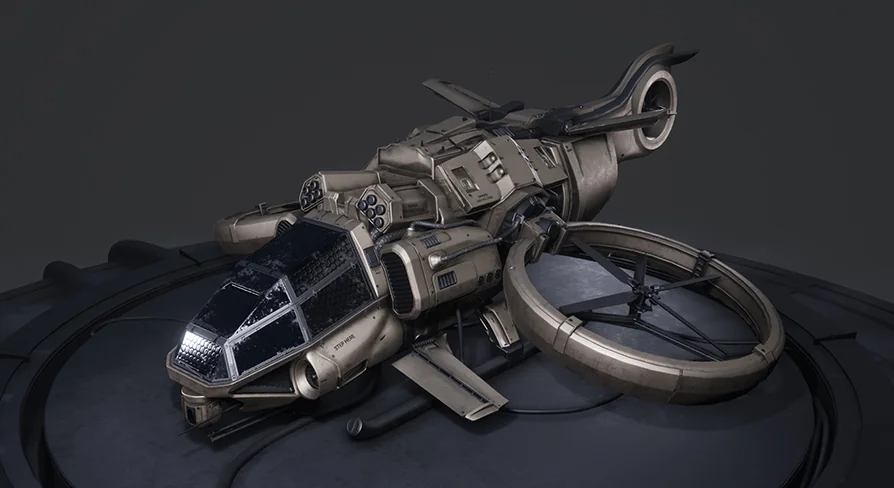
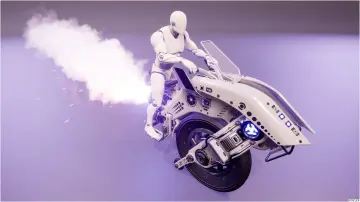
The Sci-Fi Gunship is a high-detail vehicle package aimed at Unreal Engine projects that need a flying military platform with gameplay logic already in place. The model includes LODs, a Pawn Class with physics-based movement, and a set of Skeletal Meshes that give the vehicle a reactive, mechanical feel. Everything from the wings to the antenna is treated as a moving component, so the gunship reads as a live machine on screen rather than a static prop.
Skeletal Mesh Moving Elements
What stands out in this package is how much of the model is shaped by moving Skeletal Meshes. The wings are driven by animations and an Aim Offset, meaning they react to the direction the Pawn is looking or aiming. The minigun attachment is rigged with a physics-simulated swinging gun belt, so the belt follows the motion of the gun instead of staying rigid. The scanner is rigged as well, and it cycles through idle animations while the Pawn is not possessed. The antenna swings in response to movement, adding a subtle physical touch to the ship's silhouette.
All of these elements are also imported as Static Meshes. For scenes where the gunship itself should exist as a non-interactive set piece, the animated components can be swapped for simpler static versions. That dual setup keeps the model useful both in gameplay and in Cinematics or Level decoration.
Pawn Blueprint and Physics-Based Movement
The mechanics are concentrated inside the Pawn Blueprint, which is what makes the possession model clean and direct. The vehicle can be possessed and unpossessed easily, which suits games where the player takes control of the gunship temporarily or where the same ship is shared between multiple Actors. The physics-based movement setup is part of that Blueprint, so the flight behavior is tied to the Pawn's own physics simulation rather than being split across unrelated systems.
That arrangement also makes it straightforward to hook into a custom character or vehicle flow. Because the movement and animation logic are already in the Pawn, developers can focus on mission design, AI, or player interaction without having to rebuild the core handling.
Configurable Camo Materials and Clean Color Overlay
The Materials are set up for quick visual variation. The camo Texture can be switched to any of the Textures included in the project, or replaced with a Texture you bring in yourself. This opens up custom military paint schemes without touching the Material network beneath. There is also an option to remove the camo entirely and leave a clean color, which is configured through a color overlay. That gives a plain, uniform surface for studio shots, team color identity, or a neutral base for further Material work.
Because the Material is configurable from 1 single point, the same gunship model can be reused across different factions, environments, or art directions.
Hit Effects and Impact Response
The gunship plays basic hit effects from the Unreal Engine Starter Content when it takes an impact. These effects are triggered during normal damage events, so the vehicle has a visual response to being shot or colliding with something. The use of Starter Content keeps the package accessible, and it leaves room to swap in custom Visual Effects (VFX) without changing the underlying behavior.
Axis Mappings for Custom Project Input
For the Pawn to respond to player input in a custom project, the control axis mappings need to be set up manually. The package requires several axis mappings to be defined under Project Settings > Input > Bindings: MoveForward, MoveRight, Turn, LookUp, TurnRate, and LookUpRate. The Turn and LookUp entries are meant for mouse input, while TurnRate and LookUpRate handle gamepad input.
The setup example shows how to bind the MoveForward axis. A W key should be added with a scale of 1 and an S key with a scale of -1 for keyboard support. For gamepad support, the left thumbstick Y-axis is added with a scale of 1. Similar bindings are needed for the other axis names. Once these mappings are in place, the existing Pawn Blueprint can read the input and drive the physics-based movement.
This configuration step is a common part of working with Blueprint-driven vehicles in a fresh Unreal Engine project, and the package lists the exact axis names to make the process clear.
Flying Military and Sci-Fi Production Fit
Given the tag set that comes with the package, the gunship is aimed at Machine, Vehicle, Army, Flying, Sci-Fi, Military, and Blueprint-Driven work. Its combination of animated skeletal components and a possession-ready Pawn makes it a strong fit for playable vehicles in shooter Levels, background aircraft in Cutscenes, or dynamic props in sci-fi environments.
Developers who need a ready-to-fly gunship with visible mechanical motion and configurable paint will find the setup covers both art and logic in 1 package.
 Vehicles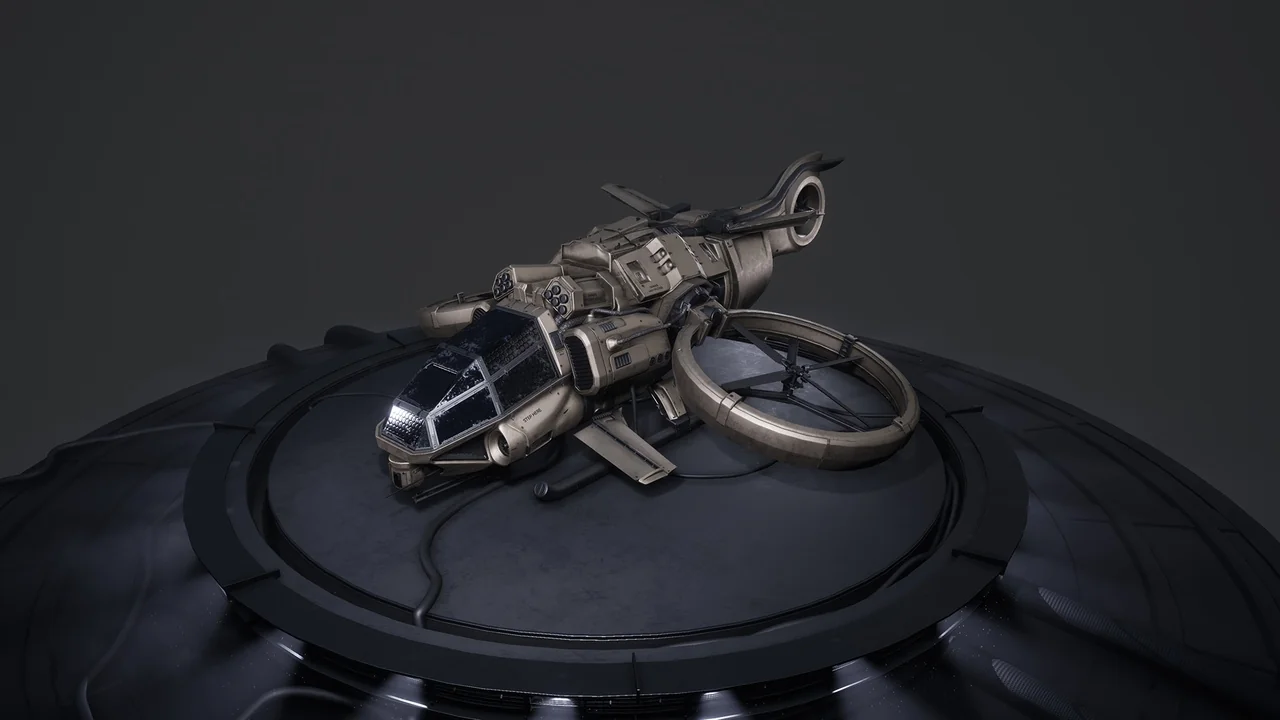
 Vehicles
 Vehicles
 Vehicles