"6f9bd6df1f44a86f"{"id":"1000878","slug":"rooibos-walking-sim","title":"Rooibos Walking Sim","category":"Engine Tools","engine":"5.6","assetVersion":"Asset Version: 1.2","engineVersion":"Engine Version: 5.6","tag":"Engine Tools","accent":"blue","visual":"mech","summary":"Rooibos Walking Sim adds object interaction, inspection, and audio feedback for first-person adventure games in Unreal Engine, with full example content for beg","platform":"Unreal Engine","indexPolicy":"index","publishedAt":"2026-08-05T15:16:28.091Z","updatedAt":"2026-08-05T15:20:19.122Z","sourceNotes":[],"fileContents":[],"compatibility":["Unreal Engine","Asset Version: 1.2","Engine Version: 5.6"],"featuredImage":{"alt":"Rooibos Walking Sim","src":"/wp-content/uploads/published/2026/08/5b541d33ea0f-a15b6211-becd-4aee-9261-43ea30aca1c7-fe7b50c5d2.webp"},"hasDownloadLink":true,"downloads":0,"terms":[{"taxonomy":"category","slug":"engine-tools-tools-and-plugins","name":"Engine Tools"}],"galleryImages":[{"src":"/wp-content/uploads/published/2026/08/088ff56185b2-76b5e527-4206-49bc-b666-cb8e4222fb07-c77a7ab496.webp","alt":"Rooibos Walking Sim"},{"src":"/wp-content/uploads/published/2026/08/04e3bb24ca8b-396c51f7-d83a-44ea-8b03-3ec09c8c9fda-d91a3c5af6.webp","alt":"Rooibos Walking Sim"},{"src":"/wp-content/uploads/published/2026/08/fb503be162b6-38a8f6fb-ed70-40a3-9d81-a6a3114a6e30-24a06adb6f.webp","alt":"Rooibos Walking Sim"},{"src":"/wp-content/uploads/published/2026/08/48683e34fd19-ce272c1b-b151-4c23-9441-55eb4c303dd6-2e54a39425.webp","alt":"Rooibos Walking Sim"},{"src":"/wp-content/uploads/published/2026/08/bf0543f70338-9be079c2-944e-48b4-aacf-ec135d31cda6-43b86ca3f5.webp","alt":"Rooibos Walking Sim"},{"src":"/wp-content/uploads/published/2026/08/8524504cb768-578caa1c-d908-4bd4-a7c6-121dbd2a0f34-1f6ef978f3.webp","alt":"Rooibos Walking Sim"}],"accessPanel":{"kind":"resource","title":"Download this resource","eyebrow":"Free Download","message":"Log in or create a free account to start your download.","fileName":"5.6.7z","safetyNote":"Resources are manually reviewed before listing to improve quality and reduce obvious risks.","actionLabel":"Download Free","resourceType":"Resource archive"},"contentHtml":"\u003cp\u003eImagine building a First-Person adventure where the player moves through a quiet environment, spots a mysterious object, and interacts with it. The camera pulls the object into view, the player inspects it, and an audio cue plays to deepen the moment. That interaction loop sits at the heart of many walking sims and narrative exploration games. The \u003cem\u003eRooibos Walking Sim\u003c/em\u003e plugin for Unreal Engine supplies the starter systems for exactly this kind of project, letting you place the focus on Level Design and story rather than wiring up the basic interaction plumbing.\u003c/p\u003e\n\n\u003ch2\u003eThe Core Interaction Loop\u003c/h2\u003e\n\n\u003cp\u003eThe plugin's primary functions are straightforward and immediately useful. Interact with objects, inspect them in front of the camera, and play audio when interacting. These 3 verbs carry a lot of weight in a First-Person adventure. Being able to pick up and spin an object for inspection is a common request in puzzle or narrative games. Playing a sound effect at the same time gives instant feedback to the player. While other asset packs may offer similar features, this plugin positions itself as a foundation that you can build on.\u003c/p\u003e\n\n\u003cp\u003eIn practice, you can place interactive objects in your Level, define what happens when the player approaches and activates them, and rely on the plugin to handle the camera alignment and audio playback. The source doesn't specify whether inspection is a separate mode or a child of a larger system, but the core capability is clear: you can look at items in close-up and hear audio on interaction.\u003c/p\u003e\n\n\u003ch2\u003eExample Content That Gets You Moving\u003c/h2\u003e\n\n\u003cp\u003eTo help new developers understand how the plugin works, it includes a set of example content. There's an example \u003ccode\u003eGameMode\u003c/code\u003e, which provides the gameplay rules, and within that \u003ccode\u003eGameMode\u003c/code\u003e there is an example \u003ccode\u003ePlayerController\u003c/code\u003e, an example \u003ccode\u003ePawn\u003c/code\u003e, and an example \u003ccode\u003eHUD\u003c/code\u003e. The package also includes an example Map that showcases all functionality, plus example \u003ccode\u003eWidgets\u003c/code\u003e. This is a practical way to learn: load the Map, play through it, and see how the interaction systems are meant to work.\u003c/p\u003e\n\n\u003cul\u003e\n \u003cli\u003eExample \u003ccode\u003eGameMode\u003c/code\u003e with example \u003ccode\u003ePlayerController\u003c/code\u003e\u003c/li\u003e\n \u003cli\u003eExample \u003ccode\u003ePawn\u003c/code\u003e\u003c/li\u003e\n \u003cli\u003eExample \u003ccode\u003eHUD\u003c/code\u003e\u003c/li\u003e\n \u003cli\u003eExample Map that showcases all functionality\u003c/li\u003e\n \u003cli\u003eExample \u003ccode\u003eWidgets\u003c/code\u003e\u003c/li\u003e\n\u003c/ul\u003e\n\n\u003cp\u003eFor a beginner, these examples are valuable because they show a complete, working setup rather than a collection of disconnected scripts. You can analyze each component, see how they connect, and then use that template as a starting point for your own project. The fact that the Map showcases all functionality means you don't have to guess what the plugin can do—you can experience it directly.\u003c/p\u003e\n\n\u003ch2\u003eBuilt to Be Reshaped\u003c/h2\u003e\n\n\u003cp\u003eThe plugin is described as highly customizable and extendable, both in C++ and \u003ccode\u003eBlueprints\u003c/code\u003e. That's a significant advantage for a walking sim or adventure game, since every project has its own interaction rules. You might want a more elaborate inspection system, or different audio triggers, or a unique \u003ccode\u003eHUD\u003c/code\u003e. Because the plugin is not a fixed solution, you can take the existing code and work it into your own logic. The option to extend via C++ offers deeper control, while \u003ccode\u003eBlueprints\u003c/code\u003e provide a visual approach for developers who prefer not to write code.\u003c/p\u003e\n\n\u003cp\u003eThis customizability also makes the plugin easier to integrate into an existing project. You don't have to build your game from scratch around the plugin; you can drop it into a current project and adapt the interaction systems to fit. The source explicitly states it is easily integrated into an existing project, which is a reassuring promise for developers who already have a project structure in place.\u003c/p\u003e\n\n\u003ch2\u003eDocumentation and Community Support\u003c/h2\u003e\n\n\u003cp\u003eA new developer working with interaction systems benefits from clear instructions. The plugin's documentation is written specifically for beginning devs, meaning it doesn't assume you already know every Unreal Engine convention. In addition to the written documentation, there's a Discord server for support and documentation. That gives you a place to ask questions, get help from other users, and perhaps share how you're using the plugin.\u003c/p\u003e\n\n\u003cp\u003eThe emphasis on documentation and support shows that the plugin's creator wants to reduce the learning curve. Instead of fumbling through a complex system, you can follow the supplied instructions and rely on the community when you hit a wall.\u003c/p\u003e\n\n\u003ch2\u003eWhat the Plugin Doesn't Include\u003c/h2\u003e\n\n\u003cp\u003eIt's also important to note that assets shown in the pictures above or in the showcase video are not included in the plugin. The example content demonstrates functionality, not finished art. This means the plugin provides the systems—the scripts, \u003ccode\u003eWidgets\u003c/code\u003e, and setup—but not the visual props, environments, or models you see in promotional material. You'll need to bring your own art assets, or use the example content as a functional placeholder while you develop your own art style.\u003c/p\u003e\n\n\u003cp\u003eThis separation is common for gameplay-focused plugins. You aren't paying for a set of models; you're paying for the interaction logic and game framework. It also means you can focus on creating your own unique look without being tethered to someone else's art direction.\u003c/p\u003e\n\n\u003cp\u003eCompatibility note: The Editor notes indicate compatibility with \u003cem\u003eRooibos Outlines\u003c/em\u003e. That could be a separate plugin or tool from the same developer, but it's a useful detail to keep in mind if you're already using that asset. The available details don't elaborate further, so we'll simply note that compatibility exists.\u003c/p\u003e\n\n\u003cp\u003e\u003cem\u003eRooibos Walking Sim\u003c/em\u003e is a practical starting point for any First-Person adventure or walking sim project. Its interaction features knock into the core of exploration games, while the example content, documentation, and customizability make it approachable for developers at different skill levels. For a team looking to prototype a narrative game without writing interaction systems from zero, this plugin offers a solid springboard. Keep in mind you'll still need to create or source your own visual assets, but the underlying gameplay logic is ready to go.\u003c/p\u003e\n\n\u003ch2\u003eExplore Similar Assets\u003c/h2\u003e\n\u003cul\u003e\n\u003cli\u003e\u003ca href=\"https://3dcghub.com/rooibos-outlines/\" rel=\"noopener noreferrer\"\u003eRooibos Outlines\u003c/a\u003e\u003c/li\u003e\n\u003cli\u003e\u003ca href=\"https://3dcghub.com/rooibos-save-system/\" rel=\"noopener noreferrer\"\u003eRooibos Save System\u003c/a\u003e\u003c/li\u003e\n\u003cli\u003e\u003ca href=\"https://3dcghub.com/city-sim-animation-pack/\" rel=\"noopener noreferrer\"\u003eCiTY SIM ANIMATION PACK\u003c/a\u003e\u003c/li\u003e\n\u003cli\u003e\u003ca href=\"https://3dcghub.com/simple-procedural-walk/\" rel=\"noopener noreferrer\"\u003eSimple Procedural Walk\u003c/a\u003e\u003c/li\u003e\n\u003cli\u003e\u003ca href=\"https://3dcghub.com/neo-kinect/\" rel=\"noopener noreferrer\"\u003eNeo Kinect\u003c/a\u003e\u003c/li\u003e\n\u003c/ul\u003e","contentTextLength":6065,"navigation":{"current":1486,"total":4218,"previous":{"id":"1000879","slug":"sci-fi-gunship","title":"Sci-fi Gunship","category":"Vehicles \u0026 Transportation","platform":"Unreal Engine","updatedAt":"2026-08-05T15:20:27.102Z"},"next":{"id":"1000877","slug":"rooibos-save-system","title":"Rooibos Save System","category":"Engine Tools","platform":"Unreal Engine","updatedAt":"2026-08-05T15:14:05.930Z"}},"relatedResources":[{"id":"1000876","slug":"rooibos-outlines","title":"Rooibos Outlines","category":"Engine Tools","engine":"5.6","assetVersion":"Asset Version: 1.1","engineVersion":"Engine Version: 5.6","tag":"Engine Tools","accent":"blue","visual":"mech","summary":"Highlight any actor in Unreal Engine with one function call. Built for walking sims and interactive scenes, it adds outlines, focus, and night vision effects.","platform":"Unreal Engine","indexPolicy":"index","publishedAt":"2026-08-05T15:10:30.175Z","updatedAt":"2026-08-05T15:10:30.175Z","sourceNotes":[],"fileContents":[],"compatibility":["Unreal Engine","Asset Version: 1.1","Engine Version: 5.6"],"featuredImage":{"alt":"Rooibos Outlines","src":"/wp-content/uploads/published/2026/08/b4192266aa54-cb98543d-ccfe-4e06-ac82-9a5acc11be84-d7157b6ce5.webp"},"hasDownloadLink":true,"downloads":0},{"id":"1000877","slug":"rooibos-save-system","title":"Rooibos Save System","category":"Engine Tools","engine":"5.6","assetVersion":"Asset Version: 1.8","engineVersion":"Engine Version: 5.6","tag":"Engine Tools","accent":"blue","visual":"mech","summary":"Rooibos Save System saves any actor with the save interface, tracks progress across maps, handles streaming, world partitions, works from C++ or Blueprints.","platform":"Unreal Engine","indexPolicy":"index","publishedAt":"2026-08-05T15:14:05.930Z","updatedAt":"2026-08-05T15:14:05.930Z","sourceNotes":[],"fileContents":[],"compatibility":["Unreal Engine","Asset Version: 1.8","Engine Version: 5.6"],"featuredImage":{"alt":"Rooibos Save System","src":"/wp-content/uploads/published/2026/08/f1c2c0dabc35-2d9b7336-d800-478f-975d-f1acf7bb2af6-e9dcb5e6e6.webp"},"hasDownloadLink":true,"downloads":0},{"id":"27483","slug":"city-sim-animation-pack","title":"CiTY SIM ANIMATION PACK","category":"Variety","engine":"4.27,5.0+","assetVersion":"Engine version: 4.27,5.0+","engineVersion":"","tag":"Variety","accent":"blue","visual":"animation","summary":"This animation library focuses on everyday city behavior: walking, running, sitting, sleeping, bar interaction, and emotes, along with role-based emergency actions. It also includes male and female movement sets that fit citizen and service-character scenes.","platform":"Unreal Engine","indexPolicy":"index","publishedAt":"2026-04-26T06:01:51.000Z","updatedAt":"2026-04-26T06:01:52.000Z","sourceNotes":[],"fileContents":[],"compatibility":["Unreal Engine","Engine version: 4.27,5.0+"],"featuredImage":{"alt":"CiTY SIM ANIMATION PACK","src":"https://3dcghub.com/wp-content/uploads/2026/04/89cb54dc9b3e_225b779a-c1f6-4171-b9ea-1efe1f14d322.webp"},"hasDownloadLink":true,"downloads":0}]}
Engine Tools
Rooibos Walking Sim
Rooibos Walking Sim adds object interaction, inspection, and audio feedback for first-person adventure games in Unreal Engine, with full example content for beg
Imagine building a First-Person adventure where the player moves through a quiet environment, spots a mysterious object, and interacts with it. The camera pulls the object into view, the player inspects it, and an audio cue plays to deepen the moment. That interaction loop sits at the heart of many walking sims and narrative exploration games. The Rooibos Walking Sim plugin for Unreal Engine supplies the starter systems for exactly this kind of project, letting you place the focus on Level Design and story rather than wiring up the basic interaction plumbing.
The Core Interaction Loop
The plugin's primary functions are straightforward and immediately useful. Interact with objects, inspect them in front of the camera, and play audio when interacting. These 3 verbs carry a lot of weight in a First-Person adventure. Being able to pick up and spin an object for inspection is a common request in puzzle or narrative games. Playing a sound effect at the same time gives instant feedback to the player. While other asset packs may offer similar features, this plugin positions itself as a foundation that you can build on.
In practice, you can place interactive objects in your Level, define what happens when the player approaches and activates them, and rely on the plugin to handle the camera alignment and audio playback. The source doesn't specify whether inspection is a separate mode or a child of a larger system, but the core capability is clear: you can look at items in close-up and hear audio on interaction.
Example Content That Gets You Moving
To help new developers understand how the plugin works, it includes a set of example content. There's an example GameMode, which provides the gameplay rules, and within that GameMode there is an example PlayerController, an example Pawn, and an example HUD. The package also includes an example Map that showcases all functionality, plus example Widgets. This is a practical way to learn: load the Map, play through it, and see how the interaction systems are meant to work.
Example GameMode with example PlayerController
Example Pawn
Example HUD
Example Map that showcases all functionality
Example Widgets
For a beginner, these examples are valuable because they show a complete, working setup rather than a collection of disconnected scripts. You can analyze each component, see how they connect, and then use that template as a starting point for your own project. The fact that the Map showcases all functionality means you don't have to guess what the plugin can do—you can experience it directly.
Built to Be Reshaped
The plugin is described as highly customizable and extendable, both in C++ and Blueprints. That's a significant advantage for a walking sim or adventure game, since every project has its own interaction rules. You might want a more elaborate inspection system, or different audio triggers, or a unique HUD. Because the plugin is not a fixed solution, you can take the existing code and work it into your own logic. The option to extend via C++ offers deeper control, while Blueprints provide a visual approach for developers who prefer not to write code.
This customizability also makes the plugin easier to integrate into an existing project. You don't have to build your game from scratch around the plugin; you can drop it into a current project and adapt the interaction systems to fit. The source explicitly states it is easily integrated into an existing project, which is a reassuring promise for developers who already have a project structure in place.
Documentation and Community Support
A new developer working with interaction systems benefits from clear instructions. The plugin's documentation is written specifically for beginning devs, meaning it doesn't assume you already know every Unreal Engine convention. In addition to the written documentation, there's a Discord server for support and documentation. That gives you a place to ask questions, get help from other users, and perhaps share how you're using the plugin.
The emphasis on documentation and support shows that the plugin's creator wants to reduce the learning curve. Instead of fumbling through a complex system, you can follow the supplied instructions and rely on the community when you hit a wall.
What the Plugin Doesn't Include
It's also important to note that assets shown in the pictures above or in the showcase video are not included in the plugin. The example content demonstrates functionality, not finished art. This means the plugin provides the systems—the scripts, Widgets, and setup—but not the visual props, environments, or models you see in promotional material. You'll need to bring your own art assets, or use the example content as a functional placeholder while you develop your own art style.
This separation is common for gameplay-focused plugins. You aren't paying for a set of models; you're paying for the interaction logic and game framework. It also means you can focus on creating your own unique look without being tethered to someone else's art direction.
Compatibility note: The Editor notes indicate compatibility with Rooibos Outlines. That could be a separate plugin or tool from the same developer, but it's a useful detail to keep in mind if you're already using that asset. The available details don't elaborate further, so we'll simply note that compatibility exists.
Rooibos Walking Sim is a practical starting point for any First-Person adventure or walking sim project. Its interaction features knock into the core of exploration games, while the example content, documentation, and customizability make it approachable for developers at different skill levels. For a team looking to prototype a narrative game without writing interaction systems from zero, this plugin offers a solid springboard. Keep in mind you'll still need to create or source your own visual assets, but the underlying gameplay logic is ready to go.
 Engine Tools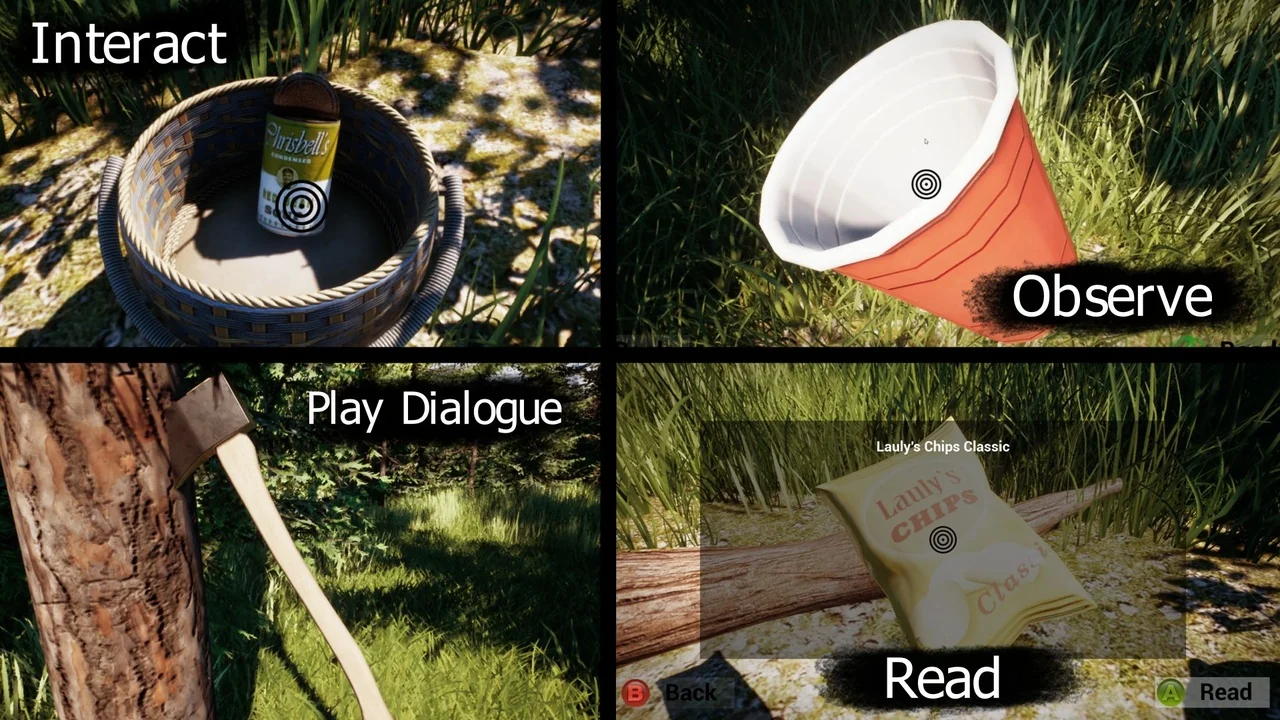
 Engine Tools
 Engine Tools
 Variety