"6f9bd6df1f44a86f"{"id":"1000857","slug":"neo-kinect","title":"Neo Kinect","category":"Engine Tools","engine":"5.6","assetVersion":"Asset Version: 1.2","engineVersion":"Engine Version: 5.6","tag":"Engine Tools","accent":"blue","visual":"mech","summary":"Neo Kinect adds Kinect v2 support to Unreal Engine with commented Blueprint nodes, C++ methods, DX12 compatibility, and six-user tracking for UE4 and UE5.","platform":"Unreal Engine","indexPolicy":"index","publishedAt":"2026-08-05T06:13:01.313Z","updatedAt":"2026-08-05T06:13:01.313Z","sourceNotes":[],"fileContents":[],"compatibility":["Unreal Engine","Asset Version: 1.2","Engine Version: 5.6"],"featuredImage":{"alt":"Neo Kinect","src":"/wp-content/uploads/published/2026/08/4fa1c9b9d816-550a1299-dd6b-4dc9-a66a-32e8bcb2c0a4-7b5dfb9c5f.webp"},"hasDownloadLink":true,"downloads":0,"terms":[{"taxonomy":"category","slug":"engine-tools-tools-and-plugins","name":"Engine Tools"}],"galleryImages":[{"src":"/wp-content/uploads/published/2026/08/d434ccf9300a-7ee4541e-dba0-460e-84c3-7b68ec82d055-ce1ebd8e60.webp","alt":"Neo Kinect"},{"src":"/wp-content/uploads/published/2026/08/2ba58103baeb-edbd02fd-c754-4505-994b-f2d11539439d-408b6259e8.webp","alt":"Neo Kinect"},{"src":"/wp-content/uploads/published/2026/08/07fd30493738-1432019d-1e3c-449e-9adf-5a85ecbced93-727f881acc.webp","alt":"Neo Kinect"},{"src":"/wp-content/uploads/published/2026/08/99991ea2629d-a1701028-cb9e-4d4f-a2cf-7fe9681286f5-7542e60fb5.webp","alt":"Neo Kinect"},{"src":"/wp-content/uploads/published/2026/08/22dc71b37d25-7b05f234-e284-4a81-a92e-f0d4c5f5c2cf-b78c11aeaa.webp","alt":"Neo Kinect"},{"src":"/wp-content/uploads/published/2026/08/15477d2696f6-4834e345-db5f-498a-88c5-9ebacecd0821-4e5de8147a.webp","alt":"Neo Kinect"},{"src":"/wp-content/uploads/published/2026/08/45e4837abd99-9ef072d2-05e6-4069-b54f-ea2c8dbb0169-d70069be3d.webp","alt":"Neo Kinect"},{"src":"/wp-content/uploads/published/2026/08/bc170a6f8aa4-89c7ffcd-0d50-4eae-9c8c-fa782344cfde-dcc0383af5.webp","alt":"Neo Kinect"}],"accessPanel":{"kind":"resource","title":"Download this resource","eyebrow":"Free Download","message":"Log in or create a free account to start your download.","fileName":"5.6.7z","safetyNote":"Resources are manually reviewed before listing to improve quality and reduce obvious risks.","actionLabel":"Download Free","resourceType":"Resource archive"},"contentHtml":"\u003cp\u003e\u003cem\u003eNeo Kinect\u003c/em\u003e brings the Kinect v2 sensor's advanced capabilities into Unreal Engine through 2 complementary paths: a set of Blueprint nodes with helpful comments, and the underlying C++ methods that can be called directly. The plugin is grouped by a single sensor that any number of Actors or Widgets can share, which keeps the workflow lean from the start.\u003c/p\u003e\n\n\u003cp\u003eThe asset runs sensor polling in its own thread. With that setup, it can track all 6 possible users, recognize their faces, and enable every frame type—color, depth, infrared, and their variations—at the same time without a noticeable drain on performance. Frames are exposed as \u003ccode\u003eTextureRenderTarget2D\u003c/code\u003e in Unreal Engine 5 (UE5), a format already compatible with Materials, UMG Widgets, and Blueprint-side pixel access functions. The UE4 version used a custom texture format for the same job.\u003c/p\u003e\n\n\u003ch2\u003eBlueprint Nodes, C++ Methods, and the Kinect v2 in Unreal Engine\u003c/h2\u003e\n\n\u003cp\u003eThe plugin's goal is to make the Kinect v2 as easy to use in Unreal as a standard input system. Blueprint nodes are commented throughout, which helps developers trace what each function does without bouncing between the Editor and documentation. For those who prefer working in code, the same functionality is available through C++ methods. This dual approach allows a project to prototype quickly in Blueprint and then move performance-sensitive paths into C++ when needed.\u003c/p\u003e\n\n\u003cp\u003eBecause the sensor is unique across the whole project, the plugin avoids a component-based pattern. Instead, it behaves like a function library: call a function from any Blueprint, including UMG Widgets, and the sensor responds. That removes the chore of dragging sensor components into every Level or Actor that needs input.\u003c/p\u003e\n\n\u003ch2\u003eQuick Start Guide and Example Projects for Both Engine Generations\u003c/h2\u003e\n\n\u003cp\u003e\u003cem\u003eNeo Kinect\u003c/em\u003e includes a Quick Start guide as a PDF file, \u003ccode\u003eNeoKinect-QuickStart.pdf\u003c/code\u003e. The same package provides separate example projects for Unreal Engine 5 and Unreal Engine 4. The UE5 project, \u003ccode\u003eNeoKinectExamples.zip\u003c/code\u003e, already adopts the newer skeleton, while the UE4 skeleton still ships in the same project. It does not yet use UE5's new demo room, so developers can focus on the skeleton change. For UE4, \u003ccode\u003eNeoKinectExamples_UE4.zip\u003c/code\u003e is the matching starting point.\u003c/p\u003e\n\n\u003cp\u003eAn updated \u003ccode\u003eAvateeringDemo\u003c/code\u003e Blueprint with joint smoothing is also provided for UE4.26 and later, and can be used to replace the asset in the example project. These starting points are especially helpful because the plugin needs calibration with a physical sensor. The Quick Start guide walks through the 1st connection and the frames that appear once the sensor is active.\u003c/p\u003e\n\n\u003ch2\u003eThe Unreal Engine 5.0 Release: DX12, Ray Tracing, and Lumen\u003c/h2\u003e\n\n\u003cp\u003eA notable milestone came with the Unreal Engine 5.0 (UE5.0) release on April 4, 2022. The plugin now returns frames as \u003ccode\u003eTextureRenderTarget2D\u003c/code\u003e when \u003ccode\u003eSetUseFrame\u003c/code\u003e is called. Previously, accessing frame textures through Widgets required a cast to a custom texture format; that format no longer exists because its customizations are unnecessary. Removing it opened the door to DX12 compatibility, so \u003cem\u003eNeo Kinect\u003c/em\u003e now works with Ray Tracing and Lumen. The release also fixed a memory leak that could appear when enabling frame types, and the codebase received many include-what-you-use improvements, cutting clutter in public headers.\u003c/p\u003e\n\n\u003ch2\u003eFrame Types, \u003ccode\u003eTextureRenderTarget2D\u003c/code\u003e, and 6-User Tracking\u003c/h2\u003e\n\n\u003cp\u003eThe frame pipeline is 1 of the plugin's strongest areas. Developers can enable color, depth, infrared, and their variations at once, and the sensor still reports positions for all 6 users and their faces. Because frames are delivered as \u003ccode\u003eTextureRenderTarget2D\u003c/code\u003e in UE5, the output plugs directly into Materials and UMG Widgets. There are also Blueprint functions for reading pixel values directly from the frame textures, which is useful for custom analysis or preprocessing.\u003c/p\u003e\n\n\u003ch2\u003eCoordinate Remapping and Mannequin Compatibility for AR\u003c/h2\u003e\n\n\u003cp\u003e\u003cem\u003eNeo Kinect\u003c/em\u003e includes the standard coordinate remapping methods from the Microsoft Kinect API, but it adds extra remapping utilities that matter for Augmented Reality (AR) work. 1 such feature retrieves the location of a joint in the Color frame without losing its depth information. All positions and orientations are adapted to Unreal's coordinate system, so a joint's transform lines up with the Engine's Mannequin character rig. For projects that already use Unreal's default character setup, this compatibility cuts down on manual retargeting.\u003c/p\u003e\n\n\u003ch2\u003eProduction History and Long-Haul Stability\u003c/h2\u003e\n\n\u003cp\u003eBefore its public release, \u003cem\u003eNeo Kinect\u003c/em\u003e spent more than 1 year inside real projects. That period was used to track down bugs and make performance improvements. The plugin went on to power applications that run for an entire day without crashing and package without problems. For a sensor plugin that sits near the bottom of a project's input stack, that kind of reliability is more important than any single feature.\u003c/p\u003e\n\n\u003cp\u003eWith the example projects, DX12-ready frame handling, and a function-library style API, \u003cem\u003eNeo Kinect\u003c/em\u003e is set up for teams that want to put the Kinect v2 to work in Unreal without building the plumbing from scratch.\u003c/p\u003e\n\n\u003ch2\u003eMore From The Same Workflow\u003c/h2\u003e\n\u003cul\u003e\n\u003cli\u003e\u003ca href=\"https://3dcghub.com/cmaa2-anti-aliasing/\" rel=\"noopener noreferrer\"\u003eCMAA2 (Anti-Aliasing)\u003c/a\u003e\u003c/li\u003e\n\u003cli\u003e\u003ca href=\"https://3dcghub.com/dlc-in-blueprints/\" rel=\"noopener noreferrer\"\u003eDLC in Blueprints\u003c/a\u003e\u003c/li\u003e\n\u003cli\u003e\u003ca href=\"https://3dcghub.com/json4ue-json-for-ue/\" rel=\"noopener noreferrer\"\u003eJSON4UE(JSON For UE)\u003c/a\u003e\u003c/li\u003e\n\u003cli\u003e\u003ca href=\"https://3dcghub.com/advanced-control-flow/\" rel=\"noopener noreferrer\"\u003eAdvanced Control Flow\u003c/a\u003e\u003c/li\u003e\n\u003cli\u003e\u003ca href=\"https://3dcghub.com/able-ability-system/\" rel=\"noopener noreferrer\"\u003eAble Ability System\u003c/a\u003e\u003c/li\u003e\n\u003c/ul\u003e","contentTextLength":5232,"navigation":{"current":1507,"total":4218,"previous":{"id":"1000858","slug":"niagara-ray-vfx-pack-remaster","title":"Niagara Ray VFX Pack Remaster","category":"Spells \u0026 Combat","platform":"Unreal Engine","updatedAt":"2026-08-05T06:17:53.049Z"},"next":{"id":"1000856","slug":"nature-water-fx","title":"Nature Water FX","category":"Liquid","platform":"Unreal Engine","updatedAt":"2026-08-04T17:08:20.756Z"}},"relatedResources":[{"id":"1000878","slug":"rooibos-walking-sim","title":"Rooibos Walking Sim","category":"Engine Tools","engine":"5.6","assetVersion":"Asset Version: 1.2","engineVersion":"Engine Version: 5.6","tag":"Engine Tools","accent":"blue","visual":"mech","summary":"Rooibos Walking Sim adds object interaction, inspection, and audio feedback for first-person adventure games in Unreal Engine, with full example content for beg","platform":"Unreal Engine","indexPolicy":"index","publishedAt":"2026-08-05T15:16:28.091Z","updatedAt":"2026-08-05T15:20:19.122Z","sourceNotes":[],"fileContents":[],"compatibility":["Unreal Engine","Asset Version: 1.2","Engine Version: 5.6"],"featuredImage":{"alt":"Rooibos Walking Sim","src":"/wp-content/uploads/published/2026/08/5b541d33ea0f-a15b6211-becd-4aee-9261-43ea30aca1c7-fe7b50c5d2.webp"},"hasDownloadLink":true,"downloads":0},{"id":"1000573","slug":"cmaa2-anti-aliasing","title":"CMAA2 (Anti-Aliasing)","category":"Engine Tools","engine":"5.6","assetVersion":"Asset Version: 1.0","engineVersion":"Engine Version: 5.6","tag":"Engine Tools","accent":"blue","visual":"mech","summary":"CMAA2 by Intel is a lightweight, single-frame anti-aliasing solution for Unreal Engine, prioritizing image sharpness without ghosting across DX11, DX12, and Vul","platform":"Unreal Engine","indexPolicy":"index","publishedAt":"2026-07-16T22:23:38.784Z","updatedAt":"2026-07-16T22:23:38.784Z","sourceNotes":[],"fileContents":[],"compatibility":["Unreal Engine","Asset Version: 1.0","Engine Version: 5.6"],"featuredImage":{"alt":"CMAA2 (Anti-Aliasing)","src":"/wp-content/uploads/published/2026/07/51b55f8c3ce5-f1b54b67-88d7-4858-bd0d-690c2124dc9d-80f511f8e4.webp"},"hasDownloadLink":true,"downloads":0},{"id":"1000876","slug":"rooibos-outlines","title":"Rooibos Outlines","category":"Engine Tools","engine":"5.6","assetVersion":"Asset Version: 1.1","engineVersion":"Engine Version: 5.6","tag":"Engine Tools","accent":"blue","visual":"mech","summary":"Highlight any actor in Unreal Engine with one function call. Built for walking sims and interactive scenes, it adds outlines, focus, and night vision effects.","platform":"Unreal Engine","indexPolicy":"index","publishedAt":"2026-08-05T15:10:30.175Z","updatedAt":"2026-08-05T15:10:30.175Z","sourceNotes":[],"fileContents":[],"compatibility":["Unreal Engine","Asset Version: 1.1","Engine Version: 5.6"],"featuredImage":{"alt":"Rooibos Outlines","src":"/wp-content/uploads/published/2026/08/b4192266aa54-cb98543d-ccfe-4e06-ac82-9a5acc11be84-d7157b6ce5.webp"},"hasDownloadLink":true,"downloads":0}]}
Engine Tools
Neo Kinect
Neo Kinect adds Kinect v2 support to Unreal Engine with commented Blueprint nodes, C++ methods, DX12 compatibility, and six-user tracking for UE4 and UE5.
Neo Kinect brings the Kinect v2 sensor's advanced capabilities into Unreal Engine through 2 complementary paths: a set of Blueprint nodes with helpful comments, and the underlying C++ methods that can be called directly. The plugin is grouped by a single sensor that any number of Actors or Widgets can share, which keeps the workflow lean from the start.
The asset runs sensor polling in its own thread. With that setup, it can track all 6 possible users, recognize their faces, and enable every frame type—color, depth, infrared, and their variations—at the same time without a noticeable drain on performance. Frames are exposed as TextureRenderTarget2D in Unreal Engine 5 (UE5), a format already compatible with Materials, UMG Widgets, and Blueprint-side pixel access functions. The UE4 version used a custom texture format for the same job.
Blueprint Nodes, C++ Methods, and the Kinect v2 in Unreal Engine
The plugin's goal is to make the Kinect v2 as easy to use in Unreal as a standard input system. Blueprint nodes are commented throughout, which helps developers trace what each function does without bouncing between the Editor and documentation. For those who prefer working in code, the same functionality is available through C++ methods. This dual approach allows a project to prototype quickly in Blueprint and then move performance-sensitive paths into C++ when needed.
Because the sensor is unique across the whole project, the plugin avoids a component-based pattern. Instead, it behaves like a function library: call a function from any Blueprint, including UMG Widgets, and the sensor responds. That removes the chore of dragging sensor components into every Level or Actor that needs input.
Quick Start Guide and Example Projects for Both Engine Generations
Neo Kinect includes a Quick Start guide as a PDF file, NeoKinect-QuickStart.pdf. The same package provides separate example projects for Unreal Engine 5 and Unreal Engine 4. The UE5 project, NeoKinectExamples.zip, already adopts the newer skeleton, while the UE4 skeleton still ships in the same project. It does not yet use UE5's new demo room, so developers can focus on the skeleton change. For UE4, NeoKinectExamples_UE4.zip is the matching starting point.
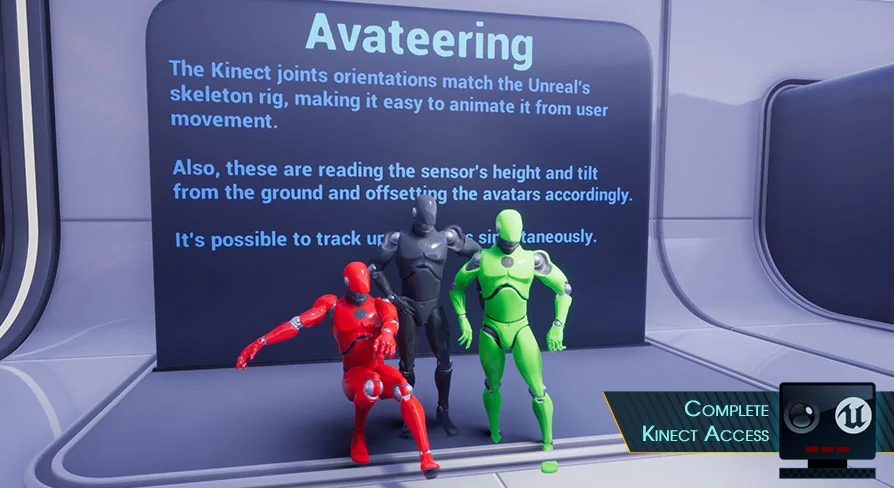
An updated AvateeringDemo Blueprint with joint smoothing is also provided for UE4.26 and later, and can be used to replace the asset in the example project. These starting points are especially helpful because the plugin needs calibration with a physical sensor. The Quick Start guide walks through the 1st connection and the frames that appear once the sensor is active.
The Unreal Engine 5.0 Release: DX12, Ray Tracing, and Lumen
A notable milestone came with the Unreal Engine 5.0 (UE5.0) release on April 4, 2022. The plugin now returns frames as TextureRenderTarget2D when SetUseFrame is called. Previously, accessing frame textures through Widgets required a cast to a custom texture format; that format no longer exists because its customizations are unnecessary. Removing it opened the door to DX12 compatibility, so Neo Kinect now works with Ray Tracing and Lumen. The release also fixed a memory leak that could appear when enabling frame types, and the codebase received many include-what-you-use improvements, cutting clutter in public headers.
Frame Types, TextureRenderTarget2D, and 6-User Tracking
The frame pipeline is 1 of the plugin's strongest areas. Developers can enable color, depth, infrared, and their variations at once, and the sensor still reports positions for all 6 users and their faces. Because frames are delivered as TextureRenderTarget2D in UE5, the output plugs directly into Materials and UMG Widgets. There are also Blueprint functions for reading pixel values directly from the frame textures, which is useful for custom analysis or preprocessing.
Coordinate Remapping and Mannequin Compatibility for AR
Neo Kinect includes the standard coordinate remapping methods from the Microsoft Kinect API, but it adds extra remapping utilities that matter for Augmented Reality (AR) work. 1 such feature retrieves the location of a joint in the Color frame without losing its depth information. All positions and orientations are adapted to Unreal's coordinate system, so a joint's transform lines up with the Engine's Mannequin character rig. For projects that already use Unreal's default character setup, this compatibility cuts down on manual retargeting.
Production History and Long-Haul Stability
Before its public release, Neo Kinect spent more than 1 year inside real projects. That period was used to track down bugs and make performance improvements. The plugin went on to power applications that run for an entire day without crashing and package without problems. For a sensor plugin that sits near the bottom of a project's input stack, that kind of reliability is more important than any single feature.
With the example projects, DX12-ready frame handling, and a function-library style API, Neo Kinect is set up for teams that want to put the Kinect v2 to work in Unreal without building the plumbing from scratch.
 Engine Tools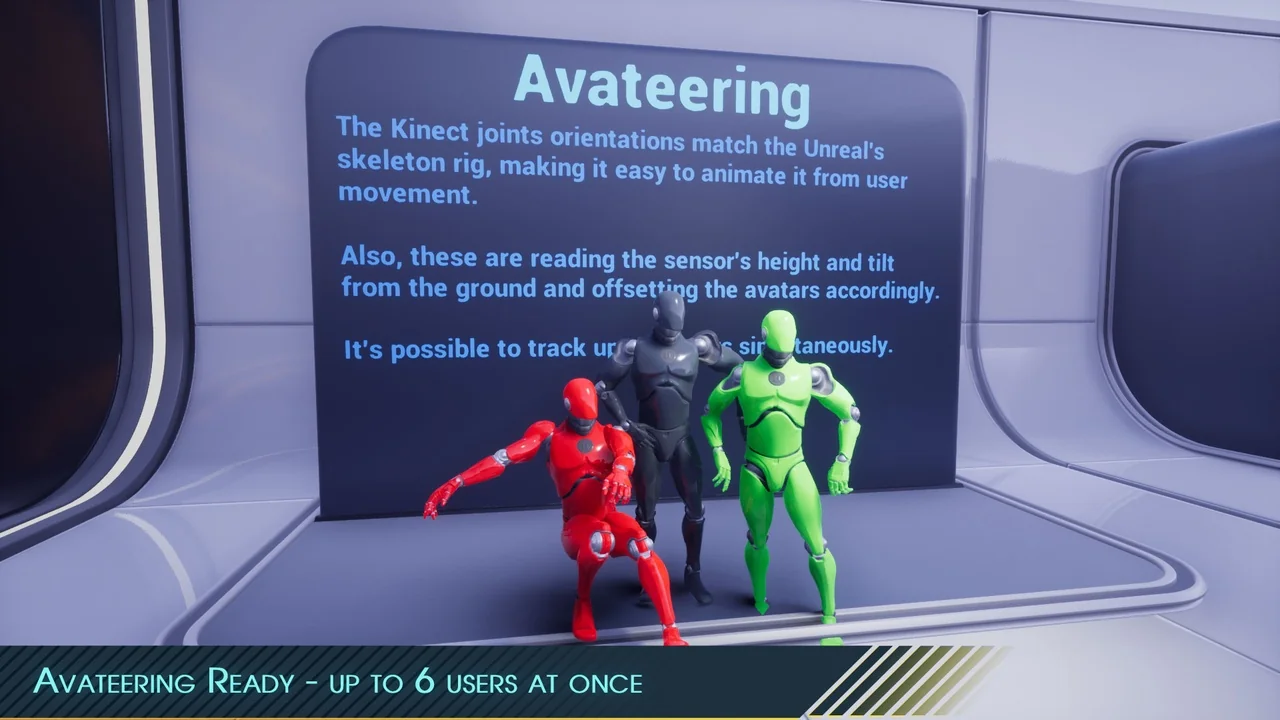
 Engine Tools
 Engine Tools
 Engine Tools