"6f9bd6df1f44a86f"{"id":"1000876","slug":"rooibos-outlines","title":"Rooibos Outlines","category":"Engine Tools","engine":"5.6","assetVersion":"Asset Version: 1.1","engineVersion":"Engine Version: 5.6","tag":"Engine Tools","accent":"blue","visual":"mech","summary":"Highlight any actor in Unreal Engine with one function call. Built for walking sims and interactive scenes, it adds outlines, focus, and night vision effects.","platform":"Unreal Engine","indexPolicy":"index","publishedAt":"2026-08-05T15:10:30.175Z","updatedAt":"2026-08-05T15:10:30.175Z","sourceNotes":[],"fileContents":[],"compatibility":["Unreal Engine","Asset Version: 1.1","Engine Version: 5.6"],"featuredImage":{"alt":"Rooibos Outlines","src":"/wp-content/uploads/published/2026/08/b4192266aa54-cb98543d-ccfe-4e06-ac82-9a5acc11be84-d7157b6ce5.webp"},"hasDownloadLink":true,"downloads":0,"terms":[{"taxonomy":"category","slug":"engine-tools-tools-and-plugins","name":"Engine Tools"}],"galleryImages":[{"src":"/wp-content/uploads/published/2026/08/78b974027a50-c840a6ea-9f8d-44bd-9a48-386f9abbeba4-230eea3cff.webp","alt":"Rooibos Outlines"},{"src":"/wp-content/uploads/published/2026/08/83a2bc4fd41d-ea47b1d7-1160-4a9c-afbd-888457697e3c-0b83fd38ce.webp","alt":"Rooibos Outlines"},{"src":"/wp-content/uploads/published/2026/08/1fd371b9c017-f6d56ed3-2b6a-4667-8a0e-0f9212674013-a62899b643.webp","alt":"Rooibos Outlines"},{"src":"/wp-content/uploads/published/2026/08/e8938cb5756f-49a2afdb-d08a-4542-981e-7db79b5c6c0a-ccf5198e75.webp","alt":"Rooibos Outlines"}],"accessPanel":{"kind":"resource","title":"Download this resource","eyebrow":"Free Download","message":"Log in or create a free account to start your download.","fileName":"5.6.0.7z","safetyNote":"Resources are manually reviewed before listing to improve quality and reduce obvious risks.","actionLabel":"Download Free","resourceType":"Resource archive"},"contentHtml":"\u003cp\u003eSome interactions fail because players simply don't see the object they're supposed to grab. Adding a highlight often means wiring up an Outline Material, managing Stencil IDs, or writing a custom Post-Process pass. \u003cem\u003eRooibos Outlines\u003c/em\u003e removes that friction by letting you highlight any \u003ccode\u003eActor\u003c/code\u003e through 1 single function call.\u003c/p\u003e\n\n\u003cp\u003eThe effect is built for Unreal Engine and pairs with \u003cem\u003eRooibos Walking Sim\u003c/em\u003e, a setup that already points toward narrative-driven, First-Person experiences. Instead of juggling Render Targets or Blueprint logic, you tell the system which \u003ccode\u003eActor\u003c/code\u003e to bring out and it does the rest.\u003c/p\u003e\n\n\u003ch2\u003e1 Call, Any Actor\u003c/h2\u003e\n\n\u003cp\u003eAt its core, this plugin is about speed. Calling 1 function triggers the highlight on the \u003ccode\u003eActor\u003c/code\u003e you point to. No multi-step setup, no per-Mesh Material overrides, no visible Blueprint spaghetti. That makes it a practical option for prototypers who need a visual answer fast, as well as for small teams that want to keep the interaction layer readable.\u003c/p\u003e\n\n\u003cp\u003eFocusing on 1 single call also simplifies iteration. You can test whether a scene reads better when an object is outlined during a specific conversation, then turn it off or move it elsewhere without touching the underlying Meshes. The brevity of the setup is the feature that stands out immediately.\u003c/p\u003e\n\n\u003ch2\u003eWhat the Tags Reveal About the Visual Language\u003c/h2\u003e\n\n\u003cp\u003eThe metadata attached to this resource points to a flexible rendering approach. Tags like \u003cem\u003eStencil\u003c/em\u003e, \u003cem\u003eDepth\u003c/em\u003e, \u003cem\u003eScreen\u003c/em\u003e, and \u003cem\u003eBuffer\u003c/em\u003e suggest the highlighting works through a screen-space pass that uses Depth and Stencil masks to generate clean silhouettes. That means the outline doesn't rely on simple emissive scaling; it can follow the \u003ccode\u003eActor\u003c/code\u003e's edge at the pixel level.\u003c/p\u003e\n\n\u003cp\u003eOther tags, such as \u003cem\u003eSelection\u003c/em\u003e, \u003cem\u003eFocus\u003c/em\u003e, and \u003cem\u003eInteractive\u003c/em\u003e, map directly to common gameplay situations. You can mark the object a character is about to pick up, emphasize a target during a puzzle, or draw attention to a talking Non-Player Character (NPC). The \u003cem\u003eNightvision\u003c/em\u003e tag adds another layer: the same system can make \u003ccode\u003eActors\u003c/code\u003e visible in low-light conditions, giving you a simple way to guide the player through darkness without building a separate night-vision Material.\u003c/p\u003e\n\n\u003cp\u003eAll of these uses feed into the same 1-function entry point. You aren't juggling multiple effect presets; the highlight system adapts to the use case you throw at it.\u003c/p\u003e\n\n\u003ch2\u003eBuilt for the Walking Sim Scene\u003c/h2\u003e\n\n\u003cp\u003eWalking sims and similar exploratory games rely heavily on environmental storytelling. When the world is the main character, the player's attention needs to be steered gently. \u003cem\u003eRooibos Outlines\u003c/em\u003e fits that need by offering a non-HUD way to place focus. Instead of showing an arrow or a floating marker, you can light up the actual object in front of the player.\u003c/p\u003e\n\n\u003cp\u003eBecause it works with any \u003ccode\u003eActor\u003c/code\u003e, it's equally useful for doors, notes, keys, and characters. A brief outline on a relevant object can replace a text prompt, keeping the screen clean and the illusion intact. In a \u003cem\u003eRooibos Walking Sim\u003c/em\u003e context, this becomes a natural extension of the core loop: explore, notice, interact.\u003c/p\u003e\n\n\u003cp\u003eThe Depth and Buffer passes also keep the effect consistent during camera movement. The outline will behave correctly whether the \u003ccode\u003eActor\u003c/code\u003e is partially occluded or moving behind a wall, which matters for a gameplay tool that's meant to communicate spatial relationships.\u003c/p\u003e\n\n\u003ch2\u003eSupport, Documentation, and a Showcase\u003c/h2\u003e\n\n\u003cp\u003eDocumentation for \u003cem\u003eRooibos Outlines\u003c/em\u003e is hosted through a Discord server, and the developer has removed the verification requirement, so access is a straightforward join-in step. For teams that need to get the plugin running mid-project, that lowers the barrier considerably.\u003c/p\u003e\n\n\u003cp\u003eThere is also a showcase video available to see the effect in motion before you commit to an implementation. Watching the actual highlight response helps you judge whether the outline thickness, color, and edge behavior match the visual language of your project.\u003c/p\u003e\n\n\u003cp\u003eFor a small tool like this, support structure can be the difference between a 1-day integration and 1 week of guesswork. Direct access to documentation and a functioning demo clip means the learning curve is mostly about applying it to your own \u003ccode\u003eActors\u003c/code\u003e.\u003c/p\u003e\n\n\u003cp\u003eThe practical value is straightforward. Insert the plugin, call the function on the \u003ccode\u003eActor\u003c/code\u003e that needs attention, and the scene communicates more clearly. For interactive environments that depend on subtle guidance, that 1 single call can quietly solve a recurring design problem.\u003c/p\u003e\n\n\u003ch2\u003eMore From The Same Workflow\u003c/h2\u003e\n\u003cul\u003e\n\u003cli\u003e\u003ca href=\"https://3dcghub.com/post-process-hand-draw-outline/\" rel=\"noopener noreferrer\"\u003ePost Process Hand Draw Outline\u003c/a\u003e\u003c/li\u003e\n\u003cli\u003e\u003ca href=\"https://3dcghub.com/auto-mesh-outline/\" rel=\"noopener noreferrer\"\u003eAuto Mesh Outline\u003c/a\u003e\u003c/li\u003e\n\u003cli\u003e\u003ca href=\"https://3dcghub.com/cartoon-cel-shader/\" rel=\"noopener noreferrer\"\u003eCartoon Cel Shader\u003c/a\u003e\u003c/li\u003e\n\u003cli\u003e\u003ca href=\"https://3dcghub.com/neo-kinect/\" rel=\"noopener noreferrer\"\u003eNeo Kinect\u003c/a\u003e\u003c/li\u003e\n\u003cli\u003e\u003ca href=\"https://3dcghub.com/voxy-a-voxel-plugin/\" rel=\"noopener noreferrer\"\u003eVoxy - A Voxel Plugin\u003c/a\u003e\u003c/li\u003e\n\u003c/ul\u003e","contentTextLength":4537,"navigation":{"current":1488,"total":4218,"previous":{"id":"1000877","slug":"rooibos-save-system","title":"Rooibos Save System","category":"Engine Tools","platform":"Unreal Engine","updatedAt":"2026-08-05T15:14:05.930Z"},"next":{"id":"1000875","slug":"rk-fantasy-archer","title":"RK Fantasy Archer","category":"Characters \u0026 Creatures","platform":"Unreal Engine","updatedAt":"2026-08-05T15:08:23.949Z"}},"relatedResources":[{"id":"1000878","slug":"rooibos-walking-sim","title":"Rooibos Walking Sim","category":"Engine Tools","engine":"5.6","assetVersion":"Asset Version: 1.2","engineVersion":"Engine Version: 5.6","tag":"Engine Tools","accent":"blue","visual":"mech","summary":"Rooibos Walking Sim adds object interaction, inspection, and audio feedback for first-person adventure games in Unreal Engine, with full example content for beg","platform":"Unreal Engine","indexPolicy":"index","publishedAt":"2026-08-05T15:16:28.091Z","updatedAt":"2026-08-05T15:20:19.122Z","sourceNotes":[],"fileContents":[],"compatibility":["Unreal Engine","Asset Version: 1.2","Engine Version: 5.6"],"featuredImage":{"alt":"Rooibos Walking Sim","src":"/wp-content/uploads/published/2026/08/5b541d33ea0f-a15b6211-becd-4aee-9261-43ea30aca1c7-fe7b50c5d2.webp"},"hasDownloadLink":true,"downloads":0},{"id":"1000877","slug":"rooibos-save-system","title":"Rooibos Save System","category":"Engine Tools","engine":"5.6","assetVersion":"Asset Version: 1.8","engineVersion":"Engine Version: 5.6","tag":"Engine Tools","accent":"blue","visual":"mech","summary":"Rooibos Save System saves any actor with the save interface, tracks progress across maps, handles streaming, world partitions, works from C++ or Blueprints.","platform":"Unreal Engine","indexPolicy":"index","publishedAt":"2026-08-05T15:14:05.930Z","updatedAt":"2026-08-05T15:14:05.930Z","sourceNotes":[],"fileContents":[],"compatibility":["Unreal Engine","Asset Version: 1.8","Engine Version: 5.6"],"featuredImage":{"alt":"Rooibos Save System","src":"/wp-content/uploads/published/2026/08/f1c2c0dabc35-2d9b7336-d800-478f-975d-f1acf7bb2af6-e9dcb5e6e6.webp"},"hasDownloadLink":true,"downloads":0},{"id":"1002006","slug":"easy-soft-outlines","title":"Easy Soft Outlines","category":"Variety","engine":"5.2+","assetVersion":"","engineVersion":"Engine Version: 5.2+","tag":"Variety","accent":"blue","visual":"mech","summary":"Implement post-process glow and soft outline effects on meshes and characters using custom depth-stencil passes and flexible material instances.","platform":"Unreal Engine","indexPolicy":"index","publishedAt":"2026-10-26T12:23:49.117Z","updatedAt":"2026-10-26T12:23:49.117Z","sourceNotes":[],"fileContents":[],"compatibility":["Unreal Engine","Engine Version: 5.2+"],"featuredImage":{"alt":"Easy Soft Outlines","src":"/wp-content/uploads/published/2026/10/8349ef037a68-9e6d7aca-d1c4-49bf-8ae4-7cf40167865c-a732d7d6f5.webp"},"hasDownloadLink":true,"downloads":0}]}
Engine Tools
Rooibos Outlines
Highlight any actor in Unreal Engine with one function call. Built for walking sims and interactive scenes, it adds outlines, focus, and night vision effects.
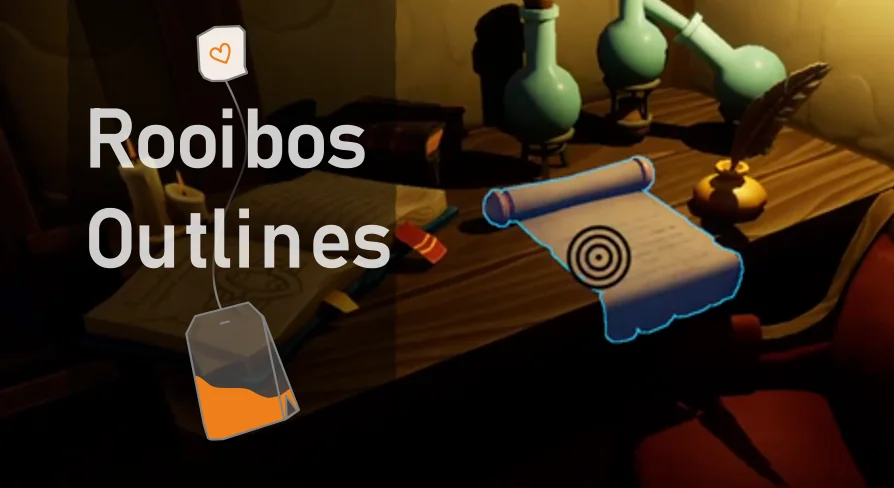
Some interactions fail because players simply don't see the object they're supposed to grab. Adding a highlight often means wiring up an Outline Material, managing Stencil IDs, or writing a custom Post-Process pass. Rooibos Outlines removes that friction by letting you highlight any Actor through 1 single function call.
The effect is built for Unreal Engine and pairs with Rooibos Walking Sim, a setup that already points toward narrative-driven, First-Person experiences. Instead of juggling Render Targets or Blueprint logic, you tell the system which Actor to bring out and it does the rest.
1 Call, Any Actor
At its core, this plugin is about speed. Calling 1 function triggers the highlight on the Actor you point to. No multi-step setup, no per-Mesh Material overrides, no visible Blueprint spaghetti. That makes it a practical option for prototypers who need a visual answer fast, as well as for small teams that want to keep the interaction layer readable.
Focusing on 1 single call also simplifies iteration. You can test whether a scene reads better when an object is outlined during a specific conversation, then turn it off or move it elsewhere without touching the underlying Meshes. The brevity of the setup is the feature that stands out immediately.
What the Tags Reveal About the Visual Language
The metadata attached to this resource points to a flexible rendering approach. Tags like Stencil, Depth, Screen, and Buffer suggest the highlighting works through a screen-space pass that uses Depth and Stencil masks to generate clean silhouettes. That means the outline doesn't rely on simple emissive scaling; it can follow the Actor's edge at the pixel level.
Other tags, such as Selection, Focus, and Interactive, map directly to common gameplay situations. You can mark the object a character is about to pick up, emphasize a target during a puzzle, or draw attention to a talking Non-Player Character (NPC). The Nightvision tag adds another layer: the same system can make Actors visible in low-light conditions, giving you a simple way to guide the player through darkness without building a separate night-vision Material.
All of these uses feed into the same 1-function entry point. You aren't juggling multiple effect presets; the highlight system adapts to the use case you throw at it.
Built for the Walking Sim Scene
Walking sims and similar exploratory games rely heavily on environmental storytelling. When the world is the main character, the player's attention needs to be steered gently. Rooibos Outlines fits that need by offering a non-HUD way to place focus. Instead of showing an arrow or a floating marker, you can light up the actual object in front of the player.
Because it works with any Actor, it's equally useful for doors, notes, keys, and characters. A brief outline on a relevant object can replace a text prompt, keeping the screen clean and the illusion intact. In a Rooibos Walking Sim context, this becomes a natural extension of the core loop: explore, notice, interact.
The Depth and Buffer passes also keep the effect consistent during camera movement. The outline will behave correctly whether the Actor is partially occluded or moving behind a wall, which matters for a gameplay tool that's meant to communicate spatial relationships.
Support, Documentation, and a Showcase
Documentation for Rooibos Outlines is hosted through a Discord server, and the developer has removed the verification requirement, so access is a straightforward join-in step. For teams that need to get the plugin running mid-project, that lowers the barrier considerably.
There is also a showcase video available to see the effect in motion before you commit to an implementation. Watching the actual highlight response helps you judge whether the outline thickness, color, and edge behavior match the visual language of your project.
For a small tool like this, support structure can be the difference between a 1-day integration and 1 week of guesswork. Direct access to documentation and a functioning demo clip means the learning curve is mostly about applying it to your own Actors.
The practical value is straightforward. Insert the plugin, call the function on the Actor that needs attention, and the scene communicates more clearly. For interactive environments that depend on subtle guidance, that 1 single call can quietly solve a recurring design problem.
 Engine Tools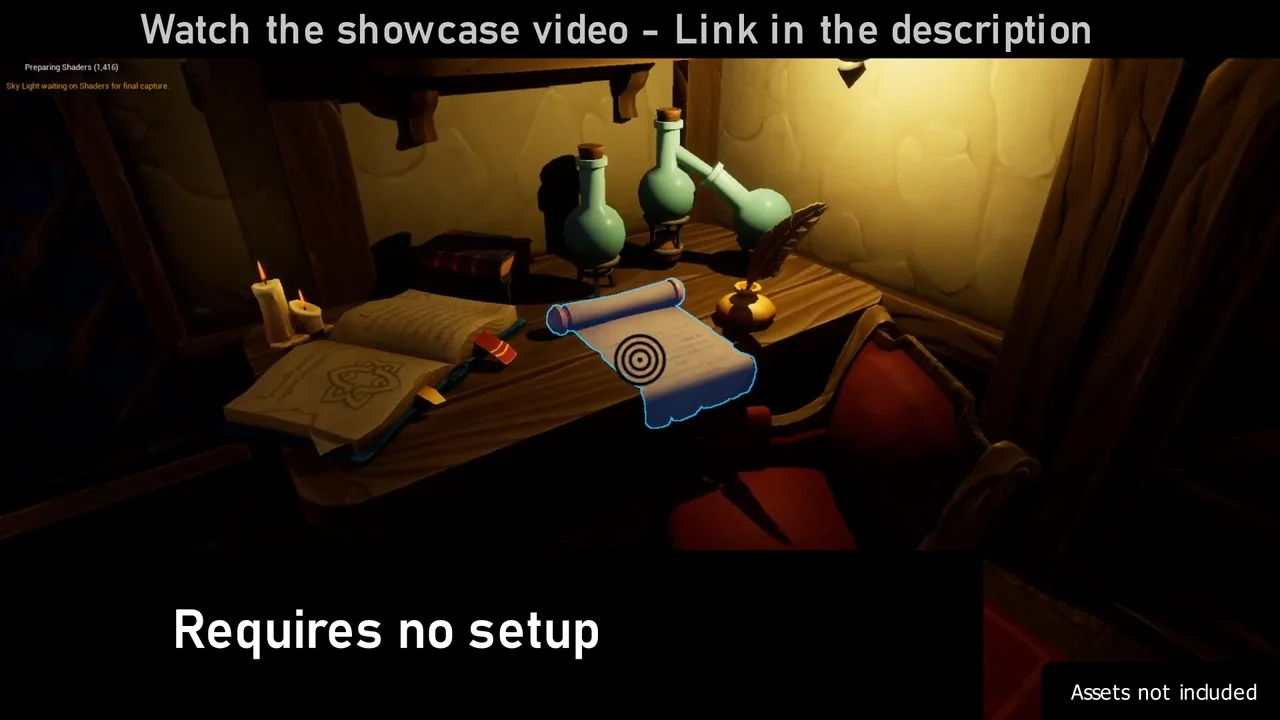
 Engine Tools
 Engine Tools
 Variety