"1f00f67f9253451b"{"id":"1000170","slug":"post-process-hand-draw-outline","title":"Post Process Hand Draw Outline","category":"Variety","engine":"5.0+","assetVersion":"","engineVersion":"Engine Version: 5.0+","tag":"Variety","accent":"blue","visual":"mech","summary":"A post process material effect that turns scenes into a hand-drawn look with flows, hairy lines, twisted corners, hatching, and strong control.","platform":"Unreal Engine","publishedAt":"2026-06-19T16:53:03.610Z","updatedAt":"2026-06-19T16:53:03.610Z","sourceNotes":[],"fileContents":[],"compatibility":["Unreal Engine","Engine Version: 5.0+"],"featuredImage":{"alt":"Post Process Hand Draw Outline","src":"/wp-content/uploads/published/2026/06/efea839babc6-78e06097-109e-4af7-8178-4f34fa4e48b4-f5ed843b18.webp"},"hasDownloadLink":true,"downloads":0,"terms":[{"taxonomy":"category","slug":"variety-vfx","name":"Variety"}],"galleryImages":[{"src":"/wp-content/uploads/published/2026/06/e7e702979e23-34676083-8bc4-4b8d-bddd-b74e4e2095f6-80262a6bf8.webp","alt":"Post Process Hand Draw Outline"},{"src":"/wp-content/uploads/published/2026/06/057f50890eaf-05009d39-19df-4e24-8c31-605572fe7cf3-e16a4f558c.webp","alt":"Post Process Hand Draw Outline"},{"src":"/wp-content/uploads/published/2026/06/1564f88443dc-4f1591da-a9b0-4bfa-a7e5-56d9ca20f64e-e4fccbf45d.webp","alt":"Post Process Hand Draw Outline"},{"src":"/wp-content/uploads/published/2026/06/07692e0c3cfd-3ac2f11b-442e-4cf5-bb63-bbcd52521641-00ca97e57a.webp","alt":"Post Process Hand Draw Outline"},{"src":"/wp-content/uploads/published/2026/06/b13e215d5ccc-ef391e23-d491-4bfc-8554-7aa5d2d128d6-a8dd8e9d39.webp","alt":"Post Process Hand Draw Outline"}],"accessPanel":{"kind":"resource","title":"Download this resource","eyebrow":"Free Download","message":"Log in or create a free account to start your download.","fileName":"Content.7z","safetyNote":"Resources are manually reviewed before listing to improve quality and reduce obvious risks.","actionLabel":"Download Free","resourceType":"Resource archive"},"contentHtml":"\u003cp\u003eWhen a scene needs to move away from a standard rendered finish, the challenge is often not adding more detail but changing the character of the image itself. Post Process Hand Draw Outline approaches that problem through a post process material effect that lets scenes read as hand draw, pushing the final image toward sketch-like marks, uneven line behavior, and shaded treatment rather than a purely clean digital result.\u003c/p\u003e\n\u003cp\u003eIts identity is not limited to a simple outline pass. The effect includes flows, hairy lines, twisted corners, hatching, and a great amount of control. That combination makes the tool useful for artists and developers who want a more expressive screen-wide treatment, especially when the goal is not rigid precision but a drawn surface with visible personality.\u003c/p\u003e \u003ch2\u003eTurning a rendered scene into a hand draw image\u003c/h2\u003e\n\u003cp\u003eThe strongest idea here is the change in representation. This is a material post process effect, so the emphasis is on how the scene is seen rather than on rebuilding every object with a new handmade asset style. For production, that matters when the visual target is a hand draw presentation applied at the scene level.\u003c/p\u003e\n\u003cp\u003eInstead of treating outlines as a narrow technical add-on, Post Process Hand Draw Outline frames them as part of a broader drawn language. A hand draw scene is not just about borders around forms. It also depends on line behavior, irregularity, and tonal treatment. That is where the listed elements begin to work together. Flows can push a sense of movement through the image. Hairy lines introduce roughness. Twisted corners break away from rigid geometry. Hatching adds a recognizable drawn shading pattern. Together, those parts move the look from a basic post effect toward something more illustrative.\u003c/p\u003e \u003ch2\u003eFlows, hairy lines, and twisted corners in motion-heavy scenes\u003c/h2\u003e\n\u003cp\u003eSome stylized effects only hold up in still images. This one points toward a more active visual language by specifically calling out flows.\u003c/p\u003e\n\u003cp\u003eFlows suggest line direction and visual motion running through the scene. For artists or developers, that opens up interesting creative use cases wherever a static contour would feel too mechanical. A scene with strong movement can benefit from lines that seem to travel, drift, or carry an uneven energy across the image. Hairy lines reinforce that effect by rejecting a perfectly smooth edge. They can make a shot feel rough, nervous, lively, or intentionally unfinished, depending on how the rest of the scene is composed. Twisted corners add another layer by disrupting the expectation that outlines should wrap around forms in a neat and stable way. In practice, those three elements point to an effect that can support visuals with a more animated, expressive, or sketchbook-like attitude rather than a sterile filter laid on top of the frame.\u003c/p\u003e\n\u003cp\u003eThat creative range is especially relevant when the visual goal is to let the image carry mood through line quality alone. A clean contour can separate objects. Hairy lines and twisted corners can also suggest tension, looseness, or spontaneity. Even without introducing any extra technical claims, the named features make it clear that this effect is interested in the character of the line, not just its visibility.\u003c/p\u003e \u003ch2\u003eHatching changes how the outline reads\u003c/h2\u003e\n\u003cp\u003eHatching gives the effect another important layer beyond the perimeter of objects. In hand-drawn work, hatching is often one of the clearest signals that an image is meant to feel illustrated rather than conventionally rendered.\u003c/p\u003e\n\u003cp\u003eBecause hatching is included here, the result can move past a scene that simply has outlines added on top. The visual language becomes closer to drawing, where shading is part of the style and not only a lighting result. That matters creatively because hatching can help a frame feel authored in a more visible way. It can suggest depth, surface treatment, and tonal emphasis while staying inside a drawn vocabulary. For a developer exploring a graphic or sketch-influenced presentation, or for an artist testing a more tactile screen treatment, hatching brings the effect closer to a complete hand draw read.\u003c/p\u003e\n\u003cp\u003eIt also changes how scenes can be staged. A scene without hatching might rely mostly on silhouette and edge separation. A scene with hatching can lean into denser mark-making and a more illustrative finish. Since hatching sits alongside flows, hairy lines, and twisted corners, the package then offers not just a single-note outline treatment but a combination of line and shading traits that can create a stronger stylized identity.\u003c/p\u003e \u003ch2\u003eWhy a post process shader can shape the whole scene\u003c/h2\u003e\n\u003cp\u003eThe tags point clearly toward process, post, shader, material, and postproduction. That set of terms places the resource in a workflow focused on image treatment rather than object-by-object remodeling.\u003c/p\u003e\n\u003cp\u003eFor artists and developers, a post process shader or material can be compelling when the intent is to affect how the full scene is presented. A hand draw look is often most convincing when it feels cohesive across the frame, and a postproduction-oriented effect naturally speaks to that kind of broad visual pass. The resource is not framed as a single decorative mark or isolated prop treatment. It is framed as something that represents scenes as hand draw. That wording matters because it shifts the conversation from local detail to scene identity.\u003c/p\u003e\n\u003cp\u003eCreatively, that makes the effect suitable for moments when the final image needs a visible transformation. A standard scene can take on a more illustrated face through the use of post process treatment. A stylized game moment can separate itself from more neutral rendering. A sequence can adopt a rougher visual voice. Even in more controlled art direction, the promise of a great amount of control suggests room to shape how strong or nuanced that hand draw push should be, without reducing the effect to one fixed look.\u003c/p\u003e \u003ch2\u003eA great amount of control is the real production hook\u003c/h2\u003e\n\u003cp\u003eMany stylized effects are easy to identify but harder to steer. The most practical phrase attached to Post Process Hand Draw Outline is the promise of a great amount of control.\u003c/p\u003e\n\u003cp\u003eThis is relevant because the included visual traits are strong ones. Flows, hairy lines, twisted corners, and hatching all have distinctive personalities. In production, the ability to control such traits is what allows them to become useful rather than overwhelming. A scene might need only a hint of roughness in its linework, or it might call for a much more assertive hand draw finish. One shot could benefit from more visible hatching, while another might rely more on the instability of corners and the movement implied by flows. The appeal of this resource lies in that adjustable relationship between effect and scene.\u003c/p\u003e\n\u003cp\u003eControl also helps when the goal is consistency. A post process effect with strong style can become part of a project’s visual language if it can be tuned rather than merely switched on. Since the resource specifically highlights a great amount of control, it presents itself as more than a novelty filter. It points toward an effect that can be shaped to serve different scenes while staying inside the same hand draw family.\u003c/p\u003e \u003ch2\u003eWhere Post Process Hand Draw Outline fits best\u003c/h2\u003e\n\u003cp\u003eThis resource is most compelling when the objective is not realism but interpretation. Its effect is focused on representing scenes as hand draw through line behavior and hatching, using a post process material approach rather than a purely object-level one.\u003c/p\u003e\n\u003cp\u003eFor artists, that means a way to push scene presentation toward something rougher, more expressive, and more visibly authored. For developers, it means a stylized screen treatment that can influence the feel of gameplay moments, transitions, or entire environments through drawn outlines and shading cues. The combination of flows, hairy lines, twisted corners, hatching, and a strong degree of control gives it a clear place in projects that want the rendered frame to feel sketched rather than polished smooth.\u003c/p\u003e\n\n\u003ch2\u003eRelated Resources Worth Checking\u003c/h2\u003e\n\u003cul\u003e\n\u003cli\u003e\u003ca href=\"https://3dcghub.com/advanced-night-vision/\" title=\"Advanced Night Vision\"\u003eAdvanced Night Vision\u003c/a\u003e\u003c/li\u003e\n\u003cli\u003e\u003ca href=\"https://3dcghub.com/fog-of-war-material/\" title=\"Fog Of War Material\"\u003eFog Of War Material\u003c/a\u003e\u003c/li\u003e\n\u003cli\u003e\u003ca href=\"https://3dcghub.com/art-of-shader-film-and-special-effects/\" title=\"Art of Shader - Film And Special Effects\"\u003eArt of Shader - Film And Special Effects\u003c/a\u003e\u003c/li\u003e\n\u003cli\u003e\u003ca href=\"https://3dcghub.com/ascii-post-process-material/\" title=\"ASCII Post Process Material\"\u003eASCII Post Process Material\u003c/a\u003e\u003c/li\u003e\n\u003cli\u003e\u003ca href=\"https://3dcghub.com/post-process-pro-pack/\" title=\"Post Process Pro Pack\"\u003ePost Process Pro Pack\u003c/a\u003e\u003c/li\u003e\n\u003c/ul\u003e","contentTextLength":8149,"navigation":{"current":1179,"total":3222,"previous":{"id":"1000171","slug":"photorealistic-helicopter","title":"Photorealistic Helicopter","category":"Aircraft","platform":"Unreal Engine","updatedAt":"2026-06-19T17:08:32.476Z"},"next":{"id":"1000169","slug":"art-of-shader-distortion-and-glitches","title":"Art Of Shader - Distortion And Glitches","category":"Shaders","platform":"Unreal Engine","updatedAt":"2026-06-19T16:49:55.317Z"}},"relatedResources":[{"id":"1000590","slug":"dynamic-sketch-post-process-material","title":"Dynamic Sketch Post-Process Material","category":"Variety","engine":"5.2+","assetVersion":"","engineVersion":"Engine Version: 5.2+","tag":"Variety","accent":"blue","visual":"luts","summary":"A stylized post-process material for Unreal Engine 5.2–5.7 featuring animated boiling effects, adjustable texture projection, and character masking for animatio","platform":"Unreal Engine","publishedAt":"2026-07-17T00:34:20.273Z","updatedAt":"2026-07-17T00:34:20.273Z","sourceNotes":[],"fileContents":[],"compatibility":["Unreal Engine","Engine Version: 5.2+"],"featuredImage":{"alt":"Dynamic Sketch Post-Process Material","src":"/wp-content/uploads/published/2026/07/f2b146652d31-7afe3eaa-33f2-4c3c-90fe-93b31800a880-b8785adb24.webp"},"hasDownloadLink":true,"downloads":0},{"id":"1000805","slug":"color-grade-50-luts","title":"Color Grade - 50 LUTs","category":"Variety","engine":"4.26+,5.0+","assetVersion":"","engineVersion":"Engine Version: 4.26+,5.0+","tag":"Variety","accent":"blue","visual":"luts","summary":"A professionally handcrafted pack of 50 LUTs for elevating lighting and post-process workflows, adding cinematic, realistic, and stylized atmosphere to environm","platform":"Unreal Engine","publishedAt":"2026-07-31T03:35:22.549Z","updatedAt":"2026-07-31T03:35:22.549Z","sourceNotes":[],"fileContents":[],"compatibility":["Unreal Engine","Engine Version: 4.26+,5.0+"],"featuredImage":{"alt":"Color Grade - 50 LUTs","src":"/wp-content/uploads/published/2026/07/b52c3f1c055e-4f6a72a8-3a42-49db-ab88-7dabfe104570-d8237b49d5.webp"},"hasDownloadLink":true,"downloads":1},{"id":"17015","slug":"advanced-night-vision","title":"Advanced Night Vision","category":"Variety","engine":"4.27,5.0+","assetVersion":"Engine version: 4.27,5.0+","engineVersion":"4.24","tag":"Variety","accent":"blue","visual":"luts","summary":"Enhance your project's atmosphere with Advanced Night Vision, a high-quality post-process material featuring modular customization and object highlighting capabilities.","platform":"Unreal Engine","publishedAt":"2026-03-13T13:28:21.000Z","updatedAt":"2026-04-19T15:43:38.000Z","sourceNotes":[],"fileContents":[],"compatibility":["Unreal Engine","Engine version: 4.27,5.0+"],"featuredImage":{"alt":"Advanced Night Vision","src":"https://3dcghub.com/wp-content/uploads/2026/03/ed66d7f0-f96c-4d81-b9e4-fc69089d4ae1.webp"},"hasDownloadLink":true,"downloads":0}]}
Variety
Post Process Hand Draw Outline
A post process material effect that turns scenes into a hand-drawn look with flows, hairy lines, twisted corners, hatching, and strong control.
Category:Unreal Engine,VarietyPlatform: Unreal EngineEngine Version: 5.0+Published: Jun 19, 2026
Variety
Resource overview
When a scene needs to move away from a standard rendered finish, the challenge is often not adding more detail but changing the character of the image itself. Post Process Hand Draw Outline approaches that problem through a post process material effect that lets scenes read as hand draw, pushing the final image toward sketch-like marks, uneven line behavior, and shaded treatment rather than a purely clean digital result.
Its identity is not limited to a simple outline pass. The effect includes flows, hairy lines, twisted corners, hatching, and a great amount of control. That combination makes the tool useful for artists and developers who want a more expressive screen-wide treatment, especially when the goal is not rigid precision but a drawn surface with visible personality.
Turning a rendered scene into a hand draw image
The strongest idea here is the change in representation. This is a material post process effect, so the emphasis is on how the scene is seen rather than on rebuilding every object with a new handmade asset style. For production, that matters when the visual target is a hand draw presentation applied at the scene level.
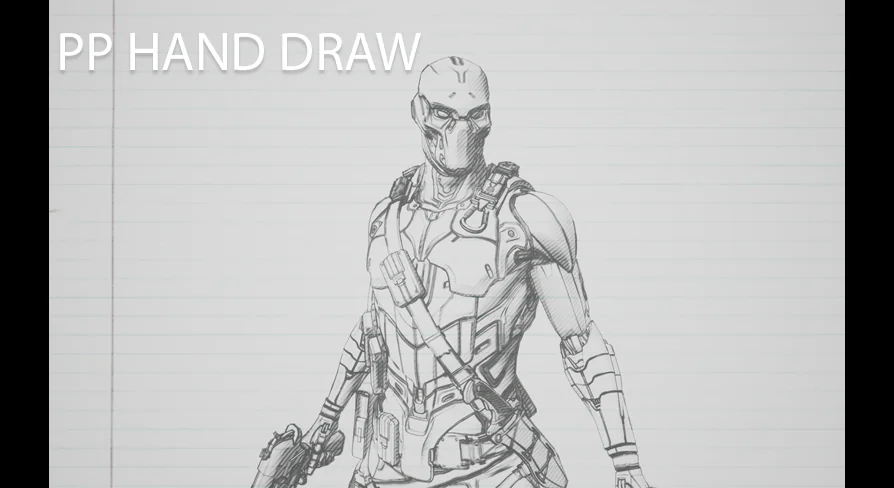
Instead of treating outlines as a narrow technical add-on, Post Process Hand Draw Outline frames them as part of a broader drawn language. A hand draw scene is not just about borders around forms. It also depends on line behavior, irregularity, and tonal treatment. That is where the listed elements begin to work together. Flows can push a sense of movement through the image. Hairy lines introduce roughness. Twisted corners break away from rigid geometry. Hatching adds a recognizable drawn shading pattern. Together, those parts move the look from a basic post effect toward something more illustrative.
Flows, hairy lines, and twisted corners in motion-heavy scenes
Some stylized effects only hold up in still images. This one points toward a more active visual language by specifically calling out flows.
Flows suggest line direction and visual motion running through the scene. For artists or developers, that opens up interesting creative use cases wherever a static contour would feel too mechanical. A scene with strong movement can benefit from lines that seem to travel, drift, or carry an uneven energy across the image. Hairy lines reinforce that effect by rejecting a perfectly smooth edge. They can make a shot feel rough, nervous, lively, or intentionally unfinished, depending on how the rest of the scene is composed. Twisted corners add another layer by disrupting the expectation that outlines should wrap around forms in a neat and stable way. In practice, those three elements point to an effect that can support visuals with a more animated, expressive, or sketchbook-like attitude rather than a sterile filter laid on top of the frame.
That creative range is especially relevant when the visual goal is to let the image carry mood through line quality alone. A clean contour can separate objects. Hairy lines and twisted corners can also suggest tension, looseness, or spontaneity. Even without introducing any extra technical claims, the named features make it clear that this effect is interested in the character of the line, not just its visibility.
Hatching changes how the outline reads
Hatching gives the effect another important layer beyond the perimeter of objects. In hand-drawn work, hatching is often one of the clearest signals that an image is meant to feel illustrated rather than conventionally rendered.
Because hatching is included here, the result can move past a scene that simply has outlines added on top. The visual language becomes closer to drawing, where shading is part of the style and not only a lighting result. That matters creatively because hatching can help a frame feel authored in a more visible way. It can suggest depth, surface treatment, and tonal emphasis while staying inside a drawn vocabulary. For a developer exploring a graphic or sketch-influenced presentation, or for an artist testing a more tactile screen treatment, hatching brings the effect closer to a complete hand draw read.
It also changes how scenes can be staged. A scene without hatching might rely mostly on silhouette and edge separation. A scene with hatching can lean into denser mark-making and a more illustrative finish. Since hatching sits alongside flows, hairy lines, and twisted corners, the package then offers not just a single-note outline treatment but a combination of line and shading traits that can create a stronger stylized identity.
Why a post process shader can shape the whole scene
The tags point clearly toward process, post, shader, material, and postproduction. That set of terms places the resource in a workflow focused on image treatment rather than object-by-object remodeling.
For artists and developers, a post process shader or material can be compelling when the intent is to affect how the full scene is presented. A hand draw look is often most convincing when it feels cohesive across the frame, and a postproduction-oriented effect naturally speaks to that kind of broad visual pass. The resource is not framed as a single decorative mark or isolated prop treatment. It is framed as something that represents scenes as hand draw. That wording matters because it shifts the conversation from local detail to scene identity.
Creatively, that makes the effect suitable for moments when the final image needs a visible transformation. A standard scene can take on a more illustrated face through the use of post process treatment. A stylized game moment can separate itself from more neutral rendering. A sequence can adopt a rougher visual voice. Even in more controlled art direction, the promise of a great amount of control suggests room to shape how strong or nuanced that hand draw push should be, without reducing the effect to one fixed look.
A great amount of control is the real production hook
Many stylized effects are easy to identify but harder to steer. The most practical phrase attached to Post Process Hand Draw Outline is the promise of a great amount of control.
This is relevant because the included visual traits are strong ones. Flows, hairy lines, twisted corners, and hatching all have distinctive personalities. In production, the ability to control such traits is what allows them to become useful rather than overwhelming. A scene might need only a hint of roughness in its linework, or it might call for a much more assertive hand draw finish. One shot could benefit from more visible hatching, while another might rely more on the instability of corners and the movement implied by flows. The appeal of this resource lies in that adjustable relationship between effect and scene.
Control also helps when the goal is consistency. A post process effect with strong style can become part of a project’s visual language if it can be tuned rather than merely switched on. Since the resource specifically highlights a great amount of control, it presents itself as more than a novelty filter. It points toward an effect that can be shaped to serve different scenes while staying inside the same hand draw family.
Where Post Process Hand Draw Outline fits best
This resource is most compelling when the objective is not realism but interpretation. Its effect is focused on representing scenes as hand draw through line behavior and hatching, using a post process material approach rather than a purely object-level one.
For artists, that means a way to push scene presentation toward something rougher, more expressive, and more visibly authored. For developers, it means a stylized screen treatment that can influence the feel of gameplay moments, transitions, or entire environments through drawn outlines and shading cues. The combination of flows, hairy lines, twisted corners, hatching, and a strong degree of control gives it a clear place in projects that want the rendered frame to feel sketched rather than polished smooth.
 Variety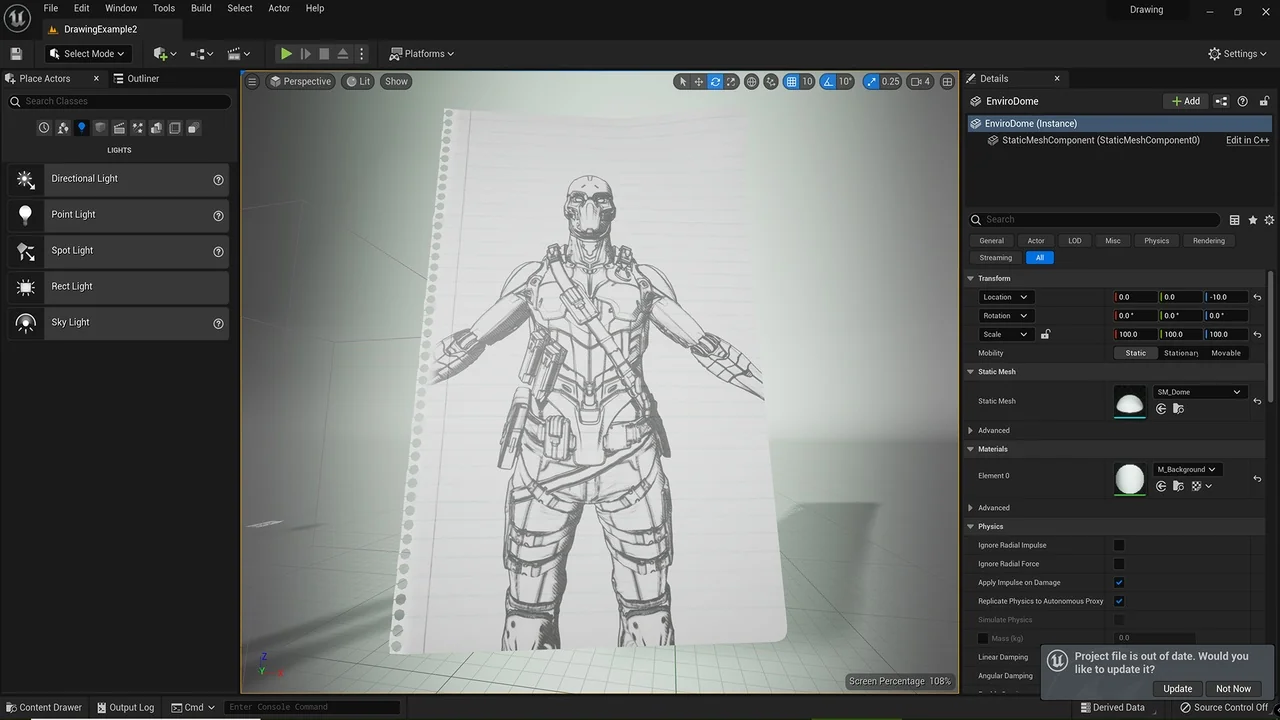
 Variety
 Variety
 Variety