"7066dd76da796369"{"id":"17015","slug":"advanced-night-vision","title":"Advanced Night Vision","category":"Variety","engine":"4.27,5.0+","assetVersion":"Engine version: 4.27,5.0+","engineVersion":"4.24","tag":"Variety","accent":"blue","visual":"luts","summary":"Enhance your project's atmosphere with Advanced Night Vision, a high-quality post-process material featuring modular customization and object highlighting capabilities.","platform":"Unreal Engine","publishedAt":"2026-03-13T13:28:21.000Z","updatedAt":"2026-04-19T15:43:38.000Z","sourceNotes":[],"fileContents":[],"compatibility":["Unreal Engine","Engine version: 4.27,5.0+"],"featuredImage":{"alt":"Advanced Night Vision","src":"https://3dcghub.com/wp-content/uploads/2026/03/ed66d7f0-f96c-4d81-b9e4-fc69089d4ae1.webp"},"hasDownloadLink":true,"downloads":0,"terms":[{"taxonomy":"category","slug":"variety-vfx","name":"Variety"},{"taxonomy":"post_tag","slug":"blueprint","name":"Blueprint"},{"taxonomy":"post_tag","slug":"environment","name":"Environment"},{"taxonomy":"post_tag","slug":"horror","name":"Horror"},{"taxonomy":"post_tag","slug":"materials","name":"Materials"},{"taxonomy":"post_tag","slug":"realistic","name":"Realistic"},{"taxonomy":"post_tag","slug":"vfx","name":"VFX"}],"galleryImages":[{"src":"https://3dcghub.com/wp-content/uploads/2026/03/2653633b01d2_e5497e63-9e00-4925-af35-32f56151c6b3.webp","alt":"Advanced Night Vision"},{"src":"https://3dcghub.com/wp-content/uploads/2026/03/8a06f3bd6488_6794a3a6-195c-4d11-bdcd-66a77680fb49.webp","alt":"Advanced Night Vision"},{"src":"https://3dcghub.com/wp-content/uploads/2026/03/2b6b91f851d2_a1e3f9a6-5a5b-4d0d-b287-204494e29c75.webp","alt":"Advanced Night Vision"}],"accessPanel":{"kind":"resource","title":"Access this resource","eyebrow":"Free Download","message":"Log in or create a free account to start your download.","fileName":"Content.7z","safetyNote":"All resources are 100% manually reviewed to eliminate all risks.","actionLabel":"Download Free","resourceType":"Resource archive"},"contentHtml":"\u003ch2\u003eHigh-Quality Visuals with Advanced Night Vision\u003c/h2\u003e\n\u003cp\u003eAdvanced Night Vision offers a premium solution for developers seeking AAA quality visual effects. This post-process material is designed to provide a realistic and immersive experience for players. Whether you are building a tense horror game or a tactical first-person shooter, this asset delivers professional results. The core of the package is built around flexibility and visual fidelity.\u003c/p\u003e\n\n\u003cp\u003eThe system is highly customizable, allowing you to fine-tune the look of your environment. Because it functions as a post-process material, it affects the entire rendered frame. Consequently, you can achieve a cohesive look that matches your game's specific art style. The developer has ensured that the material remains performant while maintaining high visual standards.\u003c/p\u003e\n\n\u003ch2\u003eModular Master Material and Customization\u003c/h2\u003e\n\u003cp\u003eAt the heart of the Advanced Night Vision pack is a modular master material. This structure is essential for developers who need to create specific visual variants. By using a master material, you can maintain consistency across different scenes. Furthermore, the pack includes a lot of variables that you can adjust to get your own unique night vision effect.\u003c/p\u003e\n\n\u003cp\u003eTo help you get started quickly, the creator has included six example instance materials. These instances showcase different configurations of the system. You can use these examples as a baseline for your own creations. Therefore, you do not have to build your effects from scratch unless you choose to do so. The variety of variables ensures that you can control everything from grain to color balance.\u003c/p\u003e\n\n\u003ch2\u003eStreamlined Setup with Macros\u003c/h2\u003e\n\u003cp\u003eIntegrating new visual effects can sometimes be a complex task. However, Advanced Night Vision simplifies this process with a dedicated macro function. This macro is designed for easy setup within your project's logic. By utilizing this function, you can trigger or manage the night vision effect with minimal effort. This focus on workflow efficiency is a significant benefit for small teams and solo developers alike.\u003c/p\u003e\n\n\u003cp\u003eIn addition to the macro, the modular nature of the pack supports a clean project hierarchy. The included examples serve as a practical guide for implementation. Consequently, you can spend less time on technical configuration and more time on level design. The system is built to be intuitive for those familiar with blueprint-based workflows.\u003c/p\u003e\n\n\u003ch2\u003eObject Highlighting and Gameplay Features\u003c/h2\u003e\n\u003cp\u003eAdvanced Night Vision includes features that go beyond simple color grading. For instance, you can mark objects to highlight them within the night vision view. This capability is incredibly useful for gameplay mechanics. You might use it to point out interactive items, objectives, or specific enemies. This feature ensures that the night vision is a functional tool for the player rather than just a visual filter.\u003c/p\u003e\n\n\u003cp\u003eThe ability to highlight objects adds a layer of tactical depth to your project. In a horror setting, this could be used to create moments of tension or clarity. In an FPS setting, it helps players identify targets in low-light environments. This versatility makes the asset a valuable addition to various genres. Moreover, the realistic nature of the effect enhances the overall player immersion.\u003c/p\u003e\n\n\u003ch2\u003eBest Fit\u003c/h2\u003e\n\u003cp\u003eAdvanced Night Vision is a robust tool for any developer needing high-quality night vision effects. With its modular master material and numerous customization variables, it offers great creative control. The inclusion of a macro function and example instances ensures a smooth setup process. Additionally, the object highlighting feature provides practical gameplay benefits. This AAA quality resource is a versatile choice for enhancing the visual atmosphere of your next project.\u003c/p\u003e\n\n\u003ch2\u003eExplore Similar Assets\u003c/h2\u003e\n\u003cul\u003e\n\u003cli\u003e\u003ca href=\"https://3dcghub.com/yughues-metal-materials/\" title=\"Yughues Metal Materials\"\u003eYughues Metal Materials\u003c/a\u003e\u003c/li\u003e\n\u003cli\u003e\u003ca href=\"https://3dcghub.com/stylized-250-materials-bundle/\" title=\"Stylized 250 Materials Bundle\"\u003eStylized 250 Materials Bundle\u003c/a\u003e\u003c/li\u003e\n\u003cli\u003e\u003ca href=\"https://3dcghub.com/preload-materials/\" title=\"Preload materials\"\u003ePreload materials\u003c/a\u003e\u003c/li\u003e\n\u003cli\u003e\u003ca href=\"https://3dcghub.com/terrain-materials-vol-2/\" title=\"Terrain Materials VOL.2\"\u003eTerrain Materials VOL.2\u003c/a\u003e\u003c/li\u003e\n\u003cli\u003e\u003ca href=\"https://3dcghub.com/stylized-materials-vol-1/\" title=\"Stylized materials VOL.1\"\u003eStylized materials VOL.1\u003c/a\u003e\u003c/li\u003e\n\u003c/ul\u003e","contentTextLength":3943,"navigation":{"current":3547,"total":4016,"previous":{"id":"17024","slug":"arcs-and-sparks","title":"Arcs and Sparks","category":"Variety","platform":"Unreal Engine","updatedAt":"2026-04-19T15:43:38.000Z"},"next":{"id":"17119","slug":"fireworks-with-sounds","title":"Fireworks With Sounds","category":"Variety","platform":"Unreal Engine","updatedAt":"2026-04-19T15:43:37.000Z"}},"relatedResources":[{"id":"17131","slug":"flight-vfx-sovereign-wings","title":"Flight VFX - Sovereign Wings","category":"Variety","engine":"4.26+,5.0+","assetVersion":"Engine version: 4.26+,5.0+","engineVersion":"4.20","tag":"Variety","accent":"blue","visual":"audio","summary":"Flight VFX - Sovereign Wings is a comprehensive asset pack designed to bring AAA-quality magical wings to your fantasy projects. It features handcrafted meshes, materials, and animations for diverse character types.","platform":"Unreal Engine","publishedAt":"2026-03-13T13:43:55.000Z","updatedAt":"2026-04-19T15:43:36.000Z","sourceNotes":[],"fileContents":[],"compatibility":["Unreal Engine","Engine version: 4.26+,5.0+"],"featuredImage":{"alt":"Flight VFX - Sovereign Wings","src":"https://3dcghub.com/wp-content/uploads/2026/03/99797357-4d31-4819-ab44-81673a8e9171.webp"},"hasDownloadLink":true,"downloads":1},{"id":"17393","slug":"portals-vfx-pack-interactions","title":"Portals VFX pack (+ interactions)","category":"Variety","engine":"4.26+,5.0+","assetVersion":"Engine version: 4.26+,5.0+","engineVersion":"4.25","tag":"Variety","accent":"blue","visual":"character","summary":"Enhance your project with the Portals VFX pack (+ interactions), featuring automated systems and Niagara-based visual effects optimized for mobile and VR platforms.","platform":"Unreal Engine","publishedAt":"2026-03-13T14:27:37.000Z","updatedAt":"2026-04-19T15:43:32.000Z","sourceNotes":[],"fileContents":[],"compatibility":["Unreal Engine","Engine version: 4.26+,5.0+"],"featuredImage":{"alt":"Portals VFX pack (+ interactions)","src":"https://3dcghub.com/wp-content/uploads/2026/03/9a918f21-37fd-4ddf-a38a-64aee7113e3a.webp"},"hasDownloadLink":true,"downloads":1},{"id":"17185","slug":"lightning-electricity-vfx-pack","title":"Lightning / Electricity VFX Pack","category":"Variety","engine":"4.26+,5.0+","assetVersion":"Engine version: 4.26+,5.0+","engineVersion":"4.24","tag":"Variety","accent":"blue","visual":"city","summary":"Enhance your project with the Lightning / Electricity VFX Pack, a versatile collection of Niagara effects ranging from electric arcs to storms. This pack includes turnkey examples and VR-optimized maps for high-performance development.","platform":"Unreal Engine","publishedAt":"2026-03-13T13:55:56.000Z","updatedAt":"2026-04-19T15:43:36.000Z","sourceNotes":[],"fileContents":[],"compatibility":["Unreal Engine","Engine version: 4.26+,5.0+"],"featuredImage":{"alt":"Lightning / Electricity VFX Pack","src":"https://3dcghub.com/wp-content/uploads/2026/03/7fdd3a51-39bb-4954-9f95-8abd86e3500c.webp"},"hasDownloadLink":true,"downloads":3}]}
Variety
Advanced Night Vision
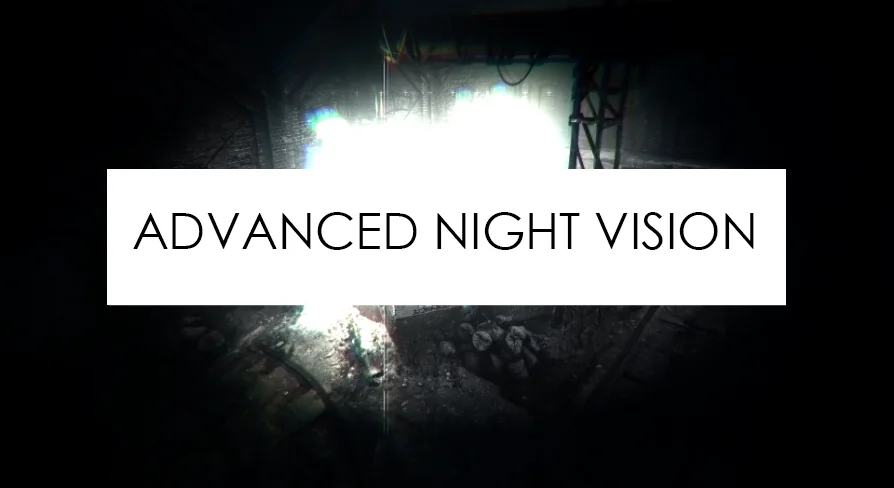
Enhance your project's atmosphere with Advanced Night Vision, a high-quality post-process material featuring modular customization and object highlighting capabilities.
Advanced Night Vision offers a premium solution for developers seeking AAA quality visual effects. This post-process material is designed to provide a realistic and immersive experience for players. Whether you are building a tense horror game or a tactical first-person shooter, this asset delivers professional results. The core of the package is built around flexibility and visual fidelity.
The system is highly customizable, allowing you to fine-tune the look of your environment. Because it functions as a post-process material, it affects the entire rendered frame. Consequently, you can achieve a cohesive look that matches your game's specific art style. The developer has ensured that the material remains performant while maintaining high visual standards.
Modular Master Material and Customization
At the heart of the Advanced Night Vision pack is a modular master material. This structure is essential for developers who need to create specific visual variants. By using a master material, you can maintain consistency across different scenes. Furthermore, the pack includes a lot of variables that you can adjust to get your own unique night vision effect.
To help you get started quickly, the creator has included six example instance materials. These instances showcase different configurations of the system. You can use these examples as a baseline for your own creations. Therefore, you do not have to build your effects from scratch unless you choose to do so. The variety of variables ensures that you can control everything from grain to color balance.
Streamlined Setup with Macros
Integrating new visual effects can sometimes be a complex task. However, Advanced Night Vision simplifies this process with a dedicated macro function. This macro is designed for easy setup within your project's logic. By utilizing this function, you can trigger or manage the night vision effect with minimal effort. This focus on workflow efficiency is a significant benefit for small teams and solo developers alike.
In addition to the macro, the modular nature of the pack supports a clean project hierarchy. The included examples serve as a practical guide for implementation. Consequently, you can spend less time on technical configuration and more time on level design. The system is built to be intuitive for those familiar with blueprint-based workflows.
Object Highlighting and Gameplay Features
Advanced Night Vision includes features that go beyond simple color grading. For instance, you can mark objects to highlight them within the night vision view. This capability is incredibly useful for gameplay mechanics. You might use it to point out interactive items, objectives, or specific enemies. This feature ensures that the night vision is a functional tool for the player rather than just a visual filter.
The ability to highlight objects adds a layer of tactical depth to your project. In a horror setting, this could be used to create moments of tension or clarity. In an FPS setting, it helps players identify targets in low-light environments. This versatility makes the asset a valuable addition to various genres. Moreover, the realistic nature of the effect enhances the overall player immersion.
Best Fit
Advanced Night Vision is a robust tool for any developer needing high-quality night vision effects. With its modular master material and numerous customization variables, it offers great creative control. The inclusion of a macro function and example instances ensures a smooth setup process. Additionally, the object highlighting feature provides practical gameplay benefits. This AAA quality resource is a versatile choice for enhancing the visual atmosphere of your next project.
 Variety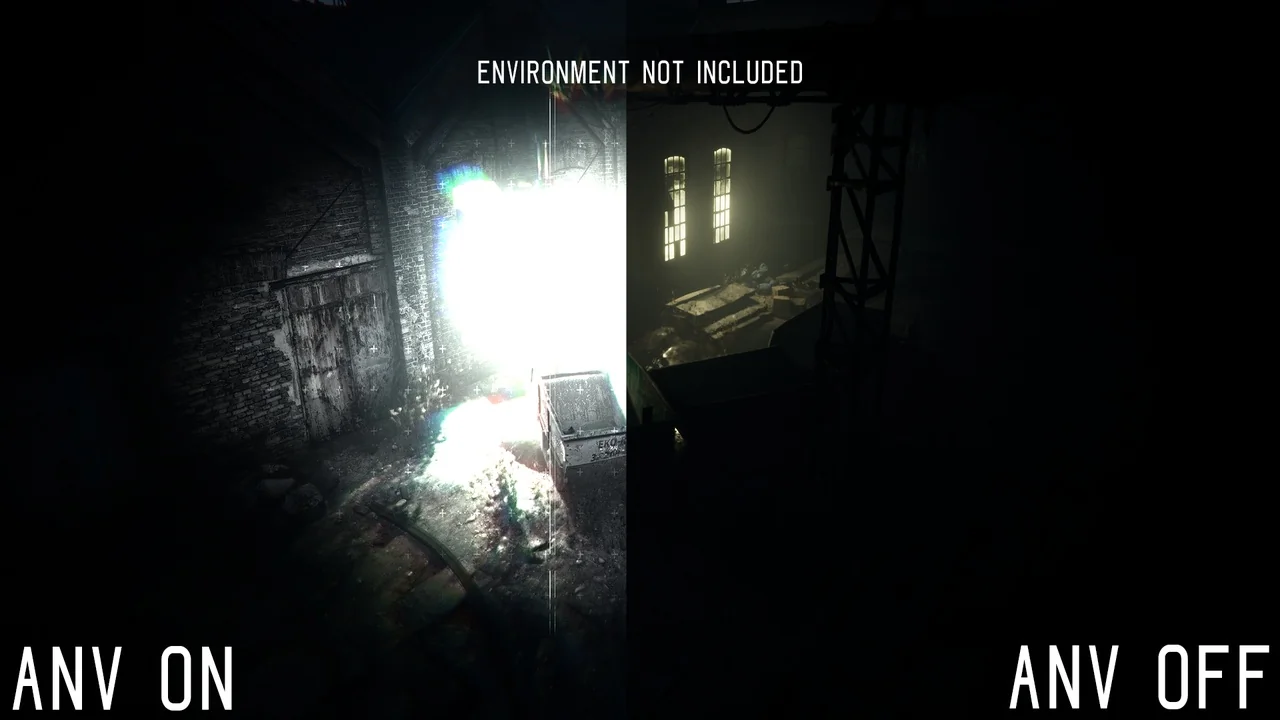
 Variety
 Variety
 Variety