"0341a2901a4ae9aa"{"id":"13212","slug":"preload-materials","title":"Preload materials","category":"Variety","engine":"5.1+","assetVersion":"Engine version: 5.1+","engineVersion":"5.1","tag":"Variety","accent":"blue","visual":"luts","summary":"Enhance your project's visual feedback with Preload materials. This resource uses RGBA channel textures to offer infinite combinations for meshes, planes, and interactive widgets.","platform":"Unreal Engine","publishedAt":"2026-03-10T16:31:25.000Z","updatedAt":"2026-04-19T15:46:30.000Z","sourceNotes":[],"fileContents":[],"compatibility":["Unreal Engine","Engine version: 5.1+"],"featuredImage":{"alt":"Preload materials","src":"https://3dcghub.com/wp-content/uploads/2026/03/234a073c-165b-4f01-bbdb-7ff37c112468.webp"},"hasDownloadLink":true,"downloads":0,"terms":[{"taxonomy":"category","slug":"variety","name":"Variety"},{"taxonomy":"post_tag","slug":"environment","name":"Environment"},{"taxonomy":"post_tag","slug":"game-systems","name":"Game Systems"},{"taxonomy":"post_tag","slug":"materials","name":"Materials"},{"taxonomy":"post_tag","slug":"textures","name":"Textures"},{"taxonomy":"post_tag","slug":"ui","name":"UI"},{"taxonomy":"post_tag","slug":"vfx","name":"VFX"}],"galleryImages":[{"src":"https://3dcghub.com/wp-content/uploads/2026/03/730acf42c730_6d55290c-c290-4a6d-a86b-090334209bff.webp","alt":"Preload materials"},{"src":"https://3dcghub.com/wp-content/uploads/2026/03/dd7ad49a6402_173eb3af-08d3-4fca-97a1-fb5f826339c6.webp","alt":"Preload materials"},{"src":"https://3dcghub.com/wp-content/uploads/2026/03/909f8ef3211b_3631cc30-539f-40cb-b679-38895b7d8932.webp","alt":"Preload materials"},{"src":"https://3dcghub.com/wp-content/uploads/2026/03/da0c1d4a1f79_37a067b5-37b8-4b6f-95f3-608730511365.webp","alt":"Preload materials"},{"src":"https://3dcghub.com/wp-content/uploads/2026/03/095f26d6ffde_59ef9d32-7eb4-437f-b237-83242349e897.webp","alt":"Preload materials"},{"src":"https://3dcghub.com/wp-content/uploads/2026/03/07abbff3683c_603d5873-9414-46c9-970f-4245f519735f.webp","alt":"Preload materials"},{"src":"https://3dcghub.com/wp-content/uploads/2026/03/b044c62f6fba_0ed93300-4a9c-44ec-b0f9-39c2de999b22.webp","alt":"Preload materials"},{"src":"https://3dcghub.com/wp-content/uploads/2026/03/f1ddcc35f277_6ca5bff6-bb33-4a72-81c4-3b2e3b98972f.webp","alt":"Preload materials"},{"src":"https://3dcghub.com/wp-content/uploads/2026/03/1d21e17611d9_75506e3f-bc0c-49fa-a504-22b14a942486.webp","alt":"Preload materials"},{"src":"https://3dcghub.com/wp-content/uploads/2026/03/815ff2afcfb0_f67f288e-dae4-4d30-ab05-ad659b64502f.webp","alt":"Preload materials"}],"accessPanel":{"kind":"resource","title":"Access this resource","eyebrow":"Free Download","message":"Log in or create a free account to start your download.","fileName":"Preload materials.7z","safetyNote":"All resources are 100% manually reviewed to eliminate all risks.","actionLabel":"Download Free","resourceType":"Resource archive"},"contentHtml":"\u003ch2\u003eIntroduction to Preload Materials\u003c/h2\u003e\n\u003cp\u003ePreload materials offer a robust solution for developers looking to implement dynamic visual elements into their projects. By utilizing RGBA channel textures, this resource provides the possibility of infinite combinations for material creation. Consequently, users can tailor the visual output to suit the specific aesthetic requirements of their game or application.\u003c/p\u003e\n\n\u003ch2\u003eVersatile Application Across Scenes and UI\u003c/h2\u003e\n\u003cp\u003eOne of the primary benefits of these Preload materials is their extreme versatility. They are designed to be introduced into a scene on any plane or mesh without difficulty. Furthermore, the developer has ensured that these materials are fully compatible with widgets. This makes them an ideal choice for creating animated menus, loading screens, and other interactive UI elements.\u003c/p\u003e\n\n\u003cp\u003eThe flexibility of the system allows for various gameplay applications, including:\u003c/p\u003e\n\u003cul\u003e\n \u003cli\u003eAnimated loading indicators and loops.\u003c/li\u003e\n \u003cli\u003eGameplay reload and charge effects.\u003c/li\u003e\n \u003cli\u003eInstant feedback for main menus and sub-menus.\u003c/li\u003e\n \u003cli\u003eDynamic mesh overlays for in-game objects.\u003c/li\u003e\n\u003c/ul\u003e\n\n\u003ch2\u003eHigh-Resolution Texture Library\u003c/h2\u003e\n\u003cp\u003eTo support the infinite material combinations, the creator has provided an extensive library of textures. Specifically, an update on 29/05/23 added 99 textures to the package. These assets are available in multiple resolutions to ensure performance and quality across different hardware. Therefore, users can choose between 2k, 4k, and 8k textures depending on their specific project needs.\u003c/p\u003e\n\n\u003ch3\u003eEfficient Workflow with RGBA Channels\u003c/h3\u003e\n\u003cp\u003eThe use of RGBA channel textures is a highly efficient method for material layering. Each channel can hold distinct information, allowing for complex visual results without unnecessary overhead. Moreover, this approach simplifies the process of creating master materials that handle everything from simple loops to complex gameplay charge sequences.\u003c/p\u003e\n\n\u003ch2\u003eClosing Notes\u003c/h2\u003e\n\u003cp\u003ePreload materials represent a comprehensive toolkit for managing both scene-based and widget-based visual effects. By combining high-resolution textures with a flexible RGBA-based system, developers can achieve professional results for loading sequences and gameplay feedback. Whether you are building a complex menu or enhancing a simple mesh, these materials provide the necessary variety and quality.\u003c/p\u003e\n\n\u003ch2\u003eRelated Resources Worth Checking\u003c/h2\u003e\n\u003cul\u003e\n\u003cli\u003e\u003ca href=\"https://3dcghub.com/terrain-materials-vol-2/\" title=\"Terrain Materials VOL.2\"\u003eTerrain Materials VOL.2\u003c/a\u003e\u003c/li\u003e\n\u003cli\u003e\u003ca href=\"https://3dcghub.com/stylized-materials-vol-1/\" title=\"Stylized materials VOL.1\"\u003eStylized materials VOL.1\u003c/a\u003e\u003c/li\u003e\n\u003cli\u003e\u003ca href=\"https://3dcghub.com/rocks-vol-1-scanned-materials/\" title=\"Rocks Vol. 1 – Scanned Materials\"\u003eRocks Vol. 1 – Scanned Materials\u003c/a\u003e\u003c/li\u003e\n\u003cli\u003e\u003ca href=\"https://3dcghub.com/muddy-materials/\" title=\"Muddy Materials\"\u003eMuddy Materials\u003c/a\u003e\u003c/li\u003e\n\u003cli\u003e\u003ca href=\"https://3dcghub.com/ground-material-texture-pack-advanced-materials-5-variations/\" title=\"Ground Material Texture Pack (Advanced Materials / 5 Variations)\"\u003eGround Material Texture Pack (Advanced Materials / 5 Variations)\u003c/a\u003e\u003c/li\u003e\n\u003c/ul\u003e","contentTextLength":2534,"navigation":{"current":3331,"total":4017,"previous":{"id":"13240","slug":"shiny-things","title":"Shiny Things","category":"Variety","platform":"Unreal Engine","updatedAt":"2026-04-19T15:46:30.000Z"},"next":{"id":"13199","slug":"motionui","title":"MotionUI","category":"Variety","platform":"Unreal Engine","updatedAt":"2026-04-19T15:46:30.000Z"}},"relatedResources":[{"id":"13126","slug":"fantastical-resource-shader","title":"Fantastical Resource Shader","category":"Variety","engine":"4.26+,5.0+","assetVersion":"Engine version: 4.26+,5.0+","engineVersion":"4.18","tag":"Variety","accent":"blue","visual":"luts","summary":"Enhance your game's interface with the Fantastical Resource Shader. This versatile tool allows for deep customization of resource orbs, potions, and magical effects using over 45 parameters.","platform":"Unreal Engine","publishedAt":"2026-03-10T15:54:25.000Z","updatedAt":"2026-04-19T15:46:31.000Z","sourceNotes":[],"fileContents":[],"compatibility":["Unreal Engine","Engine version: 4.26+,5.0+"],"featuredImage":{"alt":"Fantastical Resource Shader","src":"https://3dcghub.com/wp-content/uploads/2026/03/8dab64b5-a820-4d69-b557-63fd42ff3760.webp"},"hasDownloadLink":true,"downloads":0},{"id":"13116","slug":"extile-plus-ultimate-non-tiling-material-toolkit-for-unreal-engine-environments","title":"EXTILE PLUS -Ultimate Non-Tiling Material Toolkit for Unreal Engine Environments","category":"Variety","engine":"5.0+","assetVersion":"Engine version: 5.0+","engineVersion":"4.24","tag":"Variety","accent":"blue","visual":"luts","summary":"Eliminate repetitive tiling artifacts in your Unreal Engine projects with EXTILE PLUS. This professional toolkit offers a modular, layered system for creating high-quality, non-destructive environments and props.","platform":"Unreal Engine","publishedAt":"2026-03-10T15:51:00.000Z","updatedAt":"2026-04-19T15:46:32.000Z","sourceNotes":[],"fileContents":[],"compatibility":["Unreal Engine","Engine version: 5.0+"],"featuredImage":{"alt":"EXTILE PLUS -Ultimate Non-Tiling Material Toolkit for Unreal Engine Environments","src":"https://3dcghub.com/wp-content/uploads/2026/03/4ca170a6-3cb8-420d-9800-96f78664f282.webp"},"hasDownloadLink":true,"downloads":0},{"id":"13288","slug":"stylized-water-pack","title":"Stylized Water Pack","category":"Variety","engine":"4.26+,5.0+","assetVersion":"Engine version: 4.26+,5.0+","engineVersion":"4.24","tag":"Variety","accent":"blue","visual":"luts","summary":"Enhance your project's environments with the Stylized Water Pack, a comprehensive resource featuring adjustable water materials and convincing underwater effects. This pack includes a drag-and-drop blueprint and buoyancy functions to bring your scenes to life.","platform":"Unreal Engine","publishedAt":"2026-03-10T16:40:05.000Z","updatedAt":"2026-04-19T15:46:29.000Z","sourceNotes":[],"fileContents":[],"compatibility":["Unreal Engine","Engine version: 4.26+,5.0+"],"featuredImage":{"alt":"Stylized Water Pack","src":"https://3dcghub.com/wp-content/uploads/2026/03/9d489fc0-31df-471c-a1d2-a6d0e74ffad0.webp"},"hasDownloadLink":true,"downloads":1}]}
Variety
Preload materials
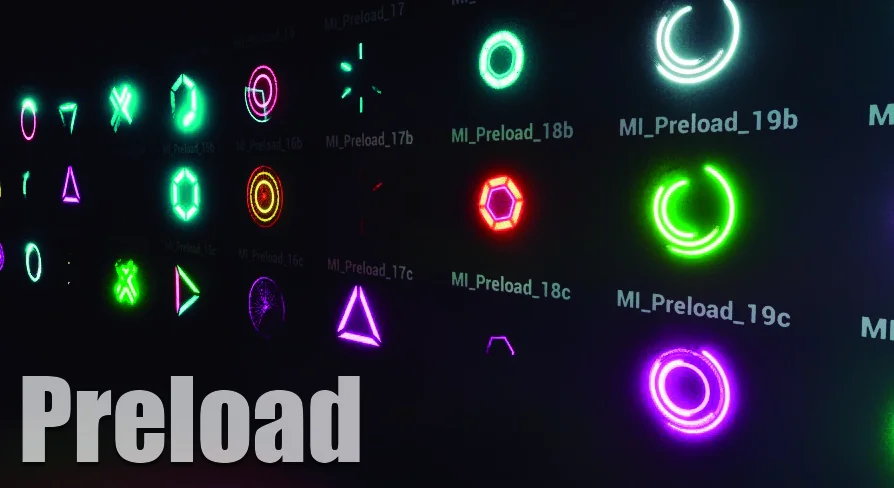
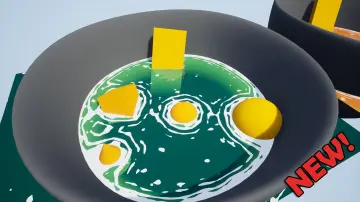
Enhance your project's visual feedback with Preload materials. This resource uses RGBA channel textures to offer infinite combinations for meshes, planes, and interactive widgets.
Preload materials offer a robust solution for developers looking to implement dynamic visual elements into their projects. By utilizing RGBA channel textures, this resource provides the possibility of infinite combinations for material creation. Consequently, users can tailor the visual output to suit the specific aesthetic requirements of their game or application.
Versatile Application Across Scenes and UI
One of the primary benefits of these Preload materials is their extreme versatility. They are designed to be introduced into a scene on any plane or mesh without difficulty. Furthermore, the developer has ensured that these materials are fully compatible with widgets. This makes them an ideal choice for creating animated menus, loading screens, and other interactive UI elements.
The flexibility of the system allows for various gameplay applications, including:
Animated loading indicators and loops.
Gameplay reload and charge effects.
Instant feedback for main menus and sub-menus.
Dynamic mesh overlays for in-game objects.
High-Resolution Texture Library
To support the infinite material combinations, the creator has provided an extensive library of textures. Specifically, an update on 29/05/23 added 99 textures to the package. These assets are available in multiple resolutions to ensure performance and quality across different hardware. Therefore, users can choose between 2k, 4k, and 8k textures depending on their specific project needs.
Efficient Workflow with RGBA Channels
The use of RGBA channel textures is a highly efficient method for material layering. Each channel can hold distinct information, allowing for complex visual results without unnecessary overhead. Moreover, this approach simplifies the process of creating master materials that handle everything from simple loops to complex gameplay charge sequences.
Closing Notes
Preload materials represent a comprehensive toolkit for managing both scene-based and widget-based visual effects. By combining high-resolution textures with a flexible RGBA-based system, developers can achieve professional results for loading sequences and gameplay feedback. Whether you are building a complex menu or enhancing a simple mesh, these materials provide the necessary variety and quality.
 Variety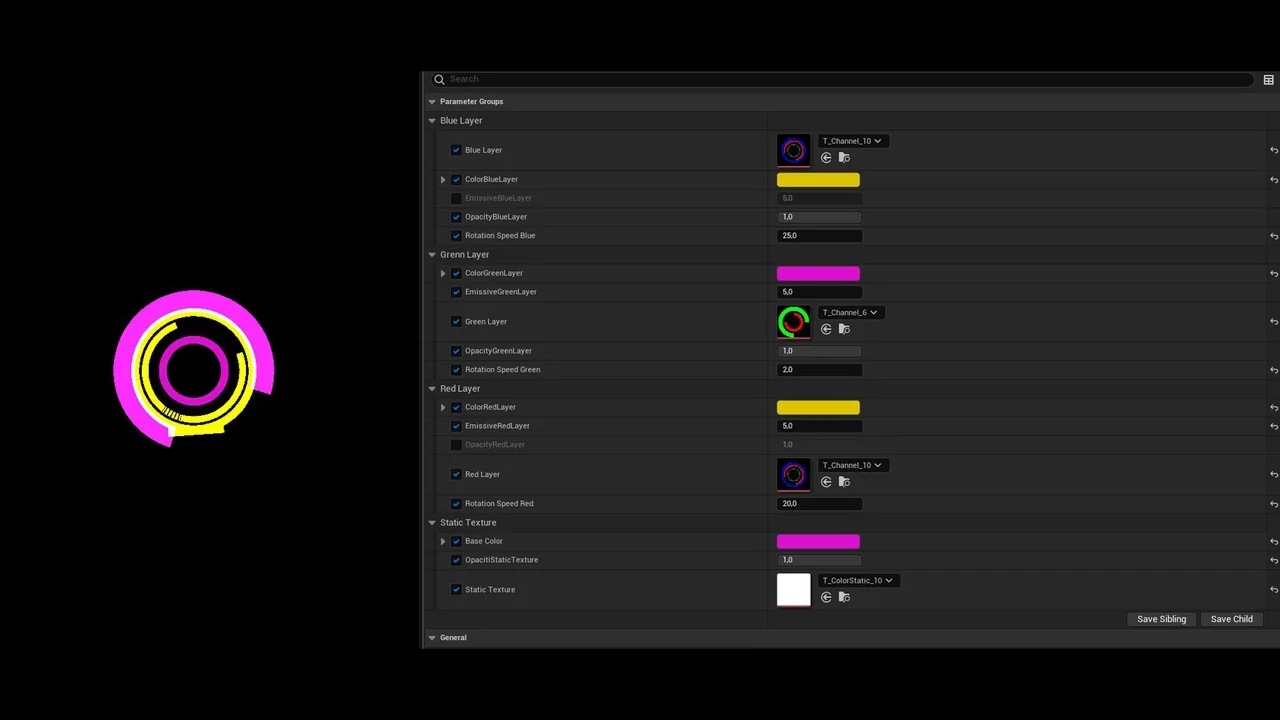
 Variety
 Variety
 Variety