"1f00f67f9253451b"{"id":"1000171","slug":"photorealistic-helicopter","title":"Photorealistic Helicopter","category":"Aircraft","engine":"5.2+","assetVersion":"","engineVersion":"Engine Version: 5.2+","tag":"Aircraft","accent":"blue","visual":"mech","summary":"A fully controlled helicopter project with sound, interior, detailed cockpit, multiplayer support, animated doors, and keyboard, mouse, and gamepad controls.","platform":"Unreal Engine","publishedAt":"2026-06-19T17:08:32.476Z","updatedAt":"2026-06-19T17:08:32.476Z","sourceNotes":[],"fileContents":[],"compatibility":["Unreal Engine","Engine Version: 5.2+"],"featuredImage":{"alt":"Photorealistic Helicopter","src":"/wp-content/uploads/published/2026/06/49aa59030a5c-d075bd02-d080-4819-a3ff-4fab412892aa-e5f24caae5.webp"},"hasDownloadLink":true,"downloads":0,"terms":[{"taxonomy":"category","slug":"aircraft","name":"Aircraft"}],"galleryImages":[{"src":"/wp-content/uploads/published/2026/06/6f54ef3814d6-b31493be-51e3-44f9-8a04-45c3d80a7f54-047bcc585d.webp","alt":"Photorealistic Helicopter"},{"src":"/wp-content/uploads/published/2026/06/513e997b9bac-d9251ed6-c806-40c3-ba66-c68331ab6d50-090cab43c6.webp","alt":"Photorealistic Helicopter"},{"src":"/wp-content/uploads/published/2026/06/eb1269de86e3-a2ac6ac4-537a-45ac-8ae5-f6c9b91c6336-351a039b25.webp","alt":"Photorealistic Helicopter"},{"src":"/wp-content/uploads/published/2026/06/d7f01fcc30d1-03ed8a3e-9667-45f9-a9a8-f1fefecef966-a2383461e4.webp","alt":"Photorealistic Helicopter"},{"src":"/wp-content/uploads/published/2026/06/5c6fb6729ba3-7396d789-a6e1-47fd-b810-97618225fffb-f4f30c74f6.webp","alt":"Photorealistic Helicopter"},{"src":"/wp-content/uploads/published/2026/06/276f63801477-204a8cd2-28fa-4e7b-8bf0-2fe6df57fd8d-733876e36f.webp","alt":"Photorealistic Helicopter"},{"src":"/wp-content/uploads/published/2026/06/c615972bad5e-43e50b72-5b51-4af9-9c2f-d9ac6488e7c9-77cdf25e02.webp","alt":"Photorealistic Helicopter"},{"src":"/wp-content/uploads/published/2026/06/43ed9c2818a7-60f7ff4b-f41d-484d-9a28-e1404c34e987-9764556d0a.webp","alt":"Photorealistic Helicopter"},{"src":"/wp-content/uploads/published/2026/06/16b37eaf77a0-10cb0931-d9c6-4e50-b0d2-a81555239f3b-68fefe30b2.webp","alt":"Photorealistic Helicopter"},{"src":"/wp-content/uploads/published/2026/06/1a47c3d2d4be-40155cfc-40c3-408d-b30b-5839ef8275a9-a165f3d077.webp","alt":"Photorealistic Helicopter"}],"accessPanel":{"kind":"resource","title":"Download this resource","eyebrow":"Free Download","message":"Log in or create a free account to start your download.","fileName":"PhotorealisticHelicopter.7z","safetyNote":"Resources are manually reviewed before listing to improve quality and reduce obvious risks.","actionLabel":"Download Free","resourceType":"Resource archive"},"contentHtml":"\u003cp\u003eMovement is the first thing this helicopter brings into a scene. It is a fully controlled helicopter with sound, an interior, a detailed cockpit, player enter and exit functionality, and multiplayer support. Instead of acting like a background prop, it is set up to be used directly as a vehicle, with lift, forward motion, sideways movement, yaw control, and interactive doors.\u003c/p\u003e\u003cp\u003eThe project also includes a video overview, sequence animation support, and a demo custom character setup that now uses a BP_Interface. The workflow note attached to that setup is simple: copy the node from third_person_bP. Manny and Quinn character support is also included. One extra project requirement is worth noting early, because it affects presentation immediately: HDRI Backdrop needs to be enabled. It is there by default, and if it is not active it can be enabled from plugins.\u003c/p\u003e\u003ch2\u003eHow Photorealistic Helicopter behaves in play\u003c/h2\u003e\u003cp\u003eThis is not a skeleton-rigged aircraft. All parts of the helicopter are animated inside a blueprint rather than being rigged with a skeletal mesh. That affects how the project is framed: it is focused on interactive behavior and blueprint-driven motion, not just on visual presence.\u003c/p\u003e\u003cp\u003eThe helicopter supports player entry and exit, which makes it suitable for scenes where the aircraft needs to function as part of gameplay rather than only as scenery. Entering the vehicle is tied to proximity at the helicopter door. Exiting is available once the helicopter is on the ground. The control notes also mention pressing and holding E and Q to start and stop or to lift the helicopter up and down, reinforcing that this is meant to be actively piloted.\u003c/p\u003e\u003cp\u003eSound and cockpit detail are part of the package’s identity as well. A detailed cockpit and a full interior make it useful for close camera work, first-person or near-first-person interaction, and sequences where players or viewers are expected to spend time inside the aircraft instead of only seeing it from a distance.\u003c/p\u003e\u003ch2\u003eBlueprint animation, BP_Interface, and Enhance Input\u003c/h2\u003e\u003cp\u003eThe project includes several workflow-oriented details that matter to anyone integrating it into a larger Unreal setup. The custom character demo now uses BP_Interface, with the note that the required step is to copy the node from third_person_bP. That points to a setup intended to connect with an existing third-person character flow rather than standing apart from it.\u003c/p\u003e\u003cp\u003eEnhance Input is also part of the project update. That is useful because the helicopter’s interaction model is broader than a simple forward-and-back vehicle. It handles vertical movement, yaw, directional travel, camera input, vehicle entry, vehicle exit, and individual door interaction. Having that mapped through an updated input system makes the package feel more like a ready gameplay feature than a passive scene element.\u003c/p\u003e\u003cp\u003eMultiplayer support is another central part of the package, not a side note. The helicopter is described as multiplayer-ready, and that immediately changes the likely scope of use. A vehicle with entry and exit, animated parts, and shared controls can fit cooperative or shared test scenes where more than one player needs to interact with the same environment. The update note places multiplayer support alongside Enhance Input, which makes both feel like practical project-facing additions rather than decorative extras.\u003c/p\u003e\u003ch2\u003eHelicopter_LineUp_Map and Helicopter_Map\u003c/h2\u003e\u003cp\u003eTwo levels are included: \u003cstrong\u003eHelicopter_LineUp_Map\u003c/strong\u003e And \u003cstrong\u003eHelicopter_Map\u003c/strong\u003e. Each serves a different purpose based on the details provided.\u003c/p\u003e\u003cp\u003e\u003cstrong\u003eHelicopter_LineUp_Map\u003c/strong\u003e Contains helicopter variation presets. That makes it the clearer choice for reviewing variations in one place or checking how different presets appear before moving into a gameplay setup.\u003c/p\u003e\u003cp\u003e\u003cstrong\u003eHelicopter_Map\u003c/strong\u003e Is simpler and more focused. It contains two helicopters and a landing pad. This gives the project a direct scene context for testing vehicle behavior, player approach, entry and exit, and grounded helicopter interaction.\u003c/p\u003e\u003cp\u003eThose two maps suggest two immediate use cases inside the same package. One is comparative viewing of helicopter variations. The other is a more straightforward interaction space focused on a limited number of helicopters and a landing area. Even without adding any assumptions beyond those facts, that split makes the package easier to place in different production stages: previewing variants on one side, testing control and scene interaction on the other.\u003c/p\u003e\u003ch2\u003eKeyboard, mouse, and gamepad controls\u003c/h2\u003e\u003cp\u003eThe control setup is described in unusually concrete terms, which helps define the asset’s practical role. This helicopter is controllable with keyboard, mouse, and gamepad.\u003c/p\u003e\u003cp\u003eFor keyboard and mouse, vehicle entry uses \u003cstrong\u003eF\u003c/strong\u003e When the player is close to the helicopter door. Exit also uses that interaction flow once the helicopter is on the ground. Vertical movement is assigned to \u003cstrong\u003eE\u003c/strong\u003e And \u003cstrong\u003eQ\u003c/strong\u003e In the Unreal Engine 5.0 project, and also to the \u003cstrong\u003eArrow Up\u003c/strong\u003e And \u003cstrong\u003eArrow Down\u003c/strong\u003e Keys. Forward and backward movement uses \u003cstrong\u003eW\u003c/strong\u003e And \u003cstrong\u003eS\u003c/strong\u003e, while right and left movement uses \u003cstrong\u003eD\u003c/strong\u003e And \u003cstrong\u003eA\u003c/strong\u003e. Camera control follows \u003cstrong\u003eMouse X\u003c/strong\u003e And \u003cstrong\u003eMouse Y\u003c/strong\u003e. Door interaction is mapped to \u003cstrong\u003e1, 2, 3, 4, 5\u003c/strong\u003e. Yaw movement is handled by pressing and holding the \u003cstrong\u003eArrow Right\u003c/strong\u003e And \u003cstrong\u003eArrow Left\u003c/strong\u003e Keys.\u003c/p\u003e\u003cp\u003eGamepad support is laid out just as specifically. Entering the vehicle uses \u003cstrong\u003eGamepad_FaceButton_Top\u003c/strong\u003e, identified as the \u003cstrong\u003eY button\u003c/strong\u003e, again when the player is close to the helicopter door. Vertical movement uses \u003cstrong\u003eGamepad_LeftTriggerAxis\u003c/strong\u003e And \u003cstrong\u003eGamepad_RightTriggerAxis\u003c/strong\u003e. Forward and backward movement uses the \u003cstrong\u003eLeft thumbstick Y-axis\u003c/strong\u003e, and right and left movement uses the \u003cstrong\u003eLeft thumbstick X-axis\u003c/strong\u003e. Camera X and Camera Y are also described through thumbstick axis controls. Doors still open and close with \u003cstrong\u003e1, 2, 3, 4, 5\u003c/strong\u003e. Yaw movement uses \u003cstrong\u003eGamepad_Face_Button_Left\u003c/strong\u003e And \u003cstrong\u003eGamepad_Face_Button_Right\u003c/strong\u003e, identified as the \u003cstrong\u003eX\u003c/strong\u003e And \u003cstrong\u003eB\u003c/strong\u003e Buttons.\u003c/p\u003e\u003cp\u003eThat level of input detail makes the package easier to evaluate for actual use. It is clear that the helicopter is not limited to a single movement axis or one showcase interaction. It supports lift, directional travel, view control, yaw, and door operation across multiple input methods.\u003c/p\u003e\u003ch2\u003eAnimated doors, cockpit access, and scene-facing use cases\u003c/h2\u003e\u003cp\u003eOne of the more tangible interactive elements is the door system. The helicopter has four to five animated doors, and they open when buttons \u003cstrong\u003e1, 2, 3, 4, 5\u003c/strong\u003e Are pressed. That creates a stronger sense of physical interaction than a vehicle that only supports movement. Doors matter in close-range scenes, boarding sequences, grounded presentation shots, and multiplayer moments where players approach the helicopter from outside before entering.\u003c/p\u003e\u003cp\u003eBecause the helicopter includes a detailed cockpit and interior, those animated access points are not isolated gimmicks. They tie directly into the way the aircraft is meant to be explored and used. A helicopter with an interior, visible cockpit detail, sound, and enter-exit functionality can support more than flyby shots. It fits landing pad scenes, boarding moments, demo environments, and interactive vehicle tests where the player moves between being outside the aircraft and piloting it.\u003c/p\u003e\u003cp\u003eThe included tags also reinforce the package’s practical identity: helicopter, modular, multiplayer, black, script, realistic, blueprint, and hawk. Even without stretching those labels beyond what is stated, they align with what the project already shows clearly: a realistic helicopter presented as a blueprint-driven, script-oriented interactive vehicle with multiplayer capability.\u003c/p\u003e\u003ch2\u003eWho this helicopter suits best\u003c/h2\u003e\u003cp\u003eThis project is most useful for teams or creators who need a helicopter that already behaves like a vehicle inside Unreal rather than a helicopter that only needs to look good in a still frame. The strongest takeaway is the combination of blueprint-based animated parts, cockpit and interior detail, player entry and exit, animated doors, multiplayer support, and fully described controls across keyboard, mouse, and gamepad. For anyone testing interactive aircraft scenes, landing pad setups, variation presets, or multiplayer vehicle use, that combination is the package’s clearest strength.\u003c/p\u003e\n\n\u003ch2\u003eMore From The Same Workflow\u003c/h2\u003e\n\u003cul\u003e\n\u003cli\u003e\u003ca href=\"https://3dcghub.com/air-balloons/\" title=\"Air Balloons\"\u003eAir Balloons\u003c/a\u003e\u003c/li\u003e\n\u003cli\u003e\u003ca href=\"https://3dcghub.com/abandoned-passenger-aircraft/\" title=\"Abandoned Passenger Aircraft\"\u003eAbandoned Passenger Aircraft\u003c/a\u003e\u003c/li\u003e\n\u003cli\u003e\u003ca href=\"https://3dcghub.com/driveable-vehicle-ah-raider/\" title=\"Driveable Vehicle : AH-Raider\"\u003eDriveable Vehicle : AH-Raider\u003c/a\u003e\u003c/li\u003e\n\u003cli\u003e\u003ca href=\"https://3dcghub.com/physics-based-helicopter/\" title=\"Physics Based Helicopter\"\u003ePhysics Based Helicopter\u003c/a\u003e\u003c/li\u003e\n\u003cli\u003e\u003ca href=\"https://3dcghub.com/driveable-vehicle-pack-redux-2-0/\" title=\"Driveable Vehicle Pack ( REDUX ) 2.0\"\u003eDriveable Vehicle Pack ( REDUX ) 2.0\u003c/a\u003e\u003c/li\u003e\n\u003c/ul\u003e","contentTextLength":8287,"navigation":{"current":1178,"total":3222,"previous":{"id":"1000172","slug":"devton-abandoned-prison","title":"DevTon Abandoned Prison","category":"Industrial","platform":"Unreal Engine","updatedAt":"2026-06-20T03:55:41.644Z"},"next":{"id":"1000170","slug":"post-process-hand-draw-outline","title":"Post Process Hand Draw Outline","category":"Variety","platform":"Unreal Engine","updatedAt":"2026-06-19T16:53:03.610Z"}},"relatedResources":[{"id":"1000115","slug":"air-balloons","title":"Air Balloons","category":"Aircraft","engine":"4.26+,5.0+","assetVersion":"","engineVersion":"Engine Version: 4.26+,5.0+","tag":"Aircraft","accent":"blue","visual":"mech","summary":"Implement dynamic, physics-driven air balloons using drag-and-drop blueprints designed for massive sky population and interactive drivable sequences.","platform":"Unreal Engine","publishedAt":"2026-06-09T13:51:38.785Z","updatedAt":"2026-06-09T13:51:38.785Z","sourceNotes":[],"fileContents":[],"compatibility":["Unreal Engine","Engine Version: 4.26+,5.0+"],"featuredImage":{"alt":"Air Balloons","src":"/wp-content/uploads/published/2026/06/fa9f0afa156f-727f3b4e-c5b4-41d6-b16c-535a627e17c4-8663a9c6ba.webp"},"hasDownloadLink":true,"downloads":0},{"id":"4918","slug":"abandoned-passenger-aircraft","title":"Abandoned Passenger Aircraft","category":"Aircraft","engine":"4.26+,5.0+","assetVersion":"Engine version: 4.26+,5.0+","engineVersion":"4.16","tag":"Aircraft","accent":"blue","visual":"city","summary":"Enhance your game environments with this detailed abandoned passenger aircraft. Featuring full interior and exterior models, it's perfect for post-apocalyptic s","platform":"Unreal Engine","publishedAt":"2026-02-14T17:00:45.000Z","updatedAt":"2026-04-19T15:57:03.000Z","sourceNotes":[],"fileContents":[],"compatibility":["Unreal Engine","Engine version: 4.26+,5.0+"],"featuredImage":{"alt":"Abandoned Passenger Aircraft","src":"https://3dcghub.com/wp-content/uploads/2026/02/f71aefd3-f6fa-4c1f-956b-6c403aff25d9.webp"},"hasDownloadLink":true,"downloads":0},{"id":"5107","slug":"driveable-vehicle-ah-raider","title":"Driveable Vehicle : AH-Raider","category":"Vehicles \u0026 Transportation","engine":"5.0+","assetVersion":"Engine version: 5.0+","engineVersion":"4.16","tag":"Vehicles","accent":"blue","visual":"animation","summary":"Boost your Unreal Engine project with the AH-Raider. This drivable stealth helicopter features optimized blueprints, seven skins, and advanced weapon systems.","platform":"Unreal Engine","publishedAt":"2026-02-14T17:43:29.000Z","updatedAt":"2026-04-19T15:57:01.000Z","sourceNotes":[],"fileContents":[],"compatibility":["Unreal Engine","Engine version: 5.0+"],"featuredImage":{"alt":"Driveable Vehicle : AH-Raider","src":"https://3dcghub.com/wp-content/uploads/2026/02/99e4b997-773c-4bcc-b1c0-ddff44a70701.webp"},"hasDownloadLink":true,"downloads":0}]}
Aircraft
Photorealistic Helicopter
A fully controlled helicopter project with sound, interior, detailed cockpit, multiplayer support, animated doors, and keyboard, mouse, and gamepad controls.
Category:Unreal Engine,AircraftPlatform: Unreal EngineEngine Version: 5.2+Published: Jun 19, 2026
Aircraft
Resource overview
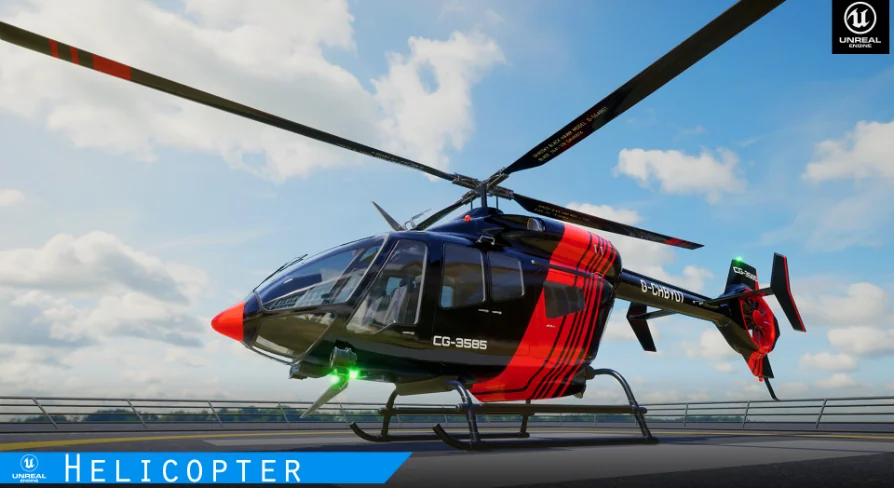
Movement is the first thing this helicopter brings into a scene. It is a fully controlled helicopter with sound, an interior, a detailed cockpit, player enter and exit functionality, and multiplayer support. Instead of acting like a background prop, it is set up to be used directly as a vehicle, with lift, forward motion, sideways movement, yaw control, and interactive doors.
The project also includes a video overview, sequence animation support, and a demo custom character setup that now uses a BP_Interface. The workflow note attached to that setup is simple: copy the node from third_person_bP. Manny and Quinn character support is also included. One extra project requirement is worth noting early, because it affects presentation immediately: HDRI Backdrop needs to be enabled. It is there by default, and if it is not active it can be enabled from plugins.
How Photorealistic Helicopter behaves in play
This is not a skeleton-rigged aircraft. All parts of the helicopter are animated inside a blueprint rather than being rigged with a skeletal mesh. That affects how the project is framed: it is focused on interactive behavior and blueprint-driven motion, not just on visual presence.
The helicopter supports player entry and exit, which makes it suitable for scenes where the aircraft needs to function as part of gameplay rather than only as scenery. Entering the vehicle is tied to proximity at the helicopter door. Exiting is available once the helicopter is on the ground. The control notes also mention pressing and holding E and Q to start and stop or to lift the helicopter up and down, reinforcing that this is meant to be actively piloted.
Sound and cockpit detail are part of the package’s identity as well. A detailed cockpit and a full interior make it useful for close camera work, first-person or near-first-person interaction, and sequences where players or viewers are expected to spend time inside the aircraft instead of only seeing it from a distance.
Blueprint animation, BP_Interface, and Enhance Input
The project includes several workflow-oriented details that matter to anyone integrating it into a larger Unreal setup. The custom character demo now uses BP_Interface, with the note that the required step is to copy the node from third_person_bP. That points to a setup intended to connect with an existing third-person character flow rather than standing apart from it.
Enhance Input is also part of the project update. That is useful because the helicopter’s interaction model is broader than a simple forward-and-back vehicle. It handles vertical movement, yaw, directional travel, camera input, vehicle entry, vehicle exit, and individual door interaction. Having that mapped through an updated input system makes the package feel more like a ready gameplay feature than a passive scene element.
Multiplayer support is another central part of the package, not a side note. The helicopter is described as multiplayer-ready, and that immediately changes the likely scope of use. A vehicle with entry and exit, animated parts, and shared controls can fit cooperative or shared test scenes where more than one player needs to interact with the same environment. The update note places multiplayer support alongside Enhance Input, which makes both feel like practical project-facing additions rather than decorative extras.
Helicopter_LineUp_Map and Helicopter_Map
Two levels are included: Helicopter_LineUp_Map And Helicopter_Map. Each serves a different purpose based on the details provided.
Helicopter_LineUp_Map Contains helicopter variation presets. That makes it the clearer choice for reviewing variations in one place or checking how different presets appear before moving into a gameplay setup.
Helicopter_Map Is simpler and more focused. It contains two helicopters and a landing pad. This gives the project a direct scene context for testing vehicle behavior, player approach, entry and exit, and grounded helicopter interaction.
Those two maps suggest two immediate use cases inside the same package. One is comparative viewing of helicopter variations. The other is a more straightforward interaction space focused on a limited number of helicopters and a landing area. Even without adding any assumptions beyond those facts, that split makes the package easier to place in different production stages: previewing variants on one side, testing control and scene interaction on the other.
Keyboard, mouse, and gamepad controls
The control setup is described in unusually concrete terms, which helps define the asset’s practical role. This helicopter is controllable with keyboard, mouse, and gamepad.
For keyboard and mouse, vehicle entry uses F When the player is close to the helicopter door. Exit also uses that interaction flow once the helicopter is on the ground. Vertical movement is assigned to E And Q In the Unreal Engine 5.0 project, and also to the Arrow Up And Arrow Down Keys. Forward and backward movement uses W And S, while right and left movement uses D And A. Camera control follows Mouse X And Mouse Y. Door interaction is mapped to 1, 2, 3, 4, 5. Yaw movement is handled by pressing and holding the Arrow Right And Arrow Left Keys.
Gamepad support is laid out just as specifically. Entering the vehicle uses Gamepad_FaceButton_Top, identified as the Y button, again when the player is close to the helicopter door. Vertical movement uses Gamepad_LeftTriggerAxis And Gamepad_RightTriggerAxis. Forward and backward movement uses the Left thumbstick Y-axis, and right and left movement uses the Left thumbstick X-axis. Camera X and Camera Y are also described through thumbstick axis controls. Doors still open and close with 1, 2, 3, 4, 5. Yaw movement uses Gamepad_Face_Button_Left And Gamepad_Face_Button_Right, identified as the X And B Buttons.
That level of input detail makes the package easier to evaluate for actual use. It is clear that the helicopter is not limited to a single movement axis or one showcase interaction. It supports lift, directional travel, view control, yaw, and door operation across multiple input methods.
Animated doors, cockpit access, and scene-facing use cases
One of the more tangible interactive elements is the door system. The helicopter has four to five animated doors, and they open when buttons 1, 2, 3, 4, 5 Are pressed. That creates a stronger sense of physical interaction than a vehicle that only supports movement. Doors matter in close-range scenes, boarding sequences, grounded presentation shots, and multiplayer moments where players approach the helicopter from outside before entering.
Because the helicopter includes a detailed cockpit and interior, those animated access points are not isolated gimmicks. They tie directly into the way the aircraft is meant to be explored and used. A helicopter with an interior, visible cockpit detail, sound, and enter-exit functionality can support more than flyby shots. It fits landing pad scenes, boarding moments, demo environments, and interactive vehicle tests where the player moves between being outside the aircraft and piloting it.
The included tags also reinforce the package’s practical identity: helicopter, modular, multiplayer, black, script, realistic, blueprint, and hawk. Even without stretching those labels beyond what is stated, they align with what the project already shows clearly: a realistic helicopter presented as a blueprint-driven, script-oriented interactive vehicle with multiplayer capability.
Who this helicopter suits best
This project is most useful for teams or creators who need a helicopter that already behaves like a vehicle inside Unreal rather than a helicopter that only needs to look good in a still frame. The strongest takeaway is the combination of blueprint-based animated parts, cockpit and interior detail, player entry and exit, animated doors, multiplayer support, and fully described controls across keyboard, mouse, and gamepad. For anyone testing interactive aircraft scenes, landing pad setups, variation presets, or multiplayer vehicle use, that combination is the package’s clearest strength.
 Aircraft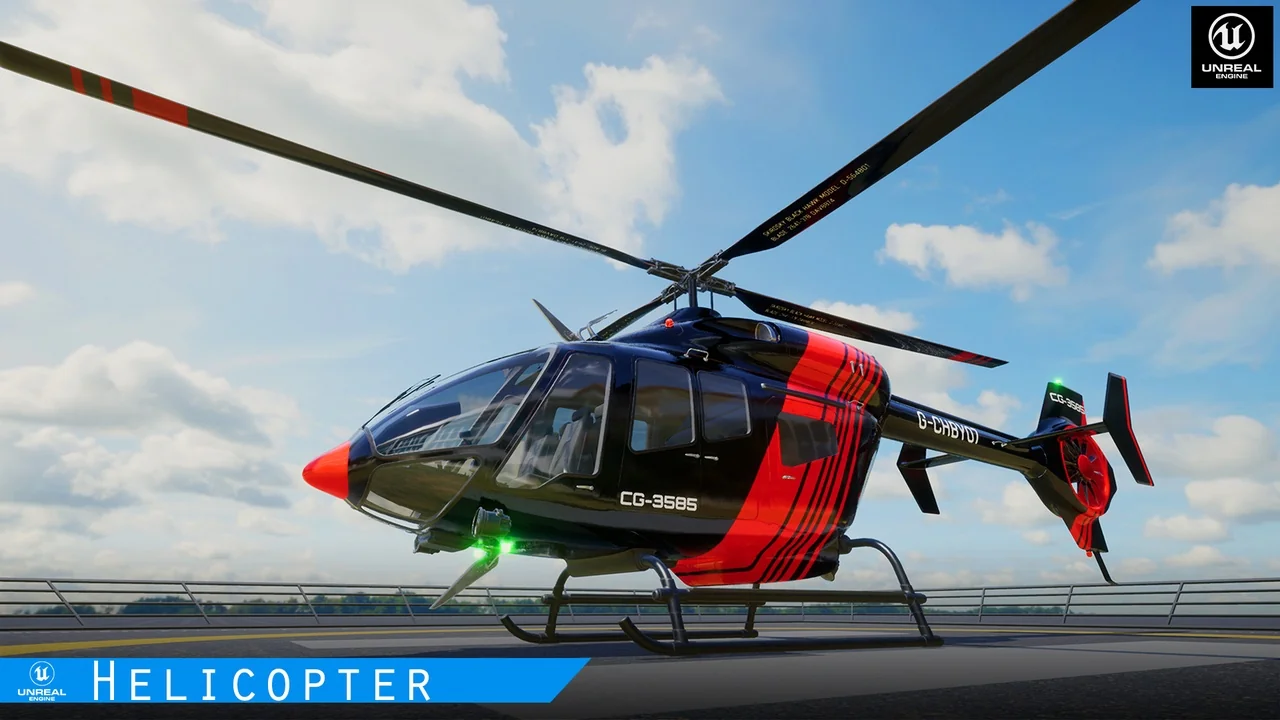
 Aircraft
 Aircraft
 Vehicles