"7066dd76da796369"{"id":"13136","slug":"fog-of-war-material","title":"Fog Of War Material","category":"Variety","engine":"5.3+","assetVersion":"Engine version: 5.3+","engineVersion":"5.3","tag":"Variety","accent":"blue","visual":"luts","summary":"The Fog Of War Material is a specialized post-process asset that generates visibility effects based on camera position. It is part of the Material Mix 2 collection.","platform":"Unreal Engine","publishedAt":"2026-03-10T15:57:16.000Z","updatedAt":"2026-04-19T15:46:31.000Z","sourceNotes":[],"fileContents":[],"compatibility":["Unreal Engine","Engine version: 5.3+"],"featuredImage":{"alt":"Fog Of War Material","src":"https://3dcghub.com/wp-content/uploads/2026/03/d95f21cf-23e2-494d-9a38-ed8709f3cd98.webp"},"hasDownloadLink":true,"downloads":1,"terms":[{"taxonomy":"category","slug":"variety","name":"Variety"},{"taxonomy":"post_tag","slug":"fog-of-war-material","name":"Fog Of War Material"},{"taxonomy":"post_tag","slug":"material-mix-2","name":"Material Mix 2"},{"taxonomy":"post_tag","slug":"materials","name":"Materials"},{"taxonomy":"post_tag","slug":"post-process-material","name":"Post Process Material"},{"taxonomy":"post_tag","slug":"templates","name":"Templates"},{"taxonomy":"post_tag","slug":"vfx","name":"VFX"}],"galleryImages":[{"src":"https://3dcghub.com/wp-content/uploads/2026/03/387d1d549f5b_7a4a2fbe-2a56-4458-9cba-fadf496ff437.webp","alt":"Fog Of War Material"},{"src":"https://3dcghub.com/wp-content/uploads/2026/03/33007001affd_4893b24d-1cb9-4e92-a9d3-c482d554283d.webp","alt":"Fog Of War Material"},{"src":"https://3dcghub.com/wp-content/uploads/2026/03/89d7be509a6f_f471d114-b0cc-42b1-8dd1-db9245b0e8f2.webp","alt":"Fog Of War Material"},{"src":"https://3dcghub.com/wp-content/uploads/2026/03/3c110b102b27_1248737d-c19f-483d-b18f-25eb1b84dc00.webp","alt":"Fog Of War Material"}],"accessPanel":{"kind":"resource","title":"Access this resource","eyebrow":"Free Download","message":"Log in or create a free account to start your download.","fileName":"Fog of War - Quick Cover.rar","safetyNote":"All resources are 100% manually reviewed to eliminate all risks.","actionLabel":"Download Free","resourceType":"Resource archive"},"contentHtml":"\u003ch2\u003eIntroduction to the Fog Of War Material\u003c/h2\u003e\n\u003cp\u003eThe Fog Of War Material is a specialized post-process asset designed to create dynamic visibility effects within your project. This material generates a fog-of-war effect that reacts directly to the camera's position. Therefore, it provides a streamlined way to manage what players can see on screen.\u003c/p\u003e\n\n\u003ch2\u003eKey Features and Functionality\u003c/h2\u003e\n\u003cp\u003eThis resource functions as a post-process material. It calculates the visual fog based on where the camera is located in the world. Moreover, this behavior ensures that the effect remains consistent with the player's perspective at all times.\u003c/p\u003e\n\n\u003cp\u003eThe \u003cstrong\u003eFog Of War Material\u003c/strong\u003e is included as part of the Material Mix 2 collection. Because it is a post-process solution, it can be integrated into your rendering pipeline to achieve a specific aesthetic. However, users should note that the visual output is strictly tied to the camera's spatial data.\u003c/p\u003e\n\n\u003ch2\u003eIntegration and Templates\u003c/h2\u003e\n\u003cp\u003eWhen implementing the \u003cstrong\u003eFog Of War Material\u003c/strong\u003e, developers often look for specific project setups. The creator notes that the Top Down Template is not included in this specific pack. However, you can easily download this template directly through the engine to test the material.\u003c/p\u003e\n\n\u003cp\u003eAlso, the material is designed to work efficiently within the post-processing volume of your scene. By utilizing this material, you can create a sense of mystery in your environments. Consequently, the \u003cstrong\u003eFog Of War Material\u003c/strong\u003e helps define the player's field of view through automated calculations.\u003c/p\u003e\n\n\u003ch2\u003eClosing Notes\u003c/h2\u003e\n\u003cp\u003eThe Fog Of War Material offers a robust solution for developers needing camera-based visibility effects. As part of Material Mix 2, it provides a professional post-process approach to environment masking. Therefore, it remains a valuable tool for those building strategic or exploration-focused experiences.\u003c/p\u003e\n\n\u003ch2\u003eExplore Similar Assets\u003c/h2\u003e\n\u003cul\u003e\n\u003cli\u003e\u003ca href=\"https://3dcghub.com/ascii-post-process-material/\" title=\"ASCII Post Process Material\"\u003eASCII Post Process Material\u003c/a\u003e\u003c/li\u003e\n\u003cli\u003e\u003ca href=\"https://3dcghub.com/rain-water-drop-flow-material-fx-system/\" title=\"Rain – Water Drop – Flow Material \u0026amp;amp; FX System\"\u003eRain – Water Drop – Flow Material \u0026amp; FX System\u003c/a\u003e\u003c/li\u003e\n\u003cli\u003e\u003ca href=\"https://3dcghub.com/speed-lines/\" title=\"Speed Lines\"\u003eSpeed Lines\u003c/a\u003e\u003c/li\u003e\n\u003cli\u003e\u003ca href=\"https://3dcghub.com/scifi-environment-offworld/\" title=\"SciFi Environment — ‘Offworld’\"\u003eSciFi Environment — ‘Offworld’\u003c/a\u003e\u003c/li\u003e\n\u003cli\u003e\u003ca href=\"https://3dcghub.com/sci-fi-props-vol01/\" title=\"Sci-Fi Props Vol01\"\u003eSci-Fi Props Vol01\u003c/a\u003e\u003c/li\u003e\n\u003c/ul\u003e","contentTextLength":2026,"navigation":{"current":3325,"total":4016,"previous":{"id":"13145","slug":"gothic-texture-pack","title":"Gothic Texture Pack","category":"Variety","platform":"Unreal Engine","updatedAt":"2026-04-19T15:46:31.000Z"},"next":{"id":"13126","slug":"fantastical-resource-shader","title":"Fantastical Resource Shader","category":"Variety","platform":"Unreal Engine","updatedAt":"2026-04-19T15:46:31.000Z"}},"relatedResources":[{"id":"13082","slug":"ascii-post-process-material","title":"ASCII Post Process Material","category":"Variety","engine":"4.26+,5.0+","assetVersion":"Engine version: 4.26+,5.0+","engineVersion":"4.15","tag":"Variety","accent":"blue","visual":"luts","summary":"Create a unique retro aesthetic with the ASCII Post Process Material. This package includes a master material and five pre-built instances to transform your scenes into character-based art.","platform":"Unreal Engine","publishedAt":"2026-03-10T15:45:26.000Z","updatedAt":"2026-04-19T15:46:32.000Z","sourceNotes":[],"fileContents":[],"compatibility":["Unreal Engine","Engine version: 4.26+,5.0+"],"featuredImage":{"alt":"ASCII Post Process Material","src":"https://3dcghub.com/wp-content/uploads/2026/03/d2a47b76-9d41-4a25-836c-68ce2067c17a.webp"},"hasDownloadLink":true,"downloads":0},{"id":"1001084","slug":"elias-wick-advanced-fog","title":"Elias Wick – Advanced Fog","category":"Variety","engine":"5.2+","assetVersion":"","engineVersion":"Engine Version: 5.2+","tag":"Variety","accent":"blue","visual":"mech","summary":"Elias Wick – Advanced Fog brings 9 materials, 25+ textures, post process effects, fog cards, and volumetric fog to Unreal Engine atmosphere workflows.","platform":"Unreal Engine","publishedAt":"2026-09-04T16:40:25.414Z","updatedAt":"2026-09-04T16:40:25.414Z","sourceNotes":[],"fileContents":[],"compatibility":["Unreal Engine","Engine Version: 5.2+"],"featuredImage":{"alt":"Elias Wick – Advanced Fog","src":"/wp-content/uploads/published/2026/09/9cbb2a29a5b0-8b87c205-3d70-4888-a8cd-930014f44c61-67d29a5755.webp"},"hasDownloadLink":true,"downloads":0},{"id":"17158","slug":"fluid-ninja-live","title":"Fluid Ninja LIVE","category":"Variety","engine":"5.4+","assetVersion":"Engine version: 5.4+","engineVersion":"Asset Version:1.9.54.4","tag":"Variety","accent":"blue","visual":"character","summary":"Fluid Ninja LIVE is a robust toolset for creating dynamic, responsive fluid simulations in real-time. It supports everything from Metahuman tracking to large-scale environmental effects like fog and sand.","platform":"Unreal Engine","publishedAt":"2026-03-13T13:52:32.000Z","updatedAt":"2026-04-19T15:43:36.000Z","sourceNotes":[],"fileContents":[],"compatibility":["Unreal Engine","Engine version: 5.4+","Asset Version: 1.9.54.4"],"featuredImage":{"alt":"Fluid Ninja LIVE","src":"https://3dcghub.com/wp-content/uploads/2026/03/48b74bb6-c70d-408a-8f29-27d49a842381.webp"},"hasDownloadLink":true,"downloads":8}]}
Variety
Fog Of War Material
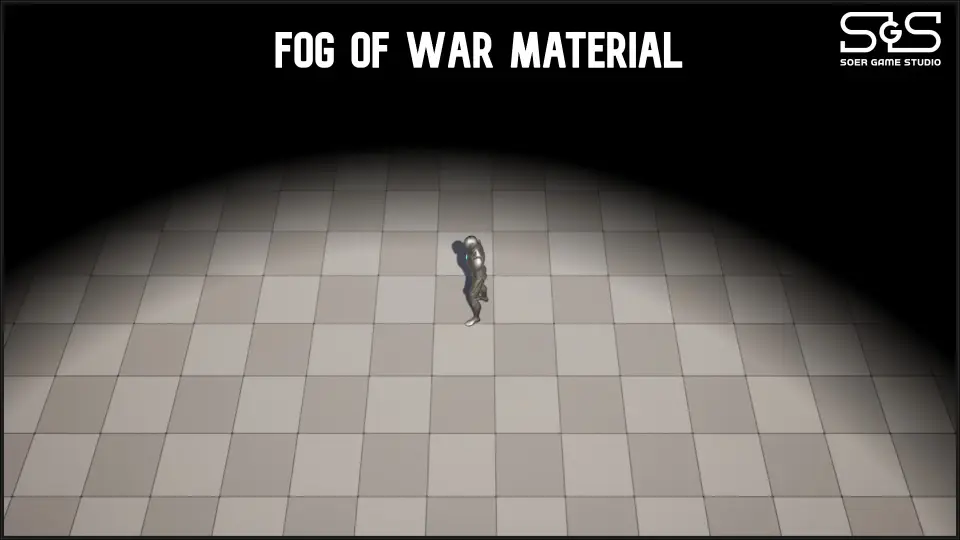
The Fog Of War Material is a specialized post-process asset that generates visibility effects based on camera position. It is part of the Material Mix 2 collection.
The Fog Of War Material is a specialized post-process asset designed to create dynamic visibility effects within your project. This material generates a fog-of-war effect that reacts directly to the camera's position. Therefore, it provides a streamlined way to manage what players can see on screen.
Key Features and Functionality
This resource functions as a post-process material. It calculates the visual fog based on where the camera is located in the world. Moreover, this behavior ensures that the effect remains consistent with the player's perspective at all times.
The Fog Of War Material is included as part of the Material Mix 2 collection. Because it is a post-process solution, it can be integrated into your rendering pipeline to achieve a specific aesthetic. However, users should note that the visual output is strictly tied to the camera's spatial data.
Integration and Templates
When implementing the Fog Of War Material, developers often look for specific project setups. The creator notes that the Top Down Template is not included in this specific pack. However, you can easily download this template directly through the engine to test the material.
Also, the material is designed to work efficiently within the post-processing volume of your scene. By utilizing this material, you can create a sense of mystery in your environments. Consequently, the Fog Of War Material helps define the player's field of view through automated calculations.
Closing Notes
The Fog Of War Material offers a robust solution for developers needing camera-based visibility effects. As part of Material Mix 2, it provides a professional post-process approach to environment masking. Therefore, it remains a valuable tool for those building strategic or exploration-focused experiences.
 Variety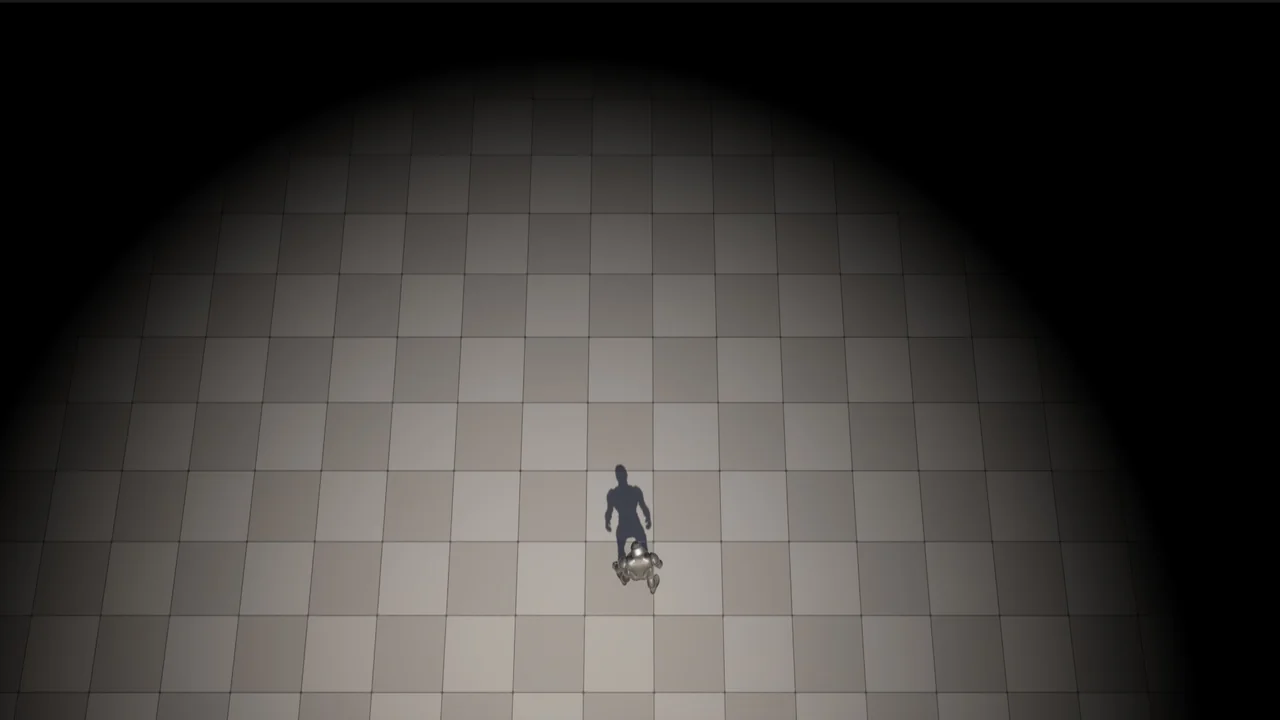
 Variety
 Variety
 Variety