"6f9bd6df1f44a86f"{"id":"1000805","slug":"color-grade-50-luts","title":"Color Grade - 50 LUTs","category":"Variety","engine":"4.26+,5.0+","assetVersion":"","engineVersion":"Engine Version: 4.26+,5.0+","tag":"Variety","accent":"blue","visual":"luts","summary":"A professionally handcrafted pack of 50 LUTs for elevating lighting and post-process workflows, adding cinematic, realistic, and stylized atmosphere to environm","platform":"Unreal Engine","indexPolicy":"index","publishedAt":"2026-07-31T03:35:22.549Z","updatedAt":"2026-07-31T03:35:22.549Z","sourceNotes":[],"fileContents":[],"compatibility":["Unreal Engine","Engine Version: 4.26+,5.0+"],"featuredImage":{"alt":"Color Grade - 50 LUTs","src":"/wp-content/uploads/published/2026/07/b52c3f1c055e-4f6a72a8-3a42-49db-ab88-7dabfe104570-d8237b49d5.webp"},"hasDownloadLink":true,"downloads":1,"terms":[{"taxonomy":"category","slug":"variety-vfx","name":"Variety"}],"galleryImages":[{"src":"/wp-content/uploads/published/2026/07/3ea2e9df223f-895afcdb-4c7a-4113-a757-a6c113b238f9-c6d463465b.webp","alt":"Color Grade - 50 LUTs"},{"src":"/wp-content/uploads/published/2026/07/908471a8edcd-5015ef6f-cdf9-40df-a485-19a11cb01fb9-5218639db1.webp","alt":"Color Grade - 50 LUTs"},{"src":"/wp-content/uploads/published/2026/07/561dd0533a2a-39edd8f5-4c03-48ae-9edb-034018310a1e-ab94c55fed.webp","alt":"Color Grade - 50 LUTs"},{"src":"/wp-content/uploads/published/2026/07/3efeeb6e3068-7b46e5eb-2a8b-4136-9a00-696186a325c8-6d92ba41ad.webp","alt":"Color Grade - 50 LUTs"},{"src":"/wp-content/uploads/published/2026/07/bbceccd27098-4b07abf0-d5f7-49e8-91a3-584ee1998c21-2cb72cfb56.webp","alt":"Color Grade - 50 LUTs"},{"src":"/wp-content/uploads/published/2026/07/a75148fb4760-edf2b4fb-f485-4ae1-9fe1-909a560807f3-c7fff93db8.webp","alt":"Color Grade - 50 LUTs"},{"src":"/wp-content/uploads/published/2026/07/3e607a039506-5eae06e8-6893-4550-ae15-e93655a5ea47-4705f90e73.webp","alt":"Color Grade - 50 LUTs"},{"src":"/wp-content/uploads/published/2026/07/259adc2114a4-5524fd2c-6c39-40c5-a75b-f9a246df632b-c08d2eea1e.webp","alt":"Color Grade - 50 LUTs"}],"accessPanel":{"kind":"resource","title":"Download this resource","eyebrow":"Free Download","message":"Log in or create a free account to start your download.","fileName":"Content.7z","safetyNote":"Resources are manually reviewed before listing to improve quality and reduce obvious risks.","actionLabel":"Download Free","resourceType":"Resource archive"},"contentHtml":"\u003cp\u003eDropping a lookup table (LUT) into a Post-Process Volume changes how light, shadow, and midtone values read across an entire scene without requiring a relight or a shader rewrite. \u003cem\u003eColor Grade - 50 LUTs\u003c/em\u003e provides exactly that kind of late-stage adjustment layer, giving artists a curated set of 50 handcrafted tables that can be swapped, combined, or refined to push a render toward a specific emotional register.\u003c/p\u003e\n\n\u003ch2\u003eBehavior Within a Lighting and Post-Process Chain\u003c/h2\u003e\n\u003cp\u003eThe pack is built to operate at the grading stage of production rather than during asset creation. Once lighting has been placed and exposure values have been settled, a LUT from this set can be applied to remap the final color response. That remap is where the emotional and atmospheric shift happens: a neutral outdoor scene can be pushed toward a cooler, industrial mood, or a warm interior can be tightened into a cinematic contrast curve. The creator describes the tables as professionally handcrafted to add emotion and breathe life into environments, which positions the pack as a finishing tool rather than a corrective one.\u003c/p\u003e\n\n\u003cp\u003eBecause the application happens in Post-Process, the underlying geometry, textures, and light rig remain untouched. The 50 LUTs function as interpretive layers on top of the rendered frame. Artists evaluating the pack can treat each table as a ready-made grade that would otherwise require manual curve editing, color balancing, and channel mixing to reproduce from scratch.\u003c/p\u003e\n\n\u003ch2\u003eThe Spread of Visual Treatments Inside the 50 LUTs Set\u003c/h2\u003e\n\u003cp\u003eThe tagging attached to the pack reveals a wide intended range. The tables cover \u003cem\u003ePost\u003c/em\u003e, \u003cem\u003eProcess\u003c/em\u003e, \u003cem\u003eVisual\u003c/em\u003e, \u003cem\u003eAtmosphere\u003c/em\u003e, and \u003cem\u003eEffect\u003c/em\u003e categories, but the more telling descriptors are \u003cem\u003eFilm\u003c/em\u003e, \u003cem\u003eCinematic\u003c/em\u003e, \u003cem\u003eColor\u003c/em\u003e, \u003cem\u003eRealistic\u003c/em\u003e, \u003cem\u003eGrading\u003c/em\u003e, \u003cem\u003eStylized\u003c/em\u003e, and \u003cem\u003eIndustrial\u003c/em\u003e. These point to tables that serve distinct looks rather than minor variations of a single grade.\u003c/p\u003e\n\n\u003cp\u003e\u003cem\u003eFilm\u003c/em\u003e and \u003cem\u003eCinematic\u003c/em\u003e tags suggest tables shaped to mimic the tonal compression and color cast behavior of physical film stock or popular cinema grading trends. \u003cem\u003eRealistic\u003c/em\u003e indicates presets aimed at keeping the scene grounded, likely with restrained saturation shifts and natural contrast that does not call attention to the grading itself. \u003cem\u003eStylized\u003c/em\u003e opens the door to more assertive looks—pushed hues, controlled desaturation, or tonal ranges that serve art-directed projects where photoreal accuracy is not the goal. \u003cem\u003eIndustrial\u003c/em\u003e points toward harder, more utilitarian environments, likely with cooler palettes or higher contrast suited to machinery, architecture, or moody interior spaces.\u003c/p\u003e\n\n\u003cp\u003eThis range matters because environment work rarely benefits from a single universal grade. A project may contain an outdoor landscape, a stylized interior, and a gritty industrial corridor, each requiring its own color treatment. With 50 options, the pack is sized to cover those scene-to-scene shifts without forcing every shot through the same filter.\u003c/p\u003e\n\n\u003ch3\u003eFrom Realistic to Stylized: Mapped Looks\u003c/h3\u003e\n\u003cp\u003eEach LUT function can be understood for production work:\u003c/p\u003e\n\u003cul\u003e\n \u003cli\u003e\u003cstrong\u003eRealistic grades:\u003c/strong\u003e Keep the existing lighting work intact while refining the tonal response for clearer depth and value separation.\u003c/li\u003e\n \u003cli\u003e\u003cstrong\u003eCinematic grades:\u003c/strong\u003e Push contrast and color temperature in ways that feel deliberate and frame-ready.\u003c/li\u003e\n \u003cli\u003e\u003cstrong\u003eStylized grades:\u003c/strong\u003e Take larger liberties with hue and saturation for art-directed sequences or fantasy/sci-fi settings where natural color is not the priority.\u003c/li\u003e\n \u003cli\u003e\u003cstrong\u003eIndustrial grades:\u003c/strong\u003e Sit naturally in tech-heavy scenes, storage spaces, warehouses, and architectural visualizations that benefit from a harder, moodier look.\u003c/li\u003e\n\u003c/ul\u003e\n\n\u003cp\u003eIn all four cases, the table does not replace the graphic work already done in the scene. It adjusts the final color interpretation of that work.\u003c/p\u003e\n\n\u003ch2\u003eWhere the Color Grade Tables Fit in Production\u003c/h2\u003e\n\u003cp\u003eIt is a Post-Process tool, and its clearest role is grading. For the workflow, there is a placement opportunity: once lighting is stable and frames are being read for mood, the 50 tables can be auditioned one by one or in short comparison passes. Because each is a finished matrix, there is no need to manually build grade stacks or recreate look curves in compositing software. A table can be swapped in, previewed, and kept or discarded in seconds. That speed also makes the pack useful for day-to-day look-development sessions, where a scene is exposed to multiple grades until the right emotional tone is found.\u003c/p\u003e\n\n\u003cp\u003eFor teams working with large or multi-environment projects, the pack can be treated as a shared grading library. The wide variety of looks covered by the tags means different scenes in the same project can share a common grading framework while retaining individual atmospheric identities. A realistic exterior sequence might use one table, while an industrial interior in the same game or visualization uses a second, and a cinematic cutscene uses a third. All three would still pull from a single curated set rather than from unrelated third-party LUTs or custom-built solutions.\u003c/p\u003e\n\n\u003ch3\u003eAtmosphere as the Effect, Not Just the Color\u003c/h3\u003e\n\u003cp\u003e\u003cem\u003eAtmosphere\u003c/em\u003e and \u003cem\u003eEffect\u003c/em\u003e tags point to tables that do more than re-color the frame. In skilled use, a LUT can change the perceived depth and density of a scene. Controlled contrast curves can make haze feel thicker, deepen falloff into background geometry, or sharpen the separation between foreground subject and environment. These secondary effects are often what breathe life into a rendered scene—the moment where flat lighting starts to feel like it has air and weight. Because the tables are handcrafted, the impulse toward emotional and atmospheric range is built into the curve shaping rather than relying on the artist to push sliders after the fact.\u003c/p\u003e\n\n\u003cp\u003eThe practical pairing is straightforward: lighting goes in first to give the scene structure, the LUT goes on top to give it identity. Without the light, the table has nothing to interpret. Without the table, the light may be technically correct but emotionally unclear. \u003cem\u003eColor Grade - 50 LUTs\u003c/em\u003e operates in that gap between correctness and intention.\u003c/p\u003e\n\n\u003ch2\u003eCompatible Structure and Pipeline Placement\u003c/h2\u003e\n\u003cp\u003eThe pack is noted as compatible with \u003cem\u003eUltimate Icon Generator\u003c/em\u003e. This makes the LUTs part of a larger procedural pipeline rather than a standalone library of disconnected files. \u003cem\u003eUltimate Icon Generator\u003c/em\u003e compatibility suggests these tables can feed into icon or preview generation systems, where quick grade passes on rendered icon source frames and previews are needed before final output. For pipeline artists working with that tool, the LUTs can serve as a ready-made set of grade states for icon thumbnails, environment previews, or visual reference passes where consistent handcrafted looks across many outputs matter.\u003c/p\u003e\n\n\u003cp\u003ePost-Process compatibility of this kind succeeds only when the tables faithfully translate through the rendering pipeline back to the final application. A grading table intended to invert film stock curves loses its value if it cannot sit cleanly inside a Post-Process Material or Volume without producing banding or clamping. The 50 LUTs set is positioned as part of that chain: a handcrafted library designed to be read by the real-time Post-Process pipeline, not a set of flat color overlays.\u003c/p\u003e\n\n\u003ch2\u003eThree Takeaways for Scene and Pipeline Teams\u003c/h2\u003e\n\u003cp\u003eFirst, when a shot's emotional goal is fixed but lighting does not fully deliver it, a LUT from this pack can close the gap. With 50 handcrafted options spanning film, realistic, stylized, and industrial looks, the pack covers a wide range without forcing an artist to build a custom grade from scratch.\u003c/p\u003e\n\n\u003cp\u003eSecond, because the tables are arranged through atmosphere and effect rather than single-color shifts, they are best used when the scene already has structure. Lighting provides the raw tonal data. The LUT provides interpretation. Trying to fix broken lighting with a LUT will produce muddy results; trying to add mood to solid lighting will produce the life and emotion the pack promises.\u003c/p\u003e\n\n\u003cp\u003eThird, for any team using \u003cem\u003eUltimate Icon Generator\u003c/em\u003e as part of its icon or preview pipeline, the pack can act as a shared grading layer for batch visual outputs. The same curated looks used on hero scenes can be applied to thumbnails and previews, keeping batch visual quality consistent across the project without extra pass work or per-icon grading effort.\u003c/p\u003e\n\n\u003cp\u003eFor production teams genuinely deciding whether \u003cem\u003eColor Grade - 50 LUTs\u003c/em\u003e earns a place in the post-process chain, the more useful question is not whether 50 tables is enough, but whether the spread from realistic to stylized industrial covers the emotional range the project requires. If the answer is yes, the pack's role is clear: apply it at the end of the lighting pipeline, audition tables directly in the Post-Process Volume, and let the grading pass define the scene's final voice.\u003c/p\u003e\n\n\u003ch2\u003eRelated Resources Worth Checking\u003c/h2\u003e\n\u003cul\u003e\n\u003cli\u003e\u003ca href=\"https://3dcghub.com/500-ultimate-luts-pack-post-processing-filters/\" rel=\"noopener noreferrer\"\u003e500+ Ultimate LUTs Pack - Post-Processing Filters\u003c/a\u003e\u003c/li\u003e\n\u003cli\u003e\u003ca href=\"https://3dcghub.com/cinematic-luts-kit/\" rel=\"noopener noreferrer\"\u003eCinematic LUTs Kit\u003c/a\u003e\u003c/li\u003e\n\u003cli\u003e\u003ca href=\"https://3dcghub.com/concrete-debris-vfx-pack/\" rel=\"noopener noreferrer\"\u003eConcrete Debris VFX Pack\u003c/a\u003e\u003c/li\u003e\n\u003cli\u003e\u003ca href=\"https://3dcghub.com/arcs-and-sparks/\" rel=\"noopener noreferrer\"\u003eArcs and Sparks\u003c/a\u003e\u003c/li\u003e\n\u003cli\u003e\u003ca href=\"https://3dcghub.com/advanced-night-vision/\" rel=\"noopener noreferrer\"\u003eAdvanced Night Vision\u003c/a\u003e\u003c/li\u003e\n\u003c/ul\u003e","contentTextLength":8911,"navigation":{"current":1559,"total":4218,"previous":{"id":"1000806","slug":"common-loading-screen","title":"Common Loading Screen","category":"Engine Tools","platform":"Unreal Engine","updatedAt":"2026-07-31T05:13:55.000Z"},"next":{"id":"1000804","slug":"clown-man","title":"Clown Man","category":"Characters \u0026 Creatures","platform":"Unreal Engine","updatedAt":"2026-07-31T03:29:34.401Z"}},"relatedResources":[{"id":"28427","slug":"500-ultimate-luts-pack-post-processing-filters","title":"500+ Ultimate LUTs Pack - Post-Processing Filters","category":"Variety","engine":"4.26+,5.0+","assetVersion":"Engine version: 4.26+,5.0+","engineVersion":"","tag":"Variety","accent":"blue","visual":"luts","summary":"500+ Ultimate LUTs Pack - Post-Processing Filters centers on quick color grading with a wide range of preset looks. The collection covers warm, dramatic, vintage, cinematic, and correction-focused LUT groups that can be applied in only a few clicks.","platform":"Unreal Engine","indexPolicy":"index","publishedAt":"2026-05-15T16:25:21.000Z","updatedAt":"2026-05-15T16:51:07.000Z","sourceNotes":[],"fileContents":[],"compatibility":["Unreal Engine","Engine version: 4.26+,5.0+"],"featuredImage":{"alt":"500+ Ultimate LUTs Pack - Post-Processing Filters","src":"https://3dcghub.com/wp-content/uploads/2026/05/0f800e413d24_9e5acf1b-7c72-4a81-a7ea-a91a846cc9be.webp"},"hasDownloadLink":true,"downloads":0},{"id":"1001925","slug":"2d-anime-vfx-pack","title":"2D Anime VFX Pack","category":"Variety","engine":"4.26+,5.0+","assetVersion":"","engineVersion":"Engine Version: 4.26+,5.0+","tag":"Variety","accent":"blue","visual":"mech","summary":"Hand-painted 2D anime VFX featuring explosions, muzzleflashes, warp, fire, smoke, and trail effects with instanced material color control for stylized games.","platform":"Unreal Engine","indexPolicy":"index","publishedAt":"2026-10-24T11:04:02.324Z","updatedAt":"2026-10-24T11:04:02.324Z","sourceNotes":[],"fileContents":[],"compatibility":["Unreal Engine","Engine Version: 4.26+,5.0+"],"featuredImage":{"alt":"2D Anime VFX Pack","src":"/wp-content/uploads/published/2026/10/57ac03a27daf-4d6ea1ad-6522-47a1-9f93-a3d7d0b6648d-757b4018a8.webp"},"hasDownloadLink":true,"downloads":2},{"id":"1001866","slug":"butterfly-particles","title":"Butterfly Particles","category":"Variety","engine":"4.25+,5.0+","assetVersion":"","engineVersion":"Engine Version: 4.25+,5.0+","tag":"Variety","accent":"blue","visual":"mech","summary":"Configure stylized Butterfly Particles across 63 Niagara systems, using 20 textures, 20 mask types, two-color materials, and custom spline controls.","platform":"Unreal Engine","indexPolicy":"index","publishedAt":"2026-10-22T11:09:50.685Z","updatedAt":"2026-10-22T11:09:50.685Z","sourceNotes":[],"fileContents":[],"compatibility":["Unreal Engine","Engine Version: 4.25+,5.0+"],"featuredImage":{"alt":"Butterfly Particles","src":"/wp-content/uploads/published/2026/10/101ba1fc51e7-91958e27-6ecd-4c95-8bd5-5ee40fd72170-6bdb5236d2.webp"},"hasDownloadLink":true,"downloads":0}]}
Variety
Color Grade - 50 LUTs
A professionally handcrafted pack of 50 LUTs for elevating lighting and post-process workflows, adding cinematic, realistic, and stylized atmosphere to environm
Dropping a lookup table (LUT) into a Post-Process Volume changes how light, shadow, and midtone values read across an entire scene without requiring a relight or a shader rewrite. Color Grade - 50 LUTs provides exactly that kind of late-stage adjustment layer, giving artists a curated set of 50 handcrafted tables that can be swapped, combined, or refined to push a render toward a specific emotional register.
Behavior Within a Lighting and Post-Process Chain
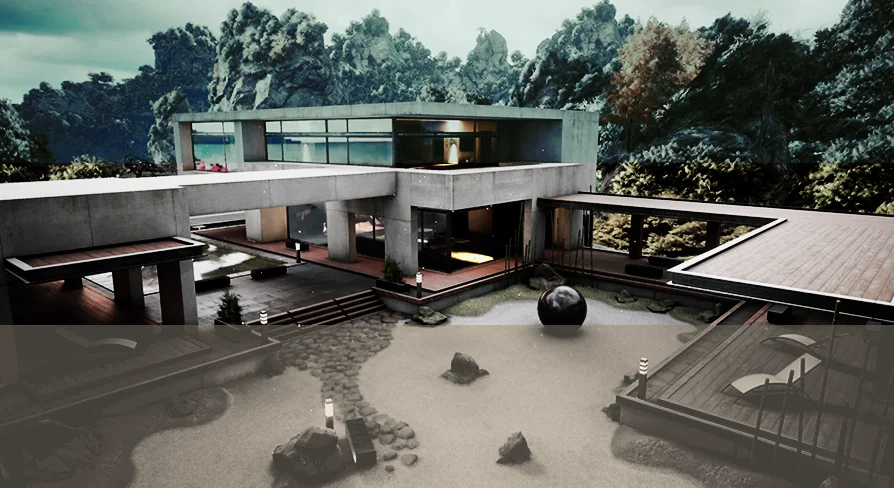
The pack is built to operate at the grading stage of production rather than during asset creation. Once lighting has been placed and exposure values have been settled, a LUT from this set can be applied to remap the final color response. That remap is where the emotional and atmospheric shift happens: a neutral outdoor scene can be pushed toward a cooler, industrial mood, or a warm interior can be tightened into a cinematic contrast curve. The creator describes the tables as professionally handcrafted to add emotion and breathe life into environments, which positions the pack as a finishing tool rather than a corrective one.
Because the application happens in Post-Process, the underlying geometry, textures, and light rig remain untouched. The 50 LUTs function as interpretive layers on top of the rendered frame. Artists evaluating the pack can treat each table as a ready-made grade that would otherwise require manual curve editing, color balancing, and channel mixing to reproduce from scratch.
The Spread of Visual Treatments Inside the 50 LUTs Set
The tagging attached to the pack reveals a wide intended range. The tables cover Post, Process, Visual, Atmosphere, and Effect categories, but the more telling descriptors are Film, Cinematic, Color, Realistic, Grading, Stylized, and Industrial. These point to tables that serve distinct looks rather than minor variations of a single grade.
Film and Cinematic tags suggest tables shaped to mimic the tonal compression and color cast behavior of physical film stock or popular cinema grading trends. Realistic indicates presets aimed at keeping the scene grounded, likely with restrained saturation shifts and natural contrast that does not call attention to the grading itself. Stylized opens the door to more assertive looks—pushed hues, controlled desaturation, or tonal ranges that serve art-directed projects where photoreal accuracy is not the goal. Industrial points toward harder, more utilitarian environments, likely with cooler palettes or higher contrast suited to machinery, architecture, or moody interior spaces.
This range matters because environment work rarely benefits from a single universal grade. A project may contain an outdoor landscape, a stylized interior, and a gritty industrial corridor, each requiring its own color treatment. With 50 options, the pack is sized to cover those scene-to-scene shifts without forcing every shot through the same filter.
From Realistic to Stylized: Mapped Looks
Each LUT function can be understood for production work:
Realistic grades: Keep the existing lighting work intact while refining the tonal response for clearer depth and value separation.
Cinematic grades: Push contrast and color temperature in ways that feel deliberate and frame-ready.
Stylized grades: Take larger liberties with hue and saturation for art-directed sequences or fantasy/sci-fi settings where natural color is not the priority.
Industrial grades: Sit naturally in tech-heavy scenes, storage spaces, warehouses, and architectural visualizations that benefit from a harder, moodier look.
In all four cases, the table does not replace the graphic work already done in the scene. It adjusts the final color interpretation of that work.
Where the Color Grade Tables Fit in Production
It is a Post-Process tool, and its clearest role is grading. For the workflow, there is a placement opportunity: once lighting is stable and frames are being read for mood, the 50 tables can be auditioned one by one or in short comparison passes. Because each is a finished matrix, there is no need to manually build grade stacks or recreate look curves in compositing software. A table can be swapped in, previewed, and kept or discarded in seconds. That speed also makes the pack useful for day-to-day look-development sessions, where a scene is exposed to multiple grades until the right emotional tone is found.
For teams working with large or multi-environment projects, the pack can be treated as a shared grading library. The wide variety of looks covered by the tags means different scenes in the same project can share a common grading framework while retaining individual atmospheric identities. A realistic exterior sequence might use one table, while an industrial interior in the same game or visualization uses a second, and a cinematic cutscene uses a third. All three would still pull from a single curated set rather than from unrelated third-party LUTs or custom-built solutions.
Atmosphere as the Effect, Not Just the Color
Atmosphere and Effect tags point to tables that do more than re-color the frame. In skilled use, a LUT can change the perceived depth and density of a scene. Controlled contrast curves can make haze feel thicker, deepen falloff into background geometry, or sharpen the separation between foreground subject and environment. These secondary effects are often what breathe life into a rendered scene—the moment where flat lighting starts to feel like it has air and weight. Because the tables are handcrafted, the impulse toward emotional and atmospheric range is built into the curve shaping rather than relying on the artist to push sliders after the fact.
The practical pairing is straightforward: lighting goes in first to give the scene structure, the LUT goes on top to give it identity. Without the light, the table has nothing to interpret. Without the table, the light may be technically correct but emotionally unclear. Color Grade - 50 LUTs operates in that gap between correctness and intention.
Compatible Structure and Pipeline Placement
The pack is noted as compatible with Ultimate Icon Generator. This makes the LUTs part of a larger procedural pipeline rather than a standalone library of disconnected files. Ultimate Icon Generator compatibility suggests these tables can feed into icon or preview generation systems, where quick grade passes on rendered icon source frames and previews are needed before final output. For pipeline artists working with that tool, the LUTs can serve as a ready-made set of grade states for icon thumbnails, environment previews, or visual reference passes where consistent handcrafted looks across many outputs matter.
Post-Process compatibility of this kind succeeds only when the tables faithfully translate through the rendering pipeline back to the final application. A grading table intended to invert film stock curves loses its value if it cannot sit cleanly inside a Post-Process Material or Volume without producing banding or clamping. The 50 LUTs set is positioned as part of that chain: a handcrafted library designed to be read by the real-time Post-Process pipeline, not a set of flat color overlays.
Three Takeaways for Scene and Pipeline Teams
First, when a shot's emotional goal is fixed but lighting does not fully deliver it, a LUT from this pack can close the gap. With 50 handcrafted options spanning film, realistic, stylized, and industrial looks, the pack covers a wide range without forcing an artist to build a custom grade from scratch.
Second, because the tables are arranged through atmosphere and effect rather than single-color shifts, they are best used when the scene already has structure. Lighting provides the raw tonal data. The LUT provides interpretation. Trying to fix broken lighting with a LUT will produce muddy results; trying to add mood to solid lighting will produce the life and emotion the pack promises.
Third, for any team using Ultimate Icon Generator as part of its icon or preview pipeline, the pack can act as a shared grading layer for batch visual outputs. The same curated looks used on hero scenes can be applied to thumbnails and previews, keeping batch visual quality consistent across the project without extra pass work or per-icon grading effort.
For production teams genuinely deciding whether Color Grade - 50 LUTs earns a place in the post-process chain, the more useful question is not whether 50 tables is enough, but whether the spread from realistic to stylized industrial covers the emotional range the project requires. If the answer is yes, the pack's role is clear: apply it at the end of the lighting pipeline, audition tables directly in the Post-Process Volume, and let the grading pass define the scene's final voice.
 Variety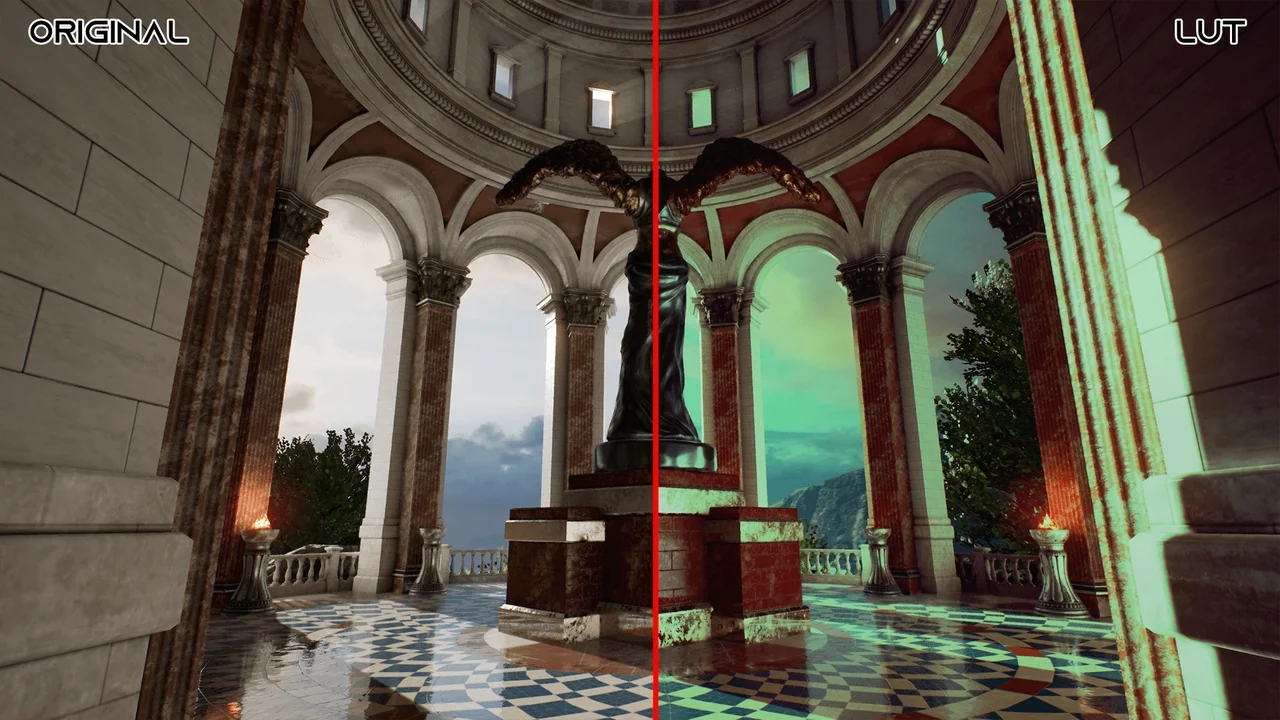
 Variety
 Variety
 Variety