"c68a05d5e51405b3"{"id":"1001866","slug":"butterfly-particles","title":"Butterfly Particles","category":"Variety","engine":"4.25+,5.0+","assetVersion":"","engineVersion":"Engine Version: 4.25+,5.0+","tag":"Variety","accent":"blue","visual":"mech","summary":"Configure stylized Butterfly Particles across 63 Niagara systems, using 20 textures, 20 mask types, two-color materials, and custom spline controls.","platform":"Unreal Engine","publishedAt":"2026-10-22T11:09:50.685Z","updatedAt":"2026-10-22T11:09:50.685Z","sourceNotes":[],"fileContents":[],"compatibility":["Unreal Engine","Engine Version: 4.25+,5.0+"],"featuredImage":{"alt":"Butterfly Particles","src":"/wp-content/uploads/published/2026/10/101ba1fc51e7-91958e27-6ecd-4c95-8bd5-5ee40fd72170-6bdb5236d2.webp"},"hasDownloadLink":true,"downloads":0,"terms":[{"taxonomy":"category","slug":"variety-vfx","name":"Variety"}],"galleryImages":[{"src":"/wp-content/uploads/published/2026/10/052ad9bbc2e8-3eac9cba-0e5a-4dad-9873-17474da4cbc6-857229233c.webp","alt":"Butterfly Particles"},{"src":"/wp-content/uploads/published/2026/10/998800db4bb8-c5b56463-0f87-4e17-adaa-747f4b5edc26-ac2fbc7c2e.webp","alt":"Butterfly Particles"},{"src":"/wp-content/uploads/published/2026/10/8284c8cc15e9-9e84e87b-e69a-4f11-b202-a4f84b75d40a-b1c0b3551c.webp","alt":"Butterfly Particles"},{"src":"/wp-content/uploads/published/2026/10/02d3bf91f083-6f3b78f1-d61e-4c05-824c-8ecd9823d047-aa5f315316.webp","alt":"Butterfly Particles"},{"src":"/wp-content/uploads/published/2026/10/9e022fd94594-03b1fb6c-759d-423e-89e4-346cf00503b2-d30886c8f0.webp","alt":"Butterfly Particles"},{"src":"/wp-content/uploads/published/2026/10/dc2d71083f1c-0e5d3daf-5963-4e48-9bd8-2e990d391200-2c8d740e46.webp","alt":"Butterfly Particles"},{"src":"/wp-content/uploads/published/2026/10/87dc834ed5ef-deb8d06f-b517-4100-9cc5-d4203781b013-445e74a757.webp","alt":"Butterfly Particles"},{"src":"/wp-content/uploads/published/2026/10/baca1cacd741-20582265-9fd6-4ebe-8bc9-45d503eee520-e1a3ef1c06.webp","alt":"Butterfly Particles"},{"src":"/wp-content/uploads/published/2026/10/ac75d02ab8cd-4dd2c1f1-ebeb-4426-a96f-ab84d48ea827-4ffd1620a2.webp","alt":"Butterfly Particles"},{"src":"/wp-content/uploads/published/2026/10/986c8ae24dc2-e6821071-8f4f-4d36-b8ee-945be10b50c3-e66dd95c0e.webp","alt":"Butterfly Particles"}],"accessPanel":{"kind":"resource","title":"Download this resource","eyebrow":"Free Download","message":"Log in or create a free account to start your download.","fileName":"Content.7z","safetyNote":"Resources are manually reviewed before listing to improve quality and reduce obvious risks.","actionLabel":"Download Free","resourceType":"Resource archive"},"contentHtml":"\u003ch2\u003eConfiguring Butterfly Textures and Masks in Material Instances\u003c/h2\u003e\n\u003cp\u003eIntegrating environmental insect effects begins at the shader level. The visual framework rests on twenty distinct butterfly textures paired with twenty mask textures. Instead of locking meshes to rigid, pre-baked coloration, the system separates wing patterns from base color values through material instances. This separation allows immediate experimentation with surface variation across swarms.\u003c/p\u003e\n\u003cp\u003eSetting up a customized variant requires assigning a base texture and selecting one of the twenty mask types inside a material instance. The primary workflow centers on configuring two-color palettes. By driving two separate color channels through the chosen mask, artists can establish vibrant contrast between wing veins, edges, and inner wing membranes. This dual-tone system fits stylized art directions, fantasy biomes, and naturalistic insect swarms without requiring external texture authoring tools.\u003c/p\u003e\n\u003cp\u003eBecause the textures emphasize lowpoly, stylized visual fidelity, instances keep texture sampling lean. Swapping the mask profile changes the perceived species or magical nature of the butterfly immediately, enabling distinct aesthetic variants across multiple areas of a level while sharing core shader logic.\u003c/p\u003e \u003ch2\u003eDirecting Movement Through Spline Particle Controls\u003c/h2\u003e\n\u003cp\u003eGuiding insects through 3D space often requires tighter trajectory management than standard ambient drift permits. Specific systems in the collection utilize splines to govern flight paths directly through levels. Placing a spline particle emitter into an environment allows level designers to draw flight corridors around trees, through ruined arches, or across water surfaces.\u003c/p\u003e\n\u003cp\u003eOnce a spline is positioned, parameter adjustments fine-tune flight behaviors. Travel speed controls how rapidly an individual butterfly navigates the curve, balancing lazy ambient glides against frantic, darting motions. Wing speed exists as an independent variable, ensuring that rapid aerial travel does not force unrealistically slow flapping, and conversely, that hovering insects can flap rapidly in place.\u003c/p\u003e\n\u003cp\u003eSize adjustments scale individual particles directly from the instance parameters. Altering scale alongside speed parameters prevents uniform swarms from appearing artificial. Blending tiny, fast-flapping individuals with larger, slower-moving gliders along identical paths creates natural depth within stylized and fantasy compositions.\u003c/p\u003e \u003ch2\u003eDeploying the 63 Niagara Particle Systems\u003c/h2\u003e\n\u003cp\u003eThe collection supplies 63 individual particle systems built on the Niagara visual effects framework. These systems span isolated ambient clusters, sprawling environmental scatter effects, and directed flight paths. Environmental placement ranges from solitary butterflies resting on foliage to dense, swirling clusters intended for magical focal points.\u003c/p\u003e\n\u003cp\u003eBecause each of the 63 systems addresses distinct spatial distributions, world builders can populate entire biomes without repeatedly duplicating a single emitter structure. Some setups emphasize ground-level interactions, staying low over grasses and flowers, while others scatter insects high into forest canopies or cavern roofs. The lowpoly structure of the underlying geometry ensures that even high-density presets maintain manageable rendering profiles.\u003c/p\u003e\n\u003cp\u003eCustomizing standard particle systems mirrors the spline parameter workflow. Global size, velocity, and lifetime attributes can be modified to fit the scale of specific visual scenes, allowing developers to adapt a single fantasy effect into a subtle background detail suitable for realistic or semi-stylized game environments.\u003c/p\u003e \u003ch2\u003eEvaluating Shader Complexity and Performance\u003c/h2\u003e\n\u003cp\u003eMonitoring the visual cost of dense insect simulations requires close inspection of overdraw and instruction counts. The particle materials maintain low instruction complexity, but high concentrations of overlapping translucent wings can accumulate overdraw if left unchecked. Checking the shader complexity visualization mode provides an immediate read on whether a scene's butterfly concentration is performing efficiently.\u003c/p\u003e\n\u003cp\u003eAlongside shader complexity views, monitoring real-time frame rates during dense particle emissions ensures baseline stability across target hardware. Because the collection relies on lowpoly assets, geometry bottlenecks remain low, placing the primary performance emphasis on managing emitter counts, particle lifetimes, and material blend modes within each zone.\u003c/p\u003e \u003ch2\u003eEngine Pipeline and Render Queue Considerations\u003c/h2\u003e\n\u003cp\u003eProduction environments demand an understanding of where specific particle mechanics function reliably and where technical barriers exist. Spline particle systems exhibit specific rendering limitations within offline workflows. When using Render Queue Cinematic, spline particles can fail to render properly, making them unsuited for offline, sequencer-driven high-resolution cinematic passes without alternate capture methods or stationary emitter substitutes.\u003c/p\u003e\n\u003cp\u003eTarget platform architecture also impacts spline implementation. When working inside Unreal Editor for Fortnite (UEFN), spline particle functionality is currently non-operational. Developers targeting UEFN environments must rely on the non-spline variants among the 63 particle systems to populate their islands with ambient insect life.\u003c/p\u003e\n\u003cp\u003eDirect technical support remains available through community developer channels. Questions regarding emitter behavior, material instance connections, or parameter tuning can be submitted directly to the creator for ongoing implementation guidance.\u003c/p\u003e\n\n\u003ch2\u003eMore From The Same Workflow\u003c/h2\u003e\n\u003cul\u003e\n\u003cli\u003e\u003ca href=\"https://3dcghub.com/stylized-vfx-pack/\" title=\"Stylized VFX Pack\"\u003eStylized VFX Pack\u003c/a\u003e\u003c/li\u003e\n\u003cli\u003e\u003ca href=\"https://3dcghub.com/simple-cartoon-fx-pack/\" title=\"Simple Cartoon FX Pack\"\u003eSimple Cartoon FX Pack\u003c/a\u003e\u003c/li\u003e\n\u003cli\u003e\u003ca href=\"https://3dcghub.com/fantasy-vfx-collection-5/\" title=\"FANTASY VFX COLLECTION \u0026#039;5\u0026#039;\"\u003eFANTASY VFX COLLECTION \u0026#039;5\u0026#039;\u003c/a\u003e\u003c/li\u003e\n\u003cli\u003e\u003ca href=\"https://3dcghub.com/attack-animals-vfx/\" title=\"Attack Animals VFX\"\u003eAttack Animals VFX\u003c/a\u003e\u003c/li\u003e\n\u003cli\u003e\u003ca href=\"https://3dcghub.com/particle-rings/\" title=\"Particle Rings\"\u003eParticle Rings\u003c/a\u003e\u003c/li\u003e\n\u003c/ul\u003e","contentTextLength":5720,"navigation":{"current":59,"total":3860,"previous":{"id":"1001867","slug":"buttons-levers-knobs-a-customizable-puzzles-asset-pack","title":"Buttons, Levers, Knobs - A customizable puzzles asset-pack","category":"Tools, Objects \u0026 Decor","platform":"Unreal Engine","updatedAt":"2026-10-22T11:10:36.562Z"},"next":{"id":"1001865","slug":"bossy-enemy-animation-pack","title":"Bossy Enemy Animation Pack","category":"Combat","platform":"Unreal Engine","updatedAt":"2026-10-22T11:06:29.141Z"}},"relatedResources":[{"id":"17449","slug":"stylized-vfx-pack","title":"Stylized VFX Pack","category":"Variety","engine":"4.26+,5.0+","assetVersion":"Engine version: 4.26+,5.0+","engineVersion":"4.22","tag":"Variety","accent":"blue","visual":"city","summary":"Enhance your project with the Stylized VFX Pack, a collection of anime-style particles featuring explosions, electric effects, and dynamic motion trails. This pack is designed for creators seeking a high-energy, stylized aesthetic.","platform":"Unreal Engine","publishedAt":"2026-03-13T14:36:06.000Z","updatedAt":"2026-04-19T15:43:32.000Z","sourceNotes":[],"fileContents":[],"compatibility":["Unreal Engine","Engine version: 4.26+,5.0+"],"featuredImage":{"alt":"Stylized VFX Pack","src":"https://3dcghub.com/wp-content/uploads/2026/03/02553b52-0b92-4de6-af20-a8d85f3e7a10.webp"},"hasDownloadLink":true,"downloads":2},{"id":"1001666","slug":"simple-cartoon-fx-pack","title":"Simple Cartoon FX Pack","category":"Variety","engine":"4.10+,5.0+","assetVersion":"","engineVersion":"Engine Version: 4.10+,5.0+","tag":"Variety","accent":"blue","visual":"mech","summary":"Explore the Simple Cartoon FX Pack, featuring 10 stylized game particles with cartoon shading and editable material instances for casual game workflows.","platform":"Unreal Engine","publishedAt":"2026-10-13T15:07:26.502Z","updatedAt":"2026-10-13T15:07:26.502Z","sourceNotes":[],"fileContents":[],"compatibility":["Unreal Engine","Engine Version: 4.10+,5.0+"],"featuredImage":{"alt":"Simple Cartoon FX Pack","src":"/wp-content/uploads/published/2026/10/43e6ff1aa10a-e7eed192-5502-4a94-a4a9-c2409c0d8613-2453e9c1e9.webp"},"hasDownloadLink":true,"downloads":3},{"id":"17105","slug":"fantasy-vfx-collection-5","title":"FANTASY VFX COLLECTION '5'","category":"Variety","engine":"4.26+,5.0+","assetVersion":"Engine version: 4.26+,5.0+","engineVersion":"4.19","tag":"Variety","accent":"blue","visual":"character","summary":"Enhance your project with the FANTASY VFX COLLECTION '5', a pack featuring various elemental effects. It is designed to provide the necessary visual components for building simple games.","platform":"Unreal Engine","publishedAt":"2026-03-13T13:41:20.000Z","updatedAt":"2026-04-19T15:43:37.000Z","sourceNotes":[],"fileContents":[],"compatibility":["Unreal Engine","Engine version: 4.26+,5.0+"],"featuredImage":{"alt":"FANTASY VFX COLLECTION '5'","src":"https://3dcghub.com/wp-content/uploads/2026/03/34133067-a06d-40d6-86a8-d12caef28570.webp"},"hasDownloadLink":true,"downloads":1}]}
Variety
Butterfly Particles
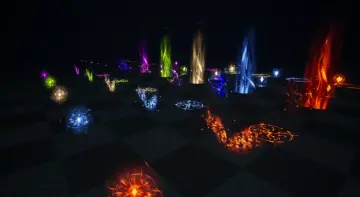
Configure stylized Butterfly Particles across 63 Niagara systems, using 20 textures, 20 mask types, two-color materials, and custom spline controls.
Category:Unreal Engine,VarietyPlatform: Unreal EngineEngine Version: 4.25+,5.0+Published: Oct 22, 2026
Variety
Resource overview
Configuring Butterfly Textures and Masks in Material Instances
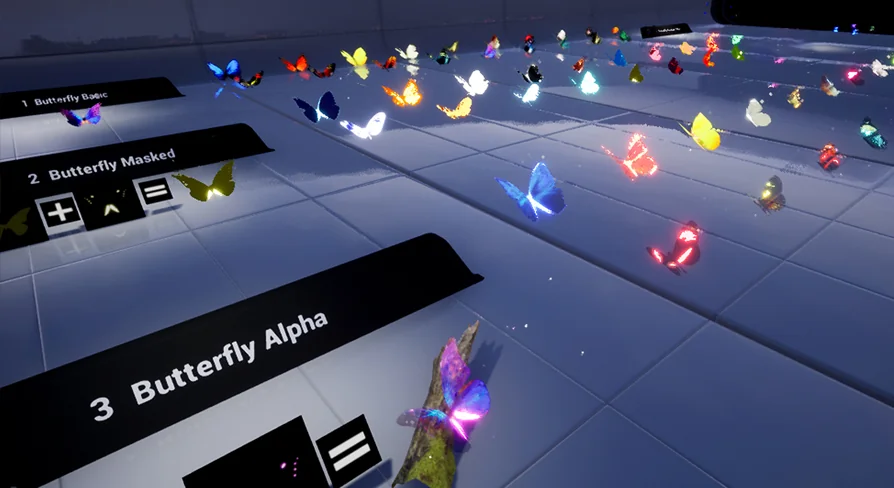
Integrating environmental insect effects begins at the shader level. The visual framework rests on twenty distinct butterfly textures paired with twenty mask textures. Instead of locking meshes to rigid, pre-baked coloration, the system separates wing patterns from base color values through material instances. This separation allows immediate experimentation with surface variation across swarms.
Setting up a customized variant requires assigning a base texture and selecting one of the twenty mask types inside a material instance. The primary workflow centers on configuring two-color palettes. By driving two separate color channels through the chosen mask, artists can establish vibrant contrast between wing veins, edges, and inner wing membranes. This dual-tone system fits stylized art directions, fantasy biomes, and naturalistic insect swarms without requiring external texture authoring tools.
Because the textures emphasize lowpoly, stylized visual fidelity, instances keep texture sampling lean. Swapping the mask profile changes the perceived species or magical nature of the butterfly immediately, enabling distinct aesthetic variants across multiple areas of a level while sharing core shader logic.
Directing Movement Through Spline Particle Controls
Guiding insects through 3D space often requires tighter trajectory management than standard ambient drift permits. Specific systems in the collection utilize splines to govern flight paths directly through levels. Placing a spline particle emitter into an environment allows level designers to draw flight corridors around trees, through ruined arches, or across water surfaces.
Once a spline is positioned, parameter adjustments fine-tune flight behaviors. Travel speed controls how rapidly an individual butterfly navigates the curve, balancing lazy ambient glides against frantic, darting motions. Wing speed exists as an independent variable, ensuring that rapid aerial travel does not force unrealistically slow flapping, and conversely, that hovering insects can flap rapidly in place.
Size adjustments scale individual particles directly from the instance parameters. Altering scale alongside speed parameters prevents uniform swarms from appearing artificial. Blending tiny, fast-flapping individuals with larger, slower-moving gliders along identical paths creates natural depth within stylized and fantasy compositions.
Deploying the 63 Niagara Particle Systems
The collection supplies 63 individual particle systems built on the Niagara visual effects framework. These systems span isolated ambient clusters, sprawling environmental scatter effects, and directed flight paths. Environmental placement ranges from solitary butterflies resting on foliage to dense, swirling clusters intended for magical focal points.
Because each of the 63 systems addresses distinct spatial distributions, world builders can populate entire biomes without repeatedly duplicating a single emitter structure. Some setups emphasize ground-level interactions, staying low over grasses and flowers, while others scatter insects high into forest canopies or cavern roofs. The lowpoly structure of the underlying geometry ensures that even high-density presets maintain manageable rendering profiles.
Customizing standard particle systems mirrors the spline parameter workflow. Global size, velocity, and lifetime attributes can be modified to fit the scale of specific visual scenes, allowing developers to adapt a single fantasy effect into a subtle background detail suitable for realistic or semi-stylized game environments.
Evaluating Shader Complexity and Performance
Monitoring the visual cost of dense insect simulations requires close inspection of overdraw and instruction counts. The particle materials maintain low instruction complexity, but high concentrations of overlapping translucent wings can accumulate overdraw if left unchecked. Checking the shader complexity visualization mode provides an immediate read on whether a scene's butterfly concentration is performing efficiently.
Alongside shader complexity views, monitoring real-time frame rates during dense particle emissions ensures baseline stability across target hardware. Because the collection relies on lowpoly assets, geometry bottlenecks remain low, placing the primary performance emphasis on managing emitter counts, particle lifetimes, and material blend modes within each zone.
Engine Pipeline and Render Queue Considerations
Production environments demand an understanding of where specific particle mechanics function reliably and where technical barriers exist. Spline particle systems exhibit specific rendering limitations within offline workflows. When using Render Queue Cinematic, spline particles can fail to render properly, making them unsuited for offline, sequencer-driven high-resolution cinematic passes without alternate capture methods or stationary emitter substitutes.
Target platform architecture also impacts spline implementation. When working inside Unreal Editor for Fortnite (UEFN), spline particle functionality is currently non-operational. Developers targeting UEFN environments must rely on the non-spline variants among the 63 particle systems to populate their islands with ambient insect life.
Direct technical support remains available through community developer channels. Questions regarding emitter behavior, material instance connections, or parameter tuning can be submitted directly to the creator for ongoing implementation guidance.
 Variety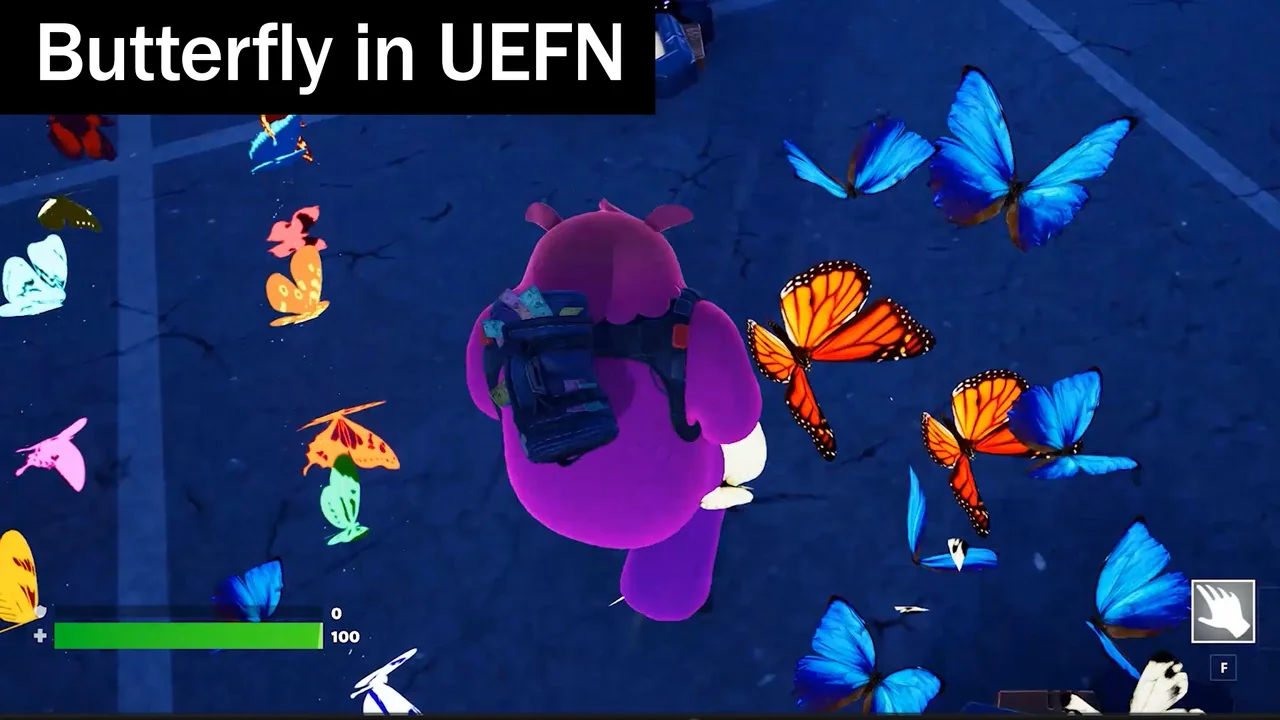
 Variety
 Variety
 Variety