"7e6fc58c410f2894"{"id":"1001666","slug":"simple-cartoon-fx-pack","title":"Simple Cartoon FX Pack","category":"Variety","engine":"4.10+,5.0+","assetVersion":"","engineVersion":"Engine Version: 4.10+,5.0+","tag":"Variety","accent":"blue","visual":"mech","summary":"Explore the Simple Cartoon FX Pack, featuring 10 stylized game particles with cartoon shading and editable material instances for casual game workflows.","platform":"Unreal Engine","publishedAt":"2026-10-13T15:07:26.502Z","updatedAt":"2026-10-13T15:07:26.502Z","sourceNotes":[],"fileContents":[],"compatibility":["Unreal Engine","Engine Version: 4.10+,5.0+"],"featuredImage":{"alt":"Simple Cartoon FX Pack","src":"/wp-content/uploads/published/2026/10/43e6ff1aa10a-e7eed192-5502-4a94-a4a9-c2409c0d8613-2453e9c1e9.webp"},"hasDownloadLink":true,"downloads":0,"terms":[{"taxonomy":"category","slug":"variety-vfx","name":"Variety"}],"galleryImages":[{"src":"/wp-content/uploads/published/2026/10/160580cacc74-e81583f5-db1f-4052-b4c8-79118f907977-43bf4ef047.webp","alt":"Simple Cartoon FX Pack"},{"src":"/wp-content/uploads/published/2026/10/fff2defd87c7-86820952-5e96-44a7-bc79-b40dc44235b5-69ad2f27d7.webp","alt":"Simple Cartoon FX Pack"},{"src":"/wp-content/uploads/published/2026/10/c939aa8973a3-6d38528f-a833-4120-a2dd-731d334f5f9f-c22890a1f1.webp","alt":"Simple Cartoon FX Pack"},{"src":"/wp-content/uploads/published/2026/10/10919756222f-0dd5ca28-82ab-4e93-8409-21624ceb2ff1-557431fce4.webp","alt":"Simple Cartoon FX Pack"},{"src":"/wp-content/uploads/published/2026/10/eede1294751c-771165d4-3ba8-4364-9182-56153dbe0a9e-bd26dc133d.webp","alt":"Simple Cartoon FX Pack"}],"accessPanel":{"kind":"resource","title":"Download this resource","eyebrow":"Free Download","message":"Log in or create a free account to start your download.","fileName":"Content.7z","safetyNote":"Resources are manually reviewed before listing to improve quality and reduce obvious risks.","actionLabel":"Download Free","resourceType":"Resource archive"},"contentHtml":"\u003cp\u003eCartoon visual effects rely on pronounced silhouettes, deliberate timing, and clear color separation to convey gameplay events instantly. In fast-paced casual games, dense photorealistic particle effects often introduce visual clutter that obscures critical action on screen. Clean visual design keeps player focus squarely on the immediate gameplay loop, providing unambiguous feedback for weapon discharges, successful strikes, active defensive states, and environmental hazards. Simple Cartoon FX Pack addresses these requirements through a compact collection of ten stylized particle systems designed to integrate into casual and fantasy game projects with straightforward editing.\u003c/p\u003e \u003ch2\u003eCartoon Shading and Material Instances in Simple Cartoon FX Pack\u003c/h2\u003e\n\u003cp\u003eThe visual signature of cartoon effects stems from stylized shading that emphasizes crisp edges and solid color values over complex physical light scattering. Within Simple Cartoon FX Pack, this aesthetic is governed through material instances that take advantage of specialized cartoon-style shading. Rather than forcing creators to rebuild shaders or edit underlying master networks for each visual variation, the pack relies on these material instances to expose crucial aesthetic parameters directly.\u003c/p\u003e \u003cp\u003eUsing material instances makes editing simple when balancing visual intensity across varying game levels. Artists can quickly adjust color schemes, change emissive strength, or modify shading contours to match specific palette requirements. If an ability transitions from a basic flame to an enchanted fantasy spell, adjusting the parameters inside the material instance allows the particle to adopt new hues while preserving its distinct cartoon aesthetic. This setup accelerates iteration times, enabling small teams to maintain aesthetic consistency across every particle emitter active in a scene without deep technical overhead.\u003c/p\u003e \u003ch2\u003eThe Ten Essential Particles for Casual Action Loops\u003c/h2\u003e\n\u003cp\u003eA major design consideration for casual titles is avoiding asset bloat by focusing entirely on the most common gameplay interactions. Simple Cartoon FX Pack compiles a focused selection of ten particle systems covering primary combat, character abilities, and environment feedback:\u003c/p\u003e\n\u003cul\u003e \u003cli\u003e\u003cstrong\u003eFire:\u003c/strong\u003e A continuous stylized flame emitter for sustained elemental damage, environmental torches, or burning hazards.\u003c/li\u003e \u003cli\u003e\u003cstrong\u003eExplosion:\u003c/strong\u003e A sudden burst effect delivering high-impact visual punch for detonating traps, barrels, or heavy ordnance.\u003c/li\u003e \u003cli\u003e\u003cstrong\u003eLand Smoke:\u003c/strong\u003e A localized ground-level dust burst that anchors character landings, heavy impacts, or sudden directional changes.\u003c/li\u003e \u003cli\u003e\u003cstrong\u003eMuzzle Flash:\u003c/strong\u003e A sharp, instantaneous discharge effect placed at weapon barrels or cast points to signal projectile release.\u003c/li\u003e \u003cli\u003e\u003cstrong\u003eThunder Strike:\u003c/strong\u003e A vertical lightning bolt particle suited to calling down dramatic magical strikes from above.\u003c/li\u003e \u003cli\u003e\u003cstrong\u003eTrail:\u003c/strong\u003e A continuous motion-tracking visual streamer that reinforces velocity along projectile paths, melee swings, or dash maneuvers.\u003c/li\u003e \u003cli\u003e\u003cstrong\u003eHit 2:\u003c/strong\u003e Two distinct impact particle variations providing instant feedback whenever attacks connect with targets.\u003c/li\u003e \u003cli\u003e\u003cstrong\u003eShield 2:\u003c/strong\u003e Two separate protective barrier effects that visualize active defensive states, force fields, or damage absorption.\u003c/li\u003e\n\u003c/ul\u003e \u003ch2\u003eStaging Impacts with Hit Variations and Protective Shields\u003c/h2\u003e\n\u003cp\u003eCombat feel hinges on responsive feedback during player attacks and enemy encounters. The inclusion of two hit variations in Simple Cartoon FX Pack allows developers to prevent repetitive visual fatigue during continuous combat sequences. Alternating between the two hit particles creates natural visual variety during rapid melee combos or automatic gunfire. Teams can also map the separate hit effects to different mechanics, such as reserving one particle for standard strikes and the second for critical hits, headshots, or elemental procs. Because both hit effects share the same cartoon shading language, they sit naturally alongside one another without visual disparity.\u003c/p\u003e \u003cp\u003eDefensive actions receive equal attention through the two shield particles. Visualizing defensive states clearly is critical in casual games where readability dictates player success. The shield effects provide distinct visual shells that communicate temporary invulnerability, barrier health, or active parry windows. Having two distinct shield options enables clear mechanical differentiation, such as deploying one particle for personal player defenses and the other for stationary objective barriers, enemy shields, or party buffs.\u003c/p\u003e \u003cp\u003eDirect combat flow is rounded out by the muzzle flash and trail systems. When a weapon fires, the muzzle flash produces an immediate cartoon burst at the firing socket, establishing the precise origin of the action. As the projectile travels across the screen, the trail particle draws a distinct line through the air, highlighting the projectile's trajectory and velocity. This ensures players can easily track incoming or outgoing attacks before they resolve into a hit or an explosion.\u003c/p\u003e \u003ch2\u003eHandling Environmental Weight: Explosion, Land Smoke, Fire, and Thunder Strike\u003c/h2\u003e\n\u003cp\u003eIn addition to direct target interactions, environmental and area-of-effect abilities require unmistakable staging. The explosion particle provides the wide-area silhouette needed when high-damage abilities detonate. Its cartoon volume delivers clear feedback to define the danger radius of an area-of-effect attack without burying the combat floor in opaque smoke.\u003c/p\u003e \u003cp\u003eGround interactions gain physical weight through the land smoke emitter. When characters fall from heights, execute heavy ground slams, or slide across terrain, triggering land smoke immediately connects the character model to the game world. This localized dust effect softens sudden animation landings and provides visual punctuation beneath explosive shockwaves.\u003c/p\u003e \u003cp\u003eElemental abilities expand further through the fire and thunder strike emitters. The fire system generates stylized flame ribbons suited for persistent hazards, active campfire props, or status-effect debuffs applied to target meshes. Meanwhile, the thunder strike emitter serves as a high-tier offensive effect. Dropping a sudden vertical bolt of lightning onto a target provides instantaneous visual payoff for magical ultimates, environmental weather hazards, or divine ability triggers. Because all four environmental and elemental emitters share consistent cartoon shading principles via their material instances, combining thunder strikes, ground dust, and fire patches in the same encounter preserves a unified art style across the screen.\u003c/p\u003e \u003ch2\u003eStylized FX Workflow Considerations\u003c/h2\u003e\n\u003cp\u003eIntegrating visual effects into casual and fantasy games requires assets that slot directly into core gameplay logic without requiring convoluted setup sequences. Simple Cartoon FX Pack is structured around the most frequently used visual effect archetypes, allowing designers to hook particle spawns directly to combat events, projectile spawners, character animation notifies, and collision delegates. The collection provides the baseline building blocks necessary to stage stylized action sequences while keeping visual clarity at the forefront.\u003c/p\u003e\n\n\u003ch2\u003eContinue Browsing Similar Packs\u003c/h2\u003e\n\u003cul\u003e\n\u003cli\u003e\u003ca href=\"https://3dcghub.com/kick-up-fx/\" title=\"Kick Up FX\"\u003eKick Up FX\u003c/a\u003e\u003c/li\u003e\n\u003cli\u003e\u003ca href=\"https://3dcghub.com/comic-sound-effect-fx/\" title=\"Comic Sound Effect FX\"\u003eComic Sound Effect FX\u003c/a\u003e\u003c/li\u003e\n\u003cli\u003e\u003ca href=\"https://3dcghub.com/flying-vehicle-fx/\" title=\"Flying Vehicle FX\"\u003eFlying Vehicle FX\u003c/a\u003e\u003c/li\u003e\n\u003cli\u003e\u003ca href=\"https://3dcghub.com/machinery-particle-fx/\" title=\"Machinery Particle FX\"\u003eMachinery Particle FX\u003c/a\u003e\u003c/li\u003e\n\u003cli\u003e\u003ca href=\"https://3dcghub.com/fantasy-vfx-collection-5/\" title=\"FANTASY VFX COLLECTION \u0026#039;5\u0026#039;\"\u003eFANTASY VFX COLLECTION \u0026#039;5\u0026#039;\u003c/a\u003e\u003c/li\u003e\n\u003c/ul\u003e","contentTextLength":7241,"navigation":{"current":16,"total":3618,"previous":{"id":"1001667","slug":"space-frontier-stations-and-ships","title":"Space Frontier Stations \u0026 Ships","category":"Sky \u0026 Space","platform":"Unreal Engine","updatedAt":"2026-10-13T15:09:29.578Z"},"next":{"id":"1001665","slug":"scifi-corridor-environment","title":"SciFi Corridor Environment","category":"Sci-Fi","platform":"Unreal Engine","updatedAt":"2026-10-13T15:05:15.324Z"}},"relatedResources":[{"id":"1000631","slug":"kick-up-fx","title":"Kick Up FX","category":"Variety","engine":"4.26+,5.0+","assetVersion":"","engineVersion":"Engine Version: 4.26+,5.0+","tag":"Variety","accent":"blue","visual":"mech","summary":"Kick Up FX delivers 10 Unreal Engine Niagara particle systems simulating vehicle wheel kick-up across dirt, mud, snow, water, and other surfaces.","platform":"Unreal Engine","publishedAt":"2026-07-21T14:39:46.079Z","updatedAt":"2026-07-21T14:39:46.079Z","sourceNotes":[],"fileContents":[],"compatibility":["Unreal Engine","Engine Version: 4.26+,5.0+"],"featuredImage":{"alt":"Kick Up FX","src":"/wp-content/uploads/published/2026/07/977fda7c63e1-fc96a220-cae4-4638-96f7-a7b0144cbd03-00b60e746f.webp"},"hasDownloadLink":true,"downloads":1},{"id":"1000576","slug":"comic-sound-effect-fx","title":"Comic Sound Effect FX","category":"Variety","engine":"4.27,5.0+","assetVersion":"","engineVersion":"Engine Version: 4.27,5.0+","tag":"Variety","accent":"blue","visual":"mech","summary":"Comic Sound Effect FX is a stylized Niagara particle system for Unreal Engine that cycles through flipbooks of 4 to 9 images for comic, emoji, and speech visual","platform":"Unreal Engine","publishedAt":"2026-07-16T23:07:30.522Z","updatedAt":"2026-07-16T23:07:30.522Z","sourceNotes":[],"fileContents":[],"compatibility":["Audio","Engine Version: 4.27,5.0+"],"featuredImage":{"alt":"Comic Sound Effect FX","src":"/wp-content/uploads/published/2026/07/b4623734105d-b517b0bd-41fa-4d2d-bef8-32deaa61fc1d-df6bc6975a.webp"},"hasDownloadLink":true,"downloads":1},{"id":"17173","slug":"flying-vehicle-fx","title":"Flying Vehicle FX","category":"Variety","engine":"4.27,5.0+","assetVersion":"Engine version: 4.27,5.0+","engineVersion":"4.27","tag":"Variety","accent":"blue","visual":"animation","summary":"Enhance your aerospace projects with Flying Vehicle FX, a collection of 14 specialized visual systems. From sonic booms to countermeasure flares, this pack adds realistic detail to any flying craft.","platform":"Unreal Engine","publishedAt":"2026-03-13T13:54:09.000Z","updatedAt":"2026-04-19T15:43:36.000Z","sourceNotes":[],"fileContents":[],"compatibility":["Unreal Engine","Engine version: 4.27,5.0+"],"featuredImage":{"alt":"Flying Vehicle FX","src":"https://3dcghub.com/wp-content/uploads/2026/03/561b9040-bfd6-4970-8b31-c1840f1b9b71.webp"},"hasDownloadLink":true,"downloads":0}]}
Variety
Simple Cartoon FX Pack
Explore the Simple Cartoon FX Pack, featuring 10 stylized game particles with cartoon shading and editable material instances for casual game workflows.
Category:Unreal Engine,VarietyPlatform: Unreal EngineEngine Version: 4.10+,5.0+Published: Oct 13, 2026
Variety
Resource overview
Cartoon visual effects rely on pronounced silhouettes, deliberate timing, and clear color separation to convey gameplay events instantly. In fast-paced casual games, dense photorealistic particle effects often introduce visual clutter that obscures critical action on screen. Clean visual design keeps player focus squarely on the immediate gameplay loop, providing unambiguous feedback for weapon discharges, successful strikes, active defensive states, and environmental hazards. Simple Cartoon FX Pack addresses these requirements through a compact collection of ten stylized particle systems designed to integrate into casual and fantasy game projects with straightforward editing.
Cartoon Shading and Material Instances in Simple Cartoon FX Pack
The visual signature of cartoon effects stems from stylized shading that emphasizes crisp edges and solid color values over complex physical light scattering. Within Simple Cartoon FX Pack, this aesthetic is governed through material instances that take advantage of specialized cartoon-style shading. Rather than forcing creators to rebuild shaders or edit underlying master networks for each visual variation, the pack relies on these material instances to expose crucial aesthetic parameters directly.
Using material instances makes editing simple when balancing visual intensity across varying game levels. Artists can quickly adjust color schemes, change emissive strength, or modify shading contours to match specific palette requirements. If an ability transitions from a basic flame to an enchanted fantasy spell, adjusting the parameters inside the material instance allows the particle to adopt new hues while preserving its distinct cartoon aesthetic. This setup accelerates iteration times, enabling small teams to maintain aesthetic consistency across every particle emitter active in a scene without deep technical overhead.
The Ten Essential Particles for Casual Action Loops
A major design consideration for casual titles is avoiding asset bloat by focusing entirely on the most common gameplay interactions. Simple Cartoon FX Pack compiles a focused selection of ten particle systems covering primary combat, character abilities, and environment feedback:
Fire: A continuous stylized flame emitter for sustained elemental damage, environmental torches, or burning hazards.
Explosion: A sudden burst effect delivering high-impact visual punch for detonating traps, barrels, or heavy ordnance.
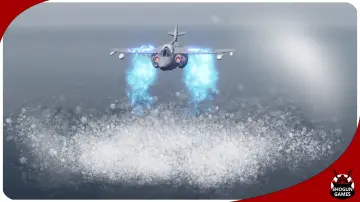
Land Smoke: A localized ground-level dust burst that anchors character landings, heavy impacts, or sudden directional changes.
Muzzle Flash: A sharp, instantaneous discharge effect placed at weapon barrels or cast points to signal projectile release.
Thunder Strike: A vertical lightning bolt particle suited to calling down dramatic magical strikes from above.
Trail: A continuous motion-tracking visual streamer that reinforces velocity along projectile paths, melee swings, or dash maneuvers.
Hit 2: Two distinct impact particle variations providing instant feedback whenever attacks connect with targets.
Shield 2: Two separate protective barrier effects that visualize active defensive states, force fields, or damage absorption.
Staging Impacts with Hit Variations and Protective Shields
Combat feel hinges on responsive feedback during player attacks and enemy encounters. The inclusion of two hit variations in Simple Cartoon FX Pack allows developers to prevent repetitive visual fatigue during continuous combat sequences. Alternating between the two hit particles creates natural visual variety during rapid melee combos or automatic gunfire. Teams can also map the separate hit effects to different mechanics, such as reserving one particle for standard strikes and the second for critical hits, headshots, or elemental procs. Because both hit effects share the same cartoon shading language, they sit naturally alongside one another without visual disparity.
Defensive actions receive equal attention through the two shield particles. Visualizing defensive states clearly is critical in casual games where readability dictates player success. The shield effects provide distinct visual shells that communicate temporary invulnerability, barrier health, or active parry windows. Having two distinct shield options enables clear mechanical differentiation, such as deploying one particle for personal player defenses and the other for stationary objective barriers, enemy shields, or party buffs.
Direct combat flow is rounded out by the muzzle flash and trail systems. When a weapon fires, the muzzle flash produces an immediate cartoon burst at the firing socket, establishing the precise origin of the action. As the projectile travels across the screen, the trail particle draws a distinct line through the air, highlighting the projectile's trajectory and velocity. This ensures players can easily track incoming or outgoing attacks before they resolve into a hit or an explosion.
Handling Environmental Weight: Explosion, Land Smoke, Fire, and Thunder Strike
In addition to direct target interactions, environmental and area-of-effect abilities require unmistakable staging. The explosion particle provides the wide-area silhouette needed when high-damage abilities detonate. Its cartoon volume delivers clear feedback to define the danger radius of an area-of-effect attack without burying the combat floor in opaque smoke.
Ground interactions gain physical weight through the land smoke emitter. When characters fall from heights, execute heavy ground slams, or slide across terrain, triggering land smoke immediately connects the character model to the game world. This localized dust effect softens sudden animation landings and provides visual punctuation beneath explosive shockwaves.
Elemental abilities expand further through the fire and thunder strike emitters. The fire system generates stylized flame ribbons suited for persistent hazards, active campfire props, or status-effect debuffs applied to target meshes. Meanwhile, the thunder strike emitter serves as a high-tier offensive effect. Dropping a sudden vertical bolt of lightning onto a target provides instantaneous visual payoff for magical ultimates, environmental weather hazards, or divine ability triggers. Because all four environmental and elemental emitters share consistent cartoon shading principles via their material instances, combining thunder strikes, ground dust, and fire patches in the same encounter preserves a unified art style across the screen.
Stylized FX Workflow Considerations
Integrating visual effects into casual and fantasy games requires assets that slot directly into core gameplay logic without requiring convoluted setup sequences. Simple Cartoon FX Pack is structured around the most frequently used visual effect archetypes, allowing designers to hook particle spawns directly to combat events, projectile spawners, character animation notifies, and collision delegates. The collection provides the baseline building blocks necessary to stage stylized action sequences while keeping visual clarity at the forefront.
 Variety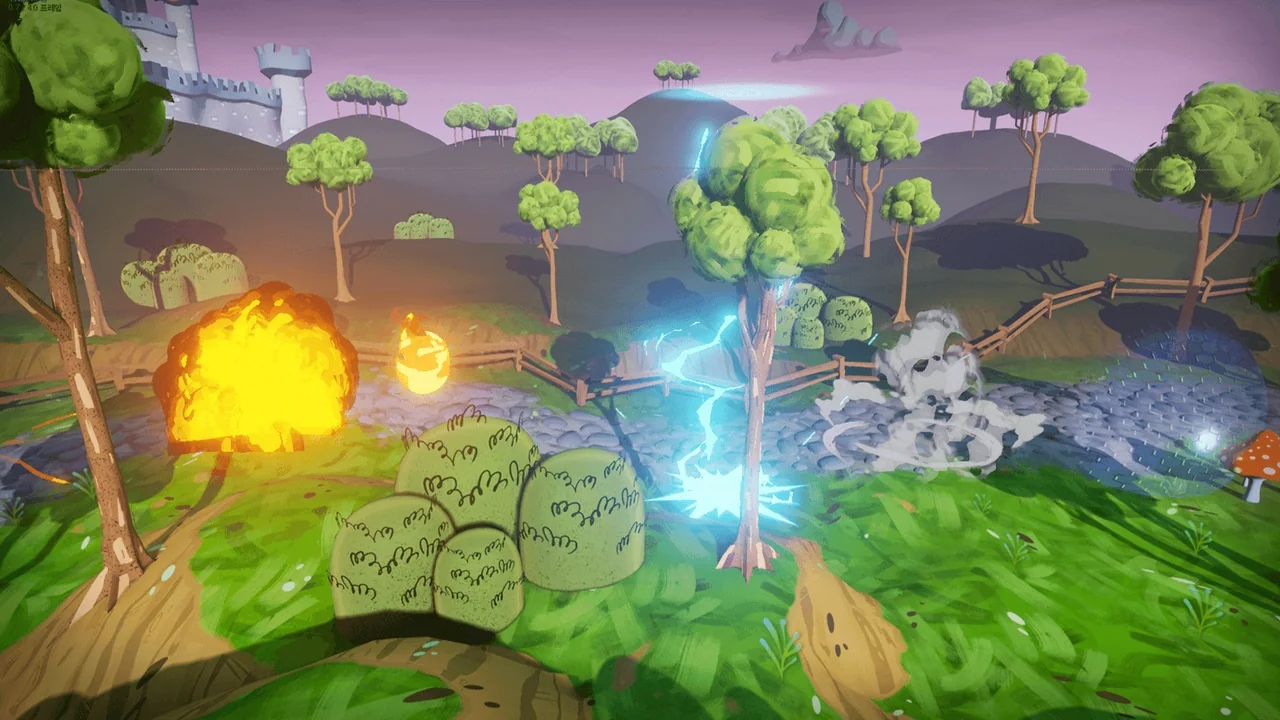
 Variety
 Variety
 Variety