"fa182e0cd0a6ea73"{"id":"1000631","slug":"kick-up-fx","title":"Kick Up FX","category":"Variety","engine":"4.26+,5.0+","assetVersion":"","engineVersion":"Engine Version: 4.26+,5.0+","tag":"Variety","accent":"blue","visual":"mech","summary":"Kick Up FX delivers 10 Unreal Engine Niagara particle systems simulating vehicle wheel kick-up across dirt, mud, snow, water, and other surfaces.","platform":"Unreal Engine","publishedAt":"2026-07-21T14:39:46.079Z","updatedAt":"2026-07-21T14:39:46.079Z","sourceNotes":[],"fileContents":[],"compatibility":["Unreal Engine","Engine Version: 4.26+,5.0+"],"featuredImage":{"alt":"Kick Up FX","src":"/wp-content/uploads/published/2026/07/977fda7c63e1-fc96a220-cae4-4638-96f7-a7b0144cbd03-00b60e746f.webp"},"hasDownloadLink":true,"downloads":1,"terms":[{"taxonomy":"category","slug":"variety-vfx","name":"Variety"}],"galleryImages":[{"src":"/wp-content/uploads/published/2026/07/3706389f543b-f6252b4a-61d2-4790-8505-7d688d2fad34-4a14d1ed42.webp","alt":"Kick Up FX"},{"src":"/wp-content/uploads/published/2026/07/7949916e2e15-2503e3b6-0753-4f9c-81a3-d69e561f7870-ca471db00b.webp","alt":"Kick Up FX"},{"src":"/wp-content/uploads/published/2026/07/80f8e34895a6-7620027f-b573-4ac8-b95d-9c030c2043e8-42c51a21a1.webp","alt":"Kick Up FX"},{"src":"/wp-content/uploads/published/2026/07/6364b29817af-4d6f8427-41f0-4696-affc-2b66c3399182-4fed83b66a.webp","alt":"Kick Up FX"},{"src":"/wp-content/uploads/published/2026/07/a131a5038079-a9e25cb5-cb9d-42f9-84fe-7899b1e9ff5b-4097964f7f.webp","alt":"Kick Up FX"},{"src":"/wp-content/uploads/published/2026/07/4759c9a4cc81-1da8b6e1-ae99-4879-b64e-101de8bb482a-a7c753ebfc.webp","alt":"Kick Up FX"},{"src":"/wp-content/uploads/published/2026/07/4ac59bc517b7-b1a3201d-8ff0-48d0-8437-7978f826d6d6-3f9c6838d9.webp","alt":"Kick Up FX"},{"src":"/wp-content/uploads/published/2026/07/21f1a0a93733-6f0995fe-ca36-4e52-b575-70e70b594359-e72d9eac08.webp","alt":"Kick Up FX"},{"src":"/wp-content/uploads/published/2026/07/4dec1a3b5f1f-0b8c1b49-304e-42c4-96b2-8fb6f9973b4a-b6d3e04b69.webp","alt":"Kick Up FX"},{"src":"/wp-content/uploads/published/2026/07/f166ec076e90-fe5c732d-0e50-47b2-b70b-ef9276febd71-418b4d38c1.webp","alt":"Kick Up FX"}],"accessPanel":{"kind":"resource","title":"Download this resource","eyebrow":"Free Download","message":"Log in or create a free account to start your download.","fileName":"Content.7z","safetyNote":"Resources are manually reviewed before listing to improve quality and reduce obvious risks.","actionLabel":"Download Free","resourceType":"Resource archive"},"contentHtml":"\u003cp\u003eIntegrating surface particle reactions into a driving game starts with the implementation path. Kick Up FX is a collection of 10 Niagara effects built to simulate the debris and smoke kicked up by moving vehicles. These particle systems are designed to be controlled directly through Blueprint logic or Unreal Engine's Sequencer, aligning the visual feedback with the physics and animation of the vehicle. By mapping the effects to Blueprint or Sequencer timelines, developers can trigger specific reactions based on wheel speed, surface type, or scripted cinematic moments.\u003c/p\u003e \u003ch2\u003eControlling Kick Up FX via Blueprint and Sequencer\u003c/h2\u003e\n\u003cp\u003eThe setup process relies on establishing communication between the vehicle's movement logic and the visual systems. Creators can route the triggering and intensity of the particle effects through Blueprint scripting. This allows the kick-up to react dynamically to gameplay variables.\u003c/p\u003e\n\u003cp\u003eFor non-interactive or pre-rendered scenes, Sequencer provides the necessary track-based control. By driving the effects through Sequencer, cinematics artists can precisely time dust bursts or mud splashes to match vehicle animations. Implementation centers on exposing the effect parameters to these control systems.\u003c/p\u003e \u003ch3\u003eNavigating the BP Setup Process\u003c/h3\u003e\n\u003cp\u003eConnecting a vehicle to these Niagara effects requires specific Blueprint configuration. A setup video is provided to guide users through the Blueprint implementation, showing how to link the particle emitters to the vehicle framework. This visual guide walks through the nodes and logic needed to activate the effects based on the physical interaction between the wheels and the ground.\u003c/p\u003e \u003ch2\u003eSurface Types and Particle Behavior\u003c/h2\u003e\n\u003cp\u003eThe package includes 10 distinct effects tailored to different ground materials. The visual identity of each effect is tied directly to the physical properties of the surface it represents. The creator has calibrated the smoke density, color, and behavior to match specific environments.\u003c/p\u003e \u003cul\u003e\n\u003cli\u003e\u003cstrong\u003eConcrete (Heavy white smoke):\u003c/strong\u003e Generates a dense, bright visual reaction suitable for urban environments.\u003c/li\u003e\n\u003cli\u003e\u003cstrong\u003eDirt:\u003c/strong\u003e Produces a standard soil-based kick-up effect for off-road tracks.\u003c/li\u003e\n\u003cli\u003e\u003cstrong\u003eDusty (Faint slightly dirty smoke):\u003c/strong\u003e A lighter, more subtle particle output for dry, loose surfaces.\u003c/li\u003e\n\u003cli\u003e\u003cstrong\u003eGrass:\u003c/strong\u003e Simulates the visual feedback of tires displacing turf.\u003c/li\u003e\n\u003cli\u003e\u003cstrong\u003eGravel:\u003c/strong\u003e Kicks up small, solid debris typical of loose rock roads.\u003c/li\u003e\n\u003cli\u003e\u003cstrong\u003eMud:\u003c/strong\u003e Simulates the wet, heavy spray of soft earth.\u003c/li\u003e\n\u003cli\u003e\u003cstrong\u003eSand:\u003c/strong\u003e Creates a fine, flowing particle reaction for desert environments.\u003c/li\u003e\n\u003cli\u003e\u003cstrong\u003eSnow:\u003c/strong\u003e Generates a white, powdery burst for winter tracks.\u003c/li\u003e\n\u003cli\u003e\u003cstrong\u003eTarmac (Light white smoke):\u003c/strong\u003e A lighter smoke variant for high-grip racing surfaces.\u003c/li\u003e\n\u003cli\u003e\u003cstrong\u003eWater:\u003c/strong\u003e Simulates the splash and mist of driving through puddles or shallow water.\u003c/li\u003e\n\u003c/ul\u003e \u003ch2\u003eUsing the Vehicle Offroad Template\u003c/h2\u003e\n\u003cp\u003eThe demo video and product screenshots showcasing these Niagara effects utilize the 'Vehicle Offroad Template'. This template serves as a demonstration environment to show how the particle systems behave under driving conditions. The template itself is not included with the Kick Up FX pack. Users will need to implement these effects within their own vehicle frameworks or driving templates.\u003c/p\u003e \u003ch2\u003eProduction Readiness\u003c/h2\u003e\n\u003cp\u003eThe resource provides documentation and support channels for implementation troubleshooting. Access to Discord support is available for users integrating the effects into their projects. The provided tags—spanning vehicle, rally, mud, car, drift, wheel, and particle—indicate the asset is specifically tuned for driving games, racing simulators, and cinematic vehicle sequences within Unreal Engine.\u003c/p\u003e\n\n\u003ch2\u003eExplore Similar Assets\u003c/h2\u003e\n\u003cul\u003e\n\u003cli\u003e\u003ca href=\"https://3dcghub.com/flying-vehicle-fx/\" title=\"Flying Vehicle FX\"\u003eFlying Vehicle FX\u003c/a\u003e\u003c/li\u003e\n\u003cli\u003e\u003ca href=\"https://3dcghub.com/machinery-particle-fx/\" title=\"Machinery Particle FX\"\u003eMachinery Particle FX\u003c/a\u003e\u003c/li\u003e\n\u003cli\u003e\u003ca href=\"https://3dcghub.com/character-body-fx-vol-1/\" title=\"Character Body FX Vol. 1\"\u003eCharacter Body FX Vol. 1\u003c/a\u003e\u003c/li\u003e\n\u003cli\u003e\u003ca href=\"https://3dcghub.com/absorption-fx/\" title=\"Absorption FX\"\u003eAbsorption FX\u003c/a\u003e\u003c/li\u003e\n\u003cli\u003e\u003ca href=\"https://3dcghub.com/abstract-fx-sprites/\" title=\"Abstract FX: Sprites\"\u003eAbstract FX: Sprites\u003c/a\u003e\u003c/li\u003e\n\u003c/ul\u003e","contentTextLength":3698,"navigation":{"current":1303,"total":3789,"previous":{"id":"1000632","slug":"kronos-matchmaking","title":"Kronos Matchmaking","category":"Network \u0026 Multiplayer","platform":"Unreal Engine","updatedAt":"2026-07-21T14:46:21.329Z"},"next":{"id":"1000630","slug":"junkyard-environment-kit","title":"Junkyard Environment Kit","category":"Industrial","platform":"Unreal Engine","updatedAt":"2026-07-21T14:31:59.635Z"}},"relatedResources":[{"id":"17173","slug":"flying-vehicle-fx","title":"Flying Vehicle FX","category":"Variety","engine":"4.27,5.0+","assetVersion":"Engine version: 4.27,5.0+","engineVersion":"4.27","tag":"Variety","accent":"blue","visual":"animation","summary":"Enhance your aerospace projects with Flying Vehicle FX, a collection of 14 specialized visual systems. From sonic booms to countermeasure flares, this pack adds realistic detail to any flying craft.","platform":"Unreal Engine","publishedAt":"2026-03-13T13:54:09.000Z","updatedAt":"2026-04-19T15:43:36.000Z","sourceNotes":[],"fileContents":[],"compatibility":["Unreal Engine","Engine version: 4.27,5.0+"],"featuredImage":{"alt":"Flying Vehicle FX","src":"https://3dcghub.com/wp-content/uploads/2026/03/561b9040-bfd6-4970-8b31-c1840f1b9b71.webp"},"hasDownloadLink":true,"downloads":0},{"id":"1001193","slug":"fx-variety-pack","title":"FX Variety Pack","category":"Variety","engine":"5.0+","assetVersion":"","engineVersion":"Engine Version: 5.0+","tag":"Variety","accent":"blue","visual":"mech","summary":"Explore the FX Variety Pack for Unreal Engine, featuring Fire, Thunder, and Water balls alongside Storm magic effects optimized with particle LODs.","platform":"Unreal Engine","publishedAt":"2026-09-17T07:38:00.893Z","updatedAt":"2026-09-17T07:38:00.893Z","sourceNotes":[],"fileContents":[],"compatibility":["Unreal Engine","Engine Version: 5.0+"],"featuredImage":{"alt":"FX Variety Pack","src":"/wp-content/uploads/published/2026/09/3b906e5709f7-a45d9b3c-13a8-4e01-80b6-cd6f315da2e6-bc48d97fe6.webp"},"hasDownloadLink":true,"downloads":0},{"id":"1001666","slug":"simple-cartoon-fx-pack","title":"Simple Cartoon FX Pack","category":"Variety","engine":"4.10+,5.0+","assetVersion":"","engineVersion":"Engine Version: 4.10+,5.0+","tag":"Variety","accent":"blue","visual":"mech","summary":"Explore the Simple Cartoon FX Pack, featuring 10 stylized game particles with cartoon shading and editable material instances for casual game workflows.","platform":"Unreal Engine","publishedAt":"2026-10-13T15:07:26.502Z","updatedAt":"2026-10-13T15:07:26.502Z","sourceNotes":[],"fileContents":[],"compatibility":["Unreal Engine","Engine Version: 4.10+,5.0+"],"featuredImage":{"alt":"Simple Cartoon FX Pack","src":"/wp-content/uploads/published/2026/10/43e6ff1aa10a-e7eed192-5502-4a94-a4a9-c2409c0d8613-2453e9c1e9.webp"},"hasDownloadLink":true,"downloads":3}]}
Variety
Kick Up FX
Kick Up FX delivers 10 Unreal Engine Niagara particle systems simulating vehicle wheel kick-up across dirt, mud, snow, water, and other surfaces.
Integrating surface particle reactions into a driving game starts with the implementation path. Kick Up FX is a collection of 10 Niagara effects built to simulate the debris and smoke kicked up by moving vehicles. These particle systems are designed to be controlled directly through Blueprint logic or Unreal Engine's Sequencer, aligning the visual feedback with the physics and animation of the vehicle. By mapping the effects to Blueprint or Sequencer timelines, developers can trigger specific reactions based on wheel speed, surface type, or scripted cinematic moments.
Controlling Kick Up FX via Blueprint and Sequencer
The setup process relies on establishing communication between the vehicle's movement logic and the visual systems. Creators can route the triggering and intensity of the particle effects through Blueprint scripting. This allows the kick-up to react dynamically to gameplay variables.
For non-interactive or pre-rendered scenes, Sequencer provides the necessary track-based control. By driving the effects through Sequencer, cinematics artists can precisely time dust bursts or mud splashes to match vehicle animations. Implementation centers on exposing the effect parameters to these control systems.
Navigating the BP Setup Process
Connecting a vehicle to these Niagara effects requires specific Blueprint configuration. A setup video is provided to guide users through the Blueprint implementation, showing how to link the particle emitters to the vehicle framework. This visual guide walks through the nodes and logic needed to activate the effects based on the physical interaction between the wheels and the ground.
Surface Types and Particle Behavior
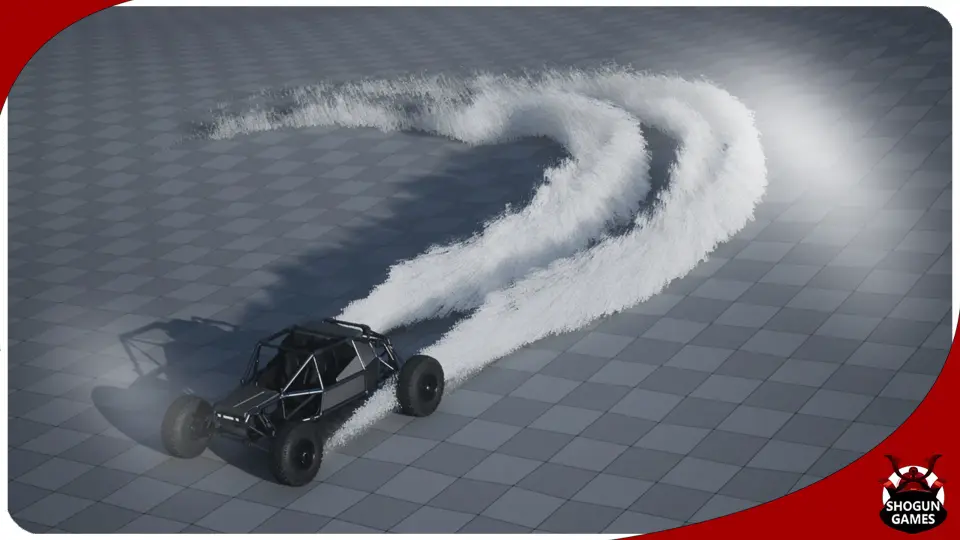
The package includes 10 distinct effects tailored to different ground materials. The visual identity of each effect is tied directly to the physical properties of the surface it represents. The creator has calibrated the smoke density, color, and behavior to match specific environments.
Concrete (Heavy white smoke): Generates a dense, bright visual reaction suitable for urban environments.
Dirt: Produces a standard soil-based kick-up effect for off-road tracks.
Dusty (Faint slightly dirty smoke): A lighter, more subtle particle output for dry, loose surfaces.
Grass: Simulates the visual feedback of tires displacing turf.
Gravel: Kicks up small, solid debris typical of loose rock roads.
Mud: Simulates the wet, heavy spray of soft earth.
Sand: Creates a fine, flowing particle reaction for desert environments.
Snow: Generates a white, powdery burst for winter tracks.
Tarmac (Light white smoke): A lighter smoke variant for high-grip racing surfaces.
Water: Simulates the splash and mist of driving through puddles or shallow water.
Using the Vehicle Offroad Template
The demo video and product screenshots showcasing these Niagara effects utilize the 'Vehicle Offroad Template'. This template serves as a demonstration environment to show how the particle systems behave under driving conditions. The template itself is not included with the Kick Up FX pack. Users will need to implement these effects within their own vehicle frameworks or driving templates.
Production Readiness
The resource provides documentation and support channels for implementation troubleshooting. Access to Discord support is available for users integrating the effects into their projects. The provided tags—spanning vehicle, rally, mud, car, drift, wheel, and particle—indicate the asset is specifically tuned for driving games, racing simulators, and cinematic vehicle sequences within Unreal Engine.
 Variety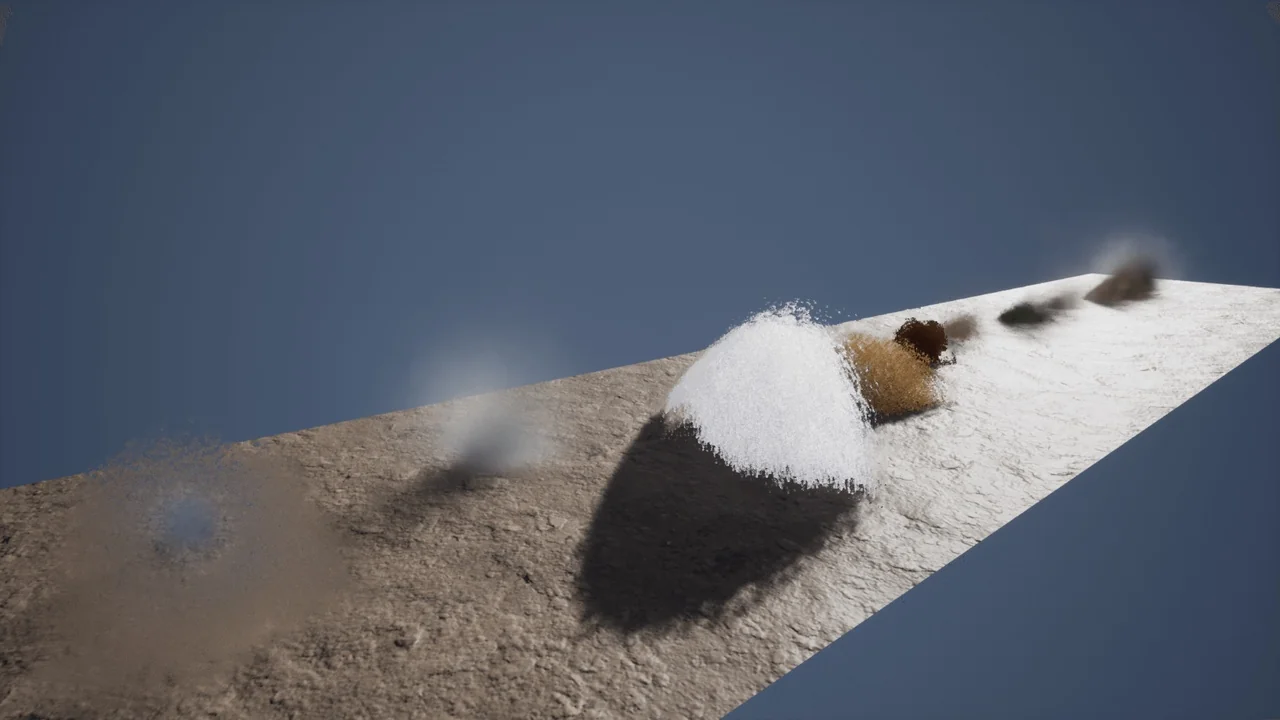
 Variety
 Variety
 Variety