"031373f479d9561a"{"id":"1000259","slug":"character-body-fx-vol-1","title":"Character Body FX Vol. 1","category":"Variety","engine":"5.0+","assetVersion":"","engineVersion":"Engine Version: 5.0+","tag":"Variety","accent":"blue","visual":"character","summary":"A technical breakdown of Character Body FX Vol. 1, detailing its 16 Niagara particle setups, skeletal mesh attachment processes, and mesh sampling features.","platform":"Unreal Engine","publishedAt":"2026-06-30T22:54:39.158Z","updatedAt":"2026-06-30T22:54:39.158Z","sourceNotes":[],"fileContents":[],"compatibility":["Unreal Engine","Engine Version: 5.0+"],"featuredImage":{"alt":"Character Body FX Vol. 1","src":"/wp-content/uploads/published/2026/06/a17b8bdb95c5-6b74e2d6-4d08-4ed6-bab5-0864dd9cbf2c-81a22072a0.webp"},"hasDownloadLink":true,"downloads":0,"terms":[{"taxonomy":"category","slug":"variety-vfx","name":"Variety"}],"galleryImages":[{"src":"/wp-content/uploads/published/2026/06/c356be94bc38-61ce1ee3-5d37-44c0-8504-4501b87ef235-d4a197bf98.webp","alt":"Character Body FX Vol. 1"},{"src":"/wp-content/uploads/published/2026/06/45d34221a148-3cfbd885-91f6-42d7-b7f2-451b5d9d23a9-58f50a53e3.webp","alt":"Character Body FX Vol. 1"},{"src":"/wp-content/uploads/published/2026/06/05029105f27c-bcfe4e33-b6a4-4bb4-ab7a-27616714ea0a-4abddf7f96.webp","alt":"Character Body FX Vol. 1"},{"src":"/wp-content/uploads/published/2026/06/c83fb62930f5-7ba9b8d2-f135-4d19-af51-68ce3f2c31c0-e0357cfe10.webp","alt":"Character Body FX Vol. 1"},{"src":"/wp-content/uploads/published/2026/06/cced4bc35f2a-d8576eb1-2d1e-452b-acf0-03a54156840b-571a29f9f9.webp","alt":"Character Body FX Vol. 1"},{"src":"/wp-content/uploads/published/2026/06/d7e1efdd3a76-e69049c2-7861-4d54-ac5e-f87662d50077-d476939185.webp","alt":"Character Body FX Vol. 1"},{"src":"/wp-content/uploads/published/2026/06/461239c1f684-c7142211-63ff-4c6a-8164-04d515fedf38-aca4bd0a06.webp","alt":"Character Body FX Vol. 1"},{"src":"/wp-content/uploads/published/2026/06/8b85c9f310d4-826d08c8-3cd6-4ecf-8bd4-a52540e2f873-7cdec92d16.webp","alt":"Character Body FX Vol. 1"},{"src":"/wp-content/uploads/published/2026/06/b2f0fafd00c5-cb8f3d44-2c6b-4443-9967-fe463150fcda-bbf016966c.webp","alt":"Character Body FX Vol. 1"}],"accessPanel":{"kind":"resource","title":"Download this resource","eyebrow":"Free Download","message":"Log in or create a free account to start your download.","fileName":"Content.7z","safetyNote":"Resources are manually reviewed before listing to improve quality and reduce obvious risks.","actionLabel":"Download Free","resourceType":"Resource archive"},"contentHtml":"\u003ch2\u003eSkeletal Mesh Implementation and CPU Access\u003c/h2\u003e\n\u003cp\u003eImplementing Character Body FX Vol. 1 begins directly at the skeletal mesh level. The system relies on precise data extraction from the character's underlying geometry to drive its visual effects. To achieve this, developers must enable the 'Allow CPU access' setting on their target skeletal mesh within the engine. This fundamental step ensures that the blueprint and particle systems can read the necessary vertex or surface data to spawn and attach effects accurately across the character's body in real-time. Without this setting enabled, the Niagara systems cannot track the mesh correctly during gameplay or cinematic sequences. The package provides specific blueprint tutorials and character setup guides to walk developers through these initial configuration stages, ensuring the engine can process the skeletal data required for the visual effects.\u003c/p\u003e\n\u003ch2\u003eSampling Regions and Blueprint Integration\u003c/h2\u003e\n\u003cp\u003eOnce the CPU access is configured, the effects are designed to attach to any type of skeletal mesh. This means the system is not restricted to a specific character rig, humanoid shape, or set of proportions. A key technical feature of this setup is the ability to handle sampling regions of the mesh. Rather than forcing particles to emit uniformly across the entire character, this functionality allows developers to isolate specific anatomical zones—such as the arms, torso, or legs—and confine the visual effects to those designated areas. A dedicated guide is included to explain how to sample these specific regions effectively, providing granular control over where the effects manifest. The blueprint tutorials further clarify how to link these sampled regions to the active Niagara systems, creating a robust pipeline from the static mesh data to the final visual output.\u003c/p\u003e\n\u003ch2\u003eUE4 Mannequin Demo and Animation Testing\u003c/h2\u003e\n\u003cp\u003eTo demonstrate how the particles follow complex skeletal movements, the included demo scene utilizes the standard UE4 Mannequin character. This baseline character is equipped with a dance animation sequence specifically chosen to test and showcase the fidelity of the particle attachments. As the mannequin performs the fast-paced dance movements, the visual effects remain locked to the specified skeletal regions, highlighting the system's ability to maintain particle alignment during rapid bone translations and rotations. While the UE4 Mannequin serves as the foundational testing ground, the underlying logic is built to be transferred to any custom skeletal mesh, provided the initial setup steps and CPU access requirements are met.\u003c/p\u003e\n\u003ch2\u003eElemental and Fantasy Niagara Systems\u003c/h2\u003e\n\u003cp\u003eThe core of the package is built entirely on the Niagara visual effects system, providing 16 distinct particle setups. A significant portion of these effects leans toward fantasy and magic aesthetics, making them suitable for player buffs, status effects, or magical transformations. Standard elemental systems like Fire provide foundational body-envelopment effects, while Light Orbs and Glitter offer more ethereal, ambient particle emission suitable for magical auras. The package also includes highly reflective and refractive structures such as Crystals, Diamonds, and Glass. These specific effects can be used to simulate a character turning into a solid state, generating a protective armor layer, or shattering during a combat sequence. Bubbles round out this category, offering an underwater or whimsical visual option that utilizes the same mesh-attachment logic.\u003c/p\u003e\n\u003ch2\u003eNature and Digital Particle Attachments\u003c/h2\u003e\n\u003cp\u003eMoving beyond standard magical glows, the system includes physical object emissions mapped to the character's body. Nature-themed projects can utilize the Flowers, Rocks, and Twigs effects. These are particularly useful for druidic characters, woodland creatures, or earth-based transformations where physical elements need to sprout from or encase the character model. The system tracks these physical meshes as they spawn along the skeletal surface, ensuring they follow the character's specific animations. Additionally, the Pixels effect provides a digital or cyberpunk alternative. This system allows a character to appear as if they are materializing from data, glitching out of a digital space, or breaking down into volumetric pixels based on the underlying mesh geometry.\u003c/p\u003e\n\u003ch2\u003eUnconventional Object Effects\u003c/h2\u003e\n\u003cp\u003eCharacter Body FX Vol. 1 also includes highly specific, unconventional particle systems that attach to the skeleton. These include Coins, Chains, and Buttons, which can be applied for unique character designs, stylized loot-drop animations, or specific game mechanics where physical wealth or restraints need to physically manifest on the player. Even more unusual are the Sticky Notes and Toilet Paper effects. These quirky additions demonstrate the extreme flexibility of the body-attachment system, showing how everyday physical objects can be driven by the exact same mesh-sampling logic as traditional fire or light particles. They serve as excellent examples of how custom meshes can be swapped into the Niagara systems to create entirely unique character visual states.\u003c/p\u003e\n\u003ch2\u003eProduction Readiness and Support Documentation\u003c/h2\u003e\n\u003cp\u003eIntegrating these 16 effects requires close attention to the provided support documentation. The setup process involves a series of small, specific steps to ensure the Niagara systems communicate correctly with the blueprints and the skeletal mesh. Reviewing this documentation is explicitly required to get the effects working seamlessly, particularly when configuring the mesh sampling regions and ensuring the CPU access is maintained across different custom character models. While the demo scene provides a working baseline, transferring the setup to production assets relies heavily on following these documented blueprint configurations to guarantee stability during complex animations.\u003c/p\u003e\n\n\u003ch2\u003eExplore Similar Assets\u003c/h2\u003e\n\u003cul\u003e\n\u003cli\u003e\u003ca href=\"https://3dcghub.com/master-materials-and-layer-system-for-daz3d-imports/\" title=\"Master Materials and Layer System for Daz3D Imports\"\u003eMaster Materials and Layer System for Daz3D Imports\u003c/a\u003e\u003c/li\u003e\n\u003cli\u003e\u003ca href=\"https://3dcghub.com/absorption-fx/\" title=\"Absorption FX\"\u003eAbsorption FX\u003c/a\u003e\u003c/li\u003e\n\u003cli\u003e\u003ca href=\"https://3dcghub.com/abstract-fx-sprites/\" title=\"Abstract FX: Sprites\"\u003eAbstract FX: Sprites\u003c/a\u003e\u003c/li\u003e\n\u003cli\u003e\u003ca href=\"https://3dcghub.com/abstract-fx-meshes/\" title=\"Abstract FX: Meshes\"\u003eAbstract FX: Meshes\u003c/a\u003e\u003c/li\u003e\n\u003cli\u003e\u003ca href=\"https://3dcghub.com/ultimate-fire-pack-vol-1-by-actionvfx-and-undertone-fx-inc/\" title=\"Ultimate Fire Pack Vol 1. by ActionVFX and Undertone FX, Inc.\"\u003eUltimate Fire Pack Vol 1. by ActionVFX and Undertone FX, Inc.\u003c/a\u003e\u003c/li\u003e\n\u003c/ul\u003e","contentTextLength":6080,"navigation":{"current":1091,"total":3223,"previous":{"id":"1000260","slug":"baltic-vfx-material-functions-and-effects-library","title":"Baltic VFX : Material functions and effects library","category":"Variety","platform":"Unreal Engine","updatedAt":"2026-06-30T22:57:37.837Z"},"next":{"id":"1000258","slug":"animalia-housefly","title":"Animalia - Housefly","category":"Characters \u0026 Creatures","platform":"Unreal Engine","updatedAt":"2026-06-30T22:49:24.269Z"}},"relatedResources":[{"id":"25079","slug":"master-materials-and-layer-system-for-daz3d-imports","title":"Master Materials and Layer System for Daz3D Imports","category":"Variety","engine":"5.0+","assetVersion":"Engine version: 5.0+","engineVersion":"","tag":"Variety","accent":"blue","visual":"luts","summary":"This material system gives imported characters a faster path into game-ready presentation, with runtime control over roughness, tint, makeup, and tattoos. It also centralizes shared parameters so multiple body regions can be adjusted together instead of edi...","platform":"Unreal Engine","publishedAt":"2026-04-18T17:32:35.000Z","updatedAt":"2026-04-20T06:12:33.000Z","sourceNotes":[],"fileContents":[],"compatibility":["Unreal Engine","Engine version: 5.0+"],"featuredImage":{"alt":"Master Materials and Layer System for Daz3D Imports","src":"https://3dcghub.com/wp-content/uploads/2026/04/d40f210d6801_8fc4237c-0e00-4c8a-ab90-795e96b288d2.webp"},"hasDownloadLink":true,"downloads":0},{"id":"1001193","slug":"fx-variety-pack","title":"FX Variety Pack","category":"Variety","engine":"5.0+","assetVersion":"","engineVersion":"Engine Version: 5.0+","tag":"Variety","accent":"blue","visual":"mech","summary":"Explore the FX Variety Pack for Unreal Engine, featuring Fire, Thunder, and Water balls alongside Storm magic effects optimized with particle LODs.","platform":"Unreal Engine","publishedAt":"2026-09-17T07:38:00.893Z","updatedAt":"2026-09-17T07:38:00.893Z","sourceNotes":[],"fileContents":[],"compatibility":["Unreal Engine","Engine Version: 5.0+"],"featuredImage":{"alt":"FX Variety Pack","src":"/wp-content/uploads/published/2026/09/3b906e5709f7-a45d9b3c-13a8-4e01-80b6-cd6f315da2e6-bc48d97fe6.webp"},"hasDownloadLink":true,"downloads":0},{"id":"1000963","slug":"realistic-starter-vfx-pack-vol-2","title":"Realistic Starter VFX Pack Vol 2","category":"Variety","engine":"5.0+","assetVersion":"","engineVersion":"Engine Version: 5.0+","tag":"Variety","accent":"blue","visual":"mech","summary":"56 unique VFX for early game prototyping: blood, fire, explosions, smoke, water, steam, and more. Includes 53 materials, 51 textures, and LODs.","platform":"Unreal Engine","publishedAt":"2026-08-15T11:13:19.886Z","updatedAt":"2026-08-15T11:13:19.886Z","sourceNotes":[],"fileContents":[],"compatibility":["Unreal Engine","Engine Version: 5.0+"],"featuredImage":{"alt":"Realistic Starter VFX Pack Vol 2","src":"/wp-content/uploads/published/2026/08/e95ba8c71930-14c6c241-c8ef-4397-a303-7175539f32e5-bc8b10c97f.webp"},"hasDownloadLink":true,"downloads":2}]}
Variety
Character Body FX Vol. 1
A technical breakdown of Character Body FX Vol. 1, detailing its 16 Niagara particle setups, skeletal mesh attachment processes, and mesh sampling features.
Category:Unreal Engine,VarietyPlatform: Unreal EngineEngine Version: 5.0+Published: Jun 30, 2026
Variety
Resource overview
Skeletal Mesh Implementation and CPU Access
Implementing Character Body FX Vol. 1 begins directly at the skeletal mesh level. The system relies on precise data extraction from the character's underlying geometry to drive its visual effects. To achieve this, developers must enable the 'Allow CPU access' setting on their target skeletal mesh within the engine. This fundamental step ensures that the blueprint and particle systems can read the necessary vertex or surface data to spawn and attach effects accurately across the character's body in real-time. Without this setting enabled, the Niagara systems cannot track the mesh correctly during gameplay or cinematic sequences. The package provides specific blueprint tutorials and character setup guides to walk developers through these initial configuration stages, ensuring the engine can process the skeletal data required for the visual effects.
Sampling Regions and Blueprint Integration
Once the CPU access is configured, the effects are designed to attach to any type of skeletal mesh. This means the system is not restricted to a specific character rig, humanoid shape, or set of proportions. A key technical feature of this setup is the ability to handle sampling regions of the mesh. Rather than forcing particles to emit uniformly across the entire character, this functionality allows developers to isolate specific anatomical zones—such as the arms, torso, or legs—and confine the visual effects to those designated areas. A dedicated guide is included to explain how to sample these specific regions effectively, providing granular control over where the effects manifest. The blueprint tutorials further clarify how to link these sampled regions to the active Niagara systems, creating a robust pipeline from the static mesh data to the final visual output.
UE4 Mannequin Demo and Animation Testing
To demonstrate how the particles follow complex skeletal movements, the included demo scene utilizes the standard UE4 Mannequin character. This baseline character is equipped with a dance animation sequence specifically chosen to test and showcase the fidelity of the particle attachments. As the mannequin performs the fast-paced dance movements, the visual effects remain locked to the specified skeletal regions, highlighting the system's ability to maintain particle alignment during rapid bone translations and rotations. While the UE4 Mannequin serves as the foundational testing ground, the underlying logic is built to be transferred to any custom skeletal mesh, provided the initial setup steps and CPU access requirements are met.
Elemental and Fantasy Niagara Systems
The core of the package is built entirely on the Niagara visual effects system, providing 16 distinct particle setups. A significant portion of these effects leans toward fantasy and magic aesthetics, making them suitable for player buffs, status effects, or magical transformations. Standard elemental systems like Fire provide foundational body-envelopment effects, while Light Orbs and Glitter offer more ethereal, ambient particle emission suitable for magical auras. The package also includes highly reflective and refractive structures such as Crystals, Diamonds, and Glass. These specific effects can be used to simulate a character turning into a solid state, generating a protective armor layer, or shattering during a combat sequence. Bubbles round out this category, offering an underwater or whimsical visual option that utilizes the same mesh-attachment logic.
Nature and Digital Particle Attachments
Moving beyond standard magical glows, the system includes physical object emissions mapped to the character's body. Nature-themed projects can utilize the Flowers, Rocks, and Twigs effects. These are particularly useful for druidic characters, woodland creatures, or earth-based transformations where physical elements need to sprout from or encase the character model. The system tracks these physical meshes as they spawn along the skeletal surface, ensuring they follow the character's specific animations. Additionally, the Pixels effect provides a digital or cyberpunk alternative. This system allows a character to appear as if they are materializing from data, glitching out of a digital space, or breaking down into volumetric pixels based on the underlying mesh geometry.
Unconventional Object Effects
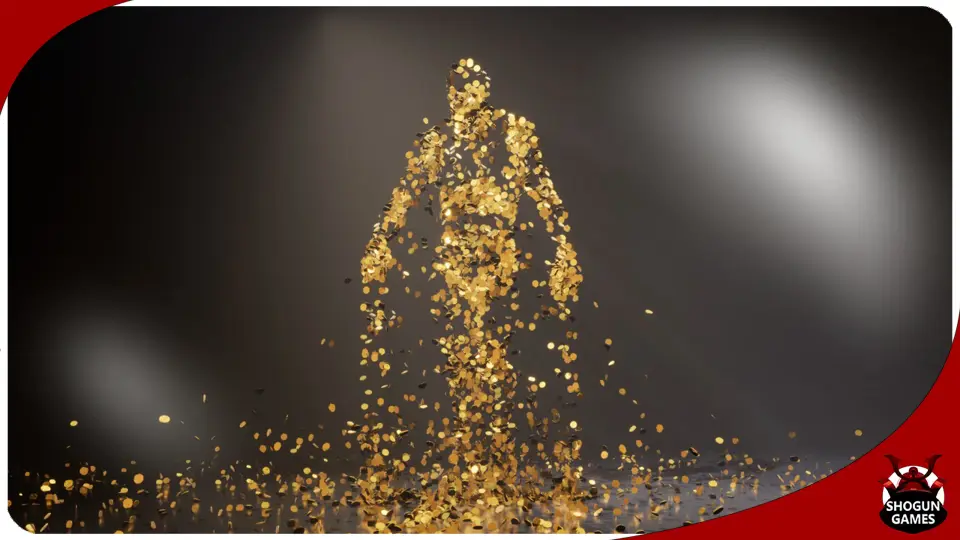
Character Body FX Vol. 1 also includes highly specific, unconventional particle systems that attach to the skeleton. These include Coins, Chains, and Buttons, which can be applied for unique character designs, stylized loot-drop animations, or specific game mechanics where physical wealth or restraints need to physically manifest on the player. Even more unusual are the Sticky Notes and Toilet Paper effects. These quirky additions demonstrate the extreme flexibility of the body-attachment system, showing how everyday physical objects can be driven by the exact same mesh-sampling logic as traditional fire or light particles. They serve as excellent examples of how custom meshes can be swapped into the Niagara systems to create entirely unique character visual states.
Production Readiness and Support Documentation
Integrating these 16 effects requires close attention to the provided support documentation. The setup process involves a series of small, specific steps to ensure the Niagara systems communicate correctly with the blueprints and the skeletal mesh. Reviewing this documentation is explicitly required to get the effects working seamlessly, particularly when configuring the mesh sampling regions and ensuring the CPU access is maintained across different custom character models. While the demo scene provides a working baseline, transferring the setup to production assets relies heavily on following these documented blueprint configurations to guarantee stability during complex animations.
 Variety
 Variety
 Variety
 Variety