"031373f479d9561a"{"id":"1000258","slug":"animalia-housefly","title":"Animalia - Housefly","category":"Characters \u0026 Creatures","engine":"4.26+,5.0+","assetVersion":"","engineVersion":"Engine Version: 4.26+,5.0+","tag":"Characters","accent":"blue","visual":"character","summary":"A detailed technical breakdown of the Animalia - Housefly asset, covering its 10 animations, root motion setup, 4K textures, 3ds Max rig, and ragdoll physics.","platform":"Unreal Engine","publishedAt":"2026-06-30T22:49:24.269Z","updatedAt":"2026-06-30T22:49:24.269Z","sourceNotes":[],"fileContents":[],"compatibility":["Unreal Engine","Engine Version: 4.26+,5.0+"],"featuredImage":{"alt":"Animalia - Housefly","src":"/wp-content/uploads/published/2026/06/4240c4823bef-b81587ae-0333-4429-a421-69870c8cf828-f2767c33e7.webp"},"hasDownloadLink":true,"downloads":0,"terms":[{"taxonomy":"category","slug":"characters-and-creatures","name":"Characters \u0026 Creatures"}],"galleryImages":[{"src":"/wp-content/uploads/published/2026/06/d366085152c9-c5569626-3d51-43e0-bfa7-629206a00fc1-cd68b4774a.webp","alt":"Animalia - Housefly"},{"src":"/wp-content/uploads/published/2026/06/167e76e4560b-52bc9499-aac1-49f0-bb52-ca430c4de475-6acb6acc31.webp","alt":"Animalia - Housefly"},{"src":"/wp-content/uploads/published/2026/06/dcd5c4a1bb66-90c43747-3530-4734-8d2c-0c9dbac47517-df349b522e.webp","alt":"Animalia - Housefly"},{"src":"/wp-content/uploads/published/2026/06/eb68d223b740-0a2822cc-8650-424c-9a8d-ea1181e089e5-6e2ea88507.webp","alt":"Animalia - Housefly"},{"src":"/wp-content/uploads/published/2026/06/ea709758ded5-491e388c-ce5c-4f60-a0b9-f4995ad3ce26-0a674bd73b.webp","alt":"Animalia - Housefly"}],"accessPanel":{"kind":"resource","title":"Download this resource","eyebrow":"Free Download","message":"Log in or create a free account to start your download.","fileName":"Content.7z","safetyNote":"Resources are manually reviewed before listing to improve quality and reduce obvious risks.","actionLabel":"Download Free","resourceType":"Resource archive"},"contentHtml":"\u003ch2\u003eBypassing Plugin Dependencies for the Housefly Model\u003c/h2\u003e\n\u003cp\u003eIntegrating the Animalia - Housefly asset into a 3D environment begins with standard skeletal mesh deployment, bypassing the need for complex proprietary grooming plugins. While the package references the availability of the gFur plugin for Unreal Engine 5, the housefly model itself operates entirely independently of it. This architectural decision ensures that the creature can be dropped into standard rendering pipelines without requiring additional third-party tools to handle surface details, fuzz, or rendering passes. The core setup relies strictly on the provided skeletal mesh and its associated textures, making it a direct solution for developers who want to avoid introducing external plugin dependencies into their project hierarchy.\u003c/p\u003e \u003ch2\u003eManaging High-Fidelity 4K Textures and LODs\u003c/h2\u003e\n\u003cp\u003eAchieving a realistic look for micro-scale creatures often requires high-resolution material data. To address this, the housefly model is equipped with 4K textures. Applying a 4K resolution map to an insect provides a dense amount of pixel data, which becomes critical when the camera moves in for extreme close-ups or macro-cinematic shots. At this resolution, the textures can hold up under tight focal lengths without artifacting or blurring. For interactive environments where a realistic housefly might land on a foreground object or player character, the 4K textures ensure that the structural details of the fly's exoskeleton and wings remain sharp and visually coherent.\u003c/p\u003e\n\u003cp\u003eBecause rendering 4K textures and high-polygon meshes for small environmental insects can quickly consume rendering budgets, the asset includes pre-configured LODs (Levels of Detail). Integrating these LODs ensures that the computational weight of the realistic housefly scales appropriately based on screen size. When the fly is in the immediate foreground, the highest-quality mesh and texture data are utilized. As the insect flies away or serves as background ambient movement, the LOD system steps down the geometry. This allows developers to populate a scene with multiple flies without incurring the performance penalty of rendering macro-level detail at a distance.\u003c/p\u003e \u003ch2\u003eImplementing the 10 Animations with Root Motion\u003c/h2\u003e\n\u003cp\u003eA flying insect requires distinct, often erratic movement states, which are supplied through a library of 10 built-in animations. Implementing these motions into an animation blueprint or state machine is highly adaptable due to the dual-format delivery of the sequence data. Every one of the 10 animations is available in two distinct formats: with root motion and without root motion (in-place). This dual provision gives developers complete control over how the fly navigates 3D space.\u003c/p\u003e\n\u003cp\u003eUtilizing the root motion animations allows the spatial translation of the fly to be driven entirely by the animation data itself. This is particularly useful for complex flight paths, specific landing sequences, or take-off animations where the physical displacement of the mesh needs to perfectly synchronize with the flapping of the wings. Root motion prevents foot-sliding or unnatural gliding when the insect interacts with surfaces. Conversely, the in-place animations allow a standard character movement component or custom AI logic to dictate the fly's velocity and trajectory. In this setup, the engine handles the spatial movement while the in-place animation simply cycles on top, which is often preferred for dynamic AI pathfinding or swarm behaviors.\u003c/p\u003e \u003ch2\u003eCustomizing Motion with the 3ds Max Animation Rig\u003c/h2\u003e\n\u003cp\u003eBeyond the pre-baked sequences, the package supports custom animation pipelines by including a dedicated 3ds Max animation rig. This expands the implementation possibilities for technical animators and rigging artists. Rather than relying exclusively on the provided 10 animations, developers can open the underlying rig directly in 3ds Max to author bespoke flight cycles, unique idle twitches, or specific environmental interactions. The rig allows for precise control over the complex wing and leg hierarchies, ensuring that any newly authored motions maintain the realistic anatomical constraints of the insect. Having access to the source animation rig means the realistic housefly can be tailored to fit highly specific cinematic sequences or specialized gameplay mechanics that require custom keyframing before being exported back into the target game engine.\u003c/p\u003e \u003ch2\u003ePhysics Integration via the Ragdoll Setup\u003c/h2\u003e\n\u003cp\u003eIntegrating physical interactions is handled through the included ragdoll setup. Rather than requiring technical artists to manually generate collision volumes, capsule limits, and joint constraints for the fly's appendages, the physics asset comes pre-configured. Setting up physics bodies on micro-appendages like insect legs can be highly tedious and prone to collision errors, making a ready-to-use ragdoll a significant time-saver. This ragdoll setup can be triggered during specific runtime events. If the insect is swatted, collides with a dynamic object at high speed, or enters a death state, the mesh can seamlessly transition from its animated state into a fully physics-driven ragdoll. This setup ensures that the creature reacts naturally to environmental collisions and gravity when it is no longer actively flying.\u003c/p\u003e \u003ch2\u003eVersion 2.2.1 Skinning Fixes and Maintenance\u003c/h2\u003e\n\u003cp\u003eMaintaining skeletal integrity is crucial for multi-legged creatures, and the asset's update history reflects targeted technical refinements. In version 2.2.1, the housefly received specific maintenance addressing its skeletal deformations. The update successfully fixed prior skinning issues, ensuring that the mesh's vertex weights deform correctly around the joints. This prevents unnatural stretching or mesh tearing during extreme wing flaps, leg movements, or complex root motion sequences. Alongside these vital skinning fixes, version 2.2.1 also tweaked a few of the existing animations to smooth out the motion data. Building upon the initial 2.2.0 release, these iterative refinements deliver a highly stable skeletal mesh ready for immediate deployment in interactive and cinematic projects.\u003c/p\u003e\n\n\u003ch2\u003eRelated Resources Worth Checking\u003c/h2\u003e\n\u003cul\u003e\n\u003cli\u003e\u003ca href=\"https://3dcghub.com/animalia-leopard-young/\" title=\"Animalia - Leopard (young)\"\u003eAnimalia - Leopard (young)\u003c/a\u003e\u003c/li\u003e\n\u003cli\u003e\u003ca href=\"https://3dcghub.com/animalia-meadow-grasshopper/\" title=\"Animalia - Meadow Grasshopper\"\u003eAnimalia - Meadow Grasshopper\u003c/a\u003e\u003c/li\u003e\n\u003cli\u003e\u003ca href=\"https://3dcghub.com/animalia-bald-and-golden-eagle/\" title=\"Animalia - Bald and Golden Eagle\"\u003eAnimalia - Bald and Golden Eagle\u003c/a\u003e\u003c/li\u003e\n\u003cli\u003e\u003ca href=\"https://3dcghub.com/animalia-honeybee/\" title=\"Animalia - Honeybee\"\u003eAnimalia - Honeybee\u003c/a\u003e\u003c/li\u003e\n\u003cli\u003e\u003ca href=\"https://3dcghub.com/animalia-domestic-cat/\" title=\"Animalia - Domestic Cat\"\u003eAnimalia - Domestic Cat\u003c/a\u003e\u003c/li\u003e\n\u003c/ul\u003e","contentTextLength":6303,"navigation":{"current":1092,"total":3223,"previous":{"id":"1000259","slug":"character-body-fx-vol-1","title":"Character Body FX Vol. 1","category":"Variety","platform":"Unreal Engine","updatedAt":"2026-06-30T22:54:39.158Z"},"next":{"id":"1000257","slug":"animalia-honeybee","title":"Animalia - Honeybee","category":"Characters \u0026 Creatures","platform":"Unreal Engine","updatedAt":"2026-06-30T22:47:21.277Z"}},"relatedResources":[{"id":"1000974","slug":"animalia-lion-male","title":"Animalia - Lion (male)","category":"Characters \u0026 Creatures","engine":"4.26+,5.0+","assetVersion":"","engineVersion":"Engine Version: 4.26+,5.0+","tag":"Characters","accent":"blue","visual":"character","summary":"Realistic male lion with 60fps animations, 4K textures, gFur support, Maya/3ds Max rigs, LODs, and ragdoll for Unreal Engine 4.24 and up.","platform":"Unreal Engine","publishedAt":"2026-08-17T16:08:33.242Z","updatedAt":"2026-08-17T16:08:33.242Z","sourceNotes":[],"fileContents":[],"compatibility":["Unreal Engine","Engine Version: 4.26+,5.0+"],"featuredImage":{"alt":"Animalia - Lion (male)","src":"/wp-content/uploads/published/2026/08/799ef29163e0-6c655651-224e-4b8d-9200-2a0d57dbd08f-30295b193d.webp"},"hasDownloadLink":true,"downloads":0},{"id":"1000973","slug":"animalia-gray-wolf-young","title":"Animalia - Gray Wolf (young)","category":"Characters \u0026 Creatures","engine":"4.26+,5.0+","assetVersion":"","engineVersion":"Engine Version: 4.26+,5.0+","tag":"Characters","accent":"blue","visual":"character","summary":"A realistic young Gray Wolf with 60fps animations, 4K textures, gFur support, Maya/3ds Max rigs, LODs, and ragdoll setup for Unreal Engine 5 projects.","platform":"Unreal Engine","publishedAt":"2026-08-17T16:04:58.364Z","updatedAt":"2026-08-17T16:04:58.364Z","sourceNotes":[],"fileContents":[],"compatibility":["Unreal Engine","Engine Version: 4.26+,5.0+"],"featuredImage":{"alt":"Animalia - Gray Wolf (young)","src":"/wp-content/uploads/published/2026/08/9fcd1d0b632e-f6aeddf4-1dc7-45c0-91e5-98a501f9cf7e-0eaf67a9d1.webp"},"hasDownloadLink":true,"downloads":0},{"id":"1000912","slug":"animalia-raccoon","title":"Animalia - Raccoon","category":"Characters \u0026 Creatures","engine":"4.26+,5.0+","assetVersion":"","engineVersion":"Engine Version: 4.26+,5.0+","tag":"Characters","accent":"blue","visual":"character","summary":"Realistic raccoon with 60fps animations, 2K textures, gFur support, LODs, ragdoll setup, and a 3ds Max rig. Works with UE 4.24+ and the Animalia Starter Kit.","platform":"Unreal Engine","publishedAt":"2026-08-07T17:04:40.260Z","updatedAt":"2026-08-07T17:04:40.260Z","sourceNotes":[],"fileContents":[],"compatibility":["Unreal Engine","Engine Version: 4.26+,5.0+"],"featuredImage":{"alt":"Animalia - Raccoon","src":"/wp-content/uploads/published/2026/08/2674d40980b0-8799a4c5-7e67-49ed-88a6-836893685cf5-b83809c831.webp"},"hasDownloadLink":true,"downloads":0}]}
Characters
Animalia - Housefly
A detailed technical breakdown of the Animalia - Housefly asset, covering its 10 animations, root motion setup, 4K textures, 3ds Max rig, and ragdoll physics.
Bypassing Plugin Dependencies for the Housefly Model
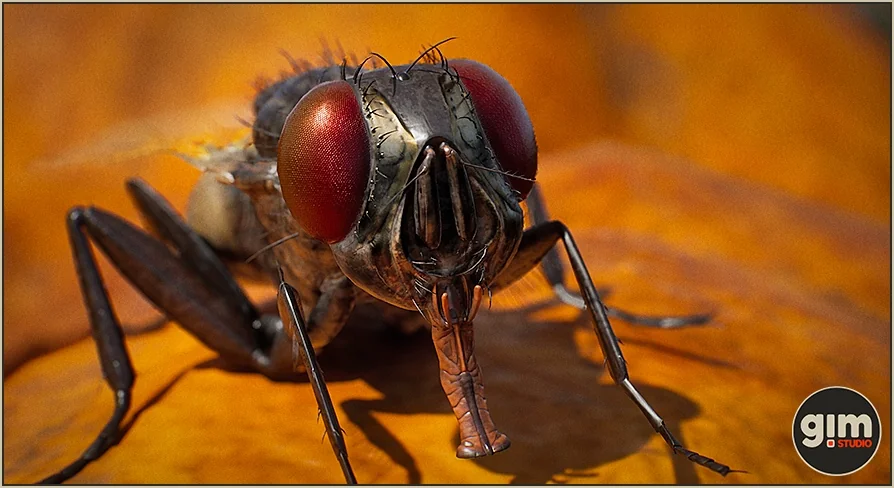
Integrating the Animalia - Housefly asset into a 3D environment begins with standard skeletal mesh deployment, bypassing the need for complex proprietary grooming plugins. While the package references the availability of the gFur plugin for Unreal Engine 5, the housefly model itself operates entirely independently of it. This architectural decision ensures that the creature can be dropped into standard rendering pipelines without requiring additional third-party tools to handle surface details, fuzz, or rendering passes. The core setup relies strictly on the provided skeletal mesh and its associated textures, making it a direct solution for developers who want to avoid introducing external plugin dependencies into their project hierarchy.
Managing High-Fidelity 4K Textures and LODs
Achieving a realistic look for micro-scale creatures often requires high-resolution material data. To address this, the housefly model is equipped with 4K textures. Applying a 4K resolution map to an insect provides a dense amount of pixel data, which becomes critical when the camera moves in for extreme close-ups or macro-cinematic shots. At this resolution, the textures can hold up under tight focal lengths without artifacting or blurring. For interactive environments where a realistic housefly might land on a foreground object or player character, the 4K textures ensure that the structural details of the fly's exoskeleton and wings remain sharp and visually coherent.
Because rendering 4K textures and high-polygon meshes for small environmental insects can quickly consume rendering budgets, the asset includes pre-configured LODs (Levels of Detail). Integrating these LODs ensures that the computational weight of the realistic housefly scales appropriately based on screen size. When the fly is in the immediate foreground, the highest-quality mesh and texture data are utilized. As the insect flies away or serves as background ambient movement, the LOD system steps down the geometry. This allows developers to populate a scene with multiple flies without incurring the performance penalty of rendering macro-level detail at a distance.
Implementing the 10 Animations with Root Motion
A flying insect requires distinct, often erratic movement states, which are supplied through a library of 10 built-in animations. Implementing these motions into an animation blueprint or state machine is highly adaptable due to the dual-format delivery of the sequence data. Every one of the 10 animations is available in two distinct formats: with root motion and without root motion (in-place). This dual provision gives developers complete control over how the fly navigates 3D space.
Utilizing the root motion animations allows the spatial translation of the fly to be driven entirely by the animation data itself. This is particularly useful for complex flight paths, specific landing sequences, or take-off animations where the physical displacement of the mesh needs to perfectly synchronize with the flapping of the wings. Root motion prevents foot-sliding or unnatural gliding when the insect interacts with surfaces. Conversely, the in-place animations allow a standard character movement component or custom AI logic to dictate the fly's velocity and trajectory. In this setup, the engine handles the spatial movement while the in-place animation simply cycles on top, which is often preferred for dynamic AI pathfinding or swarm behaviors.
Customizing Motion with the 3ds Max Animation Rig
Beyond the pre-baked sequences, the package supports custom animation pipelines by including a dedicated 3ds Max animation rig. This expands the implementation possibilities for technical animators and rigging artists. Rather than relying exclusively on the provided 10 animations, developers can open the underlying rig directly in 3ds Max to author bespoke flight cycles, unique idle twitches, or specific environmental interactions. The rig allows for precise control over the complex wing and leg hierarchies, ensuring that any newly authored motions maintain the realistic anatomical constraints of the insect. Having access to the source animation rig means the realistic housefly can be tailored to fit highly specific cinematic sequences or specialized gameplay mechanics that require custom keyframing before being exported back into the target game engine.
Physics Integration via the Ragdoll Setup
Integrating physical interactions is handled through the included ragdoll setup. Rather than requiring technical artists to manually generate collision volumes, capsule limits, and joint constraints for the fly's appendages, the physics asset comes pre-configured. Setting up physics bodies on micro-appendages like insect legs can be highly tedious and prone to collision errors, making a ready-to-use ragdoll a significant time-saver. This ragdoll setup can be triggered during specific runtime events. If the insect is swatted, collides with a dynamic object at high speed, or enters a death state, the mesh can seamlessly transition from its animated state into a fully physics-driven ragdoll. This setup ensures that the creature reacts naturally to environmental collisions and gravity when it is no longer actively flying.
Version 2.2.1 Skinning Fixes and Maintenance
Maintaining skeletal integrity is crucial for multi-legged creatures, and the asset's update history reflects targeted technical refinements. In version 2.2.1, the housefly received specific maintenance addressing its skeletal deformations. The update successfully fixed prior skinning issues, ensuring that the mesh's vertex weights deform correctly around the joints. This prevents unnatural stretching or mesh tearing during extreme wing flaps, leg movements, or complex root motion sequences. Alongside these vital skinning fixes, version 2.2.1 also tweaked a few of the existing animations to smooth out the motion data. Building upon the initial 2.2.0 release, these iterative refinements deliver a highly stable skeletal mesh ready for immediate deployment in interactive and cinematic projects.
 Characters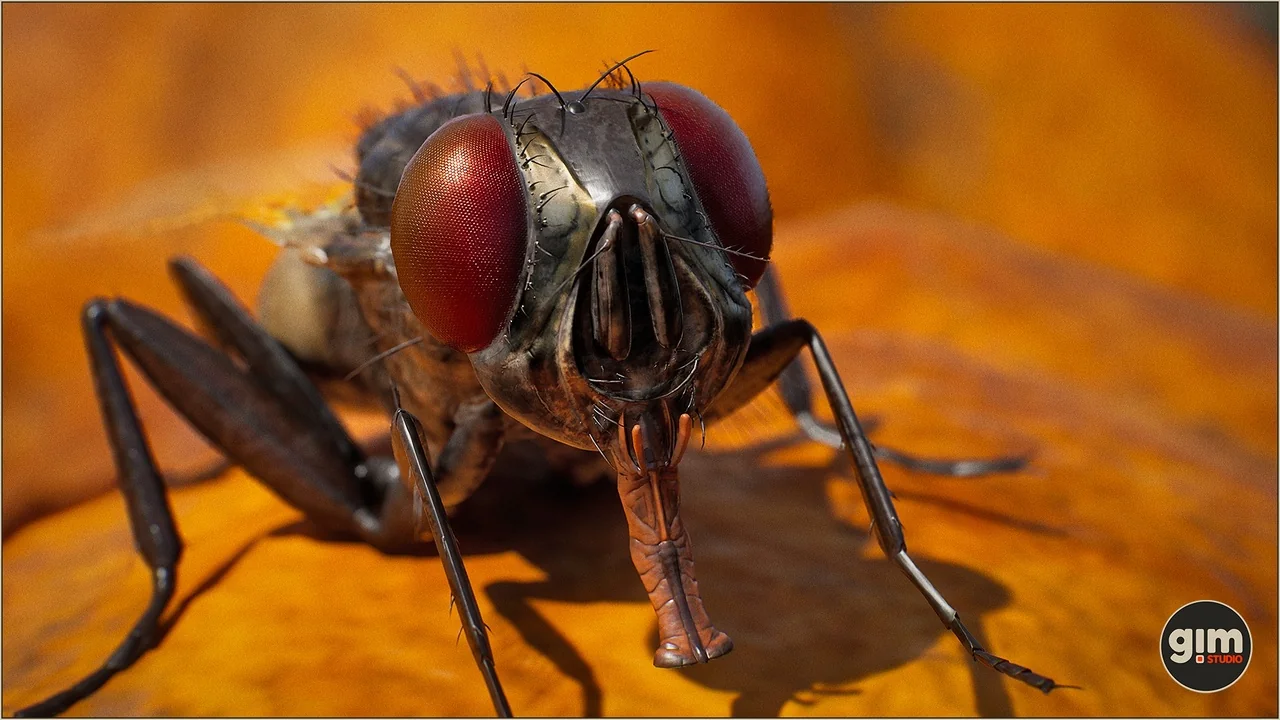
 Characters
 Characters
 Characters