"c68a05d5e51405b3"{"id":"25079","slug":"master-materials-and-layer-system-for-daz3d-imports","title":"Master Materials and Layer System for Daz3D Imports","category":"Variety","engine":"5.0+","assetVersion":"Engine version: 5.0+","engineVersion":"","tag":"Variety","accent":"blue","visual":"luts","summary":"This material system gives imported characters a faster path into game-ready presentation, with runtime control over roughness, tint, makeup, and tattoos. It also centralizes shared parameters so multiple body regions can be adjusted together instead of edi...","platform":"Unreal Engine","publishedAt":"2026-04-18T17:32:35.000Z","updatedAt":"2026-04-20T06:12:33.000Z","sourceNotes":[],"fileContents":[],"compatibility":["Unreal Engine","Engine version: 5.0+"],"featuredImage":{"alt":"Master Materials and Layer System for Daz3D Imports","src":"https://3dcghub.com/wp-content/uploads/2026/04/d40f210d6801_8fc4237c-0e00-4c8a-ab90-795e96b288d2.webp"},"hasDownloadLink":true,"downloads":0,"terms":[{"taxonomy":"category","slug":"variety-vfx","name":"Variety"},{"taxonomy":"post_tag","slug":"game-systems","name":"Game Systems"},{"taxonomy":"post_tag","slug":"materials","name":"Materials"},{"taxonomy":"post_tag","slug":"unreal-engine-5","name":"Unreal Engine 5"}],"galleryImages":[{"src":"https://3dcghub.com/wp-content/uploads/2026/04/090e26f8bf59_5a599269-cdc1-457a-adac-0e75a77325bc.webp","alt":"Master Materials and Layer System for Daz3D Imports"},{"src":"https://3dcghub.com/wp-content/uploads/2026/04/de8ee3b0a859_c6e3697b-8a48-41d3-a3b8-20036bba5cdb.webp","alt":"Master Materials and Layer System for Daz3D Imports"},{"src":"https://3dcghub.com/wp-content/uploads/2026/04/9ca5183faeb9_b82dc149-3a45-490e-97a9-bfebb4e4eff2.webp","alt":"Master Materials and Layer System for Daz3D Imports"},{"src":"https://3dcghub.com/wp-content/uploads/2026/04/435f595133bf_016da042-9432-4b53-9344-8d4e037b89a8.webp","alt":"Master Materials and Layer System for Daz3D Imports"},{"src":"https://3dcghub.com/wp-content/uploads/2026/04/62ccf7b895fd_e882081a-f414-4050-addb-e383b7233eb9.webp","alt":"Master Materials and Layer System for Daz3D Imports"},{"src":"https://3dcghub.com/wp-content/uploads/2026/04/80d17e33302c_2656600d-55ee-4b43-b777-e5dd1a35895c.webp","alt":"Master Materials and Layer System for Daz3D Imports"},{"src":"https://3dcghub.com/wp-content/uploads/2026/04/6a34b1786e0d_98a1148b-b911-45a8-ac0e-23bb89407d85.webp","alt":"Master Materials and Layer System for Daz3D Imports"},{"src":"https://3dcghub.com/wp-content/uploads/2026/04/d4aa5284162f_086d8628-ca4d-49ee-8c80-90b12f02f77f.webp","alt":"Master Materials and Layer System for Daz3D Imports"},{"src":"https://3dcghub.com/wp-content/uploads/2026/04/e21cc349022b_0bea3e00-cf38-4249-a433-eecc0f4342ee.webp","alt":"Master Materials and Layer System for Daz3D Imports"},{"src":"https://3dcghub.com/wp-content/uploads/2026/04/c9b3a5c0746a_a4215d4c-15d4-4e67-a13c-796990d42568.webp","alt":"Master Materials and Layer System for Daz3D Imports"}],"accessPanel":{"kind":"resource","title":"Access this resource","eyebrow":"Free Download","message":"Log in or create a free account to start your download.","fileName":"Content.7z","safetyNote":"All resources are 100% manually reviewed to eliminate all risks.","actionLabel":"Download Free","resourceType":"Resource archive"},"contentHtml":"\u003ch2\u003eMaterial control that stays live during gameplay\u003c/h2\u003e \u003cp\u003eImported characters gain a more flexible presentation layer with this system, which is built for real-time use in games. The setup includes a blueprint structure that allows material parameters to be adjusted at runtime, so character appearance can change on the fly instead of being locked in before play begins.\u003c/p\u003e \u003cp\u003eCommon settings such as roughness and tint color are gathered in the details panel, and those changes apply across all UV spots and body regions at once. That makes it practical for rapid character tweaking, especially when the same visual direction needs to be kept consistent across a full model.\u003c/p\u003e \u003cp\u003eThe workflow is aimed at teams that want a head start on game-ready character materials. It moves beyond static material layers and into a setup that can respond to gameplay, animation logic, and interactive character customization.\u003c/p\u003e \u003ch2\u003eOne base material, many character instances\u003c/h2\u003e \u003cp\u003eA major part of the system is its use of a single base material that can be instanced for each character. That structure is meant to reduce memory usage and keep performance efficient, which matters when a project includes several characters rather than just one hero asset.\u003c/p\u003e \u003cp\u003eThe material setup is also described as using dynamic instancing and material parameters to keep changes organized. Instead of editing each material instance separately, the details panel can be used to change multiple instances at once. That makes the process less complicated when the same adjustments need to be repeated across a cast of characters.\u003c/p\u003e \u003cp\u003eVirtual textures are part of the performance approach as well. The system uses them to help preserve visual fidelity while keeping resource usage lower, which fits the goal of balancing quality with the demands of a game environment.\u003c/p\u003e \u003ch2\u003eMakeup, tattoos, and facial detail built into the workflow\u003c/h2\u003e \u003cp\u003eBasic makeup has been added directly into the base material for runtime use. Eyeshadow, eyeliner, and lipstick are part of that setup, and the tattoo system receives the same runtime-oriented treatment. Those elements can be changed during play, giving character appearance a more active role in the scene.\u003c/p\u003e \u003cp\u003eThe result is useful for projects that want appearance changes to happen in response to game states, interactions, or customization choices. Because the parameters are handled through Unreal Engine blueprints, the material system can be tied into animation blueprints and other game logic without requiring separate workflows for every visual variation.\u003c/p\u003e \u003cp\u003eThere is also a revised advanced eye shader and a detailed mouth material included in the system. Both are aimed at improving facial realism, with the mouth material focused on lifelike texture and shading and the eye shader updated for stronger expressiveness.\u003c/p\u003e \u003ch2\u003eWhere it fits in a Daz3D-to-game pipeline\u003c/h2\u003e \u003cp\u003eThis system is positioned as the game-focused counterpart to the earlier Materials Conversion and Layer System for Daz3D Imports. The earlier system remains the base materials and layers setup for people who want to build their own dynamic parameters and blueprints. This version goes further toward game use by providing the dynamic pieces up front.\u003c/p\u003e \u003cp\u003eIt is meant for teams that want a quicker route into runtime-ready character materials, especially when character appearance needs to be adjusted from the details panel during development or in play. The structure supports game scenarios and integrates with animation blueprints, making it practical for projects where character state can change frequently.\u003c/p\u003e \u003cp\u003eThere are also related products in the same family: one is aimed at users who only want increased realism for character materials, and another is only for Metahumans and is not intended for Daz3D projects. This system sits on the game-oriented side of that lineup.\u003c/p\u003e \u003ch2\u003eWhat is included, and what still needs to be brought in\u003c/h2\u003e \u003cp\u003eNo mesh assets are included with this project, so character meshes need to be imported separately. That makes the system best suited to teams that already have a character base and want to improve the way those characters are shaded, customized, and adjusted at runtime.\u003c/p\u003e \u003cp\u003eDocumentation is available for a full breakdown of the key features. The setup is also presented as having support available through a Discord server, but the practical point is simpler: the material and blueprint structure is intended to be used as part of an existing Unreal Engine character pipeline rather than as a standalone mesh package.\u003c/p\u003e \u003cp\u003eFor projects that need live control over roughness, tint, tattoos, makeup, and facial presentation, the strongest takeaway is clear. This system is built to make imported Daz3D characters easier to manage as game-ready assets while keeping changes centralized, consistent, and fast to apply.\u003c/p\u003e\n\n\u003ch2\u003eExplore Similar Assets\u003c/h2\u003e\n\u003cul\u003e\n\u003cli\u003e\u003ca href=\"https://3dcghub.com/advanced-unreal-engine-5-multiplayer-gameplay-programming/\" title=\"Advanced Unreal Engine 5 Multiplayer Gameplay Programming\"\u003eAdvanced Unreal Engine 5 Multiplayer Gameplay Programming\u003c/a\u003e\u003c/li\u003e\n\u003cli\u003e\u003ca href=\"https://3dcghub.com/niagara-beginners-to-advanced-in-unreal-engine-5/\" title=\"Niagara Beginners to advanced in Unreal Engine 5\"\u003eNiagara Beginners to advanced in Unreal Engine 5\u003c/a\u003e\u003c/li\u003e\n\u003cli\u003e\u003ca href=\"https://3dcghub.com/create-zelda-like-skills-with-c-in-unreal-engine-5-2/\" title=\"Create Zelda-like skills with C++ in unreal engine 5\"\u003eCreate Zelda-like skills with C++ in unreal engine 5\u003c/a\u003e\u003c/li\u003e\n\u003cli\u003e\u003ca href=\"https://3dcghub.com/main-menus-beginner-class-unreal-engine-5/\" title=\"Main Menus Beginner Class – Unreal Engine 5\"\u003eMain Menus Beginner Class – Unreal Engine 5\u003c/a\u003e\u003c/li\u003e\n\u003cli\u003e\u003ca href=\"https://3dcghub.com/create-zelda-like-skills-with-c-in-unreal-engine-5/\" title=\"Create Zelda-like skills with C++ in unreal engine 5\"\u003eCreate Zelda-like skills with C++ in unreal engine 5\u003c/a\u003e\u003c/li\u003e\n\u003c/ul\u003e","contentTextLength":5081,"navigation":{"current":2214,"total":3860,"previous":{"id":"25093","slug":"mixed-magic-3-spell-vfx-pack","title":"Mixed Magic 3 - Spell VFX Pack","category":"Spells \u0026 Combat","platform":"Unreal Engine","updatedAt":"2026-04-20T06:12:33.000Z"},"next":{"id":"25055","slug":"ancient-mayan-ruins","title":"Ancient Mayan Ruins","category":"Historical","platform":"Unreal Engine","updatedAt":"2026-04-20T06:12:33.000Z"}},"relatedResources":[{"id":"17158","slug":"fluid-ninja-live","title":"Fluid Ninja LIVE","category":"Variety","engine":"5.4+","assetVersion":"Engine version: 5.4+","engineVersion":"Asset Version:1.9.54.4","tag":"Variety","accent":"blue","visual":"character","summary":"Fluid Ninja LIVE is a robust toolset for creating dynamic, responsive fluid simulations in real-time. It supports everything from Metahuman tracking to large-scale environmental effects like fog and sand.","platform":"Unreal Engine","publishedAt":"2026-03-13T13:52:32.000Z","updatedAt":"2026-04-19T15:43:36.000Z","sourceNotes":[],"fileContents":[],"compatibility":["Unreal Engine","Engine version: 5.4+","Asset Version: 1.9.54.4"],"featuredImage":{"alt":"Fluid Ninja LIVE","src":"https://3dcghub.com/wp-content/uploads/2026/03/48b74bb6-c70d-408a-8f29-27d49a842381.webp"},"hasDownloadLink":true,"downloads":8},{"id":"17488","slug":"trail-vfx-pack","title":"Trail VFX Pack","category":"Variety","engine":"5.2+","assetVersion":"Engine version: 5.2+","engineVersion":"5.2","tag":"Variety","accent":"blue","visual":"city","summary":"Enhance your project's visual impact with the Trail VFX Pack. This collection features five distinct trail types and eight elemental styles, offering deep customization for dash effects and projectiles.","platform":"Unreal Engine","publishedAt":"2026-03-13T14:42:15.000Z","updatedAt":"2026-04-19T15:43:31.000Z","sourceNotes":[],"fileContents":[],"compatibility":["Unreal Engine","Engine version: 5.2+"],"featuredImage":{"alt":"Trail VFX Pack","src":"https://3dcghub.com/wp-content/uploads/2026/03/6159abd4-2399-433b-8f7b-d9b6e15a3b9f.webp"},"hasDownloadLink":true,"downloads":3},{"id":"17417","slug":"ring-aura-vfx","title":"Ring Aura VFX","category":"Variety","engine":"5.0+","assetVersion":"Engine version: 5.0+","engineVersion":"5.0","tag":"Variety","accent":"blue","visual":"animation","summary":"Enhance your project with Ring Aura VFX, a collection of 20 unique and high-quality visual effects. These assets are optimized for efficiency and offer easy customization without requiring deep knowledge of the Niagara System.","platform":"Unreal Engine","publishedAt":"2026-03-13T14:31:52.000Z","updatedAt":"2026-04-19T15:43:32.000Z","sourceNotes":[],"fileContents":[],"compatibility":["Unreal Engine","Engine version: 5.0+"],"featuredImage":{"alt":"Ring Aura VFX","src":"https://3dcghub.com/wp-content/uploads/2026/03/21a4270e-5f24-45c0-bfd5-eabf331aad3f.webp"},"hasDownloadLink":true,"downloads":2}]}
Variety
Master Materials and Layer System for Daz3D Imports
This material system gives imported characters a faster path into game-ready presentation, with runtime control over roughness, tint, makeup, and tattoos. It also centralizes shared parameters so multiple body regions can be adjusted together instead of edi...
Imported characters gain a more flexible presentation layer with this system, which is built for real-time use in games. The setup includes a blueprint structure that allows material parameters to be adjusted at runtime, so character appearance can change on the fly instead of being locked in before play begins.
Common settings such as roughness and tint color are gathered in the details panel, and those changes apply across all UV spots and body regions at once. That makes it practical for rapid character tweaking, especially when the same visual direction needs to be kept consistent across a full model.
The workflow is aimed at teams that want a head start on game-ready character materials. It moves beyond static material layers and into a setup that can respond to gameplay, animation logic, and interactive character customization.
One base material, many character instances
A major part of the system is its use of a single base material that can be instanced for each character. That structure is meant to reduce memory usage and keep performance efficient, which matters when a project includes several characters rather than just one hero asset.
The material setup is also described as using dynamic instancing and material parameters to keep changes organized. Instead of editing each material instance separately, the details panel can be used to change multiple instances at once. That makes the process less complicated when the same adjustments need to be repeated across a cast of characters.
Virtual textures are part of the performance approach as well. The system uses them to help preserve visual fidelity while keeping resource usage lower, which fits the goal of balancing quality with the demands of a game environment.
Makeup, tattoos, and facial detail built into the workflow
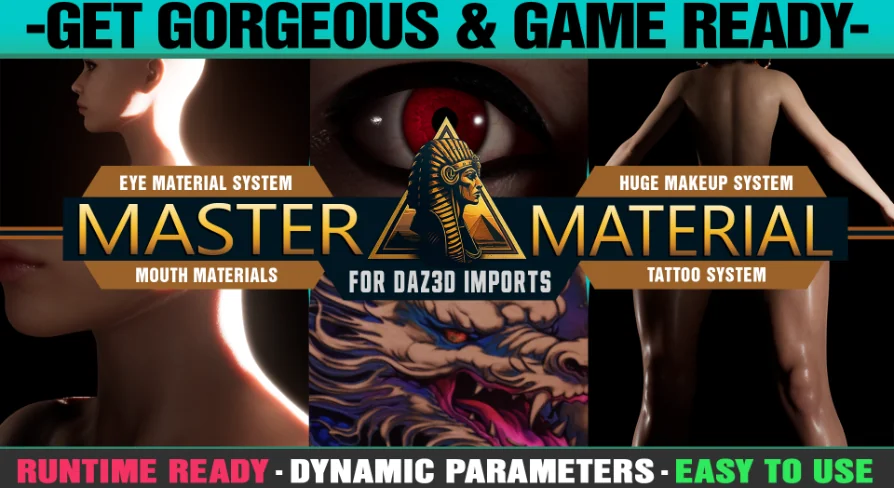
Basic makeup has been added directly into the base material for runtime use. Eyeshadow, eyeliner, and lipstick are part of that setup, and the tattoo system receives the same runtime-oriented treatment. Those elements can be changed during play, giving character appearance a more active role in the scene.
The result is useful for projects that want appearance changes to happen in response to game states, interactions, or customization choices. Because the parameters are handled through Unreal Engine blueprints, the material system can be tied into animation blueprints and other game logic without requiring separate workflows for every visual variation.
There is also a revised advanced eye shader and a detailed mouth material included in the system. Both are aimed at improving facial realism, with the mouth material focused on lifelike texture and shading and the eye shader updated for stronger expressiveness.
Where it fits in a Daz3D-to-game pipeline
This system is positioned as the game-focused counterpart to the earlier Materials Conversion and Layer System for Daz3D Imports. The earlier system remains the base materials and layers setup for people who want to build their own dynamic parameters and blueprints. This version goes further toward game use by providing the dynamic pieces up front.
It is meant for teams that want a quicker route into runtime-ready character materials, especially when character appearance needs to be adjusted from the details panel during development or in play. The structure supports game scenarios and integrates with animation blueprints, making it practical for projects where character state can change frequently.
There are also related products in the same family: one is aimed at users who only want increased realism for character materials, and another is only for Metahumans and is not intended for Daz3D projects. This system sits on the game-oriented side of that lineup.
What is included, and what still needs to be brought in
No mesh assets are included with this project, so character meshes need to be imported separately. That makes the system best suited to teams that already have a character base and want to improve the way those characters are shaded, customized, and adjusted at runtime.
Documentation is available for a full breakdown of the key features. The setup is also presented as having support available through a Discord server, but the practical point is simpler: the material and blueprint structure is intended to be used as part of an existing Unreal Engine character pipeline rather than as a standalone mesh package.
For projects that need live control over roughness, tint, tattoos, makeup, and facial presentation, the strongest takeaway is clear. This system is built to make imported Daz3D characters easier to manage as game-ready assets while keeping changes centralized, consistent, and fast to apply.
 Variety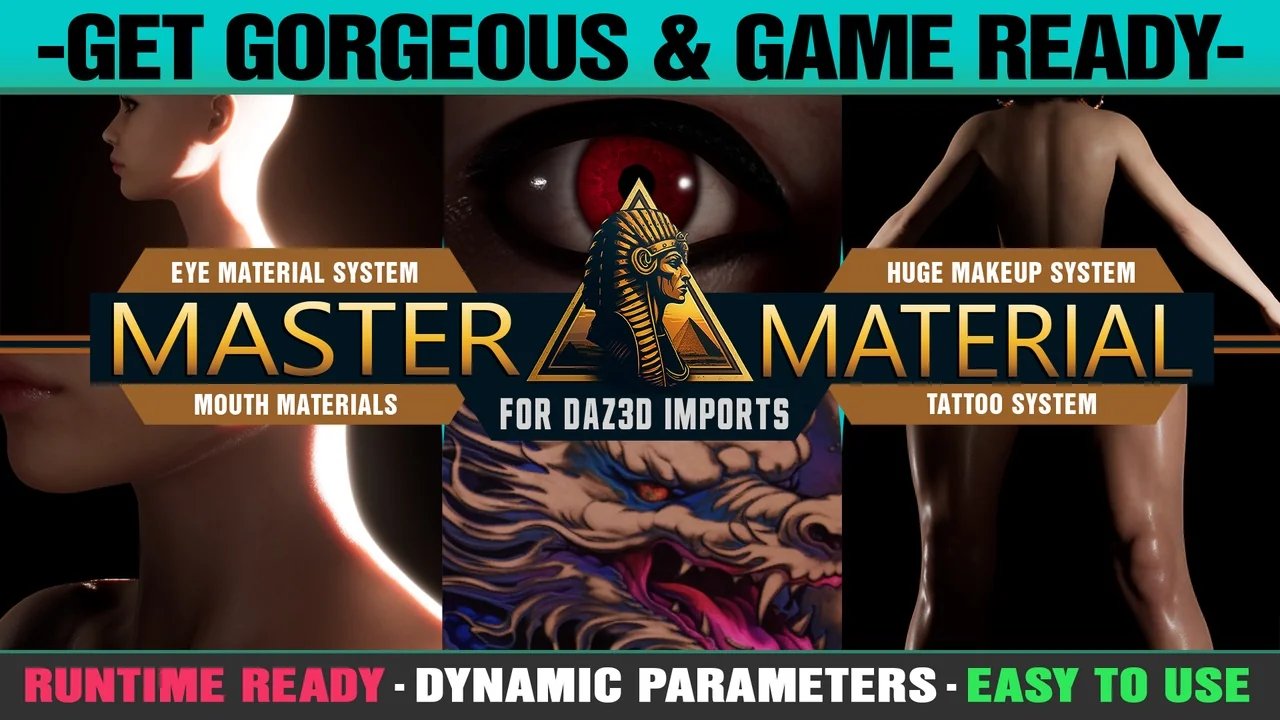
 Variety
 Variety
 Variety