"f813c18d2170b1f6"{"id":"24593","slug":"niagara-beginners-to-advanced-in-unreal-engine-5","title":"Niagara Beginners to advanced in Unreal Engine 5","category":"Unreal Engine","engine":"Video language: English","assetVersion":"Video language: English","engineVersion":"File content: video + supporting files + English subtitles","tag":"Unreal Engine","accent":"blue","visual":"luts","summary":"This Unreal Engine 5 course starts Niagara from scratch and moves into real-time VFX through practical effect builds. It covers stylized fire, smoke, explosions, portals, energy balls, fluids, and other game-focused visuals, along with mesh, material, and n...","platform":"Unreal Engine","publishedAt":"2026-04-15T14:14:53.000Z","updatedAt":"2026-04-20T06:12:42.000Z","sourceNotes":[],"fileContents":[],"compatibility":["Unreal Engine","Video language: English","File content: video + supporting files + English subtitles"],"featuredImage":{"alt":"Niagara Beginners to advanced in Unreal Engine 5","src":"https://3dcghub.com/wp-content/uploads/2026/04/93c917ee0bfb_3869562_576d_17.webp"},"hasDownloadLink":true,"downloads":0,"terms":[{"taxonomy":"category","slug":"tutoriallibrary-unrealengine","name":"Unreal Engine"},{"taxonomy":"post_tag","slug":"environment","name":"Environment"},{"taxonomy":"post_tag","slug":"unreal-engine-5","name":"Unreal Engine 5"},{"taxonomy":"post_tag","slug":"vfx","name":"VFX"}],"galleryImages":[],"accessPanel":{"kind":"video-resource","title":"Access this video resource","eyebrow":"Free Download","message":"Log in or create a free account to start your download.","fileName":"Complete VFX Niagara in Unreal Engine 5.7z","safetyNote":"All resources are 100% manually reviewed to eliminate all risks.","actionLabel":"Download Free","resourceType":"Video package"},"contentHtml":"\u003ch2\u003eStarting Niagara from scratch\u003c/h2\u003e\n\u003cp\u003eLearn real time VFX and Niagara in Unreal Engine 5 from scratch. The course is built for all levels and runs 14h 49m, so it has enough room to move from the first steps of Niagara into repeated practice with different effects. It is aimed at Unreal Engine users, Unreal Engine programmers, and game developers who want to learn how to create visual effects inside Unreal Engine.\u003c/p\u003e\n\u003cp\u003eThe learning path begins with how to create real time effects, then moves into learning Niagara by creating effects, and finally into understanding how Niagara works. That order keeps the focus on implementation. Each step feeds the next, which makes the system easier to approach when the goal is to build effects that can be used in games.\u003c/p\u003e \u003ch2\u003eEarly builds that set the visual language\u003c/h2\u003e\n\u003cp\u003eThe first effect examples establish the style of the course. Stylized fire, creating smoke effects, and creating Stylized Explosion appear as core starting points, followed by a magic portal and an energy ball. These are familiar visual targets, which helps make the workflow easier to follow while still showing how Niagara handles different looks.\u003c/p\u003e\n\u003cul\u003e \u003cli\u003eStylized fire\u003c/li\u003e \u003cli\u003eCreating smoke effects\u003c/li\u003e \u003cli\u003eCreating Stylized Explosion\u003c/li\u003e \u003cli\u003eMagic Portal\u003c/li\u003e \u003cli\u003eEnergy Ball\u003c/li\u003e\n\u003c/ul\u003e\n\u003cp\u003eBecause the builds stay in the same real-time VFX context, the course can compare different effect families without leaving Niagara behind. A fire effect, a portal, and an energy ball each ask for a different visual shape, yet they all stay inside the same practical workflow of constructing effects for Unreal Engine 5.\u003c/p\u003e \u003ch2\u003eMeshes, nodes, and material control\u003c/h2\u003e\n\u003cp\u003eAs the course progresses, it brings in the parts that give Niagara more control. Working with meshes in Niagara, dynamic parameter and particle nodes, creating materials and shapes for FX, Scratch Pad, and Substance Designer are all included in the curriculum.\u003c/p\u003e\n\u003cp\u003eThat combination adds structure to the hands-on work. Mesh use connects particles to more specific shapes, dynamic parameters and particle nodes point to control inside the system, and materials and shapes for FX make the visual side more explicit. Scratch Pad and Substance Designer widen the workflow without moving away from the same goal: building real-time visual effects inside Unreal Engine.\u003c/p\u003e \u003ch2\u003eCombat, fluids, and larger set pieces\u003c/h2\u003e\n\u003cp\u003eThe later sections expand the range of the effect work. Shield Effect, Atom, Water, Stylized Nuke Explosion, Slashes, Fire Slash, Ice attack, Radial ice attack, Summon, Muzzle Flash, Fluids, and Disintegration all appear in the learning path.\u003c/p\u003e\n\u003cp\u003eThese topics cover several different kinds of scene needs. Some are tied to combat or weapon moments, such as Muzzle Flash, Slashes, Fire Slash, and the two ice attack variations. Others move toward bigger or more dramatic visuals, such as Shield Effect, Water, Fluids, Stylized Nuke Explosion, and Disintegration. The result is a broad range of examples that still stays focused on Niagara in Unreal Engine 5.\u003c/p\u003e \u003ch2\u003eA practical route for game VFX work\u003c/h2\u003e\n\u003cp\u003eThe curriculum closes the loop with Tips and tricks, alongside the opening Introduction, so the learning path keeps returning to practical use. It is a structured route for anyone who wants to understand Niagara by making effects rather than only reading about the system.\u003c/p\u003e\n\u003cp\u003eFor Unreal Engine users, programmers, and game developers, the fit is straightforward: start with Niagara basics, move through stylized fire, smoke, explosions, portals, and energy-based effects, then branch into meshes, nodes, materials, water, fluids, and disintegration. That makes it a useful learning path when a project needs real-time FX work inside Unreal Engine 5.\u003c/p\u003e\n\n\u003ch2\u003eExplore Similar Assets\u003c/h2\u003e\n\u003cul\u003e\n\u003cli\u003e\u003ca href=\"https://3dcghub.com/create-zelda-like-skills-with-c-in-unreal-engine-5-2/\" title=\"Create Zelda-like skills with C++ in unreal engine 5\"\u003eCreate Zelda-like skills with C++ in unreal engine 5\u003c/a\u003e\u003c/li\u003e\n\u003cli\u003e\u003ca href=\"https://3dcghub.com/main-menus-beginner-class-unreal-engine-5/\" title=\"Main Menus Beginner Class – Unreal Engine 5\"\u003eMain Menus Beginner Class – Unreal Engine 5\u003c/a\u003e\u003c/li\u003e\n\u003cli\u003e\u003ca href=\"https://3dcghub.com/create-zelda-like-skills-with-c-in-unreal-engine-5/\" title=\"Create Zelda-like skills with C++ in unreal engine 5\"\u003eCreate Zelda-like skills with C++ in unreal engine 5\u003c/a\u003e\u003c/li\u003e\n\u003cli\u003e\u003ca href=\"https://3dcghub.com/make-a-2d-action-platformer-in-unreal-engine-5/\" title=\"Make a 2D Action Platformer in Unreal Engine 5\"\u003eMake a 2D Action Platformer in Unreal Engine 5\u003c/a\u003e\u003c/li\u003e\n\u003cli\u003e\u003ca href=\"https://3dcghub.com/master-unreal-engine-5-advanced-door-systems-blueprints/\" title=\"Master Unreal Engine 5 Advanced Door Systems Blueprints\"\u003eMaster Unreal Engine 5 Advanced Door Systems Blueprints\u003c/a\u003e\u003c/li\u003e\n\u003c/ul\u003e","contentTextLength":3918,"navigation":{"current":1963,"total":3651,"previous":{"id":"24596","slug":"advanced-unreal-engine-5-multiplayer-gameplay-programming","title":"Advanced Unreal Engine 5 Multiplayer Gameplay Programming","category":"Unreal Engine","platform":"Unreal Engine","updatedAt":"2026-04-20T06:12:42.000Z"},"next":{"id":"24587","slug":"create-zelda-like-skills-with-c-in-unreal-engine-5-2","title":"Create Zelda-like skills with C++ in unreal engine 5","category":"Unreal Engine","platform":"Unreal Engine","updatedAt":"2026-04-20T06:12:42.000Z"}},"relatedResources":[{"id":"1000596","slug":"unreal-engine-5-all-in-one-ue5-master-blueprint","title":"Unreal Engine 5 : All in one UE5 master Blueprint","category":"Unreal Engine","engine":"File Content: video + English subtitles","assetVersion":"Video Language: English","engineVersion":"File Content: video + English subtitles","tag":"Unreal Engine","accent":"blue","visual":"mech","summary":"A beginner-level Unreal Engine 5 course covering Niagara, Control Rig, AI, animation, materials, landscape, and Blueprints across 42 hours of structured learnin","platform":"Unreal Engine","publishedAt":"2026-07-17T17:35:41.823Z","updatedAt":"2026-07-17T17:35:41.823Z","sourceNotes":[],"fileContents":[],"compatibility":["Unreal Engine","Video Language: English","File Content: video + English subtitles"],"featuredImage":{"alt":"Unreal Engine 5 : All in one UE5 master Blueprint","src":"/wp-content/uploads/published/2026/07/6c6d072cba24-4953792-d34a-5-60c376937e.webp"},"hasDownloadLink":true,"downloads":1},{"id":"1000187","slug":"unreal-engine-5-cinematics-for-beginners-your-first-scene","title":"Unreal Engine 5: Cinematics for Beginners – Your First Scene","category":"Unreal Engine","engine":"File Content: video + English subtitles","assetVersion":"Video Language: English","engineVersion":"File Content: video + English subtitles","tag":"Unreal Engine","accent":"blue","visual":"mech","summary":"A 6h 14m Unreal Engine 5 course focused on Sequencer, Niagara VFX, cinematography, asset setup, and finishing a first cinematic scene.","platform":"Unreal Engine","publishedAt":"2026-06-22T05:42:46.521Z","updatedAt":"2026-06-22T05:42:46.521Z","sourceNotes":[],"fileContents":[],"compatibility":["Unreal Engine","Video Language: English","File Content: video + English subtitles"],"featuredImage":{"alt":"Unreal Engine 5: Cinematics for Beginners – Your First Scene","src":"/wp-content/uploads/published/2026/06/c963a6e14936-5575526-dc17-16-55cfce9062.webp"},"hasDownloadLink":true,"downloads":1},{"id":"24557","slug":"unreal-engine-5-one-course-solution-for-niagara-vfx","title":"Unreal Engine 5: One Course Solution For Niagara VFX","category":"Unreal Engine","engine":"Video language: English","assetVersion":"Video language: English","engineVersion":"File content: video + supporting files + English subtitles","tag":"Unreal Engine","accent":"blue","visual":"luts","summary":"This course moves through Niagara in a practical order, starting with basic usage and continuing into custom modules and blueprint-driven behavior. It also covers VFX materials, noise texture baking in Unreal, and examples such as rain, waterfalls, lightnin...","platform":"Unreal Engine","publishedAt":"2026-04-15T13:06:55.000Z","updatedAt":"2026-04-20T06:12:45.000Z","sourceNotes":[],"fileContents":[],"compatibility":["Unreal Engine","Video language: English","File content: video + supporting files + English subtitles"],"featuredImage":{"alt":"Unreal Engine 5: One Course Solution For Niagara VFX","src":"https://3dcghub.com/wp-content/uploads/2026/04/233a8c785bc3_4915192_86f5_8.webp"},"hasDownloadLink":true,"downloads":1}]}
Unreal Engine
Niagara Beginners to advanced in Unreal Engine 5
This Unreal Engine 5 course starts Niagara from scratch and moves into real-time VFX through practical effect builds. It covers stylized fire, smoke, explosions, portals, energy balls, fluids, and other game-focused visuals, along with mesh, material, and n...
Category:Unreal EnginePlatform: Unreal EngineVideo language: EnglishFile content: video + supporting files + English subtitlesPublished: Apr 15, 2026Updated: Apr 20, 2026
Unreal Engine
Resource overview
Starting Niagara from scratch
Learn real time VFX and Niagara in Unreal Engine 5 from scratch. The course is built for all levels and runs 14h 49m, so it has enough room to move from the first steps of Niagara into repeated practice with different effects. It is aimed at Unreal Engine users, Unreal Engine programmers, and game developers who want to learn how to create visual effects inside Unreal Engine.
The learning path begins with how to create real time effects, then moves into learning Niagara by creating effects, and finally into understanding how Niagara works. That order keeps the focus on implementation. Each step feeds the next, which makes the system easier to approach when the goal is to build effects that can be used in games.
Early builds that set the visual language
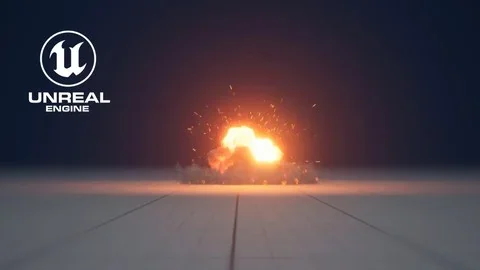
The first effect examples establish the style of the course. Stylized fire, creating smoke effects, and creating Stylized Explosion appear as core starting points, followed by a magic portal and an energy ball. These are familiar visual targets, which helps make the workflow easier to follow while still showing how Niagara handles different looks.
Stylized fire
Creating smoke effects
Creating Stylized Explosion
Magic Portal
Energy Ball
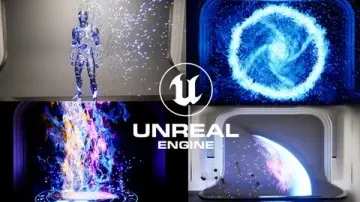
Because the builds stay in the same real-time VFX context, the course can compare different effect families without leaving Niagara behind. A fire effect, a portal, and an energy ball each ask for a different visual shape, yet they all stay inside the same practical workflow of constructing effects for Unreal Engine 5.
Meshes, nodes, and material control
As the course progresses, it brings in the parts that give Niagara more control. Working with meshes in Niagara, dynamic parameter and particle nodes, creating materials and shapes for FX, Scratch Pad, and Substance Designer are all included in the curriculum.
That combination adds structure to the hands-on work. Mesh use connects particles to more specific shapes, dynamic parameters and particle nodes point to control inside the system, and materials and shapes for FX make the visual side more explicit. Scratch Pad and Substance Designer widen the workflow without moving away from the same goal: building real-time visual effects inside Unreal Engine.
Combat, fluids, and larger set pieces
The later sections expand the range of the effect work. Shield Effect, Atom, Water, Stylized Nuke Explosion, Slashes, Fire Slash, Ice attack, Radial ice attack, Summon, Muzzle Flash, Fluids, and Disintegration all appear in the learning path.
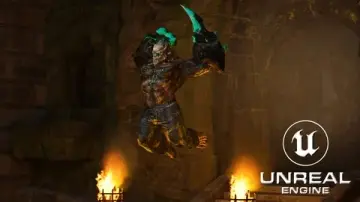
These topics cover several different kinds of scene needs. Some are tied to combat or weapon moments, such as Muzzle Flash, Slashes, Fire Slash, and the two ice attack variations. Others move toward bigger or more dramatic visuals, such as Shield Effect, Water, Fluids, Stylized Nuke Explosion, and Disintegration. The result is a broad range of examples that still stays focused on Niagara in Unreal Engine 5.
A practical route for game VFX work
The curriculum closes the loop with Tips and tricks, alongside the opening Introduction, so the learning path keeps returning to practical use. It is a structured route for anyone who wants to understand Niagara by making effects rather than only reading about the system.
For Unreal Engine users, programmers, and game developers, the fit is straightforward: start with Niagara basics, move through stylized fire, smoke, explosions, portals, and energy-based effects, then branch into meshes, nodes, materials, water, fluids, and disintegration. That makes it a useful learning path when a project needs real-time FX work inside Unreal Engine 5.
 Unreal Engine
 Unreal Engine
 Unreal Engine
 Unreal Engine