"f813c18d2170b1f6"{"id":"24557","slug":"unreal-engine-5-one-course-solution-for-niagara-vfx","title":"Unreal Engine 5: One Course Solution For Niagara VFX","category":"Unreal Engine","engine":"Video language: English","assetVersion":"Video language: English","engineVersion":"File content: video + supporting files + English subtitles","tag":"Unreal Engine","accent":"blue","visual":"luts","summary":"This course moves through Niagara in a practical order, starting with basic usage and continuing into custom modules and blueprint-driven behavior. It also covers VFX materials, noise texture baking in Unreal, and examples such as rain, waterfalls, lightnin...","platform":"Unreal Engine","publishedAt":"2026-04-15T13:06:55.000Z","updatedAt":"2026-04-20T06:12:45.000Z","sourceNotes":[],"fileContents":[],"compatibility":["Unreal Engine","Video language: English","File content: video + supporting files + English subtitles"],"featuredImage":{"alt":"Unreal Engine 5: One Course Solution For Niagara VFX","src":"https://3dcghub.com/wp-content/uploads/2026/04/233a8c785bc3_4915192_86f5_8.webp"},"hasDownloadLink":true,"downloads":1,"terms":[{"taxonomy":"category","slug":"tutoriallibrary-unrealengine","name":"Unreal Engine"},{"taxonomy":"post_tag","slug":"materials","name":"Materials"},{"taxonomy":"post_tag","slug":"unreal-engine-5","name":"Unreal Engine 5"},{"taxonomy":"post_tag","slug":"vfx","name":"VFX"}],"galleryImages":[],"accessPanel":{"kind":"video-resource","title":"Access this video resource","eyebrow":"Free Download","message":"Log in or create a free account to start your download.","fileName":"unreal-engine-5-one-course-solution-for-niagara-vfx.7z","safetyNote":"All resources are 100% manually reviewed to eliminate all risks.","actionLabel":"Download Free","resourceType":"Video package"},"contentHtml":"\u003ch2\u003eMoving through Niagara in a practical order\u003c/h2\u003e\n\u003cp\u003eUnreal Engine 5: One Course Solution For Niagara VFX follows a step-by-step path through Niagara rather than treating VFX creation as a loose collection of tricks. The structure is aimed at learners who want to use Niagara to create game-ready VFX in Unreal Engine 5, with the work unfolding across a full 17h 20m course. It is marked for all levels, which makes the pacing and organization important: the course starts with Niagara basics, then moves into skill-based VFX work, custom module work, and a closing segment that wraps the learning path.\u003c/p\u003e\n\u003cp\u003eThe curriculum reflects that progression clearly. It begins with Introduction and Niagara Basic, continues into Niagara Skill VFX, then shifts into Custom Niagara Module VFX before ending with Congratulations. That sequence gives the material a clear implementation path. Instead of jumping straight to advanced setups, the course builds toward them through the logic of emitters, renderers, materials, and behavior control.\u003c/p\u003e \u003ch2\u003eEmitters, renderers, and the material side of VFX\u003c/h2\u003e\n\u003cp\u003eOne part of the course focuses on the different usage of different Niagara emitters and renderer options. That matters for artists and developers who need effects to behave differently depending on the shot, the environment, or the gameplay moment. The course also covers how to create different master materials for VFX, keeping the material workflow tied directly to effect creation rather than separating it from the rest of the setup.\u003c/p\u003e\n\u003cp\u003eNoise work is part of that same technical chain. The course shows how to bake out a noise texture directly in Unreal, which gives another layer of control when shaping motion and variation in effects. When combined with emitter and renderer choices, this creates a workflow that can be adjusted for different visual results without leaving the Niagara-centered process.\u003c/p\u003e\n\u003cp\u003eFor learners focused on VFX materials, this section of the course is especially relevant. The material work is not presented as a standalone topic; it is connected to the broader goal of creating game-ready effects that can be used in actual scenes and gameplay contexts.\u003c/p\u003e \u003ch2\u003eEnvironment FX and attack effects\u003c/h2\u003e\n\u003cp\u003eThe examples in the course move across both environmental and combat-oriented visuals. On the environment side, the learning path includes effects such as dandelion, rain, and water fall setups. Those examples show how Niagara can be used for atmospheric movement and scene dressing, giving artists a way to build motion into the world itself.\u003c/p\u003e\n\u003cp\u003eOn the action side, the course also covers attacking FX such as energy strike, lightning hit, and projectiles. These examples shift the focus from background atmosphere to gameplay-facing impact. They point to the course's practical aim: creating effects that can support both ambient scene work and more direct action sequences.\u003c/p\u003e\n\u003cp\u003eThat mix of environment FX and attack FX gives the material a broad range without losing focus. A learner working through the course can see how the same Niagara workflow supports different visual needs, from subtle environmental motion to more aggressive game effects.\u003c/p\u003e \u003ch2\u003eCustom modules and blueprint-driven behavior\u003c/h2\u003e\n\u003cp\u003eBeyond the preset effect examples, the course moves into custom modules for custom particle behaviors. This is where the learning path becomes more flexible, because custom modules open the door to behavior that is shaped around specific needs rather than limited to basic setup patterns. The course also includes using blueprint to program VFX behavior, bringing Niagara work closer to gameplay logic and control.\u003c/p\u003e\n\u003cp\u003eThat combination of custom modules and blueprint programming makes the course more than a visual demonstration. It connects the look of the effect to the way the effect behaves. For artists and developers, that can be useful when an effect needs to respond to events, sequence changes, or other gameplay-driven moments.\u003c/p\u003e\n\u003cp\u003eThe curriculum's custom module section supports that move from standard setup into personalized control. It is a logical step after the Niagara basic and skill-based lessons, since it gives a place to apply the earlier material in more specific ways.\u003c/p\u003e \u003ch2\u003eWho this path fits\u003c/h2\u003e\n\u003cp\u003eThe target audience is straightforward: learners who want to use Niagara to create VFX in Unreal Engine 5, learners who want to create VFX materials, learners who want to create VFX meshes, and learners who want to create environment FX. Those groups overlap, but they all point to the same workflow focus. The course is built for people who want to move between visual creation, material work, and behavior control without treating them as separate worlds.\u003c/p\u003e\n\u003cp\u003eBecause the course is marked for all levels, it can serve as a structured route for someone beginning with Niagara as well as someone who wants a more organized pass through custom modules and blueprint-based behavior. The step-by-step structure, the mix of environment and attack examples, and the attention to emitters, renderers, and materials all keep the material centered on practical VFX work inside Unreal Engine 5.\u003c/p\u003e\n\u003cp\u003eFor anyone looking for a single Niagara path that stays close to real effect creation, the course offers a clear route from basic setup to custom behavior, with enough range to cover both scene atmosphere and gameplay-driven visuals.\u003c/p\u003e\n\n\u003ch2\u003eMore From The Same Workflow\u003c/h2\u003e\n\u003cul\u003e\n\u003cli\u003e\u003ca href=\"https://3dcghub.com/make-a-2d-platformer-in-unreal-engine-5-c/\" title=\"Make a 2D platformer in Unreal engine 5 C++\"\u003eMake a 2D platformer in Unreal engine 5 C++\u003c/a\u003e\u003c/li\u003e\n\u003cli\u003e\u003ca href=\"https://3dcghub.com/embergen-volumetric-unreal-engine-5/\" title=\"EmberGen Volumetric \u0026amp;amp; Unreal Engine 5\"\u003eEmberGen Volumetric \u0026amp; Unreal Engine 5\u003c/a\u003e\u003c/li\u003e\n\u003cli\u003e\u003ca href=\"https://3dcghub.com/ambient-fx-in-unreal-engine/\" title=\"Ambient Fx in Unreal Engine\"\u003eAmbient Fx in Unreal Engine\u003c/a\u003e\u003c/li\u003e\n\u003cli\u003e\u003ca href=\"https://3dcghub.com/rodinbridge-unreal-engine-add-on/\" title=\"RodinBridge – Unreal Engine Add-on\"\u003eRodinBridge – Unreal Engine Add-on\u003c/a\u003e\u003c/li\u003e\n\u003cli\u003e\u003ca href=\"https://3dcghub.com/extile-plus-ultimate-non-tiling-material-toolkit-for-unreal-engine-environments/\" title=\"EXTILE PLUS -Ultimate Non-Tiling Material Toolkit for Unreal Engine Environments\"\u003eEXTILE PLUS -Ultimate Non-Tiling Material Toolkit for Unreal Engine Environments\u003c/a\u003e\u003c/li\u003e\n\u003c/ul\u003e","contentTextLength":5570,"navigation":{"current":1949,"total":3651,"previous":{"id":"24521","slug":"math-for-video-games-the-fastest-way-to-get-smarter-at-math","title":"Math For Video Games: The Fastest Way To Get Smarter At Math","category":"Unity","platform":"Unity","updatedAt":"2026-04-20T06:12:46.000Z"},"next":{"id":"24554","slug":"learn-how-to-create-a-2d-action-game-with-unity","title":"Learn how to create a 2D Action game with Unity","category":"Unity","platform":"Unity","updatedAt":"2026-04-20T06:12:45.000Z"}},"relatedResources":[{"id":"24593","slug":"niagara-beginners-to-advanced-in-unreal-engine-5","title":"Niagara Beginners to advanced in Unreal Engine 5","category":"Unreal Engine","engine":"Video language: English","assetVersion":"Video language: English","engineVersion":"File content: video + supporting files + English subtitles","tag":"Unreal Engine","accent":"blue","visual":"luts","summary":"This Unreal Engine 5 course starts Niagara from scratch and moves into real-time VFX through practical effect builds. It covers stylized fire, smoke, explosions, portals, energy balls, fluids, and other game-focused visuals, along with mesh, material, and n...","platform":"Unreal Engine","publishedAt":"2026-04-15T14:14:53.000Z","updatedAt":"2026-04-20T06:12:42.000Z","sourceNotes":[],"fileContents":[],"compatibility":["Unreal Engine","Video language: English","File content: video + supporting files + English subtitles"],"featuredImage":{"alt":"Niagara Beginners to advanced in Unreal Engine 5","src":"https://3dcghub.com/wp-content/uploads/2026/04/93c917ee0bfb_3869562_576d_17.webp"},"hasDownloadLink":true,"downloads":0},{"id":"1000791","slug":"unreal-engine-5-chaos-destruction-complete-course","title":"Unreal Engine 5 - Chaos Destruction Complete Course!","category":"Unreal Engine","engine":"File Content: video + English subtitles","assetVersion":"Video Language: English","engineVersion":"File Content: video + English subtitles","tag":"Unreal Engine","accent":"blue","visual":"mech","summary":"A complete UE5 Chaos Destruction course covering fracturing, clusters, fields, Niagara VFX, and FPS shooter mechanics. 5h 29m of training for all levels.","platform":"Unreal Engine","publishedAt":"2026-07-30T12:53:39.502Z","updatedAt":"2026-07-30T12:53:39.502Z","sourceNotes":[],"fileContents":[],"compatibility":["Unreal Engine","Video Language: English","File Content: video + English subtitles"],"featuredImage":{"alt":"Unreal Engine 5 - Chaos Destruction Complete Course!","src":"/wp-content/uploads/published/2026/07/b1ccb61cc408-6517179-31bb-3-f9563adc43.webp"},"hasDownloadLink":true,"downloads":4},{"id":"1000187","slug":"unreal-engine-5-cinematics-for-beginners-your-first-scene","title":"Unreal Engine 5: Cinematics for Beginners – Your First Scene","category":"Unreal Engine","engine":"File Content: video + English subtitles","assetVersion":"Video Language: English","engineVersion":"File Content: video + English subtitles","tag":"Unreal Engine","accent":"blue","visual":"mech","summary":"A 6h 14m Unreal Engine 5 course focused on Sequencer, Niagara VFX, cinematography, asset setup, and finishing a first cinematic scene.","platform":"Unreal Engine","publishedAt":"2026-06-22T05:42:46.521Z","updatedAt":"2026-06-22T05:42:46.521Z","sourceNotes":[],"fileContents":[],"compatibility":["Unreal Engine","Video Language: English","File Content: video + English subtitles"],"featuredImage":{"alt":"Unreal Engine 5: Cinematics for Beginners – Your First Scene","src":"/wp-content/uploads/published/2026/06/c963a6e14936-5575526-dc17-16-55cfce9062.webp"},"hasDownloadLink":true,"downloads":1}]}
Unreal Engine
Unreal Engine 5: One Course Solution For Niagara VFX
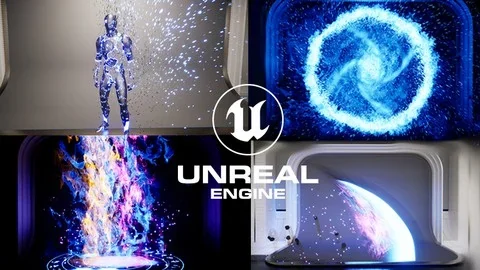
This course moves through Niagara in a practical order, starting with basic usage and continuing into custom modules and blueprint-driven behavior. It also covers VFX materials, noise texture baking in Unreal, and examples such as rain, waterfalls, lightnin...
Category:Unreal EnginePlatform: Unreal EngineVideo language: EnglishFile content: video + supporting files + English subtitlesPublished: Apr 15, 2026Updated: Apr 20, 2026
Unreal Engine
Resource overview
Moving through Niagara in a practical order
Unreal Engine 5: One Course Solution For Niagara VFX follows a step-by-step path through Niagara rather than treating VFX creation as a loose collection of tricks. The structure is aimed at learners who want to use Niagara to create game-ready VFX in Unreal Engine 5, with the work unfolding across a full 17h 20m course. It is marked for all levels, which makes the pacing and organization important: the course starts with Niagara basics, then moves into skill-based VFX work, custom module work, and a closing segment that wraps the learning path.
The curriculum reflects that progression clearly. It begins with Introduction and Niagara Basic, continues into Niagara Skill VFX, then shifts into Custom Niagara Module VFX before ending with Congratulations. That sequence gives the material a clear implementation path. Instead of jumping straight to advanced setups, the course builds toward them through the logic of emitters, renderers, materials, and behavior control.
Emitters, renderers, and the material side of VFX
One part of the course focuses on the different usage of different Niagara emitters and renderer options. That matters for artists and developers who need effects to behave differently depending on the shot, the environment, or the gameplay moment. The course also covers how to create different master materials for VFX, keeping the material workflow tied directly to effect creation rather than separating it from the rest of the setup.
Noise work is part of that same technical chain. The course shows how to bake out a noise texture directly in Unreal, which gives another layer of control when shaping motion and variation in effects. When combined with emitter and renderer choices, this creates a workflow that can be adjusted for different visual results without leaving the Niagara-centered process.
For learners focused on VFX materials, this section of the course is especially relevant. The material work is not presented as a standalone topic; it is connected to the broader goal of creating game-ready effects that can be used in actual scenes and gameplay contexts.
Environment FX and attack effects
The examples in the course move across both environmental and combat-oriented visuals. On the environment side, the learning path includes effects such as dandelion, rain, and water fall setups. Those examples show how Niagara can be used for atmospheric movement and scene dressing, giving artists a way to build motion into the world itself.
On the action side, the course also covers attacking FX such as energy strike, lightning hit, and projectiles. These examples shift the focus from background atmosphere to gameplay-facing impact. They point to the course's practical aim: creating effects that can support both ambient scene work and more direct action sequences.
That mix of environment FX and attack FX gives the material a broad range without losing focus. A learner working through the course can see how the same Niagara workflow supports different visual needs, from subtle environmental motion to more aggressive game effects.
Custom modules and blueprint-driven behavior
Beyond the preset effect examples, the course moves into custom modules for custom particle behaviors. This is where the learning path becomes more flexible, because custom modules open the door to behavior that is shaped around specific needs rather than limited to basic setup patterns. The course also includes using blueprint to program VFX behavior, bringing Niagara work closer to gameplay logic and control.
That combination of custom modules and blueprint programming makes the course more than a visual demonstration. It connects the look of the effect to the way the effect behaves. For artists and developers, that can be useful when an effect needs to respond to events, sequence changes, or other gameplay-driven moments.
The curriculum's custom module section supports that move from standard setup into personalized control. It is a logical step after the Niagara basic and skill-based lessons, since it gives a place to apply the earlier material in more specific ways.
Who this path fits
The target audience is straightforward: learners who want to use Niagara to create VFX in Unreal Engine 5, learners who want to create VFX materials, learners who want to create VFX meshes, and learners who want to create environment FX. Those groups overlap, but they all point to the same workflow focus. The course is built for people who want to move between visual creation, material work, and behavior control without treating them as separate worlds.
Because the course is marked for all levels, it can serve as a structured route for someone beginning with Niagara as well as someone who wants a more organized pass through custom modules and blueprint-based behavior. The step-by-step structure, the mix of environment and attack examples, and the attention to emitters, renderers, and materials all keep the material centered on practical VFX work inside Unreal Engine 5.
For anyone looking for a single Niagara path that stays close to real effect creation, the course offers a clear route from basic setup to custom behavior, with enough range to cover both scene atmosphere and gameplay-driven visuals.
 Unreal Engine
 Unreal Engine
 Unreal Engine
 Unreal Engine