"f813c18d2170b1f6"{"id":"24554","slug":"learn-how-to-create-a-2d-action-game-with-unity","title":"Learn how to create a 2D Action game with Unity","category":"Unity","engine":"Video language: English","assetVersion":"Video language: English","engineVersion":"File content: video + supporting files + English subtitles","tag":"Unity","accent":"cyan","visual":"city","summary":"A structured Unity course for making a Soul Knight-style 2D action game, from player setup and dungeon generation to weapons, enemies, and boss encounters. It also covers C#, clean code, and object-oriented programming in practice.","platform":"Unity","publishedAt":"2026-04-15T13:01:12.000Z","updatedAt":"2026-04-20T06:12:45.000Z","sourceNotes":[],"fileContents":[],"compatibility":["Unity","Video language: English","File content: video + supporting files + English subtitles"],"featuredImage":{"alt":"Learn how to create a 2D Action game with Unity","src":"https://3dcghub.com/wp-content/uploads/2026/04/7dc5c1d14c37_5572298_b8ce.webp"},"hasDownloadLink":true,"downloads":0,"terms":[{"taxonomy":"category","slug":"tutoriallibrary-unity","name":"Unity"},{"taxonomy":"post_tag","slug":"environment","name":"Environment"},{"taxonomy":"post_tag","slug":"unity","name":"Unity"},{"taxonomy":"post_tag","slug":"weapons","name":"Weapons"}],"galleryImages":[],"accessPanel":{"kind":"video-resource","title":"Access this video resource","eyebrow":"Free Download","message":"Log in or create a free account to start your download.","fileName":"Learn how to create a 2D Action game with Unity.rar","safetyNote":"All resources are 100% manually reviewed to eliminate all risks.","actionLabel":"Download Free","resourceType":"Video package"},"contentHtml":"\u003ch2\u003eMaking a Soul Knight-style loop in Unity\u003c/h2\u003e \u003cp\u003eWhen a project needs a 2D action game with movement, combat, rooms, and dungeon progression, this Unity course follows that exact direction. The goal is to create a game like Soul Knight, not just study isolated mechanics. That makes it useful for anyone who wants to see how separate systems come together inside one playable project.\u003c/p\u003e \u003cp\u003eThe material runs for 17h 54m and is marked for all levels, so the pacing reaches both new learners and people who already know some basics but want to put them into a working game structure. The focus stays on building, configuring, and connecting the parts that make a 2D action game feel complete.\u003c/p\u003e \u003ch2\u003eUsing C# as part of the game, not as a separate exercise\u003c/h2\u003e \u003cp\u003eC# is a major part of the workflow here. The course covers beginner to intermediate C# fundamentals while also introducing clean code and scalable system design. That combination matters because the programming is tied directly to gameplay tasks instead of staying in abstract examples.\u003c/p\u003e \u003cp\u003eThere is also a clear emphasis on object oriented programming in practice. Rather than treating OOP as theory alone, the lessons connect it to the systems needed for a real game project. That includes the kind of structure that helps a project grow without becoming hard to manage.\u003c/p\u003e \u003cp\u003eFor learners who want to understand the logic behind their own 2D game, the course points to several core skills:\u003c/p\u003e \u003cul\u003e \u003cli\u003eLearning C# as a modern programming language\u003c/li\u003e \u003cli\u003eWriting clean code\u003c/li\u003e \u003cli\u003eDesigning scalable systems\u003c/li\u003e \u003cli\u003eUnderstanding object oriented programming through use\u003c/li\u003e \u003cli\u003eBuilding general video game programming knowledge\u003c/li\u003e \u003c/ul\u003e \u003cp\u003eThose topics give the project a coding backbone that goes beyond a single mechanic. They support the rest of the game systems, from the player to the dungeon flow.\u003c/p\u003e \u003ch2\u003ePlayer setup, weapons, and combat flow\u003c/h2\u003e \u003cp\u003eSeveral parts of the curriculum focus on the player and the actions that drive the game moment to moment. The sequence includes player work, player configuration, weapons, pick items, enemies, and complete rooms. Together, those topics point to a workflow where the player is set up first, then expanded into a combat-ready character who can interact with the rest of the game.\u003c/p\u003e \u003cp\u003eA combat system with multiple weapons is one of the specific outcomes. That detail gives the project a clear action-game shape, since the player is not limited to a single attack approach. Item pickup and weapon handling are part of the same loop, so the gameplay can shift as the player moves through rooms.\u003c/p\u003e \u003cp\u003eThe curriculum also includes a boss section. Placing boss content after enemies and complete rooms suggests a full combat path rather than a test scene with one-off encounters. The game is assembled as a progression, which fits the goal of creating a Soul Knight-style experience in Unity.\u003c/p\u003e \u003ch2\u003eDungeon creation, scene work, and camera handling\u003c/h2\u003e \u003cp\u003eThe dungeon side of the project gets its own set of steps. The curriculum includes create dungeons and generate dungeons, which points to a workflow where the game does not rely on a single static layout. Dungeon structure becomes part of the experience, giving the project room-based movement and progression.\u003c/p\u003e \u003cp\u003eMain scene work appears as well, which helps tie the separate systems together into one playable build. The course also covers Cinemachine, bringing camera handling into the project so the action can be framed cleanly as the player moves through the game world.\u003c/p\u003e \u003cp\u003eThat combination of dungeon work, scene assembly, and camera setup helps the project move from isolated mechanics into a functioning game loop. The player, rooms, weapons, enemies, and boss encounters all need to sit inside the same structure, and these lessons address that overall assembly without separating the parts from the game they serve.\u003c/p\u003e \u003cp\u003eThe curriculum finishes with a final project and an extra section. That gives the course a clear endpoint while still leaving space for additional material after the main build path.\u003c/p\u003e \u003ch2\u003eWho gets the most from it\u003c/h2\u003e \u003cp\u003eThis course fits several groups. It speaks to anyone who wants to learn how to create a Soul Knight-style game in Unity, anyone aiming to make their own 2D games, and people who want to create and publish their own games. Beginners with an interest in game development are included, and so are aspiring indie game developers who want to strengthen their practical skills.\u003c/p\u003e \u003cp\u003eBecause the material covers both the gameplay systems and the code structure behind them, it works as a guided path through a full 2D action project. Someone looking for a clear route through player setup, dungeon generation, weapons, enemies, and boss content will find the most value here. It is especially useful for learners who want to understand how those pieces connect inside Unity instead of treating each one as a separate experiment.\u003c/p\u003e \u003cp\u003eIf the goal is to build a complete 2D action game and see how C#, clean code, OOP, and game systems fit together in practice, this course stays focused on that exact process.\u003c/p\u003e\n\n\u003ch2\u003eRelated Resources Worth Checking\u003c/h2\u003e\n\u003cul\u003e\n\u003cli\u003e\u003ca href=\"https://3dcghub.com/coding-in-unity-mastering-procedural-mesh-generation/\" title=\"Coding in Unity: Mastering Procedural Mesh Generation\"\u003eCoding in Unity: Mastering Procedural Mesh Generation\u003c/a\u003e\u003c/li\u003e\n\u003cli\u003e\u003ca href=\"https://3dcghub.com/build-a-poker-game-in-unity-complete-development-course/\" title=\"Build a Poker Game in Unity: Complete Development Course\"\u003eBuild a Poker Game in Unity: Complete Development Course\u003c/a\u003e\u003c/li\u003e\n\u003cli\u003e\u003ca href=\"https://3dcghub.com/make-a-match-three-puzzle-game-in-unity/\" title=\"Make a Match-Three Puzzle Game in Unity\"\u003eMake a Match-Three Puzzle Game in Unity\u003c/a\u003e\u003c/li\u003e\n\u003cli\u003e\u003ca href=\"https://3dcghub.com/making-an-ai-eight-ball-pool-game-in-unity/\" title=\"Making an AI Eight-Ball Pool Game in Unity\"\u003eMaking an AI Eight-Ball Pool Game in Unity\u003c/a\u003e\u003c/li\u003e\n\u003cli\u003e\u003ca href=\"https://3dcghub.com/the-complete-guide-to-unity-2d-platformer-development/\" title=\"The Complete Guide to Unity 2D : Platformer Development\"\u003eThe Complete Guide to Unity 2D : Platformer Development\u003c/a\u003e\u003c/li\u003e\n\u003c/ul\u003e","contentTextLength":5264,"navigation":{"current":1950,"total":3651,"previous":{"id":"24557","slug":"unreal-engine-5-one-course-solution-for-niagara-vfx","title":"Unreal Engine 5: One Course Solution For Niagara VFX","category":"Unreal Engine","platform":"Unreal Engine","updatedAt":"2026-04-20T06:12:45.000Z"},"next":{"id":"24551","slug":"egg-snatchers-fun-local-multiplayer-game-in-unity-netcode","title":"Egg Snatchers - Fun Local Multiplayer Game in Unity Netcode","category":"Unity","platform":"Unity","updatedAt":"2026-04-20T06:12:45.000Z"}},"relatedResources":[{"id":"24477","slug":"learn-to-create-advance-metroidvania-game-with-unity-c","title":"Learn to create advance Metroidvania game with Unity \u0026 C#","category":"Unity","engine":"Video language: English","assetVersion":"Video language: English","engineVersion":"File content: video + supporting files + English subtitles","tag":"Unity","accent":"cyan","visual":"audio","summary":"This Unity and C# course follows a Metroidvania-style workflow through 2D game setup, side-scroller design, dialogue, and timeline work. It also moves through named project sections such as a prison scene, a Paralex Background segment, and a second game.","platform":"Unity","publishedAt":"2026-04-14T12:43:01.000Z","updatedAt":"2026-04-20T06:12:48.000Z","sourceNotes":[],"fileContents":[],"compatibility":["Unity","Video language: English","File content: video + supporting files + English subtitles"],"featuredImage":{"alt":"Learn to create advance Metroidvania game with Unity \u0026 C#","src":"https://3dcghub.com/wp-content/uploads/2026/04/438fcf7078c3_5620336_44d4_4.webp"},"hasDownloadLink":true,"downloads":1},{"id":"24514","slug":"create-2d-multiplayer-game-with-photon-in-unity","title":"Create 2D Multiplayer Game with photon in unity","category":"Unity","engine":"Video language: English","assetVersion":"Video language: English","engineVersion":"File content: video + supporting files + English subtitles","tag":"Unity","accent":"cyan","visual":"mech","summary":"This Unity workflow follows the build of a 2D multiplayer game with Photon from the first menu screens through player setup, UI, enemies, and progression systems. It also includes mobile joystick support, game sound, and a range character type.","platform":"Unity","publishedAt":"2026-04-14T15:47:41.000Z","updatedAt":"2026-04-20T06:12:47.000Z","sourceNotes":[],"fileContents":[],"compatibility":["Unity","Video language: English","File content: video + supporting files + English subtitles"],"featuredImage":{"alt":"Create 2D Multiplayer Game with photon in unity","src":"https://3dcghub.com/wp-content/uploads/2026/04/d0bd75435e19_4751476_9c73.webp"},"hasDownloadLink":true,"downloads":1},{"id":"24480","slug":"learn-to-create-a-2d-action-zombie-game-in-unity","title":"Learn to create a 2D Action Zombie Game in Unity","category":"Unity","engine":"Video language: English","assetVersion":"Video language: English","engineVersion":"File content: video + supporting files + English subtitles","tag":"Unity","accent":"cyan","visual":"character","summary":"This beginner Unity course walks through the main parts of a 2D action zombie game: player setup, enemies, health, portals between levels, and level design. It is built for learners who want a guided path through a playable game project rather than disconne...","platform":"Unity","publishedAt":"2026-04-14T13:06:41.000Z","updatedAt":"2026-04-20T06:12:47.000Z","sourceNotes":[],"fileContents":[],"compatibility":["Unity","Video language: English","File content: video + supporting files + English subtitles"],"featuredImage":{"alt":"Learn to create a 2D Action Zombie Game in Unity","src":"https://3dcghub.com/wp-content/uploads/2026/04/4aae367ee741_5884848_cdbb_2.webp"},"hasDownloadLink":true,"downloads":0}]}
Unity
Learn how to create a 2D Action game with Unity
A structured Unity course for making a Soul Knight-style 2D action game, from player setup and dungeon generation to weapons, enemies, and boss encounters. It also covers C#, clean code, and object-oriented programming in practice.
Category:UnityPlatform: UnityVideo language: EnglishFile content: video + supporting files + English subtitlesPublished: Apr 15, 2026Updated: Apr 20, 2026
Unity
Resource overview
Making a Soul Knight-style loop in Unity
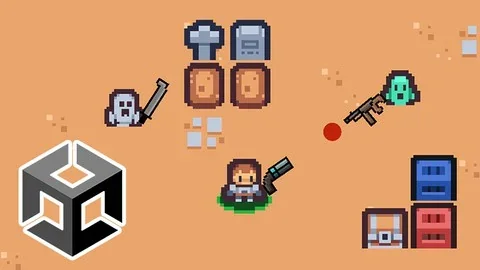
When a project needs a 2D action game with movement, combat, rooms, and dungeon progression, this Unity course follows that exact direction. The goal is to create a game like Soul Knight, not just study isolated mechanics. That makes it useful for anyone who wants to see how separate systems come together inside one playable project.
The material runs for 17h 54m and is marked for all levels, so the pacing reaches both new learners and people who already know some basics but want to put them into a working game structure. The focus stays on building, configuring, and connecting the parts that make a 2D action game feel complete.
Using C# as part of the game, not as a separate exercise
C# is a major part of the workflow here. The course covers beginner to intermediate C# fundamentals while also introducing clean code and scalable system design. That combination matters because the programming is tied directly to gameplay tasks instead of staying in abstract examples.
There is also a clear emphasis on object oriented programming in practice. Rather than treating OOP as theory alone, the lessons connect it to the systems needed for a real game project. That includes the kind of structure that helps a project grow without becoming hard to manage.
For learners who want to understand the logic behind their own 2D game, the course points to several core skills:
Learning C# as a modern programming language
Writing clean code
Designing scalable systems
Understanding object oriented programming through use
Building general video game programming knowledge
Those topics give the project a coding backbone that goes beyond a single mechanic. They support the rest of the game systems, from the player to the dungeon flow.
Player setup, weapons, and combat flow
Several parts of the curriculum focus on the player and the actions that drive the game moment to moment. The sequence includes player work, player configuration, weapons, pick items, enemies, and complete rooms. Together, those topics point to a workflow where the player is set up first, then expanded into a combat-ready character who can interact with the rest of the game.
A combat system with multiple weapons is one of the specific outcomes. That detail gives the project a clear action-game shape, since the player is not limited to a single attack approach. Item pickup and weapon handling are part of the same loop, so the gameplay can shift as the player moves through rooms.
The curriculum also includes a boss section. Placing boss content after enemies and complete rooms suggests a full combat path rather than a test scene with one-off encounters. The game is assembled as a progression, which fits the goal of creating a Soul Knight-style experience in Unity.
Dungeon creation, scene work, and camera handling
The dungeon side of the project gets its own set of steps. The curriculum includes create dungeons and generate dungeons, which points to a workflow where the game does not rely on a single static layout. Dungeon structure becomes part of the experience, giving the project room-based movement and progression.
Main scene work appears as well, which helps tie the separate systems together into one playable build. The course also covers Cinemachine, bringing camera handling into the project so the action can be framed cleanly as the player moves through the game world.
That combination of dungeon work, scene assembly, and camera setup helps the project move from isolated mechanics into a functioning game loop. The player, rooms, weapons, enemies, and boss encounters all need to sit inside the same structure, and these lessons address that overall assembly without separating the parts from the game they serve.
The curriculum finishes with a final project and an extra section. That gives the course a clear endpoint while still leaving space for additional material after the main build path.
Who gets the most from it
This course fits several groups. It speaks to anyone who wants to learn how to create a Soul Knight-style game in Unity, anyone aiming to make their own 2D games, and people who want to create and publish their own games. Beginners with an interest in game development are included, and so are aspiring indie game developers who want to strengthen their practical skills.
Because the material covers both the gameplay systems and the code structure behind them, it works as a guided path through a full 2D action project. Someone looking for a clear route through player setup, dungeon generation, weapons, enemies, and boss content will find the most value here. It is especially useful for learners who want to understand how those pieces connect inside Unity instead of treating each one as a separate experiment.
If the goal is to build a complete 2D action game and see how C#, clean code, OOP, and game systems fit together in practice, this course stays focused on that exact process.
 Unity
Unity Unity
Unity Unity
Unity Unity
Unity