"c14ff6bd758dadb1"{"id":"24535","slug":"the-complete-guide-to-unity-2d-platformer-development","title":"The Complete Guide to Unity 2D : Platformer Development","category":"Unity","engine":"Video language: English","assetVersion":"Video language: English","engineVersion":"File content: video + supporting files + English subtitles","tag":"Unity","accent":"cyan","visual":"city","summary":"This course follows the process of making a 2D platformer in Unity, starting with C# and Unity basics and moving into character work, level creation, gameplay systems, and polish. It also extends into co-op play, gamepad support, and an optional mobile vers...","platform":"Unity","publishedAt":"2026-04-15T09:46:03.000Z","updatedAt":"2026-04-20T06:12:46.000Z","sourceNotes":[],"fileContents":[],"compatibility":["Unity","Video language: English","File content: video + supporting files + English subtitles"],"featuredImage":{"alt":"The Complete Guide to Unity 2D : Platformer Development","src":"https://3dcghub.com/wp-content/uploads/2026/04/33eb152dfd65_5927092_552c.webp"},"hasDownloadLink":true,"downloads":1,"terms":[{"taxonomy":"category","slug":"tutoriallibrary-unity","name":"Unity"},{"taxonomy":"post_tag","slug":"characters","name":"Characters"},{"taxonomy":"post_tag","slug":"environment","name":"Environment"},{"taxonomy":"post_tag","slug":"unity","name":"Unity"}],"galleryImages":[],"accessPanel":{"kind":"video-resource","title":"Access this video resource","eyebrow":"Free Download","message":"Log in or create a free account to start your download.","fileName":"The Complete Guide to Unity 2D Platformer Development.rar","safetyNote":"All resources are 100% manually reviewed to eliminate all risks.","actionLabel":"Download Free","resourceType":"Video package"},"contentHtml":"\u003ch2\u003eA beginner path from Unity basics to a working 2D platformer\u003c/h2\u003e \u003cp\u003eThe course focuses on building a 2D platformer in Unity while strengthening C# knowledge along the way. It is set at beginner level, runs for 24h 37m, and follows a progression that moves from the basics of Unity and C# into a complete playable game project with local multiplayer.\u003c/p\u003e \u003cp\u003eWhat stands out most is the balance between game creation and coding practice. The material is not limited to movement or level layout. It also points toward clean, maintainable code, scalable game architectures, problem-solving skills, and a stronger general understanding of video game design.\u003c/p\u003e \u003ch2\u003eHow the project is structured\u003c/h2\u003e \u003cp\u003eThe curriculum moves in a clear order, starting with the core tools and then layering on the systems needed for a full platformer. It begins with an introduction, then moves into the basics of Unity and C#, character development, and tile-based level creation through the Tile Palette.\u003c/p\u003e \u003cp\u003eFrom there, the course expands into game logic and world behavior. Game Manager and Game Mechanics come next, followed by traps, level mechanics, and enemies. That keeps the project anchored in the rules that make a platformer feel active rather than static.\u003c/p\u003e \u003cul\u003e \u003cli\u003eIntroduction\u003c/li\u003e \u003cli\u003eBasics of Unity and C#\u003c/li\u003e \u003cli\u003eCharacter development\u003c/li\u003e \u003cli\u003eTile Palette and Level Creation\u003c/li\u003e \u003cli\u003eGame Manager and Game Mechanics\u003c/li\u003e \u003cli\u003eTraps \u0026amp; Level mechanics\u003c/li\u003e \u003cli\u003eEnemies\u003c/li\u003e \u003cli\u003eUI \u0026amp; Saving System\u003c/li\u003e \u003cli\u003eCamera\u003c/li\u003e \u003cli\u003eAudio\u003c/li\u003e \u003cli\u003eGame Polish\u003c/li\u003e \u003cli\u003eNew Input System \u0026amp; Gamepad support\u003c/li\u003e \u003cli\u003eCo-op Version of The game\u003c/li\u003e \u003cli\u003eFlying Enemies\u003c/li\u003e \u003cli\u003eThe End\u003c/li\u003e \u003cli\u003eMobile Version Of The Game (Optional)\u003c/li\u003e \u003c/ul\u003e \u003cp\u003eThat sequence shows a steady build from foundational skills to systems that shape the final experience. UI and saving are included, as well as camera and audio work, so the project does not stop at movement and level geometry. It continues through the parts that make a game feel complete and usable.\u003c/p\u003e \u003ch2\u003eSystems that shape the final play experience\u003c/h2\u003e \u003cp\u003eThe course gives attention to the details that affect how the game is played, not just how it is assembled. Camera handling appears as its own topic, alongside audio and game polish, which suggests a focus on the feel of the finished platformer as well as its structure.\u003c/p\u003e \u003cp\u003eInput support is also extended beyond basic controls. The curriculum includes the New Input System and gamepad support, then builds a co-op version of the game. That local multiplayer direction is part of the main course purpose, and it shows that the project is meant to go beyond a solo platforming loop.\u003c/p\u003e \u003cp\u003eEnemy variety is also part of the workflow. After the initial enemy work, the curriculum adds flying enemies, giving the project another layer of challenge without moving away from the same platformer framework. An optional mobile version appears near the end, which gives the project one more direction without changing the main focus.\u003c/p\u003e \u003ch2\u003eWho this fits best\u003c/h2\u003e \u003cp\u003eThe intended audience is broad, but the course remains clearly centered on people who want to make 2D games. It suits beginners with an interest in learning game development, people who want to create and publish their own games, and anyone aiming to re-skill into game development.\u003c/p\u003e \u003cp\u003eIt also matches people who want a practical portfolio piece. The course explicitly points to playable game projects as a useful outcome, whether the goal is portfolio work or personal achievement. Because it covers Object-Oriented Programming in real-world scenarios and emphasizes maintainable code, it also speaks to learners who want more than a surface-level walkthrough.\u003c/p\u003e \u003cp\u003eFor people interested in the game design industry, the course offers a broad look at the parts that hold a platformer together: character behavior, level creation, mechanics, enemies, UI, saving, camera, audio, and polish. Enthusiasts who want a deep dive into game mechanics and Unity's potential will find that the curriculum stays close to those goals throughout.\u003c/p\u003e \u003ch3\u003eBest fit in practical terms\u003c/h3\u003e \u003cp\u003eThe strongest takeaway is simple: this is a beginner-level Unity course that stays grounded in one complete 2D platformer project while covering the code, systems, and presentation work needed to make it playable. For anyone looking to build a local-multiplayer platformer and learn the Unity workflow at the same time, it offers a structured route from basics to a finished game path.\u003c/p\u003e\n\n\u003ch2\u003eExplore Similar Assets\u003c/h2\u003e\n\u003cul\u003e\n\u003cli\u003e\u003ca href=\"https://3dcghub.com/the-ultimate-unity-game-developer-course-from-zero-to-hero/\" title=\"The Ultimate Unity Game Developer Course: From Zero to Hero\"\u003eThe Ultimate Unity Game Developer Course: From Zero to Hero\u003c/a\u003e\u003c/li\u003e\n\u003cli\u003e\u003ca href=\"https://3dcghub.com/unity-bootcamp-3d-game-development/\" title=\"Unity Bootcamp: 3D Game Development\"\u003eUnity Bootcamp: 3D Game Development\u003c/a\u003e\u003c/li\u003e\n\u003cli\u003e\u003ca href=\"https://3dcghub.com/unity-visual-scripting-build-2d-and-3d-games-in-unity-with-no-coding/\" title=\"Unity Visual Scripting: Build 2D and 3D games in Unity with no coding.\"\u003eUnity Visual Scripting: Build 2D and 3D games in Unity with no coding.\u003c/a\u003e\u003c/li\u003e\n\u003cli\u003e\u003ca href=\"https://3dcghub.com/mastering-unity-muse/\" title=\"Mastering Unity Muse\"\u003eMastering Unity Muse\u003c/a\u003e\u003c/li\u003e\n\u003cli\u003e\u003ca href=\"https://3dcghub.com/create-2d-multiplayer-game-with-photon-in-unity/\" title=\"Create 2D Multiplayer Game with photon in unity\"\u003eCreate 2D Multiplayer Game with photon in unity\u003c/a\u003e\u003c/li\u003e\n\u003c/ul\u003e","contentTextLength":4542,"navigation":{"current":2013,"total":3719,"previous":{"id":"24538","slug":"making-an-ai-eight-ball-pool-game-in-unity","title":"Making an AI Eight-Ball Pool Game in Unity","category":"Unity","platform":"Unity","updatedAt":"2026-04-20T06:12:46.000Z"},"next":{"id":"24530","slug":"the-ultimate-unity-game-developer-course-from-zero-to-hero","title":"The Ultimate Unity Game Developer Course: From Zero to Hero","category":"Unity","platform":"Unity","updatedAt":"2026-04-20T06:12:46.000Z"}},"relatedResources":[{"id":"24514","slug":"create-2d-multiplayer-game-with-photon-in-unity","title":"Create 2D Multiplayer Game with photon in unity","category":"Unity","engine":"Video language: English","assetVersion":"Video language: English","engineVersion":"File content: video + supporting files + English subtitles","tag":"Unity","accent":"cyan","visual":"mech","summary":"This Unity workflow follows the build of a 2D multiplayer game with Photon from the first menu screens through player setup, UI, enemies, and progression systems. It also includes mobile joystick support, game sound, and a range character type.","platform":"Unity","publishedAt":"2026-04-14T15:47:41.000Z","updatedAt":"2026-04-20T06:12:47.000Z","sourceNotes":[],"fileContents":[],"compatibility":["Unity","Video language: English","File content: video + supporting files + English subtitles"],"featuredImage":{"alt":"Create 2D Multiplayer Game with photon in unity","src":"https://3dcghub.com/wp-content/uploads/2026/04/d0bd75435e19_4751476_9c73.webp"},"hasDownloadLink":true,"downloads":1},{"id":"24480","slug":"learn-to-create-a-2d-action-zombie-game-in-unity","title":"Learn to create a 2D Action Zombie Game in Unity","category":"Unity","engine":"Video language: English","assetVersion":"Video language: English","engineVersion":"File content: video + supporting files + English subtitles","tag":"Unity","accent":"cyan","visual":"character","summary":"This beginner Unity course walks through the main parts of a 2D action zombie game: player setup, enemies, health, portals between levels, and level design. It is built for learners who want a guided path through a playable game project rather than disconne...","platform":"Unity","publishedAt":"2026-04-14T13:06:41.000Z","updatedAt":"2026-04-20T06:12:47.000Z","sourceNotes":[],"fileContents":[],"compatibility":["Unity","Video language: English","File content: video + supporting files + English subtitles"],"featuredImage":{"alt":"Learn to create a 2D Action Zombie Game in Unity","src":"https://3dcghub.com/wp-content/uploads/2026/04/4aae367ee741_5884848_cdbb_2.webp"},"hasDownloadLink":true,"downloads":0},{"id":"24500","slug":"c-fundamentals-game-programming-for-beginners","title":"C++ Fundamentals: Game Programming For Beginners","category":"Unreal Engine","engine":"Video language: English","assetVersion":"Video language: English","engineVersion":"File content: video + supporting files + English subtitles","tag":"Unreal Engine","accent":"cyan","visual":"city","summary":"This beginner course focuses on making games in pure C++ with Raylib. It moves from variables, loops, and if-statements into object-oriented programming, debugging, clean coding, and 2D character animation through a sequence of small projects.","platform":"Unity","publishedAt":"2026-04-14T14:55:19.000Z","updatedAt":"2026-04-20T06:12:47.000Z","sourceNotes":[],"fileContents":[],"compatibility":["Unity","Video language: English","File content: video + supporting files + English subtitles"],"featuredImage":{"alt":"C++ Fundamentals: Game Programming For Beginners","src":"https://3dcghub.com/wp-content/uploads/2026/04/7307b27664a0_3926772_101e_4.webp"},"hasDownloadLink":true,"downloads":1}]}
Unity
The Complete Guide to Unity 2D : Platformer Development
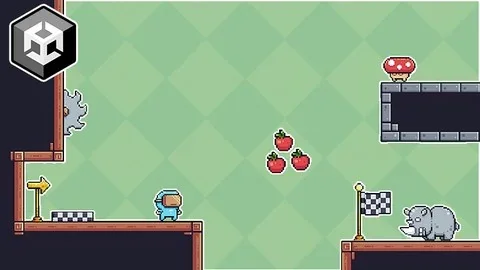
This course follows the process of making a 2D platformer in Unity, starting with C# and Unity basics and moving into character work, level creation, gameplay systems, and polish. It also extends into co-op play, gamepad support, and an optional mobile vers...
Category:UnityPlatform: UnityVideo language: EnglishFile content: video + supporting files + English subtitlesPublished: Apr 15, 2026Updated: Apr 20, 2026
Unity
Resource overview
A beginner path from Unity basics to a working 2D platformer
The course focuses on building a 2D platformer in Unity while strengthening C# knowledge along the way. It is set at beginner level, runs for 24h 37m, and follows a progression that moves from the basics of Unity and C# into a complete playable game project with local multiplayer.
What stands out most is the balance between game creation and coding practice. The material is not limited to movement or level layout. It also points toward clean, maintainable code, scalable game architectures, problem-solving skills, and a stronger general understanding of video game design.
How the project is structured
The curriculum moves in a clear order, starting with the core tools and then layering on the systems needed for a full platformer. It begins with an introduction, then moves into the basics of Unity and C#, character development, and tile-based level creation through the Tile Palette.
From there, the course expands into game logic and world behavior. Game Manager and Game Mechanics come next, followed by traps, level mechanics, and enemies. That keeps the project anchored in the rules that make a platformer feel active rather than static.
Introduction
Basics of Unity and C#
Character development
Tile Palette and Level Creation
Game Manager and Game Mechanics
Traps & Level mechanics
Enemies
UI & Saving System
Camera
Audio
Game Polish
New Input System & Gamepad support
Co-op Version of The game
Flying Enemies
The End
Mobile Version Of The Game (Optional)
That sequence shows a steady build from foundational skills to systems that shape the final experience. UI and saving are included, as well as camera and audio work, so the project does not stop at movement and level geometry. It continues through the parts that make a game feel complete and usable.
Systems that shape the final play experience
The course gives attention to the details that affect how the game is played, not just how it is assembled. Camera handling appears as its own topic, alongside audio and game polish, which suggests a focus on the feel of the finished platformer as well as its structure.
Input support is also extended beyond basic controls. The curriculum includes the New Input System and gamepad support, then builds a co-op version of the game. That local multiplayer direction is part of the main course purpose, and it shows that the project is meant to go beyond a solo platforming loop.
Enemy variety is also part of the workflow. After the initial enemy work, the curriculum adds flying enemies, giving the project another layer of challenge without moving away from the same platformer framework. An optional mobile version appears near the end, which gives the project one more direction without changing the main focus.
Who this fits best
The intended audience is broad, but the course remains clearly centered on people who want to make 2D games. It suits beginners with an interest in learning game development, people who want to create and publish their own games, and anyone aiming to re-skill into game development.
It also matches people who want a practical portfolio piece. The course explicitly points to playable game projects as a useful outcome, whether the goal is portfolio work or personal achievement. Because it covers Object-Oriented Programming in real-world scenarios and emphasizes maintainable code, it also speaks to learners who want more than a surface-level walkthrough.
For people interested in the game design industry, the course offers a broad look at the parts that hold a platformer together: character behavior, level creation, mechanics, enemies, UI, saving, camera, audio, and polish. Enthusiasts who want a deep dive into game mechanics and Unity's potential will find that the curriculum stays close to those goals throughout.
Best fit in practical terms
The strongest takeaway is simple: this is a beginner-level Unity course that stays grounded in one complete 2D platformer project while covering the code, systems, and presentation work needed to make it playable. For anyone looking to build a local-multiplayer platformer and learn the Unity workflow at the same time, it offers a structured route from basics to a finished game path.
 Unity
Unity Unity
Unity Unity
Unity Unreal Engine