"f813c18d2170b1f6"{"id":"24530","slug":"the-ultimate-unity-game-developer-course-from-zero-to-hero","title":"The Ultimate Unity Game Developer Course: From Zero to Hero","category":"Unity","engine":"Video language: English","assetVersion":"Video language: English","engineVersion":"File content: video + supporting files + English subtitles","tag":"Unity","accent":"cyan","visual":"luts","summary":"This Unity course moves from installation and C# basics into gameplay systems, lighting, post-processing, and project work. It also includes labs for documentation, prototyping, and professional workflow, with a final push toward portfolio-ready work.","platform":"Unity","publishedAt":"2026-04-14T16:37:08.000Z","updatedAt":"2026-04-20T06:12:46.000Z","sourceNotes":[],"fileContents":[],"compatibility":["Unity","Video language: English","File content: video + supporting files + English subtitles"],"featuredImage":{"alt":"The Ultimate Unity Game Developer Course: From Zero to Hero","src":"https://3dcghub.com/wp-content/uploads/2026/04/0b2fc14965be_6535427_361b_2.webp"},"hasDownloadLink":true,"downloads":0,"terms":[{"taxonomy":"category","slug":"tutoriallibrary-unity","name":"Unity"},{"taxonomy":"post_tag","slug":"animation","name":"Animation"},{"taxonomy":"post_tag","slug":"environment","name":"Environment"},{"taxonomy":"post_tag","slug":"unity","name":"Unity"}],"galleryImages":[],"accessPanel":{"kind":"video-resource","title":"Access this video resource","eyebrow":"Free Download","message":"Log in or create a free account to start your download.","fileName":"The Ultimate Unity Game Developer Course From Zero to Hero.7z","safetyNote":"All resources are 100% manually reviewed to eliminate all risks.","actionLabel":"Download Free","resourceType":"Video package"},"contentHtml":"\u003cp\u003eThis course fits the point where a Unity idea needs to become something playable: a first player controller, a working prototype, a scene that uses physics and camera control, or a project that can be shown in a portfolio. It moves through the full Unity workflow, from design and programming to deployment, while keeping the focus on practical game-building tasks.\u003c/p\u003e\n\u003cp\u003eThe path is framed for both career use and personal projects. It is set up as a long-form training route toward Unity certification, but it also speaks to learners who want to build games for fun and to people who want a more professional way of working inside Unity.\u003c/p\u003e \u003ch2\u003eStarting with Unity and C# from the ground up\u003c/h2\u003e\n\u003cp\u003eThe opening stage begins with installing and running Unity, then shifts into C# from scratch through hands-on, practical projects. That makes the course usable for complete beginners, since no prior experience in Unity or programming is required. The teaching path starts at the basics rather than assuming that the learner already knows how the engine or the language should feel.\u003c/p\u003e\n\u003cp\u003eAt the same time, the course does not stop at simple entry-level material. Experienced programmers are also part of the intended audience, which means the structure is meant to support people who already code but want to work more fluently inside Unity. The course is marked for all levels and runs for 48h 53m, so it is built as a substantial path rather than a short intro.\u003c/p\u003e\n\u003cp\u003eThat length matters because the curriculum needs room for both foundational work and the tools that show up later in a real Unity project. It covers the complete workflow, so learners are not only writing scripts. They are also seeing how those scripts fit into design, scene work, and eventual deployment.\u003c/p\u003e \u003ch2\u003eGameplay systems that carry across 2D and 3D projects\u003c/h2\u003e\n\u003cp\u003eThe course puts a lot of weight on gameplay mechanics that can be reused across different kinds of projects. It includes 2D and 3D game mechanics, along with physics, camera controls, animations, and other pieces that make scenes interactive. Those topics are the parts of Unity work that usually separate a static setup from something that actually plays.\u003c/p\u003e\n\u003cp\u003ePrefab work is another major thread. Prefabs, variants, and nesting are part of the learning path, which gives the course a clear focus on building gameplay in a way that can be organized and reused. The material also reaches into advanced Unity techniques such as lighting, light probes, post-processing, and scene optimization. Those are the areas that matter once a project needs more than a basic test scene and has to start looking and running like something finished.\u003c/p\u003e\n\u003cp\u003eCinematics also have a place here. Timeline and Cinemachine are included, so the course does not stay limited to scripting alone. That makes the path broader than a pure coding class and gives learners exposure to tools that help shape presentation and movement inside a scene.\u003c/p\u003e \u003ch2\u003eA project sequence that keeps the work concrete\u003c/h2\u003e\n\u003cp\u003eThe curriculum is arranged around a sequence of projects and labs, which keeps the learning grounded in actual tasks. Rather than moving through isolated topics, the course builds step by step from one practical stage to the next. The structure looks like this:\u003c/p\u003e\n\u003cul\u003e \u003cli\u003eWelcome to the Ultimate Unity Game Developer Course\u003c/li\u003e \u003cli\u003eInstalling and running Unity\u003c/li\u003e \u003cli\u003eProject 1 - Player Controller\u003c/li\u003e \u003cli\u003eLab 1 - Documenting a Video Game Project\u003c/li\u003e \u003cli\u003eProject 2 - Gameplay Programming and Design\u003c/li\u003e \u003cli\u003eLab 2 - Prototyping a project\u003c/li\u003e \u003cli\u003eProject 3 - Physics, Effects and Sounds\u003c/li\u003e \u003cli\u003eLab 3 - Prototyping Controls and Constraints\u003c/li\u003e \u003cli\u003eProject 4 - Advanced Gameplay\u003c/li\u003e \u003cli\u003eLab 4 - Tools and ways to work professionally\u003c/li\u003e \u003cli\u003eProject 5 - Fruit Ninja\u003c/li\u003e \u003cli\u003eLab 5 - From prototype to final product\u003c/li\u003e \u003cli\u003eCongratulations on finishing the course\u003c/li\u003e\n\u003c/ul\u003e\n\u003cp\u003eThat order shows a deliberate progression. The first project centers on player control, then the course moves into gameplay programming and design, then into physics, effects, and sounds, and later into more advanced gameplay. The final project is Fruit Ninja, which gives the training a clear endpoint and a recognisable project shape.\u003c/p\u003e\n\u003cp\u003eThe labs are just as important as the projects. One focuses on documenting a video game project, another on prototyping, another on controls and constraints, and another on tools and ways to work professionally. Those lab topics line up with the courseâs emphasis on best practices for prototyping and documenting projects, so the structure keeps circling back to how real work gets organized.\u003c/p\u003e \u003ch2\u003eWho this path is built for\u003c/h2\u003e\n\u003cp\u003eThe course is aimed at several different kinds of learners. Complete beginners get a ground-up start in Unity and C#, with no prior experience required. Aspiring game developers can use the project sequence to build real work for a professional portfolio. Students and professionals who want the Unity Certified Associate credential are also part of the intended audience, which makes the course relevant to people who want a more formal development path.\u003c/p\u003e\n\u003cp\u003eThere is also room here for people who already know how to program and want to deepen their Unity skills. The course explicitly reaches into advanced workflow topics, including scene optimization, lighting, post-processing, and the tools used to work professionally. That mix gives it a wider range than a beginner-only class.\u003c/p\u003e\n\u003cp\u003ePublished Mar 28, 2025, the course is positioned as a long, structured route through Unity development rather than a narrow specialty lesson. It is most useful for learners who want one path that covers coding, gameplay systems, cinematic tools, prototyping, documentation, and portfolio-minded project work in the same sequence.\u003c/p\u003e\n\n\u003ch2\u003eMore From The Same Workflow\u003c/h2\u003e\n\u003cul\u003e\n\u003cli\u003e\u003ca href=\"https://3dcghub.com/mastering-unity-muse/\" title=\"Mastering Unity Muse\"\u003eMastering Unity Muse\u003c/a\u003e\u003c/li\u003e\n\u003cli\u003e\u003ca href=\"https://3dcghub.com/create-2d-multiplayer-game-with-photon-in-unity/\" title=\"Create 2D Multiplayer Game with photon in unity\"\u003eCreate 2D Multiplayer Game with photon in unity\u003c/a\u003e\u003c/li\u003e\n\u003cli\u003e\u003ca href=\"https://3dcghub.com/procedural-terrain-generation-with-unity/\" title=\"Procedural Terrain Generation with Unity\"\u003eProcedural Terrain Generation with Unity\u003c/a\u003e\u003c/li\u003e\n\u003cli\u003e\u003ca href=\"https://3dcghub.com/learn-to-create-a-2d-action-zombie-game-in-unity/\" title=\"Learn to create a 2D Action Zombie Game in Unity\"\u003eLearn to create a 2D Action Zombie Game in Unity\u003c/a\u003e\u003c/li\u003e\n\u003cli\u003e\u003ca href=\"https://3dcghub.com/learn-to-create-advance-metroidvania-game-with-unity-c/\" title=\"Learn to create advance Metroidvania game with Unity \u0026amp;amp; C#\"\u003eLearn to create advance Metroidvania game with Unity \u0026amp; C#\u003c/a\u003e\u003c/li\u003e\n\u003c/ul\u003e","contentTextLength":5848,"navigation":{"current":1945,"total":3651,"previous":{"id":"24535","slug":"the-complete-guide-to-unity-2d-platformer-development","title":"The Complete Guide to Unity 2D : Platformer Development","category":"Unity","platform":"Unity","updatedAt":"2026-04-20T06:12:46.000Z"},"next":{"id":"24527","slug":"unity-bootcamp-3d-game-development","title":"Unity Bootcamp: 3D Game Development","category":"Unity","platform":"Unity","updatedAt":"2026-04-20T06:12:46.000Z"}},"relatedResources":[{"id":"24541","slug":"make-a-match-three-puzzle-game-in-unity","title":"Make a Match-Three Puzzle Game in Unity","category":"Unity","engine":"Video language: English","assetVersion":"Video language: English","engineVersion":"File content: video + supporting files + English subtitles","tag":"Unity","accent":"cyan","visual":"audio","summary":"Make a Match-Three Puzzle Game in Unity is a 16h 9m intermediate course focused on building a tile-based 2D puzzle game from scratch. It suits Unity developers who already know basic C# scripting and want a structured path from core mechanics to mobile-read...","platform":"Unity","publishedAt":"2026-04-15T09:58:27.000Z","updatedAt":"2026-04-20T06:12:46.000Z","sourceNotes":[],"fileContents":[],"compatibility":["Unity","Video language: English","File content: video + supporting files + English subtitles"],"featuredImage":{"alt":"Make a Match-Three Puzzle Game in Unity","src":"https://3dcghub.com/wp-content/uploads/2026/04/884cab9427a1_942002_8051.webp"},"hasDownloadLink":true,"downloads":1},{"id":"24500","slug":"c-fundamentals-game-programming-for-beginners","title":"C++ Fundamentals: Game Programming For Beginners","category":"Unreal Engine","engine":"Video language: English","assetVersion":"Video language: English","engineVersion":"File content: video + supporting files + English subtitles","tag":"Unreal Engine","accent":"cyan","visual":"city","summary":"This beginner course focuses on making games in pure C++ with Raylib. It moves from variables, loops, and if-statements into object-oriented programming, debugging, clean coding, and 2D character animation through a sequence of small projects.","platform":"Unity","publishedAt":"2026-04-14T14:55:19.000Z","updatedAt":"2026-04-20T06:12:47.000Z","sourceNotes":[],"fileContents":[],"compatibility":["Unity","Video language: English","File content: video + supporting files + English subtitles"],"featuredImage":{"alt":"C++ Fundamentals: Game Programming For Beginners","src":"https://3dcghub.com/wp-content/uploads/2026/04/7307b27664a0_3926772_101e_4.webp"},"hasDownloadLink":true,"downloads":1},{"id":"24282","slug":"level-design-master-class-all-in-one-complete-course","title":"Level Design Master Class: All in One Complete Course","category":"Unity","engine":"Video language: English","assetVersion":"Video language: English","engineVersion":"File content: video + supporting files + English subtitles","tag":"Unity","accent":"cyan","visual":"audio","summary":"This course moves from the first steps of level design into the work that shapes a playable space: engine setup, level breakdowns, composition, player guidance, and 3D level building in Unreal Engine and Unity. It also reaches into the industry side of the...","platform":"Unity","publishedAt":"2026-04-13T06:58:28.000Z","updatedAt":"2026-04-19T15:34:54.000Z","sourceNotes":[],"fileContents":[],"compatibility":["Unity","Video language: English","File content: video + supporting files + English subtitles"],"featuredImage":{"alt":"Level Design Master Class: All in One Complete Course","src":"https://3dcghub.com/wp-content/uploads/2026/04/8055f884b292_2207758_1136_11.webp"},"hasDownloadLink":true,"downloads":2}]}
Unity
The Ultimate Unity Game Developer Course: From Zero to Hero
This Unity course moves from installation and C# basics into gameplay systems, lighting, post-processing, and project work. It also includes labs for documentation, prototyping, and professional workflow, with a final push toward portfolio-ready work.
Category:UnityPlatform: UnityVideo language: EnglishFile content: video + supporting files + English subtitlesPublished: Apr 14, 2026Updated: Apr 20, 2026
Unity
Resource overview
This course fits the point where a Unity idea needs to become something playable: a first player controller, a working prototype, a scene that uses physics and camera control, or a project that can be shown in a portfolio. It moves through the full Unity workflow, from design and programming to deployment, while keeping the focus on practical game-building tasks.
The path is framed for both career use and personal projects. It is set up as a long-form training route toward Unity certification, but it also speaks to learners who want to build games for fun and to people who want a more professional way of working inside Unity.
Starting with Unity and C# from the ground up
The opening stage begins with installing and running Unity, then shifts into C# from scratch through hands-on, practical projects. That makes the course usable for complete beginners, since no prior experience in Unity or programming is required. The teaching path starts at the basics rather than assuming that the learner already knows how the engine or the language should feel.
At the same time, the course does not stop at simple entry-level material. Experienced programmers are also part of the intended audience, which means the structure is meant to support people who already code but want to work more fluently inside Unity. The course is marked for all levels and runs for 48h 53m, so it is built as a substantial path rather than a short intro.
That length matters because the curriculum needs room for both foundational work and the tools that show up later in a real Unity project. It covers the complete workflow, so learners are not only writing scripts. They are also seeing how those scripts fit into design, scene work, and eventual deployment.
Gameplay systems that carry across 2D and 3D projects
The course puts a lot of weight on gameplay mechanics that can be reused across different kinds of projects. It includes 2D and 3D game mechanics, along with physics, camera controls, animations, and other pieces that make scenes interactive. Those topics are the parts of Unity work that usually separate a static setup from something that actually plays.
Prefab work is another major thread. Prefabs, variants, and nesting are part of the learning path, which gives the course a clear focus on building gameplay in a way that can be organized and reused. The material also reaches into advanced Unity techniques such as lighting, light probes, post-processing, and scene optimization. Those are the areas that matter once a project needs more than a basic test scene and has to start looking and running like something finished.
Cinematics also have a place here. Timeline and Cinemachine are included, so the course does not stay limited to scripting alone. That makes the path broader than a pure coding class and gives learners exposure to tools that help shape presentation and movement inside a scene.
A project sequence that keeps the work concrete
The curriculum is arranged around a sequence of projects and labs, which keeps the learning grounded in actual tasks. Rather than moving through isolated topics, the course builds step by step from one practical stage to the next. The structure looks like this:
Welcome to the Ultimate Unity Game Developer Course
Installing and running Unity
Project 1 - Player Controller
Lab 1 - Documenting a Video Game Project
Project 2 - Gameplay Programming and Design
Lab 2 - Prototyping a project
Project 3 - Physics, Effects and Sounds
Lab 3 - Prototyping Controls and Constraints
Project 4 - Advanced Gameplay
Lab 4 - Tools and ways to work professionally
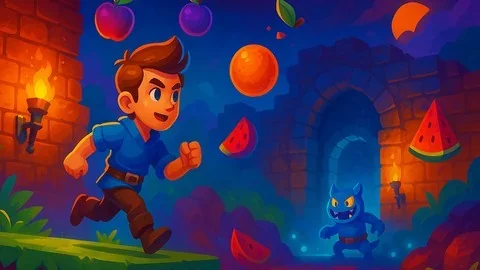
Project 5 - Fruit Ninja
Lab 5 - From prototype to final product
Congratulations on finishing the course
That order shows a deliberate progression. The first project centers on player control, then the course moves into gameplay programming and design, then into physics, effects, and sounds, and later into more advanced gameplay. The final project is Fruit Ninja, which gives the training a clear endpoint and a recognisable project shape.
The labs are just as important as the projects. One focuses on documenting a video game project, another on prototyping, another on controls and constraints, and another on tools and ways to work professionally. Those lab topics line up with the courseâs emphasis on best practices for prototyping and documenting projects, so the structure keeps circling back to how real work gets organized.
Who this path is built for
The course is aimed at several different kinds of learners. Complete beginners get a ground-up start in Unity and C#, with no prior experience required. Aspiring game developers can use the project sequence to build real work for a professional portfolio. Students and professionals who want the Unity Certified Associate credential are also part of the intended audience, which makes the course relevant to people who want a more formal development path.
There is also room here for people who already know how to program and want to deepen their Unity skills. The course explicitly reaches into advanced workflow topics, including scene optimization, lighting, post-processing, and the tools used to work professionally. That mix gives it a wider range than a beginner-only class.
Published Mar 28, 2025, the course is positioned as a long, structured route through Unity development rather than a narrow specialty lesson. It is most useful for learners who want one path that covers coding, gameplay systems, cinematic tools, prototyping, documentation, and portfolio-minded project work in the same sequence.
 Unity
Unity Unity
Unity Unreal Engine
 Unity
Unity