"f813c18d2170b1f6"{"id":"24480","slug":"learn-to-create-a-2d-action-zombie-game-in-unity","title":"Learn to create a 2D Action Zombie Game in Unity","category":"Unity","engine":"Video language: English","assetVersion":"Video language: English","engineVersion":"File content: video + supporting files + English subtitles","tag":"Unity","accent":"cyan","visual":"character","summary":"This beginner Unity course walks through the main parts of a 2D action zombie game: player setup, enemies, health, portals between levels, and level design. It is built for learners who want a guided path through a playable game project rather than disconne...","platform":"Unity","publishedAt":"2026-04-14T13:06:41.000Z","updatedAt":"2026-04-20T06:12:47.000Z","sourceNotes":[],"fileContents":[],"compatibility":["Unity","Video language: English","File content: video + supporting files + English subtitles"],"featuredImage":{"alt":"Learn to create a 2D Action Zombie Game in Unity","src":"https://3dcghub.com/wp-content/uploads/2026/04/4aae367ee741_5884848_cdbb_2.webp"},"hasDownloadLink":true,"downloads":0,"terms":[{"taxonomy":"category","slug":"tutoriallibrary-unity","name":"Unity"},{"taxonomy":"post_tag","slug":"characters","name":"Characters"},{"taxonomy":"post_tag","slug":"environment","name":"Environment"},{"taxonomy":"post_tag","slug":"unity","name":"Unity"}],"galleryImages":[],"accessPanel":{"kind":"video-resource","title":"Access this video resource","eyebrow":"Free Download","message":"Log in or create a free account to start your download.","fileName":"Learn to create a 2D Action Zombie Game in Unity.rar","safetyNote":"All resources are 100% manually reviewed to eliminate all risks.","actionLabel":"Download Free","resourceType":"Video package"},"contentHtml":"\u003ch2\u003eBuilding the game loop piece by piece\u003c/h2\u003e\u003cp\u003eThis course moves through the parts that make a 2D action zombie game function in Unity: a player, enemies, health for both sides, and a portal that sends the player between levels. Those are the core systems that give a simple 2D project structure, so the course sits in a practical part of the workflow where a game starts to behave like a real level-based experience instead of a blank prototype.\u003c/p\u003e\u003cp\u003eThe focus is not on broad theory. It is on the parts a beginner needs to bring a small zombie game to life inside Unity. The material centers on character setup, enemy setup, and the rules that connect them through health and level transitions. That makes it relevant for early project building, when the main task is getting the basic play loop in place.\u003c/p\u003e\u003cp\u003eThe course is listed as a beginner course and runs for 8h 3m. It was published on May 12, 2024. That timeframe and scope suggest a guided pace suited to someone still learning the editor and the logic behind a 2D project.\u003c/p\u003e\u003ch2\u003eWhat gets covered along the way\u003c/h2\u003e\u003cp\u003eThe learning goals are direct and specific. They point to the exact systems that shape the game:\u003c/p\u003e\u003cul\u003e\u003cli\u003eHow to create a player\u003c/li\u003e\u003cli\u003eHow to create enemies\u003c/li\u003e\u003cli\u003eHow to create health for the player and enemy\u003c/li\u003e\u003cli\u003eHow to add a portal for the player to move between levels\u003c/li\u003e\u003cli\u003eGame level design\u003c/li\u003e\u003c/ul\u003e\u003cp\u003eThese pieces matter because they map cleanly to the way a small game is usually assembled. The player and enemies establish the active part of the scene. Health gives those characters a purpose in combat or survival. The portal gives the level structure a way to move forward. Level design pulls the systems together so the game has spaces to play in, not just objects sitting in a scene.\u003c/p\u003e\u003cp\u003eThe course does not stop at one isolated mechanic. It connects the gameplay pieces to level design, which is important for a 2D action zombie project. A game like this depends on how movement, encounters, and progression fit together. When the player can move through levels and enemies can be placed into the layout, the project begins to behave like a complete game loop.\u003c/p\u003e\u003ch2\u003eHow the curriculum is arranged\u003c/h2\u003e\u003cp\u003eThe curriculum starts with Introduction and Unity Guide, then moves into Level Design and Create a 2DGame. After that, it includes Learn to create Apo City and Learn to Create Items in Unity. Those topics give the course a stepped structure: first the setup, then the construction of the game space, then additional content for the project.\u003c/p\u003e\u003cp\u003eThat sequence makes sense for a beginner path. A learner first needs a guided entry into Unity, then a clear route into building the game itself. Once the main structure is in place, level design and item creation become part of expanding the project. The inclusion of Learn to create Apo City also suggests a named project section within the curriculum, while Learn to Create Items in Unity points to the addition of gameplay objects that support the game world.\u003c/p\u003e\u003cp\u003eBecause the course is centered on a 2D action zombie game, the curriculum is focused on a single kind of project rather than a wide mix of unrelated demos. That helps keep the work anchored. Each step appears to contribute to the same end result: a 2D game built in Unity with the basic systems needed for play and progression.\u003c/p\u003e\u003ch2\u003eWhere it fits in a Unity workflow\u003c/h2\u003e\u003cp\u003eThis kind of course fits early in a production workflow, especially when the goal is to make a first playable version of a 2D game. The player, enemy, health, portal, and level design topics all belong near the stage where a project is becoming functional. They are the systems that define how the scene behaves and how the player moves through it.\u003c/p\u003e\u003cp\u003eFor a beginner, that is a useful place to learn. Instead of focusing on a single isolated mechanic, the course brings several connected parts together in one project path. A player has enemies to interact with. Enemies need health. A portal gives the game a way to progress from one level to another. Level design gives the whole setup a space to operate in. Those relationships are the backbone of a small action game.\u003c/p\u003e\u003cp\u003eThe course length also fits that kind of learning. At 8h 3m, it is long enough to move through multiple topics, but still focused on a specific project type. That makes it a practical fit for someone who wants structured time inside Unity without jumping between unrelated game ideas.\u003c/p\u003e\u003cp\u003eThe strongest takeaway is simple: this is a beginner-friendly Unity course for learning how a 2D action zombie game is assembled from the ground up, with the main gameplay systems tied directly to level design and progression.\u003c/p\u003e\n\n\u003ch2\u003eRelated Resources Worth Checking\u003c/h2\u003e\n\u003cul\u003e\n\u003cli\u003e\u003ca href=\"https://3dcghub.com/learn-to-create-advance-metroidvania-game-with-unity-c/\" title=\"Learn to create advance Metroidvania game with Unity \u0026amp;amp; C#\"\u003eLearn to create advance Metroidvania game with Unity \u0026amp; C#\u003c/a\u003e\u003c/li\u003e\n\u003cli\u003e\u003ca href=\"https://3dcghub.com/make-a-multiplayer-game-in-unity/\" title=\"Make a Multiplayer Game in Unity\"\u003eMake a Multiplayer Game in Unity\u003c/a\u003e\u003c/li\u003e\n\u003cli\u003e\u003ca href=\"https://3dcghub.com/stylized-grass-shader-for-unity-2021-2023/\" title=\"Stylized Grass Shader (for Unity 2021-2023)\"\u003eStylized Grass Shader (for Unity 2021-2023)\u003c/a\u003e\u003c/li\u003e\n\u003cli\u003e\u003ca href=\"https://3dcghub.com/make-a-horror-survival-game-in-unity/\" title=\"Make a horror survival game in Unity\"\u003eMake a horror survival game in Unity\u003c/a\u003e\u003c/li\u003e\n\u003cli\u003e\u003ca href=\"https://3dcghub.com/unity-shader-programming-beginners-to-advanced-techniques/\" title=\"Unity Shader Programming: Beginners to Advanced Techniques\"\u003eUnity Shader Programming: Beginners to Advanced Techniques\u003c/a\u003e\u003c/li\u003e\n\u003c/ul\u003e","contentTextLength":4839,"navigation":{"current":1941,"total":3651,"previous":{"id":"24484","slug":"make-a-2d-platformer-in-unreal-engine-5-c","title":"Make a 2D platformer in Unreal engine 5 C++","category":"Unreal Engine","platform":"Unreal Engine","updatedAt":"2026-04-20T06:12:47.000Z"},"next":{"id":"24541","slug":"make-a-match-three-puzzle-game-in-unity","title":"Make a Match-Three Puzzle Game in Unity","category":"Unity","platform":"Unity","updatedAt":"2026-04-20T06:12:46.000Z"}},"relatedResources":[{"id":"24514","slug":"create-2d-multiplayer-game-with-photon-in-unity","title":"Create 2D Multiplayer Game with photon in unity","category":"Unity","engine":"Video language: English","assetVersion":"Video language: English","engineVersion":"File content: video + supporting files + English subtitles","tag":"Unity","accent":"cyan","visual":"mech","summary":"This Unity workflow follows the build of a 2D multiplayer game with Photon from the first menu screens through player setup, UI, enemies, and progression systems. It also includes mobile joystick support, game sound, and a range character type.","platform":"Unity","publishedAt":"2026-04-14T15:47:41.000Z","updatedAt":"2026-04-20T06:12:47.000Z","sourceNotes":[],"fileContents":[],"compatibility":["Unity","Video language: English","File content: video + supporting files + English subtitles"],"featuredImage":{"alt":"Create 2D Multiplayer Game with photon in unity","src":"https://3dcghub.com/wp-content/uploads/2026/04/d0bd75435e19_4751476_9c73.webp"},"hasDownloadLink":true,"downloads":1},{"id":"24535","slug":"the-complete-guide-to-unity-2d-platformer-development","title":"The Complete Guide to Unity 2D : Platformer Development","category":"Unity","engine":"Video language: English","assetVersion":"Video language: English","engineVersion":"File content: video + supporting files + English subtitles","tag":"Unity","accent":"cyan","visual":"city","summary":"This course follows the process of making a 2D platformer in Unity, starting with C# and Unity basics and moving into character work, level creation, gameplay systems, and polish. It also extends into co-op play, gamepad support, and an optional mobile vers...","platform":"Unity","publishedAt":"2026-04-15T09:46:03.000Z","updatedAt":"2026-04-20T06:12:46.000Z","sourceNotes":[],"fileContents":[],"compatibility":["Unity","Video language: English","File content: video + supporting files + English subtitles"],"featuredImage":{"alt":"The Complete Guide to Unity 2D : Platformer Development","src":"https://3dcghub.com/wp-content/uploads/2026/04/33eb152dfd65_5927092_552c.webp"},"hasDownloadLink":true,"downloads":1},{"id":"24477","slug":"learn-to-create-advance-metroidvania-game-with-unity-c","title":"Learn to create advance Metroidvania game with Unity \u0026 C#","category":"Unity","engine":"Video language: English","assetVersion":"Video language: English","engineVersion":"File content: video + supporting files + English subtitles","tag":"Unity","accent":"cyan","visual":"audio","summary":"This Unity and C# course follows a Metroidvania-style workflow through 2D game setup, side-scroller design, dialogue, and timeline work. It also moves through named project sections such as a prison scene, a Paralex Background segment, and a second game.","platform":"Unity","publishedAt":"2026-04-14T12:43:01.000Z","updatedAt":"2026-04-20T06:12:48.000Z","sourceNotes":[],"fileContents":[],"compatibility":["Unity","Video language: English","File content: video + supporting files + English subtitles"],"featuredImage":{"alt":"Learn to create advance Metroidvania game with Unity \u0026 C#","src":"https://3dcghub.com/wp-content/uploads/2026/04/438fcf7078c3_5620336_44d4_4.webp"},"hasDownloadLink":true,"downloads":1}]}
Unity
Learn to create a 2D Action Zombie Game in Unity
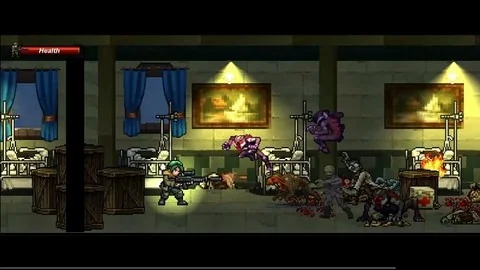
This beginner Unity course walks through the main parts of a 2D action zombie game: player setup, enemies, health, portals between levels, and level design. It is built for learners who want a guided path through a playable game project rather than disconne...
Category:UnityPlatform: UnityVideo language: EnglishFile content: video + supporting files + English subtitlesPublished: Apr 14, 2026Updated: Apr 20, 2026
Unity
Resource overview
Building the game loop piece by piece
This course moves through the parts that make a 2D action zombie game function in Unity: a player, enemies, health for both sides, and a portal that sends the player between levels. Those are the core systems that give a simple 2D project structure, so the course sits in a practical part of the workflow where a game starts to behave like a real level-based experience instead of a blank prototype.
The focus is not on broad theory. It is on the parts a beginner needs to bring a small zombie game to life inside Unity. The material centers on character setup, enemy setup, and the rules that connect them through health and level transitions. That makes it relevant for early project building, when the main task is getting the basic play loop in place.
The course is listed as a beginner course and runs for 8h 3m. It was published on May 12, 2024. That timeframe and scope suggest a guided pace suited to someone still learning the editor and the logic behind a 2D project.
What gets covered along the way
The learning goals are direct and specific. They point to the exact systems that shape the game:
How to create a player
How to create enemies
How to create health for the player and enemy
How to add a portal for the player to move between levels
Game level design
These pieces matter because they map cleanly to the way a small game is usually assembled. The player and enemies establish the active part of the scene. Health gives those characters a purpose in combat or survival. The portal gives the level structure a way to move forward. Level design pulls the systems together so the game has spaces to play in, not just objects sitting in a scene.
The course does not stop at one isolated mechanic. It connects the gameplay pieces to level design, which is important for a 2D action zombie project. A game like this depends on how movement, encounters, and progression fit together. When the player can move through levels and enemies can be placed into the layout, the project begins to behave like a complete game loop.
How the curriculum is arranged
The curriculum starts with Introduction and Unity Guide, then moves into Level Design and Create a 2DGame. After that, it includes Learn to create Apo City and Learn to Create Items in Unity. Those topics give the course a stepped structure: first the setup, then the construction of the game space, then additional content for the project.
That sequence makes sense for a beginner path. A learner first needs a guided entry into Unity, then a clear route into building the game itself. Once the main structure is in place, level design and item creation become part of expanding the project. The inclusion of Learn to create Apo City also suggests a named project section within the curriculum, while Learn to Create Items in Unity points to the addition of gameplay objects that support the game world.
Because the course is centered on a 2D action zombie game, the curriculum is focused on a single kind of project rather than a wide mix of unrelated demos. That helps keep the work anchored. Each step appears to contribute to the same end result: a 2D game built in Unity with the basic systems needed for play and progression.
Where it fits in a Unity workflow
This kind of course fits early in a production workflow, especially when the goal is to make a first playable version of a 2D game. The player, enemy, health, portal, and level design topics all belong near the stage where a project is becoming functional. They are the systems that define how the scene behaves and how the player moves through it.
For a beginner, that is a useful place to learn. Instead of focusing on a single isolated mechanic, the course brings several connected parts together in one project path. A player has enemies to interact with. Enemies need health. A portal gives the game a way to progress from one level to another. Level design gives the whole setup a space to operate in. Those relationships are the backbone of a small action game.
The course length also fits that kind of learning. At 8h 3m, it is long enough to move through multiple topics, but still focused on a specific project type. That makes it a practical fit for someone who wants structured time inside Unity without jumping between unrelated game ideas.
The strongest takeaway is simple: this is a beginner-friendly Unity course for learning how a 2D action zombie game is assembled from the ground up, with the main gameplay systems tied directly to level design and progression.
 Unity
Unity Unity
Unity Unity
Unity Unity
Unity