"f813c18d2170b1f6"{"id":"24377","slug":"stylized-grass-shader-for-unity-2021-2023","title":"Stylized Grass Shader (for Unity 2021-2023)","category":"Shaders","engine":"Original Unity version: 2021.3.45","assetVersion":"Original Unity version: 2021.3.45","engineVersion":"Asset Version:1.2.0","tag":"Shaders","accent":"cyan","visual":"city","summary":"This shader focuses on grass that can move, bend, and fade in ways that stay readable in real projects, especially across URP scenes that need terrain blending and camera-aware coverage. It also includes integration paths for common foliage tools and a clea...","platform":"Unity","publishedAt":"2026-04-14T11:37:59.000Z","updatedAt":"2026-04-20T06:12:49.000Z","sourceNotes":[],"fileContents":[],"compatibility":["Unity","Original Unity version: 2021.3.45","Asset Version: 1.2.0"],"featuredImage":{"alt":"Stylized Grass Shader (for Unity 2021-2023)","src":"https://3dcghub.com/wp-content/uploads/2026/04/9a599a5125cd_37c9f313-c7af-4f2b-8bf1-ed9d4110d606_1280x720_stretch.webp"},"hasDownloadLink":true,"downloads":2,"terms":[{"taxonomy":"category","slug":"shaders-vfx-unity-2","name":"Shaders"},{"taxonomy":"post_tag","slug":"materials","name":"Materials"},{"taxonomy":"post_tag","slug":"tools","name":"Tools"},{"taxonomy":"post_tag","slug":"unity","name":"Unity"}],"galleryImages":[{"src":"https://3dcghub.com/wp-content/uploads/2026/04/f4a21fa8a53e_1fdce8f9-468a-42f6-aa0b-1aea3cb22363_scaled.webp","alt":"Stylized Grass Shader (for Unity 2021-2023)"},{"src":"https://3dcghub.com/wp-content/uploads/2026/04/1f23e30b50f4_f2ba3dcb-15e7-4814-8e73-0a387157296b_scaled.webp","alt":"Stylized Grass Shader (for Unity 2021-2023)"},{"src":"https://3dcghub.com/wp-content/uploads/2026/04/757440678cc8_29813836-0ae3-473e-850c-0f7f4c977d97_scaled.webp","alt":"Stylized Grass Shader (for Unity 2021-2023)"},{"src":"https://3dcghub.com/wp-content/uploads/2026/04/c7a3b3b996bc_01a865f5-5d95-4527-8906-0acc6af5562f_scaled.webp","alt":"Stylized Grass Shader (for Unity 2021-2023)"},{"src":"https://3dcghub.com/wp-content/uploads/2026/04/4009b4161b10_6501b084-d20b-4660-aeaf-3422b3193aa2_scaled.webp","alt":"Stylized Grass Shader (for Unity 2021-2023)"},{"src":"https://3dcghub.com/wp-content/uploads/2026/04/9cbabcf541ed_31fb9daa-ea76-4fa6-a644-538372181fa0_scaled.webp","alt":"Stylized Grass Shader (for Unity 2021-2023)"},{"src":"https://3dcghub.com/wp-content/uploads/2026/04/ad51a63ea542_1d1fbb0c-d5b0-49fa-9f2e-e606487e9d7a_scaled.webp","alt":"Stylized Grass Shader (for Unity 2021-2023)"},{"src":"https://3dcghub.com/wp-content/uploads/2026/04/0d80ec4e2d85_c2b05d01-115d-4b7d-9a93-8b9b768324ac_scaled.webp","alt":"Stylized Grass Shader (for Unity 2021-2023)"},{"src":"https://3dcghub.com/wp-content/uploads/2026/04/77bb5bf39d0f_22cc6aa2-1a8a-4afe-8693-39a6e72b4ba5_scaled.webp","alt":"Stylized Grass Shader (for Unity 2021-2023)"},{"src":"https://3dcghub.com/wp-content/uploads/2026/04/0cc7751f66d5_0289c8f1-878a-4d15-849d-853e02bc544f_scaled.webp","alt":"Stylized Grass Shader (for Unity 2021-2023)"}],"accessPanel":{"kind":"resource","title":"Access this resource","eyebrow":"Free Download","message":"Log in or create a free account to start your download.","fileName":"Stylized Grass Shader 1.2.0.7z","safetyNote":"All resources are 100% manually reviewed to eliminate all risks.","actionLabel":"Download Free","resourceType":"Resource archive"},"contentHtml":"\u003ch2\u003eGrass that still reads from above\u003c/h2\u003e\u003cp\u003eProjects that spend a lot of time looking down at terrain need grass that does more than fill space. This shader is aimed at delivering stylized grass for the Universal Render Pipeline with visual behavior that holds up when the camera changes angle, moves close to the ground, or pulls back for a wider view.\u003c/p\u003e\u003cp\u003eThe setup is built for Unity 2021.3 through 2023.2, and the core idea is straightforward: grass should feel alive without turning into a heavy special case. Wind motion, camera-facing fades, and perspective correction all work together to keep the coverage readable. The shader also includes sun light translucency rendering, which gives the blades a brighter response where light passes through them.\u003c/p\u003e\u003cp\u003eInstead of treating grass as a generic surface, the shader handles it as a visual layer with its own response to movement, lighting, and distance. That matters in scenes where the ground needs to remain believable while still carrying a stylized look.\u003c/p\u003e\u003ch2\u003eMotion and interaction without a second camera\u003c/h2\u003e\u003cp\u003eWind animation is one of the main pieces here. The shader supports dynamic changes in speed and direction through a Wind Zone, so the movement can be tied to scene conditions rather than staying fixed. That gives the grass a sense of shared motion across the environment instead of isolated motion on each patch.\u003c/p\u003e\u003cp\u003eInteraction is handled through an easy-to-use system that supports bending and flattening. Trails, meshes, lines, and particle effects can all be used to affect the grass, which makes it suitable for scenes where characters, objects, or effects need to leave a visible path through the field. The shader does not use a second camera for bending, so the workflow avoids the extra culling and batching overhead that can come with that approach.\u003c/p\u003e\u003cp\u003eGrass color can also vary in a few practical ways. It blends with the terrain surface, including tiled setups and mesh terrains, and it supports per-object and per-vertex color variation to break up repetition. That helps keep large fields from looking tiled or uniform, especially when the same grass is repeated across wide areas.\u003c/p\u003e\u003ch2\u003eShading choices that stay close to the scene\u003c/h2\u003e\u003cp\u003eThe shader includes both physically-based and simple shading modes. The simple mode is similar to the Lit and Simple Lit shaders, so it gives a familiar path for projects that want a lighter visual style without leaving URP conventions behind. The PBR option is there when the scene needs a more grounded response to lighting.\u003c/p\u003e\u003cp\u003eSeveral camera and view-dependent options are included to keep the grass usable in different shot types. Perspective correction helps with coverage when the camera looks down from above. Angle fading fades out faces that are not oriented toward the camera, and near/far camera fading gives another layer of control over how the grass appears across distance.\u003c/p\u003e\u003cp\u003eThese options make the shader more practical in scenes where the same grass has to work both up close and from a higher viewpoint. The effect is not just visual polish; it is also about keeping the grass present in the frame without forcing every blade to read the same way at every distance.\u003c/p\u003e\u003ch2\u003eWhere it fits, and where it does not\u003c/h2\u003e\u003cp\u003eCompatibility is focused on URP rather than every rendering path. The shader supports Universal Render Pipeline 12.1.8 and newer, while excluding the Built-in RP and HDRP. It is also SRP Batching compatible, and it supports PC, macOS with OpenGL or Metal, and consoles. Render Graph is not supported.\u003c/p\u003e\u003cp\u003eThere is also one-click integration for several related tools:\u003c/p\u003e\u003cul\u003e\u003cli\u003eFoliage Renderer\u003c/li\u003e\u003cli\u003eNature Renderer (2020-2022)\u003c/li\u003e\u003cli\u003eGPU Instancer\u003c/li\u003e\u003cli\u003eCurved World 2020\u003c/li\u003e\u003cli\u003eVegetation Studio and Vegetation Studio Pro\u003c/li\u003e\u003c/ul\u003e\u003cp\u003eThe shader is not a grass placement or render tool, so it does not replace the step of actually placing vegetation in a scene. It is also not suitable for mobile platforms. Performance depends mainly on the method used for rendering, and the grass itself is composed of regular individual meshes rather than a geometry shader.\u003c/p\u003e\u003cp\u003eThose limits make the intended workflow clearer. This is a shader for projects that already know they want URP grass behavior and want the rendering side to handle wind, bending, blending, and fading in a controlled way.\u003c/p\u003e\u003ch2\u003eLegacy status and the current workflow\u003c/h2\u003e\u003cp\u003eThis version began in 2020 and was updated through a series of complementary updates, including one major revision. As of 2024 it is no longer under active development, but it still receives minor fixes needed to keep it working in supported Unity versions. It is mature and stable for the versions it supports.\u003c/p\u003e\u003cp\u003eUnity 6 introduced a different rendering architecture, so Unity 6 and newer use a separate shader implementation and rendering paradigm. That means the 2021-2023 version is best thought of as the URP-focused branch for projects that stay within its supported Unity range.\u003c/p\u003e\u003cp\u003eFor teams already on URP, the practical value is in the balance it strikes: wind, interaction, lighting response, terrain blending, and camera-aware behavior are all packed into a shader workflow that stays specific about what it can and cannot do. It is most useful for stylized scenes that need grass to react to movement and lighting while remaining readable across PC, macOS, and console targets.\u003c/p\u003e\n\n\u003ch2\u003eRelated Resources Worth Checking\u003c/h2\u003e\n\u003cul\u003e\n\u003cli\u003e\u003ca href=\"https://3dcghub.com/make-a-horror-survival-game-in-unity/\" title=\"Make a horror survival game in Unity\"\u003eMake a horror survival game in Unity\u003c/a\u003e\u003c/li\u003e\n\u003cli\u003e\u003ca href=\"https://3dcghub.com/unity-shader-programming-beginners-to-advanced-techniques/\" title=\"Unity Shader Programming: Beginners to Advanced Techniques\"\u003eUnity Shader Programming: Beginners to Advanced Techniques\u003c/a\u003e\u003c/li\u003e\n\u003cli\u003e\u003ca href=\"https://3dcghub.com/mastering-editor-scripting-in-unity/\" title=\"Mastering Editor Scripting in Unity\"\u003eMastering Editor Scripting in Unity\u003c/a\u003e\u003c/li\u003e\n\u003cli\u003e\u003ca href=\"https://3dcghub.com/altos-volumetric-clouds-skybox-and-weather-for-unity-urp/\" title=\"Altos – Volumetric Clouds, Skybox, and Weather for Unity URP\"\u003eAltos – Volumetric Clouds, Skybox, and Weather for Unity URP\u003c/a\u003e\u003c/li\u003e\n\u003cli\u003e\u003ca href=\"https://3dcghub.com/toolkit-for-unity-physics-2026/\" title=\"Toolkit for Unity Physics 2026\"\u003eToolkit for Unity Physics 2026\u003c/a\u003e\u003c/li\u003e\n\u003c/ul\u003e","contentTextLength":5544,"navigation":{"current":1926,"total":3651,"previous":{"id":"24390","slug":"stylized-water-2","title":"Stylized Water 2","category":"Shaders","platform":"Unity","updatedAt":"2026-04-20T06:12:49.000Z"},"next":{"id":"24364","slug":"sprite-shaders-ultimate","title":"Sprite Shaders Ultimate","category":"Shaders","platform":"Unity","updatedAt":"2026-04-20T06:12:49.000Z"}},"relatedResources":[{"id":"24340","slug":"polyverse-skies-low-poly-skybox-shaders","title":"Polyverse Skies | Low Poly Skybox Shaders","category":"Shaders","engine":"Original Unity version: 2022.3.0","assetVersion":"Original Unity version: 2022.3.0","engineVersion":"Asset Version:3.4.0","tag":"Shaders","accent":"cyan","visual":"character","summary":"Polyverse Skies focuses on stylized skyboxes for low poly games, with controls for gradients, overlays, clouds, stars, sun, moon, and fog. It also supports Standard and Universal Render Pipeline projects, plus Console, Mobile, and VR targets.","platform":"Unity","publishedAt":"2026-04-14T11:22:37.000Z","updatedAt":"2026-04-20T06:12:49.000Z","sourceNotes":[],"fileContents":[],"compatibility":["Unity","Original Unity version: 2022.3.0","Asset Version: 3.4.0"],"featuredImage":{"alt":"Polyverse Skies | Low Poly Skybox Shaders","src":"https://3dcghub.com/wp-content/uploads/2026/04/07945a18b484_c3bce9e3-5ea6-4ca3-8edb-c833f203d51e_1280x720_stretch.webp"},"hasDownloadLink":true,"downloads":0},{"id":"24390","slug":"stylized-water-2","title":"Stylized Water 2","category":"Shaders","engine":"Original Unity version: 2021.3.16","assetVersion":"Original Unity version: 2021.3.16","engineVersion":"Asset Version:1.7.0","tag":"Shaders","accent":"cyan","visual":"mech","summary":"Stylized Water 2 focuses on artistic control instead of strict physical simulation, giving Unity projects a flexible water setup with deep, shallow, and horizon color controls, foam options, and layered wave motion. It also keeps the workflow practical with...","platform":"Unity","publishedAt":"2026-04-14T11:40:39.000Z","updatedAt":"2026-04-20T06:12:49.000Z","sourceNotes":[],"fileContents":[],"compatibility":["Unity","Original Unity version: 2021.3.16","Asset Version: 1.7.0"],"featuredImage":{"alt":"Stylized Water 2","src":"https://3dcghub.com/wp-content/uploads/2026/04/7023b4a55d3a_62e96f7d-5061-4e32-bbd3-f4f89e0fd5cb_1280x720_stretch.webp"},"hasDownloadLink":true,"downloads":1},{"id":"24403","slug":"stylized-water-3","title":"Stylized Water 3","category":"Shaders","engine":"Original Unity version: 6000.0.68","assetVersion":"Original Unity version: 6000.0.68","engineVersion":"Asset Version:3.0.1","tag":"Shaders","accent":"cyan","visual":"audio","summary":"Stylized Water 3 focuses on artistic water rendering for Unity scenes that need clear control over color, reflections, foam, and wave motion. It covers ocean meshes, river behavior, waterfalls, puddles, and water decals without leaning on a realism-first si...","platform":"Unity","publishedAt":"2026-04-14T11:48:46.000Z","updatedAt":"2026-04-20T06:12:49.000Z","sourceNotes":[],"fileContents":[],"compatibility":["Unity","Original Unity version: 6000.0.68","Asset Version: 3.0.1"],"featuredImage":{"alt":"Stylized Water 3","src":"https://3dcghub.com/wp-content/uploads/2026/04/1e931df26ffe_2a7b5ca4-dbfb-416e-b26c-2a1dc7b15ca8_1280x720_stretch.webp"},"hasDownloadLink":true,"downloads":12}]}
Shaders
Stylized Grass Shader (for Unity 2021-2023)
This shader focuses on grass that can move, bend, and fade in ways that stay readable in real projects, especially across URP scenes that need terrain blending and camera-aware coverage. It also includes integration paths for common foliage tools and a clea...
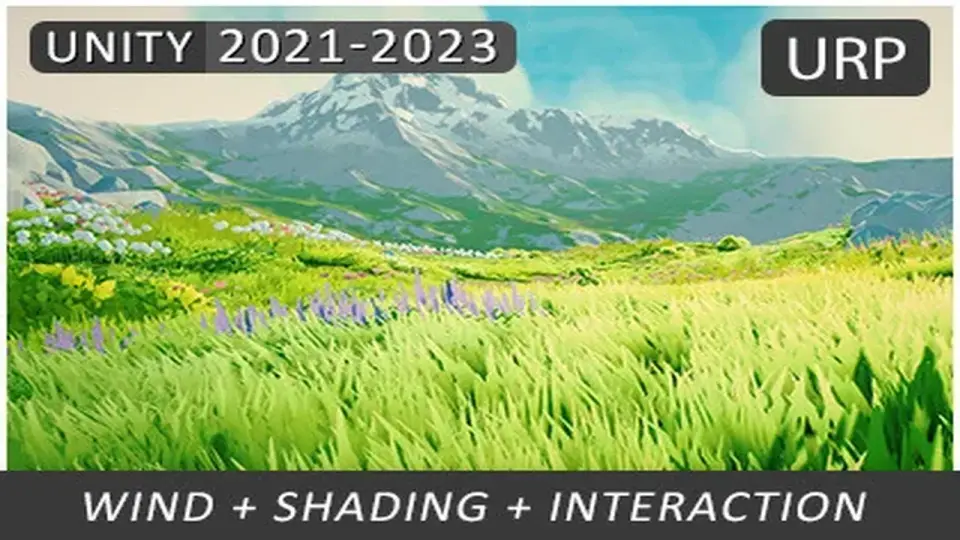
Projects that spend a lot of time looking down at terrain need grass that does more than fill space. This shader is aimed at delivering stylized grass for the Universal Render Pipeline with visual behavior that holds up when the camera changes angle, moves close to the ground, or pulls back for a wider view.
The setup is built for Unity 2021.3 through 2023.2, and the core idea is straightforward: grass should feel alive without turning into a heavy special case. Wind motion, camera-facing fades, and perspective correction all work together to keep the coverage readable. The shader also includes sun light translucency rendering, which gives the blades a brighter response where light passes through them.
Instead of treating grass as a generic surface, the shader handles it as a visual layer with its own response to movement, lighting, and distance. That matters in scenes where the ground needs to remain believable while still carrying a stylized look.
Motion and interaction without a second camera
Wind animation is one of the main pieces here. The shader supports dynamic changes in speed and direction through a Wind Zone, so the movement can be tied to scene conditions rather than staying fixed. That gives the grass a sense of shared motion across the environment instead of isolated motion on each patch.
Interaction is handled through an easy-to-use system that supports bending and flattening. Trails, meshes, lines, and particle effects can all be used to affect the grass, which makes it suitable for scenes where characters, objects, or effects need to leave a visible path through the field. The shader does not use a second camera for bending, so the workflow avoids the extra culling and batching overhead that can come with that approach.
Grass color can also vary in a few practical ways. It blends with the terrain surface, including tiled setups and mesh terrains, and it supports per-object and per-vertex color variation to break up repetition. That helps keep large fields from looking tiled or uniform, especially when the same grass is repeated across wide areas.
Shading choices that stay close to the scene
The shader includes both physically-based and simple shading modes. The simple mode is similar to the Lit and Simple Lit shaders, so it gives a familiar path for projects that want a lighter visual style without leaving URP conventions behind. The PBR option is there when the scene needs a more grounded response to lighting.
Several camera and view-dependent options are included to keep the grass usable in different shot types. Perspective correction helps with coverage when the camera looks down from above. Angle fading fades out faces that are not oriented toward the camera, and near/far camera fading gives another layer of control over how the grass appears across distance.
These options make the shader more practical in scenes where the same grass has to work both up close and from a higher viewpoint. The effect is not just visual polish; it is also about keeping the grass present in the frame without forcing every blade to read the same way at every distance.
Where it fits, and where it does not
Compatibility is focused on URP rather than every rendering path. The shader supports Universal Render Pipeline 12.1.8 and newer, while excluding the Built-in RP and HDRP. It is also SRP Batching compatible, and it supports PC, macOS with OpenGL or Metal, and consoles. Render Graph is not supported.
There is also one-click integration for several related tools:
Foliage Renderer
Nature Renderer (2020-2022)
GPU Instancer
Curved World 2020
Vegetation Studio and Vegetation Studio Pro
The shader is not a grass placement or render tool, so it does not replace the step of actually placing vegetation in a scene. It is also not suitable for mobile platforms. Performance depends mainly on the method used for rendering, and the grass itself is composed of regular individual meshes rather than a geometry shader.
Those limits make the intended workflow clearer. This is a shader for projects that already know they want URP grass behavior and want the rendering side to handle wind, bending, blending, and fading in a controlled way.
Legacy status and the current workflow
This version began in 2020 and was updated through a series of complementary updates, including one major revision. As of 2024 it is no longer under active development, but it still receives minor fixes needed to keep it working in supported Unity versions. It is mature and stable for the versions it supports.
Unity 6 introduced a different rendering architecture, so Unity 6 and newer use a separate shader implementation and rendering paradigm. That means the 2021-2023 version is best thought of as the URP-focused branch for projects that stay within its supported Unity range.
For teams already on URP, the practical value is in the balance it strikes: wind, interaction, lighting response, terrain blending, and camera-aware behavior are all packed into a shader workflow that stays specific about what it can and cannot do. It is most useful for stylized scenes that need grass to react to movement and lighting while remaining readable across PC, macOS, and console targets.
 Shaders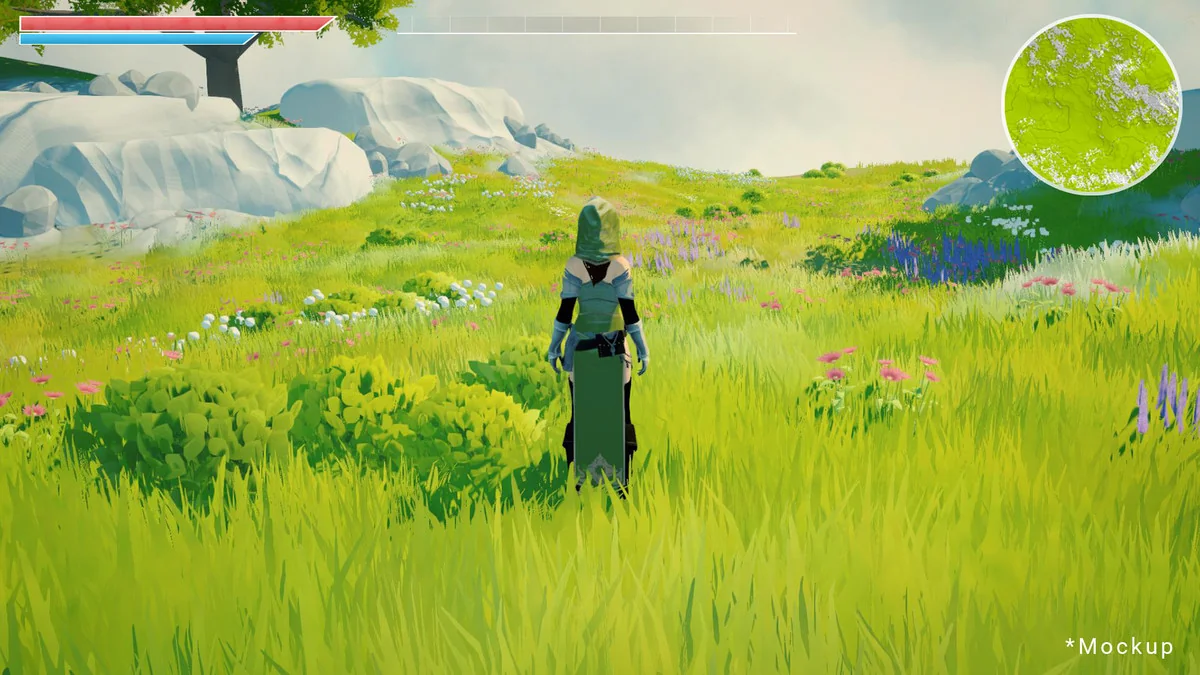
 Shaders
 Shaders
 Shaders