"7e6fc58c410f2894"{"id":"24364","slug":"sprite-shaders-ultimate","title":"Sprite Shaders Ultimate","category":"Shaders","engine":"Original Unity version: 2020.3.0","assetVersion":"Original Unity version: 2020.3.0","engineVersion":"Asset Version:6.10","tag":"Shaders","accent":"cyan","visual":"luts","summary":"Sprite Shaders Ultimate brings sprites and UI elements into motion with a large set of combinable shaders. It includes tools for masking, fading, pixel art handling, shader baking, and support across render pipelines.","platform":"Unity","publishedAt":"2026-04-14T11:31:15.000Z","updatedAt":"2026-04-20T06:12:49.000Z","sourceNotes":[],"fileContents":[],"compatibility":["Unity","Original Unity version: 2020.3.0","Asset Version: 6.10"],"featuredImage":{"alt":"Sprite Shaders Ultimate","src":"https://3dcghub.com/wp-content/uploads/2026/04/dc468761f253_7796ac63-cceb-4e61-9b8d-fe845bffe76d_1280x720_stretch.webp"},"hasDownloadLink":true,"downloads":2,"terms":[{"taxonomy":"category","slug":"shaders-vfx-unity-2","name":"Shaders"},{"taxonomy":"post_tag","slug":"materials","name":"Materials"},{"taxonomy":"post_tag","slug":"unity","name":"Unity"},{"taxonomy":"post_tag","slug":"vfx","name":"VFX"}],"galleryImages":[{"src":"https://3dcghub.com/wp-content/uploads/2026/04/fd9fd201ac66_4a3c011b-0403-4d88-9fb0-b17de756bcf4_scaled.webp","alt":"Sprite Shaders Ultimate"},{"src":"https://3dcghub.com/wp-content/uploads/2026/04/425c9a69a552_4a1bd92f-dfea-497e-9446-6748318492f5_scaled.webp","alt":"Sprite Shaders Ultimate"},{"src":"https://3dcghub.com/wp-content/uploads/2026/04/c70a3d1d5e3a_17ba86cb-5efe-44f7-a59b-06322ac89d47_scaled.webp","alt":"Sprite Shaders Ultimate"},{"src":"https://3dcghub.com/wp-content/uploads/2026/04/6c39b3b7f248_62ae5a67-ee37-4ec2-9074-661339c62bcc_scaled.webp","alt":"Sprite Shaders Ultimate"},{"src":"https://3dcghub.com/wp-content/uploads/2026/04/96ceca668a40_3d9fb12a-cbef-4486-9093-46743dc971c9_scaled.webp","alt":"Sprite Shaders Ultimate"},{"src":"https://3dcghub.com/wp-content/uploads/2026/04/d2eebcd58d25_21f06775-0ffa-465e-b01a-64db45528122_scaled.webp","alt":"Sprite Shaders Ultimate"},{"src":"https://3dcghub.com/wp-content/uploads/2026/04/a1d771014b29_fd2634ab-cf7f-47e8-8e7b-a18ce86f06b9_scaled.webp","alt":"Sprite Shaders Ultimate"}],"accessPanel":{"kind":"resource","title":"Access this resource","eyebrow":"Free Download","message":"Log in or create a free account to start your download.","fileName":"Sprite Shaders Ultimate v6.10,v6.17 (03 Sep 2025).7z","safetyNote":"All resources are 100% manually reviewed to eliminate all risks.","actionLabel":"Download Free","resourceType":"Resource archive"},"contentHtml":"\u003ch2\u003eSprites and UI with more room to move\u003c/h2\u003e \u003cp\u003eSprite Shaders Ultimate focuses on turning flat sprites and UI elements into something more active on screen. The shader set is built for visual effects that can be mixed, matched, and adjusted, so artists can shape everything from subtle fades to stronger distortions without leaving the material workflow. It is aimed at scenes where sprites need to feel alive: menus with motion, stylized gameplay effects, foliage interaction, or layered visual treatments that have to stay flexible as they are combined.\u003c/p\u003e \u003cp\u003eThe main draw is the size and variety of the shader collection. With 60+ unique shaders and 65 combinable shaders listed in the feature set, the package gives room to stack effects rather than treat each one as a separate, fixed look. That makes it useful when a project needs variation without building every treatment from scratch.\u003c/p\u003e \u003ch2\u003eHow the shader set expands visual design\u003c/h2\u003e \u003cp\u003eThe included shaders cover a broad range of looks, and the update history shows how the set has grown over time. Version 6 added Gaussian Blur, Negative, Pixel Outline, Shifting, Enchanted, Ping-Pong Glow, Screen Tiling, World Tiling, Smooth Pixel Art, Sine Scale, Wiggle, Recolor RGB, Shadow, and Sharpen. Version 5 added UV Scale, Brightness, Saturation, Contrast, and Hue. Version 4 added Alpha Tint, Split Toning, Poison, Color Replace, and Sine Glow.\u003c/p\u003e \u003cp\u003eThat variety matters because the shaders are not isolated effects. They are meant to be combined, so a single sprite or UI element can take on a layered treatment instead of relying on one hard-coded look. The collection supports both simple and more stylized outcomes, from color changes and tinting to blur, glow, outlines, and pixel-based adjustments.\u003c/p\u003e \u003ch3\u003eVisual control without leaving the material\u003c/h3\u003e \u003cp\u003eEach effect is fully customizable, with support for fading, masking, and modification. Grayscale textures can be used to mask shader effects, and the effects can be faded in different ways. That gives more control over where an effect appears and how it moves across the sprite, which is especially useful for transitions, partial reveals, and layered UI treatments.\u003c/p\u003e \u003cp\u003eThe Shader Baking Tool adds another path for use. With a button in the material, complex visual effects can be baked into sprite textures. That makes the shader system usable not only as a live effect layer, but also as a way to convert a material-driven look into texture data when needed.\u003c/p\u003e \u003ch2\u003ePipeline support and render setup\u003c/h2\u003e \u003cp\u003eAll render pipelines are fully supported, and the package also includes 2D Lit shaders for URP. In addition, 3D Lit shaders are included for URP and Built-In RP. That spread makes the shader set relevant in projects that are not locked to a single rendering path.\u003c/p\u003e \u003cp\u003eThe asset also includes a quick fix for sprite sheets. Some shaders may have issues with sprite sheets because of UV coordinates, and this package offers a way to ensure effects still fully support them. For projects that use sprite sheet animation or related workflows, that detail helps keep shader effects attached to the intended visual layout.\u003c/p\u003e \u003ch2\u003eKeeping pixel art and animated effects in sync\u003c/h2\u003e \u003cp\u003ePixel art support is another practical part of the package. Effects can be snapped to the sprite's pixels so the shader treatment preserves the pixel art style instead of smoothing it out. That makes the shaders more usable for projects that depend on crisp pixel structure and want to avoid softening the look.\u003c/p\u003e \u003cp\u003eTime-based control is also built in. The shader set includes various time-related options for animated effects, including Unscaled Time and FPS Limit. Those options give more control over how animated shaders behave in real time, which can help when the visual result needs to stay consistent across different pacing or update setups.\u003c/p\u003e \u003ch2\u003eWhere the effects can be placed\u003c/h2\u003e \u003cp\u003eSprite Shaders Ultimate is not limited to UV coordinates. The coordinate space can be changed so shader effects map to world space, object space, or screen space. That opens up different ways to align effects across multiple objects, especially when a shared pattern needs to stay visually coherent.\u003c/p\u003e \u003cp\u003eA useful example is fading multiple objects with the same overlapping pattern. With different coordinate space options, the effect can be positioned in a way that stays consistent across several sprites instead of behaving like a separate treatment on each one. That gives scene builders more control over how repeated visuals interact.\u003c/p\u003e \u003ch2\u003eTooling for practical use\u003c/h2\u003e \u003cp\u003eThe package includes utility scripts for various use cases, including foliage interaction. The Shader Inspector is described as intuitive and includes hints, a code generator, and more. Together, those tools reduce how much setup is needed when applying or adjusting effects inside a project.\u003c/p\u003e \u003cp\u003eThe resource is also presented as quick and easy to use, with no coding or shader graph required. For artists or developers who want to work directly with the visual result rather than build shader logic from the ground up, that makes the workflow more immediate.\u003c/p\u003e \u003cp\u003eFor projects that rely on sprites, UI, or stylized 2D presentation, this shader collection offers a broad set of visual treatments with controls that stay close to the material itself. It fits best where layered effects, pixel-aware rendering, and pipeline coverage all matter at the same time.\u003c/p\u003e\n\n\u003ch2\u003eContinue Browsing Similar Packs\u003c/h2\u003e\n\u003cul\u003e\n\u003cli\u003e\u003ca href=\"https://3dcghub.com/make-a-horror-survival-game-in-unity/\" title=\"Make a horror survival game in Unity\"\u003eMake a horror survival game in Unity\u003c/a\u003e\u003c/li\u003e\n\u003cli\u003e\u003ca href=\"https://3dcghub.com/unity-shader-programming-beginners-to-advanced-techniques/\" title=\"Unity Shader Programming: Beginners to Advanced Techniques\"\u003eUnity Shader Programming: Beginners to Advanced Techniques\u003c/a\u003e\u003c/li\u003e\n\u003cli\u003e\u003ca href=\"https://3dcghub.com/mastering-editor-scripting-in-unity/\" title=\"Mastering Editor Scripting in Unity\"\u003eMastering Editor Scripting in Unity\u003c/a\u003e\u003c/li\u003e\n\u003cli\u003e\u003ca href=\"https://3dcghub.com/altos-volumetric-clouds-skybox-and-weather-for-unity-urp/\" title=\"Altos – Volumetric Clouds, Skybox, and Weather for Unity URP\"\u003eAltos – Volumetric Clouds, Skybox, and Weather for Unity URP\u003c/a\u003e\u003c/li\u003e\n\u003cli\u003e\u003ca href=\"https://3dcghub.com/toolkit-for-unity-physics-2026/\" title=\"Toolkit for Unity Physics 2026\"\u003eToolkit for Unity Physics 2026\u003c/a\u003e\u003c/li\u003e\n\u003c/ul\u003e","contentTextLength":5612,"navigation":{"current":1891,"total":3618,"previous":{"id":"24377","slug":"stylized-grass-shader-for-unity-2021-2023","title":"Stylized Grass Shader (for Unity 2021-2023)","category":"Shaders","platform":"Unity","updatedAt":"2026-04-20T06:12:49.000Z"},"next":{"id":"24353","slug":"realtoon-pro-anime-toon-shader","title":"RealToon (Pro Anime/Toon Shader)","category":"Shaders","platform":"Unity","updatedAt":"2026-04-20T06:12:49.000Z"}},"relatedResources":[{"id":"24052","slug":"all-in-1-sprite-shader","title":"All In 1 Sprite Shader","category":"Shaders","engine":"Original Unity version: 2021.3.45","assetVersion":"Original Unity version: 2021.3.45","engineVersion":"Asset Version:4.25","tag":"Shaders","accent":"cyan","visual":"audio","summary":"All In 1 Sprite Shader brings sprites, UI elements, and particles into one fast workflow. It combines 46+ effects, supports multiple render pipelines, and includes tools for inspection, baking, and script access.","platform":"Unity","publishedAt":"2026-04-12T09:32:11.000Z","updatedAt":"2026-04-19T15:35:01.000Z","sourceNotes":[],"fileContents":[],"compatibility":["Unity","Original Unity version: 2021.3.45","Asset Version: 4.25"],"featuredImage":{"alt":"All In 1 Sprite Shader","src":"https://3dcghub.com/wp-content/uploads/2026/04/c9cd3962dfe2_e5a17b50-03e4-447a-939a-519f7b5e4b8f_1280x720_stretch.webp"},"hasDownloadLink":true,"downloads":5},{"id":"24416","slug":"ui-shader-effects-edge-effects","title":"UI Shader Effects - Edge Effects","category":"Shaders","engine":"Original Unity version: 2021.3.45","assetVersion":"Original Unity version: 2021.3.45","engineVersion":"Asset Version:1.1.1","tag":"Shaders","accent":"cyan","visual":"character","summary":"UI Shader Effects - Edge Effects centers on UI edge treatment for square, rectangular, and circular elements. It combines prefabs, custom shaders, ready-made materials, textures, and UIToolkit files across multiple Unity rendering pipelines.","platform":"Unity","publishedAt":"2026-04-14T11:44:30.000Z","updatedAt":"2026-04-20T06:12:49.000Z","sourceNotes":[],"fileContents":[],"compatibility":["Unity","Original Unity version: 2021.3.45","Asset Version: 1.1.1"],"featuredImage":{"alt":"UI Shader Effects - Edge Effects","src":"https://3dcghub.com/wp-content/uploads/2026/04/76bc5224a0cf_b5fe6fdd-8fb8-413e-82d8-1d8dacd60d39_1280x720_stretch.webp"},"hasDownloadLink":true,"downloads":2},{"id":"24259","slug":"highlight-plus-2-all-in-one-outline-selection-effects","title":"Highlight Plus 2 - All in One Outline \u0026 Selection Effects","category":"Shaders","engine":"Original Unity version: 2022.3.24","assetVersion":"Original Unity version: 2022.3.24","engineVersion":"Asset Version:22.0.1","tag":"Shaders","accent":"cyan","visual":"luts","summary":"Highlight Plus 2 adds a single workflow for outlining, glowing, overlaying, and marking objects inside Unity scenes. It works across objects, characters, sprites, and several other scene elements while keeping the original materials and meshes intact.","platform":"Unity","publishedAt":"2026-04-12T10:26:01.000Z","updatedAt":"2026-04-19T15:34:55.000Z","sourceNotes":[],"fileContents":[],"compatibility":["Unity","Original Unity version: 2022.3.24","Asset Version: 22.0.1"],"featuredImage":{"alt":"Highlight Plus 2 - All in One Outline \u0026 Selection Effects","src":"https://3dcghub.com/wp-content/uploads/2026/04/48ad2b2744b8_03106861-a5bb-414a-bb34-8ea70794f46f_1280x720_stretch.webp"},"hasDownloadLink":true,"downloads":2}]}
Shaders
Sprite Shaders Ultimate
Sprite Shaders Ultimate brings sprites and UI elements into motion with a large set of combinable shaders. It includes tools for masking, fading, pixel art handling, shader baking, and support across render pipelines.
Sprite Shaders Ultimate focuses on turning flat sprites and UI elements into something more active on screen. The shader set is built for visual effects that can be mixed, matched, and adjusted, so artists can shape everything from subtle fades to stronger distortions without leaving the material workflow. It is aimed at scenes where sprites need to feel alive: menus with motion, stylized gameplay effects, foliage interaction, or layered visual treatments that have to stay flexible as they are combined.
The main draw is the size and variety of the shader collection. With 60+ unique shaders and 65 combinable shaders listed in the feature set, the package gives room to stack effects rather than treat each one as a separate, fixed look. That makes it useful when a project needs variation without building every treatment from scratch.
How the shader set expands visual design
The included shaders cover a broad range of looks, and the update history shows how the set has grown over time. Version 6 added Gaussian Blur, Negative, Pixel Outline, Shifting, Enchanted, Ping-Pong Glow, Screen Tiling, World Tiling, Smooth Pixel Art, Sine Scale, Wiggle, Recolor RGB, Shadow, and Sharpen. Version 5 added UV Scale, Brightness, Saturation, Contrast, and Hue. Version 4 added Alpha Tint, Split Toning, Poison, Color Replace, and Sine Glow.
That variety matters because the shaders are not isolated effects. They are meant to be combined, so a single sprite or UI element can take on a layered treatment instead of relying on one hard-coded look. The collection supports both simple and more stylized outcomes, from color changes and tinting to blur, glow, outlines, and pixel-based adjustments.
Visual control without leaving the material
Each effect is fully customizable, with support for fading, masking, and modification. Grayscale textures can be used to mask shader effects, and the effects can be faded in different ways. That gives more control over where an effect appears and how it moves across the sprite, which is especially useful for transitions, partial reveals, and layered UI treatments.
The Shader Baking Tool adds another path for use. With a button in the material, complex visual effects can be baked into sprite textures. That makes the shader system usable not only as a live effect layer, but also as a way to convert a material-driven look into texture data when needed.
Pipeline support and render setup
All render pipelines are fully supported, and the package also includes 2D Lit shaders for URP. In addition, 3D Lit shaders are included for URP and Built-In RP. That spread makes the shader set relevant in projects that are not locked to a single rendering path.
The asset also includes a quick fix for sprite sheets. Some shaders may have issues with sprite sheets because of UV coordinates, and this package offers a way to ensure effects still fully support them. For projects that use sprite sheet animation or related workflows, that detail helps keep shader effects attached to the intended visual layout.
Keeping pixel art and animated effects in sync
Pixel art support is another practical part of the package. Effects can be snapped to the sprite's pixels so the shader treatment preserves the pixel art style instead of smoothing it out. That makes the shaders more usable for projects that depend on crisp pixel structure and want to avoid softening the look.
Time-based control is also built in. The shader set includes various time-related options for animated effects, including Unscaled Time and FPS Limit. Those options give more control over how animated shaders behave in real time, which can help when the visual result needs to stay consistent across different pacing or update setups.
Where the effects can be placed
Sprite Shaders Ultimate is not limited to UV coordinates. The coordinate space can be changed so shader effects map to world space, object space, or screen space. That opens up different ways to align effects across multiple objects, especially when a shared pattern needs to stay visually coherent.
A useful example is fading multiple objects with the same overlapping pattern. With different coordinate space options, the effect can be positioned in a way that stays consistent across several sprites instead of behaving like a separate treatment on each one. That gives scene builders more control over how repeated visuals interact.
Tooling for practical use
The package includes utility scripts for various use cases, including foliage interaction. The Shader Inspector is described as intuitive and includes hints, a code generator, and more. Together, those tools reduce how much setup is needed when applying or adjusting effects inside a project.
The resource is also presented as quick and easy to use, with no coding or shader graph required. For artists or developers who want to work directly with the visual result rather than build shader logic from the ground up, that makes the workflow more immediate.
For projects that rely on sprites, UI, or stylized 2D presentation, this shader collection offers a broad set of visual treatments with controls that stay close to the material itself. It fits best where layered effects, pixel-aware rendering, and pipeline coverage all matter at the same time.
 Shaders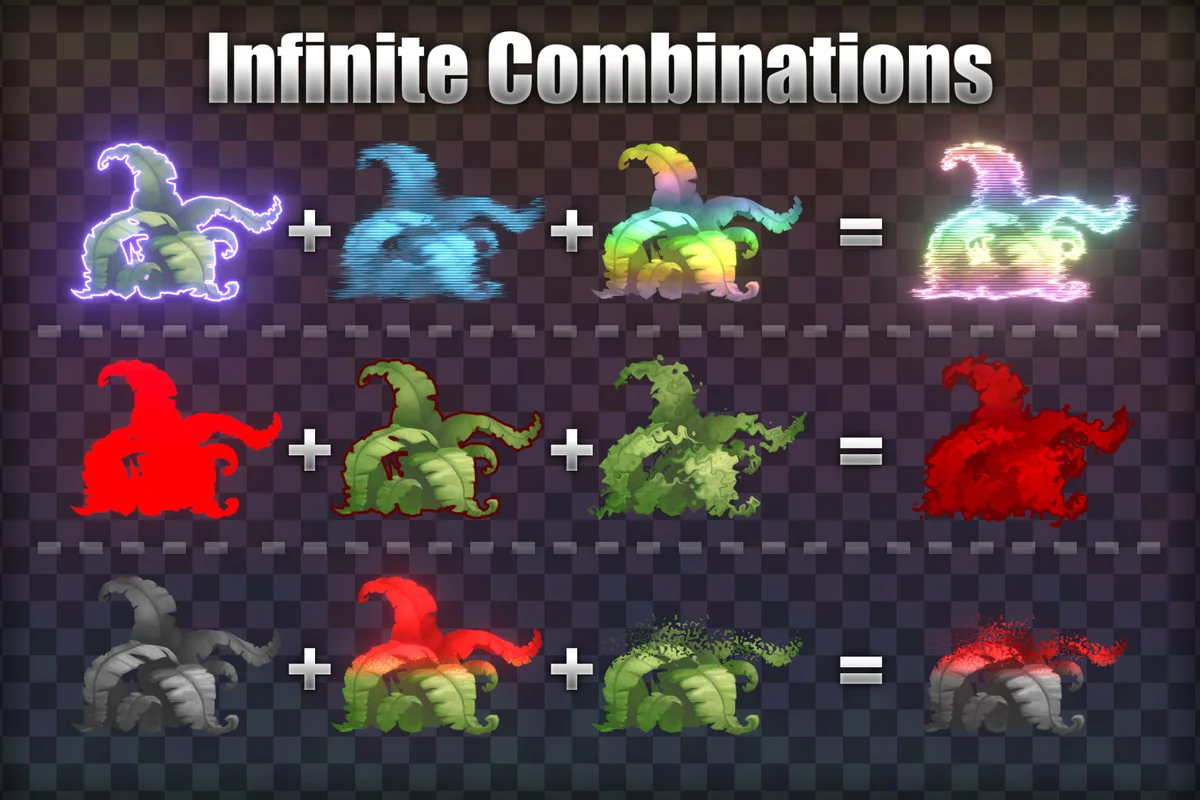
 Shaders
 Shaders
 Shaders