"7e6fc58c410f2894"{"id":"24259","slug":"highlight-plus-2-all-in-one-outline-selection-effects","title":"Highlight Plus 2 - All in One Outline \u0026 Selection Effects","category":"Shaders","engine":"Original Unity version: 2022.3.24","assetVersion":"Original Unity version: 2022.3.24","engineVersion":"Asset Version:22.0.1","tag":"Shaders","accent":"cyan","visual":"luts","summary":"Highlight Plus 2 adds a single workflow for outlining, glowing, overlaying, and marking objects inside Unity scenes. It works across objects, characters, sprites, and several other scene elements while keeping the original materials and meshes intact.","platform":"Unity","publishedAt":"2026-04-12T10:26:01.000Z","updatedAt":"2026-04-19T15:34:55.000Z","sourceNotes":[],"fileContents":[],"compatibility":["Unity","Original Unity version: 2022.3.24","Asset Version: 22.0.1"],"featuredImage":{"alt":"Highlight Plus 2 - All in One Outline \u0026 Selection Effects","src":"https://3dcghub.com/wp-content/uploads/2026/04/48ad2b2744b8_03106861-a5bb-414a-bb34-8ea70794f46f_1280x720_stretch.webp"},"hasDownloadLink":true,"downloads":2,"terms":[{"taxonomy":"category","slug":"shaders-vfx-unity-2","name":"Shaders"},{"taxonomy":"post_tag","slug":"environment","name":"Environment"},{"taxonomy":"post_tag","slug":"unity","name":"Unity"},{"taxonomy":"post_tag","slug":"vfx","name":"VFX"}],"galleryImages":[{"src":"https://3dcghub.com/wp-content/uploads/2026/04/079b1cd3ddc6_63dc3e49-abf6-4e86-a9da-ee5770318124_scaled.webp","alt":"Highlight Plus 2 - All in One Outline \u0026 Selection Effects"},{"src":"https://3dcghub.com/wp-content/uploads/2026/04/44997efbfc0f_48566487-4116-4b24-b0c8-45ac638a1030_scaled.webp","alt":"Highlight Plus 2 - All in One Outline \u0026 Selection Effects"},{"src":"https://3dcghub.com/wp-content/uploads/2026/04/e406043b0d13_e91856e1-cf62-4dfa-aa98-fd4352170066_scaled.webp","alt":"Highlight Plus 2 - All in One Outline \u0026 Selection Effects"},{"src":"https://3dcghub.com/wp-content/uploads/2026/04/3ce9ddcd6b5d_dd66c1fb-ddda-4f59-9139-76a421e5d84f_scaled.webp","alt":"Highlight Plus 2 - All in One Outline \u0026 Selection Effects"},{"src":"https://3dcghub.com/wp-content/uploads/2026/04/a22470c50f32_8f3677ab-8b7a-4e81-b0c2-8ee8d1c4a96f_scaled.webp","alt":"Highlight Plus 2 - All in One Outline \u0026 Selection Effects"},{"src":"https://3dcghub.com/wp-content/uploads/2026/04/2d0cb828baff_ca3d1de6-12e6-4d00-ac0d-6b3ed7996d72_scaled.webp","alt":"Highlight Plus 2 - All in One Outline \u0026 Selection Effects"},{"src":"https://3dcghub.com/wp-content/uploads/2026/04/b83a3f95700c_0293ccbc-f5c1-47e3-b6aa-8c1cfc1ed5b5_scaled.webp","alt":"Highlight Plus 2 - All in One Outline \u0026 Selection Effects"},{"src":"https://3dcghub.com/wp-content/uploads/2026/04/5a856be406ca_58ab959c-ab91-44ce-815a-9dea6df4fe72_scaled.webp","alt":"Highlight Plus 2 - All in One Outline \u0026 Selection Effects"},{"src":"https://3dcghub.com/wp-content/uploads/2026/04/430c5f3a8ac0_7ed62f6b-6f65-48f6-81a4-fa55c8a1d6e0_scaled.webp","alt":"Highlight Plus 2 - All in One Outline \u0026 Selection Effects"},{"src":"https://3dcghub.com/wp-content/uploads/2026/04/e2fb49509cb2_07059a63-5bb7-497d-ad98-912a4bec7539_scaled.webp","alt":"Highlight Plus 2 - All in One Outline \u0026 Selection Effects"}],"accessPanel":{"kind":"resource","title":"Access this resource","eyebrow":"Free Download","message":"Log in or create a free account to start your download.","fileName":"Highlight Plus - All in One Outline Selection Effects v22.0.1.7z","safetyNote":"All resources are 100% manually reviewed to eliminate all risks.","actionLabel":"Download Free","resourceType":"Resource archive"},"contentHtml":"\u003ch2\u003eStart with the object, not a screen effect\u003c/h2\u003e\n\u003cp\u003eHighlight Plus 2 is set up around a single, efficient script, so the emphasis stays on the object, character, or sprite that needs attention. It is compatible with Unity 6 and is aimed at scenes that need strong visual feedback without replacing the original look of the asset. Because the effects can be applied to single objects or groups, the workflow stays flexible whether the highlight is meant for one target or several elements at once.\u003c/p\u003e\n\u003cp\u003eInstant Preview is one of the most practical parts of the setup. Effects can be tested directly in the Unity Editor without entering Play Mode, which makes it easier to adjust the look while working on a scene. That kind of iteration matters when the effect itself is part of the gameplay or presentation, since outline thickness, glow intensity, overlay treatment, and visibility state all affect how the target reads on screen.\u003c/p\u003e \u003ch2\u003eMix the visual states that fit the scene\u003c/h2\u003e\n\u003cp\u003eThe asset combines multiple highlight effects in one place, so a scene can use a clean outline, a glow, an overlay, or a see-through treatment without switching between separate tools. It also supports combining effects on single or multiple objects, which gives it room to handle both subtle emphasis and more noticeable selection states.\u003c/p\u003e\n\u003cul\u003e \u003cli\u003e\u003cstrong\u003eOutline\u003c/strong\u003e Includes four quality levels, mesh-based instanced rendering, and optimized screen-space options. The outline can be tuned with color, alpha, width, gradient, padding, and visibility mode, including normal, always in front, or behind.\u003c/li\u003e \u003cli\u003e\u003cstrong\u003eOuter Glow\u003c/strong\u003e Adds per-object bloom and aura effects with four quality levels. It includes visibility settings, noise or dither, animation, and blending control.\u003c/li\u003e \u003cli\u003e\u003cstrong\u003eInner/Rim Glow\u003c/strong\u003e Focuses on color, width, intensity, and blend modes for a tighter glowing edge.\u003c/li\u003e \u003cli\u003e\u003cstrong\u003eFocus\u003c/strong\u003e Dims, blurs, and desaturates the surrounding scene so the highlighted object stays visually dominant.\u003c/li\u003e \u003cli\u003e\u003cstrong\u003eOverlay\u003c/strong\u003e Applies color or textured overlays with UV mapping control, alpha, animation speed, and custom blending.\u003c/li\u003e \u003cli\u003e\u003cstrong\u003eTarget\u003c/strong\u003e Places aiming indicators or special markers on specific parts of a GameObject. It supports custom textures, procedural shaders, and styles such as antialiased frames, crosses, or corners.\u003c/li\u003e \u003cli\u003e\u003cstrong\u003eArea of Effect\u003c/strong\u003e Creates ground-aligned animated graphics under objects or characters, which fits decal-style presentation.\u003c/li\u003e \u003cli\u003e\u003cstrong\u003eSee-Through\u003c/strong\u003e Reveals occluded objects or characters with adjustable intensity, tint, alpha, and optional colored borders while preserving correct depth.\u003c/li\u003e \u003cli\u003e\u003cstrong\u003eIcon\u003c/strong\u003e Displays floating or bouncing icons above highlighted objects, with gradient and rotation options.\u003c/li\u003e \u003cli\u003e\u003cstrong\u003eLabel\u003c/strong\u003e Shows dynamic information, such as object names, next to the highlighted target.\u003c/li\u003e \u003cli\u003e\u003cstrong\u003eHit/Flash Effect\u003c/strong\u003e Offers three variations with adjustable color, intensity, and fade-out duration.\u003c/li\u003e\n\u003c/ul\u003e\n\u003cp\u003eThat mix makes the asset useful for more than a single type of interaction. An object can be given a border, a glow, and a label, while another can receive a target marker or a see-through treatment instead. The result is a consistent system for emphasis, selection, and visual feedback inside the same scene.\u003c/p\u003e \u003ch2\u003eControl how and when the highlight appears\u003c/h2\u003e\n\u003cp\u003eHighlight Plus 2 can be driven in several ways. It supports highlighting individual objects, groups, or automatic mode with layer-based triggering, so the same setup can serve manual selection states and broader scene rules. Trigger options include volumes, Highlight Managers, or C# scripting.\u003c/p\u003e\n\u003cp\u003eThat control model is useful when a highlight needs to appear only under certain conditions rather than staying on all the time. A volume can activate the effect when something enters a defined space, a Highlight Manager can organize a broader setup, and scripting can connect the visual treatment to gameplay logic. Since the same system handles the effects and the trigger paths, it stays focused instead of spreading related work across separate tools.\u003c/p\u003e \u003ch2\u003eKeep the original materials and the wider scene intact\u003c/h2\u003e\n\u003cp\u003eThe performance note is direct: the asset avoids full-screen image effects and preserves object materials, shaders, and meshes. That matters for scenes where the original asset setup should remain visible and unchanged while the highlight effect sits on top of it. It is engineered for performance and cross-platform compatibility, which makes it suitable for production scenes that need the effect to behave consistently across different setups.\u003c/p\u003e\n\u003cp\u003eCompatibility extends to a broad set of scene content, including 3D objects, skinned meshes, LOD groups, sprite renderers, and particle systems. That range lets the same highlight system touch static environment pieces, animated characters, sprite-based content, and effects elements without changing the underlying asset type. For scenes that mix several forms of content, the benefit is having one highlight workflow that can follow the object type already in use.\u003c/p\u003e\n\u003cp\u003eFor teams building selection feedback, interaction cues, or visual emphasis inside Unity, Highlight Plus 2 stays practical because it keeps the highlight system close to the content it affects. The setup is centered on one efficient script, the controls are flexible, and the rendering approach is designed to leave the original scene assets in place.\u003c/p\u003e\n\n\u003ch2\u003eRelated Resources Worth Checking\u003c/h2\u003e\n\u003cul\u003e\n\u003cli\u003e\u003ca href=\"https://3dcghub.com/altos-volumetric-clouds-skybox-and-weather-for-unity-urp/\" title=\"Altos – Volumetric Clouds, Skybox, and Weather for Unity URP\"\u003eAltos – Volumetric Clouds, Skybox, and Weather for Unity URP\u003c/a\u003e\u003c/li\u003e\n\u003cli\u003e\u003ca href=\"https://3dcghub.com/toolkit-for-unity-physics-2026/\" title=\"Toolkit for Unity Physics 2026\"\u003eToolkit for Unity Physics 2026\u003c/a\u003e\u003c/li\u003e\n\u003cli\u003e\u003ca href=\"https://3dcghub.com/opencv-for-unity/\" title=\"OpenCV for Unity\"\u003eOpenCV for Unity\u003c/a\u003e\u003c/li\u003e\n\u003cli\u003e\u003ca href=\"https://3dcghub.com/exporter-for-unreal-to-for-unity-2026/\" title=\"Exporter for Unreal to/for Unity 2026\"\u003eExporter for Unreal to/for Unity 2026\u003c/a\u003e\u003c/li\u003e\n\u003cli\u003e\u003ca href=\"https://3dcghub.com/dialogue-system-for-unity/\" title=\"Dialogue System for Unity\"\u003eDialogue System for Unity\u003c/a\u003e\u003c/li\u003e\n\u003c/ul\u003e","contentTextLength":5439,"navigation":{"current":3613,"total":3618,"previous":{"id":"24273","slug":"embergen-volumetric-unreal-engine-5","title":"EmberGen Volumetric \u0026 Unreal Engine 5","category":"Unreal Engine","platform":"Unreal Engine","updatedAt":"2026-04-19T15:34:55.000Z"},"next":{"id":"24246","slug":"galaxy-materials-skybox-update","title":"Galaxy Materials (Skybox Update)","category":"Shaders","platform":"Unity","updatedAt":"2026-04-19T15:34:55.000Z"}},"relatedResources":[{"id":"24077","slug":"anime-shading-plus","title":"Anime Shading Plus","category":"Shaders","engine":"Original Unity version: 2022.3.62","assetVersion":"Original Unity version: 2022.3.62","engineVersion":"Asset Version:1.3","tag":"Shaders","accent":"cyan","visual":"city","summary":"Anime Shading Plus focuses on one specific problem: getting anime-style character rendering into Unity without building the lighting and pass logic from scratch. It combines shader work, outline options, shadow handling, and a few workflow tools for charact...","platform":"Unity","publishedAt":"2026-04-12T09:39:40.000Z","updatedAt":"2026-04-19T15:35:00.000Z","sourceNotes":[],"fileContents":[],"compatibility":["Unity","Original Unity version: 2022.3.62","Asset Version: 1.3"],"featuredImage":{"alt":"Anime Shading Plus","src":"https://3dcghub.com/wp-content/uploads/2026/04/8bdfd2b243d4_f619d888-b308-400e-ba5c-7573e82f327b_1280x720_stretch.webp"},"hasDownloadLink":true,"downloads":1},{"id":"24353","slug":"realtoon-pro-anime-toon-shader","title":"RealToon (Pro Anime/Toon Shader)","category":"Shaders","engine":"Original Unity version: 5.6.0","assetVersion":"Original Unity version: 5.6.0","engineVersion":"Asset Version:5.0.10","tag":"Shaders","accent":"cyan","visual":"animation","summary":"RealToon brings anime and cartoon shading into Unity scenes that need a clean stylized look for characters and objects. It spans Built-In, URP, and HDRP support, while adding controls for outlines, shadows, rim light, and other toon-specific surface effects.","platform":"Unity","publishedAt":"2026-04-14T11:22:53.000Z","updatedAt":"2026-04-20T06:12:49.000Z","sourceNotes":[],"fileContents":[],"compatibility":["Unity","Original Unity version: 5.6.0","Asset Version: 5.0.10"],"featuredImage":{"alt":"RealToon (Pro Anime/Toon Shader)","src":"https://3dcghub.com/wp-content/uploads/2026/04/9d4a38f87daa_63cc8a88-dc6c-442e-bda6-950a8054a774_1280x720_stretch.webp"},"hasDownloadLink":true,"downloads":1},{"id":"24052","slug":"all-in-1-sprite-shader","title":"All In 1 Sprite Shader","category":"Shaders","engine":"Original Unity version: 2021.3.45","assetVersion":"Original Unity version: 2021.3.45","engineVersion":"Asset Version:4.25","tag":"Shaders","accent":"cyan","visual":"audio","summary":"All In 1 Sprite Shader brings sprites, UI elements, and particles into one fast workflow. It combines 46+ effects, supports multiple render pipelines, and includes tools for inspection, baking, and script access.","platform":"Unity","publishedAt":"2026-04-12T09:32:11.000Z","updatedAt":"2026-04-19T15:35:01.000Z","sourceNotes":[],"fileContents":[],"compatibility":["Unity","Original Unity version: 2021.3.45","Asset Version: 4.25"],"featuredImage":{"alt":"All In 1 Sprite Shader","src":"https://3dcghub.com/wp-content/uploads/2026/04/c9cd3962dfe2_e5a17b50-03e4-447a-939a-519f7b5e4b8f_1280x720_stretch.webp"},"hasDownloadLink":true,"downloads":5}]}
Shaders
Highlight Plus 2 - All in One Outline & Selection Effects
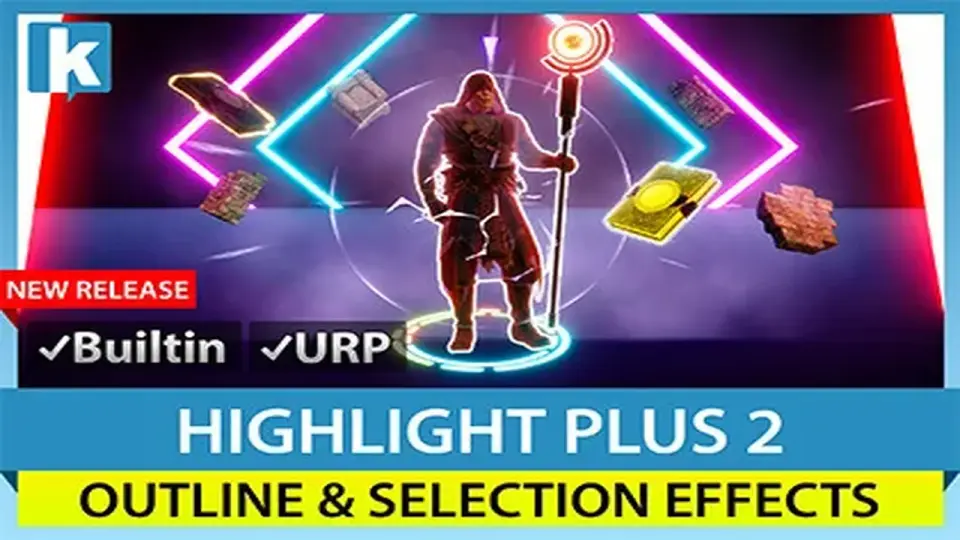
Highlight Plus 2 adds a single workflow for outlining, glowing, overlaying, and marking objects inside Unity scenes. It works across objects, characters, sprites, and several other scene elements while keeping the original materials and meshes intact.
Highlight Plus 2 is set up around a single, efficient script, so the emphasis stays on the object, character, or sprite that needs attention. It is compatible with Unity 6 and is aimed at scenes that need strong visual feedback without replacing the original look of the asset. Because the effects can be applied to single objects or groups, the workflow stays flexible whether the highlight is meant for one target or several elements at once.
Instant Preview is one of the most practical parts of the setup. Effects can be tested directly in the Unity Editor without entering Play Mode, which makes it easier to adjust the look while working on a scene. That kind of iteration matters when the effect itself is part of the gameplay or presentation, since outline thickness, glow intensity, overlay treatment, and visibility state all affect how the target reads on screen.
Mix the visual states that fit the scene
The asset combines multiple highlight effects in one place, so a scene can use a clean outline, a glow, an overlay, or a see-through treatment without switching between separate tools. It also supports combining effects on single or multiple objects, which gives it room to handle both subtle emphasis and more noticeable selection states.
Outline Includes four quality levels, mesh-based instanced rendering, and optimized screen-space options. The outline can be tuned with color, alpha, width, gradient, padding, and visibility mode, including normal, always in front, or behind.
Outer Glow Adds per-object bloom and aura effects with four quality levels. It includes visibility settings, noise or dither, animation, and blending control.
Inner/Rim Glow Focuses on color, width, intensity, and blend modes for a tighter glowing edge.
Focus Dims, blurs, and desaturates the surrounding scene so the highlighted object stays visually dominant.
Overlay Applies color or textured overlays with UV mapping control, alpha, animation speed, and custom blending.
Target Places aiming indicators or special markers on specific parts of a GameObject. It supports custom textures, procedural shaders, and styles such as antialiased frames, crosses, or corners.
Area of Effect Creates ground-aligned animated graphics under objects or characters, which fits decal-style presentation.
See-Through Reveals occluded objects or characters with adjustable intensity, tint, alpha, and optional colored borders while preserving correct depth.
Icon Displays floating or bouncing icons above highlighted objects, with gradient and rotation options.
Label Shows dynamic information, such as object names, next to the highlighted target.
Hit/Flash Effect Offers three variations with adjustable color, intensity, and fade-out duration.
That mix makes the asset useful for more than a single type of interaction. An object can be given a border, a glow, and a label, while another can receive a target marker or a see-through treatment instead. The result is a consistent system for emphasis, selection, and visual feedback inside the same scene.
Control how and when the highlight appears
Highlight Plus 2 can be driven in several ways. It supports highlighting individual objects, groups, or automatic mode with layer-based triggering, so the same setup can serve manual selection states and broader scene rules. Trigger options include volumes, Highlight Managers, or C# scripting.
That control model is useful when a highlight needs to appear only under certain conditions rather than staying on all the time. A volume can activate the effect when something enters a defined space, a Highlight Manager can organize a broader setup, and scripting can connect the visual treatment to gameplay logic. Since the same system handles the effects and the trigger paths, it stays focused instead of spreading related work across separate tools.
Keep the original materials and the wider scene intact
The performance note is direct: the asset avoids full-screen image effects and preserves object materials, shaders, and meshes. That matters for scenes where the original asset setup should remain visible and unchanged while the highlight effect sits on top of it. It is engineered for performance and cross-platform compatibility, which makes it suitable for production scenes that need the effect to behave consistently across different setups.
Compatibility extends to a broad set of scene content, including 3D objects, skinned meshes, LOD groups, sprite renderers, and particle systems. That range lets the same highlight system touch static environment pieces, animated characters, sprite-based content, and effects elements without changing the underlying asset type. For scenes that mix several forms of content, the benefit is having one highlight workflow that can follow the object type already in use.
For teams building selection feedback, interaction cues, or visual emphasis inside Unity, Highlight Plus 2 stays practical because it keeps the highlight system close to the content it affects. The setup is centered on one efficient script, the controls are flexible, and the rendering approach is designed to leave the original scene assets in place.
 Shaders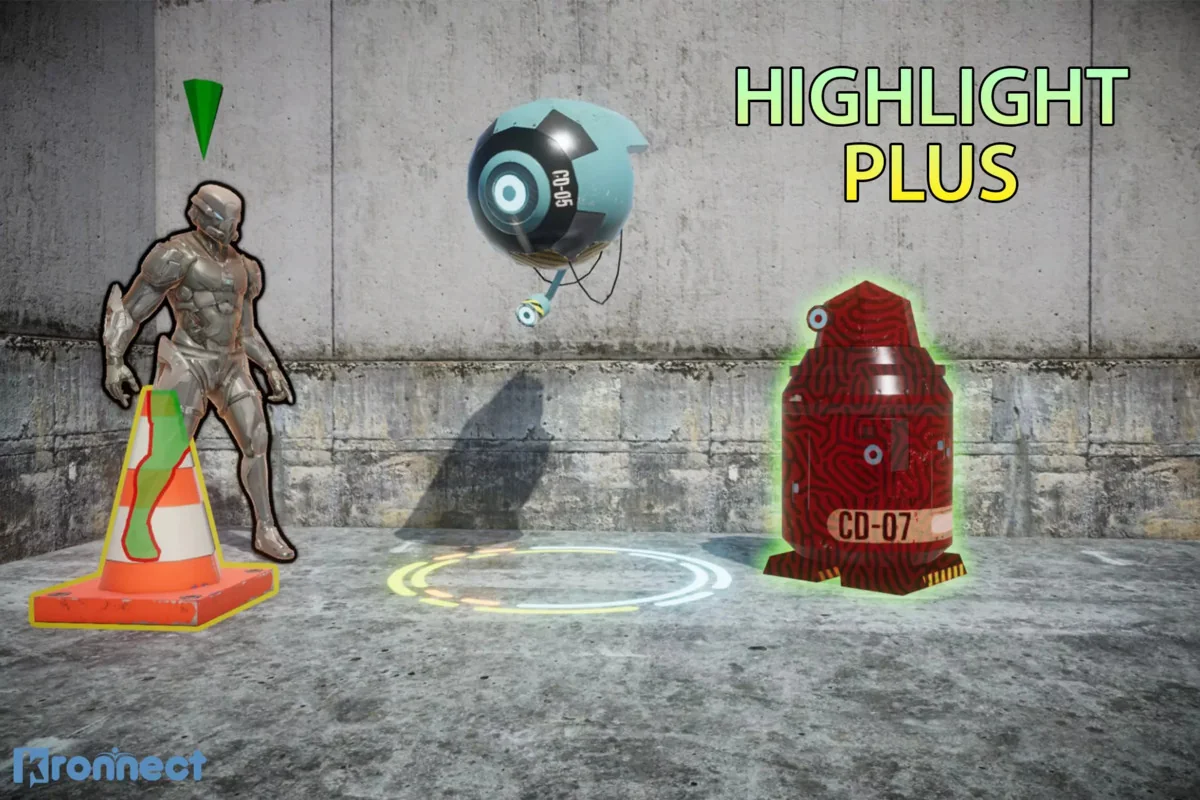
 Shaders
 Shaders
 Shaders