"7e6fc58c410f2894"{"id":"24246","slug":"galaxy-materials-skybox-update","title":"Galaxy Materials (Skybox Update)","category":"Shaders","engine":"Original Unity version: 2020.3.40","assetVersion":"Original Unity version: 2020.3.40","engineVersion":"Asset Version:2.1","tag":"Shaders","accent":"cyan","visual":"luts","summary":"Galaxy Materials (Skybox Update) centers on space and nebula surfaces that can be applied to meshes or used as skyboxes. It gives artists a set of editable shaders, cubemap textures, and gradient-driven controls for shaping the look across Built-in, URP, an...","platform":"Unity","publishedAt":"2026-04-12T10:23:16.000Z","updatedAt":"2026-04-19T15:34:55.000Z","sourceNotes":[],"fileContents":[],"compatibility":["Unity","Original Unity version: 2020.3.40","Asset Version: 2.1"],"featuredImage":{"alt":"Galaxy Materials (Skybox Update)","src":"https://3dcghub.com/wp-content/uploads/2026/04/89ae8d5d8078_8c7438b1-0416-4898-8b13-e3b5e4f9fbea_1280x720_stretch.webp"},"hasDownloadLink":true,"downloads":0,"terms":[{"taxonomy":"category","slug":"shaders-vfx-unity-2","name":"Shaders"},{"taxonomy":"post_tag","slug":"materials","name":"Materials"},{"taxonomy":"post_tag","slug":"textures","name":"Textures"},{"taxonomy":"post_tag","slug":"unity","name":"Unity"}],"galleryImages":[{"src":"https://3dcghub.com/wp-content/uploads/2026/04/20d2b19176eb_b53a2abd-17bc-435b-a425-f2ae491633bf_scaled.webp","alt":"Galaxy Materials (Skybox Update)"},{"src":"https://3dcghub.com/wp-content/uploads/2026/04/acff150893b5_d32b5268-428a-458e-86e5-b410076efc9d_scaled.webp","alt":"Galaxy Materials (Skybox Update)"},{"src":"https://3dcghub.com/wp-content/uploads/2026/04/905f7b775fff_ae8e3505-6651-4173-bb26-c6fb2002f1b7_scaled.webp","alt":"Galaxy Materials (Skybox Update)"},{"src":"https://3dcghub.com/wp-content/uploads/2026/04/75243e2783e1_b591b4a8-52c1-4456-9363-7268d4b5c051_scaled.webp","alt":"Galaxy Materials (Skybox Update)"},{"src":"https://3dcghub.com/wp-content/uploads/2026/04/b19d802b86c1_5245506f-08a6-4129-ba7c-9965e320be53_scaled.webp","alt":"Galaxy Materials (Skybox Update)"},{"src":"https://3dcghub.com/wp-content/uploads/2026/04/1b5c25e68a0b_a9f3946f-dc58-40f9-a72d-92bef9391f72_scaled.webp","alt":"Galaxy Materials (Skybox Update)"},{"src":"https://3dcghub.com/wp-content/uploads/2026/04/29ef74aefb3f_80a11636-39c9-4494-a4c9-cbbeda0e6ad3_scaled.webp","alt":"Galaxy Materials (Skybox Update)"},{"src":"https://3dcghub.com/wp-content/uploads/2026/04/b43ea35f26e7_85866f39-4e33-46c6-b510-52b1167467a8_scaled.webp","alt":"Galaxy Materials (Skybox Update)"},{"src":"https://3dcghub.com/wp-content/uploads/2026/04/e9d8139d7e5d_bebd2131-7df3-441d-a00e-51b66938dc5d_scaled.webp","alt":"Galaxy Materials (Skybox Update)"}],"accessPanel":{"kind":"resource","title":"Access this resource","eyebrow":"Free Download","message":"Log in or create a free account to start your download.","fileName":"Galaxy Materials (Skybox Update) v2.1.7z","safetyNote":"All resources are 100% manually reviewed to eliminate all risks.","actionLabel":"Download Free","resourceType":"Resource archive"},"contentHtml":"\u003ch2\u003eApplying the galaxy look to meshes and skies\u003c/h2\u003e\n\u003cp\u003eGalaxy Materials (Skybox Update) starts with a straightforward workflow: the galaxy materials can be used on any surface, and the included cubemap textures can also act as skyboxes. That gives the pack two clear uses in the same scene. A surface can carry a space or nebula treatment on a mesh, while the cubemaps can push the background into the same visual language.\u003c/p\u003e\n\u003cp\u003eThe materials are described as extremely flexible, including use on surfaces even without a normal map. That makes the pack practical for objects that need a strong visual finish without relying on extra surface detail. The focus stays on the shader look itself, which is especially useful when the goal is to place a galaxy effect directly into a scene rather than build it from layered surface maps.\u003c/p\u003e\n\u003cp\u003eAt the center of the package is a set of space and nebula materials that can be used on any mesh. The setup is broad enough to support environment pieces, props, and other scene surfaces while keeping the same galaxy styling available for skybox work.\u003c/p\u003e \u003ch2\u003eControls that change the result\u003c/h2\u003e\n\u003cp\u003eThe material controls are where the pack opens up. Rim, distortions, gradient texture, and the scroll speed of background nebulas can all be adjusted, and there are multiple textures and gradients included to help shape the effect. Those parameters make it possible to move the look away from a fixed preset and into something more tuned to the needs of a scene.\u003c/p\u003e\n\u003cp\u003eBecause the shaders are fully editable, the material behavior is not locked to one appearance. The result can be pushed toward stronger contrast, softer nebula movement, or a different color balance depending on how the parameters are set. The pack is presented as very flexible and customizable, so the visual direction comes from the shader controls rather than from a single baked-in style.\u003c/p\u003e\n\u003cp\u003eThis is also where the texture support matters. Noise and gradient textures are included specifically to support customization, which gives the shader more room to vary the galaxy surface and the background transitions. When the effect is placed on a mesh or in a skybox, those texture inputs help keep the material from feeling flat or repetitive.\u003c/p\u003e \u003ch2\u003eWhat comes with the pack\u003c/h2\u003e\n\u003cp\u003eThe included content is clearly focused on the galaxy and skybox workflow. The main set contains 16 Galaxy Materials, 19 Cubemap textures, and 44 Noise and Gradient textures. The skybox textures are set at 4096 x 2048, which gives the skybox side of the package a defined resolution target.\u003c/p\u003e\n\u003cul\u003e \u003cli\u003e16 Galaxy Materials\u003c/li\u003e \u003cli\u003e19 Cubemap textures\u003c/li\u003e \u003cli\u003e44 Noise and Gradient textures\u003c/li\u003e \u003cli\u003eFully editable shaders\u003c/li\u003e \u003cli\u003eSkybox texture resolution: 4096 x 2048\u003c/li\u003e\n\u003c/ul\u003e\n\u003cp\u003eAn example character is not included, so the package stays centered on materials, shaders, and textures rather than a complete character scene setup. That keeps the focus on visual building blocks that can be dropped into a project and shaped around the existing art direction.\u003c/p\u003e\n\u003cp\u003eDocumentation is available online, which helps keep the setup path tied to the package rather than requiring extra guesswork. The asset also includes a clear content scope: materials for surfaces, cubemaps for skies, and supporting textures for customization.\u003c/p\u003e \u003ch2\u003ePipeline support, cameras, and update notes\u003c/h2\u003e\n\u003cp\u003ePipeline coverage includes HDRP, URP, and the Standard (Built-in) pipeline. For Standard, Amplify Shader Editor is used. For URP and HDRP, Shader Graph is used. The asset also works with Orthographic and Perspective cameras, and it is marked as working on PC and Mobiles, with URP tested on mobile.\u003c/p\u003e\n\u003cp\u003eThe version history adds a few useful production notes. The latest version is 2.1, released on Nov 25, 2023. Version 2.1 added the FOX Fix parameter for Orthographic Camera setup. Version 2.0 added 27 baked nebula skybox textures, 43 new materials, and a new Skybox shader variant.\u003c/p\u003e\n\u003cp\u003eThe original Unity version is 2020.3.40, and the render pipeline compatibility lists Built-in, HDRP, and URP for 2020.3.40f1. That combination keeps the package anchored to a specific Unity baseline while still covering the main modern render paths used for space and VFX-heavy scenes.\u003c/p\u003e\n\u003cp\u003eFor projects that need galaxy surfaces, nebula backgrounds, or skybox textures that can be adjusted instead of treated as fixed art, the pack stays focused and usable. It gives artists and developers editable shader controls, mesh-friendly materials, and skybox-ready cubemaps in a setup that covers both cameras and multiple render pipelines.\u003c/p\u003e\n\n\u003ch2\u003eExplore Similar Assets\u003c/h2\u003e\n\u003cul\u003e\n\u003cli\u003e\u003ca href=\"https://3dcghub.com/yughues-metal-materials/\" title=\"Yughues Metal Materials\"\u003eYughues Metal Materials\u003c/a\u003e\u003c/li\u003e\n\u003cli\u003e\u003ca href=\"https://3dcghub.com/stylized-250-materials-bundle/\" title=\"Stylized 250 Materials Bundle\"\u003eStylized 250 Materials Bundle\u003c/a\u003e\u003c/li\u003e\n\u003cli\u003e\u003ca href=\"https://3dcghub.com/preload-materials/\" title=\"Preload materials\"\u003ePreload materials\u003c/a\u003e\u003c/li\u003e\n\u003cli\u003e\u003ca href=\"https://3dcghub.com/terrain-materials-vol-2/\" title=\"Terrain Materials VOL.2\"\u003eTerrain Materials VOL.2\u003c/a\u003e\u003c/li\u003e\n\u003cli\u003e\u003ca href=\"https://3dcghub.com/stylized-materials-vol-1/\" title=\"Stylized materials VOL.1\"\u003eStylized materials VOL.1\u003c/a\u003e\u003c/li\u003e\n\u003c/ul\u003e","contentTextLength":4625,"navigation":{"current":3614,"total":3618,"previous":{"id":"24259","slug":"highlight-plus-2-all-in-one-outline-selection-effects","title":"Highlight Plus 2 - All in One Outline \u0026 Selection Effects","category":"Shaders","platform":"Unity","updatedAt":"2026-04-19T15:34:55.000Z"},"next":{"id":"24234","slug":"pixel-perfect-fog-of-war","title":"Pixel-Perfect Fog Of War","category":"Fullscreen \u0026 Camera Effects","platform":"Unity","updatedAt":"2026-04-19T15:34:55.000Z"}},"relatedResources":[{"id":"24419","slug":"urp-glass-shaders","title":"URP - Glass Shaders","category":"Shaders","engine":"Original Unity version: 6000.3.2","assetVersion":"Original Unity version: 6000.3.2","engineVersion":"","tag":"Shaders","accent":"cyan","visual":"character","summary":"URP - Glass Shaders brings three glass variants to Unity 6 URP, with presets and a demo scene included. The package is framed as lightweight and production-ready, while its update history reaches back through several Unity LTS eras.","platform":"Unity","publishedAt":"2026-04-14T11:49:38.000Z","updatedAt":"2026-04-20T06:12:48.000Z","sourceNotes":[],"fileContents":[],"compatibility":["Unity","Original Unity version: 6000.3.2"],"featuredImage":{"alt":"URP - Glass Shaders","src":"https://3dcghub.com/wp-content/uploads/2026/04/dcee4e45-c9de-42eb-9817-3b438ed40356.webp"},"hasDownloadLink":true,"downloads":1},{"id":"24340","slug":"polyverse-skies-low-poly-skybox-shaders","title":"Polyverse Skies | Low Poly Skybox Shaders","category":"Shaders","engine":"Original Unity version: 2022.3.0","assetVersion":"Original Unity version: 2022.3.0","engineVersion":"Asset Version:3.4.0","tag":"Shaders","accent":"cyan","visual":"character","summary":"Polyverse Skies focuses on stylized skyboxes for low poly games, with controls for gradients, overlays, clouds, stars, sun, moon, and fog. It also supports Standard and Universal Render Pipeline projects, plus Console, Mobile, and VR targets.","platform":"Unity","publishedAt":"2026-04-14T11:22:37.000Z","updatedAt":"2026-04-20T06:12:49.000Z","sourceNotes":[],"fileContents":[],"compatibility":["Unity","Original Unity version: 2022.3.0","Asset Version: 3.4.0"],"featuredImage":{"alt":"Polyverse Skies | Low Poly Skybox Shaders","src":"https://3dcghub.com/wp-content/uploads/2026/04/07945a18b484_c3bce9e3-5ea6-4ca3-8edb-c833f203d51e_1280x720_stretch.webp"},"hasDownloadLink":true,"downloads":0},{"id":"24299","slug":"ice-world-2","title":"Ice World","category":"Shaders","engine":"Original Unity version: 2020.1.2","assetVersion":"Original Unity version: 2020.1.2","engineVersion":"Asset Version:2.0.3","tag":"Shaders","accent":"cyan","visual":"animation","summary":"Ice World centers on a large set of ice textures and shader variants that can be used on lakes, rivers, and model surfaces. It also includes demo scenes, ice floe models, and support for several Unity render pipelines.","platform":"Unity","publishedAt":"2026-04-14T11:12:50.000Z","updatedAt":"2026-04-20T06:12:50.000Z","sourceNotes":[],"fileContents":[],"compatibility":["Unity","Original Unity version: 2020.1.2","Asset Version: 2.0.3"],"featuredImage":{"alt":"Ice World","src":"https://3dcghub.com/wp-content/uploads/2026/04/5379d5e42b61_a48bc4f8-4cd5-4dc5-bf99-4e6616f5df29_1280x720_stretch.webp"},"hasDownloadLink":true,"downloads":2}]}
Shaders
Galaxy Materials (Skybox Update)
Galaxy Materials (Skybox Update) centers on space and nebula surfaces that can be applied to meshes or used as skyboxes. It gives artists a set of editable shaders, cubemap textures, and gradient-driven controls for shaping the look across Built-in, URP, an...
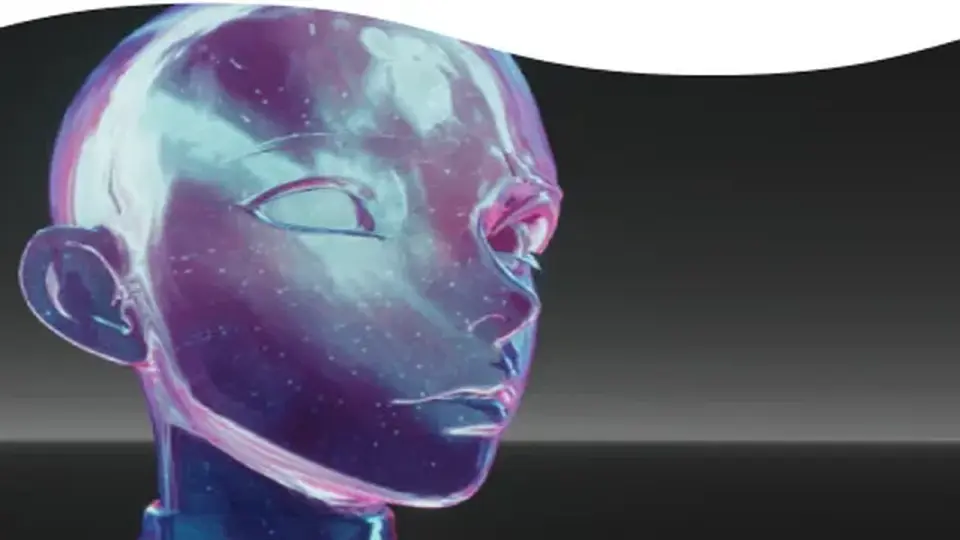
Galaxy Materials (Skybox Update) starts with a straightforward workflow: the galaxy materials can be used on any surface, and the included cubemap textures can also act as skyboxes. That gives the pack two clear uses in the same scene. A surface can carry a space or nebula treatment on a mesh, while the cubemaps can push the background into the same visual language.
The materials are described as extremely flexible, including use on surfaces even without a normal map. That makes the pack practical for objects that need a strong visual finish without relying on extra surface detail. The focus stays on the shader look itself, which is especially useful when the goal is to place a galaxy effect directly into a scene rather than build it from layered surface maps.
At the center of the package is a set of space and nebula materials that can be used on any mesh. The setup is broad enough to support environment pieces, props, and other scene surfaces while keeping the same galaxy styling available for skybox work.
Controls that change the result
The material controls are where the pack opens up. Rim, distortions, gradient texture, and the scroll speed of background nebulas can all be adjusted, and there are multiple textures and gradients included to help shape the effect. Those parameters make it possible to move the look away from a fixed preset and into something more tuned to the needs of a scene.
Because the shaders are fully editable, the material behavior is not locked to one appearance. The result can be pushed toward stronger contrast, softer nebula movement, or a different color balance depending on how the parameters are set. The pack is presented as very flexible and customizable, so the visual direction comes from the shader controls rather than from a single baked-in style.
This is also where the texture support matters. Noise and gradient textures are included specifically to support customization, which gives the shader more room to vary the galaxy surface and the background transitions. When the effect is placed on a mesh or in a skybox, those texture inputs help keep the material from feeling flat or repetitive.
What comes with the pack
The included content is clearly focused on the galaxy and skybox workflow. The main set contains 16 Galaxy Materials, 19 Cubemap textures, and 44 Noise and Gradient textures. The skybox textures are set at 4096 x 2048, which gives the skybox side of the package a defined resolution target.
16 Galaxy Materials
19 Cubemap textures
44 Noise and Gradient textures
Fully editable shaders
Skybox texture resolution: 4096 x 2048
An example character is not included, so the package stays centered on materials, shaders, and textures rather than a complete character scene setup. That keeps the focus on visual building blocks that can be dropped into a project and shaped around the existing art direction.
Documentation is available online, which helps keep the setup path tied to the package rather than requiring extra guesswork. The asset also includes a clear content scope: materials for surfaces, cubemaps for skies, and supporting textures for customization.
Pipeline support, cameras, and update notes
Pipeline coverage includes HDRP, URP, and the Standard (Built-in) pipeline. For Standard, Amplify Shader Editor is used. For URP and HDRP, Shader Graph is used. The asset also works with Orthographic and Perspective cameras, and it is marked as working on PC and Mobiles, with URP tested on mobile.
The version history adds a few useful production notes. The latest version is 2.1, released on Nov 25, 2023. Version 2.1 added the FOX Fix parameter for Orthographic Camera setup. Version 2.0 added 27 baked nebula skybox textures, 43 new materials, and a new Skybox shader variant.
The original Unity version is 2020.3.40, and the render pipeline compatibility lists Built-in, HDRP, and URP for 2020.3.40f1. That combination keeps the package anchored to a specific Unity baseline while still covering the main modern render paths used for space and VFX-heavy scenes.
For projects that need galaxy surfaces, nebula backgrounds, or skybox textures that can be adjusted instead of treated as fixed art, the pack stays focused and usable. It gives artists and developers editable shader controls, mesh-friendly materials, and skybox-ready cubemaps in a setup that covers both cameras and multiple render pipelines.
 Shaders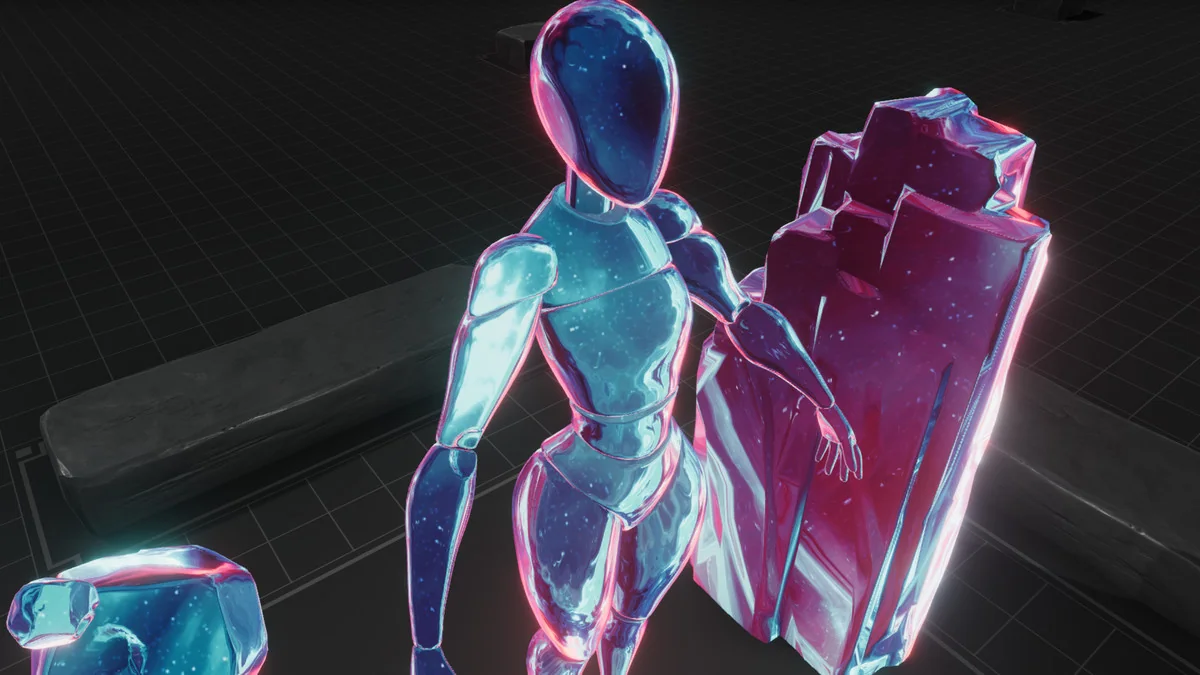
 Shaders
 Shaders
 Shaders