"7e6fc58c410f2894"{"id":"24234","slug":"pixel-perfect-fog-of-war","title":"Pixel-Perfect Fog Of War","category":"Fullscreen \u0026 Camera Effects","engine":"Original Unity version: 2021.3.45","assetVersion":"Original Unity version: 2021.3.45","engineVersion":"Asset Version:2.6.1","tag":"Fullscreen","accent":"cyan","visual":"character","summary":"Pixel-Perfect Fog Of War projects visibility from any number of objects and hides the parts of a scene that have not been seen. It fits RTS, MOBA, social deduction, and horror projects where revealed space has to stay tightly controlled. The package also ad...","platform":"Unity","publishedAt":"2026-04-12T10:23:25.000Z","updatedAt":"2026-04-19T15:34:55.000Z","sourceNotes":[],"fileContents":[],"compatibility":["Unity","Original Unity version: 2021.3.45","Asset Version: 2.6.1"],"featuredImage":{"alt":"Pixel-Perfect Fog Of War","src":"https://3dcghub.com/wp-content/uploads/2026/04/bbe64c6da850_1e9907fe-35b1-45fc-adff-a6dcaf70a15b_1280x720_stretch.webp"},"hasDownloadLink":true,"downloads":0,"terms":[{"taxonomy":"category","slug":"unity-vfx-shaders-fullscreen-camera-effects","name":"Fullscreen \u0026 Camera Effects"},{"taxonomy":"post_tag","slug":"game-systems","name":"Game Systems"},{"taxonomy":"post_tag","slug":"tools","name":"Tools"},{"taxonomy":"post_tag","slug":"unity","name":"Unity"}],"galleryImages":[{"src":"https://3dcghub.com/wp-content/uploads/2026/04/75bbb8fbdd63_a0ee73ff-2723-4ed4-b04c-b134d94d9013_scaled.webp","alt":"Pixel-Perfect Fog Of War"},{"src":"https://3dcghub.com/wp-content/uploads/2026/04/6083e86b09e7_6502234d-355b-4b72-aa3d-a3734b73610c_scaled.webp","alt":"Pixel-Perfect Fog Of War"},{"src":"https://3dcghub.com/wp-content/uploads/2026/04/dcc2f5de709b_ee4f4256-c0be-426f-8134-81cef85d6e87_scaled.webp","alt":"Pixel-Perfect Fog Of War"},{"src":"https://3dcghub.com/wp-content/uploads/2026/04/440d203246e9_eff8e265-9a01-46c7-9fa4-3dcf983f77c4_scaled.webp","alt":"Pixel-Perfect Fog Of War"},{"src":"https://3dcghub.com/wp-content/uploads/2026/04/ac04d3a71d7e_55c66ad8-ca7a-455e-9b6d-72b0b214da3d_scaled.webp","alt":"Pixel-Perfect Fog Of War"},{"src":"https://3dcghub.com/wp-content/uploads/2026/04/391c09eebe8f_f57a057f-5bb4-4c06-a513-e9b5726a19be_scaled.webp","alt":"Pixel-Perfect Fog Of War"},{"src":"https://3dcghub.com/wp-content/uploads/2026/04/85799998fd86_36ef1af2-e9e9-4bd0-b203-aac69308ae29_scaled.webp","alt":"Pixel-Perfect Fog Of War"},{"src":"https://3dcghub.com/wp-content/uploads/2026/04/ca419073cef1_2bfd272a-a2bb-4db4-9221-a52349f50595_scaled.webp","alt":"Pixel-Perfect Fog Of War"}],"accessPanel":{"kind":"resource","title":"Access this resource","eyebrow":"Free Download","message":"Log in or create a free account to start your download.","fileName":"Pixel-Perfect Fog Of War v2.6.1.7z","safetyNote":"All resources are 100% manually reviewed to eliminate all risks.","actionLabel":"Download Free","resourceType":"Resource archive"},"contentHtml":"\u003ch2\u003eVisibility that follows the scene, not a fixed script\u003c/h2\u003e\n\u003cp\u003ePixel-Perfect Fog Of War works as a line of sight tool. In practice, that means it projects a field of view from any number of objects and hides the parts of the scene that remain unseen. Instead of treating fog as a simple overlay, it behaves like a visibility system that can respond to revealers placed throughout a level.\u003c/p\u003e\n\u003cp\u003eThat makes it a natural fit for RTS, MOBA, social deduction, and horror projects, where what the player can and cannot see changes the way the scene is read. It is also described as supporting both 2D and 3D projects, so it can sit inside different kinds of production setups without forcing a single camera style or scene structure.\u003c/p\u003e\n\u003cp\u003eFor 3D fog, the field of view can be projected onto any axis, and it can be rendered with both orthographic and perspective cameras. That gives the system room to follow different presentation styles while still keeping the same basic job: reveal what is in sight, conceal what is not.\u003c/p\u003e \u003ch2\u003eScale and rendering choices that keep it flexible\u003c/h2\u003e\n\u003cp\u003eThe package is built to work across all render pipelines and on any graphics backend except WebGL, with WebGPU working. It does not require extra cameras or render textures, which keeps the setup lighter and avoids adding that overhead to a scene. Fog is rendered in camera-space at full resolution, so world size does not limit the fog of war effect, even in very large environments.\u003c/p\u003e\n\u003cp\u003eThat matters in production because the visibility system is not tied to a small map or a fixed area. Large scenes can still use the same fog behavior without needing a different approach just because the level expands. The result is a visibility layer that stays consistent while the rest of the project scales around it.\u003c/p\u003e\n\u003cp\u003ePerformance is given the same kind of attention. The system is having zero update-loop GC allocations, with most fog of war operations calculated on the GPU. The CPU side is accelerated using the C# Jobs System and Burst compiler. There is also an option to disable occlusion per revealer, which allows thousands of revealers with minimal performance impact.\u003c/p\u003e\n\u003cp\u003eA Sparse Spatial Hashing system is included for faster shader performance, and there are scalable performance options with several presets to choose from. That makes the package easier to place in scenes where many objects may need to reveal visibility at once, without turning the fog system into a separate performance burden.\u003c/p\u003e \u003ch2\u003eFog styles, opacity control, and how areas stay revealed\u003c/h2\u003e\n\u003cp\u003eThe fog itself is not locked to a single look. Soft and hard fog are both available, and fog opacity can be changed. Four fog rendering modes are included out of the box:\u003c/p\u003e\n\u003cul\u003e \u003cli\u003eSolid Color\u003c/li\u003e \u003cli\u003eGray Scale\u003c/li\u003e \u003cli\u003eScene Blur\u003c/li\u003e \u003cli\u003eScrolling Texture Fog\u003c/li\u003e\n\u003c/ul\u003e\n\u003cp\u003eThere is also a scene-wide world bounds option that darkens the out-of-bounds portion of the scene. That gives the visible area a clearer edge when the playable space needs to feel contained.\u003c/p\u003e\n\u003cp\u003eRevealed territory can be handled in a few ways. Areas seen by revealers can be permanently revealed, and the fog can also regrow slowly over time if that behavior is preferred. Per-revealer opacity is supported as well, which adds another layer of control when different objects should contribute different amounts of visibility.\u003c/p\u003e\n\u003cp\u003eThe 3.0 update adds pixelation and dithering options, which are especially relevant for retro-style projects. Those controls let the fog effect sit more naturally inside a pixelated visual language instead of looking like a separate modern layer placed on top.\u003c/p\u003e \u003ch2\u003eHiding objects, building minimaps, and getting the system into a scene\u003c/h2\u003e\n\u003cp\u003eBeyond revealing space, the package also hides objects inside the fog of war. The traditional method can disable or enable a hider renderer or game object. A newer partial hider method uses materials, which means hiders on the edge of the fog can be partially revealed, cut, or faded in. That gives scenes a softer transition at the boundary instead of a strict on/off break.\u003c/p\u003e\n\u003cp\u003eThe hider code is abstracted, so custom effects or logic can be added to hiders more easily. That is useful when the fog boundary itself needs to carry part of the visual style or gameplay readout, rather than only masking objects entirely.\u003c/p\u003e\n\u003cp\u003eA complete minimap system is included as well. Fog of war can be rendered to a texture for use as a minimap mask, with optional camera frustum rendering and unit positions on the minimap. That makes the same visibility data useful both in the main view and in the small-map layer, which keeps the system aligned across the UI and the play space.\u003c/p\u003e\n\u003cp\u003eSetup is meant to be fast. The fog of war can be added to a scene in under a minute, and no custom materials are required. It works with an existing scene out of the box, so the system can be brought into production without rebuilding the rest of the environment around it.\u003c/p\u003e\n\u003cp\u003eFor teams that need line of sight, hidden zones, and a minimap-ready visibility layer in the same package, Pixel-Perfect Fog Of War stays focused on the practical job: reveal what matters, hide what should not be seen, and do it across 2D or 3D scenes without extra camera overhead.\u003c/p\u003e\n\n\u003ch2\u003eExplore Similar Assets\u003c/h2\u003e\n\u003cul\u003e\n\u003cli\u003e\u003ca href=\"https://3dcghub.com/altos-volumetric-clouds-skybox-and-weather-for-unity-urp/\" title=\"Altos – Volumetric Clouds, Skybox, and Weather for Unity URP\"\u003eAltos – Volumetric Clouds, Skybox, and Weather for Unity URP\u003c/a\u003e\u003c/li\u003e\n\u003cli\u003e\u003ca href=\"https://3dcghub.com/toolkit-for-unity-physics-2026/\" title=\"Toolkit for Unity Physics 2026\"\u003eToolkit for Unity Physics 2026\u003c/a\u003e\u003c/li\u003e\n\u003cli\u003e\u003ca href=\"https://3dcghub.com/opencv-for-unity/\" title=\"OpenCV for Unity\"\u003eOpenCV for Unity\u003c/a\u003e\u003c/li\u003e\n\u003cli\u003e\u003ca href=\"https://3dcghub.com/exporter-for-unreal-to-for-unity-2026/\" title=\"Exporter for Unreal to/for Unity 2026\"\u003eExporter for Unreal to/for Unity 2026\u003c/a\u003e\u003c/li\u003e\n\u003cli\u003e\u003ca href=\"https://3dcghub.com/dialogue-system-for-unity/\" title=\"Dialogue System for Unity\"\u003eDialogue System for Unity\u003c/a\u003e\u003c/li\u003e\n\u003c/ul\u003e","contentTextLength":5333,"navigation":{"current":3615,"total":3618,"previous":{"id":"24246","slug":"galaxy-materials-skybox-update","title":"Galaxy Materials (Skybox Update)","category":"Shaders","platform":"Unity","updatedAt":"2026-04-19T15:34:55.000Z"},"next":{"id":"24282","slug":"level-design-master-class-all-in-one-complete-course","title":"Level Design Master Class: All in One Complete Course","category":"Unity","platform":"Unity","updatedAt":"2026-04-19T15:34:54.000Z"}},"relatedResources":[{"id":"24168","slug":"altos-volumetric-clouds-skybox-and-weather-for-unity-urp","title":"Altos - Volumetric Clouds, Skybox, and Weather for Unity URP","category":"Fullscreen \u0026 Camera Effects","engine":"Original Unity version: 2021.3.0","assetVersion":"Original Unity version: 2021.3.0","engineVersion":"Asset Version:7.14.0","tag":"Fullscreen","accent":"cyan","visual":"luts","summary":"Altos adds moving volumetric clouds, a dynamic skybox, atmospheric fog, and a day-night cycle to Unity URP projects. It also includes real-time lighting behavior, weather simulation, and Unity 6 updates for teams shaping skies inside production scenes.","platform":"Unity","publishedAt":"2026-04-12T10:04:10.000Z","updatedAt":"2026-04-19T15:34:58.000Z","sourceNotes":[],"fileContents":[],"compatibility":["Unity","Original Unity version: 2021.3.0","Asset Version: 7.14.0"],"featuredImage":{"alt":"Altos - Volumetric Clouds, Skybox, and Weather for Unity URP","src":"https://3dcghub.com/wp-content/uploads/2026/04/d1e9a70fa0df_5bfd468c-a006-4a95-9e7c-0034fd6766e8_1280x720_stretch.webp"},"hasDownloadLink":true,"downloads":1},{"id":"24186","slug":"atmospheric-height-fog-optimized-fog-for-consoles-mobile-and-vr-2","title":"Atmospheric Height Fog | Optimized Fog for Consoles, Mobile and VR","category":"Fullscreen \u0026 Camera Effects","engine":"Original Unity version: 2022.3.0","assetVersion":"Original Unity version: 2022.3.0","engineVersion":"Asset Version:3.4.0","tag":"Fullscreen","accent":"cyan","visual":"mech","summary":"Atmospheric Height Fog adds a controllable fog layer that creates depth without leaning on a heavy volumetric setup. It supports transparent shaders, world-space UI, and multiple render pipelines, making it practical for scenes that need atmosphere to carry...","platform":"Unity","publishedAt":"2026-04-12T10:13:41.000Z","updatedAt":"2026-04-19T15:34:57.000Z","sourceNotes":[],"fileContents":[],"compatibility":["Unity","Original Unity version: 2022.3.0","Asset Version: 3.4.0"],"featuredImage":{"alt":"Atmospheric Height Fog | Optimized Fog for Consoles, Mobile and VR","src":"https://3dcghub.com/wp-content/uploads/2026/04/13596ddf9861_aeca4a88-310a-4bf5-8d0c-d7b5915664f4_1280x720_stretch-1.webp"},"hasDownloadLink":true,"downloads":0},{"id":"24180","slug":"analytical-volumetric-lighting-urp-performant-raytraced-volumetric-lights","title":"Analytical Volumetric Lighting [URP] - Performant Raytraced Volumetric Lights","category":"Fullscreen \u0026 Camera Effects","engine":"Original Unity version: 2021.3.0","assetVersion":"Original Unity version: 2021.3.0","engineVersion":"Asset Version:1.2","tag":"Fullscreen","accent":"cyan","visual":"luts","summary":"Analytical Volumetric Lighting [URP] combines a post-processing render feature with a single Volumetric Light component for volumetric scenes that need high light counts. Its analytical approach avoids raymarching, keeping per-light calculations constant-ti...","platform":"Unity","publishedAt":"2026-04-12T10:05:45.000Z","updatedAt":"2026-04-19T15:34:57.000Z","sourceNotes":[],"fileContents":[],"compatibility":["Unity","Original Unity version: 2021.3.0","Asset Version: 1.2"],"featuredImage":{"alt":"Analytical Volumetric Lighting [URP] - Performant Raytraced Volumetric Lights","src":"https://3dcghub.com/wp-content/uploads/2026/04/94b47dfe6754_5dd279aa-3dd0-4818-98c6-868bb773c4a6_1280x720_stretch.webp"},"hasDownloadLink":true,"downloads":1}]}
Fullscreen
Pixel-Perfect Fog Of War
Pixel-Perfect Fog Of War projects visibility from any number of objects and hides the parts of a scene that have not been seen. It fits RTS, MOBA, social deduction, and horror projects where revealed space has to stay tightly controlled. The package also ad...
Visibility that follows the scene, not a fixed script
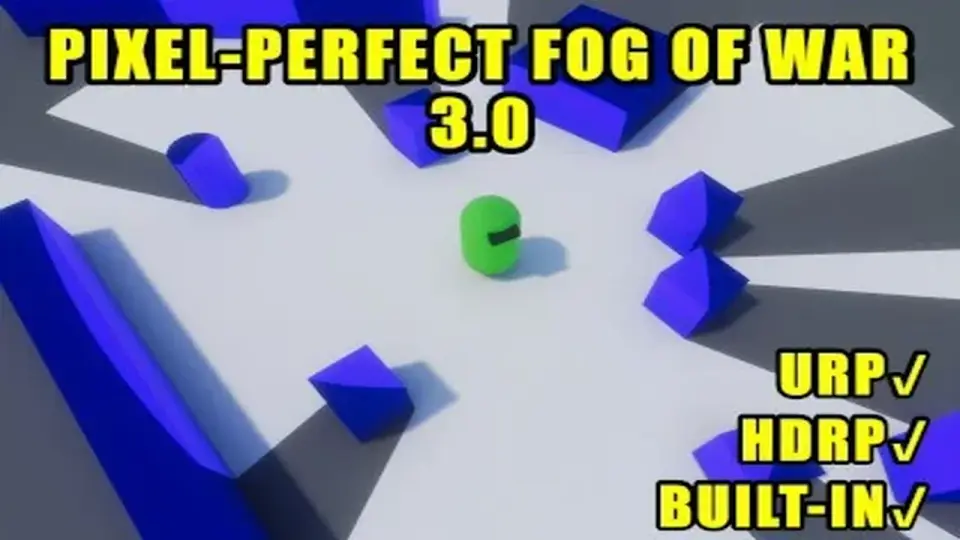
Pixel-Perfect Fog Of War works as a line of sight tool. In practice, that means it projects a field of view from any number of objects and hides the parts of the scene that remain unseen. Instead of treating fog as a simple overlay, it behaves like a visibility system that can respond to revealers placed throughout a level.
That makes it a natural fit for RTS, MOBA, social deduction, and horror projects, where what the player can and cannot see changes the way the scene is read. It is also described as supporting both 2D and 3D projects, so it can sit inside different kinds of production setups without forcing a single camera style or scene structure.
For 3D fog, the field of view can be projected onto any axis, and it can be rendered with both orthographic and perspective cameras. That gives the system room to follow different presentation styles while still keeping the same basic job: reveal what is in sight, conceal what is not.
Scale and rendering choices that keep it flexible
The package is built to work across all render pipelines and on any graphics backend except WebGL, with WebGPU working. It does not require extra cameras or render textures, which keeps the setup lighter and avoids adding that overhead to a scene. Fog is rendered in camera-space at full resolution, so world size does not limit the fog of war effect, even in very large environments.
That matters in production because the visibility system is not tied to a small map or a fixed area. Large scenes can still use the same fog behavior without needing a different approach just because the level expands. The result is a visibility layer that stays consistent while the rest of the project scales around it.
Performance is given the same kind of attention. The system is having zero update-loop GC allocations, with most fog of war operations calculated on the GPU. The CPU side is accelerated using the C# Jobs System and Burst compiler. There is also an option to disable occlusion per revealer, which allows thousands of revealers with minimal performance impact.
A Sparse Spatial Hashing system is included for faster shader performance, and there are scalable performance options with several presets to choose from. That makes the package easier to place in scenes where many objects may need to reveal visibility at once, without turning the fog system into a separate performance burden.
Fog styles, opacity control, and how areas stay revealed
The fog itself is not locked to a single look. Soft and hard fog are both available, and fog opacity can be changed. Four fog rendering modes are included out of the box:
Solid Color
Gray Scale
Scene Blur
Scrolling Texture Fog
There is also a scene-wide world bounds option that darkens the out-of-bounds portion of the scene. That gives the visible area a clearer edge when the playable space needs to feel contained.
Revealed territory can be handled in a few ways. Areas seen by revealers can be permanently revealed, and the fog can also regrow slowly over time if that behavior is preferred. Per-revealer opacity is supported as well, which adds another layer of control when different objects should contribute different amounts of visibility.
The 3.0 update adds pixelation and dithering options, which are especially relevant for retro-style projects. Those controls let the fog effect sit more naturally inside a pixelated visual language instead of looking like a separate modern layer placed on top.
Hiding objects, building minimaps, and getting the system into a scene
Beyond revealing space, the package also hides objects inside the fog of war. The traditional method can disable or enable a hider renderer or game object. A newer partial hider method uses materials, which means hiders on the edge of the fog can be partially revealed, cut, or faded in. That gives scenes a softer transition at the boundary instead of a strict on/off break.
The hider code is abstracted, so custom effects or logic can be added to hiders more easily. That is useful when the fog boundary itself needs to carry part of the visual style or gameplay readout, rather than only masking objects entirely.
A complete minimap system is included as well. Fog of war can be rendered to a texture for use as a minimap mask, with optional camera frustum rendering and unit positions on the minimap. That makes the same visibility data useful both in the main view and in the small-map layer, which keeps the system aligned across the UI and the play space.
Setup is meant to be fast. The fog of war can be added to a scene in under a minute, and no custom materials are required. It works with an existing scene out of the box, so the system can be brought into production without rebuilding the rest of the environment around it.
For teams that need line of sight, hidden zones, and a minimap-ready visibility layer in the same package, Pixel-Perfect Fog Of War stays focused on the practical job: reveal what matters, hide what should not be seen, and do it across 2D or 3D scenes without extra camera overhead.
 Fullscreen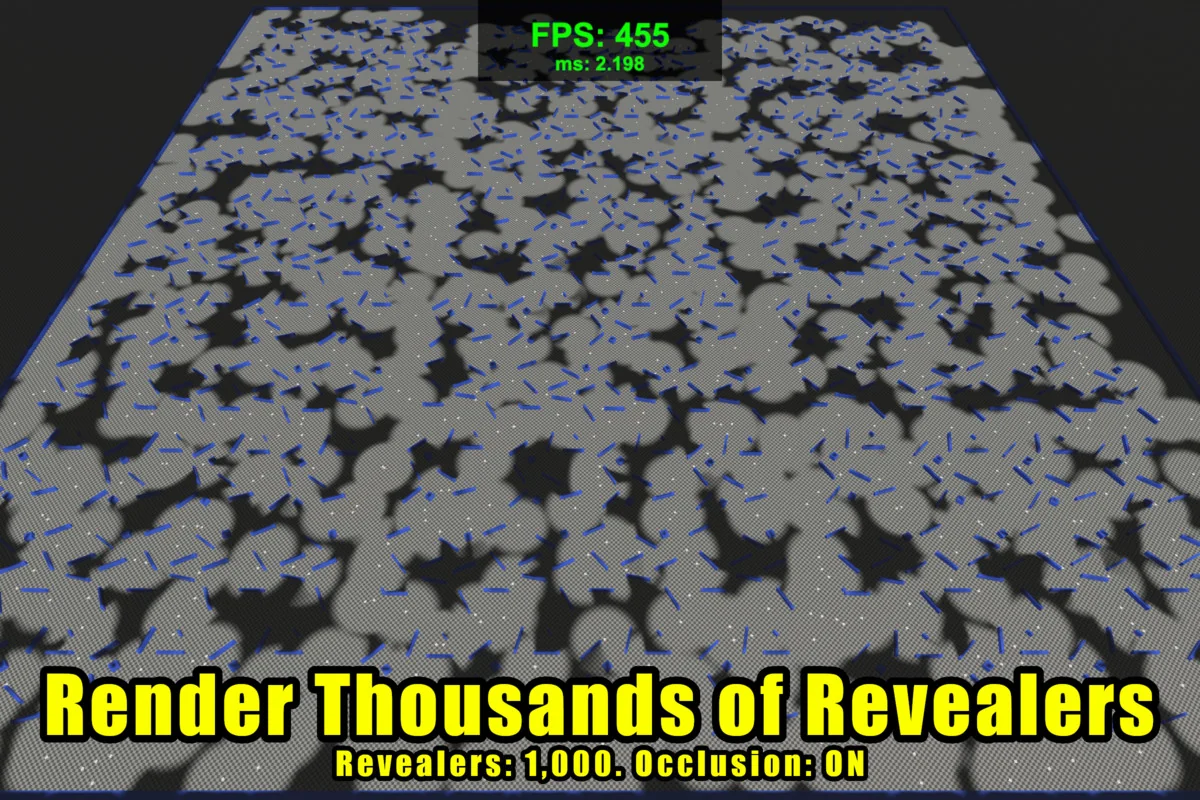
 Fullscreen
 Fullscreen
![Analytical Volumetric Lighting [URP] - Performant Raytraced Volumetric Lights](/_img/360/wp-content/uploads/2026/04/94b47dfe6754_5dd279aa-3dd0-4818-98c6-868bb773c4a6_1280x720_stretch.webp) Fullscreen
Fullscreen