"1062d43bc714d570"{"id":"22642","slug":"dialogue-system-for-unity","title":"Dialogue System for Unity","category":"Behavior AI","engine":"Original Unity version: 2020.3.0","assetVersion":"Original Unity version: 2020.3.0","engineVersion":"Asset Version:2.2.50.1 - 2.2.62.1","tag":"Behavior AI","accent":"cyan","visual":"audio","summary":"This comprehensive narrative framework enables developers to create complex branching conversations and quest systems within Unity without requiring manual scripting.","platform":"Unity","publishedAt":"2026-04-06T13:36:07.000Z","updatedAt":"2026-04-19T15:37:07.000Z","sourceNotes":[],"fileContents":[],"compatibility":["Unity","Original Unity version: 2020.3.0","Asset Version: 2.2.50.1 - 2.2.62.1"],"featuredImage":{"alt":"Dialogue System for Unity","src":"https://3dcghub.com/wp-content/uploads/2026/04/fd7de59530e4_29236222-8d3b-4997-ac58-9d5e9d180e7a_1280x720_stretch.webp"},"hasDownloadLink":true,"downloads":0,"terms":[{"taxonomy":"category","slug":"behavior-ai","name":"Behavior AI"},{"taxonomy":"post_tag","slug":"game-systems","name":"Game Systems"},{"taxonomy":"post_tag","slug":"tools","name":"Tools"},{"taxonomy":"post_tag","slug":"unity","name":"Unity"}],"galleryImages":[{"src":"https://3dcghub.com/wp-content/uploads/2026/04/b094d686774b_9fcbbdf0-1c06-4f10-a1f3-f8f9e86f31e4_scaled.webp","alt":"Dialogue System for Unity"},{"src":"https://3dcghub.com/wp-content/uploads/2026/04/b88d8e9c7797_77cdc680-4995-4d4c-9298-d028d9f1aede_scaled.webp","alt":"Dialogue System for Unity"},{"src":"https://3dcghub.com/wp-content/uploads/2026/04/dfa2a056aa2e_69cf88b0-7a45-4d78-983e-f1ffd9efbe79_scaled.webp","alt":"Dialogue System for Unity"},{"src":"https://3dcghub.com/wp-content/uploads/2026/04/fb9f38a335cf_28ccacf5-d29a-48cb-8a10-ec203874517d_scaled.webp","alt":"Dialogue System for Unity"},{"src":"https://3dcghub.com/wp-content/uploads/2026/04/116cdedb8f46_d7aad581-1a9b-4ded-bd61-a7b17b4dbe2e_scaled.webp","alt":"Dialogue System for Unity"},{"src":"https://3dcghub.com/wp-content/uploads/2026/04/50f253dd3944_427cf6e4-ea70-4487-975a-fc7afbfe476f_scaled.webp","alt":"Dialogue System for Unity"},{"src":"https://3dcghub.com/wp-content/uploads/2026/04/d12a12e2ee39_0a419603-6bc8-4eb0-b5da-844dccc3b4b7_scaled.webp","alt":"Dialogue System for Unity"},{"src":"https://3dcghub.com/wp-content/uploads/2026/04/6637d0683644_53359d3c-be47-4aa3-8994-7771f90fb3fc_scaled.webp","alt":"Dialogue System for Unity"},{"src":"https://3dcghub.com/wp-content/uploads/2026/04/cd3f676defb4_57cdca66-268d-472f-9408-ce50a9ce3fa2_scaled.webp","alt":"Dialogue System for Unity"},{"src":"https://3dcghub.com/wp-content/uploads/2026/04/7bf8e4f1ced6_30a1e39e-3bc2-4c9d-b781-7bc9d1a4c7ab_scaled.webp","alt":"Dialogue System for Unity"}],"accessPanel":{"kind":"resource","title":"Access this resource","eyebrow":"Free Download","message":"Log in or create a free account to start your download.","fileName":"Dialogue System for Unity v2.2.50.1 - 2.2.62.1.7z","safetyNote":"All resources are 100% manually reviewed to eliminate all risks.","actionLabel":"Download Free","resourceType":"Resource archive"},"contentHtml":"\u003ch2\u003eConstructing Narrative Logic Through Visual Nodes\u003c/h2\u003e\n\nThe foundation of the Dialogue System for Unity is its lean, efficient conversation engine designed to handle complex narrative structures. Rather than relying on manual scripting to trigger lines of text, the system utilizes a visual node-based editor. This workspace allows creators to map out dynamic, branching conversation trees where the path of the story can change based on player choices or internal game logic. Because the editor provides a bird's-eye view of the narrative flow, it becomes easier to manage high-density scripts similar to those found in award-winning titles like \u003ci\u003eDisco Elysium\u003c/i\u003e and \u003ci\u003eCitizen Sleeper\u003c/i\u003e.\n\nFor developers who prefer to draft their stories in specialized writing software, the system acts as a bridge between external tools and the Unity environment. It includes importers for a wide variety of formats, including articy:draft (versions 1, 2, 3, and X), Arcweave, Celtx, Chat Mapper, and Twine. It also supports industry-standard narrative languages like Yarn Spinner and Ink. This flexibility means that writers can work in their preferred environment before bringing their work into the engine as functional, interactive dialogue. Conversely, the system allows for exporting data into screenplay formats, voiceover asset lists, and CSV files, which is particularly useful for coordinating with voice actors and localization teams.\n\n\u003ch2\u003eDynamic Interactions and World Persistence\u003c/h2\u003e\n\nBeyond basic conversation, the system is designed to manage the living state of a game world. It includes a built-in quest system and a quest log to track player progress. These elements are tied into an NPC status and relationship system, allowing the game to react to how the player treats specific characters. For instance, a character might offer different dialogue options or refuse to speak to the player based on their previous interactions.\n\nTo make the world feel more active, the developer included support for \"barks\"—short, automated snippets of dialogue that NPCs can trigger as the player walks by—and on-screen alerts. These can be integrated with Quick Time Events (QTEs) to add a layer of mechanical urgency to narrative moments. To ensure these interactions persist across play sessions, the system features a save and load framework that functions without the need for custom coding, tracking variables and quest states automatically.\n\n\u003ch2\u003eCinematic Control and Multimedia Integration\u003c/h2\u003e\n\nThe Dialogue System for Unity is not limited to text boxes; it serves as a sequencer for multimedia events. Through its cutscene system, creators can synchronize audio, animations, and camera cuts directly with the dialogue flow. It features deep integration with Unity’s Cinemachine and Timeline tools, allowing for sophisticated camera movements and choreographed sequences that trigger at specific points in a conversation.\n\nBecause the system is audio-system independent, it works with the standard Unity audio engine as well as professional middleware like FMOD and Wwise. This allows sound designers to trigger complex spatial audio or music changes as part of the dialogue sequence. The visual side is equally flexible, with built-in support for multiple GUI systems. While it comes with several customizable UI prefabs to help a project get started, it is compatible with Unity UI, UI Toolkit, NGUI, and advanced text rendering tools like TextMesh Pro and Super Text Mesh. This modularity allows developers to swap in their own custom UI or cutscene systems without breaking the underlying narrative logic.\n\n\u003ch2\u003ePipeline Compatibility and Technical Workflow\u003c/h2\u003e\n\nThe framework is built to be a drop-in solution that fits into various existing project structures. It is compatible with Unity 6 and all versions from 2019 through 2022 and newer. It functions across different dimensions and platforms, including 2D, 3D, VR, and AR projects. For developers who want to dive into the technical backend, the complete C# source code is included, and there is an optional Lua scripting and variable system for those who want to add more logic to their dialogue nodes.\n\nThe system's ability to integrate with other popular Unity frameworks further streamlines development. It has built-in support for assets like Adventure Creator, Action-RPG Starter Kit, Behavior Designer, and Cinema Director, among others. This ensures that the dialogue logic can communicate effectively with AI behavior trees, character controllers, and inventory systems. For projects targeting international audiences, the system provides localization support, either through its own internal tools or by integrating with the Unity Localization package or i2 Localization.\n\nWhether a project requires simple shopkeeper interactions or a massive, multi-pathed political thriller, the system provides the tools to manage the data. By providing a sci-fi environment and an animated model as part of the package, the developer offers a baseline for testing these narrative systems in a live scene immediately. The combination of node-based editing, extensive importers, and broad integration support makes it a central hub for narrative-driven development.\n\n\u003ch2\u003eContinue Browsing Similar Packs\u003c/h2\u003e\n\u003cul\u003e\n\u003cli\u003e\u003ca href=\"https://3dcghub.com/ambient-sounds-interactive-soundscapes-for-unity-6/\" title=\"Ambient Sounds – Interactive Soundscapes for Unity 6\"\u003eAmbient Sounds – Interactive Soundscapes for Unity 6\u003c/a\u003e\u003c/li\u003e\n\u003cli\u003e\u003ca href=\"https://3dcghub.com/pegasus-flythroughs-for-unity-6/\" title=\"Pegasus – Flythroughs for Unity 6\"\u003ePegasus – Flythroughs for Unity 6\u003c/a\u003e\u003c/li\u003e\n\u003cli\u003e\u003ca href=\"https://3dcghub.com/motion-matching-for-unity/\" title=\"Motion Matching for Unity\"\u003eMotion Matching for Unity\u003c/a\u003e\u003c/li\u003e\n\u003cli\u003e\u003ca href=\"https://3dcghub.com/civil-ai-system/\" title=\"CIVIL-AI-SYSTEM\"\u003eCIVIL-AI-SYSTEM\u003c/a\u003e\u003c/li\u003e\n\u003cli\u003e\u003ca href=\"https://3dcghub.com/blaze-ai-engine/\" title=\"Blaze AI Engine\"\u003eBlaze AI Engine\u003c/a\u003e\u003c/li\u003e\n\u003c/ul\u003e","contentTextLength":5389,"navigation":{"current":3215,"total":3379,"previous":{"id":"22621","slug":"blaze-ai-engine","title":"Blaze AI Engine","category":"Behavior AI","platform":"Unity","updatedAt":"2026-04-19T15:37:08.000Z"},"next":{"id":"22629","slug":"civil-ai-system","title":"CIVIL-AI-SYSTEM","category":"Behavior AI","platform":"Unity","updatedAt":"2026-04-19T15:37:07.000Z"}},"relatedResources":[{"id":"22612","slug":"behavior-designer-behavior-trees-for-everyone","title":"Behavior Designer - Behavior Trees for Everyone","category":"Behavior AI","engine":"Original Unity version: 2019.4.0","assetVersion":"Original Unity version: 2019.4.0","engineVersion":"Asset Version:1.7.12","tag":"Behavior AI","accent":"cyan","visual":"city","summary":"Behavior Designer provides a mature behavior tree framework for Unity projects, combining a visual editor with a high-performance runtime. It enables developers to create complex AI logic through a data-oriented design that prioritizes stability across mobi...","platform":"Unity","publishedAt":"2026-04-06T13:27:20.000Z","updatedAt":"2026-04-19T15:37:09.000Z","sourceNotes":[],"fileContents":[],"compatibility":["Unity","Original Unity version: 2019.4.0","Asset Version: 1.7.12"],"featuredImage":{"alt":"Behavior Designer - Behavior Trees for Everyone","src":"https://3dcghub.com/wp-content/uploads/2026/04/b1de0425a478_c4058bef-eb5c-41f4-82c4-ee4f3818ddd6_1280x720_stretch.webp"},"hasDownloadLink":true,"downloads":5},{"id":"22599","slug":"ash-vehicle-ai","title":"Ash Vehicle AI","category":"Behavior AI","engine":"Original Unity version: 2020.3.12","assetVersion":"Original Unity version: 2020.3.12","engineVersion":"Asset Version:3.0","tag":"Behavior AI","accent":"cyan","visual":"luts","summary":"Ash Vehicle AI simplifies the implementation of autonomous cars in Unity, providing tools for path following, obstacle avoidance, and rapid vehicle configuration without the need for custom programming.","platform":"Unity","publishedAt":"2026-04-06T13:27:10.000Z","updatedAt":"2026-04-19T15:37:09.000Z","sourceNotes":[],"fileContents":[],"compatibility":["Unity","Original Unity version: 2020.3.12","Asset Version: 3.0"],"featuredImage":{"alt":"Ash Vehicle AI","src":"https://3dcghub.com/wp-content/uploads/2026/04/2c991ae3de0f_6b6ee69d-0d4a-49e0-957c-931ca4a7bed7_1280x720_stretch.webp"},"hasDownloadLink":true,"downloads":1},{"id":"22654","slug":"love-hate","title":"Love/Hate","category":"Behavior AI","engine":"Original Unity version: 2020.3.0","assetVersion":"Original Unity version: 2020.3.0","engineVersion":"Asset Version:1.10.50","tag":"Behavior AI","accent":"cyan","visual":"animation","summary":"Love/Hate offers a sophisticated framework for Unity developers to implement emotional intelligence and social dynamics within their NPCs, allowing characters to judge actions, form relationships, and share gossip.","platform":"Unity","publishedAt":"2026-04-06T13:36:53.000Z","updatedAt":"2026-04-19T15:37:06.000Z","sourceNotes":[],"fileContents":[],"compatibility":["Unity","Original Unity version: 2020.3.0","Asset Version: 1.10.50"],"featuredImage":{"alt":"Love/Hate","src":"https://3dcghub.com/wp-content/uploads/2026/04/92fd181a9601_695233ea-b32c-4cee-a1b2-8069ba043cf9_1280x720_stretch.webp"},"hasDownloadLink":true,"downloads":0}]}
Behavior AI
Dialogue System for Unity
This comprehensive narrative framework enables developers to create complex branching conversations and quest systems within Unity without requiring manual scripting.
The foundation of the Dialogue System for Unity is its lean, efficient conversation engine designed to handle complex narrative structures. Rather than relying on manual scripting to trigger lines of text, the system utilizes a visual node-based editor. This workspace allows creators to map out dynamic, branching conversation trees where the path of the story can change based on player choices or internal game logic. Because the editor provides a bird's-eye view of the narrative flow, it becomes easier to manage high-density scripts similar to those found in award-winning titles like Disco Elysium and Citizen Sleeper.
For developers who prefer to draft their stories in specialized writing software, the system acts as a bridge between external tools and the Unity environment. It includes importers for a wide variety of formats, including articy:draft (versions 1, 2, 3, and X), Arcweave, Celtx, Chat Mapper, and Twine. It also supports industry-standard narrative languages like Yarn Spinner and Ink. This flexibility means that writers can work in their preferred environment before bringing their work into the engine as functional, interactive dialogue. Conversely, the system allows for exporting data into screenplay formats, voiceover asset lists, and CSV files, which is particularly useful for coordinating with voice actors and localization teams.
Dynamic Interactions and World Persistence
Beyond basic conversation, the system is designed to manage the living state of a game world. It includes a built-in quest system and a quest log to track player progress. These elements are tied into an NPC status and relationship system, allowing the game to react to how the player treats specific characters. For instance, a character might offer different dialogue options or refuse to speak to the player based on their previous interactions.
To make the world feel more active, the developer included support for "barks"—short, automated snippets of dialogue that NPCs can trigger as the player walks by—and on-screen alerts. These can be integrated with Quick Time Events (QTEs) to add a layer of mechanical urgency to narrative moments. To ensure these interactions persist across play sessions, the system features a save and load framework that functions without the need for custom coding, tracking variables and quest states automatically.
Cinematic Control and Multimedia Integration
The Dialogue System for Unity is not limited to text boxes; it serves as a sequencer for multimedia events. Through its cutscene system, creators can synchronize audio, animations, and camera cuts directly with the dialogue flow. It features deep integration with Unity’s Cinemachine and Timeline tools, allowing for sophisticated camera movements and choreographed sequences that trigger at specific points in a conversation.
Because the system is audio-system independent, it works with the standard Unity audio engine as well as professional middleware like FMOD and Wwise. This allows sound designers to trigger complex spatial audio or music changes as part of the dialogue sequence. The visual side is equally flexible, with built-in support for multiple GUI systems. While it comes with several customizable UI prefabs to help a project get started, it is compatible with Unity UI, UI Toolkit, NGUI, and advanced text rendering tools like TextMesh Pro and Super Text Mesh. This modularity allows developers to swap in their own custom UI or cutscene systems without breaking the underlying narrative logic.
Pipeline Compatibility and Technical Workflow
The framework is built to be a drop-in solution that fits into various existing project structures. It is compatible with Unity 6 and all versions from 2019 through 2022 and newer. It functions across different dimensions and platforms, including 2D, 3D, VR, and AR projects. For developers who want to dive into the technical backend, the complete C# source code is included, and there is an optional Lua scripting and variable system for those who want to add more logic to their dialogue nodes.
The system's ability to integrate with other popular Unity frameworks further streamlines development. It has built-in support for assets like Adventure Creator, Action-RPG Starter Kit, Behavior Designer, and Cinema Director, among others. This ensures that the dialogue logic can communicate effectively with AI behavior trees, character controllers, and inventory systems. For projects targeting international audiences, the system provides localization support, either through its own internal tools or by integrating with the Unity Localization package or i2 Localization.
Whether a project requires simple shopkeeper interactions or a massive, multi-pathed political thriller, the system provides the tools to manage the data. By providing a sci-fi environment and an animated model as part of the package, the developer offers a baseline for testing these narrative systems in a live scene immediately. The combination of node-based editing, extensive importers, and broad integration support makes it a central hub for narrative-driven development.
 Behavior AI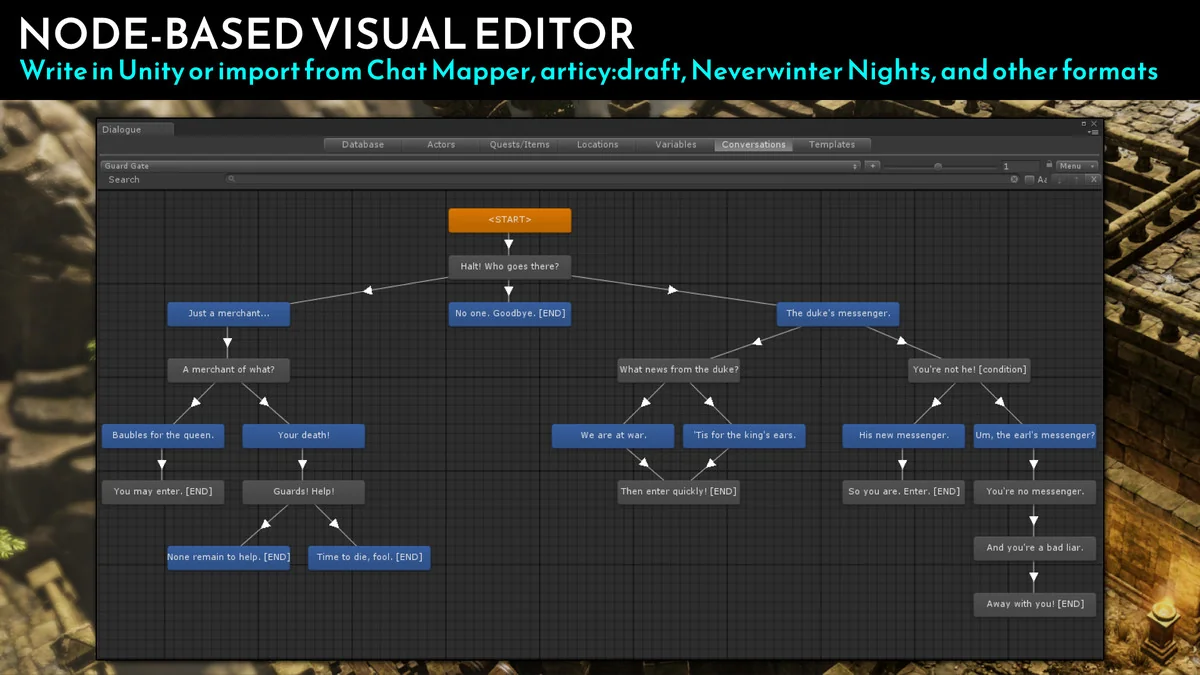
 Behavior AI
 Behavior AI
 Behavior AI