"26aaab8a5d5ed4fc"{"id":"22629","slug":"civil-ai-system","title":"CIVIL-AI-SYSTEM","category":"Behavior AI","engine":"Original Unity version: 2022.3.7","assetVersion":"Original Unity version: 2022.3.7","engineVersion":"","tag":"Behavior AI","accent":"cyan","visual":"mech","summary":"CIVIL-AI-SYSTEM provides a framework for creating lived-in digital environments without requiring manual coding or complex graphs. The system focuses on automated population, work and need behaviors, and detailed item interaction.","platform":"Unity","publishedAt":"2026-04-06T13:32:31.000Z","updatedAt":"2026-04-19T15:37:07.000Z","sourceNotes":[],"fileContents":[],"compatibility":["Unity","Original Unity version: 2022.3.7"],"featuredImage":{"alt":"CIVIL-AI-SYSTEM","src":"https://3dcghub.com/wp-content/uploads/2026/04/9d2dbe998cce_9050041d-d7c4-4dcc-916a-c08c9afd7189_1280x720_stretch.webp"},"hasDownloadLink":true,"downloads":1,"terms":[{"taxonomy":"category","slug":"behavior-ai","name":"Behavior AI"},{"taxonomy":"post_tag","slug":"characters","name":"Characters"},{"taxonomy":"post_tag","slug":"game-systems","name":"Game Systems"},{"taxonomy":"post_tag","slug":"unity","name":"Unity"}],"galleryImages":[{"src":"https://3dcghub.com/wp-content/uploads/2026/04/ea29f26afeb5_b62bc8dd-f205-42c3-a612-3f331fd56ce8_scaled.webp","alt":"CIVIL-AI-SYSTEM"},{"src":"https://3dcghub.com/wp-content/uploads/2026/04/ecaedd25231f_cea0b86e-554c-4fcc-ae19-53226c4ab62f_scaled.webp","alt":"CIVIL-AI-SYSTEM"},{"src":"https://3dcghub.com/wp-content/uploads/2026/04/aff26a2a05ce_98301465-0081-47dd-9d7a-e69f0c81eb3e_scaled.webp","alt":"CIVIL-AI-SYSTEM"},{"src":"https://3dcghub.com/wp-content/uploads/2026/04/45e406245ae7_c5b90d9a-f403-44b5-9467-95fb40cc0d6a_scaled.webp","alt":"CIVIL-AI-SYSTEM"},{"src":"https://3dcghub.com/wp-content/uploads/2026/04/adc1a871d4be_98839951-8ef2-4e54-993f-4fbbacf4cef2_scaled.webp","alt":"CIVIL-AI-SYSTEM"}],"accessPanel":{"kind":"resource","title":"Access this resource","eyebrow":"Free Download","message":"Log in or create a free account to start your download.","fileName":"CIVIL-AI-SYSTEM.7z","safetyNote":"All resources are 100% manually reviewed to eliminate all risks.","actionLabel":"Download Free","resourceType":"Resource archive"},"contentHtml":"\u003ch2\u003eAutomated Scene Population and Setup\u003c/h2\u003e\u003cp\u003ePopulating a large environment, such as a city or a village, often requires significant manual labor. CIVIL-AI-SYSTEM addresses this through a population system designed to automate the placement of life within a scene. Users define specific zones—such as houses, workplaces, and item locations—and use population regions to pull from a pool of characters. The system then manages the distribution and assignment of these characters across the designated areas.\u003c/p\u003e\u003cp\u003eFor projects requiring more granular control, the developer has included support for bespoke agents. This allows for the manual placement of specific citizens while still utilizing the broader automated system for the rest of the environment. To streamline the initial implementation, a 'Getting Started' checklist helper is built directly into the tool to guide the setup process.\u003c/p\u003e\u003ch2\u003eDefining Agent Logic Through Work and Need Systems\u003c/h2\u003e\u003cp\u003eThe system distinguishes itself by using real-life comparisons to define agent logic rather than relying on abstract graphs or complex code. This approach is split into two primary behavior structures: work behaviors and need behaviors. Work behaviors allow agents to perform specific roles within the environment, and the system supports multiple ways to complete a single task, which increases the robustness of the simulation if one path becomes unavailable.\u003c/p\u003e\u003cp\u003eNeed behaviors add a secondary layer of depth, providing agents with personal requirements that drive their actions and add flavor to their routines. These behaviors are designed to be built iteratively, allowing for the gradual addition of complexity as the scene evolves.\u003c/p\u003e\u003ch2\u003eItem Interaction and Ownership Mechanics\u003c/h2\u003e\u003cp\u003eInteraction in CIVIL-AI-SYSTEM goes beyond simple proximity triggers. The tool features a deep item system where interactions can cause designed side effects, influencing the state of the agent or the world. This is supported by an ownership system, which gives agents a conceptual understanding of what belongs to them. Agents are capable of carrying, storing, and interacting with items in various ways, and these actions are reflected visually through the item system.\u003c/p\u003e\u003cp\u003eCustomization is handled through a layered approach. This allows for the creation of different 'feeling' regions within a single project, where animations and character types can be adjusted to suit the specific atmosphere of a neighborhood or district.\u003c/p\u003e\u003ch2\u003eVisual Cues and Animation Management\u003c/h2\u003e\u003cp\u003eTo ensure that agent actions are readable to the viewer, the system includes a built-in animation controller. This controller is responsible for providing visual cues that correspond to the agents' current tasks or needs. By linking behaviors directly to the animation state, the system ensures that the physical movements of the characters align with their internal logic, such as working, carrying an object, or fulfilling a personal need.\u003c/p\u003e\u003ch2\u003ePerformance and System Stability\u003c/h2\u003e\u003cp\u003eThe architecture of CIVIL-AI-SYSTEM is optimized to handle hundreds of agents simultaneously, making it suitable for dense urban environments or busy social hubs. To prevent project-breaking interruptions during development, the system utilizes a 'Quiet Failing' design. In this setup, if an error occurs, it is logged for the user to review, but the system continues to run, preventing the entire simulation from crashing.\u003c/p\u003e\u003cp\u003eAs the tool evolves, the developer has maintained backward compatibility across updates. This ensures that meaningful additions—such as the previously introduced need features and item system reworks—can be integrated into existing projects without requiring a total overhaul of the established logic.\u003c/p\u003e\n\n\u003ch2\u003eExplore Similar Assets\u003c/h2\u003e\n\u003cul\u003e\n\u003cli\u003e\u003ca href=\"https://3dcghub.com/ambient-sounds-interactive-soundscapes-for-unity-6/\" title=\"Ambient Sounds – Interactive Soundscapes for Unity 6\"\u003eAmbient Sounds – Interactive Soundscapes for Unity 6\u003c/a\u003e\u003c/li\u003e\n\u003cli\u003e\u003ca href=\"https://3dcghub.com/pegasus-flythroughs-for-unity-6/\" title=\"Pegasus – Flythroughs for Unity 6\"\u003ePegasus – Flythroughs for Unity 6\u003c/a\u003e\u003c/li\u003e\n\u003cli\u003e\u003ca href=\"https://3dcghub.com/motion-matching-for-unity/\" title=\"Motion Matching for Unity\"\u003eMotion Matching for Unity\u003c/a\u003e\u003c/li\u003e\n\u003cli\u003e\u003ca href=\"https://3dcghub.com/blaze-ai-engine/\" title=\"Blaze AI Engine\"\u003eBlaze AI Engine\u003c/a\u003e\u003c/li\u003e\n\u003cli\u003e\u003ca href=\"https://3dcghub.com/behavior-designer-behavior-trees-for-everyone/\" title=\"Behavior Designer – Behavior Trees for Everyone\"\u003eBehavior Designer – Behavior Trees for Everyone\u003c/a\u003e\u003c/li\u003e\n\u003c/ul\u003e\n\n\u003ch2\u003eAsset Gallery\u003c/h2\u003e","contentTextLength":3905,"navigation":{"current":3237,"total":3400,"previous":{"id":"22642","slug":"dialogue-system-for-unity","title":"Dialogue System for Unity","category":"Behavior AI","platform":"Unity","updatedAt":"2026-04-19T15:37:07.000Z"},"next":{"id":"22665","slug":"spaceship-ai","title":"Spaceship AI","category":"Behavior AI","platform":"Unity","updatedAt":"2026-04-19T15:37:06.000Z"}},"relatedResources":[{"id":"22657","slug":"mobile-pedestrian-system","title":"Mobile Pedestrian System","category":"Behavior AI","engine":"Original Unity version: 2021.3.45","assetVersion":"Original Unity version: 2021.3.45","engineVersion":"Asset Version:1.1.2","tag":"Behavior AI","accent":"cyan","visual":"luts","summary":"The Mobile Pedestrian System offers a framework for creating realistic urban movement through grid-based navigation and root motion animation. It supports dynamic zoning, obstacle avoidance, and seamless integration with traffic systems.","platform":"Unity","publishedAt":"2026-04-06T13:37:03.000Z","updatedAt":"2026-04-19T15:37:06.000Z","sourceNotes":[],"fileContents":[],"compatibility":["Unity","Original Unity version: 2021.3.45","Asset Version: 1.1.2"],"featuredImage":{"alt":"Mobile Pedestrian System","src":"https://3dcghub.com/wp-content/uploads/2026/04/2780ec011d3b_e7d03524-9803-4cab-8b61-c4b7c814f3d0_1280x720_stretch.webp"},"hasDownloadLink":true,"downloads":0},{"id":"22621","slug":"blaze-ai-engine","title":"Blaze AI Engine","category":"Behavior AI","engine":"Original Unity version: 2022.3.53","assetVersion":"Original Unity version: 2022.3.53","engineVersion":"Asset Version:3.3.2 - 3.4.9","tag":"Behavior AI","accent":"cyan","visual":"character","summary":"Blaze AI provides a streamlined workflow for creating complex NPC behaviors in Unity, including support for off-mesh links and a simplified animation system that bypasses traditional triggers. It is designed to handle everything from melee brutes to tactica...","platform":"Unity","publishedAt":"2026-04-06T13:29:37.000Z","updatedAt":"2026-04-19T15:37:08.000Z","sourceNotes":[],"fileContents":[],"compatibility":["Unity","Original Unity version: 2022.3.53","Asset Version: 3.3.2 - 3.4.9"],"featuredImage":{"alt":"Blaze AI Engine","src":"https://3dcghub.com/wp-content/uploads/2026/04/7fa6bc676a49_4265806c-3b1c-4ec4-9293-dd9a2f822e67_1280x720_stretch.webp"},"hasDownloadLink":true,"downloads":0},{"id":"22654","slug":"love-hate","title":"Love/Hate","category":"Behavior AI","engine":"Original Unity version: 2020.3.0","assetVersion":"Original Unity version: 2020.3.0","engineVersion":"Asset Version:1.10.50","tag":"Behavior AI","accent":"cyan","visual":"animation","summary":"Love/Hate offers a sophisticated framework for Unity developers to implement emotional intelligence and social dynamics within their NPCs, allowing characters to judge actions, form relationships, and share gossip.","platform":"Unity","publishedAt":"2026-04-06T13:36:53.000Z","updatedAt":"2026-04-19T15:37:06.000Z","sourceNotes":[],"fileContents":[],"compatibility":["Unity","Original Unity version: 2020.3.0","Asset Version: 1.10.50"],"featuredImage":{"alt":"Love/Hate","src":"https://3dcghub.com/wp-content/uploads/2026/04/92fd181a9601_695233ea-b32c-4cee-a1b2-8069ba043cf9_1280x720_stretch.webp"},"hasDownloadLink":true,"downloads":0}]}
Behavior AI
CIVIL-AI-SYSTEM
CIVIL-AI-SYSTEM provides a framework for creating lived-in digital environments without requiring manual coding or complex graphs. The system focuses on automated population, work and need behaviors, and detailed item interaction.
Populating a large environment, such as a city or a village, often requires significant manual labor. CIVIL-AI-SYSTEM addresses this through a population system designed to automate the placement of life within a scene. Users define specific zones—such as houses, workplaces, and item locations—and use population regions to pull from a pool of characters. The system then manages the distribution and assignment of these characters across the designated areas.
For projects requiring more granular control, the developer has included support for bespoke agents. This allows for the manual placement of specific citizens while still utilizing the broader automated system for the rest of the environment. To streamline the initial implementation, a 'Getting Started' checklist helper is built directly into the tool to guide the setup process.
Defining Agent Logic Through Work and Need Systems
The system distinguishes itself by using real-life comparisons to define agent logic rather than relying on abstract graphs or complex code. This approach is split into two primary behavior structures: work behaviors and need behaviors. Work behaviors allow agents to perform specific roles within the environment, and the system supports multiple ways to complete a single task, which increases the robustness of the simulation if one path becomes unavailable.
Need behaviors add a secondary layer of depth, providing agents with personal requirements that drive their actions and add flavor to their routines. These behaviors are designed to be built iteratively, allowing for the gradual addition of complexity as the scene evolves.
Item Interaction and Ownership Mechanics
Interaction in CIVIL-AI-SYSTEM goes beyond simple proximity triggers. The tool features a deep item system where interactions can cause designed side effects, influencing the state of the agent or the world. This is supported by an ownership system, which gives agents a conceptual understanding of what belongs to them. Agents are capable of carrying, storing, and interacting with items in various ways, and these actions are reflected visually through the item system.
Customization is handled through a layered approach. This allows for the creation of different 'feeling' regions within a single project, where animations and character types can be adjusted to suit the specific atmosphere of a neighborhood or district.
Visual Cues and Animation Management
To ensure that agent actions are readable to the viewer, the system includes a built-in animation controller. This controller is responsible for providing visual cues that correspond to the agents' current tasks or needs. By linking behaviors directly to the animation state, the system ensures that the physical movements of the characters align with their internal logic, such as working, carrying an object, or fulfilling a personal need.
Performance and System Stability
The architecture of CIVIL-AI-SYSTEM is optimized to handle hundreds of agents simultaneously, making it suitable for dense urban environments or busy social hubs. To prevent project-breaking interruptions during development, the system utilizes a 'Quiet Failing' design. In this setup, if an error occurs, it is logged for the user to review, but the system continues to run, preventing the entire simulation from crashing.
As the tool evolves, the developer has maintained backward compatibility across updates. This ensures that meaningful additions—such as the previously introduced need features and item system reworks—can be integrated into existing projects without requiring a total overhaul of the established logic.
 Behavior AI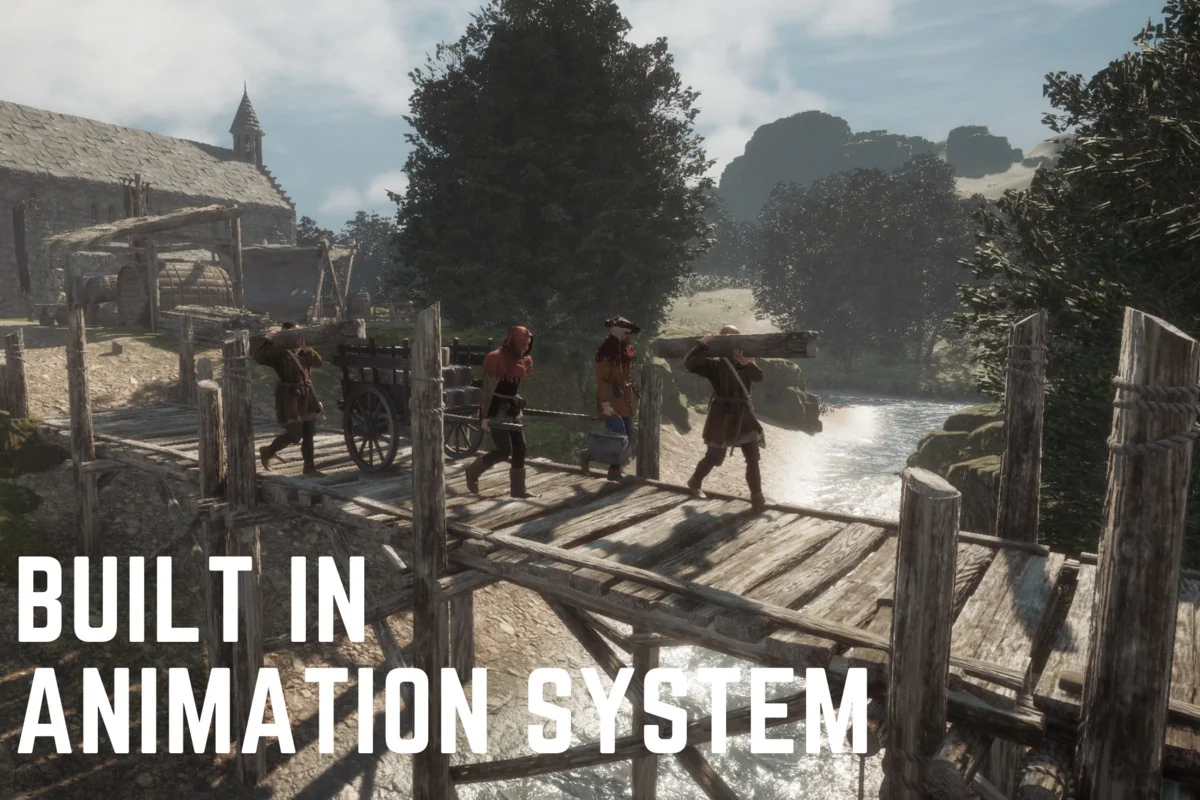
 Behavior AI
 Behavior AI
 Behavior AI