"26aaab8a5d5ed4fc"{"id":"22612","slug":"behavior-designer-behavior-trees-for-everyone","title":"Behavior Designer - Behavior Trees for Everyone","category":"Behavior AI","engine":"Original Unity version: 2019.4.0","assetVersion":"Original Unity version: 2019.4.0","engineVersion":"Asset Version:1.7.12","tag":"Behavior AI","accent":"cyan","visual":"city","summary":"Behavior Designer provides a mature behavior tree framework for Unity projects, combining a visual editor with a high-performance runtime. It enables developers to create complex AI logic through a data-oriented design that prioritizes stability across mobi...","platform":"Unity","publishedAt":"2026-04-06T13:27:20.000Z","updatedAt":"2026-04-19T15:37:09.000Z","sourceNotes":[],"fileContents":[],"compatibility":["Unity","Original Unity version: 2019.4.0","Asset Version: 1.7.12"],"featuredImage":{"alt":"Behavior Designer - Behavior Trees for Everyone","src":"https://3dcghub.com/wp-content/uploads/2026/04/b1de0425a478_c4058bef-eb5c-41f4-82c4-ee4f3818ddd6_1280x720_stretch.webp"},"hasDownloadLink":true,"downloads":5,"terms":[{"taxonomy":"category","slug":"behavior-ai","name":"Behavior AI"},{"taxonomy":"post_tag","slug":"game-systems","name":"Game Systems"},{"taxonomy":"post_tag","slug":"tools","name":"Tools"},{"taxonomy":"post_tag","slug":"unity","name":"Unity"}],"galleryImages":[{"src":"https://3dcghub.com/wp-content/uploads/2026/04/5612faf504ee_cb7efe78-b00c-4c18-85c0-53bf3579f32c_scaled.webp","alt":"Behavior Designer - Behavior Trees for Everyone"},{"src":"https://3dcghub.com/wp-content/uploads/2026/04/028e13a7785a_18be6f69-5d93-4e22-a25d-d42c4364aa3a_scaled.webp","alt":"Behavior Designer - Behavior Trees for Everyone"},{"src":"https://3dcghub.com/wp-content/uploads/2026/04/9d2bcb82c9bd_d22eb87b-bebb-4ce7-bc74-c9c9895f0bfc_scaled.webp","alt":"Behavior Designer - Behavior Trees for Everyone"},{"src":"https://3dcghub.com/wp-content/uploads/2026/04/c894f241dc31_0ca9b6b4-5e9a-4a35-b6de-ee6bcde3d66d_scaled.webp","alt":"Behavior Designer - Behavior Trees for Everyone"},{"src":"https://3dcghub.com/wp-content/uploads/2026/04/0ee1fa7342e1_c53096f8-8d69-48f6-ad5f-1ce94202613d_scaled.webp","alt":"Behavior Designer - Behavior Trees for Everyone"},{"src":"https://3dcghub.com/wp-content/uploads/2026/04/9c88c08636bd_3ab7e3da-9cee-4d3a-b226-bf0c0af3a534_scaled.webp","alt":"Behavior Designer - Behavior Trees for Everyone"},{"src":"https://3dcghub.com/wp-content/uploads/2026/04/43a5fa3c8d3e_4668efa5-3d9c-44b4-9b7d-51d47bb42814_scaled.webp","alt":"Behavior Designer - Behavior Trees for Everyone"},{"src":"https://3dcghub.com/wp-content/uploads/2026/04/7ebc901dcb98_dbff8b15-1117-436d-b96c-b68366ca4696_scaled.webp","alt":"Behavior Designer - Behavior Trees for Everyone"},{"src":"https://3dcghub.com/wp-content/uploads/2026/04/c52d3a029fe0_162d2672-4946-4e69-ac30-0116b209b909_scaled.webp","alt":"Behavior Designer - Behavior Trees for Everyone"},{"src":"https://3dcghub.com/wp-content/uploads/2026/04/bf1de0183e11_1be3a983-f27c-4831-a852-7f1f5d337e7e_scaled.webp","alt":"Behavior Designer - Behavior Trees for Everyone"}],"accessPanel":{"kind":"resource","title":"Access this resource","eyebrow":"Free Download","message":"Log in or create a free account to start your download.","fileName":"Behavior Designer - Behavior Trees for Everyone v1.7.12.7z","safetyNote":"All resources are 100% manually reviewed to eliminate all risks.","actionLabel":"Download Free","resourceType":"Resource archive"},"contentHtml":"\u003ch2\u003eVisual AI Authoring and Debugging\u003c/h2\u003e\n\u003cp\u003eBehavior Designer offers a visual behavior tree system for Unity, designed to facilitate the creation of complex AI logic by programmers, designers, and artists. The core of the package is an intuitive visual editor that allows users to construct AI behaviors without the immediate need for custom code. To ensure the reliability of these systems, the tool includes a visual runtime debugger and real-time error detection, enabling developers to identify and resolve logic issues as they occur during execution.\u003c/p\u003e\n\n\u003cp\u003eDecision-making within the system is managed through features like Conditional Aborts, which allow for more responsive AI behavior by interrupting tasks when specific conditions change. Additionally, the inclusion of Utility Theory task evaluation provides a framework for creating more nuanced decision-making processes, where the AI can weigh multiple factors before choosing an action.\u003c/p\u003e\n\n\u003ch2\u003ePerformance and Resource Management\u003c/h2\u003e\n\u003cp\u003eStability and efficiency are central to the architecture of Behavior Designer. The system is built from the ground up with a data-oriented internal design aimed at maximizing performance across various platforms, including desktop, console, and mobile devices. A key technical feature is the zero runtime allocation policy after initialization. By avoiding memory allocations during the game loop, the system helps maintain a consistent frame rate and reduces the likelihood of garbage collection spikes in resource-intensive projects.\u003c/p\u003e\n\n\u003cp\u003eFor projects requiring even higher levels of scalability, the Pro version of the tool introduces support for Entity Component System (ECS) workflows. This version utilizes a data-oriented architecture to handle more complex AI systems while maintaining the performance standards required for modern game development.\u003c/p\u003e\n\n\u003ch2\u003eExtensibility and Developer Workflow\u003c/h2\u003e\n\u003cp\u003eWhile Behavior Designer includes hundreds of built-in tasks, it is also designed to be highly extensible. A powerful API allows programmers to create custom tasks that fit specific project needs. For those looking to leverage existing codebases, reflection tasks enable the reuse of existing code within the behavior tree framework. Communication between different tasks is handled through a system of shared variables, ensuring that data can be passed efficiently across the tree.\u003c/p\u003e\n\n\u003cp\u003eThe workflow is further supported by a built-in event system and support for both binary and JSON serialization. This flexibility allows developers to integrate the AI logic into their existing data pipelines. Additionally, the package includes runtime source code, providing full visibility into the system's inner workings for teams that require deep customization or specific debugging capabilities.\u003c/p\u003e\n\n\u003ch2\u003eAdd-on Packs and Specialized AI Modules\u003c/h2\u003e\n\u003cp\u003eTo address specific gameplay requirements, several specialized add-on packs are available that extend the functionality of the base system. These packs provide pre-configured tasks and logic for common game mechanics:\u003c/p\u003e\n\u003cul\u003e\n \u003cli\u003e\u003cstrong\u003eMovement Pack:\u003c/strong\u003e Provides specialized logic for handling character navigation and positioning.\u003c/li\u003e\n \u003cli\u003e\u003cstrong\u003eTactical and Formations Packs:\u003c/strong\u003e Designed for group-based AI, allowing units to coordinate movements and maintain specific positions relative to one another.\u003c/li\u003e\n \u003cli\u003e\u003cstrong\u003eDeathmatch AI Kit:\u003c/strong\u003e Tailored for competitive combat scenarios.\u003c/li\u003e\n \u003cli\u003e\u003cstrong\u003eIntegration Packs:\u003c/strong\u003e Specific modules for third-party tools like Malbers Animations and RPG Builder.\u003c/li\u003e\n\u003c/ul\u003e\n\n\u003ch2\u003eBroad Third-Party Ecosystem\u003c/h2\u003e\n\u003cp\u003eOne of the primary strengths of Behavior Designer is its extensive compatibility with other popular Unity tools. This integration allows the behavior tree system to act as a central hub for various game systems. Notable integrations include pathfinding solutions like the A* Pathfinding Project and PolyNav, as well as animation and rigging tools such as Final IK and Cinema Director.\u003c/p\u003e\n\n\u003cp\u003eFor visual scripting and logic, the system integrates with Bolt and PlayMaker, allowing developers to combine different logic-authoring methods. It also supports UI frameworks like NGUI and 2D Toolkit, and audio systems like Master Audio. Other supported systems include the Dialogue System, Quest Machine, and various pooling solutions such as PoolManager and Core GameKit. This ecosystem ensures that the AI can interact directly with inventory systems, camera controllers, and network solutions like Mirror without requiring extensive bridge code.\u003c/p\u003e\n\n\u003cp\u003eThis system is best suited for development teams that require a stable, production-proven method for managing AI complexity. Whether building simple mobile prototypes or large-scale AAA-style projects, the combination of visual authoring and a performance-focused runtime provides a scalable foundation for lifelike AI behavior.\u003c/p\u003e\n\n\u003ch2\u003eExplore Similar Assets\u003c/h2\u003e\n\u003cul\u003e\n\u003cli\u003e\u003ca href=\"https://3dcghub.com/ambient-sounds-interactive-soundscapes-for-unity-6/\" title=\"Ambient Sounds – Interactive Soundscapes for Unity 6\"\u003eAmbient Sounds – Interactive Soundscapes for Unity 6\u003c/a\u003e\u003c/li\u003e\n\u003cli\u003e\u003ca href=\"https://3dcghub.com/pegasus-flythroughs-for-unity-6/\" title=\"Pegasus – Flythroughs for Unity 6\"\u003ePegasus – Flythroughs for Unity 6\u003c/a\u003e\u003c/li\u003e\n\u003cli\u003e\u003ca href=\"https://3dcghub.com/motion-matching-for-unity/\" title=\"Motion Matching for Unity\"\u003eMotion Matching for Unity\u003c/a\u003e\u003c/li\u003e\n\u003cli\u003e\u003ca href=\"https://3dcghub.com/a-pathfinding-project-pro/\" title=\"A* Pathfinding Project Pro\"\u003eA* Pathfinding Project Pro\u003c/a\u003e\u003c/li\u003e\n\u003cli\u003e\u003ca href=\"https://3dcghub.com/audio-visualization-playlist-system/\" title=\"Audio Visualization \u0026amp;amp; Playlist System\"\u003eAudio Visualization \u0026amp; Playlist System\u003c/a\u003e\u003c/li\u003e\n\u003c/ul\u003e\n\n\u003ch2\u003eAsset Gallery\u003c/h2\u003e","contentTextLength":4944,"navigation":{"current":3232,"total":3400,"previous":{"id":"22587","slug":"a-pathfinding-project-pro","title":"A* Pathfinding Project Pro","category":"Behavior AI","platform":"Unity","updatedAt":"2026-04-19T15:37:10.000Z"},"next":{"id":"22599","slug":"ash-vehicle-ai","title":"Ash Vehicle AI","category":"Behavior AI","platform":"Unity","updatedAt":"2026-04-19T15:37:09.000Z"}},"relatedResources":[{"id":"22642","slug":"dialogue-system-for-unity","title":"Dialogue System for Unity","category":"Behavior AI","engine":"Original Unity version: 2020.3.0","assetVersion":"Original Unity version: 2020.3.0","engineVersion":"Asset Version:2.2.50.1 - 2.2.62.1","tag":"Behavior AI","accent":"cyan","visual":"audio","summary":"This comprehensive narrative framework enables developers to create complex branching conversations and quest systems within Unity without requiring manual scripting.","platform":"Unity","publishedAt":"2026-04-06T13:36:07.000Z","updatedAt":"2026-04-19T15:37:07.000Z","sourceNotes":[],"fileContents":[],"compatibility":["Unity","Original Unity version: 2020.3.0","Asset Version: 2.2.50.1 - 2.2.62.1"],"featuredImage":{"alt":"Dialogue System for Unity","src":"https://3dcghub.com/wp-content/uploads/2026/04/fd7de59530e4_29236222-8d3b-4997-ac58-9d5e9d180e7a_1280x720_stretch.webp"},"hasDownloadLink":true,"downloads":0},{"id":"13714","slug":"athena-ai-a-utility-ai-framework-v2","title":"Athena AI: A Utility AI Framework - V2","category":"Engine Tools","engine":"5.1 - 5.4","assetVersion":"Engine version: 5.1 - 5.4","engineVersion":"Asset Version:2.0","tag":"Engine Tools","accent":"blue","visual":"audio","summary":"Athena AI: A Utility AI Framework - V2 provides a powerful and modular system for creating smarter NPCs. It replaces rigid condition trees with reactive, data-driven behaviors using curves and structured logic.","platform":"Unreal Engine","publishedAt":"2026-03-11T09:45:45.000Z","updatedAt":"2026-04-19T15:46:23.000Z","sourceNotes":[],"fileContents":[],"compatibility":["Unreal Engine","Engine version: 5.1 - 5.4","Asset Version: 2.0"],"featuredImage":{"alt":"Athena AI: A Utility AI Framework - V2","src":"https://3dcghub.com/wp-content/uploads/2026/03/8e651a50-5518-47d7-8584-284991c6cb2c.webp"},"hasDownloadLink":true,"downloads":0},{"id":"22587","slug":"a-pathfinding-project-pro","title":"A* Pathfinding Project Pro","category":"Behavior AI","engine":"Original Unity version: 2021.3.45","assetVersion":"Original Unity version: 2021.3.45","engineVersion":"Asset Version:5.1.2","tag":"Behavior AI","accent":"cyan","visual":"mech","summary":"A* Pathfinding Project Pro offers a robust framework for managing AI navigation in Unity. By leveraging multithreading and the Burst compiler, it enables complex movement logic across diverse graph types.","platform":"Unity","publishedAt":"2026-04-06T13:26:51.000Z","updatedAt":"2026-04-19T15:37:10.000Z","sourceNotes":[],"fileContents":[],"compatibility":["Unity","Original Unity version: 2021.3.45","Asset Version: 5.1.2"],"featuredImage":{"alt":"A* Pathfinding Project Pro","src":"https://3dcghub.com/wp-content/uploads/2026/04/2fdf049e6f1c_03e43c32-286b-4169-b5d1-ef8ee4751951_1280x720_stretch.webp"},"hasDownloadLink":true,"downloads":2}]}
Behavior AI
Behavior Designer - Behavior Trees for Everyone
Behavior Designer provides a mature behavior tree framework for Unity projects, combining a visual editor with a high-performance runtime. It enables developers to create complex AI logic through a data-oriented design that prioritizes stability across mobi...
Behavior Designer offers a visual behavior tree system for Unity, designed to facilitate the creation of complex AI logic by programmers, designers, and artists. The core of the package is an intuitive visual editor that allows users to construct AI behaviors without the immediate need for custom code. To ensure the reliability of these systems, the tool includes a visual runtime debugger and real-time error detection, enabling developers to identify and resolve logic issues as they occur during execution.
Decision-making within the system is managed through features like Conditional Aborts, which allow for more responsive AI behavior by interrupting tasks when specific conditions change. Additionally, the inclusion of Utility Theory task evaluation provides a framework for creating more nuanced decision-making processes, where the AI can weigh multiple factors before choosing an action.
Performance and Resource Management
Stability and efficiency are central to the architecture of Behavior Designer. The system is built from the ground up with a data-oriented internal design aimed at maximizing performance across various platforms, including desktop, console, and mobile devices. A key technical feature is the zero runtime allocation policy after initialization. By avoiding memory allocations during the game loop, the system helps maintain a consistent frame rate and reduces the likelihood of garbage collection spikes in resource-intensive projects.
For projects requiring even higher levels of scalability, the Pro version of the tool introduces support for Entity Component System (ECS) workflows. This version utilizes a data-oriented architecture to handle more complex AI systems while maintaining the performance standards required for modern game development.
Extensibility and Developer Workflow
While Behavior Designer includes hundreds of built-in tasks, it is also designed to be highly extensible. A powerful API allows programmers to create custom tasks that fit specific project needs. For those looking to leverage existing codebases, reflection tasks enable the reuse of existing code within the behavior tree framework. Communication between different tasks is handled through a system of shared variables, ensuring that data can be passed efficiently across the tree.
The workflow is further supported by a built-in event system and support for both binary and JSON serialization. This flexibility allows developers to integrate the AI logic into their existing data pipelines. Additionally, the package includes runtime source code, providing full visibility into the system's inner workings for teams that require deep customization or specific debugging capabilities.
Add-on Packs and Specialized AI Modules
To address specific gameplay requirements, several specialized add-on packs are available that extend the functionality of the base system. These packs provide pre-configured tasks and logic for common game mechanics:
Movement Pack: Provides specialized logic for handling character navigation and positioning.
Tactical and Formations Packs: Designed for group-based AI, allowing units to coordinate movements and maintain specific positions relative to one another.
Deathmatch AI Kit: Tailored for competitive combat scenarios.
Integration Packs: Specific modules for third-party tools like Malbers Animations and RPG Builder.
Broad Third-Party Ecosystem
One of the primary strengths of Behavior Designer is its extensive compatibility with other popular Unity tools. This integration allows the behavior tree system to act as a central hub for various game systems. Notable integrations include pathfinding solutions like the A* Pathfinding Project and PolyNav, as well as animation and rigging tools such as Final IK and Cinema Director.
For visual scripting and logic, the system integrates with Bolt and PlayMaker, allowing developers to combine different logic-authoring methods. It also supports UI frameworks like NGUI and 2D Toolkit, and audio systems like Master Audio. Other supported systems include the Dialogue System, Quest Machine, and various pooling solutions such as PoolManager and Core GameKit. This ecosystem ensures that the AI can interact directly with inventory systems, camera controllers, and network solutions like Mirror without requiring extensive bridge code.
This system is best suited for development teams that require a stable, production-proven method for managing AI complexity. Whether building simple mobile prototypes or large-scale AAA-style projects, the combination of visual authoring and a performance-focused runtime provides a scalable foundation for lifelike AI behavior.
 Behavior AI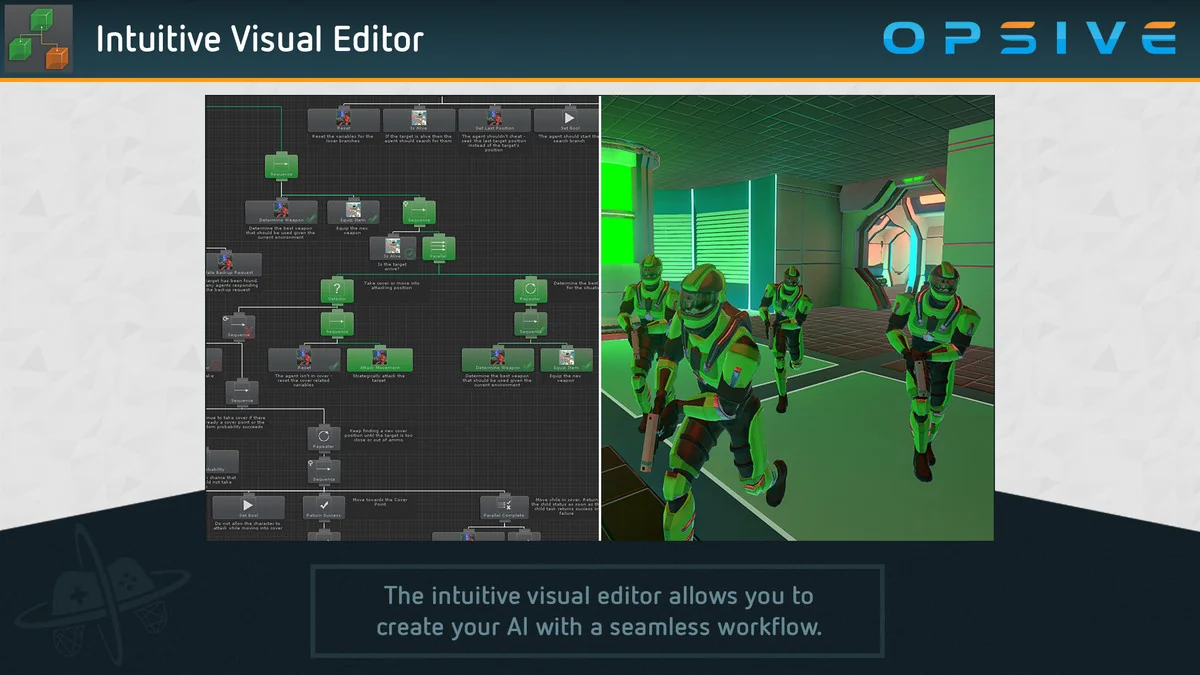
 Behavior AI
 Engine Tools
 Behavior AI