"7e6fc58c410f2894"{"id":"24186","slug":"atmospheric-height-fog-optimized-fog-for-consoles-mobile-and-vr-2","title":"Atmospheric Height Fog | Optimized Fog for Consoles, Mobile and VR","category":"Fullscreen \u0026 Camera Effects","engine":"Original Unity version: 2022.3.0","assetVersion":"Original Unity version: 2022.3.0","engineVersion":"Asset Version:3.4.0","tag":"Fullscreen","accent":"cyan","visual":"mech","summary":"Atmospheric Height Fog adds a controllable fog layer that creates depth without leaning on a heavy volumetric setup. It supports transparent shaders, world-space UI, and multiple render pipelines, making it practical for scenes that need atmosphere to carry...","platform":"Unity","publishedAt":"2026-04-12T10:13:41.000Z","updatedAt":"2026-04-19T15:34:57.000Z","sourceNotes":[],"fileContents":[],"compatibility":["Unity","Original Unity version: 2022.3.0","Asset Version: 3.4.0"],"featuredImage":{"alt":"Atmospheric Height Fog | Optimized Fog for Consoles, Mobile and VR","src":"https://3dcghub.com/wp-content/uploads/2026/04/13596ddf9861_aeca4a88-310a-4bf5-8d0c-d7b5915664f4_1280x720_stretch-1.webp"},"hasDownloadLink":true,"downloads":0,"terms":[{"taxonomy":"category","slug":"unity-vfx-shaders-fullscreen-camera-effects","name":"Fullscreen \u0026 Camera Effects"},{"taxonomy":"post_tag","slug":"materials","name":"Materials"},{"taxonomy":"post_tag","slug":"unity","name":"Unity"},{"taxonomy":"post_tag","slug":"vfx","name":"VFX"}],"galleryImages":[],"accessPanel":{"kind":"resource","title":"Access this resource","eyebrow":"Free Download","message":"Log in or create a free account to start your download.","fileName":"Atmospheric Height Fog Optimized Fog for Consoles Mobile and VR v3.4.0 (21 Nov 2024).7z","safetyNote":"All resources are 100% manually reviewed to eliminate all risks.","actionLabel":"Download Free","resourceType":"Resource archive"},"contentHtml":"\u003ch2\u003eFog that adds depth without asking for a heavy setup\u003c/h2\u003e\n\u003cp\u003eAtmospheric Height Fog is a simple height fog system with directional light and animated noise support. It aims for a volumetric-like result while using lower computation power, which makes the effect useful when a scene needs visible depth but still has to stay within a lighter rendering budget.\u003c/p\u003e\n\u003cp\u003eThe look is not locked into one treatment. Distance-based fog, height-based fog, dual-color fog, and fog axis selection give the creator several ways to shape how the atmosphere sits inside a scene. Animated noise can keep the fog from feeling static, while volume blending support helps the effect move more naturally across different areas. Fog presets are included as well, so a consistent base look can be reused instead of rebuilt every time.\u003c/p\u003e \u003ch2\u003eWorking the fog into the projectâs render path\u003c/h2\u003e\n\u003cp\u003eCompatibility covers Standard Render Pipeline 2022.3+, Universal Render Pipeline 2022.3+ / 6.0+ / 6.3+, and HD Render Pipeline 2022.3+ / 6.0+ / 6.3+.\u003c/p\u003e\n\u003cp\u003eShaders for 6.1 and 6.2 are included, but TECH releases are not officially supported, and the asset is recommended with LTS releases only. That keeps the setup tied to stable project versions rather than experimental ones. The fog also supports forward and deferred rendering, perspective and orthographic cameras, scene view visibility, and VR support, so the same atmosphere can follow the projectâs camera and rendering choices without forcing a different workflow for each view.\u003c/p\u003e \u003ch2\u003eExtending the atmosphere into transparent shaders and UI\u003c/h2\u003e\n\u003cp\u003eA major practical advantage is the way the fog can be carried into transparent materials. Fog support can be added with functions available for Amplify Shader Editor, Shader Graph, or any custom-written shader, which helps keep separate assets from cutting cleanly through the atmosphere.\u003c/p\u003e\n\u003cp\u003eThere is ApplyHeightFog support for Amplify Editor and for Unity Shader Graph, while AtmosphericHeightFog.cginc functions can be used to add fog support to custom transparent shaders. The package also includes a UI Default shader with Height Fog support when UI is used in a World Space Canvas. That gives the fog a wider role than background scenery alone, letting it influence materials and overlays that need to share the same depth treatment.\u003c/p\u003e \u003ch2\u003ePresets, blending, and changes over time\u003c/h2\u003e\n\u003cp\u003eFog presets make it easier to start from a defined look, and Basic Time Of Day support is handled through Day-Night preset interpolation. That lets the atmosphere shift with lighting changes rather than staying frozen in one state.\u003c/p\u003e\n\u003cp\u003eVolume blending support adds another level of control for transitions between fog areas. Zero global keywords usage is included for 2019.1+, which keeps the implementation cleaner inside the project. The result is a fog setup that can stay consistent across scenes while still allowing different spaces or lighting conditions to feel distinct.\u003c/p\u003e \u003ch2\u003eWhere it connects with shaders, water tools, and VR work\u003c/h2\u003e\n\u003cp\u003eThe developer also provides integration with several third-party tools. Amplify Shader Editor has full shader editing support. Crest for Standard RP and Crest for Universal RP both require manual setup. R.A.M 2019 for URP also requires manual setup. Lux Water for Standard RP, Stylized Water For URP, and Stylized Water by Staggart Creations are all listed with manual setup required as well.\u003c/p\u003e\n\u003cp\u003eThat makes the fog easier to place alongside other shader-heavy parts of a scene, especially where transparent materials or water systems already exist. For projects targeting consoles, mobile, or VR, the appeal is the combination of a soft atmospheric look, shader-level flexibility, and support across the main render pipelines. It fits best when fog needs to be part of the sceneâs structure, not just an overlay at the edge of the frame.\u003c/p\u003e\n\n\u003ch2\u003eExplore Similar Assets\u003c/h2\u003e\n\u003cul\u003e\n\u003cli\u003e\u003ca href=\"https://3dcghub.com/altos-volumetric-clouds-skybox-and-weather-for-unity-urp/\" title=\"Altos – Volumetric Clouds, Skybox, and Weather for Unity URP\"\u003eAltos – Volumetric Clouds, Skybox, and Weather for Unity URP\u003c/a\u003e\u003c/li\u003e\n\u003cli\u003e\u003ca href=\"https://3dcghub.com/toolkit-for-unity-physics-2026/\" title=\"Toolkit for Unity Physics 2026\"\u003eToolkit for Unity Physics 2026\u003c/a\u003e\u003c/li\u003e\n\u003cli\u003e\u003ca href=\"https://3dcghub.com/opencv-for-unity/\" title=\"OpenCV for Unity\"\u003eOpenCV for Unity\u003c/a\u003e\u003c/li\u003e\n\u003cli\u003e\u003ca href=\"https://3dcghub.com/exporter-for-unreal-to-for-unity-2026/\" title=\"Exporter for Unreal to/for Unity 2026\"\u003eExporter for Unreal to/for Unity 2026\u003c/a\u003e\u003c/li\u003e\n\u003cli\u003e\u003ca href=\"https://3dcghub.com/dialogue-system-for-unity/\" title=\"Dialogue System for Unity\"\u003eDialogue System for Unity\u003c/a\u003e\u003c/li\u003e\n\u003c/ul\u003e","contentTextLength":4001,"navigation":{"current":3605,"total":3618,"previous":{"id":"24136","slug":"enviro-3-terrain-shader","title":"Enviro 3 - Terrain Shader","category":"Shaders","platform":"Unity","updatedAt":"2026-04-19T15:34:58.000Z"},"next":{"id":"24183","slug":"artistic-bundle","title":"Artistic Bundle","category":"Fullscreen \u0026 Camera Effects","platform":"Unity","updatedAt":"2026-04-19T15:34:57.000Z"}},"relatedResources":[{"id":"24210","slug":"easy-performant-outline-2d-3d-urp-hdrp","title":"Easy Performant Outline 2D | 3D (URP / HDRP)","category":"Fullscreen \u0026 Camera Effects","engine":"Original Unity version: 2021.3.0","assetVersion":"Original Unity version: 2021.3.0","engineVersion":"Asset Version:3.5.9","tag":"Fullscreen","accent":"cyan","visual":"character","summary":"This outline tool adds 2D and 3D edge effects with a setup that fits URP and HDRP projects. It includes per-object control, multi-layer outlines, semi-transparent styles, and support for mobile, VR, HDR, and LDR.","platform":"Unity","publishedAt":"2026-04-12T10:16:58.000Z","updatedAt":"2026-04-19T15:34:56.000Z","sourceNotes":[],"fileContents":[],"compatibility":["Unity","Original Unity version: 2021.3.0","Asset Version: 3.5.9"],"featuredImage":{"alt":"Easy Performant Outline 2D | 3D (URP / HDRP)","src":"https://3dcghub.com/wp-content/uploads/2026/04/56b4f3480d13_63c9738c-3944-408a-9270-532d895c84b0_1280x720_stretch.webp"},"hasDownloadLink":true,"downloads":0},{"id":"24168","slug":"altos-volumetric-clouds-skybox-and-weather-for-unity-urp","title":"Altos - Volumetric Clouds, Skybox, and Weather for Unity URP","category":"Fullscreen \u0026 Camera Effects","engine":"Original Unity version: 2021.3.0","assetVersion":"Original Unity version: 2021.3.0","engineVersion":"Asset Version:7.14.0","tag":"Fullscreen","accent":"cyan","visual":"luts","summary":"Altos adds moving volumetric clouds, a dynamic skybox, atmospheric fog, and a day-night cycle to Unity URP projects. It also includes real-time lighting behavior, weather simulation, and Unity 6 updates for teams shaping skies inside production scenes.","platform":"Unity","publishedAt":"2026-04-12T10:04:10.000Z","updatedAt":"2026-04-19T15:34:58.000Z","sourceNotes":[],"fileContents":[],"compatibility":["Unity","Original Unity version: 2021.3.0","Asset Version: 7.14.0"],"featuredImage":{"alt":"Altos - Volumetric Clouds, Skybox, and Weather for Unity URP","src":"https://3dcghub.com/wp-content/uploads/2026/04/d1e9a70fa0df_5bfd468c-a006-4a95-9e7c-0034fd6766e8_1280x720_stretch.webp"},"hasDownloadLink":true,"downloads":1},{"id":"23725","slug":"3d-games-effects-bundle-1","title":"3D Games Effects Bundle 1","category":"Particles","engine":"Original Unity version: 2020.3.16","assetVersion":"Original Unity version: 2020.3.16","engineVersion":"Asset Version:1.6","tag":"Particles","accent":"cyan","visual":"city","summary":"3D Games Effects Bundle 1 brings 97 sprite-sheet animations into one Unity package, with six volumes and a small showroom level included. It fits HUD work, 2D and 3D games, mobile projects, VR, and other scenes that need direct visual impact without particl...","platform":"Unity","publishedAt":"2026-04-11T16:49:35.000Z","updatedAt":"2026-04-19T15:35:12.000Z","sourceNotes":[],"fileContents":[],"compatibility":["Unity","Original Unity version: 2020.3.16","Asset Version: 1.6"],"featuredImage":{"alt":"3D Games Effects Bundle 1","src":"https://3dcghub.com/wp-content/uploads/2026/04/dcdac1791029_32db77c9-71f3-4100-b67e-706f8c9a8fe0_1280x720_stretch.webp"},"hasDownloadLink":true,"downloads":0}]}
Fullscreen
Atmospheric Height Fog | Optimized Fog for Consoles, Mobile and VR
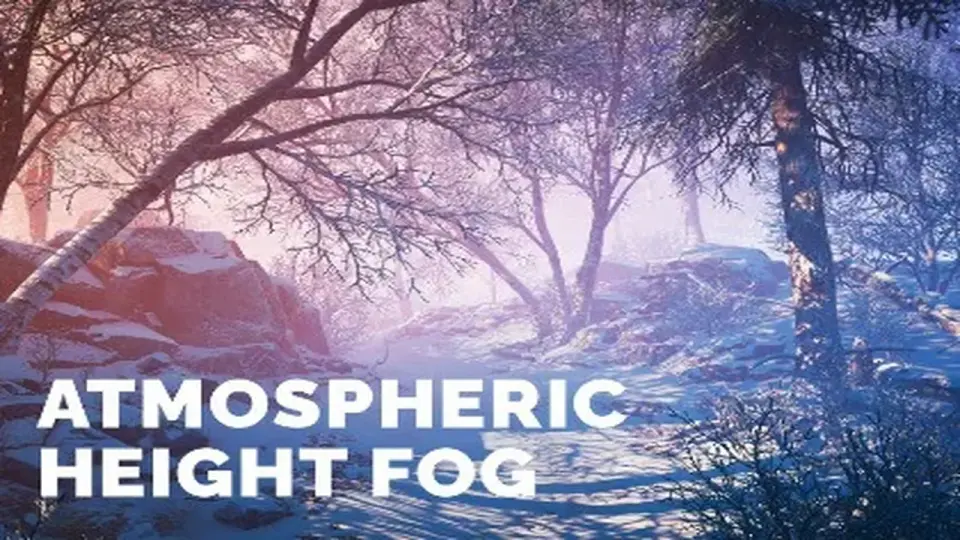
Atmospheric Height Fog adds a controllable fog layer that creates depth without leaning on a heavy volumetric setup. It supports transparent shaders, world-space UI, and multiple render pipelines, making it practical for scenes that need atmosphere to carry...
Fog that adds depth without asking for a heavy setup
Atmospheric Height Fog is a simple height fog system with directional light and animated noise support. It aims for a volumetric-like result while using lower computation power, which makes the effect useful when a scene needs visible depth but still has to stay within a lighter rendering budget.
The look is not locked into one treatment. Distance-based fog, height-based fog, dual-color fog, and fog axis selection give the creator several ways to shape how the atmosphere sits inside a scene. Animated noise can keep the fog from feeling static, while volume blending support helps the effect move more naturally across different areas. Fog presets are included as well, so a consistent base look can be reused instead of rebuilt every time.
Working the fog into the projectâs render path
Compatibility covers Standard Render Pipeline 2022.3+, Universal Render Pipeline 2022.3+ / 6.0+ / 6.3+, and HD Render Pipeline 2022.3+ / 6.0+ / 6.3+.
Shaders for 6.1 and 6.2 are included, but TECH releases are not officially supported, and the asset is recommended with LTS releases only. That keeps the setup tied to stable project versions rather than experimental ones. The fog also supports forward and deferred rendering, perspective and orthographic cameras, scene view visibility, and VR support, so the same atmosphere can follow the projectâs camera and rendering choices without forcing a different workflow for each view.
Extending the atmosphere into transparent shaders and UI
A major practical advantage is the way the fog can be carried into transparent materials. Fog support can be added with functions available for Amplify Shader Editor, Shader Graph, or any custom-written shader, which helps keep separate assets from cutting cleanly through the atmosphere.
There is ApplyHeightFog support for Amplify Editor and for Unity Shader Graph, while AtmosphericHeightFog.cginc functions can be used to add fog support to custom transparent shaders. The package also includes a UI Default shader with Height Fog support when UI is used in a World Space Canvas. That gives the fog a wider role than background scenery alone, letting it influence materials and overlays that need to share the same depth treatment.
Presets, blending, and changes over time
Fog presets make it easier to start from a defined look, and Basic Time Of Day support is handled through Day-Night preset interpolation. That lets the atmosphere shift with lighting changes rather than staying frozen in one state.
Volume blending support adds another level of control for transitions between fog areas. Zero global keywords usage is included for 2019.1+, which keeps the implementation cleaner inside the project. The result is a fog setup that can stay consistent across scenes while still allowing different spaces or lighting conditions to feel distinct.
Where it connects with shaders, water tools, and VR work
The developer also provides integration with several third-party tools. Amplify Shader Editor has full shader editing support. Crest for Standard RP and Crest for Universal RP both require manual setup. R.A.M 2019 for URP also requires manual setup. Lux Water for Standard RP, Stylized Water For URP, and Stylized Water by Staggart Creations are all listed with manual setup required as well.
That makes the fog easier to place alongside other shader-heavy parts of a scene, especially where transparent materials or water systems already exist. For projects targeting consoles, mobile, or VR, the appeal is the combination of a soft atmospheric look, shader-level flexibility, and support across the main render pipelines. It fits best when fog needs to be part of the sceneâs structure, not just an overlay at the edge of the frame.
 Fullscreen
 Fullscreen
 Fullscreen
 Particles