"7e6fc58c410f2894"{"id":"24419","slug":"urp-glass-shaders","title":"URP - Glass Shaders","category":"Shaders","engine":"Original Unity version: 6000.3.2","assetVersion":"Original Unity version: 6000.3.2","engineVersion":"","tag":"Shaders","accent":"cyan","visual":"character","summary":"URP - Glass Shaders brings three glass variants to Unity 6 URP, with presets and a demo scene included. The package is framed as lightweight and production-ready, while its update history reaches back through several Unity LTS eras.","platform":"Unity","publishedAt":"2026-04-14T11:49:38.000Z","updatedAt":"2026-04-20T06:12:48.000Z","sourceNotes":[],"fileContents":[],"compatibility":["Unity","Original Unity version: 6000.3.2"],"featuredImage":{"alt":"URP - Glass Shaders","src":"https://3dcghub.com/wp-content/uploads/2026/04/dcee4e45-c9de-42eb-9817-3b438ed40356.webp"},"hasDownloadLink":true,"downloads":1,"terms":[{"taxonomy":"category","slug":"shaders-vfx-unity-2","name":"Shaders"},{"taxonomy":"post_tag","slug":"environment","name":"Environment"},{"taxonomy":"post_tag","slug":"materials","name":"Materials"},{"taxonomy":"post_tag","slug":"unity","name":"Unity"}],"galleryImages":[],"accessPanel":{"kind":"resource","title":"Access this resource","eyebrow":"Free Download","message":"Log in or create a free account to start your download.","fileName":"URP - Glass Shaders 2020.1.7z","safetyNote":"All resources are 100% manually reviewed to eliminate all risks.","actionLabel":"Download Free","resourceType":"Resource archive"},"contentHtml":"\u003ch2\u003eGlass surfaces for windows and other transparent materials\u003c/h2\u003e\u003cp\u003eURP - Glass Shaders fits scenes that need glass in Unity 6 URP, especially when the material has to handle transparency, refraction, and reflection without turning into a large setup exercise. It is lightweight and production-ready, which points to a workflow that stays focused on the shader itself rather than a complicated surrounding system.\u003c/p\u003e\u003cp\u003eThe package lines up with both realistic glass and stylized glass, and it also fits simple transparent shader work for window material use. Those directions matter because not every scene wants the same result. Some projects need a cleaner, more believable surface, while others need a more stylized look that still reads clearly as glass.\u003c/p\u003e\u003ch2\u003eThree variants, with presets already included\u003c/h2\u003e\u003cp\u003eThree versatile glass variants are included, and each one comes with presets. That gives a direct way to start testing looks without beginning from a blank material every time. Presets are useful in a shader workflow because they make it easier to move from the default setup to a usable starting point, then refine from there.\u003c/p\u003e\u003cp\u003eThe variants are also useful because they let a project compare different glass behaviors inside the same package. A single scene can need more than one treatment of transparency, and having three options in one place makes it easier to match the material to the asset it is sitting on. A window, a decorative pane, or another transparent surface can each call for a different balance of visibility and surface response.\u003c/p\u003e\u003cp\u003eA demo scene is included as well. That is a practical addition for a shader package because it gives a ready-made place to open the materials and see how the variants behave in context. With a demo scene on hand, the shader setup does not have to be imagined in isolation; it can be checked in an actual scene arrangement alongside the presets.\u003c/p\u003e\u003ch2\u003eRefraction changes across the update history\u003c/h2\u003e\u003cp\u003eThe update history shows the package moving through several Unity generations. The latest release adds Unity 6 support, and another release covers 2022 LTS. Earlier notes extend support across 2019.4.x LTS, 2020.3.x LTS, and 2021.3.x LTS, with fixed warning messages also listed in that branch of updates.\u003c/p\u003e\u003cp\u003eOne release from 2020.1 adds built-in and URP support, new built-in shaders, and a new Glass(IOR) shader with more accurate refraction. It also adds new features and customization aimed at producing many glass results. That is a clear sign that the shader set was developed with different visual outcomes in mind, not just one fixed look.\u003c/p\u003e\u003cp\u003eEarlier updates add LightProbes support, shader improvements, mobile-friendly changes, and a fix for a script conflict. Another step adds new shader properties, improvements for PBR, and a new shader UI. The history reaches back to compatibility with Unity 2018.1.0b13 or higher, and one older update mentions an upgrade to Unity 5.5.1. First publication is dated Jun 15, 2015, so the package has a long release trail behind it.\u003c/p\u003e\u003ch2\u003ePackage details that matter during setup\u003c/h2\u003e\u003cp\u003eThe asset arrives as a unitypackage and contains 125 assets. Its file size is 44.8 MB. The original Unity version is 6000.3.2, and the render pipeline compatibility line points to 6000.3.2f1: URP. The latest version is 2026.0.0, with the latest release dated Feb 19, 2026.\u003c/p\u003e\u003cp\u003eThose details place the package squarely in a Unity 6 URP workflow. For a team already working in that pipeline, the important part is that the shader set is already centered on URP and includes the core pieces needed to test and apply glass materials: multiple variants, presets, and a demo scene. The long update history also suggests a package that has been adapted across several Unity eras rather than tied to a single short-lived version path.\u003c/p\u003e\u003cp\u003eIt is most useful for Unity teams that need glass materials in URP and want a focused shader set with clear starting points for implementation. The combination of three variants, presets, a demo scene, and a documented support history makes it a practical fit for projects that want to work directly with transparent surfaces and refraction in Unity 6.\u003c/p\u003e\n\n\u003ch2\u003eMore From The Same Workflow\u003c/h2\u003e\n\u003cul\u003e\n\u003cli\u003e\u003ca href=\"https://3dcghub.com/stylized-grass-shader-for-unity-2021-2023/\" title=\"Stylized Grass Shader (for Unity 2021-2023)\"\u003eStylized Grass Shader (for Unity 2021-2023)\u003c/a\u003e\u003c/li\u003e\n\u003cli\u003e\u003ca href=\"https://3dcghub.com/make-a-horror-survival-game-in-unity/\" title=\"Make a horror survival game in Unity\"\u003eMake a horror survival game in Unity\u003c/a\u003e\u003c/li\u003e\n\u003cli\u003e\u003ca href=\"https://3dcghub.com/unity-shader-programming-beginners-to-advanced-techniques/\" title=\"Unity Shader Programming: Beginners to Advanced Techniques\"\u003eUnity Shader Programming: Beginners to Advanced Techniques\u003c/a\u003e\u003c/li\u003e\n\u003cli\u003e\u003ca href=\"https://3dcghub.com/mastering-editor-scripting-in-unity/\" title=\"Mastering Editor Scripting in Unity\"\u003eMastering Editor Scripting in Unity\u003c/a\u003e\u003c/li\u003e\n\u003cli\u003e\u003ca href=\"https://3dcghub.com/altos-volumetric-clouds-skybox-and-weather-for-unity-urp/\" title=\"Altos – Volumetric Clouds, Skybox, and Weather for Unity URP\"\u003eAltos – Volumetric Clouds, Skybox, and Weather for Unity URP\u003c/a\u003e\u003c/li\u003e\n\u003c/ul\u003e","contentTextLength":4404,"navigation":{"current":1899,"total":3618,"previous":{"id":"24432","slug":"volumetric-fog-mist-2","title":"Volumetric Fog \u0026 Mist 2","category":"Shaders","platform":"Unity","updatedAt":"2026-04-20T06:12:48.000Z"},"next":{"id":"24518","slug":"mastering-unity-muse","title":"Mastering Unity Muse","category":"Unity","platform":"Unity","updatedAt":"2026-04-20T06:12:47.000Z"}},"relatedResources":[{"id":"24104","slug":"cozy-stylized-weather-3","title":"COZY: Stylized Weather 3","category":"Shaders","engine":"Original Unity version: 2022.3.62","assetVersion":"Original Unity version: 2022.3.62","engineVersion":"Asset Version:3.5.4 - 3.6.8","tag":"Shaders","accent":"cyan","visual":"audio","summary":"COZY: Stylized Weather 3 handles the weather layer with a hand-crafted look instead of realism. It covers time-of-day, seasons, clouds, storms, fog, and scene-color tweaks, while supporting Built-In, HDRP, and URP.","platform":"Unity","publishedAt":"2026-04-12T09:44:13.000Z","updatedAt":"2026-04-19T15:34:59.000Z","sourceNotes":[],"fileContents":[],"compatibility":["Unity","Original Unity version: 2022.3.62","Asset Version: 3.5.4 - 3.6.8"],"featuredImage":{"alt":"COZY: Stylized Weather 3","src":"https://3dcghub.com/wp-content/uploads/2026/04/4bb6b2024623_96bcefb7-182c-45a9-b50f-59d65b527604_1280x720_stretch.webp"},"hasDownloadLink":true,"downloads":10},{"id":"24158","slug":"flat-kit-toon-shading-and-water","title":"Flat Kit: Toon Shading and Water","category":"Shaders","engine":"Original Unity version: 2020.3.0","assetVersion":"Original Unity version: 2020.3.0","engineVersion":"Asset Version:4.9.2","tag":"Shaders","accent":"cyan","visual":"animation","summary":"Flat Kit brings cel shading, stylized water, outlines, fog, pixelation, and terrain shading into a single Unity-focused setup. It also supports Built-in and URP workflows, with XR, mobile, WebGL, and console coverage stated for the package.","platform":"Unity","publishedAt":"2026-04-12T10:01:58.000Z","updatedAt":"2026-04-19T15:34:58.000Z","sourceNotes":[],"fileContents":[],"compatibility":["Unity","Original Unity version: 2020.3.0","Asset Version: 4.9.2"],"featuredImage":{"alt":"Flat Kit: Toon Shading and Water","src":"https://3dcghub.com/wp-content/uploads/2026/04/2dd8adfba05b_5dbcd94d-8661-443e-bbe6-8df8069d47f8_1280x720_stretch.webp"},"hasDownloadLink":true,"downloads":2},{"id":"24040","slug":"advanced-edge-detection","title":"Advanced Edge Detection","category":"Shaders","engine":"Original Unity version: 6000.0.56","assetVersion":"Original Unity version: 6000.0.56","engineVersion":"Asset Version:1.0","tag":"Shaders","accent":"cyan","visual":"mech","summary":"Advanced Edge Detection adds clear outlines through normals, depth buffer detection, and URP-only custom data options. It also includes masking, sketch-style effects, and support for transparent shader behaviors such as water effects. The package targets Un...","platform":"Unity","publishedAt":"2026-04-12T09:32:04.000Z","updatedAt":"2026-04-19T15:35:01.000Z","sourceNotes":[],"fileContents":[],"compatibility":["Unity","Original Unity version: 6000.0.56","Asset Version: 1.0"],"featuredImage":{"alt":"Advanced Edge Detection","src":"https://3dcghub.com/wp-content/uploads/2026/04/35059a61cc0a_b81ab469-50c3-47fd-9d2b-0dd39f9680f6_1280x720_stretch.webp"},"hasDownloadLink":true,"downloads":0}]}
Shaders
URP - Glass Shaders
URP - Glass Shaders brings three glass variants to Unity 6 URP, with presets and a demo scene included. The package is framed as lightweight and production-ready, while its update history reaches back through several Unity LTS eras.
Glass surfaces for windows and other transparent materials
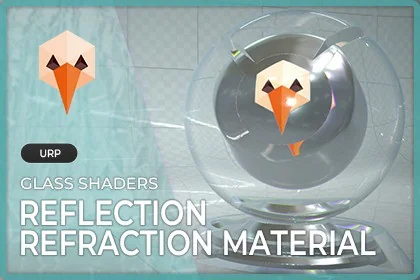
URP - Glass Shaders fits scenes that need glass in Unity 6 URP, especially when the material has to handle transparency, refraction, and reflection without turning into a large setup exercise. It is lightweight and production-ready, which points to a workflow that stays focused on the shader itself rather than a complicated surrounding system.
The package lines up with both realistic glass and stylized glass, and it also fits simple transparent shader work for window material use. Those directions matter because not every scene wants the same result. Some projects need a cleaner, more believable surface, while others need a more stylized look that still reads clearly as glass.
Three variants, with presets already included
Three versatile glass variants are included, and each one comes with presets. That gives a direct way to start testing looks without beginning from a blank material every time. Presets are useful in a shader workflow because they make it easier to move from the default setup to a usable starting point, then refine from there.
The variants are also useful because they let a project compare different glass behaviors inside the same package. A single scene can need more than one treatment of transparency, and having three options in one place makes it easier to match the material to the asset it is sitting on. A window, a decorative pane, or another transparent surface can each call for a different balance of visibility and surface response.
A demo scene is included as well. That is a practical addition for a shader package because it gives a ready-made place to open the materials and see how the variants behave in context. With a demo scene on hand, the shader setup does not have to be imagined in isolation; it can be checked in an actual scene arrangement alongside the presets.
Refraction changes across the update history
The update history shows the package moving through several Unity generations. The latest release adds Unity 6 support, and another release covers 2022 LTS. Earlier notes extend support across 2019.4.x LTS, 2020.3.x LTS, and 2021.3.x LTS, with fixed warning messages also listed in that branch of updates.
One release from 2020.1 adds built-in and URP support, new built-in shaders, and a new Glass(IOR) shader with more accurate refraction. It also adds new features and customization aimed at producing many glass results. That is a clear sign that the shader set was developed with different visual outcomes in mind, not just one fixed look.
Earlier updates add LightProbes support, shader improvements, mobile-friendly changes, and a fix for a script conflict. Another step adds new shader properties, improvements for PBR, and a new shader UI. The history reaches back to compatibility with Unity 2018.1.0b13 or higher, and one older update mentions an upgrade to Unity 5.5.1. First publication is dated Jun 15, 2015, so the package has a long release trail behind it.
Package details that matter during setup
The asset arrives as a unitypackage and contains 125 assets. Its file size is 44.8 MB. The original Unity version is 6000.3.2, and the render pipeline compatibility line points to 6000.3.2f1: URP. The latest version is 2026.0.0, with the latest release dated Feb 19, 2026.
Those details place the package squarely in a Unity 6 URP workflow. For a team already working in that pipeline, the important part is that the shader set is already centered on URP and includes the core pieces needed to test and apply glass materials: multiple variants, presets, and a demo scene. The long update history also suggests a package that has been adapted across several Unity eras rather than tied to a single short-lived version path.
It is most useful for Unity teams that need glass materials in URP and want a focused shader set with clear starting points for implementation. The combination of three variants, presets, a demo scene, and a documented support history makes it a practical fit for projects that want to work directly with transparent surfaces and refraction in Unity 6.
 Shaders
 Shaders
 Shaders
 Shaders