"7e6fc58c410f2894"{"id":"24040","slug":"advanced-edge-detection","title":"Advanced Edge Detection","category":"Shaders","engine":"Original Unity version: 6000.0.56","assetVersion":"Original Unity version: 6000.0.56","engineVersion":"Asset Version:1.0","tag":"Shaders","accent":"cyan","visual":"mech","summary":"Advanced Edge Detection adds clear outlines through normals, depth buffer detection, and URP-only custom data options. It also includes masking, sketch-style effects, and support for transparent shader behaviors such as water effects. The package targets Un...","platform":"Unity","publishedAt":"2026-04-12T09:32:04.000Z","updatedAt":"2026-04-19T15:35:01.000Z","sourceNotes":[],"fileContents":[],"compatibility":["Unity","Original Unity version: 6000.0.56","Asset Version: 1.0"],"featuredImage":{"alt":"Advanced Edge Detection","src":"https://3dcghub.com/wp-content/uploads/2026/04/35059a61cc0a_b81ab469-50c3-47fd-9d2b-0dd39f9680f6_1280x720_stretch.webp"},"hasDownloadLink":true,"downloads":0,"terms":[{"taxonomy":"category","slug":"shaders-vfx-unity-2","name":"Shaders"},{"taxonomy":"post_tag","slug":"materials","name":"Materials"},{"taxonomy":"post_tag","slug":"unity","name":"Unity"},{"taxonomy":"post_tag","slug":"vfx","name":"VFX"}],"galleryImages":[{"src":"https://3dcghub.com/wp-content/uploads/2026/04/135c0463f2be_60da3480-9b6a-4802-a5b4-af0ff36222ec_scaled.webp","alt":"Advanced Edge Detection"},{"src":"https://3dcghub.com/wp-content/uploads/2026/04/09e63d4a2637_492ec51e-725f-465c-ac48-4e11ca57ff0e_scaled.webp","alt":"Advanced Edge Detection"},{"src":"https://3dcghub.com/wp-content/uploads/2026/04/1ba1553a23d1_73812910-cd85-4cd9-a60a-311166139d74_scaled.webp","alt":"Advanced Edge Detection"},{"src":"https://3dcghub.com/wp-content/uploads/2026/04/f6b176b5d1e2_a165b343-f203-4731-b4fe-771a51edafbf_scaled.webp","alt":"Advanced Edge Detection"},{"src":"https://3dcghub.com/wp-content/uploads/2026/04/adf9818a252c_d9fedf75-1951-42cf-b27c-77b13119dac0_scaled.webp","alt":"Advanced Edge Detection"}],"accessPanel":{"kind":"resource","title":"Access this resource","eyebrow":"Free Download","message":"Log in or create a free account to start your download.","fileName":"Advanced Edge Detection v1.0.7z","safetyNote":"All resources are 100% manually reviewed to eliminate all risks.","actionLabel":"Download Free","resourceType":"Resource archive"},"contentHtml":"\u003ch2\u003eOutlines that respond to depth, normals, and scene distance\u003c/h2\u003e\u003cp\u003eAdvanced Edge Detection adds clear edge-detected outlines to a scene, with the aim of making the result readable instead of harsh or noisy. The package works with normals and depth buffer edge detection, so outlines can follow the structure of geometry rather than acting like a flat overlay.\u003c/p\u003e\u003cp\u003eTwo specific controls help it handle common problem areas. Acute Angles Fix addresses issues that usually show up around steep angles in depth edge detection. Depth Fade keeps outlines readable even as objects sit farther from the camera. Those two pieces make the effect feel more consistent across a scene instead of breaking down when geometry gets more complex or when the camera moves back.\u003c/p\u003e\u003cp\u003eThe result is not limited to a single outline style. The package is set up to let edges appear as a visual layer that can stay clear while still reacting to the shapes underneath.\u003c/p\u003e \u003ch2\u003eStyling options beyond a plain line pass\u003c/h2\u003e\u003cp\u003eThe package includes sketch and hand-drawn effects for a more stylized presentation. Grain and UV offset effects are part of that set, giving the outlines a rougher appearance when a scene needs something less mechanical than a clean contour line.\u003c/p\u003e\u003cp\u003eCustom Masking adds another practical layer. Instead of outlining everything by default, specific objects can be selected to receive outlines while others are left alone. That makes the effect easier to use in scenes where only certain elements should stand out.\u003c/p\u003e\u003cp\u003eEdge Read is aimed at transparent shaders. It lets edge detection data be used inside transparent shader behavior, which opens the door to custom responses such as water effects. That makes the package more than a visual pass for opaque objects; it can also feed information into shader logic where transparency matters.\u003c/p\u003e\u003cul\u003e\u003cli\u003eNormals and depth buffer edge detection\u003c/li\u003e\u003cli\u003eAcute Angles Fix for steep-angle cases\u003c/li\u003e\u003cli\u003eDepth Fade for distant outlines\u003c/li\u003e\u003cli\u003eSketch, grain, and UV offset effects\u003c/li\u003e\u003cli\u003eCustom Masking for per-object control\u003c/li\u003e\u003cli\u003eEdge Read for transparent shader behavior\u003c/li\u003e\u003c/ul\u003e \u003ch2\u003eURP-only data detection for more detailed control\u003c/h2\u003e\u003cp\u003eCustom Data Edge Detection is available only for URP. It uses object IDs, vertex colors, and custom textures to detect edges, with the goal of reducing common artifacts and producing more detailed edge detection. That makes the URP path the most specific option in the package when a project needs more than normals and depth alone.\u003c/p\u003e\u003cp\u003eThis feature is also the most selective part of the workflow. Because it can read object IDs, vertex colors, and custom textures, it gives the developer more ways to separate shapes and guide where edges appear. The package notes that this capability is limited to URP, so it is not part of the Built-in path.\u003c/p\u003e\u003cp\u003eFor projects that rely on stylized outlines and want finer control over which surfaces are recognized, this is the section of the package that does the most specialized work.\u003c/p\u003e \u003ch2\u003eWhere it fits, and what to keep in mind before using it\u003c/h2\u003e\u003cp\u003eAdvanced Edge Detection supports URP and Built-in versions, but it works only in Unity 6.0+. Built-in requires Shader Graph for the demo scenes to work. The package also does not support VR or webGL, so those targets are outside its scope.\u003c/p\u003e\u003cp\u003eThe package comes as a unitypackage, with 70 assets and a file size of 13.9 MB. The original Unity version is 6000.0.56, and the latest version is 3.0. The latest release date is Feb 07, 2026. Release notes for 3.0 mention that Unity 2022 is deprecated, that shader keyword build issues were addressed by changing from shader feature to multi-compile, and that URP 6.0+ works out of the box without.unitypackage importing required.\u003c/p\u003e\u003cp\u003eNot every asset or demo scene shown in the showcase is included in the package. Some of the showcased visuals are used only for the video or screenshots, while the package itself stays focused on the edge detection system and its controls.\u003c/p\u003e\u003cp\u003eFor teams working in Unity 6.0+ and looking for outlines that can be tuned, masked, and extended into transparent shader behavior, this package is strongest when the scene needs visible edges without locking into a single look.\u003c/p\u003e\n\n\u003ch2\u003eMore From The Same Workflow\u003c/h2\u003e\n\u003cul\u003e\n\u003cli\u003e\u003ca href=\"https://3dcghub.com/toolkit-for-unity-physics-2026/\" title=\"Toolkit for Unity Physics 2026\"\u003eToolkit for Unity Physics 2026\u003c/a\u003e\u003c/li\u003e\n\u003cli\u003e\u003ca href=\"https://3dcghub.com/opencv-for-unity/\" title=\"OpenCV for Unity\"\u003eOpenCV for Unity\u003c/a\u003e\u003c/li\u003e\n\u003cli\u003e\u003ca href=\"https://3dcghub.com/exporter-for-unreal-to-for-unity-2026/\" title=\"Exporter for Unreal to/for Unity 2026\"\u003eExporter for Unreal to/for Unity 2026\u003c/a\u003e\u003c/li\u003e\n\u003cli\u003e\u003ca href=\"https://3dcghub.com/dialogue-system-for-unity/\" title=\"Dialogue System for Unity\"\u003eDialogue System for Unity\u003c/a\u003e\u003c/li\u003e\n\u003cli\u003e\u003ca href=\"https://3dcghub.com/ambient-sounds-interactive-soundscapes-for-unity-6/\" title=\"Ambient Sounds – Interactive Soundscapes for Unity 6\"\u003eAmbient Sounds – Interactive Soundscapes for Unity 6\u003c/a\u003e\u003c/li\u003e\n\u003c/ul\u003e","contentTextLength":4325,"navigation":{"current":3593,"total":3618,"previous":{"id":"24052","slug":"all-in-1-sprite-shader","title":"All In 1 Sprite Shader","category":"Shaders","platform":"Unity","updatedAt":"2026-04-19T15:35:01.000Z"},"next":{"id":"24077","slug":"anime-shading-plus","title":"Anime Shading Plus","category":"Shaders","platform":"Unity","updatedAt":"2026-04-19T15:35:00.000Z"}},"relatedResources":[{"id":"24416","slug":"ui-shader-effects-edge-effects","title":"UI Shader Effects - Edge Effects","category":"Shaders","engine":"Original Unity version: 2021.3.45","assetVersion":"Original Unity version: 2021.3.45","engineVersion":"Asset Version:1.1.1","tag":"Shaders","accent":"cyan","visual":"character","summary":"UI Shader Effects - Edge Effects centers on UI edge treatment for square, rectangular, and circular elements. It combines prefabs, custom shaders, ready-made materials, textures, and UIToolkit files across multiple Unity rendering pipelines.","platform":"Unity","publishedAt":"2026-04-14T11:44:30.000Z","updatedAt":"2026-04-20T06:12:49.000Z","sourceNotes":[],"fileContents":[],"compatibility":["Unity","Original Unity version: 2021.3.45","Asset Version: 1.1.1"],"featuredImage":{"alt":"UI Shader Effects - Edge Effects","src":"https://3dcghub.com/wp-content/uploads/2026/04/76bc5224a0cf_b5fe6fdd-8fb8-413e-82d8-1d8dacd60d39_1280x720_stretch.webp"},"hasDownloadLink":true,"downloads":2},{"id":"24031","slug":"advanced-dissolve","title":"Advanced Dissolve","category":"Shaders","engine":"Original Unity version: 2019.4.0","assetVersion":"Original Unity version: 2019.4.0","engineVersion":"Asset Version:2024.2","tag":"Shaders","accent":"cyan","visual":"luts","summary":"Advanced Dissolve gives Unity shaders a shape-driven dissolve system with Plane, Sphere, Cube, Capsule, and Cone cutouts. Edge color controllers, texture blending, and optional feature mixing keep the effect flexible, while Shader Graph integration opens th...","platform":"Unity","publishedAt":"2026-04-12T09:26:14.000Z","updatedAt":"2026-04-19T15:35:02.000Z","sourceNotes":[],"fileContents":[],"compatibility":["Unity","Original Unity version: 2019.4.0","Asset Version: 2024.2"],"featuredImage":{"alt":"Advanced Dissolve","src":"https://3dcghub.com/wp-content/uploads/2026/04/55119519cae7_a2c667af-4584-4508-a13f-7372abbace85_1280x720_stretch.webp"},"hasDownloadLink":true,"downloads":1},{"id":"24136","slug":"enviro-3-terrain-shader","title":"Enviro 3 - Terrain Shader","category":"Shaders","engine":"Original Unity version: 2021.3.45","assetVersion":"Original Unity version: 2021.3.45","engineVersion":"Asset Version:1.1.2","tag":"Shaders","accent":"cyan","visual":"audio","summary":"Enviro 3 - Terrain Shader is a PBR terrain shader for Unity that focuses on weather-driven surface changes. It covers dynamic snow, puddles, wetness, blending control, and terrain hole support across supported render pipelines.","platform":"Unity","publishedAt":"2026-04-12T09:54:37.000Z","updatedAt":"2026-04-19T15:34:58.000Z","sourceNotes":[],"fileContents":[],"compatibility":["Unity","Original Unity version: 2021.3.45","Asset Version: 1.1.2"],"featuredImage":{"alt":"Enviro 3 - Terrain Shader","src":"https://3dcghub.com/wp-content/uploads/2026/04/85056b4933d5_c948eb4b-7e79-4b63-a5f1-ee65186a1e93_1280x720_stretch.webp"},"hasDownloadLink":true,"downloads":3}]}
Shaders
Advanced Edge Detection
Advanced Edge Detection adds clear outlines through normals, depth buffer detection, and URP-only custom data options. It also includes masking, sketch-style effects, and support for transparent shader behaviors such as water effects. The package targets Un...
Outlines that respond to depth, normals, and scene distance
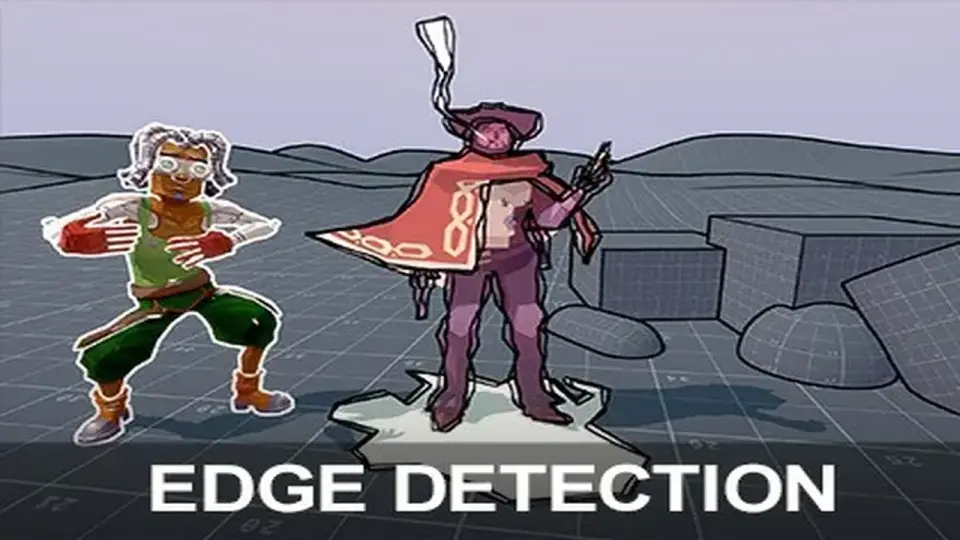
Advanced Edge Detection adds clear edge-detected outlines to a scene, with the aim of making the result readable instead of harsh or noisy. The package works with normals and depth buffer edge detection, so outlines can follow the structure of geometry rather than acting like a flat overlay.
Two specific controls help it handle common problem areas. Acute Angles Fix addresses issues that usually show up around steep angles in depth edge detection. Depth Fade keeps outlines readable even as objects sit farther from the camera. Those two pieces make the effect feel more consistent across a scene instead of breaking down when geometry gets more complex or when the camera moves back.
The result is not limited to a single outline style. The package is set up to let edges appear as a visual layer that can stay clear while still reacting to the shapes underneath.
Styling options beyond a plain line pass
The package includes sketch and hand-drawn effects for a more stylized presentation. Grain and UV offset effects are part of that set, giving the outlines a rougher appearance when a scene needs something less mechanical than a clean contour line.
Custom Masking adds another practical layer. Instead of outlining everything by default, specific objects can be selected to receive outlines while others are left alone. That makes the effect easier to use in scenes where only certain elements should stand out.
Edge Read is aimed at transparent shaders. It lets edge detection data be used inside transparent shader behavior, which opens the door to custom responses such as water effects. That makes the package more than a visual pass for opaque objects; it can also feed information into shader logic where transparency matters.
Normals and depth buffer edge detection
Acute Angles Fix for steep-angle cases
Depth Fade for distant outlines
Sketch, grain, and UV offset effects
Custom Masking for per-object control
Edge Read for transparent shader behavior
URP-only data detection for more detailed control
Custom Data Edge Detection is available only for URP. It uses object IDs, vertex colors, and custom textures to detect edges, with the goal of reducing common artifacts and producing more detailed edge detection. That makes the URP path the most specific option in the package when a project needs more than normals and depth alone.
This feature is also the most selective part of the workflow. Because it can read object IDs, vertex colors, and custom textures, it gives the developer more ways to separate shapes and guide where edges appear. The package notes that this capability is limited to URP, so it is not part of the Built-in path.
For projects that rely on stylized outlines and want finer control over which surfaces are recognized, this is the section of the package that does the most specialized work.
Where it fits, and what to keep in mind before using it
Advanced Edge Detection supports URP and Built-in versions, but it works only in Unity 6.0+. Built-in requires Shader Graph for the demo scenes to work. The package also does not support VR or webGL, so those targets are outside its scope.
The package comes as a unitypackage, with 70 assets and a file size of 13.9 MB. The original Unity version is 6000.0.56, and the latest version is 3.0. The latest release date is Feb 07, 2026. Release notes for 3.0 mention that Unity 2022 is deprecated, that shader keyword build issues were addressed by changing from shader feature to multi-compile, and that URP 6.0+ works out of the box without.unitypackage importing required.
Not every asset or demo scene shown in the showcase is included in the package. Some of the showcased visuals are used only for the video or screenshots, while the package itself stays focused on the edge detection system and its controls.
For teams working in Unity 6.0+ and looking for outlines that can be tuned, masked, and extended into transparent shader behavior, this package is strongest when the scene needs visible edges without locking into a single look.
 Shaders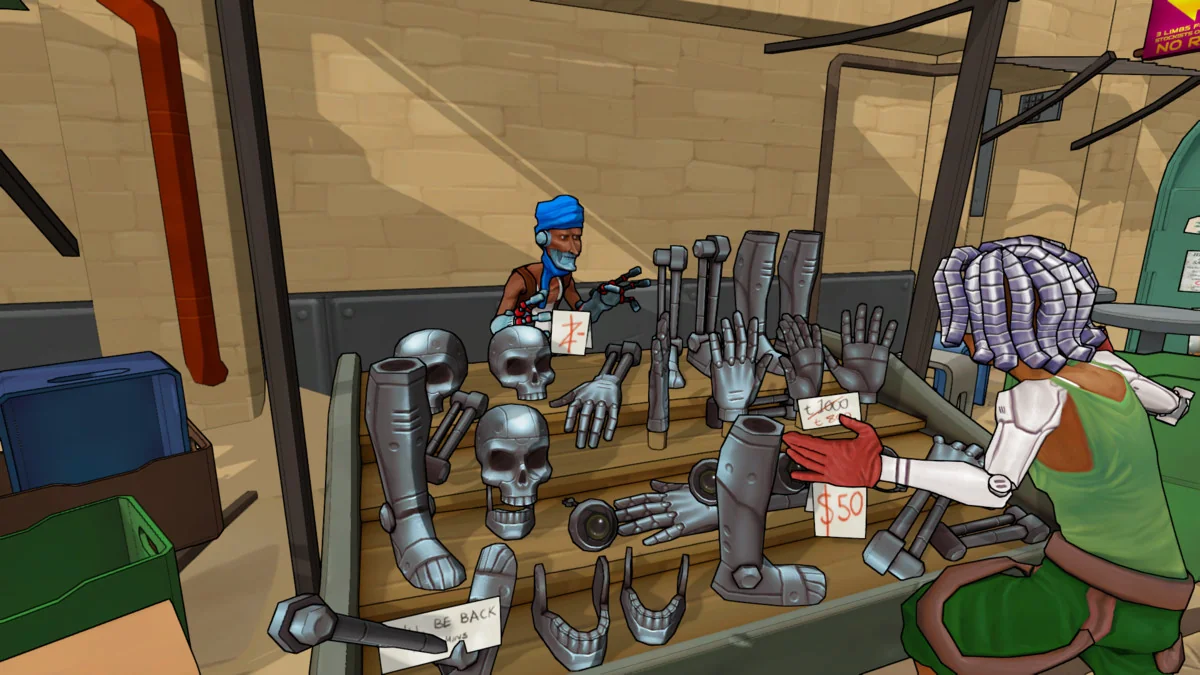
 Shaders
 Shaders
 Shaders