"6ac84fdb0bd06614"{"id":"24077","slug":"anime-shading-plus","title":"Anime Shading Plus","category":"Shaders","engine":"Original Unity version: 2022.3.62","assetVersion":"Original Unity version: 2022.3.62","engineVersion":"Asset Version:1.3","tag":"Shaders","accent":"cyan","visual":"city","summary":"Anime Shading Plus focuses on one specific problem: getting anime-style character rendering into Unity without building the lighting and pass logic from scratch. It combines shader work, outline options, shadow handling, and a few workflow tools for charact...","platform":"Unity","publishedAt":"2026-04-12T09:39:40.000Z","updatedAt":"2026-04-19T15:35:00.000Z","sourceNotes":[],"fileContents":[],"compatibility":["Unity","Original Unity version: 2022.3.62","Asset Version: 1.3"],"featuredImage":{"alt":"Anime Shading Plus","src":"https://3dcghub.com/wp-content/uploads/2026/04/8bdfd2b243d4_f619d888-b308-400e-ba5c-7573e82f327b_1280x720_stretch.webp"},"hasDownloadLink":true,"downloads":0,"terms":[{"taxonomy":"category","slug":"shaders-vfx-unity-2","name":"Shaders"},{"taxonomy":"post_tag","slug":"characters","name":"Characters"},{"taxonomy":"post_tag","slug":"materials","name":"Materials"},{"taxonomy":"post_tag","slug":"unity","name":"Unity"}],"galleryImages":[{"src":"https://3dcghub.com/wp-content/uploads/2026/04/80d50535837a_7d1780a8-3f60-41e4-ab35-bfb6b1a5a561_scaled.webp","alt":"Anime Shading Plus"},{"src":"https://3dcghub.com/wp-content/uploads/2026/04/b1eea6382cfa_54eea703-bc50-4114-ba99-a8a6bb39d5d6_scaled.webp","alt":"Anime Shading Plus"},{"src":"https://3dcghub.com/wp-content/uploads/2026/04/4bf001fb969e_d9881ffe-396e-4e00-89d4-5c1298ddbc72_scaled.webp","alt":"Anime Shading Plus"},{"src":"https://3dcghub.com/wp-content/uploads/2026/04/e2e584e34491_16b51f7f-04ac-412d-9d01-a70a9840ac59_scaled.webp","alt":"Anime Shading Plus"},{"src":"https://3dcghub.com/wp-content/uploads/2026/04/af2ab7130b77_dcf46923-b26e-4850-99eb-0f7dae3c219b_scaled.webp","alt":"Anime Shading Plus"},{"src":"https://3dcghub.com/wp-content/uploads/2026/04/4ae201286c13_c27664bb-4f2d-47ac-99b7-a127249f04d0_scaled.webp","alt":"Anime Shading Plus"},{"src":"https://3dcghub.com/wp-content/uploads/2026/04/d0cfa9973e78_467ac1ae-954b-414d-8ed6-1c74dddee294_scaled.webp","alt":"Anime Shading Plus"},{"src":"https://3dcghub.com/wp-content/uploads/2026/04/3433c3a9d996_62ad2de4-2b42-479a-9617-dfdd8f3bc02c_scaled.webp","alt":"Anime Shading Plus"},{"src":"https://3dcghub.com/wp-content/uploads/2026/04/412146d97b0f_716fc0fc-bf9c-494e-add4-4b255fd0165d_scaled.webp","alt":"Anime Shading Plus"},{"src":"https://3dcghub.com/wp-content/uploads/2026/04/24274015ecc5_b61c171b-c80a-4e69-914e-6313fc649dea_scaled.webp","alt":"Anime Shading Plus"}],"accessPanel":{"kind":"resource","title":"Access this resource","eyebrow":"Free Download","message":"Log in or create a free account to start your download.","fileName":"Anime Shading Plus v1.3 (02 Nov 2025).7z","safetyNote":"All resources are 100% manually reviewed to eliminate all risks.","actionLabel":"Download Free","resourceType":"Resource archive"},"contentHtml":"\u003ch2\u003eAnime-style character rendering without custom pass work\u003c/h2\u003e\n\u003cp\u003eAnime Shading Plus takes aim at a common Unity workflow problem: making anime-style characters look right without spending time writing custom lighting logic and render passes for URP. The plugin centers on rendering JRPG-like and anime-style characters, with the visual output focused on cel shading and related character effects rather than general-purpose scene rendering.\u003c/p\u003e\n\u003cp\u003eIts core purpose is straightforward. Instead of starting from a blank setup and assembling a shading stack piece by piece, it provides shader and custom pass support that already targets this style of character rendering. That makes it relevant when the project needs a specific Japanese cartoon look and the team wants a practical starting point for it.\u003c/p\u003e \u003ch2\u003eWhat the shader setup covers\u003c/h2\u003e\n\u003cp\u003eThe shader side is the main part of the package. It includes a shader dedicated to anime-style characters, plus support for handling lighting in a way that works better for cel-shaded characters. That includes additional light sources and ambient lighting, so the character shading can still react to indirect light sources instead of ignoring them.\u003c/p\u003e\n\u003cp\u003eThere is also an option to mix standard PBR lighting and toon shading. That gives a project room to combine a more traditional material response with a stylized look when a scene or character calls for it. The plugin also notes post-processing effects for anime-style characters, including tonemapping, which extends the styling work beyond the base shader pass.\u003c/p\u003e \u003ch3\u003eShadow handling and self-shadow control\u003c/h3\u003e\n\u003cp\u003eShadow behavior is treated as a separate concern. Anime Shading Plus includes a ShadowMap specifically drawn for cel-shaded characters, and it also provides a cube-based self-shadow remover. Those two pieces point to a workflow where the shadow response can be shaped to fit stylized character rendering instead of relying on a standard shadow setup alone.\u003c/p\u003e\n\u003cp\u003eThis is useful when the character needs cleaner forms, flatter shading regions, or a shadow result that does not fight the anime look. The focus stays on character rendering, not broad environmental lighting systems.\u003c/p\u003e \u003ch2\u003eOutline options for different character setups\u003c/h2\u003e\n\u003cp\u003eOutlines are a major part of the package. The plugin supports both customizable screen space outlines and mesh-based outlines for characters. That gives two different ways to approach edge emphasis, depending on the scene and the model setup.\u003c/p\u003e\n\u003cp\u003eScreen space outlines can be adjusted, while mesh-based outlines give a character-level approach. The package also includes a smoothed normal baking tool for mesh-based outline work. That is paired with the shading workflow rather than treated as an isolated add-on, which matters when the outline result depends on how the model is prepared.\u003c/p\u003e \u003ch3\u003eWorkflow tools for character prep\u003c/h3\u003e\n\u003cp\u003eBeyond the shading and outline systems, the plugin includes tools aimed at preparation work. One is a face shadow map baking tool. Another is the smoothed normal baking tool mentioned above for mesh-based outlines. These tools point toward a pipeline where the model itself may need adjustment before the final anime look is finished.\u003c/p\u003e\n\u003cp\u003eThe target users section makes that expectation clear: users should be able to work independently with third-party DCC tools, including adjusting vertex color or UVs on the model. In practice, this means the plugin fits better in a character workflow where model preparation is already part of the process.\u003c/p\u003e \u003ch2\u003eWhere it fits in production\u003c/h2\u003e\n\u003cp\u003eThe plugin is aimed at developers who need to render anime characters in Unity, as well as studios and teams using this kind of shader as a base for 3D character projects with a Japanese cartoon rendering style. It also fits developers who want to learn how to write custom shaders and passes in Unityâs URP pipeline.\u003c/p\u003e\n\u003cp\u003eThat range makes the package relevant in a few different production settings. A character-focused game can use it to establish a stylized visual language. A studio can use it as a starting point for its own shader work. Someone learning URP shader and pass development can use it as a reference point for how anime-style rendering is assembled in practice.\u003c/p\u003e \u003ch3\u003ePlatform focus and current limits\u003c/h3\u003e\n\u003cp\u003eThe primary target platforms are PC, Mac, and iOS. The plugin has not been optimized for Android or low-end devices, though it is noted as theoretically possible. VR and XR are not yet supported because Stereo Rendering and Foveat Rendering have not been tested. Consoles such as PS5, PS4, Xbox, and Switch have also not been tested.\u003c/p\u003e\n\u003cp\u003eThose limits matter when planning a pipeline. If the project is targeting one of the primary platforms, the package lines up with the intended use. If the project depends on mobile low-end performance, VR/XR, or consoles, the shader and script setup would need careful validation before it can be treated as a fit.\u003c/p\u003e \u003ch2\u003eDocumentation and Unity 6 support\u003c/h2\u003e\n\u003cp\u003eAnime Shading Plus comes with documentation that covers shader parameters, environment setup, limitations, performance tips, and tutorials or examples for creating anime-style characters. The documentation is available in English, Chinese, and Japanese, which helps when the workflow needs a reference during setup or tuning.\u003c/p\u003e\n\u003cp\u003eThe plugin also includes full Render Graph API support for Unity 6. That gives it a clear place in newer Unity pipelines, especially for teams working with the current Render Graph setup and looking for an anime shading solution that already accounts for it.\u003c/p\u003e \u003cp\u003eFor character-heavy projects that need toon shading, outlines, shadow control, and a few practical prep tools, Anime Shading Plus fits most naturally into the part of production where stylized character rendering is being assembled and refined.\u003c/p\u003e\n\n\u003ch2\u003eExplore Similar Assets\u003c/h2\u003e\n\u003cul\u003e\n\u003cli\u003e\u003ca href=\"https://3dcghub.com/toolkit-for-unity-physics-2026/\" title=\"Toolkit for Unity Physics 2026\"\u003eToolkit for Unity Physics 2026\u003c/a\u003e\u003c/li\u003e\n\u003cli\u003e\u003ca href=\"https://3dcghub.com/opencv-for-unity/\" title=\"OpenCV for Unity\"\u003eOpenCV for Unity\u003c/a\u003e\u003c/li\u003e\n\u003cli\u003e\u003ca href=\"https://3dcghub.com/exporter-for-unreal-to-for-unity-2026/\" title=\"Exporter for Unreal to/for Unity 2026\"\u003eExporter for Unreal to/for Unity 2026\u003c/a\u003e\u003c/li\u003e\n\u003cli\u003e\u003ca href=\"https://3dcghub.com/dialogue-system-for-unity/\" title=\"Dialogue System for Unity\"\u003eDialogue System for Unity\u003c/a\u003e\u003c/li\u003e\n\u003cli\u003e\u003ca href=\"https://3dcghub.com/ambient-sounds-interactive-soundscapes-for-unity-6/\" title=\"Ambient Sounds – Interactive Soundscapes for Unity 6\"\u003eAmbient Sounds – Interactive Soundscapes for Unity 6\u003c/a\u003e\u003c/li\u003e\n\u003c/ul\u003e","contentTextLength":5931,"navigation":{"current":3157,"total":3181,"previous":{"id":"24040","slug":"advanced-edge-detection","title":"Advanced Edge Detection","category":"Shaders","platform":"Unity","updatedAt":"2026-04-19T15:35:01.000Z"},"next":{"id":"24064","slug":"amplify-shader-pack","title":"Amplify Shader Pack","category":"Shaders","platform":"Unity","updatedAt":"2026-04-19T15:35:00.000Z"}},"relatedResources":[{"id":"24353","slug":"realtoon-pro-anime-toon-shader","title":"RealToon (Pro Anime/Toon Shader)","category":"Shaders","engine":"Original Unity version: 5.6.0","assetVersion":"Original Unity version: 5.6.0","engineVersion":"Asset Version:5.0.10","tag":"Shaders","accent":"cyan","visual":"animation","summary":"RealToon brings anime and cartoon shading into Unity scenes that need a clean stylized look for characters and objects. It spans Built-In, URP, and HDRP support, while adding controls for outlines, shadows, rim light, and other toon-specific surface effects.","platform":"Unity","publishedAt":"2026-04-14T11:22:53.000Z","updatedAt":"2026-04-20T06:12:49.000Z","sourceNotes":[],"fileContents":[],"compatibility":["Unity","Original Unity version: 5.6.0","Asset Version: 5.0.10"],"featuredImage":{"alt":"RealToon (Pro Anime/Toon Shader)","src":"https://3dcghub.com/wp-content/uploads/2026/04/9d4a38f87daa_63cc8a88-dc6c-442e-bda6-950a8054a774_1280x720_stretch.webp"},"hasDownloadLink":true,"downloads":1},{"id":"24259","slug":"highlight-plus-2-all-in-one-outline-selection-effects","title":"Highlight Plus 2 - All in One Outline \u0026 Selection Effects","category":"Shaders","engine":"Original Unity version: 2022.3.24","assetVersion":"Original Unity version: 2022.3.24","engineVersion":"Asset Version:22.0.1","tag":"Shaders","accent":"cyan","visual":"luts","summary":"Highlight Plus 2 adds a single workflow for outlining, glowing, overlaying, and marking objects inside Unity scenes. It works across objects, characters, sprites, and several other scene elements while keeping the original materials and meshes intact.","platform":"Unity","publishedAt":"2026-04-12T10:26:01.000Z","updatedAt":"2026-04-19T15:34:55.000Z","sourceNotes":[],"fileContents":[],"compatibility":["Unity","Original Unity version: 2022.3.24","Asset Version: 22.0.1"],"featuredImage":{"alt":"Highlight Plus 2 - All in One Outline \u0026 Selection Effects","src":"https://3dcghub.com/wp-content/uploads/2026/04/48ad2b2744b8_03106861-a5bb-414a-bb34-8ea70794f46f_1280x720_stretch.webp"},"hasDownloadLink":true,"downloads":2},{"id":"24340","slug":"polyverse-skies-low-poly-skybox-shaders","title":"Polyverse Skies | Low Poly Skybox Shaders","category":"Shaders","engine":"Original Unity version: 2022.3.0","assetVersion":"Original Unity version: 2022.3.0","engineVersion":"Asset Version:3.4.0","tag":"Shaders","accent":"cyan","visual":"character","summary":"Polyverse Skies focuses on stylized skyboxes for low poly games, with controls for gradients, overlays, clouds, stars, sun, moon, and fog. It also supports Standard and Universal Render Pipeline projects, plus Console, Mobile, and VR targets.","platform":"Unity","publishedAt":"2026-04-14T11:22:37.000Z","updatedAt":"2026-04-20T06:12:49.000Z","sourceNotes":[],"fileContents":[],"compatibility":["Unity","Original Unity version: 2022.3.0","Asset Version: 3.4.0"],"featuredImage":{"alt":"Polyverse Skies | Low Poly Skybox Shaders","src":"https://3dcghub.com/wp-content/uploads/2026/04/07945a18b484_c3bce9e3-5ea6-4ca3-8edb-c833f203d51e_1280x720_stretch.webp"},"hasDownloadLink":true,"downloads":0}]}
Shaders
Anime Shading Plus
Anime Shading Plus focuses on one specific problem: getting anime-style character rendering into Unity without building the lighting and pass logic from scratch. It combines shader work, outline options, shadow handling, and a few workflow tools for charact...
Anime-style character rendering without custom pass work
Anime Shading Plus takes aim at a common Unity workflow problem: making anime-style characters look right without spending time writing custom lighting logic and render passes for URP. The plugin centers on rendering JRPG-like and anime-style characters, with the visual output focused on cel shading and related character effects rather than general-purpose scene rendering.
Its core purpose is straightforward. Instead of starting from a blank setup and assembling a shading stack piece by piece, it provides shader and custom pass support that already targets this style of character rendering. That makes it relevant when the project needs a specific Japanese cartoon look and the team wants a practical starting point for it.
What the shader setup covers
The shader side is the main part of the package. It includes a shader dedicated to anime-style characters, plus support for handling lighting in a way that works better for cel-shaded characters. That includes additional light sources and ambient lighting, so the character shading can still react to indirect light sources instead of ignoring them.
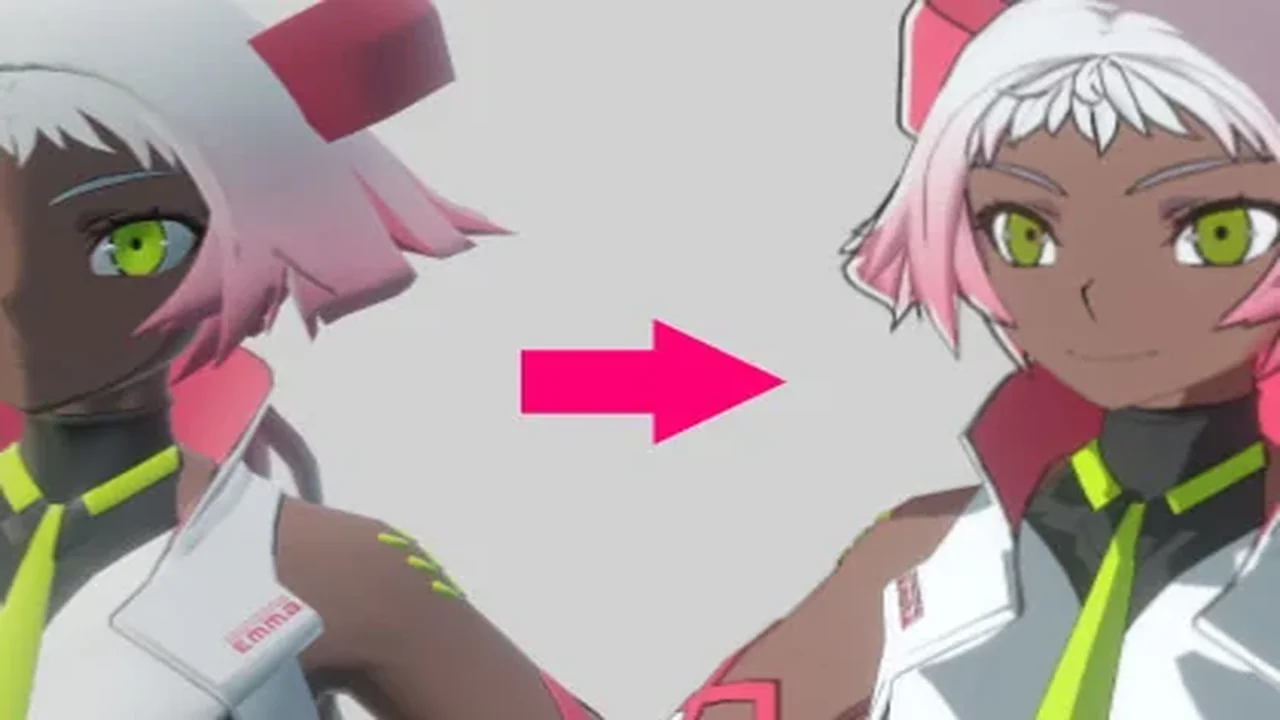
There is also an option to mix standard PBR lighting and toon shading. That gives a project room to combine a more traditional material response with a stylized look when a scene or character calls for it. The plugin also notes post-processing effects for anime-style characters, including tonemapping, which extends the styling work beyond the base shader pass.
Shadow handling and self-shadow control
Shadow behavior is treated as a separate concern. Anime Shading Plus includes a ShadowMap specifically drawn for cel-shaded characters, and it also provides a cube-based self-shadow remover. Those two pieces point to a workflow where the shadow response can be shaped to fit stylized character rendering instead of relying on a standard shadow setup alone.
This is useful when the character needs cleaner forms, flatter shading regions, or a shadow result that does not fight the anime look. The focus stays on character rendering, not broad environmental lighting systems.
Outline options for different character setups
Outlines are a major part of the package. The plugin supports both customizable screen space outlines and mesh-based outlines for characters. That gives two different ways to approach edge emphasis, depending on the scene and the model setup.
Screen space outlines can be adjusted, while mesh-based outlines give a character-level approach. The package also includes a smoothed normal baking tool for mesh-based outline work. That is paired with the shading workflow rather than treated as an isolated add-on, which matters when the outline result depends on how the model is prepared.
Workflow tools for character prep
Beyond the shading and outline systems, the plugin includes tools aimed at preparation work. One is a face shadow map baking tool. Another is the smoothed normal baking tool mentioned above for mesh-based outlines. These tools point toward a pipeline where the model itself may need adjustment before the final anime look is finished.
The target users section makes that expectation clear: users should be able to work independently with third-party DCC tools, including adjusting vertex color or UVs on the model. In practice, this means the plugin fits better in a character workflow where model preparation is already part of the process.
Where it fits in production
The plugin is aimed at developers who need to render anime characters in Unity, as well as studios and teams using this kind of shader as a base for 3D character projects with a Japanese cartoon rendering style. It also fits developers who want to learn how to write custom shaders and passes in Unityâs URP pipeline.
That range makes the package relevant in a few different production settings. A character-focused game can use it to establish a stylized visual language. A studio can use it as a starting point for its own shader work. Someone learning URP shader and pass development can use it as a reference point for how anime-style rendering is assembled in practice.
Platform focus and current limits
The primary target platforms are PC, Mac, and iOS. The plugin has not been optimized for Android or low-end devices, though it is noted as theoretically possible. VR and XR are not yet supported because Stereo Rendering and Foveat Rendering have not been tested. Consoles such as PS5, PS4, Xbox, and Switch have also not been tested.
Those limits matter when planning a pipeline. If the project is targeting one of the primary platforms, the package lines up with the intended use. If the project depends on mobile low-end performance, VR/XR, or consoles, the shader and script setup would need careful validation before it can be treated as a fit.
Documentation and Unity 6 support
Anime Shading Plus comes with documentation that covers shader parameters, environment setup, limitations, performance tips, and tutorials or examples for creating anime-style characters. The documentation is available in English, Chinese, and Japanese, which helps when the workflow needs a reference during setup or tuning.
The plugin also includes full Render Graph API support for Unity 6. That gives it a clear place in newer Unity pipelines, especially for teams working with the current Render Graph setup and looking for an anime shading solution that already accounts for it.
For character-heavy projects that need toon shading, outlines, shadow control, and a few practical prep tools, Anime Shading Plus fits most naturally into the part of production where stylized character rendering is being assembled and refined.
 Shaders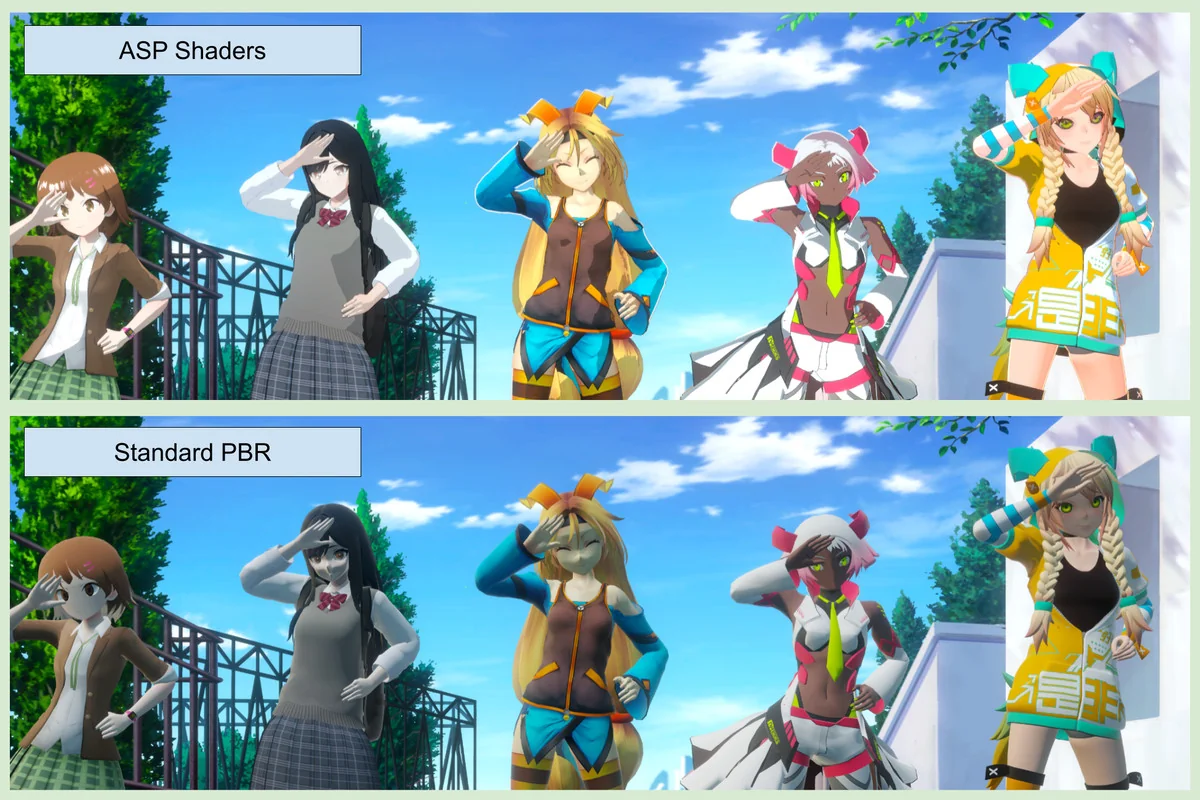
 Shaders
 Shaders
 Shaders