"7e6fc58c410f2894"{"id":"24403","slug":"stylized-water-3","title":"Stylized Water 3","category":"Shaders","engine":"Original Unity version: 6000.0.68","assetVersion":"Original Unity version: 6000.0.68","engineVersion":"Asset Version:3.0.1","tag":"Shaders","accent":"cyan","visual":"audio","summary":"Stylized Water 3 focuses on artistic water rendering for Unity scenes that need clear control over color, reflections, foam, and wave motion. It covers ocean meshes, river behavior, waterfalls, puddles, and water decals without leaning on a realism-first si...","platform":"Unity","publishedAt":"2026-04-14T11:48:46.000Z","updatedAt":"2026-04-20T06:12:49.000Z","sourceNotes":[],"fileContents":[],"compatibility":["Unity","Original Unity version: 6000.0.68","Asset Version: 3.0.1"],"featuredImage":{"alt":"Stylized Water 3","src":"https://3dcghub.com/wp-content/uploads/2026/04/1e931df26ffe_2a7b5ca4-dbfb-416e-b26c-2a1dc7b15ca8_1280x720_stretch.webp"},"hasDownloadLink":true,"downloads":12,"terms":[{"taxonomy":"category","slug":"shaders-vfx-unity-2","name":"Shaders"},{"taxonomy":"post_tag","slug":"environment","name":"Environment"},{"taxonomy":"post_tag","slug":"materials","name":"Materials"},{"taxonomy":"post_tag","slug":"unity","name":"Unity"}],"galleryImages":[{"src":"https://3dcghub.com/wp-content/uploads/2026/04/616781345ca8_c8a060b2-9957-46c9-bb87-d97d5fa5b5e4_scaled.webp","alt":"Stylized Water 3"},{"src":"https://3dcghub.com/wp-content/uploads/2026/04/7da37777c734_45d068c4-c1dd-4c10-86de-430f0ce0dddf_scaled.webp","alt":"Stylized Water 3"},{"src":"https://3dcghub.com/wp-content/uploads/2026/04/7eaac107797d_063c781c-8f62-4fbe-9042-4f138517c231_scaled.webp","alt":"Stylized Water 3"},{"src":"https://3dcghub.com/wp-content/uploads/2026/04/a63075e5bca4_2a0a55bb-fb87-4bb8-8286-2250effae25f_scaled.webp","alt":"Stylized Water 3"},{"src":"https://3dcghub.com/wp-content/uploads/2026/04/55bd205cdbb6_8f847423-af8f-45ac-97a8-0ac0c483dadd_scaled.webp","alt":"Stylized Water 3"},{"src":"https://3dcghub.com/wp-content/uploads/2026/04/8657f4d7b618_20b77517-a2c8-4b8f-8aa8-1fc81afe3039_scaled.webp","alt":"Stylized Water 3"},{"src":"https://3dcghub.com/wp-content/uploads/2026/04/07fc52e8c577_83ee63e3-4645-404b-92bd-71bd10947477_scaled.webp","alt":"Stylized Water 3"},{"src":"https://3dcghub.com/wp-content/uploads/2026/04/8e03957db948_3057f7fa-6c96-4afe-bb58-bd60bf045f6e_scaled.webp","alt":"Stylized Water 3"},{"src":"https://3dcghub.com/wp-content/uploads/2026/04/7bb6c59d8d8a_b77cac5e-1834-4bc8-94bf-7db115247283_scaled.webp","alt":"Stylized Water 3"},{"src":"https://3dcghub.com/wp-content/uploads/2026/04/fe5458ffcbe2_5db0f836-4772-4eff-9d7c-e3fdb594d91f_scaled.webp","alt":"Stylized Water 3"}],"accessPanel":{"kind":"resource","title":"Access this resource","eyebrow":"Free Download","message":"Log in or create a free account to start your download.","fileName":"Stylized Water 3 v3.0.1.7z","safetyNote":"All resources are 100% manually reviewed to eliminate all risks.","actionLabel":"Download Free","resourceType":"Resource archive"},"contentHtml":"\u003ch2\u003eWater for scenes that need style before simulation\u003c/h2\u003e\n\u003cp\u003eStylized Water 3 is aimed at games and environments where water needs to support the scene rather than dominate it with a realistic simulation. It fits a wide range of applications that require water, from broad ocean views to smaller touches like puddles and shoreline details. The emphasis stays on artistic freedom, so the water can be shaped to match a projectâs visual direction instead of chasing a strictly PBR-based result.\u003c/p\u003e\n\u003cp\u003eThat approach is backed by a custom lighting model that gives direct control over color and light or environment reflections while still keeping correct dynamic lighting behaviour. Unityâs native lighting features remain supported, so the water can work inside scenes that already rely on the engineâs built-in lighting setup. The package is also presented as easy to use and self-documented, with UX and UI treated as a core part of the workflow.\u003c/p\u003e\n\u003cp\u003eIt builds on over 10 years of experience in shader development and water rendering, covering both asset store work and commercial projects. That background shows up in the way the water is split between broad visual control and practical scene tools.\u003c/p\u003e \u003ch2\u003eShading controls that stay readable in use\u003c/h2\u003e\n\u003cp\u003eThe water shader is not locked to one look. It includes Unlit, Simple, and Advanced shading modes, which makes it possible to cover low-end and high-end graphics within the same asset. Deep, shallow, and horizon color controls help define how the water behaves across distance and depth, while a flat shading mode supports a low poly look when that style is the better match.\u003c/p\u003e\n\u003cp\u003eFoam and surface response are given a lot of room to move. Intersection foam can react to opaque geometry through scene depth or vertex colors, and surface foam can be adjusted on its own. Animated caustics are available for shallow water, translucency is rendered from all light types, and refraction distorts objects behind the water surface. Sparkles come from the normal map, and reflections can be controlled separately for directional lights, point lights, spot lights, and the environment.\u003c/p\u003e\n\u003cp\u003eWave behavior is also part of the shader story. Layered wave animations are GPU-driven and available through presets, while distance normals and surface foam help reduce visible tiling. UV- or world-projected tiling keeps the water seamless, and vertex color support gives control over foam, underwater fog, and wave height. The result is a toolset that stays focused on visible decisions rather than burying the look under simulation complexity.\u003c/p\u003e \u003ch2\u003eRivers, oceans, puddles, and waterfalls in one workflow\u003c/h2\u003e\n\u003cp\u003eSeveral of the newest additions make the asset feel especially useful for different kinds of water in the same project. The ocean mesh component includes an 8x8km mesh with gradual vertex density, which makes it suitable for large outdoor scenes where the water needs to extend far beyond the camera without looking flat. River mode adds directional animations and slope-based foam, giving flowing water a different behavior from static pools or open water.\u003c/p\u003e\n\u003cp\u003eSmaller details are covered too. Waterfall prefabs come in three sizes, and puddle prefabs are included for ground-level surface details. Water decals snap textures onto the water, which opens the door to things like oil spills, weeds, and targeting reticles. Those additions make it easier to use the same system for both large environment pieces and smaller scene accents.\u003c/p\u003e\n\u003cp\u003eWave presentation has also been expanded. Wave animations were revamped with a profile system that allows various wave types, and improved wave crest foam shading adds min and max range control plus bubbles. A GPU-based height query system makes rivers and Dynamic Effects readable, while the height pre-pass allows other shaders to read out the water surface height. That makes the water easier to integrate with other rendering and effect systems in the scene.\u003c/p\u003e\n\u003cp\u003eProjects already using Stylized Water 2 can be upgraded, which matters for teams that want to keep a familiar style while moving to the newer rendering and wave systems.\u003c/p\u003e \u003ch2\u003eCompatibility, documentation, and the parts that make setup practical\u003c/h2\u003e\n\u003cp\u003eA license for the asset guarantees access to updates for Unity 6.0 through 6.4, with the possibility of new versions and features as they appear. Rendering code has been rewritten for Render Graph support, which places the asset in a more current rendering path inside Unity. For teams already working in those versions, that compatibility note is one of the clearest indicators of where the package is meant to sit.\u003c/p\u003e\n\u003cp\u003eDocumentation is a visible part of the workflow. The material interface uses a clean accordion-style layout with tooltips, which keeps the settings organized without forcing the user to hunt through a crowded panel. Combined with the self-documented focus and the emphasis on straightforward UX/UI, the asset is positioned to work for both beginners and more advanced users.\u003c/p\u003e\n\u003cp\u003eThat mix of control and readability is what makes the package practical across different project types. It can support stylized shorelines, rivers with slope-based foam, open water with a large ocean mesh, puddles with simple environmental detail, or waterfalls that need their own prefab variations. The strongest fit is for projects that want water to be visually specific, easy to direct, and broad enough to cover both small effects and large scenes without changing tools.\u003c/p\u003e\n\u003cp\u003eIf the project needs stylized water with clear shading controls, readable wave behavior, and support for both large and small environments, this is a focused match.\u003c/p\u003e\n\n\u003ch2\u003eExplore Similar Assets\u003c/h2\u003e\n\u003cul\u003e\n\u003cli\u003e\u003ca href=\"https://3dcghub.com/stylized-grass-shader-for-unity-2021-2023/\" title=\"Stylized Grass Shader (for Unity 2021-2023)\"\u003eStylized Grass Shader (for Unity 2021-2023)\u003c/a\u003e\u003c/li\u003e\n\u003cli\u003e\u003ca href=\"https://3dcghub.com/make-a-horror-survival-game-in-unity/\" title=\"Make a horror survival game in Unity\"\u003eMake a horror survival game in Unity\u003c/a\u003e\u003c/li\u003e\n\u003cli\u003e\u003ca href=\"https://3dcghub.com/unity-shader-programming-beginners-to-advanced-techniques/\" title=\"Unity Shader Programming: Beginners to Advanced Techniques\"\u003eUnity Shader Programming: Beginners to Advanced Techniques\u003c/a\u003e\u003c/li\u003e\n\u003cli\u003e\u003ca href=\"https://3dcghub.com/mastering-editor-scripting-in-unity/\" title=\"Mastering Editor Scripting in Unity\"\u003eMastering Editor Scripting in Unity\u003c/a\u003e\u003c/li\u003e\n\u003cli\u003e\u003ca href=\"https://3dcghub.com/altos-volumetric-clouds-skybox-and-weather-for-unity-urp/\" title=\"Altos – Volumetric Clouds, Skybox, and Weather for Unity URP\"\u003eAltos – Volumetric Clouds, Skybox, and Weather for Unity URP\u003c/a\u003e\u003c/li\u003e\n\u003c/ul\u003e","contentTextLength":5873,"navigation":{"current":1888,"total":3618,"previous":{"id":"24416","slug":"ui-shader-effects-edge-effects","title":"UI Shader Effects - Edge Effects","category":"Shaders","platform":"Unity","updatedAt":"2026-04-20T06:12:49.000Z"},"next":{"id":"24390","slug":"stylized-water-2","title":"Stylized Water 2","category":"Shaders","platform":"Unity","updatedAt":"2026-04-20T06:12:49.000Z"}},"relatedResources":[{"id":"24158","slug":"flat-kit-toon-shading-and-water","title":"Flat Kit: Toon Shading and Water","category":"Shaders","engine":"Original Unity version: 2020.3.0","assetVersion":"Original Unity version: 2020.3.0","engineVersion":"Asset Version:4.9.2","tag":"Shaders","accent":"cyan","visual":"animation","summary":"Flat Kit brings cel shading, stylized water, outlines, fog, pixelation, and terrain shading into a single Unity-focused setup. It also supports Built-in and URP workflows, with XR, mobile, WebGL, and console coverage stated for the package.","platform":"Unity","publishedAt":"2026-04-12T10:01:58.000Z","updatedAt":"2026-04-19T15:34:58.000Z","sourceNotes":[],"fileContents":[],"compatibility":["Unity","Original Unity version: 2020.3.0","Asset Version: 4.9.2"],"featuredImage":{"alt":"Flat Kit: Toon Shading and Water","src":"https://3dcghub.com/wp-content/uploads/2026/04/2dd8adfba05b_5dbcd94d-8661-443e-bbe6-8df8069d47f8_1280x720_stretch.webp"},"hasDownloadLink":true,"downloads":2},{"id":"24390","slug":"stylized-water-2","title":"Stylized Water 2","category":"Shaders","engine":"Original Unity version: 2021.3.16","assetVersion":"Original Unity version: 2021.3.16","engineVersion":"Asset Version:1.7.0","tag":"Shaders","accent":"cyan","visual":"mech","summary":"Stylized Water 2 focuses on artistic control instead of strict physical simulation, giving Unity projects a flexible water setup with deep, shallow, and horizon color controls, foam options, and layered wave motion. It also keeps the workflow practical with...","platform":"Unity","publishedAt":"2026-04-14T11:40:39.000Z","updatedAt":"2026-04-20T06:12:49.000Z","sourceNotes":[],"fileContents":[],"compatibility":["Unity","Original Unity version: 2021.3.16","Asset Version: 1.7.0"],"featuredImage":{"alt":"Stylized Water 2","src":"https://3dcghub.com/wp-content/uploads/2026/04/7023b4a55d3a_62e96f7d-5061-4e32-bbd3-f4f89e0fd5cb_1280x720_stretch.webp"},"hasDownloadLink":true,"downloads":1},{"id":"24104","slug":"cozy-stylized-weather-3","title":"COZY: Stylized Weather 3","category":"Shaders","engine":"Original Unity version: 2022.3.62","assetVersion":"Original Unity version: 2022.3.62","engineVersion":"Asset Version:3.5.4 - 3.6.8","tag":"Shaders","accent":"cyan","visual":"audio","summary":"COZY: Stylized Weather 3 handles the weather layer with a hand-crafted look instead of realism. It covers time-of-day, seasons, clouds, storms, fog, and scene-color tweaks, while supporting Built-In, HDRP, and URP.","platform":"Unity","publishedAt":"2026-04-12T09:44:13.000Z","updatedAt":"2026-04-19T15:34:59.000Z","sourceNotes":[],"fileContents":[],"compatibility":["Unity","Original Unity version: 2022.3.62","Asset Version: 3.5.4 - 3.6.8"],"featuredImage":{"alt":"COZY: Stylized Weather 3","src":"https://3dcghub.com/wp-content/uploads/2026/04/4bb6b2024623_96bcefb7-182c-45a9-b50f-59d65b527604_1280x720_stretch.webp"},"hasDownloadLink":true,"downloads":10}]}
Shaders
Stylized Water 3
Stylized Water 3 focuses on artistic water rendering for Unity scenes that need clear control over color, reflections, foam, and wave motion. It covers ocean meshes, river behavior, waterfalls, puddles, and water decals without leaning on a realism-first si...
Water for scenes that need style before simulation
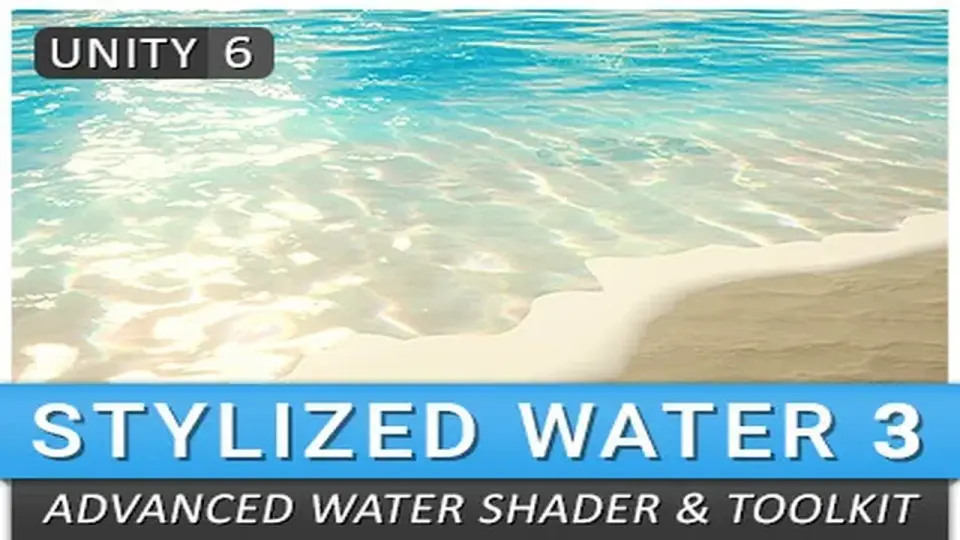
Stylized Water 3 is aimed at games and environments where water needs to support the scene rather than dominate it with a realistic simulation. It fits a wide range of applications that require water, from broad ocean views to smaller touches like puddles and shoreline details. The emphasis stays on artistic freedom, so the water can be shaped to match a projectâs visual direction instead of chasing a strictly PBR-based result.
That approach is backed by a custom lighting model that gives direct control over color and light or environment reflections while still keeping correct dynamic lighting behaviour. Unityâs native lighting features remain supported, so the water can work inside scenes that already rely on the engineâs built-in lighting setup. The package is also presented as easy to use and self-documented, with UX and UI treated as a core part of the workflow.
It builds on over 10 years of experience in shader development and water rendering, covering both asset store work and commercial projects. That background shows up in the way the water is split between broad visual control and practical scene tools.
Shading controls that stay readable in use
The water shader is not locked to one look. It includes Unlit, Simple, and Advanced shading modes, which makes it possible to cover low-end and high-end graphics within the same asset. Deep, shallow, and horizon color controls help define how the water behaves across distance and depth, while a flat shading mode supports a low poly look when that style is the better match.
Foam and surface response are given a lot of room to move. Intersection foam can react to opaque geometry through scene depth or vertex colors, and surface foam can be adjusted on its own. Animated caustics are available for shallow water, translucency is rendered from all light types, and refraction distorts objects behind the water surface. Sparkles come from the normal map, and reflections can be controlled separately for directional lights, point lights, spot lights, and the environment.
Wave behavior is also part of the shader story. Layered wave animations are GPU-driven and available through presets, while distance normals and surface foam help reduce visible tiling. UV- or world-projected tiling keeps the water seamless, and vertex color support gives control over foam, underwater fog, and wave height. The result is a toolset that stays focused on visible decisions rather than burying the look under simulation complexity.
Rivers, oceans, puddles, and waterfalls in one workflow
Several of the newest additions make the asset feel especially useful for different kinds of water in the same project. The ocean mesh component includes an 8x8km mesh with gradual vertex density, which makes it suitable for large outdoor scenes where the water needs to extend far beyond the camera without looking flat. River mode adds directional animations and slope-based foam, giving flowing water a different behavior from static pools or open water.
Smaller details are covered too. Waterfall prefabs come in three sizes, and puddle prefabs are included for ground-level surface details. Water decals snap textures onto the water, which opens the door to things like oil spills, weeds, and targeting reticles. Those additions make it easier to use the same system for both large environment pieces and smaller scene accents.
Wave presentation has also been expanded. Wave animations were revamped with a profile system that allows various wave types, and improved wave crest foam shading adds min and max range control plus bubbles. A GPU-based height query system makes rivers and Dynamic Effects readable, while the height pre-pass allows other shaders to read out the water surface height. That makes the water easier to integrate with other rendering and effect systems in the scene.
Projects already using Stylized Water 2 can be upgraded, which matters for teams that want to keep a familiar style while moving to the newer rendering and wave systems.
Compatibility, documentation, and the parts that make setup practical
A license for the asset guarantees access to updates for Unity 6.0 through 6.4, with the possibility of new versions and features as they appear. Rendering code has been rewritten for Render Graph support, which places the asset in a more current rendering path inside Unity. For teams already working in those versions, that compatibility note is one of the clearest indicators of where the package is meant to sit.
Documentation is a visible part of the workflow. The material interface uses a clean accordion-style layout with tooltips, which keeps the settings organized without forcing the user to hunt through a crowded panel. Combined with the self-documented focus and the emphasis on straightforward UX/UI, the asset is positioned to work for both beginners and more advanced users.
That mix of control and readability is what makes the package practical across different project types. It can support stylized shorelines, rivers with slope-based foam, open water with a large ocean mesh, puddles with simple environmental detail, or waterfalls that need their own prefab variations. The strongest fit is for projects that want water to be visually specific, easy to direct, and broad enough to cover both small effects and large scenes without changing tools.
If the project needs stylized water with clear shading controls, readable wave behavior, and support for both large and small environments, this is a focused match.
 Shaders
 Shaders
 Shaders
 Shaders