"c14ff6bd758dadb1"{"id":"24416","slug":"ui-shader-effects-edge-effects","title":"UI Shader Effects - Edge Effects","category":"Shaders","engine":"Original Unity version: 2021.3.45","assetVersion":"Original Unity version: 2021.3.45","engineVersion":"Asset Version:1.1.1","tag":"Shaders","accent":"cyan","visual":"character","summary":"UI Shader Effects - Edge Effects centers on UI edge treatment for square, rectangular, and circular elements. It combines prefabs, custom shaders, ready-made materials, textures, and UIToolkit files across multiple Unity rendering pipelines.","platform":"Unity","publishedAt":"2026-04-14T11:44:30.000Z","updatedAt":"2026-04-20T06:12:49.000Z","sourceNotes":[],"fileContents":[],"compatibility":["Unity","Original Unity version: 2021.3.45","Asset Version: 1.1.1"],"featuredImage":{"alt":"UI Shader Effects - Edge Effects","src":"https://3dcghub.com/wp-content/uploads/2026/04/76bc5224a0cf_b5fe6fdd-8fb8-413e-82d8-1d8dacd60d39_1280x720_stretch.webp"},"hasDownloadLink":true,"downloads":2,"terms":[{"taxonomy":"category","slug":"shaders-vfx-unity-2","name":"Shaders"},{"taxonomy":"post_tag","slug":"materials","name":"Materials"},{"taxonomy":"post_tag","slug":"unity","name":"Unity"},{"taxonomy":"post_tag","slug":"vfx","name":"VFX"}],"galleryImages":[{"src":"https://3dcghub.com/wp-content/uploads/2026/04/aef29e1e7a06_06b6959a-322b-4d84-a57e-c396f4609514_scaled.webp","alt":"UI Shader Effects - Edge Effects"},{"src":"https://3dcghub.com/wp-content/uploads/2026/04/75139e58818f_7a4f513b-42a0-4e02-a7fb-15f3f0fc580c_scaled.webp","alt":"UI Shader Effects - Edge Effects"},{"src":"https://3dcghub.com/wp-content/uploads/2026/04/fee8870d5bbc_74eb2f5b-6b4e-460d-b6c7-b6610d3e2fad_scaled.webp","alt":"UI Shader Effects - Edge Effects"},{"src":"https://3dcghub.com/wp-content/uploads/2026/04/67cd9b916bed_6cc8b3de-9a0f-48f0-948c-a2d59207156f_scaled.webp","alt":"UI Shader Effects - Edge Effects"},{"src":"https://3dcghub.com/wp-content/uploads/2026/04/9e2388620255_34633f71-3663-418f-ae45-109c29779a31_scaled.webp","alt":"UI Shader Effects - Edge Effects"},{"src":"https://3dcghub.com/wp-content/uploads/2026/04/d99c57869e1a_e4ca662e-d989-4d50-9285-091bc9d245d1_scaled.webp","alt":"UI Shader Effects - Edge Effects"},{"src":"https://3dcghub.com/wp-content/uploads/2026/04/7e0103f6f556_97467710-3b3f-4719-92ce-0b05f218cdbe_scaled.webp","alt":"UI Shader Effects - Edge Effects"},{"src":"https://3dcghub.com/wp-content/uploads/2026/04/2bbd22a4f667_a9230404-6e48-4128-b43c-9e662bd38796_scaled.webp","alt":"UI Shader Effects - Edge Effects"},{"src":"https://3dcghub.com/wp-content/uploads/2026/04/567fa6ea9ec5_aaa99805-dacf-4d0c-a5ac-136d0c7dedde_scaled.webp","alt":"UI Shader Effects - Edge Effects"},{"src":"https://3dcghub.com/wp-content/uploads/2026/04/f80ff0050c3c_768fe6ce-223a-4ae3-a3b2-39f499a296aa_scaled.webp","alt":"UI Shader Effects - Edge Effects"}],"accessPanel":{"kind":"resource","title":"Access this resource","eyebrow":"Free Download","message":"Log in or create a free account to start your download.","fileName":"UI Shader Effects - Edge Effects v1.1.1.7z","safetyNote":"All resources are 100% manually reviewed to eliminate all risks.","actionLabel":"Download Free","resourceType":"Resource archive"},"contentHtml":"\u003ch2\u003eEdge shaders, prefabs, and textures in one package\u003c/h2\u003e \u003cp\u003eUI Shader Effects - Edge Effects brings together the pieces needed to style UI borders and edge treatments without limiting the work to a single shape or a single pipeline. The package covers square, rectangular, and circular UI elements, so it can be used across different interface parts that do not share the same outline. Rather than offering one fixed look, it gives a set of interchangeable parts that can be mixed into different combinations.\u003c/p\u003e \u003cp\u003eThe package includes 20 customizable effect prefabs, 7 custom shaders, 32 ready-made materials, 34 effect textures, and 20 uxml effect files. A single demo scene is included as well. Those pieces form the practical core of the resource: prefabs for quick setup, shaders for the effect behavior itself, materials for prebuilt variations, textures for the visual surface, and uxml files for UIToolkit work in Unity 6.3+.\u003c/p\u003e \u003cp\u003eThe texture set comes in 512Ã512, 1024Ã1024, and 2048Ã2048 sizes. That range gives the package a few different levels of detail to work with, depending on how an interface element is being assembled. The result is a library that stays focused on edge presentation instead of spreading into unrelated UI systems.\u003c/p\u003e \u003ch2\u003eShape support and the way the effects are combined\u003c/h2\u003e \u003cp\u003eWhat stands out most is the shape coverage. Square, rectangular, and circular UI elements are all supported, so the same effect family can be applied to different interface layouts. That matters for projects where panels, buttons, indicators, or framed elements do not follow a single geometry. A circular control does not need a separate visual language from a rectangular panel just because the base shape changes.\u003c/p\u003e \u003cp\u003eThe combination system is one of the main working ideas behind the package. Prefabs, shaders, materials, and textures can be mixed to create many different results, and the set is described as offering unlimited combination possibilities through flexible parameters. In practice, that means the effect set is arranged to let the same core components serve multiple UI styles rather than locking each effect into a single appearance.\u003c/p\u003e \u003cp\u003eBecause the materials are already prepared and the prefabs are customizable, the package can serve as a starting point for interface styling instead of requiring every effect to be assembled from scratch. AI-generated icons for the demo scene, which helps explain the visual presentation used in that scene without adding any extra system beyond the edge effects themselves.\u003c/p\u003e \u003ch2\u003eUnity pipelines, UIToolkit support, and color space behavior\u003c/h2\u003e \u003cp\u003eCompatibility spans the Built-in pipeline, URP, and HDRP, and the package is also listed as Unity 6 compatible. It is mobile-friendly, which places it in a useful position for projects that need the same general effect set across different Unity rendering paths. The support is not limited to a single rendering setup, so the package can fit into more than one project structure.\u003c/p\u003e \u003cp\u003eThere is one narrower case to keep in mind: Unity 6.3+ UIToolkit support is available only in URP, and only for desktop. Mobile is not supported for that UIToolkit path. That detail keeps the package grounded in a specific implementation rather than implying universal UIToolkit coverage across every platform.\u003c/p\u003e \u003cp\u003eThe package is designed and tested for Linear color space. In Gamma color space projects, colors may appear slightly different, and some small adjustments may be needed, such as changing color intensity or brightness. That note is important because edge effects often depend on visible contrast, so the color-space setting can change how strongly the effect reads on screen.\u003c/p\u003e \u003ch2\u003eProject fit and practical use\u003c/h2\u003e \u003cp\u003eUI Shader Effects - Edge Effects is a close fit for projects that need visible edge treatment on UI shapes without moving into unrelated asset types. Since it supports square, rectangular, and circular elements, it can be used where interface pieces need to feel related even when their outlines differ. The included materials, textures, and prefabs make it easier to keep a consistent edge style while still varying the result.\u003c/p\u003e \u003cp\u003eThe presence of both standard pipeline support and Unity 6.3+ UIToolkit files gives the package a clear split in use cases. Projects using Built-in, URP, or HDRP can work with the shader and material side, while desktop UIToolkit work in URP can use the uxml effect files directly. That makes the package relevant both for older Unity projects and for newer UI workflows.\u003c/p\u003e \u003cp\u003eIts lighter footprint also comes through in the technical details: the package is 27.0 MB, contains 166 assets, and ships as a unitypackage. The original Unity version is 2021.3.45, and supported Unity versions include 2021.3.45, 6000.2.9, and 6000.3.0. It sits in the Shaders category under vfx/shaders, which matches the effect-driven focus of the content rather than a broader UI toolkit.\u003c/p\u003e \u003ch2\u003eTechnical details at a glance\u003c/h2\u003e \u003cp\u003eFirst published on Aug 06, 2024, the package later reached version 2.0.0 with a latest release date of Oct 29, 2025. The setup includes a demo scene, and the demo uses AI-generated icons. Those details reinforce that the package is centered on showing the edge effects in use while staying focused on the shader-driven part of the UI workflow.\u003c/p\u003e \u003cp\u003eFor projects that need edge styling across multiple UI shapes and Unity pipelines, this package is set up to handle that work with a compact set of shaders, prefabs, materials, textures, and UIToolkit files.\u003c/p\u003e\n\n\u003ch2\u003eContinue Browsing Similar Packs\u003c/h2\u003e\n\u003cul\u003e\n\u003cli\u003e\u003ca href=\"https://3dcghub.com/stylized-grass-shader-for-unity-2021-2023/\" title=\"Stylized Grass Shader (for Unity 2021-2023)\"\u003eStylized Grass Shader (for Unity 2021-2023)\u003c/a\u003e\u003c/li\u003e\n\u003cli\u003e\u003ca href=\"https://3dcghub.com/make-a-horror-survival-game-in-unity/\" title=\"Make a horror survival game in Unity\"\u003eMake a horror survival game in Unity\u003c/a\u003e\u003c/li\u003e\n\u003cli\u003e\u003ca href=\"https://3dcghub.com/unity-shader-programming-beginners-to-advanced-techniques/\" title=\"Unity Shader Programming: Beginners to Advanced Techniques\"\u003eUnity Shader Programming: Beginners to Advanced Techniques\u003c/a\u003e\u003c/li\u003e\n\u003cli\u003e\u003ca href=\"https://3dcghub.com/mastering-editor-scripting-in-unity/\" title=\"Mastering Editor Scripting in Unity\"\u003eMastering Editor Scripting in Unity\u003c/a\u003e\u003c/li\u003e\n\u003cli\u003e\u003ca href=\"https://3dcghub.com/altos-volumetric-clouds-skybox-and-weather-for-unity-urp/\" title=\"Altos – Volumetric Clouds, Skybox, and Weather for Unity URP\"\u003eAltos – Volumetric Clouds, Skybox, and Weather for Unity URP\u003c/a\u003e\u003c/li\u003e\n\u003c/ul\u003e\n\n\u003ch2\u003eAsset Gallery\u003c/h2\u003e","contentTextLength":5744,"navigation":{"current":1992,"total":3719,"previous":{"id":"24299","slug":"ice-world-2","title":"Ice World","category":"Shaders","platform":"Unity","updatedAt":"2026-04-20T06:12:50.000Z"},"next":{"id":"24403","slug":"stylized-water-3","title":"Stylized Water 3","category":"Shaders","platform":"Unity","updatedAt":"2026-04-20T06:12:49.000Z"}},"relatedResources":[{"id":"24052","slug":"all-in-1-sprite-shader","title":"All In 1 Sprite Shader","category":"Shaders","engine":"Original Unity version: 2021.3.45","assetVersion":"Original Unity version: 2021.3.45","engineVersion":"Asset Version:4.25","tag":"Shaders","accent":"cyan","visual":"audio","summary":"All In 1 Sprite Shader brings sprites, UI elements, and particles into one fast workflow. It combines 46+ effects, supports multiple render pipelines, and includes tools for inspection, baking, and script access.","platform":"Unity","publishedAt":"2026-04-12T09:32:11.000Z","updatedAt":"2026-04-19T15:35:01.000Z","sourceNotes":[],"fileContents":[],"compatibility":["Unity","Original Unity version: 2021.3.45","Asset Version: 4.25"],"featuredImage":{"alt":"All In 1 Sprite Shader","src":"https://3dcghub.com/wp-content/uploads/2026/04/c9cd3962dfe2_e5a17b50-03e4-447a-939a-519f7b5e4b8f_1280x720_stretch.webp"},"hasDownloadLink":true,"downloads":5},{"id":"24364","slug":"sprite-shaders-ultimate","title":"Sprite Shaders Ultimate","category":"Shaders","engine":"Original Unity version: 2020.3.0","assetVersion":"Original Unity version: 2020.3.0","engineVersion":"Asset Version:6.10","tag":"Shaders","accent":"cyan","visual":"luts","summary":"Sprite Shaders Ultimate brings sprites and UI elements into motion with a large set of combinable shaders. It includes tools for masking, fading, pixel art handling, shader baking, and support across render pipelines.","platform":"Unity","publishedAt":"2026-04-14T11:31:15.000Z","updatedAt":"2026-04-20T06:12:49.000Z","sourceNotes":[],"fileContents":[],"compatibility":["Unity","Original Unity version: 2020.3.0","Asset Version: 6.10"],"featuredImage":{"alt":"Sprite Shaders Ultimate","src":"https://3dcghub.com/wp-content/uploads/2026/04/dc468761f253_7796ac63-cceb-4e61-9b8d-fe845bffe76d_1280x720_stretch.webp"},"hasDownloadLink":true,"downloads":2},{"id":"24186","slug":"atmospheric-height-fog-optimized-fog-for-consoles-mobile-and-vr-2","title":"Atmospheric Height Fog | Optimized Fog for Consoles, Mobile and VR","category":"Fullscreen \u0026 Camera Effects","engine":"Original Unity version: 2022.3.0","assetVersion":"Original Unity version: 2022.3.0","engineVersion":"Asset Version:3.4.0","tag":"Fullscreen","accent":"cyan","visual":"mech","summary":"Atmospheric Height Fog adds a controllable fog layer that creates depth without leaning on a heavy volumetric setup. It supports transparent shaders, world-space UI, and multiple render pipelines, making it practical for scenes that need atmosphere to carry...","platform":"Unity","publishedAt":"2026-04-12T10:13:41.000Z","updatedAt":"2026-04-19T15:34:57.000Z","sourceNotes":[],"fileContents":[],"compatibility":["Unity","Original Unity version: 2022.3.0","Asset Version: 3.4.0"],"featuredImage":{"alt":"Atmospheric Height Fog | Optimized Fog for Consoles, Mobile and VR","src":"https://3dcghub.com/wp-content/uploads/2026/04/13596ddf9861_aeca4a88-310a-4bf5-8d0c-d7b5915664f4_1280x720_stretch-1.webp"},"hasDownloadLink":true,"downloads":0}]}
Shaders
UI Shader Effects - Edge Effects
UI Shader Effects - Edge Effects centers on UI edge treatment for square, rectangular, and circular elements. It combines prefabs, custom shaders, ready-made materials, textures, and UIToolkit files across multiple Unity rendering pipelines.
Edge shaders, prefabs, and textures in one package
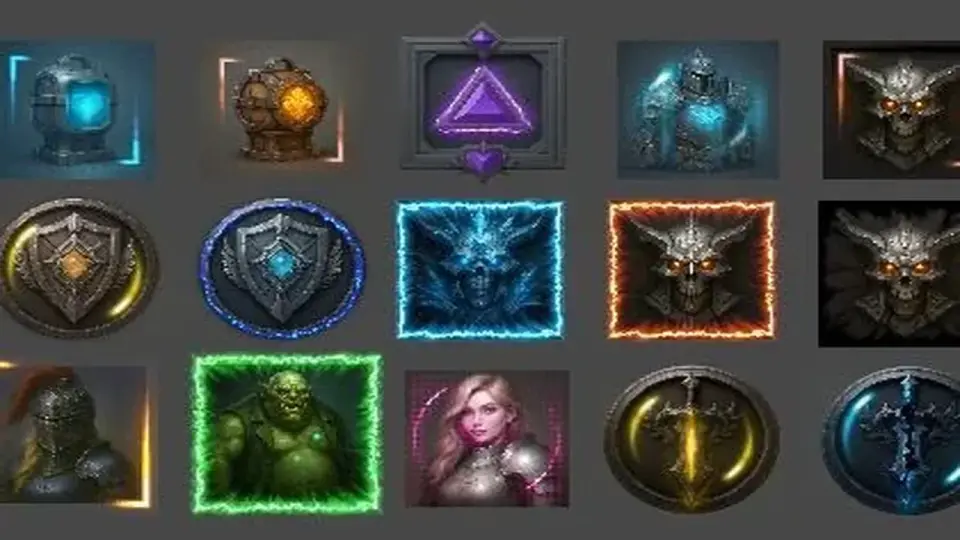
UI Shader Effects - Edge Effects brings together the pieces needed to style UI borders and edge treatments without limiting the work to a single shape or a single pipeline. The package covers square, rectangular, and circular UI elements, so it can be used across different interface parts that do not share the same outline. Rather than offering one fixed look, it gives a set of interchangeable parts that can be mixed into different combinations.
The package includes 20 customizable effect prefabs, 7 custom shaders, 32 ready-made materials, 34 effect textures, and 20 uxml effect files. A single demo scene is included as well. Those pieces form the practical core of the resource: prefabs for quick setup, shaders for the effect behavior itself, materials for prebuilt variations, textures for the visual surface, and uxml files for UIToolkit work in Unity 6.3+.
The texture set comes in 512Ã512, 1024Ã1024, and 2048Ã2048 sizes. That range gives the package a few different levels of detail to work with, depending on how an interface element is being assembled. The result is a library that stays focused on edge presentation instead of spreading into unrelated UI systems.
Shape support and the way the effects are combined
What stands out most is the shape coverage. Square, rectangular, and circular UI elements are all supported, so the same effect family can be applied to different interface layouts. That matters for projects where panels, buttons, indicators, or framed elements do not follow a single geometry. A circular control does not need a separate visual language from a rectangular panel just because the base shape changes.
The combination system is one of the main working ideas behind the package. Prefabs, shaders, materials, and textures can be mixed to create many different results, and the set is described as offering unlimited combination possibilities through flexible parameters. In practice, that means the effect set is arranged to let the same core components serve multiple UI styles rather than locking each effect into a single appearance.
Because the materials are already prepared and the prefabs are customizable, the package can serve as a starting point for interface styling instead of requiring every effect to be assembled from scratch. AI-generated icons for the demo scene, which helps explain the visual presentation used in that scene without adding any extra system beyond the edge effects themselves.
Unity pipelines, UIToolkit support, and color space behavior
Compatibility spans the Built-in pipeline, URP, and HDRP, and the package is also listed as Unity 6 compatible. It is mobile-friendly, which places it in a useful position for projects that need the same general effect set across different Unity rendering paths. The support is not limited to a single rendering setup, so the package can fit into more than one project structure.
There is one narrower case to keep in mind: Unity 6.3+ UIToolkit support is available only in URP, and only for desktop. Mobile is not supported for that UIToolkit path. That detail keeps the package grounded in a specific implementation rather than implying universal UIToolkit coverage across every platform.
The package is designed and tested for Linear color space. In Gamma color space projects, colors may appear slightly different, and some small adjustments may be needed, such as changing color intensity or brightness. That note is important because edge effects often depend on visible contrast, so the color-space setting can change how strongly the effect reads on screen.
Project fit and practical use
UI Shader Effects - Edge Effects is a close fit for projects that need visible edge treatment on UI shapes without moving into unrelated asset types. Since it supports square, rectangular, and circular elements, it can be used where interface pieces need to feel related even when their outlines differ. The included materials, textures, and prefabs make it easier to keep a consistent edge style while still varying the result.
The presence of both standard pipeline support and Unity 6.3+ UIToolkit files gives the package a clear split in use cases. Projects using Built-in, URP, or HDRP can work with the shader and material side, while desktop UIToolkit work in URP can use the uxml effect files directly. That makes the package relevant both for older Unity projects and for newer UI workflows.
Its lighter footprint also comes through in the technical details: the package is 27.0 MB, contains 166 assets, and ships as a unitypackage. The original Unity version is 2021.3.45, and supported Unity versions include 2021.3.45, 6000.2.9, and 6000.3.0. It sits in the Shaders category under vfx/shaders, which matches the effect-driven focus of the content rather than a broader UI toolkit.
Technical details at a glance
First published on Aug 06, 2024, the package later reached version 2.0.0 with a latest release date of Oct 29, 2025. The setup includes a demo scene, and the demo uses AI-generated icons. Those details reinforce that the package is centered on showing the edge effects in use while staying focused on the shader-driven part of the UI workflow.
For projects that need edge styling across multiple UI shapes and Unity pipelines, this package is set up to handle that work with a compact set of shaders, prefabs, materials, textures, and UIToolkit files.
 Shaders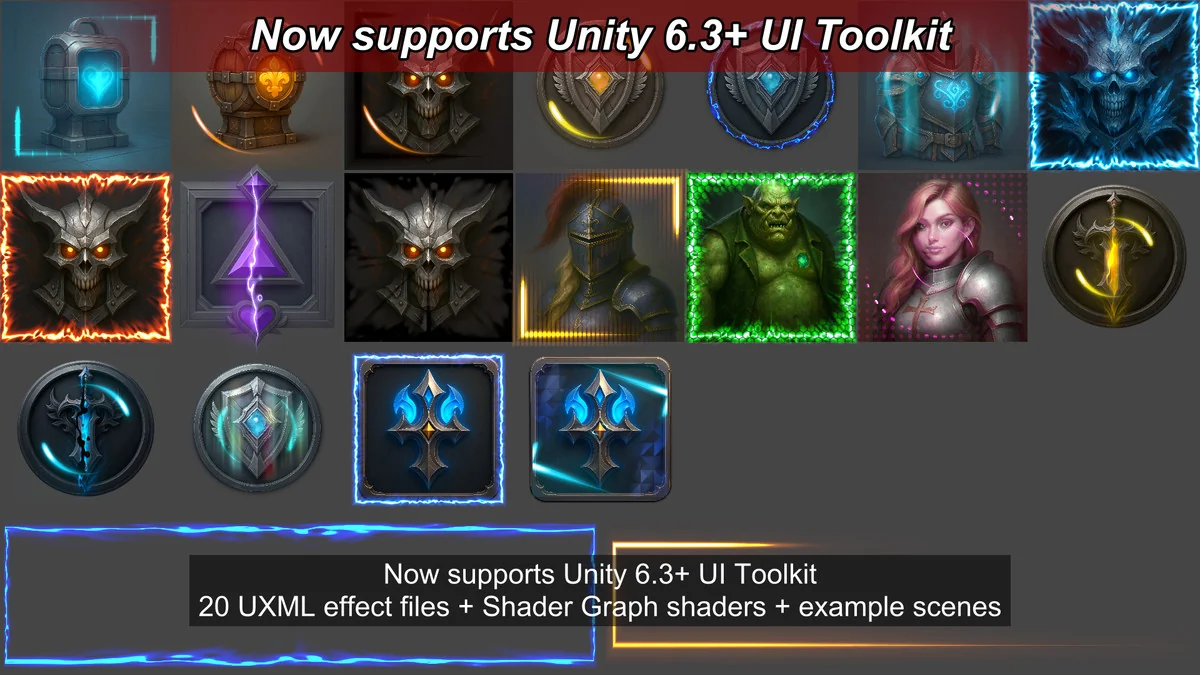
 Shaders
 Shaders
 Fullscreen