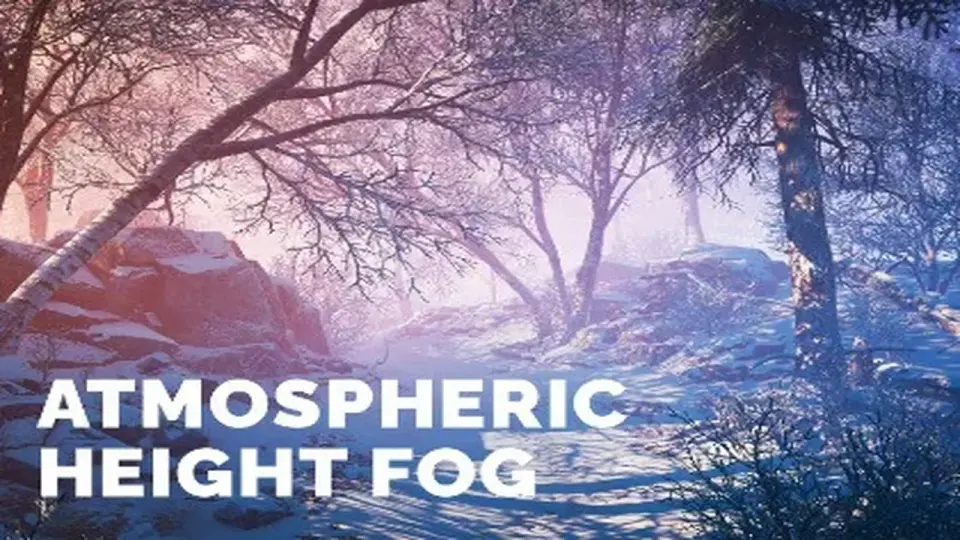
"7e6fc58c410f2894"{"id":"24080","slug":"atmospheric-height-fog-optimized-fog-for-consoles-mobile-and-vr","title":"Atmospheric Height Fog | Optimized Fog for Consoles, Mobile and VR","category":"Shaders","engine":"Original Unity version: 2022.3.0","assetVersion":"Original Unity version: 2022.3.0","engineVersion":"","tag":"Shaders","accent":"cyan","visual":"city","summary":"Atmospheric Height Fog brings a shader-based height fog setup to Unity with directional light, animated noise, and transparent-shader support. It fits projects that need a fog layer across Standard, URP, and HD pipelines without moving away from editable sh...","platform":"Unity","publishedAt":"2026-04-12T09:39:53.000Z","updatedAt":"2026-04-19T15:34:59.000Z","sourceNotes":[],"fileContents":[],"compatibility":["Unity","Original Unity version: 2022.3.0"],"featuredImage":{"alt":"Atmospheric Height Fog | Optimized Fog for Consoles, Mobile and VR","src":"https://3dcghub.com/wp-content/uploads/2026/04/13596ddf9861_aeca4a88-310a-4bf5-8d0c-d7b5915664f4_1280x720_stretch.webp"},"hasDownloadLink":true,"downloads":2,"terms":[{"taxonomy":"category","slug":"shaders-vfx-unity-2","name":"Shaders"},{"taxonomy":"post_tag","slug":"materials","name":"Materials"},{"taxonomy":"post_tag","slug":"tools","name":"Tools"},{"taxonomy":"post_tag","slug":"unity","name":"Unity"}],"galleryImages":[],"accessPanel":{"kind":"resource","title":"Access this resource","eyebrow":"Free Download","message":"Log in or create a free account to start your download.","fileName":"Atmospheric Height Fog.7z","safetyNote":"All resources are 100% manually reviewed to eliminate all risks.","actionLabel":"Download Free","resourceType":"Resource archive"},"contentHtml":"\u003ch2\u003eShader-driven setup that stays editable\u003c/h2\u003e\n\u003cp\u003eAtmospheric Height Fog is a Unity fog package built with Amplify Shader Editor, so the effect lives in a shader workflow instead of a fixed, closed setup. The shaders can be modified with ease, which makes the fog easier to adapt when a scene needs a specific look or when the art direction changes during production.\u003c/p\u003e\n\u003cp\u003eThat shader-first approach also matters for transparent materials. Fog support can be added through functions available for Amplify Shader Editor, Shader Graph, or custom-written shaders. ApplyHeightFog is available for Amplify Shader Editor, another ApplyHeightFog function is available for Shader Graph, and AtmosphericHeightFog.cginc functions are available for custom transparent shaders. In practice, that gives the fog a place in scenes where glass, water edges, VFX materials, or other transparent surfaces still need to sit inside the same atmospheric depth as the rest of the world.\u003c/p\u003e\n\u003cp\u003eA UI Default shader with Height Fog support is also included for cases where UI is used in a World Space Canvas. That is a practical detail for scenes that place interface elements inside the 3D environment rather than keeping them flat on the screen.\u003c/p\u003e \u003ch2\u003eFog controls that shape depth and motion\u003c/h2\u003e\n\u003cp\u003eAt its core, the package provides simple yet beautiful height fog with directional light and animated noise support. The goal is a volumetric-like effect while using lower computation power, which makes the effect suitable for scenes that need atmosphere without pushing into a heavier fog solution.\u003c/p\u003e\n\u003cp\u003eThe available controls cover distance-based fog, dual-color fog, height-based fog, directional light fog, and fog axis selection. 3D animated noise adds movement, while volume blending support helps the fog transition more naturally across spaces. Fog presets provide quick starting points, and Basic Time Of Day uses Day-Night preset interpolation for a straightforward time-of-day shift.\u003c/p\u003e\n\u003cp\u003eZero global keywords usage is included for 2019.1+, which keeps the implementation from relying on global keyword overhead. That kind of detail is useful when a project already has multiple shaders and systems competing for attention inside the render setup.\u003c/p\u003e \u003ch2\u003eRender pipelines, camera modes, and production reach\u003c/h2\u003e\n\u003cp\u003eCompatibility covers Standard Render Pipeline 2022.3+, Universal Render Pipeline 2022.3+, 6.0+, and 6.3+, plus HD Render Pipeline 2022.3+, 6.0+, and 6.3+. Shaders for 6.1 and 6.2 are included, though TECH releases are not officially supported. The recommended path is to use LTS releases only.\u003c/p\u003e\n\u003cp\u003eThe fog works with forward and deferred support, perspective and orthographic support, and scene view visibility support. VR support is included as well, which keeps the effect relevant for headset-driven scenes as well as standard desktop workflows.\u003c/p\u003e\n\u003cp\u003eThat range makes the package easier to place in real production work. A project may use a standard camera, an orthographic setup, or a VR scene, and the same fog system still follows the same shader-based approach across those camera and rendering modes.\u003c/p\u003e \u003ch2\u003eIntegrations that matter when the scene includes water and custom shaders\u003c/h2\u003e\n\u003cp\u003eAmplify Shader Editor gets full shader editing support. Crest for Standard RP by Wave Harmonic, Crest for Universal RP by Wave Harmonic, R.A.M 2019 for URP by Nature Manufacture, Lux Water for Standard RP by Forst, Stylized Water For URP by Alexander Ameye, and Stylized Water by Staggart Creations are all listed as integrations, with manual setup required for each of them.\u003c/p\u003e\n\u003cp\u003eThose integrations point toward the kinds of projects this fog is meant to sit beside: water-heavy scenes, shader-driven environments, and setups where transparent materials need to share the same atmospheric layer as the terrain and lighting. The manual setup note is important, because it makes the integration path clear before the effect is dropped into a larger scene.\u003c/p\u003e\n\u003cp\u003eFor teams building around editable shaders, transparent materials, and multiple Unity render paths, Atmospheric Height Fog provides a direct way to add depth without changing the surrounding workflow. The practical takeaway is simple: it is a fog system that stays flexible, covers Standard, URP, and HD pipelines, and keeps room for both custom shaders and VR-ready scenes.\u003c/p\u003e\n\n\u003ch2\u003eExplore Similar Assets\u003c/h2\u003e\n\u003cul\u003e\n\u003cli\u003e\u003ca href=\"https://3dcghub.com/toolkit-for-unity-physics-2026/\" title=\"Toolkit for Unity Physics 2026\"\u003eToolkit for Unity Physics 2026\u003c/a\u003e\u003c/li\u003e\n\u003cli\u003e\u003ca href=\"https://3dcghub.com/opencv-for-unity/\" title=\"OpenCV for Unity\"\u003eOpenCV for Unity\u003c/a\u003e\u003c/li\u003e\n\u003cli\u003e\u003ca href=\"https://3dcghub.com/exporter-for-unreal-to-for-unity-2026/\" title=\"Exporter for Unreal to/for Unity 2026\"\u003eExporter for Unreal to/for Unity 2026\u003c/a\u003e\u003c/li\u003e\n\u003cli\u003e\u003ca href=\"https://3dcghub.com/dialogue-system-for-unity/\" title=\"Dialogue System for Unity\"\u003eDialogue System for Unity\u003c/a\u003e\u003c/li\u003e\n\u003cli\u003e\u003ca href=\"https://3dcghub.com/ambient-sounds-interactive-soundscapes-for-unity-6/\" title=\"Ambient Sounds – Interactive Soundscapes for Unity 6\"\u003eAmbient Sounds – Interactive Soundscapes for Unity 6\u003c/a\u003e\u003c/li\u003e\n\u003c/ul\u003e","contentTextLength":4450,"navigation":{"current":3600,"total":3618,"previous":{"id":"24091","slug":"chroma-easy-pro-shaders","title":"Chroma: Easy Pro Shaders","category":"Shaders","platform":"Unity","updatedAt":"2026-04-19T15:34:59.000Z"},"next":{"id":"24168","slug":"altos-volumetric-clouds-skybox-and-weather-for-unity-urp","title":"Altos - Volumetric Clouds, Skybox, and Weather for Unity URP","category":"Fullscreen \u0026 Camera Effects","platform":"Unity","updatedAt":"2026-04-19T15:34:58.000Z"}},"relatedResources":[{"id":"24340","slug":"polyverse-skies-low-poly-skybox-shaders","title":"Polyverse Skies | Low Poly Skybox Shaders","category":"Shaders","engine":"Original Unity version: 2022.3.0","assetVersion":"Original Unity version: 2022.3.0","engineVersion":"Asset Version:3.4.0","tag":"Shaders","accent":"cyan","visual":"character","summary":"Polyverse Skies focuses on stylized skyboxes for low poly games, with controls for gradients, overlays, clouds, stars, sun, moon, and fog. It also supports Standard and Universal Render Pipeline projects, plus Console, Mobile, and VR targets.","platform":"Unity","publishedAt":"2026-04-14T11:22:37.000Z","updatedAt":"2026-04-20T06:12:49.000Z","sourceNotes":[],"fileContents":[],"compatibility":["Unity","Original Unity version: 2022.3.0","Asset Version: 3.4.0"],"featuredImage":{"alt":"Polyverse Skies | Low Poly Skybox Shaders","src":"https://3dcghub.com/wp-content/uploads/2026/04/07945a18b484_c3bce9e3-5ea6-4ca3-8edb-c833f203d51e_1280x720_stretch.webp"},"hasDownloadLink":true,"downloads":0},{"id":"24158","slug":"flat-kit-toon-shading-and-water","title":"Flat Kit: Toon Shading and Water","category":"Shaders","engine":"Original Unity version: 2020.3.0","assetVersion":"Original Unity version: 2020.3.0","engineVersion":"Asset Version:4.9.2","tag":"Shaders","accent":"cyan","visual":"animation","summary":"Flat Kit brings cel shading, stylized water, outlines, fog, pixelation, and terrain shading into a single Unity-focused setup. It also supports Built-in and URP workflows, with XR, mobile, WebGL, and console coverage stated for the package.","platform":"Unity","publishedAt":"2026-04-12T10:01:58.000Z","updatedAt":"2026-04-19T15:34:58.000Z","sourceNotes":[],"fileContents":[],"compatibility":["Unity","Original Unity version: 2020.3.0","Asset Version: 4.9.2"],"featuredImage":{"alt":"Flat Kit: Toon Shading and Water","src":"https://3dcghub.com/wp-content/uploads/2026/04/2dd8adfba05b_5dbcd94d-8661-443e-bbe6-8df8069d47f8_1280x720_stretch.webp"},"hasDownloadLink":true,"downloads":2},{"id":"24104","slug":"cozy-stylized-weather-3","title":"COZY: Stylized Weather 3","category":"Shaders","engine":"Original Unity version: 2022.3.62","assetVersion":"Original Unity version: 2022.3.62","engineVersion":"Asset Version:3.5.4 - 3.6.8","tag":"Shaders","accent":"cyan","visual":"audio","summary":"COZY: Stylized Weather 3 handles the weather layer with a hand-crafted look instead of realism. It covers time-of-day, seasons, clouds, storms, fog, and scene-color tweaks, while supporting Built-In, HDRP, and URP.","platform":"Unity","publishedAt":"2026-04-12T09:44:13.000Z","updatedAt":"2026-04-19T15:34:59.000Z","sourceNotes":[],"fileContents":[],"compatibility":["Unity","Original Unity version: 2022.3.62","Asset Version: 3.5.4 - 3.6.8"],"featuredImage":{"alt":"COZY: Stylized Weather 3","src":"https://3dcghub.com/wp-content/uploads/2026/04/4bb6b2024623_96bcefb7-182c-45a9-b50f-59d65b527604_1280x720_stretch.webp"},"hasDownloadLink":true,"downloads":10}]}
Shaders
Atmospheric Height Fog | Optimized Fog for Consoles, Mobile and VR
Atmospheric Height Fog brings a shader-based height fog setup to Unity with directional light, animated noise, and transparent-shader support. It fits projects that need a fog layer across Standard, URP, and HD pipelines without moving away from editable sh...
Atmospheric Height Fog is a Unity fog package built with Amplify Shader Editor, so the effect lives in a shader workflow instead of a fixed, closed setup. The shaders can be modified with ease, which makes the fog easier to adapt when a scene needs a specific look or when the art direction changes during production.
That shader-first approach also matters for transparent materials. Fog support can be added through functions available for Amplify Shader Editor, Shader Graph, or custom-written shaders. ApplyHeightFog is available for Amplify Shader Editor, another ApplyHeightFog function is available for Shader Graph, and AtmosphericHeightFog.cginc functions are available for custom transparent shaders. In practice, that gives the fog a place in scenes where glass, water edges, VFX materials, or other transparent surfaces still need to sit inside the same atmospheric depth as the rest of the world.
A UI Default shader with Height Fog support is also included for cases where UI is used in a World Space Canvas. That is a practical detail for scenes that place interface elements inside the 3D environment rather than keeping them flat on the screen.
Fog controls that shape depth and motion
At its core, the package provides simple yet beautiful height fog with directional light and animated noise support. The goal is a volumetric-like effect while using lower computation power, which makes the effect suitable for scenes that need atmosphere without pushing into a heavier fog solution.
The available controls cover distance-based fog, dual-color fog, height-based fog, directional light fog, and fog axis selection. 3D animated noise adds movement, while volume blending support helps the fog transition more naturally across spaces. Fog presets provide quick starting points, and Basic Time Of Day uses Day-Night preset interpolation for a straightforward time-of-day shift.
Zero global keywords usage is included for 2019.1+, which keeps the implementation from relying on global keyword overhead. That kind of detail is useful when a project already has multiple shaders and systems competing for attention inside the render setup.
Render pipelines, camera modes, and production reach
Compatibility covers Standard Render Pipeline 2022.3+, Universal Render Pipeline 2022.3+, 6.0+, and 6.3+, plus HD Render Pipeline 2022.3+, 6.0+, and 6.3+. Shaders for 6.1 and 6.2 are included, though TECH releases are not officially supported. The recommended path is to use LTS releases only.
The fog works with forward and deferred support, perspective and orthographic support, and scene view visibility support. VR support is included as well, which keeps the effect relevant for headset-driven scenes as well as standard desktop workflows.
That range makes the package easier to place in real production work. A project may use a standard camera, an orthographic setup, or a VR scene, and the same fog system still follows the same shader-based approach across those camera and rendering modes.
Integrations that matter when the scene includes water and custom shaders
Amplify Shader Editor gets full shader editing support. Crest for Standard RP by Wave Harmonic, Crest for Universal RP by Wave Harmonic, R.A.M 2019 for URP by Nature Manufacture, Lux Water for Standard RP by Forst, Stylized Water For URP by Alexander Ameye, and Stylized Water by Staggart Creations are all listed as integrations, with manual setup required for each of them.
Those integrations point toward the kinds of projects this fog is meant to sit beside: water-heavy scenes, shader-driven environments, and setups where transparent materials need to share the same atmospheric layer as the terrain and lighting. The manual setup note is important, because it makes the integration path clear before the effect is dropped into a larger scene.
For teams building around editable shaders, transparent materials, and multiple Unity render paths, Atmospheric Height Fog provides a direct way to add depth without changing the surrounding workflow. The practical takeaway is simple: it is a fog system that stays flexible, covers Standard, URP, and HD pipelines, and keeps room for both custom shaders and VR-ready scenes.
 Shaders
 Shaders
 Shaders
 Shaders