"7e6fc58c410f2894"{"id":"24353","slug":"realtoon-pro-anime-toon-shader","title":"RealToon (Pro Anime/Toon Shader)","category":"Shaders","engine":"Original Unity version: 5.6.0","assetVersion":"Original Unity version: 5.6.0","engineVersion":"Asset Version:5.0.10","tag":"Shaders","accent":"cyan","visual":"animation","summary":"RealToon brings anime and cartoon shading into Unity scenes that need a clean stylized look for characters and objects. It spans Built-In, URP, and HDRP support, while adding controls for outlines, shadows, rim light, and other toon-specific surface effects.","platform":"Unity","publishedAt":"2026-04-14T11:22:53.000Z","updatedAt":"2026-04-20T06:12:49.000Z","sourceNotes":[],"fileContents":[],"compatibility":["Unity","Original Unity version: 5.6.0","Asset Version: 5.0.10"],"featuredImage":{"alt":"RealToon (Pro Anime/Toon Shader)","src":"https://3dcghub.com/wp-content/uploads/2026/04/9d4a38f87daa_63cc8a88-dc6c-442e-bda6-950a8054a774_1280x720_stretch.webp"},"hasDownloadLink":true,"downloads":1,"terms":[{"taxonomy":"category","slug":"shaders-vfx-unity-2","name":"Shaders"},{"taxonomy":"post_tag","slug":"characters","name":"Characters"},{"taxonomy":"post_tag","slug":"materials","name":"Materials"},{"taxonomy":"post_tag","slug":"unity","name":"Unity"}],"galleryImages":[{"src":"https://3dcghub.com/wp-content/uploads/2026/04/e1232bf99dca_17962ffa-0105-4d0b-a417-90fd68e6c62f_scaled.webp","alt":"RealToon (Pro Anime/Toon Shader)"},{"src":"https://3dcghub.com/wp-content/uploads/2026/04/94e1ad491e99_b9fb8dcb-6fef-4906-8dee-8439bb34693c_scaled.webp","alt":"RealToon (Pro Anime/Toon Shader)"},{"src":"https://3dcghub.com/wp-content/uploads/2026/04/8952d54aecb0_2f73642d-af89-4e50-89d1-b47e9de15ed2_scaled.webp","alt":"RealToon (Pro Anime/Toon Shader)"},{"src":"https://3dcghub.com/wp-content/uploads/2026/04/2f0be80cb008_4d08ee00-f7cf-449d-a113-cdd5c7384d19_scaled.webp","alt":"RealToon (Pro Anime/Toon Shader)"},{"src":"https://3dcghub.com/wp-content/uploads/2026/04/ed4e4ee1e112_4ab7de1b-746d-4d39-b50d-8c6f22a01c8f_scaled.webp","alt":"RealToon (Pro Anime/Toon Shader)"},{"src":"https://3dcghub.com/wp-content/uploads/2026/04/69d66f3a6376_3bae6ab8-2393-41d6-8b79-3facc0f24204_scaled.webp","alt":"RealToon (Pro Anime/Toon Shader)"},{"src":"https://3dcghub.com/wp-content/uploads/2026/04/a9af897db999_ed519775-56f3-4ca8-8690-7536cec8be19_scaled.webp","alt":"RealToon (Pro Anime/Toon Shader)"},{"src":"https://3dcghub.com/wp-content/uploads/2026/04/711ed0261cf7_275a4f13-a8b8-4877-9f26-5dd2855c8d1b_scaled.webp","alt":"RealToon (Pro Anime/Toon Shader)"},{"src":"https://3dcghub.com/wp-content/uploads/2026/04/c7a563c8664e_111b14c1-4819-4394-a88f-88e2c2215336_scaled.webp","alt":"RealToon (Pro Anime/Toon Shader)"},{"src":"https://3dcghub.com/wp-content/uploads/2026/04/7f55b3a526ba_806eb5d7-cc09-4df0-99be-25253b6aa60b_scaled.webp","alt":"RealToon (Pro Anime/Toon Shader)"}],"accessPanel":{"kind":"resource","title":"Access this resource","eyebrow":"Free Download","message":"Log in or create a free account to start your download.","fileName":"RealToon Pro AnimeToon Shader v5.0.10.7z","safetyNote":"All resources are 100% manually reviewed to eliminate all risks.","actionLabel":"Download Free","resourceType":"Resource archive"},"contentHtml":"\u003ch2\u003eAnime and cartoon surfaces for characters, props, and stylized scenes\u003c/h2\u003e\n\u003cp\u003eRealToon (Pro Anime/Toon Shader) fits projects that need characters and objects to read with a strong anime or cartoon finish. It is aimed at games, film and animation work, and illustration-style visuals, so it can sit in a scene where the surface treatment matters as much as the model itself. The shader also leaves room for other stylized looks, which gives it a wider use than a single fixed toon style.\u003c/p\u003e\n\u003cp\u003eThat makes it useful anywhere a production needs clear shapes, controlled shading, and a look that pushes away from standard realism. The material controls are centered on the parts that define toon rendering: outlines, shadow behavior, rim light, gloss response, and surface variations that keep the result readable while still feeling stylized.\u003c/p\u003e \u003ch2\u003ePipeline support across Built-In, URP, and HDRP\u003c/h2\u003e\n\u003cp\u003eOne of the most important parts of the shader is how broadly it is set up across Unity rendering pipelines and paths. It supports the Built-In/Standard Rendering Pipeline, Lightweight/Universal Rendering Pipeline, and High Definition Rendering Pipeline. Rendering paths are covered as well, including Forward for Built-In, URP, and HDRP, Forward+ / Forward Plus for URP, Deferred for URP and HDRP, and Deferred+ / Deferred Plus for URP.\u003c/p\u003e\n\u003cp\u003eThe supported Unity versions run from Unity 5 through 2023, along with Unity 6 and future or next generation Unity. It is also noted as the first Anime/Toon/Cel shader to fully support HDRP and DXR/Ray Tracing, and the first to fully support Forward+ rendering in URP, Deferred Rendering, and APV (Adaptive Probe Volume).\u003c/p\u003e\n\u003cp\u003ePlatform coverage is also broad: PC, Mac, Linux, mobile, and consoles are included, with Nintendo Switch and Xbox named directly. PlayStation support is listed for RealToon URP and RealToon HDRP. The shader can also work as a fully multi-lighting solution, and it can be used unlit as well.\u003c/p\u003e\n\u003cul\u003e\n\u003cli\u003eBuilt-In / Standard Rendering Pipeline\u003c/li\u003e\n\u003cli\u003eLightweight / Universal Rendering Pipeline\u003c/li\u003e\n\u003cli\u003eHigh Definition Rendering Pipeline\u003c/li\u003e\n\u003cli\u003eForward, Forward+, Deferred, and Deferred+\u003c/li\u003e\n\u003c/ul\u003e \u003ch2\u003eSurface controls that shape the toon look\u003c/h2\u003e\n\u003cp\u003eThe shader includes a set of controls that focus on how an anime or toon material presents itself under light. Perspective Adjustment changes an object from its default 3D appearance toward a 2D Toon/Anime look. That is a useful starting point when a model needs to sit closer to a flat animated style without changing the model itself.\u003c/p\u003e\n\u003cp\u003eSmear Effect adds trail lines or line noise when an object moves fast, which supports the motion language often associated with anime and toon visuals. Smooth Object Normal is there for cleaner shading, while Self Shadow lets the shader adjust size, threshold, and hardness without using a texture map. Normal Map support adds more detail or can override the object's normal.\u003c/p\u003e\n\u003cp\u003eSDF Mode provides SDF shadow for character faces and other uses, and it supports point, spot, directional, and area lights. Screen Space Rim Light adds a screen-space rim lighting approach for a more pronounced edge light. Those controls work together when the project needs facial shading, edge emphasis, and a clear separation between lit and shaded forms.\u003c/p\u003e \u003ch2\u003eOutlines, reflections, gloss, and special material behavior\u003c/h2\u003e\n\u003cp\u003eThe outline system is one of the more flexible parts of the shader. Outline color and width can be adjusted, and there is support for a noise or distort outline for a sketch-style effect. The outline can also be used or left out, which gives flexibility when draw calls need to be kept lower or when the scene calls for a cleaner silhouette.\u003c/p\u003e\n\u003cp\u003eFReflection uses images or textures as reflection, with size and position controls. It is not a matcap-style reflection or a cubemap approach, so the reflection behavior is kept within the shader's own set of controls. Gloss (Texture), also called Custom Gloss, uses images or textures for gloss and can follow light position and object rotation. ShadowT (Texture) handles gradient or flat-based shadow and shade response.\u003c/p\u003e\n\u003cp\u003eRefraction is included for anime or cartoon-style glass, ice, liquid, and similar materials. Reduce Shadow makes it possible to reduce the real-time shadow of an object material without affecting the other parts of the object. Those features matter when a project needs more than flat toon shading and wants specific material reactions to stay stylized instead of drifting back toward standard realism.\u003c/p\u003e \u003ch2\u003eWhere it fits in a production workflow\u003c/h2\u003e\n\u003cp\u003eRealToon works best in a workflow where shading is part of the art direction from the start. It can support a character that needs clean toon face shadow, a prop that needs an outline and controlled gloss, or a scene that uses stylized glass, liquid, or ice. Because it can handle both lit and unlit use, it also fits scenes that need different levels of shading control within the same project.\u003c/p\u003e\n\u003cp\u003eFor teams building games, film shots, or illustration-style renderings, the shader gives a concentrated set of tools for shape, line, and shadow treatment without moving away from the anime and cartoon look. If a project needs stylized characters or objects that stay consistent across supported Unity pipelines and platforms, this shader is set up for that kind of work.\u003c/p\u003e\n\n\u003ch2\u003eRelated Resources Worth Checking\u003c/h2\u003e\n\u003cul\u003e\n\u003cli\u003e\u003ca href=\"https://3dcghub.com/make-a-horror-survival-game-in-unity/\" title=\"Make a horror survival game in Unity\"\u003eMake a horror survival game in Unity\u003c/a\u003e\u003c/li\u003e\n\u003cli\u003e\u003ca href=\"https://3dcghub.com/unity-shader-programming-beginners-to-advanced-techniques/\" title=\"Unity Shader Programming: Beginners to Advanced Techniques\"\u003eUnity Shader Programming: Beginners to Advanced Techniques\u003c/a\u003e\u003c/li\u003e\n\u003cli\u003e\u003ca href=\"https://3dcghub.com/mastering-editor-scripting-in-unity/\" title=\"Mastering Editor Scripting in Unity\"\u003eMastering Editor Scripting in Unity\u003c/a\u003e\u003c/li\u003e\n\u003cli\u003e\u003ca href=\"https://3dcghub.com/altos-volumetric-clouds-skybox-and-weather-for-unity-urp/\" title=\"Altos – Volumetric Clouds, Skybox, and Weather for Unity URP\"\u003eAltos – Volumetric Clouds, Skybox, and Weather for Unity URP\u003c/a\u003e\u003c/li\u003e\n\u003cli\u003e\u003ca href=\"https://3dcghub.com/toolkit-for-unity-physics-2026/\" title=\"Toolkit for Unity Physics 2026\"\u003eToolkit for Unity Physics 2026\u003c/a\u003e\u003c/li\u003e\n\u003c/ul\u003e","contentTextLength":5523,"navigation":{"current":1892,"total":3618,"previous":{"id":"24364","slug":"sprite-shaders-ultimate","title":"Sprite Shaders Ultimate","category":"Shaders","platform":"Unity","updatedAt":"2026-04-20T06:12:49.000Z"},"next":{"id":"24340","slug":"polyverse-skies-low-poly-skybox-shaders","title":"Polyverse Skies | Low Poly Skybox Shaders","category":"Shaders","platform":"Unity","updatedAt":"2026-04-20T06:12:49.000Z"}},"relatedResources":[{"id":"24077","slug":"anime-shading-plus","title":"Anime Shading Plus","category":"Shaders","engine":"Original Unity version: 2022.3.62","assetVersion":"Original Unity version: 2022.3.62","engineVersion":"Asset Version:1.3","tag":"Shaders","accent":"cyan","visual":"city","summary":"Anime Shading Plus focuses on one specific problem: getting anime-style character rendering into Unity without building the lighting and pass logic from scratch. It combines shader work, outline options, shadow handling, and a few workflow tools for charact...","platform":"Unity","publishedAt":"2026-04-12T09:39:40.000Z","updatedAt":"2026-04-19T15:35:00.000Z","sourceNotes":[],"fileContents":[],"compatibility":["Unity","Original Unity version: 2022.3.62","Asset Version: 1.3"],"featuredImage":{"alt":"Anime Shading Plus","src":"https://3dcghub.com/wp-content/uploads/2026/04/8bdfd2b243d4_f619d888-b308-400e-ba5c-7573e82f327b_1280x720_stretch.webp"},"hasDownloadLink":true,"downloads":1},{"id":"24158","slug":"flat-kit-toon-shading-and-water","title":"Flat Kit: Toon Shading and Water","category":"Shaders","engine":"Original Unity version: 2020.3.0","assetVersion":"Original Unity version: 2020.3.0","engineVersion":"Asset Version:4.9.2","tag":"Shaders","accent":"cyan","visual":"animation","summary":"Flat Kit brings cel shading, stylized water, outlines, fog, pixelation, and terrain shading into a single Unity-focused setup. It also supports Built-in and URP workflows, with XR, mobile, WebGL, and console coverage stated for the package.","platform":"Unity","publishedAt":"2026-04-12T10:01:58.000Z","updatedAt":"2026-04-19T15:34:58.000Z","sourceNotes":[],"fileContents":[],"compatibility":["Unity","Original Unity version: 2020.3.0","Asset Version: 4.9.2"],"featuredImage":{"alt":"Flat Kit: Toon Shading and Water","src":"https://3dcghub.com/wp-content/uploads/2026/04/2dd8adfba05b_5dbcd94d-8661-443e-bbe6-8df8069d47f8_1280x720_stretch.webp"},"hasDownloadLink":true,"downloads":2},{"id":"15951","slug":"stylized-rendering-system-cel-shader","title":"Stylized Rendering System (Cel-Shader)","category":"Shaders","engine":"5.0+","assetVersion":"Engine version: 5.0+","engineVersion":"4.26","tag":"Shaders","accent":"blue","visual":"city","summary":"Transform your project with the Stylized Rendering System (Cel-Shader), featuring 25 outline styles and easy drag-and-drop setup for anime and manga aesthetics.","platform":"Unreal Engine","publishedAt":"2026-03-12T13:33:25.000Z","updatedAt":"2026-04-19T15:44:38.000Z","sourceNotes":[],"fileContents":[],"compatibility":["Unreal Engine","Engine version: 5.0+"],"featuredImage":{"alt":"Stylized Rendering System (Cel-Shader)","src":"https://3dcghub.com/wp-content/uploads/2026/03/e9e51600-f665-4ee5-95a5-93a70a539615.webp"},"hasDownloadLink":true,"downloads":5}]}
Shaders
RealToon (Pro Anime/Toon Shader)
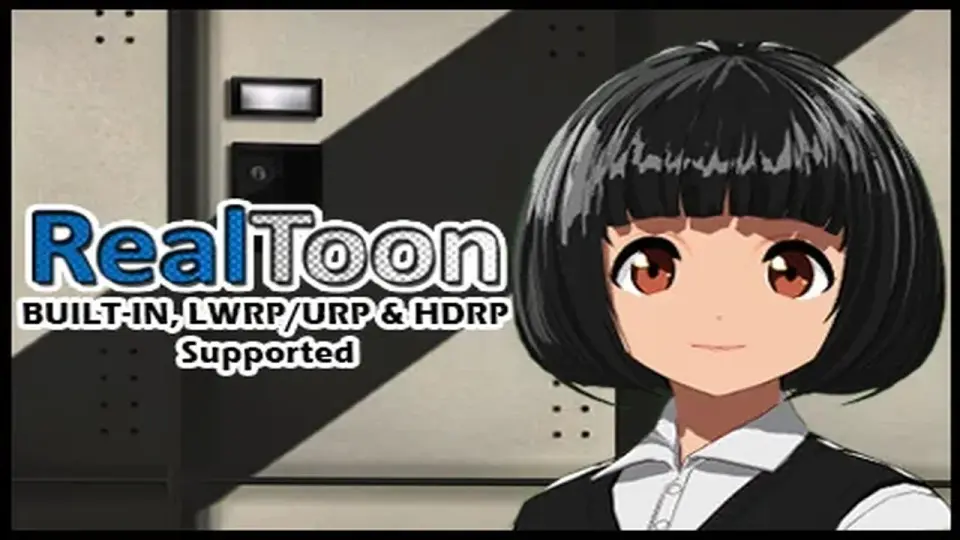
RealToon brings anime and cartoon shading into Unity scenes that need a clean stylized look for characters and objects. It spans Built-In, URP, and HDRP support, while adding controls for outlines, shadows, rim light, and other toon-specific surface effects.
Anime and cartoon surfaces for characters, props, and stylized scenes
RealToon (Pro Anime/Toon Shader) fits projects that need characters and objects to read with a strong anime or cartoon finish. It is aimed at games, film and animation work, and illustration-style visuals, so it can sit in a scene where the surface treatment matters as much as the model itself. The shader also leaves room for other stylized looks, which gives it a wider use than a single fixed toon style.
That makes it useful anywhere a production needs clear shapes, controlled shading, and a look that pushes away from standard realism. The material controls are centered on the parts that define toon rendering: outlines, shadow behavior, rim light, gloss response, and surface variations that keep the result readable while still feeling stylized.
Pipeline support across Built-In, URP, and HDRP
One of the most important parts of the shader is how broadly it is set up across Unity rendering pipelines and paths. It supports the Built-In/Standard Rendering Pipeline, Lightweight/Universal Rendering Pipeline, and High Definition Rendering Pipeline. Rendering paths are covered as well, including Forward for Built-In, URP, and HDRP, Forward+ / Forward Plus for URP, Deferred for URP and HDRP, and Deferred+ / Deferred Plus for URP.
The supported Unity versions run from Unity 5 through 2023, along with Unity 6 and future or next generation Unity. It is also noted as the first Anime/Toon/Cel shader to fully support HDRP and DXR/Ray Tracing, and the first to fully support Forward+ rendering in URP, Deferred Rendering, and APV (Adaptive Probe Volume).
Platform coverage is also broad: PC, Mac, Linux, mobile, and consoles are included, with Nintendo Switch and Xbox named directly. PlayStation support is listed for RealToon URP and RealToon HDRP. The shader can also work as a fully multi-lighting solution, and it can be used unlit as well.
Built-In / Standard Rendering Pipeline
Lightweight / Universal Rendering Pipeline
High Definition Rendering Pipeline
Forward, Forward+, Deferred, and Deferred+
Surface controls that shape the toon look
The shader includes a set of controls that focus on how an anime or toon material presents itself under light. Perspective Adjustment changes an object from its default 3D appearance toward a 2D Toon/Anime look. That is a useful starting point when a model needs to sit closer to a flat animated style without changing the model itself.
Smear Effect adds trail lines or line noise when an object moves fast, which supports the motion language often associated with anime and toon visuals. Smooth Object Normal is there for cleaner shading, while Self Shadow lets the shader adjust size, threshold, and hardness without using a texture map. Normal Map support adds more detail or can override the object's normal.
SDF Mode provides SDF shadow for character faces and other uses, and it supports point, spot, directional, and area lights. Screen Space Rim Light adds a screen-space rim lighting approach for a more pronounced edge light. Those controls work together when the project needs facial shading, edge emphasis, and a clear separation between lit and shaded forms.
Outlines, reflections, gloss, and special material behavior
The outline system is one of the more flexible parts of the shader. Outline color and width can be adjusted, and there is support for a noise or distort outline for a sketch-style effect. The outline can also be used or left out, which gives flexibility when draw calls need to be kept lower or when the scene calls for a cleaner silhouette.
FReflection uses images or textures as reflection, with size and position controls. It is not a matcap-style reflection or a cubemap approach, so the reflection behavior is kept within the shader's own set of controls. Gloss (Texture), also called Custom Gloss, uses images or textures for gloss and can follow light position and object rotation. ShadowT (Texture) handles gradient or flat-based shadow and shade response.
Refraction is included for anime or cartoon-style glass, ice, liquid, and similar materials. Reduce Shadow makes it possible to reduce the real-time shadow of an object material without affecting the other parts of the object. Those features matter when a project needs more than flat toon shading and wants specific material reactions to stay stylized instead of drifting back toward standard realism.
Where it fits in a production workflow
RealToon works best in a workflow where shading is part of the art direction from the start. It can support a character that needs clean toon face shadow, a prop that needs an outline and controlled gloss, or a scene that uses stylized glass, liquid, or ice. Because it can handle both lit and unlit use, it also fits scenes that need different levels of shading control within the same project.
For teams building games, film shots, or illustration-style renderings, the shader gives a concentrated set of tools for shape, line, and shadow treatment without moving away from the anime and cartoon look. If a project needs stylized characters or objects that stay consistent across supported Unity pipelines and platforms, this shader is set up for that kind of work.
 Shaders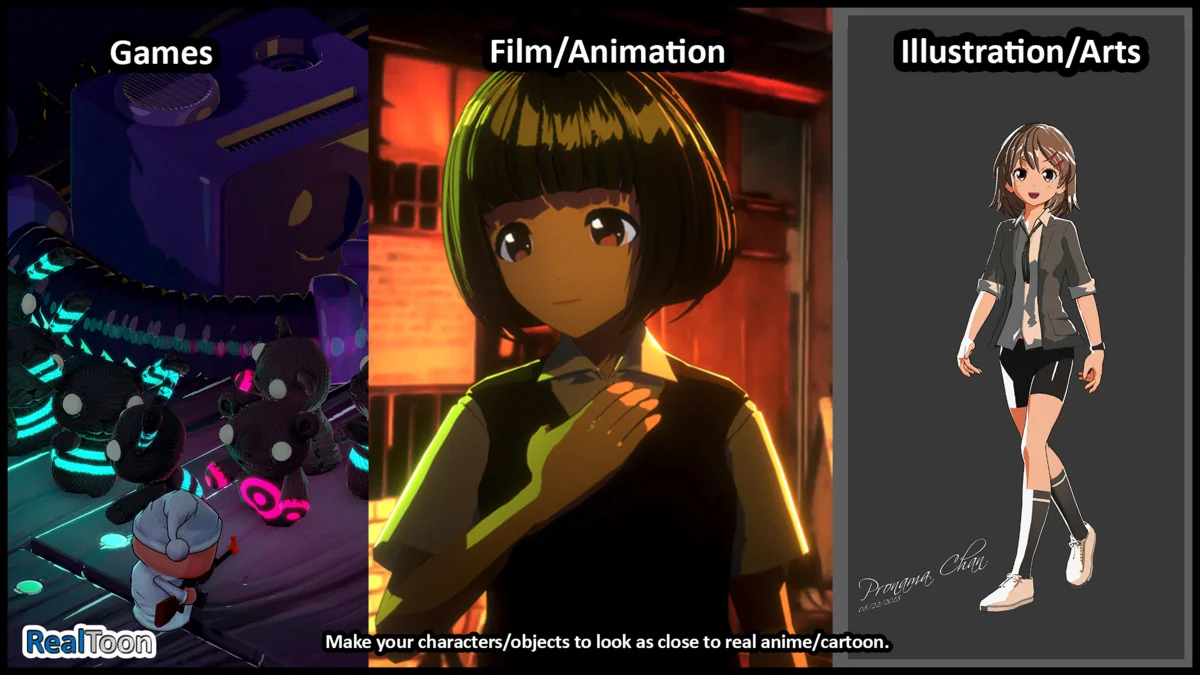
 Shaders
 Shaders
 Shaders