"7e6fc58c410f2894"{"id":"24316","slug":"omnishade-pbr-physically-based-uber-shader","title":"OmniShade PBR - Physically Based Uber Shader","category":"Shaders","engine":"Original Unity version: 2022.3.62","assetVersion":"Original Unity version: 2022.3.62","engineVersion":"Asset Version:1.3.0","tag":"Shaders","accent":"cyan","visual":"city","summary":"OmniShade PBR extends Unityâs Standard Lit workflow with a physically based shader that adds stylized lighting, layered materials, and texture painting support. It also supports Built-In, URP, and HDRP, with adaptive shader variants and Shader Graph imple...","platform":"Unity","publishedAt":"2026-04-14T11:19:12.000Z","updatedAt":"2026-04-20T06:12:50.000Z","sourceNotes":[],"fileContents":[],"compatibility":["Unity","Original Unity version: 2022.3.62","Asset Version: 1.3.0"],"featuredImage":{"alt":"OmniShade PBR - Physically Based Uber Shader","src":"https://3dcghub.com/wp-content/uploads/2026/04/aae2db2ec3cf_b94cd628-98ea-4e8a-8a50-b0cd480024a8_1280x720_stretch.webp"},"hasDownloadLink":true,"downloads":0,"terms":[{"taxonomy":"category","slug":"shaders-vfx-unity-2","name":"Shaders"},{"taxonomy":"post_tag","slug":"materials","name":"Materials"},{"taxonomy":"post_tag","slug":"textures","name":"Textures"},{"taxonomy":"post_tag","slug":"unity","name":"Unity"}],"galleryImages":[{"src":"https://3dcghub.com/wp-content/uploads/2026/04/245839a134f8_df9dafaa-f58b-40ac-bc77-a9ebd52d5e57_scaled.webp","alt":"OmniShade PBR - Physically Based Uber Shader"},{"src":"https://3dcghub.com/wp-content/uploads/2026/04/74a34e2d0f5e_5696e766-4784-42bd-b41f-2c643fd7e7a5_scaled.webp","alt":"OmniShade PBR - Physically Based Uber Shader"},{"src":"https://3dcghub.com/wp-content/uploads/2026/04/363be80a8bdd_5ef9c9a7-cb36-49d2-b74f-1ccd6a577e44_scaled.webp","alt":"OmniShade PBR - Physically Based Uber Shader"},{"src":"https://3dcghub.com/wp-content/uploads/2026/04/bfd2b74cce4d_5a25fa51-cd5d-4d12-a81e-d8aaef0479fc_scaled.webp","alt":"OmniShade PBR - Physically Based Uber Shader"},{"src":"https://3dcghub.com/wp-content/uploads/2026/04/128f10effed3_5cd1f965-58d8-40f9-b702-92406f711eff_scaled.webp","alt":"OmniShade PBR - Physically Based Uber Shader"},{"src":"https://3dcghub.com/wp-content/uploads/2026/04/781dd0d35d5c_dcb7063a-e983-4eb0-8d6e-a4f1df9bccb2_scaled.webp","alt":"OmniShade PBR - Physically Based Uber Shader"},{"src":"https://3dcghub.com/wp-content/uploads/2026/04/465b0e0a0cc6_546fc613-926f-48d1-b0bc-a0cbcf5f8513_scaled.webp","alt":"OmniShade PBR - Physically Based Uber Shader"},{"src":"https://3dcghub.com/wp-content/uploads/2026/04/789ab06103ce_50a13f09-6592-4a1a-b9c6-4d8749be8c4d_scaled.webp","alt":"OmniShade PBR - Physically Based Uber Shader"},{"src":"https://3dcghub.com/wp-content/uploads/2026/04/9c37795e4733_b5989e7d-7ac7-4153-a2b1-7145a3d2c562_scaled.webp","alt":"OmniShade PBR - Physically Based Uber Shader"},{"src":"https://3dcghub.com/wp-content/uploads/2026/04/a87411a3e35f_c9b33377-492e-4064-ab67-ca8d2f4c326f_scaled.webp","alt":"OmniShade PBR - Physically Based Uber Shader"}],"accessPanel":{"kind":"resource","title":"Access this resource","eyebrow":"Free Download","message":"Log in or create a free account to start your download.","fileName":"OmniShade PBR - Physically Based Uber Shader v1.3.0 (16 May 2025).7z","safetyNote":"All resources are 100% manually reviewed to eliminate all risks.","actionLabel":"Download Free","resourceType":"Resource archive"},"contentHtml":"\u003ch2\u003eStarting from Unityâs Standard Lit workflow\u003c/h2\u003e\n\u003cp\u003eOmniShade PBR keeps the familiar Unity Standard Lit path in view, then pushes it into a physically based uber shader with more room for lighting variation and material control. It is presented as a straightforward upgrade for anyone already working with Standard Lit, while adding stylized lighting, blended layers, texture painting support, and a broader feature set for surface work.\u003c/p\u003e\n\u003cp\u003eThat makes it useful when one material has to carry more than a simple lit response. A character piece, environment surface, prop, or vegetation material can stay inside the same shader family while gaining extra lighting treatment, reflected response, or layered texture variation. The shader is meant to let artists add detail without changing their whole workflow every time a surface needs more personality.\u003c/p\u003e\n\u003cp\u003eOmniShade PBR is also positioned as a physically-based shader rather than a non-PBR option, which matters for scenes that need realistic lighting behavior while still leaving room for stylized choices such as rim light and layered color control.\u003c/p\u003e \u003ch2\u003eWhat can be combined on a single material\u003c/h2\u003e\n\u003cp\u003eThe shader supports a large set of features, and they can be used in any combination with optimal performance. That flexibility is one of the main reasons it stands out: a material can stay focused when it only needs a few controls, or it can stack several shading effects together when a more complex look is needed.\u003c/p\u003e\n\u003cul\u003e\n\u003cli\u003ePBR lighting\u003c/li\u003e\n\u003cli\u003eMetallic, normal, occlusion, and emission maps\u003c/li\u003e\n\u003cli\u003eSecondary normal map\u003c/li\u003e\n\u003cli\u003eColor adjustments and saturation control\u003c/li\u003e\n\u003cli\u003eRim light\u003c/li\u003e\n\u003cli\u003eReflection map\u003c/li\u003e\n\u003cli\u003eVertex colors with Polybrush support\u003c/li\u003e\n\u003cli\u003eDetail map\u003c/li\u003e\n\u003cli\u003e3 blended layers with texture painting support\u003c/li\u003e\n\u003cli\u003eHeight-based coloring\u003c/li\u003e\n\u003cli\u003eShadow overlay\u003c/li\u003e\n\u003cli\u003eVertex sway for vegetation\u003c/li\u003e\n\u003cli\u003eFade with camera distance\u003c/li\u003e\n\u003cli\u003eIndependent UV tiling and offsets for each texture\u003c/li\u003e\n\u003cli\u003eOpaque and transparent versions\u003c/li\u003e\n\u003c/ul\u003e\n\u003cp\u003eIn practical use, that means a material can start with standard PBR maps and then add pieces of extra control where they matter. Rim light can help edges read more clearly, reflection support can give a surface a stronger response, and detail maps can add close-range texture variation. The three blended layers and texture painting support open the door to more hand-authored variation, while vertex colors with Polybrush support give another route for shaping the final look.\u003c/p\u003e\n\u003cp\u003eHeight-based coloring and shadow overlay help separate forms without moving to a different shader. Independent UV tiling and offsets for each texture make it easier to tune different map types individually, and the opaque and transparent versions give the shader a wider range of surface treatment inside the same system. For vegetation, vertex sway adds motion, and camera-distance fade gives another way to control how the material reads at range.\u003c/p\u003e \u003ch2\u003eShader Graph, pipeline support, and adaptive performance\u003c/h2\u003e\n\u003cp\u003eOmniShade PBR is built with Unity Shader Graph, which gives the shader a clear implementation path inside Unityâs rendering ecosystem. Support is included for Built-In, URP, and HDRP, so the shader can fit into different pipeline setups without changing the overall material approach.\u003c/p\u003e\n\u003cp\u003eThe performance system is deliberately adaptive. It detects the minimum calculations needed for the feature set that is currently enabled, then generates the minimal shader variant for that combination. That keeps the shader from carrying work that is not being used, and the result is described as having similar performance to Standard Lit.\u003c/p\u003e\n\u003cp\u003eThe feature set is also described as fast enough for newer mobile devices. That matters for projects where the same shader has to support detailed PBR surfaces without becoming too heavy for the target hardware. The adaptive variant system, combined with Shader Graph implementation, is part of what makes the shader feel production-ready rather than fixed to a single narrow use case.\u003c/p\u003e\n\u003cp\u003eThere is also a script for animating textures in the shader, a slick collapsable shader UI, and a modular structure made from 20 subgraphs. The modular setup is useful when shader components need to be reused in other graphs, and the collapsable interface helps keep the material UI organized when several options are active at once.\u003c/p\u003e \u003ch2\u003eWhere the shader gives artists room to work\u003c/h2\u003e\n\u003cp\u003eOmniShade PBR includes several details that directly support day-to-day art work rather than staying abstract at the rendering level. The combination of texture painting support, vertex colors, layered decals, and height-based coloring gives artists multiple ways to adjust surfaces without starting over. That is especially helpful when a project needs variation across props or environments, but still wants the same shader logic underneath.\u003c/p\u003e\n\u003cp\u003eThe shader also fits scenes that need both realistic lighting and small stylized pushes. Rim light and reflections can be used for emphasis, while saturation controls and color adjustments let a material be tuned without leaving the shader. Because all of these features can be combined, the material can stay consistent across a project while still allowing different looks from one asset to the next.\u003c/p\u003e\n\u003cp\u003eA tutorial demo scene is included as well, which makes the package easier to study in context. For teams that already rely on Standard Lit, the path is especially direct: the shader keeps that familiar entry point, extends it with more lighting and layering options, and keeps the workflow inside Unity Shader Graph.\u003c/p\u003e\n\u003cp\u003eFor projects that want a PBR shader with layered control, texture painting support, and pipeline coverage across Built-In, URP, and HDRP, OmniShade PBR is set up as a practical shader family rather than a single narrow material. It keeps the feature set broad, the implementation modular, and the rendering path centered on Shader Graph for ongoing use in Unity projects.\u003c/p\u003e\n\n\u003ch2\u003eRelated Resources Worth Checking\u003c/h2\u003e\n\u003cul\u003e\n\u003cli\u003e\u003ca href=\"https://3dcghub.com/make-a-horror-survival-game-in-unity/\" title=\"Make a horror survival game in Unity\"\u003eMake a horror survival game in Unity\u003c/a\u003e\u003c/li\u003e\n\u003cli\u003e\u003ca href=\"https://3dcghub.com/unity-shader-programming-beginners-to-advanced-techniques/\" title=\"Unity Shader Programming: Beginners to Advanced Techniques\"\u003eUnity Shader Programming: Beginners to Advanced Techniques\u003c/a\u003e\u003c/li\u003e\n\u003cli\u003e\u003ca href=\"https://3dcghub.com/mastering-editor-scripting-in-unity/\" title=\"Mastering Editor Scripting in Unity\"\u003eMastering Editor Scripting in Unity\u003c/a\u003e\u003c/li\u003e\n\u003cli\u003e\u003ca href=\"https://3dcghub.com/altos-volumetric-clouds-skybox-and-weather-for-unity-urp/\" title=\"Altos – Volumetric Clouds, Skybox, and Weather for Unity URP\"\u003eAltos – Volumetric Clouds, Skybox, and Weather for Unity URP\u003c/a\u003e\u003c/li\u003e\n\u003cli\u003e\u003ca href=\"https://3dcghub.com/toolkit-for-unity-physics-2026/\" title=\"Toolkit for Unity Physics 2026\"\u003eToolkit for Unity Physics 2026\u003c/a\u003e\u003c/li\u003e\n\u003c/ul\u003e","contentTextLength":6070,"navigation":{"current":1884,"total":3618,"previous":{"id":"24327","slug":"planets-earth-mars-and-the-moon","title":"Planets Earth, Mars and the Moon","category":"Shaders","platform":"Unity","updatedAt":"2026-04-20T06:12:50.000Z"},"next":{"id":"24303","slug":"marine-shader-pack","title":"Marine Shader Pack","category":"Shaders","platform":"Unity","updatedAt":"2026-04-20T06:12:50.000Z"}},"relatedResources":[{"id":"24080","slug":"atmospheric-height-fog-optimized-fog-for-consoles-mobile-and-vr","title":"Atmospheric Height Fog | Optimized Fog for Consoles, Mobile and VR","category":"Shaders","engine":"Original Unity version: 2022.3.0","assetVersion":"Original Unity version: 2022.3.0","engineVersion":"","tag":"Shaders","accent":"cyan","visual":"city","summary":"Atmospheric Height Fog brings a shader-based height fog setup to Unity with directional light, animated noise, and transparent-shader support. It fits projects that need a fog layer across Standard, URP, and HD pipelines without moving away from editable sh...","platform":"Unity","publishedAt":"2026-04-12T09:39:53.000Z","updatedAt":"2026-04-19T15:34:59.000Z","sourceNotes":[],"fileContents":[],"compatibility":["Unity","Original Unity version: 2022.3.0"],"featuredImage":{"alt":"Atmospheric Height Fog | Optimized Fog for Consoles, Mobile and VR","src":"https://3dcghub.com/wp-content/uploads/2026/04/13596ddf9861_aeca4a88-310a-4bf5-8d0c-d7b5915664f4_1280x720_stretch.webp"},"hasDownloadLink":true,"downloads":2},{"id":"24136","slug":"enviro-3-terrain-shader","title":"Enviro 3 - Terrain Shader","category":"Shaders","engine":"Original Unity version: 2021.3.45","assetVersion":"Original Unity version: 2021.3.45","engineVersion":"Asset Version:1.1.2","tag":"Shaders","accent":"cyan","visual":"audio","summary":"Enviro 3 - Terrain Shader is a PBR terrain shader for Unity that focuses on weather-driven surface changes. It covers dynamic snow, puddles, wetness, blending control, and terrain hole support across supported render pipelines.","platform":"Unity","publishedAt":"2026-04-12T09:54:37.000Z","updatedAt":"2026-04-19T15:34:58.000Z","sourceNotes":[],"fileContents":[],"compatibility":["Unity","Original Unity version: 2021.3.45","Asset Version: 1.1.2"],"featuredImage":{"alt":"Enviro 3 - Terrain Shader","src":"https://3dcghub.com/wp-content/uploads/2026/04/85056b4933d5_c948eb4b-7e79-4b63-a5f1-ee65186a1e93_1280x720_stretch.webp"},"hasDownloadLink":true,"downloads":3},{"id":"24145","slug":"enviro-3-uber-shader","title":"Enviro 3 - UBER Shader","category":"Shaders","engine":"Original Unity version: 2021.3.23","assetVersion":"Original Unity version: 2021.3.23","engineVersion":"Asset Version:1.1.1","tag":"Shaders","accent":"cyan","visual":"character","summary":"Enviro 3 - UBER Shader is a PBR shader for Unity surfaces that need rain, puddles, snow, and wetness to change in step with weather. It works with Enviro 3 integration, fog, and volume lighting, while covering Built-in, HDRP, and URP pipelines.","platform":"Unity","publishedAt":"2026-04-12T09:58:47.000Z","updatedAt":"2026-04-19T15:34:58.000Z","sourceNotes":[],"fileContents":[],"compatibility":["Unity","Original Unity version: 2021.3.23","Asset Version: 1.1.1"],"featuredImage":{"alt":"Enviro 3 - UBER Shader","src":"https://3dcghub.com/wp-content/uploads/2026/04/b64026198eee_ce8e96e6-43bd-476b-9fcc-9195e26e2587_1280x720_stretch.webp"},"hasDownloadLink":true,"downloads":2}]}
Shaders
OmniShade PBR - Physically Based Uber Shader
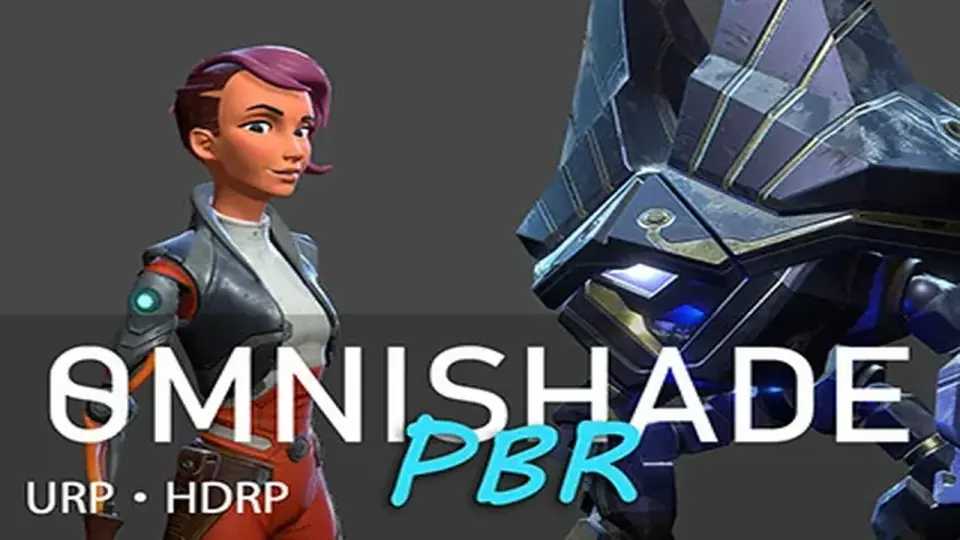
OmniShade PBR extends Unityâs Standard Lit workflow with a physically based shader that adds stylized lighting, layered materials, and texture painting support. It also supports Built-In, URP, and HDRP, with adaptive shader variants and Shader Graph imple...
OmniShade PBR keeps the familiar Unity Standard Lit path in view, then pushes it into a physically based uber shader with more room for lighting variation and material control. It is presented as a straightforward upgrade for anyone already working with Standard Lit, while adding stylized lighting, blended layers, texture painting support, and a broader feature set for surface work.
That makes it useful when one material has to carry more than a simple lit response. A character piece, environment surface, prop, or vegetation material can stay inside the same shader family while gaining extra lighting treatment, reflected response, or layered texture variation. The shader is meant to let artists add detail without changing their whole workflow every time a surface needs more personality.
OmniShade PBR is also positioned as a physically-based shader rather than a non-PBR option, which matters for scenes that need realistic lighting behavior while still leaving room for stylized choices such as rim light and layered color control.
What can be combined on a single material
The shader supports a large set of features, and they can be used in any combination with optimal performance. That flexibility is one of the main reasons it stands out: a material can stay focused when it only needs a few controls, or it can stack several shading effects together when a more complex look is needed.
PBR lighting
Metallic, normal, occlusion, and emission maps
Secondary normal map
Color adjustments and saturation control
Rim light
Reflection map
Vertex colors with Polybrush support
Detail map
3 blended layers with texture painting support
Height-based coloring
Shadow overlay
Vertex sway for vegetation
Fade with camera distance
Independent UV tiling and offsets for each texture
Opaque and transparent versions
In practical use, that means a material can start with standard PBR maps and then add pieces of extra control where they matter. Rim light can help edges read more clearly, reflection support can give a surface a stronger response, and detail maps can add close-range texture variation. The three blended layers and texture painting support open the door to more hand-authored variation, while vertex colors with Polybrush support give another route for shaping the final look.
Height-based coloring and shadow overlay help separate forms without moving to a different shader. Independent UV tiling and offsets for each texture make it easier to tune different map types individually, and the opaque and transparent versions give the shader a wider range of surface treatment inside the same system. For vegetation, vertex sway adds motion, and camera-distance fade gives another way to control how the material reads at range.
Shader Graph, pipeline support, and adaptive performance
OmniShade PBR is built with Unity Shader Graph, which gives the shader a clear implementation path inside Unityâs rendering ecosystem. Support is included for Built-In, URP, and HDRP, so the shader can fit into different pipeline setups without changing the overall material approach.
The performance system is deliberately adaptive. It detects the minimum calculations needed for the feature set that is currently enabled, then generates the minimal shader variant for that combination. That keeps the shader from carrying work that is not being used, and the result is described as having similar performance to Standard Lit.
The feature set is also described as fast enough for newer mobile devices. That matters for projects where the same shader has to support detailed PBR surfaces without becoming too heavy for the target hardware. The adaptive variant system, combined with Shader Graph implementation, is part of what makes the shader feel production-ready rather than fixed to a single narrow use case.
There is also a script for animating textures in the shader, a slick collapsable shader UI, and a modular structure made from 20 subgraphs. The modular setup is useful when shader components need to be reused in other graphs, and the collapsable interface helps keep the material UI organized when several options are active at once.
Where the shader gives artists room to work
OmniShade PBR includes several details that directly support day-to-day art work rather than staying abstract at the rendering level. The combination of texture painting support, vertex colors, layered decals, and height-based coloring gives artists multiple ways to adjust surfaces without starting over. That is especially helpful when a project needs variation across props or environments, but still wants the same shader logic underneath.
The shader also fits scenes that need both realistic lighting and small stylized pushes. Rim light and reflections can be used for emphasis, while saturation controls and color adjustments let a material be tuned without leaving the shader. Because all of these features can be combined, the material can stay consistent across a project while still allowing different looks from one asset to the next.
A tutorial demo scene is included as well, which makes the package easier to study in context. For teams that already rely on Standard Lit, the path is especially direct: the shader keeps that familiar entry point, extends it with more lighting and layering options, and keeps the workflow inside Unity Shader Graph.
For projects that want a PBR shader with layered control, texture painting support, and pipeline coverage across Built-In, URP, and HDRP, OmniShade PBR is set up as a practical shader family rather than a single narrow material. It keeps the feature set broad, the implementation modular, and the rendering path centered on Shader Graph for ongoing use in Unity projects.
 Shaders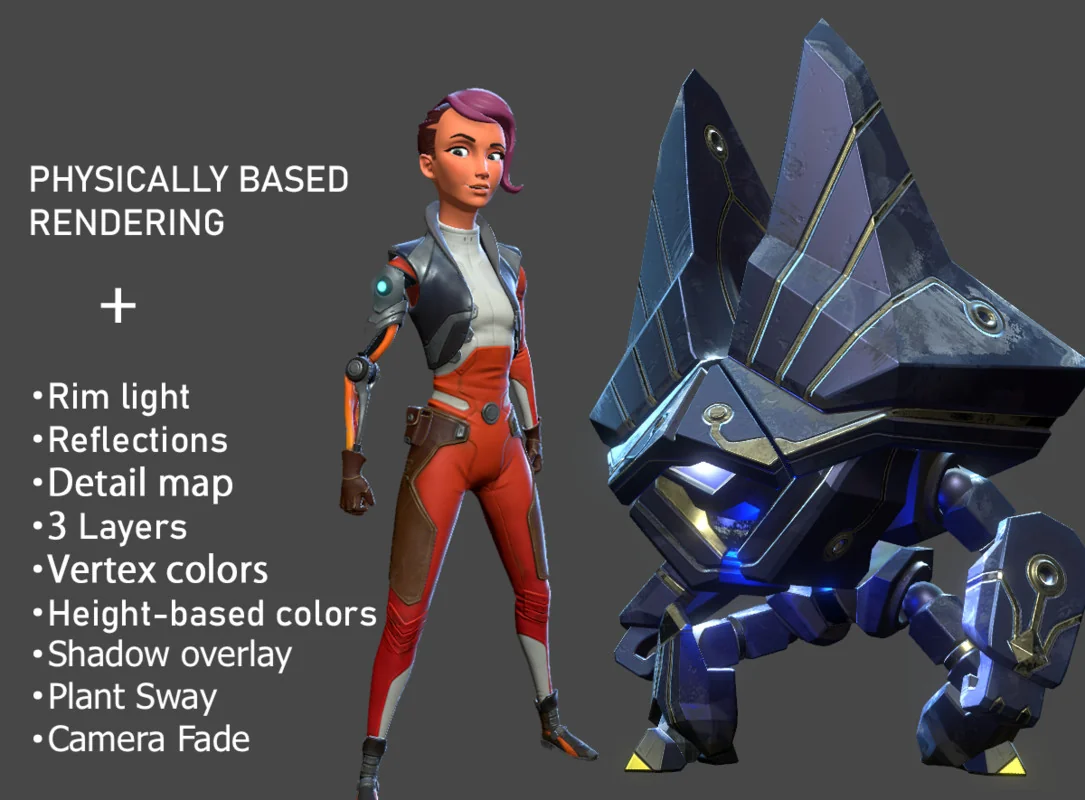
 Shaders
 Shaders
 Shaders