"7e6fc58c410f2894"{"id":"24327","slug":"planets-earth-mars-and-the-moon","title":"Planets Earth, Mars and the Moon","category":"Shaders","engine":"Original Unity version: 4.6.1","assetVersion":"Original Unity version: 4.6.1","engineVersion":"Asset Version:0.4.4","tag":"Shaders","accent":"cyan","visual":"mech","summary":"Planets Earth, Mars and the Moon brings three realistic-looking planets into Unity with prefabs, customizable shaders, clouds, atmosphere, and a demo scene. It suits projects that need orbital views, flyby shots, or planet-focused visuals with clear surface...","platform":"Unity","publishedAt":"2026-04-14T11:19:35.000Z","updatedAt":"2026-04-20T06:12:50.000Z","sourceNotes":[],"fileContents":[],"compatibility":["Unity","Original Unity version: 4.6.1","Asset Version: 0.4.4"],"featuredImage":{"alt":"Planets Earth, Mars and the Moon","src":"https://3dcghub.com/wp-content/uploads/2026/04/caf96da9e76c_259e88f3-c164-4db3-bf23-b744dac3d749_1280x720_stretch.webp"},"hasDownloadLink":true,"downloads":3,"terms":[{"taxonomy":"category","slug":"shaders-vfx-unity-2","name":"Shaders"},{"taxonomy":"post_tag","slug":"environment","name":"Environment"},{"taxonomy":"post_tag","slug":"materials","name":"Materials"},{"taxonomy":"post_tag","slug":"unity","name":"Unity"}],"galleryImages":[{"src":"https://3dcghub.com/wp-content/uploads/2026/04/66a4f67d5ef4_afaa4764-e9a8-46e5-9b25-0c64b2065719_scaled.webp","alt":"Planets Earth, Mars and the Moon"},{"src":"https://3dcghub.com/wp-content/uploads/2026/04/a6e21a403e7c_50777113-4a09-4dbe-88b9-a535a76027fd_scaled.webp","alt":"Planets Earth, Mars and the Moon"},{"src":"https://3dcghub.com/wp-content/uploads/2026/04/e71d29f79e9e_60a178b3-7d30-4593-a0b5-c1022d7f2f4a_scaled.webp","alt":"Planets Earth, Mars and the Moon"},{"src":"https://3dcghub.com/wp-content/uploads/2026/04/d2c807b9147c_5c8dff8d-2340-4271-83fd-d6e2c1449118_scaled.webp","alt":"Planets Earth, Mars and the Moon"},{"src":"https://3dcghub.com/wp-content/uploads/2026/04/12cb6f1ac355_367bb16f-741f-4717-843b-7fdb47a25b0a_scaled.webp","alt":"Planets Earth, Mars and the Moon"},{"src":"https://3dcghub.com/wp-content/uploads/2026/04/0cee3f59e800_f33eb20b-1203-4d66-8926-badc0e2aad60_scaled.webp","alt":"Planets Earth, Mars and the Moon"},{"src":"https://3dcghub.com/wp-content/uploads/2026/04/cf989b12b773_ba5eaa43-cda9-49b2-99d8-cc85b5c17f6a_scaled.webp","alt":"Planets Earth, Mars and the Moon"},{"src":"https://3dcghub.com/wp-content/uploads/2026/04/3dc12bb2836f_8cf386c7-416e-4f07-8780-c3f07a832c6c_scaled.webp","alt":"Planets Earth, Mars and the Moon"}],"accessPanel":{"kind":"resource","title":"Access this resource","eyebrow":"Free Download","message":"Log in or create a free account to start your download.","fileName":"Planets Earth Mars and the Moon.7z","safetyNote":"All resources are 100% manually reviewed to eliminate all risks.","actionLabel":"Download Free","resourceType":"Resource archive"},"contentHtml":"\u003ch2\u003ePlanet scenes with Earth, Mars, and the Moon at the center\u003c/h2\u003e \u003cp\u003eThis Unity package focuses on three realistic-looking planets: Earth, Mars, and the Moon. That narrow scope makes it easy to understand what it is meant to do. It is not a broad environment collection or a general space toolkit; it is a planet-oriented asset built for scenes where those bodies need to appear on screen with visible surface detail, atmospheric depth, and lighting effects that hold up in close views as well as wider shots.\u003c/p\u003e \u003cp\u003eThe package is set up for projects that need planets to be dropped into a scene quickly and then adjusted as needed. The combination of ready-to-use prefabs, shaders, textures, and a demo scene gives it a clear scene-building role rather than a purely decorative one. It is aimed at showing how the planets work in practice, not just how they look in isolation.\u003c/p\u003e \u003ch2\u003eWhat is included for scene assembly\u003c/h2\u003e \u003cp\u003eThe most direct part of the package is the set of ready-to-use prefabs. They can be dynamically instantiated, which makes them useful in scenes where planets need to appear through scripted events rather than sit in place as static objects.\u003c/p\u003e \u003cp\u003eThat prefab setup is paired with a large visual stack: highly customizable shaders, separated clouds and cloud shadows, an outer atmosphere shader with a scattering effect, a Milky Way skybox, and a sun lens flare. Each element adds a different layer to the final image. The planets themselves are built on a high polygon sphere with about 40,000 triangles, and the package includes a set of 8K textures to support the detailed look.\u003c/p\u003e \u003cp\u003eThere is also an included demo scene that shows how everything works together. That makes the package easier to evaluate in context, since the planets are not presented as isolated pieces but as part of a working scene setup.\u003c/p\u003e \u003ch2\u003eSurface detail, clouds, and atmosphere\u003c/h2\u003e \u003cp\u003eThe shader setup is one of the main reasons this package stands out. The shaders support normals, night lights, specular, and an inner atmospheric scattering effect. Those elements matter when a planet needs more than a flat color pass. Normals and specular help the sphere read as a physical surface, night lights add city-side illumination where appropriate, and the atmospheric scattering effect gives the edge of the planet more depth.\u003c/p\u003e \u003cp\u003eClouds are handled separately from the planet body, along with cloud shadows. That separation gives the clouds their own visual role instead of merging them into the base texture. The package also includes an outer atmosphere shader with scattering, which adds another layer around the planet and helps shape the silhouette against space or a sky backdrop.\u003c/p\u003e \u003cp\u003eThe current release notes mention two specific updates: the atmosphere effect was improved so it no longer highlights triangles of the sphere model, and clouds rendering was improved so it blends better with the atmosphere effect. Those changes point to a package that is focused on how the layers interact, not just on the presence of the layers themselves.\u003c/p\u003e \u003ch2\u003eWhere it fits in a Unity project\u003c/h2\u003e \u003cp\u003eThe package fits naturally into scenes that need planetary visuals, orbital flybys, or space-themed presentation shots. The presence of an Earth flyby video and an all planets video reinforces that kind of use. With Earth, Mars, and the Moon available together, it can support scenes that compare worlds side by side or move between them in the same project.\u003c/p\u003e \u003cp\u003eThe Milky Way skybox and sun lens flare also make it suitable for backgrounds that need a space setting rather than just a single isolated planet. That combination supports shots where the planet is the visual focus but still needs a surrounding environment to make the scene feel complete.\u003c/p\u003e \u003cp\u003eBecause the prefabs can be dynamically instantiated, the package can also suit scenes where planets are introduced during runtime. That makes it practical for presentations, scripted flybys, or any scene flow that changes what the player sees without requiring a fixed setup from the start.\u003c/p\u003e \u003ch2\u003eCompatibility notes and project limits\u003c/h2\u003e \u003cp\u003eThere is one clear limitation called out for this package: it does not work with Universal Render Pipeline in Unity 2019. That matters for projects that are already built around that pipeline, since the package is tied to the rendering setup it supports.\u003c/p\u003e \u003cp\u003eThe packageâs compatibility details list the original Unity version as 4.6.1, and supported Unity versions include 4.6.1, 5.4.0, 2017.4.37, and 2019.3.5. The file size is 559.5 MB, the asset count is 66, and the package type is unitypackage. It sits in the Shaders category under vfx/shaders.\u003c/p\u003e \u003cp\u003eFor teams working with older Unity versions or projects that need a planet-focused shader package rather than a broader environment pack, the combination of prefabs, textures, shaders, and demo content gives a clear starting point. It is most practical when the scene needs Earth, Mars, or the Moon to feel visually grounded without building those systems from scratch.\u003c/p\u003e\n\n\u003ch2\u003eExplore Similar Assets\u003c/h2\u003e\n\u003cul\u003e\n\u003cli\u003e\u003ca href=\"https://3dcghub.com/make-a-horror-survival-game-in-unity/\" title=\"Make a horror survival game in Unity\"\u003eMake a horror survival game in Unity\u003c/a\u003e\u003c/li\u003e\n\u003cli\u003e\u003ca href=\"https://3dcghub.com/unity-shader-programming-beginners-to-advanced-techniques/\" title=\"Unity Shader Programming: Beginners to Advanced Techniques\"\u003eUnity Shader Programming: Beginners to Advanced Techniques\u003c/a\u003e\u003c/li\u003e\n\u003cli\u003e\u003ca href=\"https://3dcghub.com/mastering-editor-scripting-in-unity/\" title=\"Mastering Editor Scripting in Unity\"\u003eMastering Editor Scripting in Unity\u003c/a\u003e\u003c/li\u003e\n\u003cli\u003e\u003ca href=\"https://3dcghub.com/altos-volumetric-clouds-skybox-and-weather-for-unity-urp/\" title=\"Altos – Volumetric Clouds, Skybox, and Weather for Unity URP\"\u003eAltos – Volumetric Clouds, Skybox, and Weather for Unity URP\u003c/a\u003e\u003c/li\u003e\n\u003cli\u003e\u003ca href=\"https://3dcghub.com/toolkit-for-unity-physics-2026/\" title=\"Toolkit for Unity Physics 2026\"\u003eToolkit for Unity Physics 2026\u003c/a\u003e\u003c/li\u003e\n\u003c/ul\u003e","contentTextLength":5212,"navigation":{"current":1883,"total":3618,"previous":{"id":"27034","slug":"medieval-village-slavic-huts-environment","title":"Medieval Village - Slavic Huts environment","category":"Medieval","platform":"Unreal Engine","updatedAt":"2026-04-21T06:37:36.000Z"},"next":{"id":"24316","slug":"omnishade-pbr-physically-based-uber-shader","title":"OmniShade PBR - Physically Based Uber Shader","category":"Shaders","platform":"Unity","updatedAt":"2026-04-20T06:12:50.000Z"}},"relatedResources":[{"id":"24340","slug":"polyverse-skies-low-poly-skybox-shaders","title":"Polyverse Skies | Low Poly Skybox Shaders","category":"Shaders","engine":"Original Unity version: 2022.3.0","assetVersion":"Original Unity version: 2022.3.0","engineVersion":"Asset Version:3.4.0","tag":"Shaders","accent":"cyan","visual":"character","summary":"Polyverse Skies focuses on stylized skyboxes for low poly games, with controls for gradients, overlays, clouds, stars, sun, moon, and fog. It also supports Standard and Universal Render Pipeline projects, plus Console, Mobile, and VR targets.","platform":"Unity","publishedAt":"2026-04-14T11:22:37.000Z","updatedAt":"2026-04-20T06:12:49.000Z","sourceNotes":[],"fileContents":[],"compatibility":["Unity","Original Unity version: 2022.3.0","Asset Version: 3.4.0"],"featuredImage":{"alt":"Polyverse Skies | Low Poly Skybox Shaders","src":"https://3dcghub.com/wp-content/uploads/2026/04/07945a18b484_c3bce9e3-5ea6-4ca3-8edb-c833f203d51e_1280x720_stretch.webp"},"hasDownloadLink":true,"downloads":0},{"id":"24403","slug":"stylized-water-3","title":"Stylized Water 3","category":"Shaders","engine":"Original Unity version: 6000.0.68","assetVersion":"Original Unity version: 6000.0.68","engineVersion":"Asset Version:3.0.1","tag":"Shaders","accent":"cyan","visual":"audio","summary":"Stylized Water 3 focuses on artistic water rendering for Unity scenes that need clear control over color, reflections, foam, and wave motion. It covers ocean meshes, river behavior, waterfalls, puddles, and water decals without leaning on a realism-first si...","platform":"Unity","publishedAt":"2026-04-14T11:48:46.000Z","updatedAt":"2026-04-20T06:12:49.000Z","sourceNotes":[],"fileContents":[],"compatibility":["Unity","Original Unity version: 6000.0.68","Asset Version: 3.0.1"],"featuredImage":{"alt":"Stylized Water 3","src":"https://3dcghub.com/wp-content/uploads/2026/04/1e931df26ffe_2a7b5ca4-dbfb-416e-b26c-2a1dc7b15ca8_1280x720_stretch.webp"},"hasDownloadLink":true,"downloads":12},{"id":"24104","slug":"cozy-stylized-weather-3","title":"COZY: Stylized Weather 3","category":"Shaders","engine":"Original Unity version: 2022.3.62","assetVersion":"Original Unity version: 2022.3.62","engineVersion":"Asset Version:3.5.4 - 3.6.8","tag":"Shaders","accent":"cyan","visual":"audio","summary":"COZY: Stylized Weather 3 handles the weather layer with a hand-crafted look instead of realism. It covers time-of-day, seasons, clouds, storms, fog, and scene-color tweaks, while supporting Built-In, HDRP, and URP.","platform":"Unity","publishedAt":"2026-04-12T09:44:13.000Z","updatedAt":"2026-04-19T15:34:59.000Z","sourceNotes":[],"fileContents":[],"compatibility":["Unity","Original Unity version: 2022.3.62","Asset Version: 3.5.4 - 3.6.8"],"featuredImage":{"alt":"COZY: Stylized Weather 3","src":"https://3dcghub.com/wp-content/uploads/2026/04/4bb6b2024623_96bcefb7-182c-45a9-b50f-59d65b527604_1280x720_stretch.webp"},"hasDownloadLink":true,"downloads":10}]}
Shaders
Planets Earth, Mars and the Moon
Planets Earth, Mars and the Moon brings three realistic-looking planets into Unity with prefabs, customizable shaders, clouds, atmosphere, and a demo scene. It suits projects that need orbital views, flyby shots, or planet-focused visuals with clear surface...
Planet scenes with Earth, Mars, and the Moon at the center
This Unity package focuses on three realistic-looking planets: Earth, Mars, and the Moon. That narrow scope makes it easy to understand what it is meant to do. It is not a broad environment collection or a general space toolkit; it is a planet-oriented asset built for scenes where those bodies need to appear on screen with visible surface detail, atmospheric depth, and lighting effects that hold up in close views as well as wider shots.
The package is set up for projects that need planets to be dropped into a scene quickly and then adjusted as needed. The combination of ready-to-use prefabs, shaders, textures, and a demo scene gives it a clear scene-building role rather than a purely decorative one. It is aimed at showing how the planets work in practice, not just how they look in isolation.
What is included for scene assembly
The most direct part of the package is the set of ready-to-use prefabs. They can be dynamically instantiated, which makes them useful in scenes where planets need to appear through scripted events rather than sit in place as static objects.
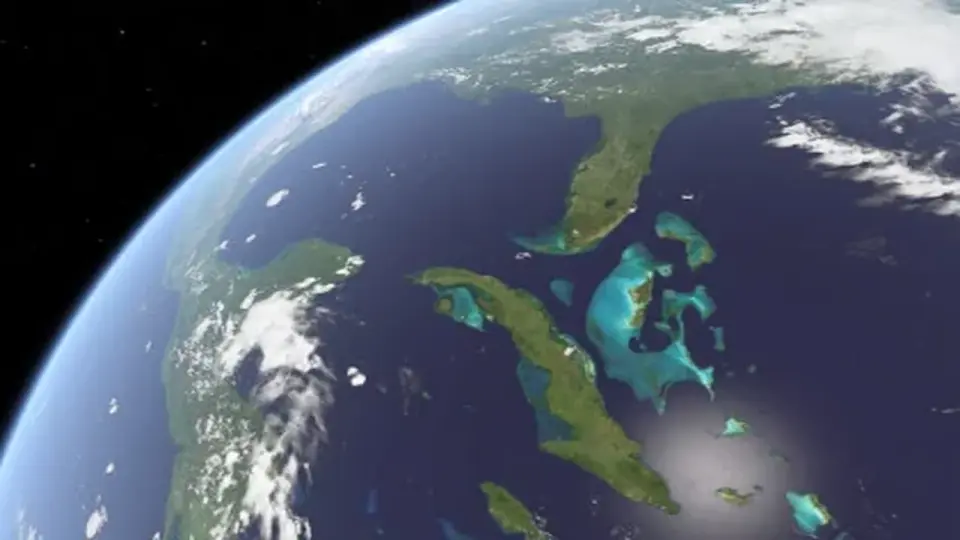
That prefab setup is paired with a large visual stack: highly customizable shaders, separated clouds and cloud shadows, an outer atmosphere shader with a scattering effect, a Milky Way skybox, and a sun lens flare. Each element adds a different layer to the final image. The planets themselves are built on a high polygon sphere with about 40,000 triangles, and the package includes a set of 8K textures to support the detailed look.
There is also an included demo scene that shows how everything works together. That makes the package easier to evaluate in context, since the planets are not presented as isolated pieces but as part of a working scene setup.
Surface detail, clouds, and atmosphere
The shader setup is one of the main reasons this package stands out. The shaders support normals, night lights, specular, and an inner atmospheric scattering effect. Those elements matter when a planet needs more than a flat color pass. Normals and specular help the sphere read as a physical surface, night lights add city-side illumination where appropriate, and the atmospheric scattering effect gives the edge of the planet more depth.
Clouds are handled separately from the planet body, along with cloud shadows. That separation gives the clouds their own visual role instead of merging them into the base texture. The package also includes an outer atmosphere shader with scattering, which adds another layer around the planet and helps shape the silhouette against space or a sky backdrop.
The current release notes mention two specific updates: the atmosphere effect was improved so it no longer highlights triangles of the sphere model, and clouds rendering was improved so it blends better with the atmosphere effect. Those changes point to a package that is focused on how the layers interact, not just on the presence of the layers themselves.
Where it fits in a Unity project
The package fits naturally into scenes that need planetary visuals, orbital flybys, or space-themed presentation shots. The presence of an Earth flyby video and an all planets video reinforces that kind of use. With Earth, Mars, and the Moon available together, it can support scenes that compare worlds side by side or move between them in the same project.
The Milky Way skybox and sun lens flare also make it suitable for backgrounds that need a space setting rather than just a single isolated planet. That combination supports shots where the planet is the visual focus but still needs a surrounding environment to make the scene feel complete.
Because the prefabs can be dynamically instantiated, the package can also suit scenes where planets are introduced during runtime. That makes it practical for presentations, scripted flybys, or any scene flow that changes what the player sees without requiring a fixed setup from the start.
Compatibility notes and project limits
There is one clear limitation called out for this package: it does not work with Universal Render Pipeline in Unity 2019. That matters for projects that are already built around that pipeline, since the package is tied to the rendering setup it supports.
The packageâs compatibility details list the original Unity version as 4.6.1, and supported Unity versions include 4.6.1, 5.4.0, 2017.4.37, and 2019.3.5. The file size is 559.5 MB, the asset count is 66, and the package type is unitypackage. It sits in the Shaders category under vfx/shaders.
For teams working with older Unity versions or projects that need a planet-focused shader package rather than a broader environment pack, the combination of prefabs, textures, shaders, and demo content gives a clear starting point. It is most practical when the scene needs Earth, Mars, or the Moon to feel visually grounded without building those systems from scratch.
 Shaders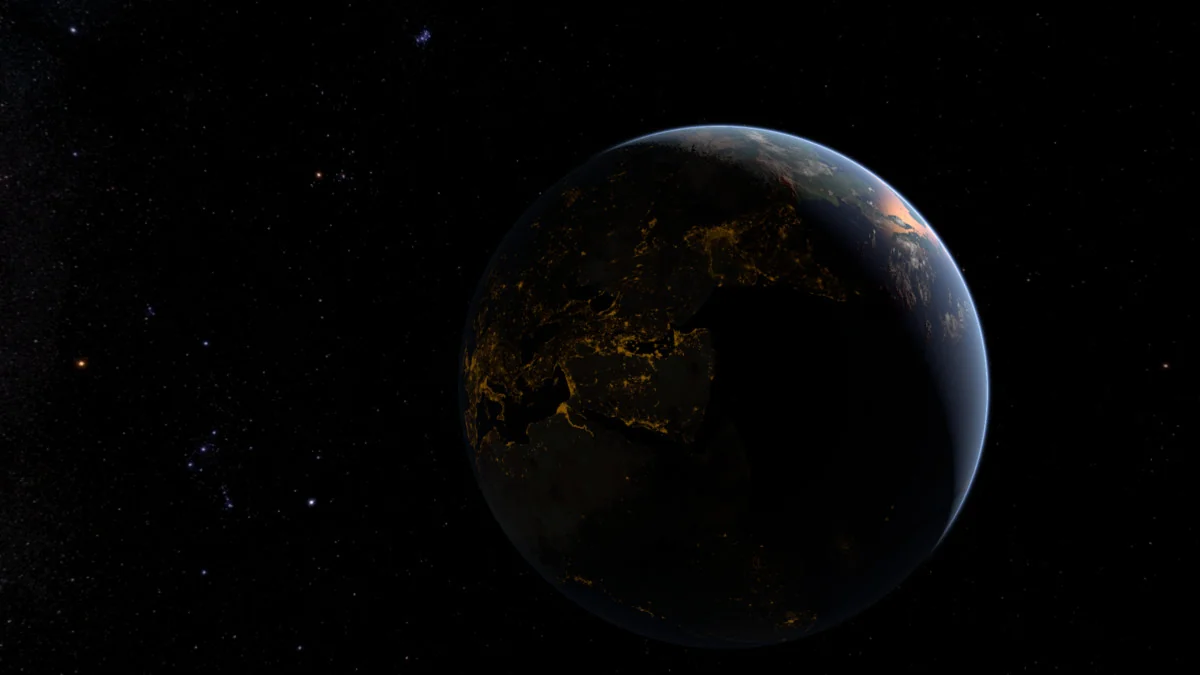
 Shaders
 Shaders
 Shaders